

Building or upgrading a desktop PC means deciding how to connect to your network. While Ethernet offers stability, a PCIe WiFi card gives you wireless freedom without sacrificing speed or reliability. Whether you’re gaming competitively, streaming 4K content, or working from home, the right WiFi adapter can deliver the performance you need.
This guide covers the top PCIe WiFi cards available in 2026, from budget-friendly WiFi 6 adapters to cutting-edge WiFi 6E models that unlock the 6GHz band. We’ll help you understand which features matter most for your specific use case.
Quick answer
This guide compares 10 picks, with StarTech Wi-Fi 6E PCIe Network Card with Bluetooth 5.3 ranked first. TP-Link WiFi 6E PCIe Card with Intel AX210, Tri-Band holds the highest customer rating among them. TP-Link Archer TX3000E WiFi 6 PCIe Card with Bluetooth has the most customer reviews.

Pros
- Outstanding wireless performance with tri-band capability and industry-leading 2400Mbps speeds
- Thoughtfully designed magnetic antenna base eliminates cable clutter and enables optimal signal reception
- All-in-one solution with Bluetooth 5.3 eliminates the need for separate wireless peripherals adapter
- Works on both Windows and Linux, making it ideal for multi-OS setups and enthusiast builds
- Backed by 2-year warranty and free 24/5 multilingual technical support
Cons
- Windows 10 users cannot access the 6GHz band, limiting next-gen speed benefits to Windows 11 systems
- Requires available 9-pin USB 2.0 header on motherboard for Bluetooth functionality, not all boards have this
- Premium pricing reflects enterprise-grade build quality, making it a significant investment versus basic cards
The StarTech PAX2235-WIFI-6E-CARD is a premium wireless networking solution designed for desktop users who demand cutting-edge connectivity. This PCIe 3.0 card brings Wi-Fi 6E technology to existing systems, unlocking access to the less-congested 6GHz band while maintaining full backwards compatibility with older Wi-Fi standards. It's built for gamers, content creators, remote professionals, and power users running Windows 11 or Linux who refuse to compromise on performance.
Performance is the standout strength here. The card delivers blazing-fast speeds up to 2400Mbps on the 6GHz band, 2402Mbps on 5GHz, and 574Mbps on the 2.4GHz band. OFDMA and MU-MIMO technologies reduce latency and dramatically improve data transfer efficiency in congested networks. The integrated Bluetooth 5.3 adds real convenience, enabling wireless mice, keyboards, and headsets without needing a separate USB dongle. The magnetic antenna base with its 3.6ft cable is a thoughtful design touch, allowing you to position antennas for optimal signal strength and minimal interference.
Build quality reflects StarTech's reputation for durability. The all-metal aluminum heatsink keeps the card cool under sustained heavy usage, while the low-profile bracket accommodates compact cases and small form-factor builds. The rubber-based magnetic antenna stand grips non-metallic surfaces securely. Included accessories are comprehensive: quick-start guide, mounting bracket with screws, Bluetooth cable, and antenna stand.
Real drawbacks exist and deserve honesty. Windows 10 users cannot access the 6GHz band, so the upgrade makes less sense for older systems. Bluetooth functionality requires an available 9-pin USB 2.0 header on your motherboard, which not all boards provide. The price tag is steep compared to basic Wi-Fi 6 cards, though the enterprise-grade build and Bluetooth 5.3 justify the investment.
Verdict: This is a best-in-class Wi-Fi 6E card for anyone upgrading a Windows 11 or Linux desktop with uncompromising networking needs. The combination of blazing speeds, reliable build quality, Bluetooth 5.3, and thoughtful design makes it worth the premium price for enthusiasts and professionals.
Wireless Standards: Wi-Fi 6E (802.11ax), 802.11ac, 802.11n, 802.11g, 802.11a, 802.11b
Speed: 2400Mbps (6GHz), 2402Mbps (5GHz), 574Mbps (2.4GHz)
Interface: PCIe 3.0 x1
Bluetooth: 5.3 with BLE, BDR, EDR support
Security: WPA3, WPA2
Dimensions: 4.7in L x 2.4in W x 0.7in H
Weight: 7.04 ounces
Bracket: Low-profile included
Warranty: 2-year limited
OS Support: Windows 10/11, Linux (Note: Windows 10 does not support 6GHz band)
Who Should Buy This: Users running Windows 11 or Linux who want the fastest possible wireless speeds and integrated Bluetooth in a single card. Gamers seeking low-latency gaming, content creators uploading large files, and remote workers managing video conferencing benefit most from the performance gains.
Who Should Skip This: Windows 10 users locked into older operating systems will lose the 6GHz advantage. Users with budget constraints may find more value in standard Wi-Fi 6 cards. Those with space-constrained laptops won't need it, as this is a desktop PCIe card only.
Installation Note: Ensure your motherboard has an available 9-pin USB 2.0 header if you want to use Bluetooth functionality. The card requires only a PCIe x1 slot, which all modern motherboards provide.
Worth the Price: At this price point, you're investing in enterprise-grade reliability, premium build quality, and forward-looking 6GHz support. For enthusiasts, content creators, and professionals, the performance and durability justify the cost.

Pros
- Access to the less congested 6 GHz band eliminates interference from crowded 2.4 and 5 GHz networks
- Tri-band speeds of up to 2402 Mbps per band deliver exceptional performance for bandwidth-intensive tasks
- Compact single-antenna design with magnetic base provides flexibility without cluttering your workspace
- WPA3 security standard and CISA pledge demonstrate genuine commitment to user data protection
- Bluetooth 5.3 integration reduces the need for separate wireless peripherals and improves ecosystem connectivity
Cons
- Requires Windows 11 to access 6 GHz functionality, leaving Windows 10 users limited to dual-band performance
- Actual speeds depend on router capabilities; pairing with a WiFi 6E or higher router is necessary to realize full potential
- Performance varies based on environmental factors like distance, walls, and obstacles that can reduce advertised speeds
The TP-Link WiFi 6E card is a modern PCIe upgrade designed for desktop users seeking high-speed wireless connectivity beyond what older WiFi 5 cards can deliver. This card targets gamers, content creators, remote workers, and PC enthusiasts who demand reliable, fast networking for demanding applications like 4K video streaming, real-time gaming, and VR experiences.
What sets this card apart is its access to the 6 GHz band, which remains relatively uncongested compared to the crowded 2.4 and 5 GHz spectrum in most homes. Combined with tri-band support and a total bandwidth of 5.3 Gbps, the card delivers impressive speeds across three bands: 2402 Mbps on 6 GHz, 2402 Mbps on 5 GHz, and 574 Mbps on 2.4 GHz. OFDMA and MU-MIMO technology further minimize lag on busy networks, making this card excellent for concurrent streaming, gaming, and device connectivity.
The physical design is thoughtful for a network adapter. The single high-gain antenna with a flexible, magnetized base allows you to position it optimally without additional mounting hardware. This compact approach saves valuable desktop real estate while maintaining strong, consistent signal reception. The card also integrates Bluetooth 5.3, reducing the need for separate wireless adapters and improving overall ecosystem connectivity with controllers, headsets, and keyboards.
A notable consideration is the Windows 11 requirement to access 6 GHz functionality. Windows 10 users can still use the card but will be limited to dual-band performance. Additionally, maximum speeds require pairing with a WiFi 6E or higher router, and real-world performance varies based on distance, obstacles, and environmental interference. TP-Link's WPA3 encryption and CISA Secure-by-Design certification provide confidence in data protection and long-term security maintenance.
This card represents solid value for upgrading your desktop's wireless capabilities, especially if you already have a WiFi 6E router or are planning to invest in one. The combination of modern security, low-lag technology, and access to the uncongested 6 GHz band makes it a practical choice for anyone moving beyond legacy WiFi standards.
Wireless Standards: WiFi 6E with tri-band support covering 2.4 GHz, 5 GHz, and 6 GHz bands
Maximum Data Rate: 5.3 Gbps total (2402 Mbps on 6 GHz, 2402 Mbps on 5 GHz, 574 Mbps on 2.4 GHz)
Connectivity: PCIe interface with Bluetooth 5.3
Processor: Intel AX210
Security: WPA3 encryption, CISA Secure-by-Design compliant
Antenna: Single high-gain with flexible magnetic base
Operating Systems: Windows 11 and Windows 10 64-bit (6 GHz support requires Windows 11)
Color: Black
Weight: 1.76 ounces
Technology Features: OFDMA, MU-MIMO for reduced lag
Ideal For: This card suits gamers, content creators, remote workers, and PC enthusiasts upgrading from older WiFi standards. Anyone with a WiFi 6E router looking to maximize wireless performance will benefit significantly.
Pre-Purchase Checklist: Verify your PC has an available PCIe slot. Confirm your router supports WiFi 6E if you want to use the 6 GHz band. Ensure your system runs Windows 11 for full functionality or Windows 10 for dual-band operation.
Installation Tips: Installation is straightforward on Windows 11 and 10 64-bit systems. Insert the card into a PCIe slot, install drivers if needed, and configure your WiFi connection through Windows settings. Position the antenna for optimal signal reception based on your router location.
Performance Optimization: Pair this card with a WiFi 6E or newer router to realize maximum speeds. Place your antenna away from metal objects and direct it toward your router. Monitor network conditions as performance varies based on distance, walls, and interference from neighboring networks.
Not Recommended If: You operate Windows 11 or earlier versions without WiFi 6E router support, have no available PCIe slots, or primarily use wired connections and only need backup wireless.

Pros
- Blazing fast 5.4 Gbps tri-band speeds with dedicated 6GHz lane for zero interference
- Future-proof WiFi 6E standard ensures compatibility with next-generation devices and routers
- WPA3 security standard and Bluetooth 5.3 provide both wireless security and convenience
- Dual 5dBi antennas with magnetic mounts offer flexible placement and improved signal strength
- Wide OS support including Windows 10/11 and Linux with 12-month warranty plus lifetime tech support
Cons
- Requires a WiFi 6E compatible router to unlock full potential, limiting value for older network setups
- Zero customer reviews available yet, making real-world performance validation difficult
- PCIe slot occupancy may conflict with other expansion cards in compact builds
The WAVLINK AXE5400 is a PCIe-based WiFi 6E network adapter designed for desktop users who demand the fastest wireless speeds available. It's ideal for content creators, gamers, and professionals who stream 4K video, play competitive online games, or work with bandwidth-heavy applications on a desktop computer.
This card leverages Intel's AX210 chipset to deliver tri-band performance across 2.4GHz, 5GHz, and 6GHz frequencies. The dedicated 6GHz band is the standout feature, offering a congestion-free channel for latency-sensitive tasks like VR and competitive gaming. Real-world speeds should reach 574 Mbps on 2.4GHz, 2400 Mbps on 5GHz, and 2400 Mbps on 6GHz, totaling 5.4 Gbps. The dual 5dBi antennas with magnetic bases provide flexible positioning and reportedly deliver 3x faster speeds than WiFi 5 while reducing lag by 75%.
Build quality appears solid with included standard and low-profile brackets for various case configurations, a heat sink for thermal management, and magnetic antenna mounts for optimal signal strength. The card maintains a compact form factor suitable for most mid-tower and full-tower systems. WPA3 encryption and Bluetooth 5.3 round out security and connectivity features with modern standards.
The main limitation is that this card requires a WiFi 6E router to operate at peak performance. If your current router only supports WiFi 5 or 6, you won't see the benefits of the 6GHz band. Additionally, with no customer reviews yet, real-world durability and driver stability remain unverified.
The WAVLINK AXE5400 is a solid choice for desktop builders upgrading to WiFi 6E. If you already own a compatible router or plan to upgrade soon, the low price point and strong feature set make this card a practical investment in next-generation wireless performance.
Chipset: Intel AX210
WiFi Standard: WiFi 6E (802.11ax/802.11be)
Bands: 2.4GHz (574 Mbps), 5GHz (2400 Mbps), 6GHz (2400 Mbps)
Total Throughput: 5.4 Gbps
Bluetooth: Bluetooth 5.3
PCIe Interface: x1/x4/x8/x16 compatible
Security: WPA3 encryption
Antennas: Dual 5dBi magnetic antennas
Bandwidth: 160 MHz
Compatible OS: Windows 10, Windows 11, Linux
Included Accessories: 2 antennas, magnetic base, standard bracket, low-profile bracket, heat sink
Warranty: 12 months standard, 18 months for registered users, lifetime technical support
Who Should Buy This Card: The AXE5400 is ideal for desktop gamers, content creators, and remote workers who need maximum wireless speeds and minimal latency. It's perfect for anyone with a WiFi 6E router or planning to upgrade to one.
When to Skip It: If your router is WiFi 5 or older, you won't benefit from the 6GHz band. For laptops and ultraportables, an external USB WiFi adapter is more practical. Budget-conscious users on WiFi 5 networks should consider a standard WiFi 6 card instead.
Installation Considerations: Check your motherboard manual to ensure you have an available PCIe slot. Most modern desktops have multiple x1 slots. Driver installation is straightforward for Windows, though Linux users should verify driver availability before purchase.
ROI Timeline: The card's value becomes apparent immediately if paired with a WiFi 6E router. For pure speed upgrades from WiFi 5, expect noticeable improvements in streaming quality and gaming responsiveness within your first week of use.

The AX3000 chipset delivers up to 2400Mbps throughput, enough headroom for 4K streaming and large file transfers without throttling your connection. The magnetized antenna base lets you reposition for better signal strength without wrestling with fixed mounts, particularly useful if your router sits in another room. Bluetooth 5.3 support means you can connect wireless peripherals directly to the card instead of occupying a separate USB port.
Pros
- Magnetized antenna base with cable for flexible positioning
- Bluetooth 5.3 eliminates need for separate adapter
- MU-MIMO support for multi-device environments
- Low-profile bracket included for compact cases
Cons
- Windows 64-bit only, no Linux support
- WiFi 6 rather than newer WiFi 7 standard
Desktop PCs benefit from WiFi 6 when wired connections aren't practical, and the Archer TX3000E delivers AX3000 speeds across dual bands with a maximum throughput of 2400Mbps. The adapter uses 802.11ax technology and supports MU-MIMO for efficient data handling when multiple devices share the network. Two high-gain antennas attach to a magnetized base connected by cable, letting you position them away from the case to improve signal reception. Bluetooth 5.3 is included, so you can connect wireless peripherals without occupying additional USB ports. The card fits standard PCIe slots and ships with a low-profile bracket for compact builds. Driver support covers Windows 11 and Windows 10 in 64-bit editions. Low latency performance makes this suitable for gaming and streaming workloads. The removable antenna system helps maintain signal strength in challenging placement scenarios where the desktop sits under a desk or against a wall.
Connectivity and Performance: WiFi 6 (802.11ax) with speeds up to 2.4 Gbps, dual-band support (2.4 GHz and 5 GHz), Bluetooth 5.3, MU-MIMO and OFDMA technology
Physical Design: Dimensions 4.76 inches length x 3.75 inches width x 0.85 inches height, weight 16 ounces, black color with magnetized antenna base and low-profile bracket
Compatibility: Windows 10 and Windows 11 (64-bit only), requires PCIe slot, motherboard F_USB connector for Bluetooth functionality
Included Accessories: Archer TX3000E card, Bluetooth header cable, quick installation guide, resource CD with drivers, low-profile bracket, magnetized antenna base with cable, two high-gain antennas
Warranty and Support: 2-year manufacturer warranty, driver and firmware downloads available from TP-Link support website

Pros
- WiFi 6E delivers future-proof connectivity with access to less congested 6GHz band
- Dual-stream support across all three bands ensures stable performance for multiple devices
- 2400Mbps top speed handles 4K streaming, gaming, and large file transfers without bottlenecks
- Included high-quality AORUS antenna maximizes range and signal reliability
- Bluetooth 5.2 integration eliminates need for separate wireless adapters
Cons
- Requires PCIe x1 slot, limiting compatibility with older or fully-populated motherboards
- No reviews available at time of listing, making real-world user feedback unavailable
- Requires WiFi 6E router support to access 6GHz benefits, which remains less common than WiFi 6
The GIGABYTE GC-WBAX210 is a premium PCIe WiFi 6E adapter designed for desktop enthusiasts and professionals who demand cutting-edge wireless connectivity. This card integrates Intel's AX210 module, positioning it at the forefront of residential WiFi technology for gaming rigs, content creation workstations, and home networks requiring maximum bandwidth and minimal latency.
The standout feature is WiFi 6E support with a dedicated 6GHz band, eliminating interference from crowded 2.4GHz and 5GHz channels. Paired with dual-stream wireless on all three bands and up to 2400Mbps theoretical throughput, this adapter delivers the speed and responsiveness needed for competitive gaming, 4K video streaming, and large file transfers. MU-MIMO technology ensures stable performance even when multiple devices connect simultaneously.
Build quality reflects GIGABYTE's AORUS brand heritage. The card ships with a high-performance 2x2 antenna that physically connects to the adapter, providing robust signal strength and range. The antenna design and overall construction feel durable, with proper EMI shielding for reliable operation alongside other components.
One limitation is dependence on a compatible WiFi 6E router; the adapter's advanced features remain inaccessible with older WiFi 6 hardware. Additionally, PCIe slot availability may be a concern on motherboards with multiple expansion cards already installed. The lack of user reviews at launch means real-world validation is limited, though GIGABYTE's track record inspires confidence.
Verdict: The GC-WBAX210 is an excellent choice for forward-thinking PC builders upgrading to WiFi 6E networks. It delivers genuine performance improvements over WiFi 6, though prospective buyers should verify router compatibility before purchasing. Recommended for gamers, streamers, and anyone prioritizing wireless speed and stability.
Wireless Standard: IEEE 802.11ax/ac/a/b/g/n compliant
Frequency Bands: 2.4GHz, 5GHz, 6GHz (tri-band)
Max Speed: 2400 Mbps (2.4GHz + 5GHz + 6GHz combined)
Chipset: Intel WiFi 6E AX210 module
Antenna: AORUS 2x2 (2 Transmit / 2 Receive)
Stream Support: Dual-stream per band
Interface: PCIe x1
Bluetooth: 5.2 with MU-MIMO TX/RX
Package Contents: WiFi card, user manual
Dimensions: 8.27" L x 5.83" W x 2.16" H
Model: GC-WBAX210
UPC: 889523026649
Is This Right for Me? The GC-WBAX210 suits desktop PC users seeking the latest in wireless connectivity. If you already own a WiFi 6E router or plan to upgrade soon, this adapter unlocks significant performance gains. Gamers, content creators, and remote workers with high bandwidth needs will benefit most.
Compatibility Check: Verify your motherboard has an available PCIe x1 slot. The adapter works with any modern desktop computer but requires BIOS recognition of the AX210 module. Check your motherboard manufacturer's compatibility list before purchase.
Router Requirements: To access WiFi 6E features, you must pair this card with a compatible WiFi 6E router. Standard WiFi 6 routers will limit you to 2.4GHz and 5GHz bands, reducing the adapter's benefits. Confirm router support before upgrading.
Performance Expectations: Theoretical 2400Mbps speed assumes optimal conditions and line-of-sight to the router. Real-world performance depends on router quality, placement, distance, and network congestion. Most users see dramatic improvements in speed and responsiveness compared to older WiFi standards.

Pros
- Significant speed improvement over USB WiFi adapters, with stable connections ideal for gaming and streaming
- Flexible antenna positioning via magnetic base allows you to find the optimal signal location on your desk
- Dual-band support with 6 GHz spectrum access eliminates congestion and provides more bandwidth
- Comprehensive package includes both mounting brackets, cables, and detailed setup instructions
- Low-latency performance delivers responsive connectivity for competitive gaming and VR applications
Cons
- Requires Windows 11 to access the 6GHz band, limiting compatibility for users on older operating systems
- Bluetooth functionality requires connection to an F_USB header on your motherboard, not all boards may have this available
- Real-world speeds may fall short of maximum theoretical speeds depending on router capability and environmental factors
The TP-Link Archer TXE75E is a premium WiFi 6E PCIe network card designed for desktop users who demand high-speed wireless connectivity and reliable performance. This card is perfect for competitive gamers, content creators, and power users who want to eliminate the performance limitations of older USB adapters or built-in WiFi solutions.
What sets this card apart is its tri-band architecture delivering up to 5.4 Gbps of combined throughput, plus the ability to operate on the newer 6 GHz band for less interference and more bandwidth. The dual high-gain antennas with magnetized base are genuinely useful for finding optimal signal reception without being tethered to a single location. Advanced features like OFDMA, MU-MIMO, and WPA3 security provide tangible benefits for both performance and network safety.
Installation is straightforward thanks to the standard PCIe form factor and included low-profile bracket option. The package comes well-equipped with everything needed for setup. Performance gains are particularly noticeable when upgrading from older adapters, with users reporting stable connections and significant speed improvements for online gaming and streaming applications.
The main limitation is the Windows 11 requirement for 6 GHz functionality and the need for an F_USB motherboard header to enable Bluetooth. Additionally, real-world speeds depend heavily on having a compatible WiFi 6E router, so users with older routers will see less dramatic improvements.
Overall, this is a solid investment for anyone building or upgrading a high-performance gaming or workstation PC who wants future-proof wireless connectivity with proven reliability and strong real-world performance.
Connectivity and Performance: WiFi 6E tri-band (2.4 GHz, 5 GHz, 6 GHz), maximum speeds of 5.4 Gbps (2402 Mbps on 6 GHz, 2402 Mbps on 5 GHz, 574 Mbps on 2.4 GHz), Bluetooth 5.3 with 2x faster speeds than Bluetooth 4.2
Security and Technology: WPA3 encryption, OFDMA, MU-MIMO for reduced latency, Intel WiFi 6E chipset
Physical Design: PCIe form factor, dual high-gain external antennas with magnetized base, dimensions 4.76 inches L x 3.75 inches W x 0.85 inches H
Compatibility and Installation: Windows 11 required for 6 GHz support, includes both standard and low-profile PCIe brackets, Bluetooth requires F_USB motherboard header connection
Warranty: 2-year manufacturer warranty, includes installation guide, resource CD, and all necessary cables
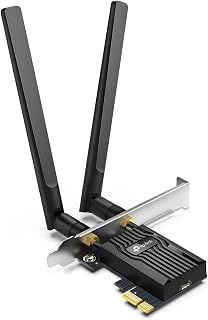
This AX3000 adapter brings dual-band 802.11ax speeds to any desktop, with MU-MIMO support ensuring stable performance even when multiple devices share your network. WPA3 encryption adds a layer of security that older WPA2 cards lack, protecting your traffic from modern vulnerabilities. The low-latency design makes it a solid choice for competitive gaming or video calls where lag spikes can disrupt the experience.
Pros
- WPA3 encryption for enhanced network security
- Bluetooth 5.2 for wireless peripheral support
- 5dBi high-gain antennas for improved range
- Low-profile bracket for compact PC builds
Cons
- Antennas mount directly to card without extension
- Windows 64-bit exclusive driver support
The Archer TX55E brings WiFi 6 connectivity to desktops through a PCIe interface, supporting dual-band operation on 2.4GHz and 5GHz frequencies with AX3000 speeds. The 802.11ax wireless adapter includes MU-MIMO to manage traffic when multiple devices connect simultaneously, reducing congestion during heavy use. Two 5dBi high-gain antennas mount directly to the card and can be adjusted for better signal capture. Bluetooth 5.2 handles wireless accessories without requiring extra dongles. WPA3 encryption provides updated security protocols for network protection. Low latency operation suits real-time applications like video calls and online gaming. Installation uses a standard PCIe slot, and a low-profile bracket accommodates smaller form factor builds. Driver compatibility is limited to Windows 11 and Windows 10 in 64-bit versions. The card ships with a resource CD and quick installation guide to simplify setup for first-time installers.
Connectivity: WiFi 6 (802.11ax), Dual-band (2.4 GHz + 5 GHz), Bluetooth 5.2
Speeds: Maximum 2.4 Gbps total (2402 Mbps @ 5 GHz, 574 Mbps @ 2.4 GHz)
Technology: OFDMA, MU-MIMO, 1024-QAM, 160 MHz bandwidth, WPA3 security
Interface: PCIe slot with standard and low-profile mounting brackets
Antennas: Two 5 dBi high-gain external antennas
Compatibility: Windows 10 and 11 64-bit only, PCIe slot required
Dimensions: 4.72 inches L x 3.09 inches W x 0.83 inches H
Warranty: 2 years
This card fits desktops needing straightforward WiFi 6 with Bluetooth and WPA3 security in a standard PCIe form factor. The directly mounted antennas work well when the PC sits in an open area with clear line of sight to the router. Pass if you require WiFi 7, operate a 32-bit system, or use an operating system other than Windows. Also skip if antenna placement flexibility is critical for your setup.
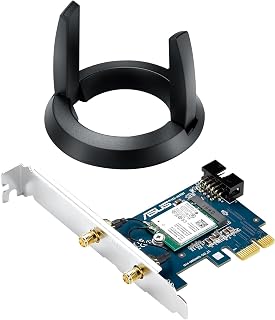
ASUS PCE-AC55BT B1 AC1200 WiFi Bluetooth 4.2 PCIe
Pros
- Combines WiFi and Bluetooth in one card, eliminating the need for separate adapters
- External antenna design delivers noticeably better range than internal antennas
- Flexible form factor works in desktop PCs, mini PCs, and barebones systems
- Dual-band connectivity reduces interference and improves gaming and streaming performance
- Easy installation with included support CD and straightforward driver setup
Cons
- No reviews available yet, making it difficult to verify real-world performance from other users
- AC1200 speed is modest compared to newer WiFi 6 adapters, though solid for most users
- Requires available PCIe or mPCIe slot, not compatible with laptops or USB-only setups
The ASUS PCE-AC55BT B1 is a hybrid WiFi and Bluetooth adapter designed for desktop PCs and compact mini systems that lack built-in wireless connectivity. It targets users upgrading older systems, building gaming rigs that demand low-latency connections, or anyone needing both WiFi and Bluetooth without buying two separate cards.
The standout feature is its external antenna base, which significantly improves signal reception compared to internal antennas. The dual-band AC1200 standard operates on both 2.4 GHz for range and 5 GHz for speed, making it well-suited for streaming, online gaming, and general browsing. Bluetooth 4.2 with BLE support lets you connect headsets, mice, and keyboards simultaneously with your WiFi connection.
Build quality is solid ASUS engineering in a compact form factor. The adapter includes a low-profile bracket for space-constrained builds, and the removable card design is genuinely flexible. It works in full PCIe slots on standard desktops and mPCIe slots on mini PCs, making it a practical choice for multiple system types.
The main limitation is that AC1200 is aging compared to modern WiFi 6 and WiFi 6E cards. If your router or internet speeds demand cutting-edge performance, this adapter won't be the bottleneck, but it won't unlock the latest WiFi standards either. Also, you'll need an available PCIe or mPCIe slot, so laptops and systems with all slots occupied won't be compatible.
The ASUS PCE-AC55BT B1 is a reliable all-in-one wireless solution for upgrading older systems or building compact PCs. Backed by a 2-year warranty and ASUS support, it delivers practical connectivity for users who value stability over cutting-edge speed.
Wireless Standards: AC1200 dual-band, operating frequencies 2.4 GHz and 5 GHz, data transfer rate 1200 Mbps
Bluetooth: Version 4.2 with BLE support
Physical: PCIe and mPCIe card with external antenna base, low-profile bracket included
Compatibility: Windows 7, Windows 8.1, Windows 10, and Linux
Warranty: 2 years from ASUS Computer International Direct
In the Box: PCE-AC55BT B1 adapter, low-profile bracket, external antenna base, support CD, and warranty card
Best For: Desktop PC upgrades, gaming builds, mini PC systems, and users needing both WiFi and Bluetooth from one card
Consider This If: Your system has available PCIe or mPCIe slots and you want reliable connectivity without spending extra on two separate adapters
Skip If: You need WiFi 6 speeds, your system has no free PCIe slots, you're using a laptop, or you require cutting-edge wireless performance
Installation: Insert the card into an available slot, secure with the included bracket, install drivers from the support CD, and connect the external antenna base. Most users report 10-15 minute setup times

Pros
- Significant performance boost with 4x4 antenna configuration over entry-level adapters
- Multiple antenna mounting options accommodate both compact and coverage-optimized setups
- Reliable heat dissipation keeps the adapter stable during heavy network loads
- MU-MIMO support enables efficient multi-device networks
- Aftermarket antenna compatibility allows future customization and coverage expansion
Cons
- Requires PCIe x1 slot which may not be available on all older or compact motherboards
- Driver support limited to Windows 7 and Windows 10, excluding newer operating systems
- Actual performance depends heavily on router compatibility and WiFi network conditions
The ASUS PCE-AC88 is a premium PCIe WiFi adapter designed for desktop PC users who demand high-performance wireless connectivity. This adapter is ideal for gamers, content creators, and power users who work with large file transfers, streaming, or online gaming where WiFi reliability and speed make a real difference.
The standout feature is its dual-band 4x4 antenna configuration that delivers speeds up to 2100 Mbps on the 5GHz band and 1000 Mbps on 2.4GHz, offering approximately 60% faster performance than standard 3x3 adapters. MU-MIMO technology ensures that multiple devices can connect simultaneously without bandwidth degradation, making this adapter particularly valuable in modern multi-device homes and offices.
Build quality is solid with a custom heatsink that effectively manages thermal output during intensive use. The flexible antenna system is a thoughtful design choice, allowing users to mount the four external antennas on the included magnetic base for maximum coverage or attach them directly to the card for compact installations. RP-SMA connectors enable swapping in third-party antennas if future upgrades become necessary.
The main limitations are its compatibility window, supporting only Windows 7 and Windows 10, and dependency on PCIe x1 slot availability. Real-world performance will also vary based on your router's capabilities and environmental factors like distance and obstacles between device and wireless access point.
Overall, the PCE-AC88 is a reliable, high-performance solution for desktop users seeking a significant WiFi upgrade. With strong build quality, flexible installation options, and proven performance, it delivers measurable value for those whose work or entertainment depends on fast, stable wireless connections.
Wireless Standards: IEEE 802.11ac dual-band 4x4 configuration
Speed: AC3100 with up to 2100 Mbps (5GHz) and 1000 Mbps (2.4GHz)
Interface: PCI Express x1
Antennas: 4 dipole antennas with external magnetic base or direct PCIe mounting
Connectors: RP-SMA for aftermarket antenna compatibility
Technology: MU-MIMO support
Operating Temperature: 0 to 40 degrees Celsius
Supported OS: Windows 7 and Windows 10 (32-bit and 64-bit)
Dimensions: 8.3 inches length, 2.24 inches width, 10.9 inches height
Weight: 125 grams
Warranty: 2 years
Certifications: CE, FCC, C-Tick, IC, IDA, NCC, RCM
Ideal For: This adapter is perfect for desktop gamers wanting lower latency WiFi, remote workers handling large file uploads and downloads, content creators transferring media files wirelessly, and enthusiasts who demand maximum WiFi performance without ethernet cables.
Consider If: You have a modern WiFi 6 router, you live far from your access point, you run multiple connected devices simultaneously, or you experience buffering or disconnects with your current adapter.
May Not Be Ideal: Windows 11 users, those without available PCIe slots, users with older WiFi 5 or WiFi 6 routers where the 4x4 capability offers diminishing returns, or budget-conscious buyers satisfied with basic connectivity.

Pros
- State-of-the-art Wi-Fi 6E delivers significantly faster speeds than older Wi-Fi standards
- Tri-band design with OFDMA and MU-MIMO ensures priority bandwidth allocation for your applications
- Integrated Bluetooth 5.2 eliminates clutter and simplifies wireless connectivity
- Straightforward PCI Express installation requires no additional drivers or complex setup
- Affordable entry point to Wi-Fi 6E technology for desktop users
Cons
- Requires an available PCI Express slot, limiting compatibility to desktop computers only
- Performance gains depend heavily on having a Wi-Fi 6E capable router to take full advantage
- Limited user reviews available at this time provide minimal real-world usage insights
The ASUS PCE-AXE5400 is a Wi-Fi 6E PCI Express adapter designed for desktop users who want to harness next-generation wireless technology without replacing their entire setup. This adapter delivers tri-band connectivity and Bluetooth 5.2 support, making it ideal for gamers, remote workers, and content creators who demand reliable, fast wireless performance.
The standout feature is its Wi-Fi 6E capability paired with OFDMA and MU-MIMO technology. These advanced protocols work together to reduce network congestion, prioritize your traffic, and deliver smoother performance during bandwidth-heavy tasks like 4K streaming, online gaming, and video conferencing. The 5400 Mbps data transfer rate represents a significant leap over older Wi-Fi standards.
From a design perspective, the adapter features a straightforward form factor that fits standard PCI Express slots. Installation is refreshingly simple compared to many networking components, making this accessible even to users with moderate technical skills. The included manual and adapter hardware ensure you have everything needed for a quick setup.
One consideration is that realizing the full potential of Wi-Fi 6E requires a compatible Wi-Fi 6E router. If your router is older, you'll still benefit from faster speeds, but won't tap into all capabilities. Additionally, as a PCI Express card, this adapter is exclusively for desktop systems and not suitable for laptops or mobile devices.
Overall, the ASUS PCE-AXE5400 represents solid value for desktop users ready to upgrade to Wi-Fi 6E. It combines cutting-edge wireless technology with practical ease of installation, making it a smart choice for anyone seeking performance improvements without system-wide upgrades.
Key Specifications
Model: PCE-AXE5400
Brand: ASUS
Interface: PCI Express, Bluetooth
Wireless Standard: Wi-Fi 6E
Data Transfer Rate: 5400 Mbps
Bands: Tri-band
Bluetooth Version: 5.2
Technology: OFDMA, MU-MIMO
Compatible Devices: Desktop computers
Dimensions: 9.45 inches L x 27.17 inches W x 0.98 inches H
Weight: 0.05 kg
Included Items: Adapter, Manual
Best Sellers Rank: #793 in Internal Computer Networking Cards
Is This Adapter Right for You?
Choose the ASUS PCE-AXE5400 if you have a desktop computer with an available PCI Express slot and want to upgrade to Wi-Fi 6E without replacing your entire system. This adapter is particularly valuable if you already own or plan to purchase a Wi-Fi 6E capable router.
Before You Buy
Verify that your desktop motherboard has an available PCI Express slot. Confirm that your router supports Wi-Fi 6E to maximize the adapter's capabilities. Check that your operating system is compatible with ASUS drivers for this model. Consider your physical setup to ensure proper antenna positioning for optimal signal reception.
Installation Tips
Power down your system completely before installation. Ground yourself to prevent static discharge. Refer to the included manual for proper slot placement. After physical installation, install the latest drivers from ASUS support to ensure optimal performance and compatibility.
What to Look for When Choosing a PCIe WiFi Card
WiFi Standard and Speed
The WiFi standard determines your maximum theoretical speeds and network efficiency. WiFi 6E is the newest option, adding access to the 6GHz band for less interference and lower latency, with combined speeds reaching 5400Mbps across three bands. The StarTech Wi-Fi 6E PCIe Network Card and TP-Link WiFi 6E Intel AX210 Tri-Band PCIe WiFi both leverage this technology with Intel AX210 chipsets.
WiFi 6 (802.11ax) remains an excellent choice if you don’t need 6GHz access, offering dual-band speeds up to 3000Mbps with improved performance in crowded networks through OFDMA and MU-MIMO technologies. If your router doesn’t support WiFi 6E, or if you’re looking for better value, WiFi 6 adapters deliver substantial improvements over older AC standards while costing considerably less.
Antenna Design and Signal Strength
Antenna configuration directly impacts your signal reception and range. Most modern PCIe WiFi cards include external antennas with magnetic bases that let you position them away from your desktop case for optimal signal strength. The ASUS PCE-AC88 Dual-Band 4×4 AC3100 WiFi PCIe features four antennas with a flexible magnetic base, maximizing coverage in larger homes.
Dual-antenna setups work well for most users, offering a balance between performance and desk space. Single-antenna models like the TP-Link WiFi 6E Intel AX210 Tri-Band PCIe WiFi provide a compact solution while still delivering strong WiFi 6E performance. Consider your router’s location and any physical obstacles when deciding how many antennas you need.
Bluetooth Connectivity
Most modern PCIe WiFi cards include integrated Bluetooth, eliminating the need for separate adapters for wireless peripherals. Bluetooth 5.3, found in the TP-Link WiFi 6 PCIe WiFi Card for PC and WAVLINK AXE5400 PCIe WiFi 6E WiFi Card, offers faster speeds and broader range compared to earlier versions.
Remember that Bluetooth functionality requires connecting an internal USB header cable from the WiFi card to your motherboard. Check that you have an available USB 2.0 header before purchasing if you plan to use wireless keyboards, mice, headsets, or game controllers. If you’re setting up a complete workstation, you might also want to review our guide on laptops optimized for remote work.
Chipset and Compatibility
Intel chipsets dominate the high-performance PCIe WiFi card market. The Intel AX210 powers most WiFi 6E adapters, including the TP-Link WiFi 6E Intel AX210 AXE5400 PCIe WiFi Card and GIGABYTE WiFi 6E GC-WBAX210, providing reliable performance and excellent driver support across Windows and Linux.
Verify operating system compatibility before purchasing. Most cards support Windows 10 and 11, but Linux compatibility varies. Windows 11 is required to access the 6GHz band on WiFi 6E cards. Also confirm your motherboard has an available PCIe x1 slot (the card will work in larger x4, x8, or x16 slots as well) and check whether you need a low-profile bracket for smaller cases.
Final Thoughts
Choosing the right PCIe WiFi card depends on your router capabilities, budget, and specific connectivity needs. For future-proof performance with WiFi 6E tri-band speeds and Bluetooth 5.3, the WAVLINK AXE5400 PCIe WiFi 6E WiFi Card delivers excellent value with its Intel AX210 chipset and dual antennas. If you prefer a proven WiFi 6 option with outstanding user feedback and dual-antenna coverage, the TP-Link WiFi 6 PCIe WiFi Card for PC offers reliable performance for gaming and streaming without requiring a WiFi 6E router.
Frequently Asked Questions
Do I need WiFi 6E or is WiFi 6 enough for gaming?
WiFi 6 provides excellent gaming performance with low latency and speeds up to 3000Mbps, which exceeds what most internet connections can deliver. WiFi 6E adds the 6GHz band for even less interference in dense wireless environments, but you’ll need a WiFi 6E router and Windows 11 to access it. For most gamers in 2026, WiFi 6 delivers all the speed and responsiveness needed for competitive play.
Will a PCIe WiFi card work in any PCIe slot?
PCIe WiFi cards are designed for x1 slots but will physically fit and function in larger x4, x8, or x16 slots on your motherboard. Most modern motherboards include at least one x1 slot below the graphics card. If you’re building a compact system, verify that your case accommodates either a standard or low-profile bracket, as most cards include both options.
How much faster is a PCIe WiFi card compared to USB WiFi adapters?
PCIe WiFi cards typically outperform USB adapters due to dedicated PCIe bandwidth, better thermal management with heatsinks, and superior antenna designs. While high-end USB 3.0 adapters can reach similar theoretical speeds, PCIe cards maintain more consistent performance under load and experience less interference. The direct motherboard connection also reduces latency, which matters significantly for gaming and video conferencing. Students pursuing technical degrees might find our recommendations for laptops suited to computer science programs helpful as well.
Can I use a PCIe WiFi card and Ethernet at the same time?
Yes, Windows and most operating systems allow simultaneous Ethernet and WiFi connections. Your system will typically prioritize the Ethernet connection for internet traffic while keeping WiFi active. This setup works well if you want wired connectivity for your primary internet connection while using WiFi for specific devices or as a backup connection.
Common questions
What is the best WiFi 7 PCIe card for desktop PCs in 2026?
The TP-Link Archer TXE75E stands out as a top WiFi 7 PCIe option, offering tri-band AXE5400 speeds with Intel AX210 chipset, Bluetooth 5.3, and a flexible magnetized antenna base for optimal signal placement. WiFi 7 delivers significantly faster speeds and lower latency than WiFi 6, making it ideal for high-bandwidth tasks like 4K streaming, gaming, and large file transfers. The TXE75E's dual antennas and support for WPA3, MU-MIMO, and OFDMA ensure strong performance in demanding network environments.



Write Your Review
No reviews yet. Be the first to share your experience!