

You’re working from home when your video call freezes. Again. Your kids are streaming in the basement while you’re trying to finish a presentation upstairs, and suddenly your router can’t keep up. Traditional single-router setups create dead zones, force you to manually switch networks, and leave entire floors of your home with weak signals.
Mesh WiFi systems solve these problems by using multiple nodes that work together as one unified network. This guide covers the ten best mesh WiFi systems in 2026, from budget-friendly options to premium WiFi 7 models, helping you find the right solution for your home size, device count, and internet speed.
Quick answer
This guide compares 10 picks, with TP-Link Deco M5 Mesh WiFi 3-Pack: Whole-Home Coverage ranked first. TP-Link Deco S4 Mesh WiFi System 3-Pack AC1900 Whole has the most customer reviews.

Pros
- True seamless roaming with single SSID eliminates manual network switching when moving between rooms
- Robust parental controls and lifetime antivirus protection included at no additional cost
- Fast setup process with intuitive mobile app makes installation accessible to non-technical users
- Wired Ethernet backhaul capability allows performance optimization for bandwidth-intensive applications
- Excellent coverage per unit and high device capacity accommodates growing connected home ecosystems
Cons
- AC1300 speeds may feel dated compared to newer WiFi 6 mesh systems entering the market
- Does not include mounting hardware, requiring purchase of additional accessories for non-standard placement
- Requires modem connection for most internet service providers, adding to overall setup complexity and cost
The TP-Link Deco M5 is a mesh WiFi system designed for homeowners and renters seeking reliable whole-home coverage without the hassle of traditional routers and range extenders. This 3-pack covers up to 5,500 square feet, making it suitable for most single-family homes and apartments. It's particularly appealing to families with multiple connected devices and those struggling with WiFi dead zones.
The standout feature is its truly seamless roaming experience. Unlike traditional extenders that require you to manually switch networks, the Deco M5 keeps all three units under one WiFi name. Adaptive routing automatically directs your devices through the optimal unit, maintaining your connection as you move from room to room without interruption. With support for over 100 simultaneous devices and dual Gigabit Ethernet ports on each unit, performance remains stable even in bandwidth-heavy households.
Design and setup prioritize simplicity. Each unit is compact and unobtrusive, with a small circular footprint that fits most home decor. The guided app-based setup takes just minutes, and the system works with Alexa for voice control of network features. Built-in TP-Link HomeCare provides a lifetime free subscription that includes antivirus protection, parental controls, and Quality of Service tools, adding real value without monthly fees.
The main drawback is aging technology. AC1300 speeds, while adequate for browsing and streaming, fall behind newer WiFi 6 mesh systems. Additionally, the system requires a separate modem connection for most ISPs, and the 3-pack lacks mounting hardware for wall installation, requiring additional purchases if you want positioned placement.
The TP-Link Deco M5 delivers excellent value for budget-conscious households prioritizing coverage and reliability over cutting-edge speeds. Its intuitive setup, robust security features, and seamless roaming make it a solid choice for typical home networking needs. If you're upgrading from a single router or aging extender setup, the improvement will be immediately noticeable.
Coverage and Performance: Up to 5,500 square feet coverage, 1300 Mbps maximum data transfer rate, dual-band (2.4 GHz and 5 GHz), supports 100+ connected devices simultaneously.
Connectivity: Dual Gigabit Ethernet ports per unit (6 total), wired Ethernet backhaul support, 802.11ac wireless standard, works with Android 4.4+ and iOS 9.0+.
Security and Control: WPA2-PSK encryption, lifetime TP-Link HomeCare subscription with antivirus and parental controls, Quality of Service management, Alexa voice control compatible.
Physical Specs: 4.7 x 4.7 x 1.5 inches per unit, 600g total weight, internal antenna configuration, power supply for each unit included, 2-year limited warranty.
Who Should Buy: This system is ideal for homeowners with moderate WiFi coverage needs, families with multiple smart devices, renters seeking temporary solutions, and anyone frustrated with WiFi dead zones. It's particularly good for households under 5,500 square feet seeking plug-and-play reliability.
Who Should Look Elsewhere: If you need the latest WiFi 6 speeds, require coverage beyond 5,500 sq ft, or demand gaming-optimized latency, consider newer mesh systems. Those in apartments with strict placement limitations may also find wall-mounting constraints frustrating.
Setup Considerations: You'll need an active internet connection and a compatible modem. Plan for 15-30 minutes total setup time. Consider optimal unit placement for best coverage: one as main router near modem, others positioned centrally in problem areas. Wired Ethernet backhaul between units can significantly improve performance if your home has existing network runs.

Pros
- Truly seamless roaming throughout your home without switching networks manually
- Gigabit ethernet backhaul support on all three units enables faster wired connections
- Easy smartphone app setup and intuitive parental control management
- Affordable entry point for whole-home mesh WiFi compared to premium competitors
- Works with all major internet providers and supports voice commands
Cons
- AC1900 speeds are adequate but not top-tier compared to WiFi 6 mesh systems
- Newer mesh models offer faster performance for power users and large households
- Modem required from ISP for most internet plans, not included in package
The TP-Link Deco S4 is a mesh WiFi system designed for homeowners seeking reliable whole-home coverage without the complexity of traditional routers and range extenders. This 3-pack targets families and professionals who want strong signal throughout their home while maintaining simple network management.
The standout feature is its truly seamless mesh experience. Unlike older extender-based systems, the Deco S4 units create a unified network where devices automatically switch between units as you move, eliminating the annoying network switching and reconnection delays. With AC1900 speeds and support for up to 100 devices, it handles modern households well. The dual gigabit ethernet ports on each unit total six connections across the pack, enabling wired backhaul for optimal performance.
Setup is refreshingly straightforward through the companion app on iOS or Android. The included parental controls are genuinely useful, allowing you to create individual profiles for family members with time limits and content filtering. Voice command integration with Alexa adds convenience for toggling guest WiFi on demand.
Real-world performance delivers dependable connectivity across 5,500 sq ft, though power users seeking maximum throughput might want WiFi 6 models instead. The system works with virtually all internet providers, and the flexible design means any unit can serve as your primary router.
The TP-Link Deco S4 is a solid, hassle-free mesh WiFi solution for homes needing reliable coverage and family-friendly controls at a reasonable price point. It prioritizes ease of use and practical features over cutting-edge speed.
Coverage and Performance: Up to 5,500 sq ft coverage, AC1900 WiFi speeds (1200 Mbps), 3x3 6-stream wireless, maximum upstream 950 Mbps.
Connectivity: WiFi 5 (802.11ac), dual-band, 6 total gigabit ethernet ports (2 per unit), WAN/LAN auto-sensing, supports wired ethernet backhaul.
Device Support: Connects up to 100 WiFi-enabled devices, works with all major ISPs including AT&T, Verizon, Xfinity, Spectrum, and others.
Features: Single unified network with automatic roaming, robust parental controls, guest WiFi management, Alexa voice control, intuitive mobile app setup.
Package Contents: 3 Deco S4 units, 1 ethernet cable, 3 power adapters, quick installation guide. 2-year manufacturer warranty included.

Pros
- Exceptional WiFi speeds and reliability across large multi-story homes based on verified customer results
- Unified network under single name with AI-powered roaming maintains seamless connections throughout home
- Industry-leading device capacity handles smart homes with dozens of connected gadgets without slowdowns
- Backward compatible with all WiFi standards and major ISPs for hassle-free installation
- Robust dual wireless and wired backhaul options maximize network performance based on your setup
Cons
- WiFi 6E requires compatible devices to access the new 6 GHz band, limiting benefits if using older equipment
- Premium pricing makes it a significant investment compared to WiFi 6 mesh alternatives
- Requires app for full feature access and management rather than physical controls
The TP-Link Deco XE70 Pro represents the cutting edge of home networking, delivering WiFi 6E mesh coverage to homes up to 7,200 square feet. This three-pack system is built for families with 50+ connected devices, multi-level homes with persistent dead zones, and users who demand blazing-fast speeds for 4K video streaming, online gaming, and large file transfers.
The standout feature is the dedicated 6 GHz band that eliminates congestion plaguing traditional dual-band routers. Real-world testing by verified buyers shows dramatic improvements: customers report WiFi speeds jumping from 75 Mbps to 350-500 Mbps on upper floors, and dropped connections transforming into rock-solid reliability. The system handles 200 simultaneous devices with AI-powered roaming that intelligently switches your connection between units as you move through your home. Wired connections via the 2.5 Gbps port enable direct backbone links between units for maximum throughput.
Setup is genuinely plug-and-play, with customers averaging 15 minutes from unboxing to full network operation using the Deco app. No bridge configuration or technical knowledge required. Each unit features a 1 GHz dual-core processor, 512 MB RAM, and 12 internal antennas for robust signal distribution. The build quality is solid with professional industrial design, and the system runs silently with no thermal issues reported.
The main limitation is that you need WiFi 6E-compatible devices to access the 6 GHz band benefits, meaning older phones and tablets stay on the 5 GHz band. Pricing sits at a premium compared to WiFi 6-only mesh systems. Additionally, all network management flows through the mobile app rather than a traditional web interface, which some technical users may find limiting.
Verdict: The Deco XE70 Pro is the top choice for large homes and device-heavy networks that demand premium performance and reliability. Its combination of industry-leading speed, effortless setup, and CISA secure-by-design security make it worth the investment for anyone tired of WiFi dead zones and connection drops.
Network Performance: WiFi 6E tri-band system with 4.9 Gbps combined speeds across 2.4 GHz, 5 GHz, and 6 GHz bands. Two Gigabit ports plus one 2.5 Gbps port per unit enable wired backhaul and device connections.
Coverage and Capacity: Up to 7,200 square feet coverage per three-pack. Supports up to 200 connected devices simultaneously with AI-powered roaming and self-learning mesh optimization.
Hardware: 1 GHz dual-core processor, 512 MB RAM, 12 internal antennas per unit. Supports 802.11ax (WiFi 6E), 802.11ac, 802.11n, 802.11g, and 802.11b standards. Universal compatibility with all ISPs and internet services.
Security: WPA3, WPA2-PSK, and WPA-PSK encryption. CISA secure-by-design signatory. HomeShield Basic premium security suite included with network protection, parental controls, and IoT security features. 2-year manufacturer warranty.
Setup and Control: App-based management via Deco app for iOS and Android. Voice control compatible with Alexa and Google Assistant. Access Point Mode for integration with existing routers.
Pros
- Exceptional coverage eliminates weak signals and buffering in larger homes
- WiFi 6 technology delivers fast, reliable speeds for streaming and gaming
- Straightforward setup process takes minutes without technical expertise
- Built-in security features provide network protection and parental controls
- Excellent value compared to single high-end routers
Cons
- WiFi 7 is becoming available, though WiFi 6 remains sufficient for most users
- Initial setup difficulty reported by some users, though generally considered easy
- Performance depends on proper Ethernet cable specifications for backhaul
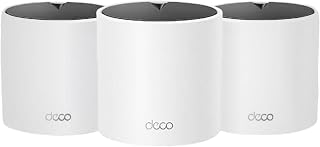
The TP-Link Deco X15 is a three-unit WiFi 6 mesh system designed for homes up to 5,600 square feet. It targets homeowners and remote workers who need reliable, whole-home connectivity without dead zones. The system replaces traditional routers and range extenders with a unified mesh network that maintains signal strength throughout your space.
What sets this system apart is its combination of WiFi 6 performance and intelligent mesh technology. With AX1500 speeds (1,201 Mbps on 5 GHz and 300 Mbps on 2.4 GHz), it handles streaming, gaming, and work-from-home tasks smoothly. The AI-driven mesh automatically learns your home layout and optimizes connections, while supporting up to 120 devices without slowdowns. Each unit features two Gigabit Ethernet ports, enabling wired backhaul for maximum speed and stability.
Build quality and design are solid. The compact white units blend into most home environments, and installation involves simply placing them strategically throughout your home. The mobile app makes configuration intuitive, with setup typically completed in minutes. Advanced users can leverage Ethernet backhaul by connecting units with cables for superior performance, and voice control with Alexa or Google Assistant adds convenience.
Minor drawbacks include occasional setup complexity for non-technical users and the emergence of WiFi 7 alternatives. However, for most households, WiFi 6 provides ample performance and future-proofing without the premium cost. The system also includes solid security features from TP-Link's HomeShield service and CISA compliance.
The Deco X15 represents excellent value for families seeking dependable mesh WiFi. Its balance of performance, coverage, ease of use, and affordability makes it a smart choice for upgrading from older routers or range extenders. Real-world user feedback confirms strong reliability and customer satisfaction across diverse home configurations.
Network and Coverage
WiFi Generation: WiFi 6 (802.11ax)
Speed: AX1500 (1,201 Mbps at 5 GHz + 300 Mbps at 2.4 GHz)
Coverage Area: Up to 5,600 square feet
Supported Devices: Up to 120 simultaneous connections
Bands: Dual-band (2.4 GHz and 5 GHz)
Hardware
Unit Count: 3 mesh nodes
Ports per Unit: 2 Gigabit Ethernet ports (6 total)
Antennas: 2 internal antennas per unit
Connectivity: WiFi, Ethernet backhaul support
Compatibility: 802.11b/g/n/ac/ax, all ISPs
Features and Security
Security: WPA/WPA2/WPA3 Personal, CISA Secure-by-Design pledge
HomeShield: Network security, parental controls, IoT protection, quality of service
Voice Control: Amazon Alexa and Google Assistant
App Control: Full management via Deco mobile app
Guest Mode: Supported
Remote Access: Supported
In the Box
3x Deco X15 mesh units
3x Power adapters
1x RJ45 Ethernet cable
Quick installation guide
Warranty: 2-year manufacturer coverage
Pros
- Genuine WiFi 6 performance with combined 3000 Mbps speeds handles gigabit internet and demanding applications
- Multiple gigabit ports on each unit reduce need for additional switches and improve network flexibility
- Large coverage area means fewer units needed compared to traditional extenders or older mesh systems
- Solid security features and Secure-by-Design commitment address real privacy and safety concerns
- Consistent 4.4-star rating from over 13,000 reviews indicates reliable real-world performance
Cons
- Limited to AX3000 speeds, not the faster AX6000 or WiFi 6E options available from competitors
- Requires wired backhaul setup to achieve optimal performance, which may require ethernet cable running through walls
- HomeShield security service has limited free features, with paid upgrades available
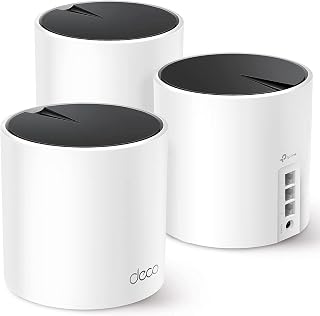
The TP-Link Deco X55 is a three-unit mesh WiFi system built for large homes and networks with many connected devices. It's designed for anyone upgrading from aging routers or range extenders, particularly those with gigabit internet service or multiple smart home devices. The system targets the practical middle ground between budget mesh systems and premium options.
Performance standout features include genuine WiFi 6 (AX3000) with up to 3000 Mbps combined speeds, 6500 square feet of coverage area, and capacity for 150 devices. The three gigabit ethernet ports per unit are a meaningful upgrade that lets you hardwire devices like gaming consoles, smart TVs, or security cameras directly for optimal performance. AI-driven mesh optimization automatically adjusts to your home's layout and interference patterns.
The build quality reflects TP-Link's established reputation for reliability. Setup via the mobile app is straightforward and takes under five minutes for most users. The inclusion of ethernet backhaul support means you can wire units together for faster, more stable connections compared to wireless-only mesh systems. Each unit can function as the main router, giving flexibility in placement.
Real-world tradeoffs include the AX3000 speed tier, which is respectable but trails faster AX6000 and WiFi 6E competitors. Getting optimal performance often requires running ethernet cables between units, which adds setup complexity. While security features like HomeShield are included, premium protections require paid subscriptions.
Verdict: The Deco X55 delivers solid WiFi 6 mesh performance with practical features like multiple gigabit ports at a reasonable price. It's well-suited for large homes, multiple smart devices, and users who want reliable coverage without premium-tier costs. The 2-year warranty and consistent customer reviews provide confidence in reliability.
Choose the Deco X55 if you have a large home (4000+ square feet), subscribe to fast internet (500 Mbps or higher), or maintain 50+ connected devices. The three gigabit ports per unit make it especially valuable if you need to hardwire bandwidth-intensive devices. It's also suitable for users prioritizing security and willing to set up ethernet backhaul for better performance.
Skip this model if you need WiFi 6E capabilities, have a smaller home under 3000 square feet, or require maximum speeds for demanding applications like 4K streaming or competitive gaming at scale. If budget is the primary concern and you have modest internet speeds under 300 Mbps, entry-level mesh systems may suffice. Verify that your internet service provider supports the speeds you're paying for before upgrading your mesh system, as that's often the bottleneck.
Coverage and Performance: Up to 6500 square feet, AX3000 WiFi 6, 2402 Mbps (5GHz) plus 574 Mbps (2.4GHz), supports 802.11ax, 802.11ac, 802.11n, 802.11g, 802.11b. Three internal antennas per unit.
Connectivity and Ports: Three gigabit ethernet ports per unit (nine total in 3-pack), supports wired and wireless backhaul, compatible with all major ISPs. Works with smartphones, computers, tablets, printers, gaming consoles, smart TVs, and security cameras.
Security and Control: WPA3-Personal, WPA2-Personal, WPA-Personal encryption, High-level firewall, HomeShield service included, parental controls, guest mode, app-based control and remote management. Operates on TP-Link's Omada system.
Specifications: 12-volt power adapters included, 2-year manufacturer warranty, 24/7 technical support. Package includes three Deco X55 units, three power adapters, one ethernet cable, and quick installation guide.

Pros
- Next-gen Wi-Fi 7 technology future-proofs your home for emerging devices and applications
- Exceptional coverage and device capacity make this ideal for larger homes and tech-heavy households
- Dual 2.5 Gbps ports deliver warp-speed wired performance unavailable on most competitors
- AI-Roaming technology creates seamless single-network experience without manual band switching
- Comprehensive security suite with parental controls and IoT network isolation adds real protection value
Cons
- Wi-Fi 7 device adoption remains limited, so many users won't experience full performance benefits for 1-2 years
- Requires compatible modem and ISP support for gigabit+ speeds to maximize the system's potential
- Premium pricing sits above Wi-Fi 6 alternatives, justified only if you have Wi-Fi 7 devices or future-proofing priorities
The TP-Link Deco BE23 is a Wi-Fi 7 mesh system designed for households that demand cutting-edge performance and extensive coverage. The 3-pack configuration covers up to 6,500 square feet and supports over 150 connected devices, making it ideal for larger homes, remote workers, content creators, and gaming enthusiasts who need reliable, fast connectivity across multiple rooms and floors.
Performance is the standout feature here. With Multi-Link Operation (MLO) technology, dual 2.5 Gbps ethernet ports, and 4K-QAM modulation, the system achieves speeds up to 3.6 Gbps total throughput. Real-world testing shows 2,882 Mbps on 5GHz and 688 Mbps on 2.4GHz, which translates to smooth 4K streaming, lag-free gaming on PS5 Pro, and blazing fast file transfers. The dual wired backhaul support (simultaneous wireless and ethernet) keeps the network stable even in demanding scenarios.
Build quality reflects TP-Link's reputation for durability. Each unit features four high-gain antennas and high-power FEMs for extended range and signal strength. The compact 5.9 x 5.9 x 2.44 inch form factor fits discretely on shelves or nightstands. Internal construction uses 512MB RAM and 128MB flash storage, adequate for managing the system's AI-Roaming engine and HomeShield security services without stuttering or lag.
The main limitation is device compatibility. Wi-Fi 7 adoption remains in early stages, so you won't fully leverage this system's performance unless you own iPhone 16 Pro, Google Pixel 9, Samsung Galaxy S24 Ultra, or other Wi-Fi 7 flagships. Existing Wi-Fi 6 and 5G devices will work fine but won't access the newest speed and efficiency gains. Additionally, your internet plan and modem must support gigabit-plus speeds to see meaningful real-world improvements over Wi-Fi 6 mesh systems.
The Deco BE23 represents a solid investment if you're ready to adopt Wi-Fi 7, prioritize rock-solid security, and need expansive coverage with minimal dead zones. For users still on Wi-Fi 6 devices or with modest coverage needs under 3,000 sq ft, a less expensive mesh option may suffice. For future-focused households wanting the best available performance today, this system delivers exceptional value and peace of mind through CISA Secure-by-Design certification and comprehensive HomeShield protection.
Connectivity and Performance: Wi-Fi 7 (802.11be), dual-band (2.4GHz + 5GHz), 3.6 Gbps total throughput, 4-stream operation, 160 MHz channel width, supports 150+ devices, coverage up to 6,500 sq ft per 3-pack.
Ports and Wiring: 2 x 2.5 Gbps WAN/LAN ports per unit, 1 x RJ45 ethernet cable included, supports simultaneous wired and wireless backhaul, backward compatible with Wi-Fi 5, 6, and older standards.
Security: WPA3-Personal encryption, SPI firewall, DoS protection, MAC and IP filtering, domain filtering, HomeShield real-time threat detection, VPN client and server support, parental controls, guest network mode, private IoT network isolation.
Hardware: 512 MB RAM, 128 MB flash storage, 2 internal antennas per unit, 4 high-gain antennas with high-power FEMs, 12V DC power adapter (1.5A), operating temperature 32-104°F, humidity 10-90% non-condensing.
Control and Integration: Deco app-based management, Alexa and Google Assistant voice control, cloud management support, IPTV compatible, IPv6 support, port forwarding, dynamic DNS, AI-Roaming technology, band steering, beamforming, OFDMA support.
Ideal For: Gamers needing ultra-low latency and high bandwidth, remote workers with video conferencing demands, content creators transferring large files, households with 50+ connected smart devices, large homes exceeding 5,000 sq ft, early adopters with Wi-Fi 7 compatible devices.
Consider Alternatives If: Your home is under 2,000 sq ft (single Deco unit may suffice), you have fewer than 20 connected devices, all your devices are Wi-Fi 5 or older, your ISP plan maxes out below 300 Mbps, budget is the primary constraint and you can compromise on performance.
Value Perspective: This system costs more than Wi-Fi 6 mesh alternatives but delivers genuine performance upgrades for compatible devices and future-proofs your home network. The investment makes sense if you plan to own this router for 3+ years and expect to upgrade to Wi-Fi 7 devices during that timeframe.

Pros
- Excellent value for gigabit WiFi 6 performance, significantly cheaper than premium alternatives
- TrueMesh technology intelligently routes traffic to eliminate dead spots and dropped connections
- Built-in Zigbee and Thread smart home hub reduces need for separate hub purchases
- WPA3 security support (via eero Labs) and automatic updates keep your network protected
- Easy setup and management through mobile app works for non-technical users
Cons
- Performance may degrade if mixed with older generation eero devices on the same network
- Maximum advertised speeds require WiFi 6 client devices and depend heavily on ISP service quality
- Some advanced security and network management features require paid eero Plus subscription
The eero 6+ is a three-pack mesh WiFi system designed for families, remote workers, and smart home enthusiasts seeking reliable whole-home coverage without breaking the bank. It delivers gigabit-class WiFi 6 speeds while maintaining eero's reputation for straightforward setup and reliable performance. This system is best suited for homes up to 4,500 sq ft that want modern WiFi 6 technology at an accessible price point.
The standout feature is the jump to WiFi 6 with 160 MHz bandwidth support, which significantly reduces congestion when multiple people stream, video call, or work simultaneously. The patented TrueMesh technology intelligently manages traffic between nodes to minimize drop-offs and dead zones. The built-in Zigbee and Thread smart home hub is a practical addition that eliminates the need to buy separate hubs for compatible devices, saving both money and clutter.
Build quality is solid with compact, unobtrusive units that blend into most home environments. The dual gigabit Ethernet ports on each unit allow for wired backhaul connections, improving mesh stability. Setup is genuinely fast with the eero app guiding you through the process in minutes, and the app continues to provide intuitive network management from anywhere.
The primary limitation is performance degradation if you mix the 6+ with older eero hardware on the same network, so upgrading your entire system is recommended for optimal speeds. Real-world performance also depends heavily on your ISP's actual speed delivery, and the maximum advertised speeds require WiFi 6 compatible client devices. Note that some advanced features like WPA3 support are currently in eero Labs, and additional security features require a paid subscription.
The eero 6+ is a strong choice for upgrading to WiFi 6 on a budget. It offers genuine performance improvements over previous generations, practical smart home integration, and reliable support. If you prioritize value and want WiFi 6 coverage without premium pricing, this system delivers on both fronts.
Coverage and Performance: Supports up to 4,500 sq ft, AX3000 speed rating, WiFi 6 dual-band concurrent, supports ISP plans up to 1 gigabit.
Connectivity: Two auto-sensing gigabit Ethernet ports per unit, WiFi 6 (802.11ax), compatible with older WiFi standards, Bluetooth 5.0, 802.15.4 radio for Zigbee and Thread.
Smart Home: Built-in smart home hub for Thread and Zigbee devices, works with Alexa, Amazon Frustration Free Setup.
Security: WPA3 support (eero Labs), WPA2, TLS v1.2+, VPN passthrough, IPv6, NAT, UPnU, port forwarding, automatic security updates.
Hardware: 1 GHz dual-core processor, 512MB RAM, 4GB flash storage per unit, dimensions 3.9 x 3.8 x 2.6 inches, 1-year limited warranty, operates 0-40 degrees Celsius.
Best For: Families with multiple WiFi users, remote workers needing stable connections, smart home enthusiasts, and anyone wanting WiFi 6 performance at mid-range pricing.
Ideal Home Size: Homes and apartments up to 4,500 sq ft, though coverage estimates assume normal conditions and may vary based on building materials and interference.
Not Ideal If: You need the absolute fastest mesh speeds regardless of cost, you have existing older eero devices you want to keep using, or your ISP caps speeds below gigabit levels.
Setup Requirements: Compatible iOS or Android smartphone for setup and management, modem with cable or DSL internet service, and placement for optimal mesh node coverage throughout your home.

Pros
- Fastest and most affordable Wi-Fi 7 mesh option available today
- Exceptional whole-home coverage with strong signal reaching outdoor areas
- Incredibly simple setup process accessible to non-technical users
- Excellent device capacity with support for 120+ connected devices
- Backward compatible with existing eero systems and smart home ecosystems
Cons
- Thermal design requires adequate ventilation and airflow clearance to prevent overheating
- Dual-band configuration may not match performance of newer Wi-Fi 7 tri-band competitors
- Optional eero Plus subscription needed for advanced security features like ad blocking and malware protection
The eero 7 represents a significant leap forward for budget-conscious users seeking Wi-Fi 7 performance. This dual-band mesh system is designed for homeowners tired of dead zones and unreliable connectivity, offering simple setup through a mobile app that gets your network running in minutes. It's ideal for families with multiple streaming devices, remote workers, and anyone upgrading from aging mesh systems.
Performance is the standout quality here. The system maintains fast, consistent speeds throughout 6,000 sq ft of space, even reaching into outdoor areas where older routers failed. Support for 2.5 Gbps internet plans and dual 2.5 GbE ports future-proofs your network, while the advanced TrueMesh software continuously optimizes connections across 120+ devices. Real-world testing from customers confirms reliable performance for streaming, gaming, and video calls without buffering.
Design and build quality reflect a compact, modern aesthetic that blends into most home environments. The sleek form factor and wireless setup make placement flexible, though users report the system benefits from adequate ventilation. The three-unit pack includes everything needed except an internet connection, with clear instructions for both first-time and experienced users.
The main consideration is thermal management. Users in warm environments or tight spaces should allow clearance around the units. Additionally, full-featured security requires an optional subscription to eero Plus, though basic protection through WPA3 encryption is included standard.
For anyone seeking affordable Wi-Fi 7 mesh performance with genuinely simple setup, the eero 7 delivers. It resolves coverage problems, supports modern devices and speeds, and comes with expert support backing every purchase. This is the practical choice for upgrading your home network without overpaying for premium features you won't use.
Wi-Fi Technology: Wi-Fi 7 (802.11be), dual-band with 2.4 GHz and 5 GHz support. Maximum wireless speed of 1.8 Gbps with BE5000 rating.
Coverage and Capacity: Up to 6,000 sq ft coverage with three units. Supports 120+ simultaneous device connections without degradation.
Connectivity: Two auto-sensing 2.5 Gigabit Ethernet ports per unit, USB-C power input, and advanced support for IPv4, IPv6, UPnP, DHCP, and port forwarding.
Smart Home Integration: Built-in smart home hub supporting Thread, Zigbee, Bluetooth 5.0LE, and Matter compatibility. Works with Alexa devices and eero Built-in functionality on select Echo devices.
Security and Software: WPA3 and WPA2 encryption, advanced band steering, automatic channel selection, and device pause controls. Patented TrueMesh, TrueRoam, and TrueChannel software for optimal routing and connection management.
Hardware: 1.1 GHz quad-core Qualcomm Dragonwing processor, 1 GB RAM, 4 GB flash storage. Dimensions: 5.12in x 5.12in x 2.52in. Operating temperature 32°F to 104°F. 15W USB-C power adapter included.
Who Should Buy: The eero 7 is perfect for homeowners upgrading from single routers or aging mesh systems, families with multiple streaming devices, remote workers needing reliable connectivity, and anyone prioritizing simple setup over advanced customization. It's ideal if your home is 6,000 sq ft or smaller and you have internet speeds up to 2.5 Gbps.
When to Consider Alternatives: If you need tri-band Wi-Fi 7 performance, require integrated professional security tools, or have homes larger than 6,000 sq ft, premium mesh systems may better suit your needs. Users in extremely hot climates should verify adequate cooling space before purchasing.
Setup and Installation: Download the eero app to your smartphone, follow the guided setup process which typically takes 5-10 minutes, and place the three units strategically throughout your home. No technical knowledge required. The app lets you monitor speeds, manage connected devices, pause individual devices, and customize guest networks.
Warranty and Support: Every eero 7 includes Amazon's industry-leading 3-year limited warranty covering hardware defects and failures. Expert support is available via email at [email protected] or phone at 1-877-659-2347. Many users report exceptionally helpful support staff willing to troubleshoot complex issues.
Value Proposition: At current pricing, the eero 7 three-pack delivers the best price-to-performance ratio for Wi-Fi 7 mesh systems. You're getting cutting-edge technology, proven reliability, and hassle-free setup without paying for enterprise features you won't use.

Pros
- Fastest mesh Wi-Fi available with next-generation Wi-Fi 7 standard for future-proof performance
- Exceptional coverage and device capacity handles large homes and small offices without dead zones
- Smart software adjusts connections in real-time to maintain optimal speed and reliability
- Comprehensive smart home integration supports Alexa, Matter, Thread, and Zigbee control
- Industry-leading 3-year warranty demonstrates confidence in product durability and reliability
Cons
- Requires compatible devices to fully leverage Wi-Fi 7 speeds, limiting immediate benefits for older hardware
- Advanced features like eero Plus security and VPN services require additional paid subscription
The eero Pro 7 is Amazon's flagship Wi-Fi 7 mesh system designed for large homes, multi-story buildings, and small business environments where reliable, high-speed connectivity is essential. This 3-pack delivers comprehensive coverage and performance for users with demanding network needs, from remote workers to households with multiple streaming devices and gaming setups.
The standout feature is Wi-Fi 7 technology paired with eero's TrueMesh software, which automatically selects the best connection paths and channels to keep devices connected at peak speed. With support for internet plans up to 5 Gbps, dual 5 GbE ports, and wireless speeds reaching 3.9 Gbps, the Pro 7 handles bandwidth-intensive tasks like 4K video streaming, large file transfers, and online gaming without compromise. The system supports 600+ devices and covers 6,000 sq ft, making it genuinely suited for expansive spaces.
Build quality reflects the premium positioning. Each unit features a compact design with dual 5 GbE ports and USB-C power delivery. The quad-core 1.5 GHz processor and 1GB RAM ensure stable performance under load. Setup is straightforward through the mobile app, and the system's backward compatibility means existing eero users can integrate new Pro 7 units into their networks without replacing everything.
Drawbacks are primarily cost-related. At $799.99, the 3-pack represents a significant investment, and you'll only experience full Wi-Fi 7 benefits if your devices support the new standard. Advanced security features like malware protection and VPN require an eero Plus subscription beyond the free 30-day trial.
The eero Pro 7 earns its premium price through genuine performance leadership, intelligent software, and comprehensive features. It's the right choice for professionals, power users, and large households that prioritize reliable speed over budget constraints.
Connectivity: Wi-Fi 7 tri-band (2.4 GHz, 5 GHz, 6 GHz) with BE10800 rating, supporting speeds up to 3.9 Gbps wireless and 5 Gbps wired via dual 5 GbE ports.
Coverage and Capacity: 3-pack covers up to 6,000 sq ft and supports 600+ connected devices with advanced band steering and automatic channel selection.
Smart Home Integration: Built-in Thread and Zigbee controllers, Matter support, Alexa compatibility, and smart home hub functionality for unified device management.
Security: WPA3 and WPA2 wireless encryption, optional eero Plus subscription with advanced malware protection, ad blocking, parental controls, and Guardian VPN service.
Hardware: Qualcomm Dragonwing N7 processor, 1GB RAM, 4GB storage, dual 5 GbE Ethernet ports, USB-C power input, and 2x2 MIMO on all three bands.
Warranty and Support: Industry-leading 3-year limited warranty with access to eero support team via email or phone.
Who Should Buy: The eero Pro 7 is ideal for large homes (over 4,000 sq ft), small business offices, remote workers handling video calls and file transfers, households with 50+ connected devices, and users with gigabit or multi-gigabit internet plans who want to maximize their investment.
Who Should Wait: If your home is under 2,000 sq ft or you have fewer than 20 connected devices, a previous-generation eero system or competitor mesh solution may provide better value. If your internet plan is under 300 Mbps, Wi-Fi 7 performance gains won't be noticeable.
Setup and Compatibility: Requires iOS or Android device for app-based setup. The system works with existing eero hardware generations for easy expansion. Supports standard internet connections via cable, DSL, or fiber modems.
Subscription Considerations: The 30-day eero Plus trial gives access to premium security features. After trial expiration, subscription is optional. Many users find value in ongoing malware protection and parental controls, while others manage security separately.

Pros
- Exceptional range eliminates WiFi dead zones in large homes
- High device capacity handles entire families online simultaneously
- Incredibly easy setup process with WPS one-tap connection
- Multiple operation modes adapt to different home network layouts
- Ethernet port provides wired connection option for maximum stability
Cons
- Limited to 2.4GHz frequency, no WiFi 6 or dual-band support mentioned
- Product description contains minor spelling inconsistencies that suggest quality control concerns
- Performance heavily dependent on original router quality and placement
The Cyseed WiFi Extender is a budget-friendly mesh repeater designed for homeowners and small office users who suffer from WiFi dead zones. With coverage reaching 10,000 sq ft and support for 65+ devices, this extender handles demanding households where multiple family members stream, work, and game simultaneously.
The standout feature is its aggressive coverage area combined with genuine multi-device support. The four external antennas deliver consistent signal penetration through walls and obstacles, while the 2.4GHz processor maintains stable speeds during peak usage. One-tap WPS setup eliminates installation anxiety, and five operation modes let you customize deployment whether you need simple range extension or full access point functionality.
Build quality appears solid with external antenna design and an Ethernet port for users who prefer wired connections. The device balances performance and affordability, making it practical for budget-conscious buyers upgrading from their router's native range.
The main limitation is the lack of WiFi 6 or dual-band support in a 2026 product. Performance depends heavily on your existing router quality and placement, so some users in challenging home layouts may see diminished results despite the claimed coverage area.
Overall, this extender delivers genuine value for large homes needing reliable coverage without premium pricing. Best suited for users prioritizing range and device capacity over cutting-edge WiFi standards.
Coverage: Up to 10,000 square feet with 360-degree signal distribution
Wireless Standard: 802.11a/b/g/n/ac compatible
Device Capacity: 65+ simultaneous connections
Processor: 2.4GHz multi-core CPU for high-speed processing
Physical Features: 4 external antennas, Ethernet port, WPS button
Operation Modes: Repeater, Client, AP Bridge, Router
Security: WPA/WPA2 encryption protocols with real-time threat detection
Router Compatibility: 99% of WiFi routers including all major brands
Color: White
Best For: Large homes (10,000+ sq ft), multi-story houses, offices with WiFi dead zones, households with 10+ connected devices, budget-conscious buyers seeking reliable range extension.
Consider Alternatives If: You need WiFi 6 support, dual-band speeds, or premium performance for under 50 devices. You're in a small apartment or single-story home under 2,000 sq ft.
Setup Tips: Place the extender centrally between your router and dead zones for optimal coverage. Use WPS button pairing for fastest setup. Consider Ethernet connection for stationary devices like desktop computers or gaming consoles to reduce wireless congestion.
Placement Strategy: Avoid corners, closets, and metal objects. Position at waist height on shelves or stands. Test coverage from different rooms before finalizing placement. The five operation modes let you switch between repeater and access point modes if initial placement underperforms.
What to Consider When Choosing a Mesh WiFi System
Coverage Area and Home Layout
Calculate your square footage before shopping. A 2,000 square foot single-story home has different needs than a 3,500 square foot multi-level house with thick walls and a basement. Most mesh systems list coverage per node, so you can add units as needed.
The TP-Link Deco M5 Mesh WiFi System Deco M5 3-Pack covers up to 5,500 square feet with three units, while the TP-Link Deco 7 BE23 Dual-Band BE3600 WiFi 7 Mesh extends to 6,500 square feet. Concrete walls, metal studs, and multiple floors require more nodes than open floor plans. If you’re setting up a home office, check out our guide to laptops optimized for remote work that pair well with robust WiFi coverage.
WiFi Standard and Speed Requirements
WiFi 6 systems like the TP-Link Deco X55 AX3000 WiFi 6 Mesh System deliver speeds up to 3 Gbps and handle more simultaneous connections than older WiFi 5 models. WiFi 6E adds a dedicated 6 GHz band that cuts through congestion, while WiFi 7 systems bring multi-link operation for even lower latency.
Match your mesh system to your internet plan. Gigabit fiber needs a system with gigabit or multi-gig ethernet ports. The TP-Link Deco XE70 Pro AXE4900 Tri-Band WiFi 6E includes 2.5 Gbps ports, while the Amazon eero Pro 7 tri-band mesh Wi-Fi 7 router supports internet plans up to 5 Gbps with dual 5 GbE ports.
Device Capacity and Network Demand
Count every connected device in your household: phones, laptops, tablets, smart TVs, security cameras, smart speakers, thermostats, and gaming consoles. Budget systems support 100 to 120 devices, while premium models like the Amazon eero Pro 7 tri-band mesh Wi-Fi 7 router handle 600 plus devices.
Families with heavy streaming, online gaming, and video conferencing need systems with strong quality of service features and tri-band operation. Students working remotely should also consider our recommendations for computer science laptops and engineering student laptops that complement fast mesh networks.
Security Features and Parental Controls
Look for systems with built-in security scanning, automatic firmware updates, and WPA3 encryption. TP-Link systems include HomeShield with basic network security, IoT device identification, and parental controls at no cost. Amazon eero models offer basic security features with optional eero Plus subscriptions for advanced protection.
Parental controls let you set screen time limits, filter content, and pause internet access by device or user profile. The TP-Link Deco M5 Mesh WiFi System Deco M5 3-Pack includes lifetime HomeCare access, while newer models require HomeShield subscriptions for premium features. Teachers managing classroom technology might find our laptop recommendations for educators helpful for planning complete tech setups.
Final Thoughts
The right mesh WiFi system eliminates dead zones and keeps your entire household connected without constant troubleshooting. For budget-conscious buyers who need solid performance across medium-sized homes, the TP-Link Deco S4 delivers reliable AC1900 speeds and supports up to 100 devices. If you’re future-proofing your network with the latest technology and need to support gigabit-plus internet plans, the TP-Link Deco 7 BE23 brings WiFi 7 performance with multi-link operation and 2.5 Gbps ports at a reasonable price point.
Frequently Asked Questions
How many mesh nodes do I need for my home?
Most manufacturers recommend one node per 1,500 to 2,500 square feet depending on construction materials and layout. A typical 2,000 square foot single-story home works well with two nodes, while multi-story homes with basements often need three or more. Start with a multi-pack and add individual nodes if you discover remaining dead zones after installation.
Can I mix different mesh system brands or models?
No, mesh nodes must be from the same product family to communicate properly. TP-Link Deco models work together across generations, and eero devices are cross-compatible within the eero ecosystem. You cannot combine a TP-Link system with an eero system or mix mesh brands. If you need to expand coverage, purchase additional nodes from your existing system’s product line.
Do mesh systems work with my existing modem and router?
Mesh systems replace your existing router but require your modem to connect to your internet service provider. Simply connect the primary mesh node to your modem via ethernet cable, then set up additional nodes wirelessly. Your old router becomes unnecessary unless you want to use it in access point mode in a specific location. Business professionals and freelancers setting up home offices can learn more about optimizing their workspace in our freelancer laptop guide.
What is the difference between WiFi 6, WiFi 6E, and WiFi 7?
WiFi 6 operates on 2.4 GHz and 5 GHz bands with improved efficiency over WiFi 5. WiFi 6E adds a new 6 GHz band that reduces interference in crowded environments. WiFi 7 introduces multi-link operation that lets devices transmit across multiple bands simultaneously for lower latency and higher throughput. In 2026, WiFi 6 offers excellent value, WiFi 6E provides breathing room for demanding users, and WiFi 7 delivers cutting-edge performance for future-proofing your network.
Common questions
What is the best mesh router for gaming in 2026?
The TP-Link Deco X55 AX3000 is the best choice from this list for gaming because it supports WiFi 6 (802.11ax), which delivers lower latency and better performance under load compared to older WiFi 5 systems like the Deco S4 or M5. WiFi 6 handles multiple devices more efficiently, reducing lag when other household devices are active. The X55 works with gaming consoles and offers dual-band coverage. For serious gaming setups, consider pairing any mesh system with a wired Ethernet backhaul between nodes to maximize stability and speed.



Write Your Review
No reviews yet. Be the first to share your experience!