

You need a laptop that keeps up from morning bell to after-school planning sessions, handles video calls without freezing, and fits comfortably in your work bag. Whether you’re managing Google Classroom, creating presentations, or grading assignments, the right machine makes every task smoother.
This guide walks through seven laptops built for teachers who need reliable performance, solid battery life, and practical features. We’ve included options across different budgets and preferences, from compact 13-inch models to larger 17-inch displays for multitasking.
Quick answer
This guide compares 7 picks, with HP Essential 14 Laptop Intel N150 128GB Windows 11 ranked first. Apple MacBook Neo 13-inch A18 Pro Laptop, 256GB SSD holds the highest customer rating among them.

For teachers on a budget who need a reliable daily driver, this 14-inch HP covers the basics well. The included Office 365 subscription means no extra software costs, and Windows 11 runs smoothly on the Intel N150 CPU for lesson planning, grading documents, and email. The 14-inch screen size hits a sweet spot between portability and comfortable viewing at a desk.
Pros
- 3.24-pound weight ideal for carrying between classrooms and home
- 11-hour battery covers full school day without charging
- Included Microsoft 365 provides immediate access to essential software
- AI noise reduction improves clarity during parent and admin calls
Cons
- 4GB RAM limits multitasking with many browser tabs or applications
- 128GB storage requires active file management or cloud reliance
Teachers moving between classrooms, attending professional development sessions, or working from home need a laptop that travels easily without sacrificing essential functionality, and this HP Essential 2026 delivers exactly that portability-focused package. Weighing just 3.24 pounds and measuring under an inch thick, it slips into tote bags alongside textbooks and lesson materials without adding bulk. The included Microsoft 365 subscription eliminates software licensing concerns and provides immediate access to Word, Excel, and PowerPoint for creating worksheets, tracking grades, and building presentations. The Intel N150 processor with 4GB RAM handles typical teaching workflows like email correspondence, online attendance systems, video conferencing with parents, and web-based learning platforms without struggle. The 11-hour battery life covers a full school day plus evening lesson planning without hunting for outlets. The 720p camera with AI noise reduction ensures clear communication during remote parent conferences or virtual faculty meetings, while dual microphones capture your voice reliably even in noisy environments. The 14-inch HD anti-glare display provides enough screen space for comfortable document editing while reducing reflections from classroom windows. Wi-Fi 6 and Bluetooth 5.4 connect quickly to school networks and wireless peripherals. The willow green finish offers a professional appearance that stands out from standard black laptops in faculty workrooms.
Processor: Intel N150, up to 3.6 GHz Turbo Boost, 6 MB L3 cache, 4 cores, 4 threads
Memory: 4GB LPDDR5 RAM
Storage: 128GB UFS storage
Display: 14-inch HD (1366 x 768) anti-glare, 250-nit brightness, 62.5% sRGB coverage, 79% screen-to-body ratio
Graphics: Integrated graphics
Operating System: Windows 11 S
Connectivity: Wi-Fi 6 (2x2), Bluetooth 5.4
Ports: 1 USB Type-C 10Gbps with DisplayPort 1.2, 2 USB Type-A 5Gbps, 1 HDMI 1.4b, 1 headphone/microphone combo jack, 1 multi-format SD card reader
Camera: HP True Vision 720p HD with noise reduction
Audio: Dual speakers, full-size keyboard with numeric keypad, HP Imagepad
Battery: Up to 11 hours video playback, 7.5 hours mixed usage, 7.5 hours wireless streaming
Design: Weighs 3.24 lb, measures 12.76" x 8.86" x 0.71", Willow Green top cover with matte finish, natural silver keyboard deck
Included Software: 1-year Microsoft 365 Personal subscription
This laptop best serves elementary and middle school teachers whose daily work centers on communication, document creation, web-based platforms, and video conferencing rather than intensive computing tasks. It fits educators who prioritize lightweight portability for moving between classrooms or commuting. Teachers working extensively with large multimedia files, complex data analysis, or running multiple resource-heavy applications simultaneously should consider models with more RAM and storage. Those who rarely leave their desk might prefer a larger display.

Teachers who move between classroom and home prep will appreciate how the A18 Pro chip handles AI-powered tools like grading aids and lesson planning apps without slowing down. At 2.71 pounds and just 0.5 inches thin, it slips into any bag without adding bulk. The 1080p FaceTime HD camera ensures clear video for parent conferences or hybrid teaching sessions.
Pros
- 16-hour battery lasts full teaching days plus evening work
- 2.7 pounds makes classroom-to-classroom transport effortless
- Apple Intelligence assists with lesson planning and parent communication
- 1080p camera and dual mics excel for virtual meetings
Cons
- 256GB storage fills quickly with teaching materials and media
- Only two USB-C ports limits projector and peripheral connections
Teachers managing digital classrooms need a laptop that moves seamlessly between lesson planning, video calls, and student collaboration tools without slowing down. The MacBook Neo delivers exactly that with its A18 Pro chip and 16-core Neural Engine, providing responsive performance for everything from running presentation software to editing teaching videos. Apple Intelligence offers practical classroom benefits: quickly summarizing research articles, drafting parent communications, and organizing lesson notes without compromising privacy. The 16-hour battery life means you can teach a full school day plus evening grading sessions without hunting for outlets. At 2.7 pounds, it slips easily into a bag for moving between classrooms or taking home. The 1080p FaceTime camera and dual-mic array ensure clear virtual parent conferences and remote teaching sessions. The recycled aluminum build withstands the daily wear of classroom life. Two USB-C ports and a headphone jack cover projector connections and headphones for quiet planning periods. The 256GB storage holds lesson materials and student work, though media-heavy projects may require cloud backup.
Processor: Apple A18 Pro with 6-core CPU (2 performance + 4 efficiency), 5-core GPU, 16-core Neural Engine, 60GB/s memory bandwidth
Display: 13-inch Liquid Retina with 2408x1506 resolution, 500 nits brightness, 1 billion color support, IPS technology
Memory & Storage: 8GB unified memory, 256GB SSD storage
Battery: 36.5-watt-hour lithium-ion, up to 16 hours video streaming, up to 11 hours wireless web browsing
Camera & Audio: 1080p FaceTime HD camera, dual-mic array with directional beamforming, dual-speaker sound system with Spatial Audio support
Ports: Two USB-C ports (one USB 3, one USB 2), 3.5mm headphone jack, supports one external 4K display at 60Hz
Design: 8.12 x 11.71 x 0.5 inches, 2.7 pounds, recycled aluminum enclosure, available in Silver, Blush, Citrus, and Indigo
Operating System: macOS with Apple Intelligence and seamless iPhone integration
Elementary through high school teachers who use Apple devices personally will appreciate the ecosystem integration for AirDrop and iCloud syncing between classroom and home. Perfect for educators prioritizing battery life and portability over storage capacity. Teachers who store extensive video libraries, manage large media projects, or frequently connect multiple peripherals simultaneously should consider models with more storage and additional ports. Those already invested in Windows-specific educational software may face compatibility challenges.

A 17.3-inch FHD IPS anti-glare display is a standout feature for teachers who spend long hours reviewing student work or building slide decks. The 512GB SSD gives ample room for curriculum files, videos, and resources, while the AMD Ryzen 3 with 8 threads keeps multitasking smooth across multiple browser tabs and productivity apps throughout the school day.
Pros
- 17.3-inch screen reduces eye strain during long grading sessions
- 512GB storage accommodates extensive teaching materials and resources
- 14+ hour battery eliminates mid-day charging during school hours
- FHD camera with AI noise reduction improves virtual parent conferences
Cons
- Keyboard lacks backlighting for early morning or after-hours work
- Ryzen 3 processor adequate for teaching tasks but not intensive multimedia editing
Teachers who grade papers, review student work, and plan lessons for hours each day benefit from maximum screen space to reduce eye strain and improve workflow efficiency. The 17.3-inch FHD display on this HP provides exactly that, showing full-page documents at readable sizes and allowing side-by-side windows for comparing student essays or cross-referencing curriculum standards. The 300-nit brightness and wide viewing angles mean the screen remains clear whether you're working at your classroom desk or presenting materials to small student groups gathered around. The AMD Ryzen 3 processor and 8GB RAM handle typical teaching workloads smoothly: streaming educational videos, running virtual classroom software, managing attendance and grade portals simultaneously. With 512GB storage, there's room for curriculum materials, teaching resources, and student work without constant file management. The exceptional 14-hour battery life supports morning prep, full teaching schedules, faculty meetings, and evening grading without interruption. AI noise reduction ensures parent phone calls remain professional even from busy environments. Despite the large screen, it weighs just 4.4 pounds and measures 0.65 inches thin, making it surprisingly portable for moving between home and school. Comprehensive connectivity including HDMI 2.1, dual USB-C, and dual USB-A handles smartboards, document cameras, and thumb drives.
Display: 17.3-inch FHD IPS, 1920x1080, 300 nits, 62.5% sRGB, anti-glare, 178-degree viewing angles
Processor: AMD Ryzen 3 30, 4 cores, 8 threads, up to 4.1 GHz boost, 4MB L3 cache
Memory: 8GB LPDDR5-5500 MT/s onboard
Storage: 512GB PCIe NVMe M.2 SSD
Graphics: AMD Radeon 610M integrated
Connectivity: Wi-Fi 6 (802.11ax), Bluetooth 5.4, 2x USB-A 5Gbps, 2x USB-C 10Gbps (USB-PD 3.1, DisplayPort 1.4), 1x HDMI 2.1, 1x 3.5mm audio jack
Camera: 1080p FHD with HDR auto-switch, dual array microphones
Battery: Up to 14 hours 15 minutes, 45W USB-C GaN fast charger (0-50% in 45 minutes)
Weight: 4.4 pounds
Dimensions: 15.65" x 10.09" x 0.65"
Operating System: Windows 11 Home with Copilot Key
Sustainability: EPEAT Silver Climate+ registered, ENERGY STAR certified

Teachers focused on student-facing productivity work will find this 14-inch option practical and ready to go. Wi-Fi 6 support means faster, more stable connections in busy school networks, and the bundled MS Office Pro Plus removes the need for separate software licenses. The anti-glare coating reduces eye strain during extended grading or lesson prep sessions.
Pros
- Lifetime Office 2024 eliminates subscription costs for essential software
- Complete accessory bundle removes need for separate purchases
- Windows 11 Pro provides advanced features for school network integration
- 9-hour battery life covers full school day and commute
Cons
- 4GB RAM constrains heavy multitasking with resource-intensive applications
- 128GB internal storage requires external drive dependency for large files
Educational budgets stretch thin, and this HP 14-inch configuration recognizes that reality by bundling everything a teacher needs into one purchase. The lifetime Microsoft Office 2024 Professional Plus license eliminates recurring subscription costs that eat into personal budgets, providing perpetual access to Word, Excel, PowerPoint, and Outlook for creating lesson materials and managing classroom records. Windows 11 Pro with Copilot AI offers advanced productivity features and better network management for teachers working within school district systems. The included 500GB external drive, wireless mouse, earbuds, and cables mean you can start working immediately without additional purchases. The Intel quad-core N150 processor with 4GB LPDDR5 RAM delivers responsive performance for everyday teaching tasks like attendance tracking, online grade books, email communication, and video conferencing with parents or administrators. The 128GB internal storage handles operating system and essential applications while the external drive accommodates growing collections of curriculum materials. At 3.24 pounds with 9-hour battery life, it travels comfortably between home and school. The 720p camera with dual-array microphones captures clear video and audio for remote parent conferences or collaborative planning sessions with colleagues. Wi-Fi 6 ensures reliable connectivity to school networks. The anti-glare HD display reduces eye strain during extended grading marathons or lesson planning sessions.
Processor: 13th Gen Intel Core N150, quad-core, up to 3.6 GHz Turbo Boost, 6MB cache, 4 threads
Memory: 4GB LPDDR5 RAM, power-efficient design supports high data rates
Storage: 128GB UFS SSD built-in, 500GB portable external drive included
Display: 14-inch HD LED, 1366x768 resolution, anti-glare micro-edge, 250 nits brightness
Graphics: Integrated Intel Graphics
Operating System: Windows 11 Pro with Copilot AI integration
Battery: 3-cell 41Wh lithium-ion, up to 9 hours per charge, HP Fast Charge capable
Connectivity: Wi-Fi 6 (802.11ax), Bluetooth 5.4, USB-C 5Gbps, dual USB-A 5Gbps, HDMI 1.4b, SD card reader, 3.5mm audio jack
Camera: 720p HD True Vision with temporal noise reduction, dual-array digital microphones
Keyboard: Full-size English layout, natural silver finish
Weight: 3.24 lbs (1.47 kg)
Dimensions: 12.76 x 8.86 x 0.71 inches (32.4 x 22.5 x 1.8 cm)
Color: Willow Green
This configuration serves budget-conscious teachers across all grade levels who need a complete computing solution without ongoing software costs or additional accessory purchases. It fits educators whose workflows center on communication, document creation, web-based platforms, and standard educational software. Teachers working with video editing, large photo libraries, coding instruction, or running multiple demanding applications simultaneously should invest in models with more RAM and internal storage capacity.

The 2K touchscreen on this 16-inch model makes it especially useful for teachers who annotate lesson materials or interact directly with content on-screen. At 1920x1200 resolution with an IPS anti-glare panel, text and images stay sharp and easy to read. The AMD Ryzen 3 with 8GB of LPDDR5 RAM handles classroom productivity software and video playback without issue.
Pros
- 16-inch 2K touchscreen provides ample workspace for grading and planning
- 14+ hour battery covers full school days without charging
- Touch capability simplifies presentations and document annotation
- Comprehensive ports connect classroom projectors and peripherals
Cons
- 256GB storage constrains teachers with large media libraries
- No backlit keyboard for early morning or evening work in dim spaces
Classroom environments demand laptops with screens large enough to display lesson plans, grade spreadsheets, and student work side by side. This 16-inch HP delivers that workspace with a 2K touchscreen that makes navigating educational platforms and annotating documents intuitive. The 1920x1200 resolution provides extra vertical space compared to standard displays, showing more rows in gradebooks and longer portions of student essays without scrolling. Teachers juggling Google Classroom, Zoom, and grading software will find the AMD Ryzen 3 7320U handles these tasks without lag. The touchscreen simplifies presentations, allowing you to circle key points or navigate slides naturally during lessons. Battery life exceeding 14 hours covers extended school days, after-school meetings, and evening lesson prep without needing a charger. The AI noise reduction proves valuable during planning periods in noisy staff rooms or when taking parent calls from busy classrooms. At 3.6 pounds with a 0.6-inch profile, it fits standard teacher bags. Fast charging recovers 50% battery during lunch breaks. Dual USB-C with Power Delivery, two USB-A ports, and HDMI connect document cameras, projectors, and flash drives educators rely on daily.
Display: 16-inch 2K IPS touchscreen, 1920x1200 resolution, 300 nits brightness, anti-glare coating, 62.5% sRGB color gamut
Processor: AMD Ryzen 3 7320U, 4 cores, 8 threads, up to 4.1 GHz
Memory: 8GB LPDDR5-5500 MT/s RAM (onboard)
Storage: 256GB PCIe NVMe M.2 SSD
Graphics: AMD Radeon 610M dedicated graphics
Battery: Up to 14 hours 15 minutes, 45W USB Type-C GaN power adapter with 0-50% fast charge in 45 minutes
Connectivity: Wi-Fi 6 (802.11ax), Bluetooth 5.4, 2x USB Type-A 5Gbps, 2x USB Type-C 10Gbps with Power Delivery 3.1 and DisplayPort 1.4, 1x HDMI 2.1, 3.5mm audio jack
Camera: 1080p FHD with HDR auto-switch and dual array microphones
Audio: Dual speakers
Keyboard: Matte paint finish
Dimensions: 14.12 x 9.91 x 0.6 inches
Weight: 3.6 pounds
Operating System: Windows 11 Home
Color: Mica Silver
Certifications: EPEAT Silver Climate+, ENERGY STAR Certified
Teachers who spend significant time managing spreadsheets, reviewing digital assignments, or creating multimedia lessons will benefit from the large touchscreen workspace. Ideal for educators comfortable with Windows 11 and those who frequently present using touchscreen interaction. Teachers storing extensive video resources, high-resolution photos, or large student project archives need more than the 256GB storage. Those running specialized educational software with high memory demands may find the 8GB RAM limiting during intensive multitasking.

Dell's 15.6-inch FHD display gives teachers a comfortable canvas for reviewing essays, building presentations, or displaying content during small-group instruction. The 512GB hard drive offers solid local storage for multimedia lesson resources, and 8GB of RAM keeps the Intel Core 3 100U running multiple apps without grinding to a halt during a busy prep period.
Pros
- 512GB storage holds extensive curriculum libraries and student files
- 8GB RAM handles multitasking across educational platforms smoothly
- Full HD 15.6-inch display provides comfortable workspace for grading
- Anti-glare coating reduces eye strain during extended planning sessions
Cons
- Larger footprint less portable than 13 or 14-inch models
- Integrated graphics limit advanced multimedia creation
Classroom teaching demands a machine that can handle lesson planning, grading spreadsheets, multimedia presentations, and video conferencing without hesitation, and this Dell 15.6-inch laptop delivers that reliability in a straightforward package. The Intel Core 3 100U processor paired with 8GB RAM provides enough headroom for teachers juggling Google Classroom tabs, PowerPoint slides, and Zoom calls simultaneously. The 512GB storage capacity accommodates years of curriculum materials, student work samples, and educational resources without constant file management. The full HD display gives you workspace for side-by-side document comparison during grading sessions, while the anti-glare coating reduces eye fatigue under fluorescent classroom lighting. The 15.6-inch screen size strikes a practical balance: large enough for comfortable multitasking at your desk, yet portable enough to carry between classrooms or home. Windows 11 Home integrates smoothly with school district IT systems and educational software ecosystems. The integrated graphics handle educational videos and presentation slides without stuttering. The memory card slot provides quick access to photos from classroom activities or field trips. This is a workhorse machine built for the daily grind of educational workflows rather than cutting-edge performance.
Display: 15.6 inch FHD (1920x1080) with anti-glare coating
Processor: Intel Core i3
Memory: 8GB RAM
Storage: 512GB SSD
Graphics: Integrated Intel Graphics
Operating System: Windows 11 Home
Color: Carbon Black
Special Features: Anti-glare coating, memory card slot, numeric keypad, Dell ComfortView blue light reduction
Warranty: 1 Year Onsite Service
This laptop suits elementary through high school teachers who need dependable performance for lesson planning, grading, communication, and classroom presentations without technical complications. It fits educators comfortable with Windows who prioritize screen real estate and storage capacity over extreme portability. Teachers working primarily with resource-intensive video editing, 3D modeling software, or coding instruction should look elsewhere. Those who carry their laptop between multiple buildings daily might find the 15.6-inch form factor less convenient than smaller alternatives.
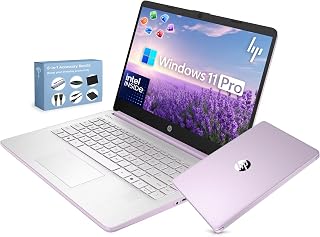
Weighing in as an ultra-light 14-inch option, this laptop is built for teachers who carry their gear between classrooms. Microsoft Office 2024 comes pre-loaded, so lesson plans and grade sheets are ready from day one. The fast-charging feature is a practical win for educators who forget to plug in overnight and need a quick top-up before first period.
Pros
- Exceptional value with included accessories and Microsoft Office worth $200+ separately
- Lightweight and thin profile makes it genuinely portable for students and traveling professionals
- Impressive battery life of up to 9 hours covers a full school or work day
- Windows 11 Pro includes enterprise-grade security features and BitLocker encryption
- Dual microphones and 720p camera deliver solid performance for remote meetings and online learning
Cons
- Build quality feels plastic and less premium compared to higher-priced models, which may concern durability-focused buyers
- 4GB RAM and Intel N150 processor limit performance for heavy multitasking, video editing, or gaming
- HD resolution (1366x768) on 14-inch screen is acceptable but not as sharp as modern Full HD displays
The HP 14-inch laptop is a budget-friendly option designed for students, remote workers, and everyday users who prioritize portability and value. With its slim profile, 3.24 lb weight, and included accessories, it positions itself as an all-in-one solution for those seeking an affordable entry-level computer without sacrificing essential functionality.
Performance comes from the quad-core Intel N150 processor running up to 3.6 GHz with 4GB LPDDR5 RAM, handling web browsing, document editing, and video calls with ease. The combination of 128GB internal SSD and 500GB external drive provides adequate storage for most users. Windows 11 Pro includes integrated Microsoft Copilot AI assistance for productivity tasks. Real-world feedback confirms the laptop maintains good speed for everyday applications despite modest specifications.
The 14-inch HD display with anti-glare coating delivers clear visuals for work and entertainment, though the 1366x768 resolution is standard rather than high-definition. The true strength lies in battery life, which reaches up to 9 hours of genuine use, and the bundled accessories add real value: a 6-in-1 USB-C docking station, 500GB portable drive, wireless mouse, and free Microsoft Office 2024 software.
Build quality reflects the budget price point. The plastic construction feels lightweight but less durable than premium models, and some users report minor issues like occasional mouse disconnects. However, for occasional home and school use, this is generally acceptable. The keyboard is full-size and comfortable, and the 720p HD camera with noise-reducing microphones handles video conferences adequately.
This laptop excels as a practical investment for students, remote workers on a budget, and casual users. It delivers essential productivity features, genuine portability, and excellent battery life without demanding premium durability. The included ecosystem of accessories provides immediate productivity. Best suited for those prioritizing affordability and convenience over performance-intensive tasks.
This HP laptop is ideal if you need reliable everyday computing for under $300 with included accessories. It works best for students attending online classes, professionals working remotely with typical office applications, and casual users who value portability and long battery life over raw performance.
Consider this laptop if you primarily use web browsers, Microsoft Office, email, video conferencing, and streaming. The 4GB RAM and Intel N150 processor handle these tasks smoothly. However, skip this if you plan to edit video, run demanding software, play modern games, or regularly work with large design files.
The included docking station and external drive make this especially valuable for students commuting between classes and libraries. The wireless mouse and USB extensions add immediate usability. Just note the plastic construction means handling with care will extend its lifespan. The long battery life means fewer times searching for outlets during campus or workday activities.
What to Look for When Choosing a Teacher Laptop
Battery Life and Portability
You’re moving between classrooms, staff meetings, and home workspaces. A laptop that lasts through a full school day without hunting for outlets changes everything.
Look for models advertising 11+ hours of battery life and weighing under 3.5 pounds. The Apple 2026 MacBook Neo 13-inch Laptop with A18 Pro delivers 16 hours on a single charge while staying incredibly light. Fast charging features let you top up during lunch breaks when needed.
Display Quality and Size
You’ll spend hours reading student work, creating presentations, and reviewing documents. A clear, comfortable display reduces eye strain and makes text easier to read.
Full HD (1920×1080) resolution should be your baseline, with anti-glare coatings helping in bright classrooms. Touchscreens add flexibility for annotations and interactive lessons. If you frequently work with multiple windows open simultaneously, consider 15-17 inch screens that provide more workspace without external monitors.
Performance for Education Software
Your laptop needs to handle Google Workspace, Microsoft Office, video conferencing, and browser tabs without lag. Most teaching tasks don’t require gaming-level power, but responsiveness matters.
Intel Core i3 or AMD Ryzen 3 processors with 8GB RAM handle standard teaching workflows smoothly. The Dell 15.6 Laptop, FHD, Intel Core 3 100U balances performance and value with its Intel Core 3 processor. For basic lesson planning and grading, even Intel N150 quad-core chips deliver adequate speed at lower price points.
Connectivity and Camera Quality
Remote learning and hybrid teaching made video quality essential. You need clear audio and sharp video for parent conferences, staff meetings, and distance instruction.
Look for 1080p or 720p HD cameras with dual microphones and noise reduction features. Wi-Fi 6 support ensures stable connections when streaming or screen sharing. Multiple USB ports, HDMI outputs, and SD card readers let you connect projectors, external drives, and camera memory cards without adapters. Some modern laptops also include dedicated AI noise cancellation that filters background classroom sounds during calls.
Final Thoughts
The right laptop depends on how you teach and where you work most. If you value longevity and seamless integration with iPads and iPhones, the Apple 2026 MacBook Neo 13-inch Laptop with A18 Pro offers exceptional battery life and a premium build that handles years of daily use. Teachers needing a larger workspace for multitasking across lesson plans, email, and student management systems should consider the HP OmniBook 3 17.3 inch Laptop PC, FHD Display, which combines a spacious screen with reliable AMD performance. Match your choice to your actual workflow rather than specs alone, and you’ll find a machine that supports your teaching instead of slowing it down.
Frequently Asked Questions
How much RAM do teachers really need in a laptop?
8GB RAM handles most teaching tasks smoothly, including Google Workspace, Microsoft Office, video conferencing, and multiple browser tabs. If you regularly run resource-intensive applications like video editing software or virtual labs, 16GB provides extra headroom. For basic lesson planning, email, and grading, 4GB can work but may feel sluggish when multitasking.
Are Chromebooks good enough for teachers in 2026?
Chromebooks work well if your school uses Google Workspace and you work primarily online. They boot quickly, update automatically, and cost less than Windows or Mac laptops. However, they can’t run desktop versions of specialized software like Adobe Creative Suite or Microsoft Publisher. If your district requires specific Windows applications or you need offline productivity tools, a traditional laptop offers more flexibility.
What’s the ideal screen size for a teacher laptop?
13-14 inch laptops balance portability with usable workspace, making them ideal if you move between classrooms frequently. 15-16 inch models provide more screen real estate for multitasking without being unwieldy. 17 inch laptops work best as semi-portable workstations for teachers who primarily work from one desk and need maximum display area. Consider where you’ll use your laptop most when deciding, and remember that external monitors can expand your workspace at home or in your classroom.
Should teachers choose Windows, Mac, or Chrome OS?
Windows laptops offer the widest software compatibility and budget options, working with nearly any education application. Macs provide excellent build quality, long-term reliability, and seamless integration if you use an iPhone or iPad, though they cost more upfront. Chrome OS suits teachers who work primarily in Google Workspace and prefer simplicity over flexibility. Your choice should align with your school’s existing technology ecosystem and the specific software you use daily.








Write Your Review
No reviews yet. Be the first to share your experience!