

Choosing between a gaming laptop and desktop is rarely about frame rates alone. You may need one machine for a dorm room, a shared home office, or regular travel, while still wanting demanding games to feel smooth at your normal desk.
This gaming laptop vs desktop guide is for players balancing mobility with long-term performance. We compare the portable and desktop systems in this roundup, then explain how cooling, displays, upgrades, and your daily routine should influence the choice, alongside our laptop and computer buying guides.
Quick answer
This guide compares 10 picks, with Lenovo Legion 5a Gaming Laptop RTX 5060 OLED 165Hz ranked first. ASUS ROG Strix G16 2025 Gaming Laptop, Intel i7, RTX holds the highest customer rating among them.
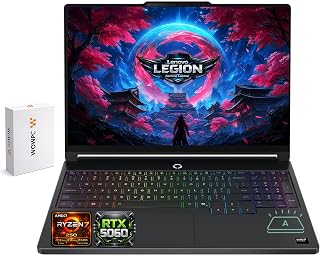
Anyone comparing a high-end laptop against a desktop build will notice the 2560x1600 OLED panel at 165Hz, a combination that closes much of the visual gap. With 32GB of RAM and an RTX 5060, plus a bundled 500GB portable drive, it's built to argue that a laptop can hold its own on both performance and storage flexibility.
Pros
- 15.3-inch OLED display at 165Hz rivals desktop monitor quality
- RTX 5060 and Ryzen 7 250 handle modern titles at high settings
- 32GB DDR5 RAM and 1TB SSD plus 500GB portable drive for storage
- Portable 5-pound build for gaming performance on the go
Cons
- RTX 5060 is entry-level, not suited for ultra settings in future demanding titles
- Warranty coverage is relatively short at one year
If the deciding factor between a gaming laptop and a desktop is refusing to compromise on display quality or performance, the Lenovo Legion 5a is built for that reader. Its 15.3-inch OLED display at 2560x1600 and 165Hz delivers visuals that rival a dedicated desktop monitor setup, something most gaming laptops cannot claim. Paired with the RTX 5060 and Ryzen 7 250, it runs modern titles like Cyberpunk 2077, Starfield, and Baldur's Gate 3 at high settings, closing much of the performance gap that typically pushes serious gamers toward a desktop tower. The 8 cores and 16 threads handle streaming while gaming or rendering, and 32GB of DDR5 RAM keeps heavy multitasking smooth. At 5 pounds, it travels well, pairing desktop-caliber visuals and performance with genuine portability a desktop cannot match. For anyone deciding they want desktop-level capability without giving up mobility, this is one of the stronger laptop arguments in that comparison, backed by a 1TB SSD and included 500GB portable drive for storage flexibility.
Processor: AMD Ryzen 7 250, 8 cores, 16 threads, 3.3GHz base, 5.1GHz boost, 8MB L2 cache, 16MB L3 cache
GPU: NVIDIA GeForce RTX 5060, 8GB GDDR7 memory, 115W TGP, 572 AI TOPS, up to 2497MHz boost
Display: 15.3-inch OLED, 2560x1600 WQXGA, 165Hz, 100% DCI-P3, 1000 nits peak brightness, G-SYNC, DisplayHDR True Black 1000
Memory: 32GB DDR5 RAM (configurable up to 64GB), 1TB PCIe M.2 SSD (configurable up to 2TB)
Connectivity: Wi-Fi 7, Bluetooth 5.4, 3x USB-A 5Gbps, 2x USB-C USB4 40Gbps with DisplayPort 1.4 and 65W-100W Power Delivery, 1x HDMI 2.1, 1x Ethernet RJ-45
Battery: 80Wh lithium-ion, Rapid Charge Pro, up to 10.2 hours estimated runtime (250 nits), up to 12.1 hours video playback (150 nits)
OS: Windows 11 Home 64-bit, English
Design: Eclipse Black, approximately 13.54 x 9.63 x 0.79 inches, approximately 5 lbs
Camera: 5MP with electronic privacy shutter
Keyboard: 1-zone RGB backlit
Suits gamers and creators who want near-desktop performance and display quality without being tied to a stationary setup, including streamers, video editors, and 3D artists. It fits anyone choosing portability as a priority alongside strong gaming capability. Skip it if you want the absolute highest-end GPU performance for future demanding titles, since the RTX 5060 is capable but entry-level in this lineup, or if a longer warranty matters to you.

For someone whose use case leans toward casual or light gaming rather than demanding AAA titles, integrated graphics paired with 16GB of RAM keeps things simple and efficient. It's a reasonable pick for readers who've decided a full discrete GPU, laptop or desktop, is more than their actual gaming habits require.
Pros
- Thin 0.66-inch build genuinely portable
- 16GB RAM and 512GB SSD handle daily multitasking
- Fast Windows 11 Pro boot and app launches
- WiFi 6 and varied ports for easy connectivity
Cons
- Integrated graphics limit demanding AAA gaming
- 60Hz display isn't built for competitive play
If the laptop vs desktop debate for you is really about mobility and flexibility, this is the laptop side of the argument in its simplest form. At 0.66 inches thick and sized for a backpack, it goes anywhere a desktop never could, while still covering the basics a desktop tower would handle at home. The Ryzen 7 chip (up to 4.3GHz), 16GB of DDR4 RAM, and 512GB SSD give you real multitasking and quick boot times, which matters if this machine is replacing a desktop entirely rather than supplementing one. Integrated AMD graphics mean it won't match a gaming desktop's horsepower, but for students or remote workers choosing portability over raw power, that tradeoff is the whole point. WiFi 6, Bluetooth 5.2, and a mix of USB-C, HDMI, and USB 3.2 ports keep it connected without needing a docking setup. This is the pick for someone who has already decided mobility outweighs maximum performance.
Display: 15.6-inch FHD LCD, 1920x1080 pixels, 60Hz refresh rate with thin-bezel design
Processor: AMD Ryzen 7 (6-core), base 3.7GHz, up to 4.3GHz maximum
Memory: 16GB DDR4 SODIMM RAM (upgradeable up to 64GB)
Storage: 512GB M.2 NVMe SSD
Graphics: Integrated AMD Radeon Graphics at up to 1200MHz
Operating System: Windows 11 Pro pre-installed
Connectivity: WiFi 6, Bluetooth 5.2, HDMI, USB 3.2, Type-C, 3.5mm audio jack, memory card slot
Battery: 54.72 watt-hours lithium-ion
Dimensions: 14.06 inches L x 9 inches W x 0.66 inches thick
Model: KAIGERR LX15PRO, manufactured by Shenzhen CYX Industrial Co., Ltd.
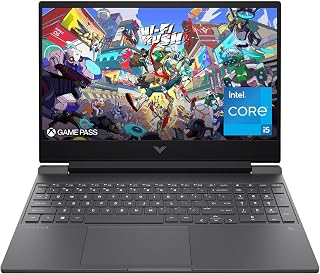
Readers torn between a budget laptop and a budget desktop will find this one tips the scale toward mobility. The 144Hz display keeps fast-paced titles fluid, and the fingerprint reader adds a convenience desktops rarely offer. Spill resistance also matters for anyone who'd otherwise worry about gaming near a desk setup.
Pros
- 144Hz Full HD display for smooth 1080p gaming
- RTX 3050 and i5-12450H handle AAA titles with solid frame rates
- 16GB RAM and 512GB SSD support responsive multitasking
- Portable 7-pound build with spill-resistant keyboard
Cons
- Battery life drops noticeably during gaming sessions
- RTX 3050 is entry-level and limits high settings in demanding titles
Choosing between a gaming laptop and a desktop often comes down to one question: can a portable machine actually deliver desktop-like gaming without the premium cost? The HP Victus 15.6 answers that for anyone leaning laptop. Its 144Hz Full HD panel paired with the RTX 3050 and i5-12450H handles modern AAA titles at 1080p with solid frame rates, closing much of the gap that used to favor desktops for gaming performance. The 16GB RAM and 512GB SSD keep multitasking responsive, so switching between gaming, streaming, and creative work feels natural rather than like a desktop replacement that fell short. At 7 pounds, it stays genuinely portable, something no desktop setup can offer, and the anti-glare coating plus spill-resistant keyboard add durability for life outside a dedicated desk. For readers weighing mobility against raw power, this laptop represents the practical middle ground: not a desktop's ceiling, but enough headroom to skip the desktop entirely for 1080p gaming.
The RTX 3050 6GB graphics card excels at 1080p gaming, comfortably running popular esports titles like Valorant, CS2, and Fortnite at high framerates. Modern AAA games like Cyberpunk 2077 and Starfield play at medium to high settings with 60+ fps, while demanding titles may require lowering settings to maintain smooth 144Hz performance.
The 144Hz display takes full advantage of the GPU capabilities, delivering noticeably smoother motion compared to standard 60Hz screens. This is particularly beneficial for competitive gaming where responsiveness matters. The anti-glare matte finish reduces reflections during long gaming sessions, minimizing eye fatigue.
Processor: Intel Core i5-12450H (4.4GHz)
Graphics: NVIDIA GeForce RTX 3050 6GB GDDR6
Display: 15.6" FHD IPS (1920x1080) 144Hz with anti-glare coating
Memory: 16GB DDR4-3200
Storage: 512GB PCIe SSD
Connectivity: Wi-Fi 6, Bluetooth
Ports: HDMI output, USB Power Delivery
Weight: 7 pounds
OS: Windows 11 Pro
Battery: Limited capacity for gaming use

For readers weighing portability against power, this one leans hard into the laptop side of the debate. The RTX 5060 paired with 32GB of DDR5 means fewer compromises versus a desktop build, while the 180Hz WUXGA panel keeps motion smooth enough that you won't miss an external monitor. A 1TB Gen 4 SSD rounds out the case for going mobile.
Pros
- RTX 5060 GPU with 572 AI TOPS for serious performance
- 180Hz WUXGA display stays smooth under load
- 32GB DDR5 RAM and 1TB Gen 4 SSD handle multitasking
- Backlit keyboard and numeric keypad for productivity
Cons
- Only one open M.2 slot limits storage expansion
- 16-inch screen smaller than desktop monitor setups
For anyone weighing a gaming laptop against a desktop build with similar specs, the Nitro V 16S is the laptop that makes the case hardest. It pairs an AMD Ryzen 7 260 with an RTX 5060 GPU rated at 572 AI TOPS, the kind of dedicated graphics performance usually associated with desktop towers. The 16-inch WUXGA display running at 180Hz means you're not giving up smoothness for portability, and 32GB of DDR5 RAM plus a 1TB Gen 4 SSD matches what you'd expect from a capable desktop setup. Where it differs from a desktop is upgradability, with only one open M.2 slot limiting future storage expansion, something desktop owners take for granted. If your decision hinges on wanting desktop-level gaming and content creation power without being tied to a desk, this laptop closes that gap about as well as a laptop can, backed by a backlit keyboard and numeric keypad for everyday productivity.
Processor: AMD Ryzen 7 260 with up to 38 AI TOPS
Graphics: NVIDIA GeForce RTX 5060 Laptop GPU with 572 AI TOPS, Blackwell architecture, 4th-gen RT Cores, 5th-gen Tensor Cores
Display: 16 inch WUXGA (1920 x 1200) IPS, 180Hz refresh rate, 100% sRGB color coverage
Memory: 32GB DDR5 5600MHz (2 DDR5 slots, maximum 32GB)
Storage: 1TB PCIe Gen 4 SSD (2 M.2 slots, 1 available)
Operating System: Windows 11 Home
Keyboard: Backlit with numeric keypad
Connectivity: Wi-Fi 6
Color: Black
Good fit if you want desktop-caliber gaming and video editing performance but need to carry it between locations, like a dorm, home office, or studio setup. Skip it if you've already decided a desktop tower is fine for your situation, since you'd get similar or better graphics performance for less by not paying for portability you won't use.

ASUS ROG Strix G16 2025 Gaming Laptop, Intel i7
If the deciding factor is whether a laptop can match desktop-level visuals, the ROG Nebula Display answers that directly, delivering color accuracy that rivals a dedicated monitor. Paired with the RTX 5060 and a 165Hz refresh rate, it argues well for choosing portability without feeling like you've downgraded your screen experience.
Pros
- 165Hz FHD+ display with i7 14650HX and RTX 5060
- Vapor chamber and liquid metal cooling for sustained loads
- 16GB DDR5 RAM and 1TB Gen 4 SSD avoid bottlenecks
- Wi-Fi 7 and sturdy build at 2.65kg
Cons
- Battery life around 2 hours limits unplugged use
- Fixed RTX 5060 GPU with no upgrade path
This is the laptop to consider when the real question is whether you can get desktop-level frame rates without a desktop's footprint. The 165Hz FHD+ display, Intel Core i7 14650HX, and RTX 5060 combine to push 100+ fps in modern titles at high settings, which is squarely in desktop gaming territory. ASUS backs that performance with vapor chamber and liquid metal cooling, addressing the heat management challenge that typically favors desktops over laptops during long sessions. The catch, and it's the one that most separates this from an actual desktop, is battery life of around 2 hours, meaning it performs like a desktop mainly when plugged in. For buyers torn between a gaming desktop and a gaming laptop, the Strix G16 shows what you gain in portability (16GB DDR5, 1TB Gen 4 SSD, Wi-Fi 7, sturdy 2.65kg build) and what you still give up, namely all-day unplugged use and the GPU upgrade path a desktop would offer.
Processor: Intel Core i7 14650HX (16 cores, 2.2 GHz base)
Graphics: NVIDIA GeForce RTX 5060 (8GB GDDR5, DLSS 4)
Display: 16 inch FHD+ (1920x1200) 165Hz IPS LED, 3ms response time
Memory: 16GB DDR5-5600MHz (upgradeable)
Storage: 1TB PCIe Gen 4 SSD (upgradeable)
Connectivity: Wi-Fi 7 (802.11be), USB ports, HDMI output
Audio: Dolby Atmos speakers
Keyboard: Gaming-grade QWERTY with RGB
Battery: 90Wh Lithium-Ion, 2 hours gaming, 50 hours standby
Weight: 2.65kg
Dimensions: 13.94 x 10.55 x 0.9 inches
OS: Windows 11 Home
Warranty: Limited
Choose this over a desktop if you need genuine portability, like moving between rooms, LAN events, or travel, and you're fine gaming mostly while plugged in. Skip it if you mainly game in one spot at home, where a desktop would give you more GPU upgrade flexibility and no battery compromise for a similar level of performance.

For someone deciding if a laptop can still deliver enough thermal headroom to compete with a desktop, HP's enhanced thermal design is the relevant detail here. Combined with a dedicated RTX 3050 and a Full HD panel, it makes the case that compact doesn't have to mean compromised cooling.
Pros
- Dedicated RTX 3050 GPU outperforms integrated graphics for 1080p gaming
- 12th-gen i5-12500H handles multitasking across work and gaming
- Full HD IPS display offers vibrant colors and wide viewing angles
- Portable 2.29kg build suits daily transport between locations
Cons
- 8GB RAM may feel constrained as software demands grow
- Battery life is unspecified, worth checking if portability is a priority
For readers trying to decide if a laptop can replace a desktop setup, the HP Victus 15 makes the case for going portable without feeling like a downgrade. It pairs a 12th-gen Intel Core i5-12500H with a dedicated RTX 3050, giving it real gaming legs rather than relying on integrated graphics the way many non-gaming laptops do. That combination handles esports titles and moderately demanding games at 1080p with solid framerates, while the i5 processor manages multitasking well enough to cover work and creative tasks between sessions. At 2.29kg it remains practical to carry between locations, something a desktop tower simply cannot do. The 512GB SSD and Full HD IPS display round out a package built for people who want one machine instead of a desktop plus a separate work laptop. It is not aiming to match a gaming desktop's upper limits, but as a single device that handles gaming, study, and daily computing, it fits the portable side of the laptop versus desktop decision well.
Processor: Intel Core i5-12500H (12th Generation)
Graphics: NVIDIA GeForce RTX 3050 with 8GB DDR4 SDRAM
RAM: 8GB DDR4 Memory
Storage: 512GB SSD
Display: 15.6-inch Full HD IPS (1920x1080), 178-degree viewing angles
Operating System: Windows 11 Home
Connectivity: Wi-Fi 5 (802.11ac), Bluetooth, 3x USB ports, 1x HDMI
Weight: 2.29kg
Dimensions: 14.09 inches length x 10.04 inches width x 0.93 inches depth
Security: Fingerprint recognition, Windows 11 security features
Battery: Integrated lithium battery power
What Games Will It Handle?
The RTX 3050 is optimized for competitive and indie gaming at 1080p resolution. You can expect smooth performance in esports titles like Valorant, Fortnite, and CS:GO at high or ultra settings. Demanding AAA titles like Cyberpunk 2077 or Starfield will run at medium settings at playable framerates, though you'll need to balance settings for consistently smooth 60+ fps.
Real-World Performance:
This laptop excels at gaming sessions of 2-4 hours, with the dedicated GPU handling thermal loads efficiently. The 12th-gen Intel processor pairs well with the RTX 3050, eliminating CPU bottlenecking for most 1080p gaming scenarios. For content creation like streaming or video editing while gaming, 8GB RAM is functional but may cause stuttering during demanding renders.
Productivity Beyond Gaming:
The combination of processor and SSD makes this laptop equally capable for office work, video conferencing, software development, and creative tasks. Multitasking across browsers, applications, and lightweight creative software runs smoothly, though heavy video editing or 3D rendering will benefit from future RAM upgrades.

For readers who want desktop-level control in laptop form, the included MUX switch is the standout detail, letting the RTX 5060 bypass integrated graphics for a more direct performance path. That's the kind of tuning option usually associated with desktop builds, making the portability tradeoff easier to justify.
Pros
- 165Hz display pairs well with RTX 5060 for smooth 1080p/1440p gaming
- 180-degree hinge adds versatility a desktop can't match
- GiMATE AI assistant optimizes performance automatically
- Slim 19.45mm chassis stays portable for a 16-inch laptop
Cons
- No touchscreen, limiting creative or note-taking use
- 1TB SSD can fill up fast with a large game library
If you're torn between a laptop and a desktop, the GIGABYTE Gaming A16 makes the case for portable without giving up a real gaming experience. It's the pick for anyone who needs one machine that works at a desk, in a dorm, or on the road. The RTX 5060 and Ryzen 7 260 combo handles 1080p and 1440p gaming comfortably, and the 165Hz panel keeps motion smooth enough that you won't feel like you compromised by skipping a desktop tower. The 180-degree hinge and GiMATE optimization add flexibility a desktop simply can't offer, letting the same machine double as a presentation tool or streaming setup. At 4.9 pounds and 16 inches, it's not the lightest laptop out there, but compared to lugging around a desktop tower, monitor, and peripherals, it's a clear win for anyone whose setup needs to move. For buyers weighing mobility against raw desktop power, this laptop is the strongest middle-ground argument.
Processor: AMD Ryzen 7 260 with AI capabilities
Graphics: NVIDIA GeForce RTX 5060 with 8GB GDDR7 VRAM
Display: 16-inch IPS LCD, 1920x1200 resolution, 165Hz refresh rate, matte finish
Memory: System RAM not specified in available data
Storage: 1TB SSD with solid-state interface
Operating System: Windows 11 Home
Weight: 4.9 pounds
Dimensions: 14.11 inches L x 0.9 inches W x 10.33 inches Thick
Connectivity: Wi-Fi 7, Bluetooth 5.0, Gigabit Ethernet, 4 USB ports, HDMI output
Features: MUX Switch, 180-degree hinge, GiMATE AI agent, Golden Curve keyboard, Dolby Atmos audio
Gaming Performance: The RTX 5060 excels at 1440p gaming and handles 1080p gaming at ultra settings with frame rates well above 60fps. At the native 1920x1200 resolution, expect high frame rates in modern AAA titles with medium-to-high settings. NVIDIA DLSS 4 further boosts performance by intelligently upscaling lower-resolution renders, allowing ultra-quality visuals with minimal performance cost.
Multitasking & Streaming: The Ryzen 7 260 has the multi-core muscle to game while streaming to Twitch or YouTube. Its architecture supports simultaneous encoding for recordings without stuttering your in-game performance.
Content Creation: The RTX 5060 and NVIDIA Studio drivers provide hardware acceleration for video editing, 3D rendering, and image generation. GiMATE's AI optimization ensures your workload gets the system resources it needs when it matters most.

Readers who've concluded a desktop is the right call for raw power will appreciate the RTX 5070 paired with air cooling built for sustained load, something laptops still struggle to match. The tower form factor also leaves room for future upgrades, a key reason desktops win this comparison for performance-focused buyers.
Pros
- 140+ fps in AAA titles with ray tracing enabled
- 12GB GDDR7 VRAM gives headroom for future games
- Quieter acoustic performance than many competing desktops
- 8 expansion slots and tool-free access for easy upgrades
Cons
- Included 450W power supply is inadequate for the RTX 5070
- Listed DVD optical drive doesn't match the actual unit
For readers deciding between a gaming laptop and a desktop, the Alienware Aurora represents what you gain by choosing a tower: sustained high frame rates without thermal throttling. This is the setup for someone who has a dedicated space and wants a machine built to stay cool under extended load, something laptops struggle with by design. The RTX 5070 with 12GB GDDR7 VRAM and Intel Core Ultra 7 265F combine for 140+ fps in modern AAA titles with ray tracing on, and the acoustic optimization keeps that performance quiet. The 8 expansion slots and tool-free access mean this desktop can grow with you, upgrading storage or components as needs change, something a laptop chassis simply can't accommodate. If your decision comes down to needing a system that stays planted and keeps pace with future games, this is the stronger long-term investment. Just know the included 450W power supply isn't sufficient for this GPU, so plan for a replacement before setup.
Pick this if you have a permanent space for a tower and want gaming headroom that outlasts a laptop's thermal limits, especially for ray tracing and AAA titles at high settings. It fits serious gamers and streamers upgrading from consoles. Skip it if portability matters at all, or if you're not prepared to budget for a stronger power supply than the one included.
Processor: Intel Core Ultra 7 265F
Graphics: NVIDIA GeForce RTX 5070 with 12GB GDDR7 VRAM
Memory: Configured RAM (check your specific SKU)
Storage: SSD (capacity varies by configuration)
Power Supply: 450W (insufficient, upgrade to 1000W recommended)
Cooling: Air cooled with optimized thermal design
Display Output: HDMI
Connectivity: Bluetooth, Wi-Fi 802.11.be, USB, Ethernet
Operating System: Windows 11 Home
Dimensions: 18.05 x 7.76 x 16.46 inches
Weight: 33.9 pounds
Expansion Slots: 8 total
Warranty: 1-year onsite service included

Pros
- Excellent performance-to-price ratio for 1080p and light 1440p gaming
- Modern DDR5 and PCIe Gen 4 storage provide fast, future-ready architecture
- Strong connectivity options including Wi-Fi 6 and multiple high-speed USB ports
- Visually appealing RGB design fits modern gaming setups
- 1-year warranty with toll-free tech support provides peace of mind
Cons
- RTX 5060 limits performance at higher resolutions or demanding AAA titles on max settings
- No keyboard or mouse included in the box, requiring additional purchase
- 16GB RAM, while sufficient, is on the lower end for content creation workflows
The Acer Nitro 60 is a well-rounded mid-range gaming desktop designed for gamers and content creators who want solid 1080p performance without breaking the bank. With its Intel Core i5-14400F processor and NVIDIA RTX 5060 graphics, it targets players who value smooth gameplay at high settings over cutting-edge ultra-HD performance.
Performance where it matters: the i5-14400F's 10 cores handle both gaming and multitasking with ease, while the RTX 5060 delivers the horsepower needed for excellent 1080p gaming. NVIDIA DLSS 4 upscaling helps maintain smooth frame rates, making it capable of light 1440p gaming on optimized titles. The 16GB DDR5 RAM and 1TB PCIe Gen 4 SSD ensure fast load times and responsive system behavior across applications.
Build and design strike a nice balance between form and function. The 30-liter chassis features customizable aRGB lighting, modern aerodynamic cooling vents, and a compact footprint that fits most desks. Connectivity is comprehensive with Wi-Fi 6, Gigabit Ethernet, and multiple USB 3.2 ports supporting fast data transfers and device charging.
Where this system falls short: the RTX 5060, while capable, isn't designed for 4K gaming or demanding creative workloads at maximum settings. The base 16GB RAM may require upgrading for serious content creation. Additionally, keyboard and mouse are not included.
Verdict: The Acer Nitro 60 offers compelling value for budget-conscious gamers seeking reliable 1080p performance and modern components. Its DDR5 architecture and fast storage make it future-proof for several years. Recommended for esports players, casual AAA gamers, and aspiring creators looking for an entry-level workstation.
Processor: Intel Core i5-14400F 10-Core (up to 4.7 GHz)
Graphics: NVIDIA GeForce RTX 5060 with 8GB GDDR7, 614 AI TOPS
Memory: 16GB DDR5-6400 (expandable to 192GB)
Storage: 1TB PCIe Gen 4 NVMe SSD
Power: 650W 80+ Gold Certified
Cooling: ARGB CPU Cooler with copper heat pipes
Display Output: 3x DisplayPort 2.1b, 1x HDMI 2.1b
Connectivity: Wi-Fi 6 802.11ax, Gigabit Ethernet, Bluetooth 5.3, USB 3.2 Gen2x2 Type-C (20 Gbps), USB 3.2 Gen2 Type-A (10 Gbps), USB 3.2 Gen1 Type-A (5 Gbps), USB 2.0
Operating System: Windows 11 Home
Dimensions: 14.9 x 8.5 x 15.9 inches, 13.6 pounds
Color: Black
Warranty: 1 Year Parts and Labor Limited Warranty
Best For: Gamers targeting 1080p high-refresh gaming, esports enthusiasts, entry-level content creators, and anyone seeking a reliable gaming PC with modern components and excellent upgrade potential.
Consider Alternatives If: You need consistent 1440p ultra settings, plan heavy 4K content creation, or require more than 16GB RAM out of the box. In those cases, investing in an RTX 5070 or higher would better serve your needs.
Upgrade Tips: The system supports RAM expansion up to 192GB and includes additional SATA ports for storage expansion. Consider adding another 16GB DDR5 stick and a second SSD for content creation workflows or gaming libraries with many titles.
Setup Considerations: Budget for a mouse and keyboard separately. Monitor and headphones are also not included. The system requires an outlet for the 650W power supply and adequate ventilation around the chassis for optimal cooling performance.

For the desktop side of this comparison, 32GB of DDR5 and a 2TB SSD make a strong case for buyers who want headroom a laptop configuration rarely matches at this tier. Paired with the RTX 5070, it suits readers prioritizing long-term performance and storage capacity over portability.
Pros
- 8-core Ryzen 7 8700F and RTX 5070 handle AAA titles at max settings
- 32GB DDR5 RAM and 2TB SSD support fast loading and multitasking
- Four-fan airflow keeps the system cool and quiet
- Includes RGB keyboard and mouse as part of the package
Cons
- Reports of inconsistent support and warranty handling
- Pre-installed Windows 11 Home may need upgrading for business use
When the laptop-versus-desktop decision comes down to raw power per dollar spent on performance, the MSI Codex Z2 shows what a stationary setup can deliver that a portable one generally can't. This pre-built skips the complexity of a custom build while still giving you an 8-core Ryzen 7 8700F and RTX 5070 pairing that handles AAA titles at maximum settings. The 32GB DDR5 RAM and 2TB NVMe SSD mean fast loading and multitasking headroom that laptops at similar performance tiers often can't match without heavier cooling and bigger batteries. The four-fan airflow design keeps things cool and quiet during long sessions, addressing one of the biggest tradeoffs people face when choosing portability over a tower. For anyone who has decided a desktop fits their space and usage better, this is a strong plug-and-play option that doesn't require building from scratch.
Processor: AMD Ryzen 7 8700F (8 cores, 16 threads, up to 5.0 GHz)
Graphics: NVIDIA GeForce RTX 5070 (Blackwell architecture)
Memory: 32GB DDR5 at 6000 MHz (2 slots, expandable to 96GB)
Storage: 2TB NVMe SSD
Cooling: ARGB air cooler with four system fans (3 front intake, 1 rear exhaust)
Connectivity: DisplayPort, HDMI, Ethernet, USB 3.2 Gen 1 and Gen 2, Bluetooth 802.11ax Wi-Fi
Operating System: Windows 11 Home
Peripherals: Keyboard and mouse with RGB lighting included
Warranty: 1-year manufacturer limited
Dimensions: 16 x 8.38 x 19 inches, 21.3 lbs
Model: MSI Codex Z2 (A8NVP-436US)
Good fit if you've settled on a desktop setup and want strong performance without building your own PC, including newcomers to PC gaming and streamers who multitask. Less ideal if you need to move your setup between locations, since this is a stationary tower. Also consider skipping if you need Windows 11 Pro for business workflows out of the box.
Buying Guide: Gaming Laptop vs Desktop
The comparison includes lightweight integrated-graphics options, RTX 3050 systems, RTX 5060 laptops, and desktop machines with RTX 5060 or RTX 5070 graphics. That range matters because lighter competitive games, large single-player releases, streaming, and creative work do not place the same demands on your hardware.
Use the product list as a starting point rather than an automatic ranking. A configuration that suits a compact room may be the wrong fit if you play on a large external display, record gameplay, or expect to replace major components later.
Portability and Where You Actually Play
A laptop is the practical answer when you rotate among a dorm, family home, office, or LAN gathering. KAIGERR’s light gaming model pairs 16GB of memory and a 512GB NVMe drive with integrated Radeon graphics, making sense for lighter competitive titles, indie games, classwork, and routine multitasking rather than high-end desktop-style graphics demands.
More capable portable machines narrow the performance gap, while still asking you to carry a charger, mouse, and headset. The GIGABYTE Gaming A16 has a slim 19.45mm chassis and a lay-flat hinge, while Lenovo’s Legion 5a combines a 165Hz OLED panel and Wi-Fi 7 in roughly a 5-pound package; our gaming laptop accessories guide can help you build a travel-ready kit.
Graphics Power, Resolution, and Cooling
An RTX 5060 laptop is a substantial step up from integrated graphics or an RTX 3050, but laptop GPU performance also depends on power limits and the chassis cooling design. The ROG Strix G16 pairs its RTX 5060 with an Intel Core i7 processor and a 165Hz display, while the Acer Nitro V 16S AI Gaming Laptop combines RTX 5060 graphics with 32GB of DDR5 memory and a 180Hz panel.
At a fixed desk, the msi Codex Z2 and Alienware Aurora use RTX 5070 graphics, giving them more graphics headroom for demanding visual settings, higher-resolution displays, or background tasks while you play. Larger desktop cases can generally move more air and use more substantial cooling, which is valuable during extended gaming sessions.
Built-In Screen or a Dedicated Desk Setup
With a laptop, the display is part of the buying decision from day one. Lenovo’s Legion 5a offers a 15.3-inch WQXGA OLED screen with 165Hz refresh, G-SYNC, and broad DCI-P3 color coverage, whereas the Acer Nitro V 16S AI Gaming Laptop offers a 16-inch 1920 x 1200 IPS display at 180Hz with 100% sRGB coverage.
A desktop gives you freedom to choose the screen that suits your favorite games and workspace, then replace it without replacing the PC. This can be especially useful if you want a larger panel for strategy games, a high-refresh screen for action games, or separate displays for chat and streaming; browse our electronics buying guides when planning the rest of your desk.
Upgrade Paths and Useful Lifespan
Laptops usually let you expand storage and, on some models, memory, but their CPU and GPU are not practical replacement parts. The Acer Nitro V 16S AI Gaming Laptop includes two M.2 slots and supports up to 32GB of memory, while the HP Victus 15 Gaming Laptop is a straightforward option for players who value a compact all-in-one system.
Desktops make it easier to add drives, raise memory capacity, change graphics cards, and improve cooling as your needs evolve. The acer Nitro 60 N60-640-UR21 Gaming Desktop supports memory expansion up to 192GB, but you should still confirm case clearance, power supply capacity, ports, and manufacturer-specific parts before planning a future upgrade.
Final Thoughts
Choose the laptop route if your gaming setup must move with you, and choose a desktop if long sessions, component upgrades, and a permanent desk matter more. The Lenovo Legion 5a Gaming Laptop, AMD Ryzen 7 250 suits players who want a vivid high-refresh portable experience, while the msi Codex Z2 Gaming Desktop, AMD R7-8700F better fits a powerful stationary setup with stronger graphics headroom.
Frequently Asked Questions
Is a gaming laptop or desktop better for college and travel?
A gaming laptop is usually the stronger choice if you need one PC for classes, home, and weekend travel. A 15- or 16-inch machine with dedicated graphics can cover coursework and gaming without requiring a separate setup in every location.
A desktop is less convenient when your living space changes often, but it can be an excellent choice for a stable apartment or home desk. If you expect to run virtual machines or technical software alongside games, compare the requirements in our cybersecurity student laptop guide before deciding.
Can a gaming laptop handle AAA games in 2026?
Yes, a well-equipped RTX 5060 laptop can handle many current AAA games, particularly when you match visual settings to the laptop’s display resolution. The best experience depends on the game, thermal design, GPU power allocation, and whether features such as DLSS are available.
An RTX 3050 laptop remains a reasonable choice for less demanding games and sensible settings at Full HD. If your priority is high refresh gaming with advanced lighting effects or demanding creation work, move toward a stronger GPU and make cooling a major part of your comparison.
Do gaming desktops last longer than gaming laptops?
Not automatically, but a desktop can remain useful longer because you can often replace its graphics card, add memory, install another SSD, or improve airflow. A laptop can still provide many years of reliable use when you choose enough memory and storage for your normal workload from the start.
Before selecting a tower, consider whether its case, power supply, and internal layout leave room for the upgrades you may want later. Comparing configurations through our current computer deals can also help you spot systems with more useful expansion potential.
Should I buy an external monitor with a gaming laptop?
An external monitor makes sense if you usually play at one desk and want a larger image, a particular refresh rate, or more room for productivity. Your laptop screen still gives you flexibility away from home, while the monitor creates a more comfortable fixed gaming station.
Confirm the laptop’s HDMI, USB-C, or USB4 display support and use a cable rated for the resolution and refresh rate you want. If you are building a flexible travel kit across multiple devices, our ROG Ally accessory ideas can also inspire useful protection and connection options.








Write Your Review
No reviews yet. Be the first to share your experience!