

Cybersecurity courses can put a surprising load on a notebook: a Linux virtual machine, browser research, packet analysis, note taking, and an online lecture may all be running together. The best laptop for cybersecurity students needs enough headroom for that mix without becoming awkward to carry between campus, a dorm, and a study group.
This guide compares configurations that make sense for hands-on security coursework, from beginner command-line labs to VM-heavy projects. Course files and VM snapshots also deserve separate copies, so a dependable external hard drive for backup is a practical companion to your laptop.
Quick answer
This guide compares 10 picks, with Lenovo ThinkBook 16 Gen 9 AMD Ryzen 7 5750U 32GB 1TB ranked first. HP 17 Inch FHD Laptop, AMD Ryzen 5, 32GB RAM, 1TB SSD holds the highest customer rating among them. Lenovo V15 AMD Ryzen 7 Business Laptop, 40GB RAM, 1TB has the most customer reviews.

The fingerprint reader adds biometric authentication, reinforcing security principles taught in identity and access management courses. With 32GB RAM and a Ryzen 7 250 processor, it supports multiple isolated environments for malware sandboxing and vulnerability research. The backlit keyboard facilitates late-night coding sessions when developing security scripts or completing incident response assignments.
Pros
- Fingerprint reader and Windows 11 Pro support security-focused authentication practices
- 16-inch display with eye-care certification aids extended study sessions
- Military-grade durability survives student transport and daily use
- Backlit keyboard and numeric keypad improve productivity during late lab work
Cons
- 5-hour battery life requires charging during longer campus days
- 45% NTSC color gamut limits digital forensics and imaging work
Security education involves constant typing for scripting, report writing, and command-line work, making the ThinkBook 16 Gen 9's backlit keyboard and numeric keypad practical tools for late-night lab sessions. The fingerprint reader provides biometric authentication that cybersecurity students should use as standard practice. Windows 11 Pro delivers the virtualization and encryption features security programs require. Under the hood, the 8-core AMD Ryzen 7 processor with 5.1 GHz turbo boost and 32GB RAM handle security lab workloads including penetration testing VMs, network monitoring tools, and development environments. The 1TB SSD stores VM snapshots, packet captures, and security toolsets without storage anxiety. The 16-inch display offers workspace for split-screen coding and documentation, and TÜV Eyesafe certification reduces strain during marathon study sessions before exams. Military-grade durability means the laptop survives backpack transport and the general wear of student life. At 3.74 lbs and 0.69 inches thick, it remains portable enough for daily campus use. The ultra-portable form factor suits students moving between lecture halls, labs, and library study spaces throughout the day.
Processor: AMD Ryzen 7 250 (8 cores, 16 threads, 3.3 GHz base, 5.1 GHz turbo)
Memory: 32GB RAM
Storage: 1TB PCIe M.2 SSD
Display: 16-inch WUXGA IPS (1920x1200), 60Hz, 300 nits, 45% NTSC, TÜV Eyesafe certified
Graphics: Integrated AMD Graphics
Operating System: Windows 11 Pro
Battery: 71Wh Lithium-Ion, up to 5 hours
Weight: 3.74 lbs
Dimensions: 14.1 inches (L) x 9.98 inches (W) x 0.69 inches (Th)
Connectivity: 2x USB-C (Thunderbolt 4), 2x USB-A, HDMI 2.1, Ethernet, SD card reader, Wi-Fi 7, Bluetooth
Keyboard: Backlit US, numeric keypad
Security: Fingerprint reader, TPM 2.0, Military-grade durability
This laptop fits cybersecurity students who value biometric security, a larger display for multitasking, and professional-grade durability for multi-year use through a degree program. The 32GB RAM handles typical security coursework VM requirements effectively. Students running day-long remote labs away from power should note the 5-hour battery limitation and plan accordingly. Those needing color-accurate displays for digital forensics imaging work may find the 45% NTSC color gamut constraining, though it serves standard security work adequately.

The spill-resistant design protects against accidents during long security lab sessions, while the numeric keypad accelerates data entry when documenting vulnerabilities or logging findings. With 16GB DDR5 RAM and Windows 11 Pro, it runs security analysis tools and sandboxed environments efficiently. The 512GB SSD provides adequate space for essential penetration testing frameworks and practice datasets.
Pros
- MIL-SPEC 810H durability and spill-resistant keyboard withstand campus rigors
- 16GB DDR5 RAM runs security VMs and analysis tools effectively
- Dual 4K display support expands workspace for monitoring and execution
- Gigabit Ethernet provides stable wired connections for network labs
Cons
- 512GB storage fills quickly with multiple security distributions and datasets
- Integrated graphics limit GPU-accelerated security applications
Security students need reliable hardware that survives the demands of campus life, and the Lenovo V15 brings MIL-SPEC 810H durability with a spill-resistant keyboard that protects against accidents during lab sessions. The AMD Ryzen 5 7520U with 16GB DDR5 RAM provides enough power for running Kali Linux in a VM alongside your host OS, essential for penetration testing coursework. The 512GB NVMe SSD boots quickly and handles the read-write demands of security tools like Wireshark, Nmap, and Metasploit. Dual 4K display support through USB-C and HDMI lets you extend your workspace for monitoring network traffic on one screen while executing commands on another. The privacy shutter on the webcam addresses a fundamental security principle students should practice. Gigabit Ethernet ensures stable wired connections for network security labs where wireless introduces variables. At 3.6 pounds, this laptop moves easily between lecture halls and library study sessions. The 15.6-inch FHD anti-glare display with TUV low blue light certification reduces eye fatigue during extended coding or documentation work.
Processor: AMD Ryzen 5 7520U with Radeon 610M integrated graphics
Memory: 16GB DDR5 RAM
Storage: 512GB PCIe NVMe M.2 SSD
Display: 15.6-inch FHD (1920x1080) anti-glare LCD with TUV Low Blue Light certification
Operating System: Windows 11 Pro 64-bit with Microsoft Copilot
Connectivity: Wi-Fi 6E, Bluetooth 5, USB-C 3.2 Gen 1 with DisplayPort 1.2, two USB-A 3.2 Gen 1, HDMI 1.4b, Gigabit Ethernet
Security: BitLocker encryption, Remote Desktop, privacy webcam shutter
Keyboard: Full-size with dedicated numeric keypad, spill-resistant
Durability: Military-grade MIL-SPEC 810H tested
Weight: 3.6 pounds
Dimensions: 14.14 inches L x 9.28 inches W x 0.78 inches Th
Color: Gray
Warranty: One-year limited warranty from Lenovo
Ideal for cybersecurity students who need a durable, portable machine for VM-based labs and network analysis without breaking the budget. The combination of military-grade build quality, adequate RAM for virtualization, and comprehensive connectivity handles most undergraduate and certification coursework. Skip this if you plan to run resource-heavy security suites with multiple simultaneous VMs or need dedicated graphics for password cracking. Also not the right choice if storage capacity matters more than portability, as 512GB fills quickly with multiple OS images.
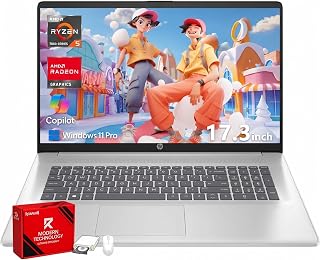
Windows 11 Pro delivers BitLocker encryption and enhanced security features that align with enterprise-level cybersecurity coursework. The 32GB RAM capacity supports running multiple virtual machines concurrently for network simulation and malware analysis labs. With 1TB of storage, there's sufficient space for security tool suites, forensics datasets, and virtual environments without constant file management.
Pros
- 32GB RAM handles multiple virtual machines and security tools simultaneously
- 1TB SSD stores numerous OS images and forensic datasets
- 17.3-inch FHD display provides workspace for terminals and documentation
- Windows 11 Pro includes Hyper-V and BitLocker for labs and encryption
Cons
- Integrated graphics limit GPU-intensive security applications
- 17-inch size reduces portability for students moving between classes
Cybersecurity coursework demands serious multitasking capability, and this HP 17-inch laptop delivers with 32GB RAM that keeps virtual machines, packet analysis tools, and code editors running simultaneously without slowdown. The AMD Ryzen 5 7430U processor handles security lab environments and scripting tasks reliably, while the 1TB SSD provides ample space for multiple operating system images, penetration testing distributions, and forensic datasets. The 17.3-inch Full HD IPS display gives you room to arrange terminals, network diagrams, and documentation side by side, critical when following along with labs or debugging complex configurations. Windows 11 Pro includes Hyper-V for native virtualization and BitLocker for encrypting sensitive project data. The full-size keyboard with numeric keypad speeds up IP address entry and hexadecimal work. Wi-Fi 6 ensures stable connectivity for cloud-based security labs and remote access scenarios. HP Fast Charge restores half the battery in 45 minutes, helpful between classes. The anti-glare coating reduces eye strain during extended coding or research sessions.
Display: 17.3-inch Full HD (1920x1080) IPS anti-glare, 250 nits brightness, 178-degree viewing angles
Processor: AMD Ryzen 5 7430U with 6 cores, 12 threads, and 4.3GHz max boost clock
Memory and Storage: 32GB DDR4 RAM at 3200MHz, 1TB PCIe NVMe SSD
Graphics: AMD Radeon integrated graphics
Connectivity: Wi-Fi 6 (802.11ax), Bluetooth 5.4, USB-C, 2x USB-A, HDMI 1.4b, 3.5mm headphone/microphone combo jack
Battery: Lithium-ion with HP Fast Charge (0-50% in 45 minutes)
Keyboard: Full-size with dedicated numeric keypad
Operating System: Windows 11 Pro with BitLocker security
Dimensions: 15.78 inches (L) x 10.15 inches (W) x 0.81 inches (thickness)
Best for cybersecurity students running multiple VMs, working with large datasets, or managing complex lab environments where screen real estate and memory capacity matter most. The 32GB RAM and spacious display support demanding coursework and certification prep. Skip this if portability is your priority, as the 17-inch form factor and weight make daily commutes challenging. Also not suitable if your program involves GPU-accelerated password cracking or machine learning security applications, since integrated graphics won't deliver the performance required.

The 10-core Intel i7-13620H processor delivers strong multi-threaded performance for password cracking simulations and cryptographic analysis exercises. With 24GB RAM, it comfortably runs nested virtual machines required for building attack-and-defend scenarios. The 1TB NVMe SSD ensures fast boot times for multiple operating systems and quick access to security tool libraries.
Pros
- 10-core processor and 24GB RAM handle security tools and virtual labs smoothly
- Military-grade durability withstands student life and frequent transport
- 1TB NVMe SSD supports large VM images and security datasets
- Privacy shutter camera and lightweight design suit security-conscious mobile students
Cons
- Integrated graphics limit GPU-accelerated security tasks
- FHD resolution standard for detailed network visualization work
Cybersecurity students need machines that can run virtual labs, handle packet analysis tools, and support multiple security applications simultaneously without throttling. The Lenovo V15 G4 meets these demands with its 10-core Intel i7-13620H processor that reaches 4.9GHz and 24GB of dual-channel RAM. This configuration allows smooth operation of virtual machines for penetration testing labs while running Wireshark, Metasploit, and other security tools in parallel. The 1TB PCIe 4.0 NVMe SSD provides the speed needed for rapid VM snapshots and large dataset processing common in malware analysis coursework. Military-grade MIL-STD-810H durability certification means the laptop survives the transport between classes and study sessions. At 1.65kg, it remains genuinely portable for students moving between campus locations. The anti-glare FHD display with 87% screen-to-body ratio reduces eye strain during extended coding and research sessions. WiFi 6 ensures fast network connectivity for remote labs, and the included 8-in-1 port expander adds flexibility for connecting to various security hardware devices. The HD privacy shutter camera addresses basic security hygiene that cybersecurity students should practice.
Processor: Intel Core i7-13620H (10 cores, 6P+4E, 16 threads, up to 4.9GHz)
Memory: 24GB DDR4 RAM (dual-channel)
Storage: 1TB PCIe 4.0 NVMe SSD
Display: 15.6-inch FHD (1920x1080) anti-glare, 87% screen-to-body ratio
Graphics: Integrated Intel Graphics
Operating System: Windows 11 Home
Connectivity: WiFi 6, Bluetooth 5.2, Gigabit Ethernet, USB-C with Power Delivery and DisplayPort, HDMI 1.4b, multiple USB 3.0 ports, SD card slot, Micro SD card slot
Audio: Dolby Audio stereo speakers
Camera: HD 720p with privacy shutter
Security: TPM 2.0, Kensington lock slot, MIL-STD-810H durability tested
Weight: 1.65kg
Accessories: 8-in-1 USB Type-C port expander included

The 17.3-inch FHD display with anti-glare coating provides ample screen space for analyzing network traffic or monitoring multiple security dashboards simultaneously. With 512 GB of storage and 8 GB of RAM, it handles virtual machines for penetration testing labs without constant slowdowns. The dual USB-C ports with 10Gbps signaling support fast data transfers when working with large forensics images or security tool repositories.
Pros
- 17.3-inch FHD display provides workspace for lectures and documentation
- 14-hour battery supports full day of classes and labs without charging
- 512GB SSD handles basic security tools and a few distributions
- Lightweight at 4.4 pounds despite large screen size
Cons
- 8GB RAM limits multitasking and VM performance
- Ryzen 3 processor struggles with resource-intensive security applications
Students beginning their cybersecurity journey need a laptop that covers the fundamentals without overwhelming complexity, and the HP OmniBook 3 delivers with straightforward hardware that handles introductory coursework effectively. The AMD Ryzen 3 processor with 8GB LPDDR5 RAM runs basic security tools, Python scripting environments, and single virtual machines for learning Linux commands and network fundamentals. The 512GB SSD provides adequate space for a few security distributions and course materials. What sets this apart is the 17.3-inch FHD display that gives beginners room to follow video lectures, reference documentation, and practice commands without constantly switching windows. The exceptional 14-hour battery life means you can attend classes, complete labs, and study without hunting for outlets. Dual USB-C ports with 10Gbps signaling and DisplayPort support external monitors for expanding your workspace as coursework complexity grows. The FHD camera with AI noise reduction produces clear video for remote office hours or study group calls. At 4.4 pounds with a thin profile, this laptop balances screen size with reasonable portability for daily campus use.
Display: 17.3-inch FHD IPS, 1920x1080, 300 nits, 62.5% sRGB, anti-glare, 178-degree viewing angles
Processor: AMD Ryzen 3 30, 4 cores, 8 threads, up to 4.1 GHz boost, 4MB L3 cache
Memory: 8GB LPDDR5-5500 MT/s onboard
Storage: 512GB PCIe NVMe M.2 SSD
Graphics: AMD Radeon 610M integrated
Connectivity: Wi-Fi 6 (802.11ax), Bluetooth 5.4, 2x USB-A 5Gbps, 2x USB-C 10Gbps (USB-PD 3.1, DisplayPort 1.4), 1x HDMI 2.1, 1x 3.5mm audio jack
Camera: 1080p FHD with HDR auto-switch, dual array microphones
Battery: Up to 14 hours 15 minutes, 45W USB-C GaN fast charger (0-50% in 45 minutes)
Weight: 4.4 pounds
Dimensions: 15.65" x 10.09" x 0.65"
Operating System: Windows 11 Home with Copilot Key
Sustainability: EPEAT Silver Climate+ registered, ENERGY STAR certified

Pros
- High-performance 10-core processor handles multitasking, streaming, and creative work without lag
- Substantial 32GB RAM and 1TB SSD exceed typical business laptop specs at this price point
- Dedicated numeric keypad and privacy shutter address real workplace security and productivity needs
- Modern connectivity with USB-C, USB-A, HDMI, Wi-Fi 6, and Bluetooth 5.4 covers most device needs
- Lightweight at 4.6 pounds and thin at 0.78 inches, making it genuinely portable for commuting
Cons
- HD resolution (1366x768) on a 15.6-inch screen is basic by current standards, lacking sharpness for detailed graphics work
- Only 250 nits brightness may struggle in very bright outdoor or sunlit environments
- Single USB-C and dual USB-A ports limit simultaneous peripheral connections without a hub
This HP 15.6-inch laptop is purpose-built for business professionals and students who prioritize productivity and reliability over gaming or media creation. The combination of a 10-core Intel Core i7-1355U processor, 32GB RAM, and 1TB SSD positions it as a serious workstation for office tasks, video conferencing, and intensive multitasking. Windows 11 integration ensures fast boot times and responsive operations that keep workflows moving.
The standout features reflect HP's business-first design philosophy. The numeric keypad accelerates data entry for finance and accounting work, while the camera privacy shutter provides genuine security for sensitive video calls. Wi-Fi 6 and Bluetooth 5.4 deliver modern wireless performance, and the HD 720p camera with dual-array microphones supports professional video conferencing without requiring external equipment.
Build quality and portability strike a practical balance. At 4.6 pounds and 0.78 inches thick, this laptop feels genuinely portable for daily commuting and travel. The anti-glare HD display reduces eye strain during extended work sessions, though the 1366x768 resolution is entry-level by today's standards and lacks the sharpness needed for video editing or detailed graphic design.
The main limitation is display quality. With only 250 nits brightness and basic HD resolution, outdoor visibility is compromised, and content creators will find the pixel density insufficient. The port selection, while functional, lacks the abundance of USB-A slots some power users expect. However, these tradeoffs are reasonable for a business-focused machine prioritizing performance and productivity.
Verdict: This is a dependable choice for business professionals, accountants, and students needing a portable workstation. The processor power and RAM capacity ensure smooth performance across office applications, while business-specific features like the numeric keypad and privacy shutter add genuine value. The modest display is the main compromise, but it does not detract from the laptop's core mission of reliable, efficient computing.
Processor: Intel Core i7-1355U 10-Core (13th Gen), up to 5 GHz, 12MB Cache, Intel Graphics.
Display: 15.6-inch HD LED, 1366x768 resolution, 250 nits, anti-glare, 60Hz refresh rate.
Memory and Storage: 32GB DDR4 SDRAM, 1TB SSD (solid state drive).
Connectivity: 1x USB-C, 2x USB-A, 1x HDMI, Wi-Fi 6 (802.11ax), Bluetooth 5.4, headphone/microphone combo jack.
Camera and Audio: HP True Vision 720p HD camera with integrated dual-array digital microphones.
Special Features: Numeric keypad, camera privacy shutter, integrated graphics, no optical drive.
Operating System: Windows 11.
Physical: Black color, 14.14in L x 9.31in W x 0.78in thick, 4.6 pounds.
Warranty: Standard warranty included.

Windows 11 Pro includes advanced security management features like Group Policy and remote desktop capabilities essential for enterprise security coursework. The Ryzen 7 7730U with 32GB RAM handles resource-intensive tasks like static malware analysis and network packet inspection without performance bottlenecks. Wi-Fi 6 support ensures reliable connectivity during remote penetration testing labs and CTF competitions.
Pros
- Windows 11 Pro includes BitLocker, Hyper-V, and security features for coursework
- 32GB RAM supports multiple VMs and security tools running concurrently
- Lightweight design at 3.3 pounds aids transport between classes
- Numeric keypad useful for scripting and log analysis work
Cons
- Integrated graphics unsuitable for GPU-intensive security tasks
- Battery life specifications not provided in product details
Security students benefit from Windows 11 Pro's built-in security features like BitLocker encryption, Hyper-V for virtualization, and Windows Sandbox for malware analysis. The HP 255 G10 delivers these professional-grade tools alongside hardware that supports typical security coursework demands. Its 8-core AMD Ryzen 7 7730U processor and 32GB RAM provide headroom for running Kali Linux VMs, security monitoring tools, and development environments simultaneously. Students report the system handles heavy multitasking without lag, which matters when you're analyzing network traffic while documenting findings and researching vulnerabilities. The 1TB PCIe SSD accommodates security tool suites, VM images, and capture files without constant cleanup. Wi-Fi 6 connectivity ensures reliable performance during remote penetration testing labs and cloud security exercises. At 3.3 pounds and 0.73 inches thin, this laptop travels easily between classes and study locations. The numeric keypad aids data entry during log analysis and scripting work. The 15.6-inch FHD anti-glare IPS display with eye-strain reduction supports extended research and coding sessions common in security programs.
Choose this if you're a cybersecurity student who needs Windows 11 Pro's security and virtualization features for coursework at a reasonable cost. The 32GB RAM configuration handles typical security lab scenarios and multitasking well. Students already committed to dedicated Linux hardware or those running extremely demanding GPU-accelerated cracking should look elsewhere. If your program relies heavily on macOS-specific security tools or requires specific hardware compatibility, verify requirements first before choosing this Windows-focused machine.
Processor: AMD Ryzen 7 7730U, 8 cores, 16 threads, 2.0 GHz base, up to 4.5 GHz turbo
Memory: 32GB high-bandwidth RAM
Storage: 1TB PCIe M.2 SSD
Display: 15.6 inch FHD (1920 x 1080), IPS, anti-glare, 250 nits brightness
Graphics: AMD Radeon integrated graphics
Operating System: Windows 11 Pro
Connectivity: Wi-Fi 6 (802.11ax), Bluetooth 5.2
Ports: 2x USB Type-A, 1x USB Type-C, 1x HDMI, 1x headphone/microphone combo
Weight: 3.3 pounds
Dimensions: 14.17 x 9.29 x 0.73 inches
Special Features: Numeric keypad, webcam, stereo speakers

Pros
- Premium build quality with MIL-STD testing ensures this laptop withstands daily professional use and travel
- Ample screen real estate with 16-inch 1920x1200 display reduces eye strain during long work sessions
- Powerful processor and 32GB RAM handle demanding applications, large datasets, and AI workflows effortlessly
- Comprehensive ports and connectivity options minimize the need for additional adapters or docking stations
- Three-year warranty on upgraded memory and SSD components provides extended protection
Cons
- Zero customer reviews at launch means no real-world user feedback on long-term reliability or performance
- Resealed unit with upgraded components means you're purchasing a refurbished machine, not factory-sealed
The HP ProBook 460 G11 is a premium business laptop engineered for professionals who demand security, performance, and versatility. This 16-inch device is specifically designed for enterprise users, developers, designers, and remote workers who need a reliable tool for hybrid work environments, video conferencing, and resource-intensive applications.
The standout features center on raw performance and productivity. The Intel Core Ultra 7 155U processor delivers approximately 20% better performance than its predecessor, paired with 32GB of DDR5 RAM and a 1TB NVMe SSD. This configuration handles multitasking seamlessly, from running multiple browser tabs and cloud applications to processing large spreadsheets, video editing, and AI-assisted workflows. The 16-inch WUXGA display with 1920x1200 resolution offers exceptional clarity and expanded vertical workspace, reducing scrolling and boosting efficiency for document-heavy work.
Build quality and durability are priority features. The laptop carries MIL-STD testing certification, meaning it's engineered to withstand drops, vibration, and environmental stresses. HP Wolf Security provides multi-layered endpoint protection, while the backlit keyboard, fingerprint reader, and premium materials reinforce its professional positioning. The 3.9-pound weight and 0.43-inch profile make it portable, and the reported all-day battery life supports full workdays without constantly hunting for outlets.
Two considerations warrant mention. First, this is a resealed unit with upgraded memory and SSD components, so you're purchasing a refurbished machine rather than a factory-sealed new unit, though it does come with extended warranty coverage. Second, at $1,449.99, the price reflects premium positioning and may exceed budgets for small businesses or individual freelancers seeking comparable performance at lower cost.
The HP ProBook 460 G11 delivers genuine value for organizations and professionals prioritizing security, durability, and productivity over price. If you need a business-class laptop that handles demanding workflows and provides enterprise-grade protection, this machine justifies its investment. For budget-conscious buyers, lower-cost alternatives exist, but they sacrifice the durability, security features, and professional build quality this model provides.
Processor: Intel Core Ultra 7 155U (up to 4.80 GHz Turbo) with Integrated Intel Graphics
Memory: 32GB DDR5 RAM
Storage: 1TB PCIe NVMe M.2 SSD
Display: 16-inch WUXGA (1920x1200) 16:10 IPS anti-glare, 300 nits brightness
Connectivity: Wi-Fi 6E (802.11ax), Bluetooth 5.3, two USB-C with Power Delivery and DisplayPort 1.4, two USB-A, HDMI 2.1, Ethernet, 3.5mm headphone/microphone jack
Graphics: Integrated Intel Graphics with shared video memory
Camera: 2MP FHD webcam with dual-microphone array
Operating System: Windows 11 Professional 64-bit with AI Copilot
Dimensions: 14.15in L x 9.88in W x 0.43in thick
Weight: 3.9 pounds
Warranty: One-year HP warranty on remaining components, three-year warranty on upgraded memory and SSD
Ideal For: Business professionals, enterprise users, developers, consultants, designers, remote workers, digital nomads, and small business owners who prioritize security, durability, and performance.
Best Use Cases: Financial modeling, data analysis, software development, video editing, content creation, virtual meetings, large spreadsheet work, cloud-based applications, video conferencing, presentations, CRM management, project management, and hybrid work environments.
Work Environments: Home offices, corporate campuses, co-working spaces, client meetings, on-site fieldwork, business travel, and remote locations where reliable connectivity and all-day battery life matter.
Not Ideal For: Budget-conscious buyers seeking entry-level laptops, casual users with basic computing needs, or gamers requiring high-performance dedicated graphics processors.

Military-grade durability ensures the device withstands frequent transport between classes, study groups, and security conferences. The Ryzen 5 7520U with 8GB RAM handles essential security tools like Wireshark, Metasploit, and Burp Suite for introductory penetration testing coursework. Fast charging minimizes downtime between lab sessions, keeping you productive during intensive capture-the-flag competitions.
Pros
- Exceptional portability at 3.6 pounds makes it genuinely travel-friendly
- Outstanding battery life lasting hours on a single charge, confirmed by multiple reviewers
- Stays cool under load thanks to IceCool thermal technology, minimal overheating
- Responsive keyboard with ErgoSense design reduces wrist strain during extended typing
- Reliable performance handles everyday tasks, graphic work, and streaming without lag
Cons
- Not suitable for gaming or intensive video editing due to integrated graphics
- Only 8GB RAM may feel limiting if you run many applications simultaneously
- Thermal management requires keeping vents clear and avoiding use on soft surfaces
The ASUS Vivobook Go 15 is a practical ultraportable laptop designed for students, remote workers, and everyday users who need reliable computing on the go. Its 3.6 pound weight and slim profile make it genuinely portable, while the Windows 11 operating system and AMD Ryzen 5 processor deliver capable performance for productivity, content consumption, and creative work.
The standout features here are real-world advantages backed by user feedback. The fast-charging battery reaches 50% capacity in 30 minutes, the military-grade durability means it's built to last, and the IceCool thermal technology keeps performance stable without excessive heat. The 15.6 inch FHD display offers immersive viewing without the bulk of larger laptops, and AI Noise-Canceling Technology ensures clear video calls in any environment.
Build quality is solid with thoughtful design touches like the physical webcam shield, 180-degree lay-flat hinge, and responsive ErgoSense keyboard. The laptop feels durable without being heavy, and the mix of USB-A, USB-C, and HDMI ports provides flexible connectivity for external devices. Multiple reviewers confirm it handles graphic work, document editing, and streaming smoothly.
The main limitation is graphics performance. The integrated AMD Radeon GPU is not intended for gaming or professional video editing. Additionally, the 8GB RAM and integrated graphics mean you should avoid running too many applications simultaneously. Thermal management requires keeping vents clear, as noted by users, though overheating is not a common issue under normal use.
The ASUS Vivobook Go 15 is an excellent value for anyone prioritizing portability, reliability, and everyday performance over raw power. It excels for students, business users, and anyone needing a dependable laptop for work, study, and entertainment without the premium price tag.
Processor: AMD Ryzen 5 7520U
Memory: 8GB LPDDR5 RAM at 2400 MHz
Storage: 512GB SSD via PCIe
Display: 15.6 inch FHD (1920x1080) with NanoEdge bezels
Graphics: AMD Radeon (Integrated)
Connectivity: Wi-Fi 6E, Bluetooth 5, USB-A, USB-C, HDMI
Battery: 42 Wh Lithium-Ion, 30-minute fast charging to 50%
Weight: 3.6 pounds
Dimensions: 14.9 inches L x 9.15 inches W x 0.7 inches Thickness
Operating System: Windows 11 Home
Special Features: Military-grade durability, ErgoSense keyboard, physical webcam shield, 180-degree lay-flat hinge, AI Noise-Canceling Technology
Warranty: Limited
Ideal For: College students needing affordable, portable computing for classes and study. Remote workers and freelancers who need reliable performance in coffee shops or home offices. Anyone seeking a lightweight second laptop for travel or casual use. Users prioritizing battery life and portability over gaming or professional graphics work.
Not Ideal For: Serious gamers requiring high-performance graphics. Professional video editors or 3D modelers. Power users who run resource-intensive software simultaneously. Those needing upgradeability beyond the current configuration.

The RJ45 Ethernet port enables direct wired connections for network security labs where analyzing raw packet data or testing intrusion detection systems requires stable, low-latency connectivity. With 40GB RAM, it runs complex virtualization setups for red team exercises and blue team defense simulations simultaneously. The Ryzen 7 7730U provides sufficient processing power for real-time log analysis and threat hunting practice.
Pros
- 40GB RAM handles multiple VMs and security tools without lag
- Windows 11 Pro includes Hyper-V for virtualization labs
- RJ45 Ethernet port supports direct network analysis work
- Numeric keypad speeds up IP and subnet entry
Cons
- Display shows washed-out colors with poor saturation
- Speaker output is weak and barely audible
Cybersecurity coursework demands serious compute resources for virtual machines, network simulation, and penetration testing tools. The Lenovo V15 delivers that foundation with an 8-core Ryzen 7 7730U and 40GB of RAM, giving students the headroom to run multiple VMs simultaneously without slowdown. The 1TB SSD provides ample space for security tool suites, ISOs, and lab environments. Windows 11 Pro includes Hyper-V support out of the box, eliminating the need for third-party hypervisor licenses. The full numeric keypad proves useful for entering IP addresses, subnet masks, and long command strings during lab work. Ethernet via RJ45 is essential for certain networking labs and packet capture exercises where Wi-Fi introduces variables you don't want. The chassis construction feels dependable, and the 8-hour battery keeps you mobile between classes and study sessions. Weight sits at 3.6 pounds, manageable for daily transport. The display won't win awards for color accuracy, and audio output is weak, but neither matters when you're focused on terminal windows, Wireshark captures, or Kali toolsets. This is a practical student workhorse built for function over flash.
Processor: AMD Ryzen 7 7730U (8 cores, 16 threads, 2.0 GHz base, 4.5 GHz max turbo)
Memory: 40GB high-bandwidth RAM
Storage: 1TB PCIe NVMe M.2 SSD
Display: 15.6 inch FHD LCD (1920x1080) at 60Hz refresh rate
Graphics: AMD Radeon integrated graphics
Operating System: Windows 11 Pro
Connectivity: 1x USB 3.2 Type-C, 1x USB 3.2 Type-A, 1x USB 2.0, 1x HDMI, 1x Ethernet RJ45, Wi-Fi 6 (802.11ax), Bluetooth 5.0
Other Features: Numeric keypad, HD webcam, headphone/microphone combo jack
Battery: 38 watt-hours, up to 8 hours
Weight: 3.6 pounds
Dimensions: 14.13 inches (L) x 9.29 inches (W) x 0.78 inches (H)
Cybersecurity students running labs with multiple virtual machines, compiling code, or analyzing network traffic will appreciate the 40GB RAM and multi-core Ryzen processor. The numeric keypad and Ethernet port add real utility for security workflows. Students planning to use the laptop for media editing, graphic design coursework, or entertainment should look elsewhere. The washed-out display and poor speakers make this a poor fit for multimedia tasks. If your program is terminal-heavy and VM-intensive, this fits. If you need a hybrid machine for creative electives, it doesn't.
How to Choose a Laptop for Cybersecurity Coursework
Prioritize Memory and Processor Threads for Virtual Machines
Virtual machines consume memory quickly, especially when you keep a browser, documentation, terminals, and a Windows host active. Start with 16GB RAM for introductory work, but 32GB is the more comfortable target if your classes use multiple machines, local containers, or larger datasets.
The Lenovo Laptop Computer V15, AMD Ryzen 5 7520U gives lighter lab work a useful 16GB foundation, while the ASUS 2023 Vivobook Go 15 Laptop is better suited to research, note taking, and a single light VM because it has 8GB RAM. For substantially heavier workloads, the Lenovo ThinkBook 16 Gen 9 Laptop with AMD Ryzen 7 and HP ProBook 460 G11 16" Laptop both pair capable processors with 32GB memory, while the Lenovo V-Series V15 Business Laptop lists an expansive 40GB configuration.
Choose Storage With Room for Lab Images and Project Files
Security distributions, virtual disk files, packet captures, code repositories, and course downloads can fill a 512GB SSD faster than expected. A 1TB internal SSD gives you useful breathing room, and it makes it easier to keep active projects local instead of constantly deleting and restoring files.
The HP 255 G10 15.6" FHD Business Laptop and Lenovo Laptop, 15.6" FHD, Intel 10-Core i7-13620H each combine 1TB storage with generous memory for a cleaner lab setup. For moving images between systems, consult our portable SSD recommendations, and consider a dedicated home archive with one of these NAS hard drive options.
Match Security Features and Your Operating System Needs
Windows 11 Pro is useful for students who want BitLocker encryption, Remote Desktop, and business-oriented management features on their primary machine. A TPM security chip, fingerprint reader, webcam shutter, and wired Ethernet can also make everyday campus and home-lab use more practical.
The HP ProBook 460 G11 16" Laptop stands out for its business-focused security platform, fingerprint reader, Ethernet, and Windows 11 Pro. The HP OmniBook 3 17.3 inch Laptop PC, FHD Display and HP Laptop, 15.6" HD Business & Student Laptop still offer useful privacy-minded touches, but their Windows Home configurations may be less appealing if you specifically need Pro features.
Do Not Overlook the Display, Ports, and Keyboard
You will spend long stretches reading terminal output, comparing logs, documenting findings, and writing reports. A Full HD or WUXGA anti-glare panel is far easier to live with than a lower-resolution display, while USB-C, HDMI, and Ethernet simplify an external-monitor or wired-network setup.
The HP 17 Inch FHD Laptop Computer for Business gives you a broad 17.3-inch Full HD workspace, while the HP Laptop, 15.6" HD Business & Student Laptop has a lower-resolution HD panel that is less ideal for dense windows. If you write reports with frequent number entry, a dedicated number pad can help, while a compact tenkeyless keyboard may create more desk space beside an external display.
Final Thoughts
Your strongest choice depends on how many virtual machines you expect to run and how often you work away from a desk. For demanding, VM-heavy classes, the Lenovo ThinkBook 16 Gen 9 Laptop with AMD Ryzen 7 offers the more capable memory-and-storage foundation, while the ASUS 2023 Vivobook Go 15 Laptop is a sensible fit for lighter coursework and everyday portability.
Frequently Asked Questions
How much RAM does a cybersecurity student need?
16GB is a reasonable starting point for browser research, coding, terminal work, and one modest virtual machine. Choose 32GB if you expect to run a Windows VM alongside a Linux security distribution, containers, large packet captures, or many browser tabs. More memory also helps your laptop remain useful as coursework becomes more advanced.
Is Windows 11 Pro important for cybersecurity students?
Windows 11 Pro is not mandatory, since many security tools can run in Linux virtual machines or through compatible Windows environments. It is valuable if you want BitLocker device encryption, Remote Desktop, or advanced management features. Students who mainly use browser tools, code editors, and one Linux VM can still work effectively with Windows Home.
Should I buy a 15-inch or 17-inch laptop for cybersecurity classes?
A 15-inch or 16-inch laptop usually delivers the easiest balance of workspace and portability for daily classes. A 17-inch model is appealing when you prefer a larger view of multiple windows and expect to work mostly from one location. Screen resolution and anti-glare treatment matter just as much as display size when reading code and logs.
What accessories should cybersecurity students add to a laptop?
Start with a backup drive, a USB-C hub or Ethernet adapter if needed, and a comfortable mouse for long lab sessions. An external monitor can make terminal output and reference material easier to view side by side. If you type extensive reports or scripts, our keycap guide can help you personalize a more comfortable desk setup.








Write Your Review
No reviews yet. Be the first to share your experience!