

You’ve probably seen two PC builds with identical hardware but wildly different temperatures. The difference is often the case. If you’ve ever wondered whether airflow actually changes anything beyond a few degrees, you’re not alone; and the answer matters more than most builders expect. Whether you’re planning a new build or upgrading an existing one, understanding airflow can save your components and keep your system quiet. Check out our roundup of top PC cases to see how the best options stack up.
This guide is for anyone building or upgrading a PC in 2026 who wants honest, practical answers. We cover what airflow actually does inside a case, what separates a well-ventilated chassis from a suffocating one, and which cases from brands like NZXT, Fractal Design, and Cooler Master give you the most thermal headroom for your money.
Quick Comparison
Ratings reflect the most recent data pull. Check each listing for current price and availability.
Quick answer
This guide compares 8 picks, with NZXT H6 Flow Mid-Tower PC Case | Dual-Chamber Airflow ranked first. Cooler Master Q300L Micro-ATX Mini-Tower PC Case has the most customer reviews.

With support for ATX down to Mini-ITX boards and a dual-chamber frame, this case isolates cable clutter from the main airflow channel so fans aren't working against obstructions. Three included 120mm fans and 7 expansion slots make it a versatile pick for anyone building specifically around airflow rather than retrofitting a closed case later.
Pros
- Dual-chamber layout isolates airflow from PSU and cables
- Airflow-optimized perforation on top and side panels
- Supports ATX, micro-ATX, and mini-ITX motherboards
- Wide cable channels make routing straightforward
Cons
- Higher PSU placement complicates rear cable management
- SSD tray position may conflict with added fan controllers or RGB hubs
Airflow performance depends on more than fan count, it depends on how a case directs air through the whole chassis, and this H6 Flow variant is built around exactly that principle. The dual-chamber layout keeps the power supply and cable routing isolated from the motherboard compartment, so the three pre-installed 120mm fans work with a cleaner air path instead of fighting cable clutter or PSU heat. The airflow-optimized perforation pattern across the top and side panels extends ventilation beyond just the front intake, which is a key detail for anyone evaluating whether a case actually moves air efficiently or just looks like it does. Support for ATX, micro-ATX, and mini-ITX boards means this airflow advantage isn't limited to one build size. Seven expansion slots and SGCC steel construction round out a case that treats airflow as a structural feature, not an afterthought, while panoramic tempered glass keeps the build visible.
Case Type: Mid Tower Dual Chamber
Motherboard Support: ATX, micro-ATX, mini-ITX
Dimensions: 16.34in D x 11.3in W x 17.13in H
Weight: 9.4 kg (20.7 lbs)
Material: SGCC Steel, Tempered Glass
Color: White
Cooling: Air cooling optimized
Pre-installed Fans: 3x 120mm fans
Fan Support: Multiple 120mm/140mm fan placements
USB 3.0 Ports: 2
Expansion Slots: 7
Internal Bays: 2x 3.5-inch bays
PSU Mounting: Bottom mount, supports up to 500W
Power Supply Maximum: 500W
Warranty: 2-year manufacturer warranty
Model Number: CC-H61FW-01
Buy this if you want a case where airflow is engineered into the layout itself, not just added with extra fans, and you're building on ATX, micro-ATX, or mini-ITX. It suits first-time builders thanks to intuitive cable channels. Skip it if you're planning extensive modular upgrades like additional fan controllers or RGB hubs, since SSD tray placement can get in the way.

The dual-chamber layout here directly separates the PSU and cables from the main airflow path, which is the exact design principle readers researching case airflow should look for. Three 120mm fans come included, and the high-performance front panel is built to pull air through rather than restrict it like a solid glass front would.
Pros
- Dual-chamber design separates airflow from cables and PSU
- Three 120mm fans pre-installed for immediate cooling
- Perforated panels boost ventilation while filtering dust
- Panoramic glass panels still showcase components
Cons
- Compact size limits room for large GPUs or coolers
- Bundled fans aren't ideal for silent or max-performance builds
When airflow is the whole question, case architecture matters more than fan count, and the H6 Flow answers with a dual-chamber layout that physically separates the motherboard area from the power supply and cables. That separation is the real airflow story here: it keeps hot PSU exhaust and cable clutter out of the main air path, so the three pre-installed 120mm intake fans can move air cleanly across the components that actually generate heat. The perforated top and side panels add passive ventilation while filtering dust, which matters for anyone worried that better airflow means more maintenance. In a compact mid-tower footprint, this case proves that strong airflow doesn't require a huge chassis, just smarter internal routing. For readers comparing airflow-focused cases, the combination of chamber separation, three included fans, and dust-filtered perforation covers both active and passive cooling strategies in one package, backed by solid metal construction and panoramic glass that still shows off the build.
Case Specifications: Model: NZXT H6 Flow (CC-H61FB-01). Type: Compact mid-tower. Motherboard Compatibility: ATX. Color: Black. Material: Metal and tempered glass. Power Supply Mounting: Bottom mount. Cooling Method: Air. Pre-installed Fans: Three 120mm units positioned for optimal airflow.
Design Features: Wraparound panoramic glass panels with seamless edges. Dual-chamber interior layout separates component areas for improved thermal management. Airflow-optimized perforation pattern on top and side panels. Intuitive cable management system with wide channels and routing straps.
Dimensions and Form Factor: Designed as a space-efficient mid-tower that accommodates standard ATX motherboards while maintaining a compact footprint suitable for desks and smaller builds.
Buy this if you want measurably better airflow in a space-saving case without building a custom fan setup from scratch, especially for gaming or content creation rigs. Skip it if you're running oversized graphics cards or premium tower coolers, since the compact interior can feel tight. Also skip it if you plan to fully replace the fans anyway, as the bundled ones are solid but not enthusiast-tier.
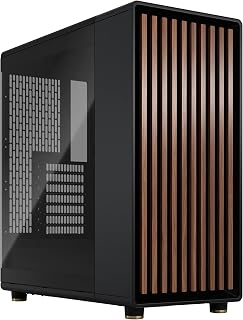
For readers chasing balanced airflow without sacrificing looks, this mid tower ships with two 140mm PWM fans already installed, which matters since larger fans move more air at lower RPM and noise. The 7 expansion slots suit a full ATX build, and the dedicated Type C USB port covers modern front panel connectivity most airflow-focused cases skip.
Pros
- Open-front design built for airflow, not just looks
- Two 140mm PWM fans included as a cooling baseline
- Supports GPUs up to 355mm and 360mm front radiators
- Seven expansion slots for future cooling or components
Cons
- Tempered glass side panel limits airflow on that face
- Wood front needs occasional light maintenance
Airflow in a mid tower comes down to how air enters and exits, and the North's open-front design is built around that principle rather than tacking it on. The front panel isn't a solid wood slab blocking intake, it's engineered to let air pass through while still showing off the walnut finish, so you get the aesthetic without strangling your intake path. Two 140mm PWM fans come preinstalled, giving a working baseline of airflow right out of the box rather than leaving you to source fans separately. Because the case supports GPUs up to 355mm and front radiators up to 360mm, there's room to scale cooling as your build grows, whether that means more fans or a liquid loop. The tempered glass side panel does mean one side isn't ventilated, so airflow leans on the front and top rather than cross-flow. For a build where you want real wood styling but still need the case to breathe, the North balances both sides of that equation better than most wood-paneled designs manage.
This case supports a wide range of modern motherboards: ATX, mATX, and ITX form factors all fit comfortably. Graphics cards up to 355mm work without modification, though this reduces to 300mm if you're planning a 360mm front-mounted radiator, which is important to verify before purchasing.
Storage flexibility is solid with two combined 3.5-inch/2.5-inch drive mounts and two dedicated 2.5-inch slots. This gives you options for traditional drives, SSDs, or a hybrid setup. The seven bridgeless expansion slots support modern networking and expansion cards without limitations.

Mesh side panels are the key spec here, giving a second intake path beyond the front for builds that need maximum airflow rather than a solid glass view. Two 140mm PWM fans come preinstalled, and the ATX mid tower layout with Type C USB makes it a practical choice for anyone prioritizing thermals over aesthetics.
Pros
- Mesh side panels add airflow beyond the front intake
- Two 140mm PWM fans included as a starting point
- Supports GPUs up to 355mm or 300mm with a 360mm radiator
- Seven bridgeless expansion slots for added cooling components
Cons
- GPU clearance shrinks to 300mm when running a 360mm front radiator
- Wood front panel requires occasional cleaning to maintain appearance
This version of the North swaps the solid glass side panel for mesh side panels, which makes it the more airflow-focused option between the two North variants. Mesh on the sides plus the open front intake and top ventilation creates three points of airflow instead of one, which is exactly what matters when evaluating a case on cooling performance rather than looks alone. Two 140mm Aspect PWM fans are included to get that airflow moving immediately. The case supports GPUs up to 355mm, or 300mm if you're running a 360mm front radiator, so there's a real tradeoff to plan around depending on whether you prioritize GPU length or radiator size. Seven bridgeless expansion slots give room for additional fans or water cooling components if you want to push airflow further. Compatibility with ATX, mATX, and ITX motherboards means this airflow-oriented layout isn't locked to one build size. For anyone specifically comparing case designs on how well they move air, the mesh side panels are the clearest differentiator here.
Form Factor: Mid-tower ATX case
Motherboard Support: ATX, mATX, ITX
GPU Compatibility: Up to 355mm, or 300mm with 360mm front radiator
Expansion Slots: 7 bridgeless slots
Drive Mounts: 2 combined 3.5"/2.5" mounts, 2 dedicated 2.5" mounts
Front Panel: Real sustainably-sourced walnut or oak wood
Ventilation: Mesh front, full mesh side panels, integrated top mesh
Included Fans: 2x 140mm Aspect PWM fans
Ports: 1x USB 2.0, 2x USB 3.0, USB Type-C
Dimensions: 17.6" D x 8.46" W x 18.46" H
Weight: 9.5 kg
Warranty: 2 years
Premium Aesthetic: The North stands out through its use of real wood paneling and metal accents rather than plastic or brushed aluminum. Each case features sustainably-sourced walnut or oak panels on the front, creating a warm, natural look that complements modern living spaces. The wood is complemented by sleek brass or steel details that add contemporary sophistication.
Build Quality: Fractal Design's engineering is evident in both the materials selected and the overall construction. The metal enclosure is robust and well-finished. The integration of natural materials with precision-engineered mesh ventilation demonstrates thoughtful design that balances form with function. Tool-free panel removal with integrated tabs shows attention to user experience.
Customization: The case accepts ATX, mATX, and ITX motherboards, giving flexibility for different build sizes. Seven bridgeless expansion slots accommodate water cooling setups, additional fans, and radiators. The generous interior layout prevents component conflicts while maintaining accessibility for upgrades and maintenance.

For readers weighing air versus liquid cooling, this full tower supports both cooling methods, giving flexibility if airflow alone isn't enough for a hot CPU or GPU combo. The bottom mounted PSU keeps intake air cooler before it hits components, which is exactly the kind of detail that matters once you start comparing case airflow design.
Pros
- Open front panel with integrated mesh maximizes intake
- Three 140mm PWM fans included as standard
- Supports GPUs up to 413mm and radiators up to 420mm
- Eight internal bays for extensive storage
Cons
- Large footprint demands significant space
- Wood panels need more maintenance than metal
If airflow matters to you, the North XL's open front panel with integrated mesh is the clearest example of a design choice built specifically to avoid restriction. Rather than relying on gaps or vents cut into a solid front, the entire front is designed around unobstructed intake, backed by three included 140mm PWM fans. That open design pairs with a full-tower interior that supports E-ATX motherboards, GPUs up to 413mm, and radiators up to 420mm, so airflow has room to actually move around components instead of pooling around tight clearances. With cooling support for both air and water, and eight internal bays for drives, this case is built for people who want to scale cooling capacity as their build grows rather than hit a ceiling. The tradeoff for all that open ventilation and space is size: at 20 inches tall, this is a case you plan a room around, not one you squeeze into a gap under a desk.
Case Type: Full Tower
Motherboard Support: E-ATX, ATX, mATX, mITX
Dimensions: 19.8 inches D x 9.4 inches W x 20 inches H
Weight: 9500g (approximately 21 lbs)
GPU Clearance: Up to 413mm, or 380mm with 420mm front radiator
Front Radiator: Up to 420mm
Top Radiator: Up to 360mm
Storage: 8 internal bays for 3.5-inch drives
Included Fans: 3x 140mm Aspect PWM fans
Panel Material: Tempered glass
Ventilation: Fine-patterned mesh with open front design
Cooling Methods: Air and water cooling compatible
Power Supply: Bottom mount
Ports: 3 USB 2.0 ports
Warranty: 2 years
Model Number: FD-C-NOR1X-02
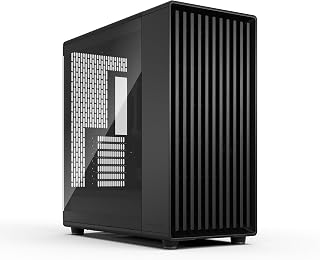
Anyone running a high heat-output ATX or E-ATX build will appreciate the three 140mm fans included here, since bigger fans at full tower scale push more volume with less strain. A built in dust filter keeps that airflow clean over time, which matters when you're relying on case ventilation instead of a closed loop for cooling.
Pros
- Three 140mm Momentum fans included for strong intake airflow
- Open front mesh design supports genuine airflow, not just styling
- Supports GPUs up to 413mm and E-ATX motherboards
- Strategically placed Velcro straps simplify cable management
Cons
- GPU clearance tightens with a 420mm front radiator installed
- Thumb screws are awkward to remove without a screwdriver
If airflow is the priority, the North XL Momentum approaches it from the fan side rather than just the chassis design. Three Momentum 140mm fans with LCP blades come preinstalled, which is one more fan than most mid towers ship with, and they're paired with the same open front mesh that lets intake air move freely instead of fighting a solid panel. That combination matters more in a full tower, since larger cases can struggle to move air efficiently through so much internal volume. Support for GPUs up to 413mm and extensive radiator compatibility means the airflow design isn't just for show, it's built to keep pace with genuinely high-end hardware that generates real heat. The tradeoff is that maximum GPU clearance shrinks if you install a 420mm front radiator, so you're balancing intake fan area against GPU length depending on your cooling choice. For anyone treating airflow as a real engineering constraint rather than an afterthought, this case gives you more fan hardware and more front mesh to work with than typical full towers.
Case Type: Full Tower
Motherboard Support: E-ATX, ATX, Micro-ATX, Mini-ITX
Max GPU Length: 413mm (380mm with 420mm front radiator)
Radiator Support: Front up to 420mm, Top up to 360mm
Included Fans: Three Momentum 140mm fans with LCP blades
Ports: 2x USB 3.0
Materials: Alloy Steel, Tempered Glass
Color: Black with blackened oak front
Dimensions: 19.8in D x 9.4in W x 20in H
Weight: 26.2 lbs
Warranty: 2 Years

If airflow is the whole point of your build, this mini-tower backs it up with a mesh-forward design and bottom-mounted PSU, keeping hot exhaust away from intake fans. With 4 expansion slots and support for Micro-ATX and Mini-ITX boards, it's a smart pick for a compact rig that still needs real air movement through the chassis, not just a transparent panel for show.
Pros
- Fully perforated panels on all sides for open airflow
- Supports up to five fans despite compact size
- Fits 360mm GPUs and 240mm AIOs in a mini-tower
- Magnetic dust filters keep intake clean
Cons
- Compact interior requires careful component planning
- Only one internal 3.5-inch bay
Airflow starts with case design, and the Q300L is built around that principle rather than treating it as an afterthought. Every panel is perforated, so instead of fighting a single intake point you get a fully ventilated shell that supports up to five fans working together. That matters in a mini-tower, where heat has fewer places to escape. Despite the compact micro-ATX and mini-ITX footprint, it still fits 360mm graphics cards and 240mm AIO coolers, so you're not sacrificing thermal headroom for size. The magnetic dust filters keep intake clean without blocking flow, and the adjustable I/O panel lets you route cables so they don't sit in the way of airflow paths. Three fans come preinstalled, with room to expand if your build runs hot. For anyone researching whether case airflow actually matters, the Q300L is a practical case study: a small chassis that proves good ventilation design can outweigh raw interior volume.
Physical Dimensions: 15.39 inches deep, 9.06 inches wide, 15 inches tall. Weight: 480 grams.
Motherboard Support: Micro-ATX and Mini-ITX. Total expansion slots: 4. Internal bays: 1 (3.5-inch hard disk form factor). USB 3.0 ports: 2.
Component Compatibility: CPU coolers up to 159mm height, graphics cards up to 360mm length, power supplies up to 160mm length and 500 watts maximum output.
Cooling: 240mm liquid cooler and 5 fans supported. Three fans included by default. Fully ventilated with perforated design on all sides and magnetic dust filters.
Materials and Build: Alloy steel and plastic enclosure. Dark gray color. Model MCB-Q300L-KANN-S00. Includes 2-year warranty. PSU mounting type: bottom mount.
Good for builders who want a small-footprint case without giving up airflow, especially for office builds, streaming rigs, or space-limited gaming setups. Skip it if you need more than one internal 3.5-inch bay or plan a build with heavy storage expansion. Also worth skipping if you want a case with airflow proven out by a large base of user reviews, since none exist yet for this model.

Readers more interested in raw performance than case theory will find this prebuilt sidesteps the airflow question entirely, pairing a Ryzen 9 7900X with an RTX 5070 and 32GB of DDR5 in a tower already engineered for thermals. It's a reasonable answer for anyone who wants gaming and everyday performance without researching fan placement themselves.
Pros
- 240mm liquid CPU cooler preinstalled for sustained sessions
- Ryzen 9 7900X and RTX 5070 12GB GPU handle demanding titles
- 32GB DDR5 RAM supports smooth multitasking
- Tempered glass case with thermal layout already configured
Cons
- 1TB storage may require external expansion for large libraries
- Standard 1-year warranty with no extended coverage
Airflow concerns usually start with component choice, and this prebuilt removes that guesswork by pairing a 240mm liquid CPU cooler with a tempered glass case that's already been matched to its internal hardware. Rather than researching case compatibility and fan layouts yourself, you get a system where thermal management for the Ryzen 9 7900X and RTX 5070 12GB GPU has already been accounted for by the builder. That matters for anyone who wants the benefits of good airflow design without assembling or tuning it themselves. The 32GB DDR5 RAM and 1TB NVMe SSD round out a build meant to handle gaming, streaming, and everyday multitasking without thermal throttling getting in the way. Connectivity through USB ports, Ethernet, and dual display outputs covers typical setup needs. For readers who care about airflow in principle but would rather not manage it directly, this is the path of least resistance: a system engineered with cooling already factored into its physical layout.
Processor: AMD Ryzen 9 7900X (12-core, 4.7 GHz base, 5.6 GHz boost)
Graphics: NVIDIA GeForce RTX 5070 12GB GDDR6
Memory: 32GB DDR5 4800MHz RAM (16GB x2 sticks, upgradeable to 128GB)
Storage: 1TB NVMe SSD (fast boot and load times)
Cooling: 240mm Liquid CPU Cooler (iBUYPOWER AW4) with RGB fans
Case: iBUYPOWER Element with tempered glass and 16-color RGB lighting
Operating System: Windows 11 Home pre-installed
Connectivity: Wi-Fi 802.11AC, Bluetooth, Gigabit Ethernet, 6x USB 3.1, DisplayPort, HDMI
Peripherals: Gaming keyboard and RGB gaming mouse included
Warranty: 1 year manufacturer coverage
Dimensions: 20 x 9.1 x 17.4 inches | Weight: 36 lbs
A good fit for gamers, streamers, or everyday users who want a system with cooling already handled and don't want to research or build a case setup themselves. Skip it if you want to customize or upgrade airflow components yourself, or if you need more than 1TB of built-in storage for a large game library. Also consider skipping if extended hardware warranty coverage beyond one year is a priority.
Buying Guide: What to Look for in a High-Airflow PC Case
Front Panel Design: Mesh vs. Solid
The front panel is where airflow starts or stops. A solid, glass-fronted case restricts intake air before it ever reaches your components. Mesh panels, like those on the Fractal Design North – Genuine Walnut Wood Front; allow ambient air to flow in freely without resistance.
Fine-patterned mesh strikes the best balance: good intake volume while still catching dust before it settles on your fans and heatsinks. If you’re running a high-wattage GPU or a CPU with a high thermal design power, an open mesh front is one of the highest-impact upgrades you can make.
Fan Configuration and Static Pressure
More fans don’t automatically mean better cooling, placement and fan type matter just as much. Positive pressure setups (more intake than exhaust) reduce dust accumulation, while negative pressure pulls more air through but brings dust with it. The NZXT H6 Flow | CC-H61FB-01 ships with three 120mm fans pre-installed at angles optimized for directed airflow, giving you a solid thermal baseline right out of the box.
Cases that support larger 140mm fans, like the Fractal Design North XL Charcoal Black TG Dark with its three included 140mm Aspect PWM fans, move more air per revolution. That means lower RPMs, less noise, and comparable or better cooling compared to smaller fans spinning harder.
Radiator and Liquid Cooling Support
If you’re running or planning to run an AIO liquid cooler, radiator support is a non-negotiable spec. The Fractal Design North XL Momentum Black supports front radiators up to 420mm and top radiators up to 360mm, which covers virtually every AIO on the market. Knowing your radiator fits before you buy the case prevents a lot of frustration.
Even if you’re air cooling today, a case with good radiator support gives you an upgrade path. If you later move to a high-end GPU, for example, a card like those in our guide to the best PC cases for the RTX 5070 Ti, you’ll want that thermal flexibility already built into your chassis.
Chassis Layout: Dual-Chamber vs. Traditional
Traditional cases mix your PSU, cables, and main components in one shared space. Dual-chamber designs separate the PSU and storage from the motherboard area, which reduces cable clutter and opens up airflow paths directly to your GPU and CPU. The NZXT H6 Flow | CC-H61FW-01 uses exactly this approach, with a compact footprint that still prioritizes GPU cooling and clean cable routing.
For smaller builds, the Cooler Master Q300L V1 Micro-ATX PC Case takes a different approach with perforated panels on all sides, creating a passive airflow path that works even in tight spaces. It also features a modular I/O panel you can reposition depending on your desk setup. If you’re also evaluating cases for a specific GPU, our best PC cases for the RTX 5060 Ti roundup covers several compact-friendly options.
Final Thoughts
PC case airflow absolutely matters, and the right choice comes down to your build goals. For a refined mid-tower with excellent out-of-the-box cooling, the NZXT H6 Flow | CC-H61FW-01 is hard to beat for its dual-chamber efficiency and clean aesthetic. If you want a larger platform with premium fan support and stunning natural materials, the Fractal Design North XL Momentum Black delivers serious thermal performance alongside a distinctive blackened oak design that looks as good as it performs.
Frequently Asked Questions
Does PC case airflow really affect CPU and GPU temperatures?
Yes, measurably so. A case with restricted intake and exhaust traps heat generated by your CPU and GPU, causing them to throttle performance or run louder fans to compensate. In 2026, with GPUs and CPUs drawing more power than ever, a well-ventilated case keeps thermals stable under sustained workloads like gaming or rendering.
Is a mesh front panel always better than tempered glass?
For pure airflow, yes. Mesh panels allow significantly more air intake than glass or solid fronts. That said, some cases like the Fractal Design North series manage to combine tempered glass side panels with mesh ventilation elsewhere, so you don’t always have to choose between looks and thermals. The key is ensuring the intake pathway (usually the front or top) isn’t obstructed.
How many case fans do I actually need?
For most builds, three to four fans in a balanced intake-exhaust configuration is sufficient. Starting with a case that includes fans pre-installed (like the NZXT H6 Flow with three 120mm fans or the Fractal Design North with two 140mm fans) saves you from guessing. You can always add more later if you move to a higher-wattage GPU. Our roundup of best PC cases for the RX 9070 covers airflow-first options worth considering for demanding GPU configurations.
Does case size impact airflow performance?
Larger cases generally have more room for fans and better natural convection, but size alone doesn’t guarantee good airflow. A well-designed Micro-ATX case like the Cooler Master Q300L V1 with perforated panels on multiple sides can outperform a poorly ventilated full tower. Fan placement, panel design, and cable management all contribute more to thermals than raw case volume.
Common questions
Should you choose a mesh versus glass front panel for your case?
Mesh wins for airflow since it lets more air reach your intake fans directly, which helps keep CPU and GPU temperatures down under load. Glass fronts, like the Fractal Design North's tempered glass dark option, look sleeker and show off interior components, but they restrict intake compared to the mesh version of the same case. If cooling performance matters more than looks, pick mesh. If you want a showcase build and already have strong fans, glass is fine.
What does positive pressure mean for airflow inside a PC case?
Positive pressure means more air is pushed in by intake fans than is pulled out by exhaust fans, so the case stays slightly pressurized. This forces air out through small gaps instead of pulling dust in through them, which keeps internals cleaner over time. Cases with strong front intake, like the Fractal Design North models with included 140mm fans, make it easier to set up this kind of fan configuration.
Why do dust filters matter for keeping your PC case clean?
Dust filters matter because they stop debris from building up on fans, heatsinks, and inside the power supply, which can raise temperatures and shorten component lifespan over time. The Cooler Master Q300L includes a dust filter alongside its fully ventilated design, and the mesh version of the Fractal Design North also has one. Regularly cleaning these filters keeps airflow consistent without letting dust accumulate inside the case.




Write Your Review
No reviews yet. Be the first to share your experience!