You bought a high-speed DDR4 kit rated at 3600 MHz, plugged it into your new build, and booted up, only to see it running at 2133 MHz. Sound familiar? The motherboard you choose has a direct impact on whether your RAM actually runs at its advertised speed, and understanding that relationship can save you a lot of frustration.
This guide is for anyone building or upgrading a PC who wants to know how the motherboard influences RAM speed, what to look for when pairing components, and which boards give you the most control over memory performance. We evaluated eight motherboards across AMD and Intel platforms to help you make a confident decision.
Quick answer
This guide compares 8 picks, with ASUS TUF Gaming B550M-PLUS AMD Ryzen Micro ATX ranked first. GIGABYTE GA-A320M-S2H AM4 Micro ATX Motherboard for AMD has the most customer reviews.

Pros
- Proven TUF Gaming durability with military-grade components and extensive build testing
- Excellent value for PCIe 4.0 and dual M.2 storage support at this price tier
- Thoughtful design with heatsinks on M.2 slots and SATA ports positioned to avoid GPU conflicts
- Fast 2.5Gb Ethernet eliminates network bottlenecks for online gaming and streaming
- Clean BIOS interface and strong community support from ASUS TUF ecosystem
Cons
- Micro-ATX form factor limits expansion slots compared to full-size ATX boards
- DDR4 memory only (not DDR5), though B550 chipset limitation affects all competitors
- Shipping from overseas can add several weeks to delivery times
The ASUS TUF Gaming B550M-PLUS is a micro-ATX motherboard engineered for gamers and content creators running Ryzen 3000 or 5000 series processors. Its compact form factor makes it perfect for balanced builds where you want flagship features without a full ATX footprint.
The standout features center on future-proofing and performance stability. PCIe 4.0 support delivers dramatically faster NVMe speeds, while the 8+2 DrMOS power delivery ensures clean power even during overclocking sessions. The dual M.2 slots with integrated heatsinks mean you'll never throttle your fast storage. For online gaming, the 2.5Gb Ethernet connection eliminates network lag, and the Realtek S1200A codec produces professional-grade audio clarity.
Build quality reflects the TUF Gaming reputation. Military-grade capacitors, a beefier power solution than typical B550 boards, and comprehensive thermal management including VRM heatsinks and a fanless PCH cooler demonstrate real durability engineering. The thoughtful port layout keeps SATA connectors at the bottom, preventing graphics cards from blocking access like some competitor micro-ATX designs.
The main trade-offs involve form factor constraints and DDR4 memory support. The compact layout offers fewer expansion slots, and DDR4 is aging compared to newer platforms. Shipping times from overseas can also extend delivery by several weeks.
Verdict: The TUF Gaming B550M-PLUS delivers exceptional value for micro-ATX builders. It combines proven durability, current-gen performance features, and smart engineering at a competitive price. Highly recommended for anyone building a balanced mid-range to high-end gaming or productivity system.
Processor and Memory: Socket AM4 for Ryzen 3000/5000 series, supports up to 128GB DDR4 across 4 DIMM slots, native DDR4-2933 with XMP support to 4400+.
Storage and Expansion: 2 M.2 slots with PCIe 4.0 support, 6 SATA 3.0 ports, 3 PCIe slots (x16 graphics, x1 expansion), comprehensive fan headers and USB headers for case integration.
Connectivity: 1 x 2.5Gb Ethernet port with TUF LANGuard, 1 x HDMI, 1 x DisplayPort, multiple USB 2.0 and USB 3.2 Gen 2 Type-A/Type-C ports, optical S/PDIF audio output.
Power and Audio: 24-pin ATX power connector with 8+2 phase VRM, Realtek S1200A codec with 108dB SNR (line out) and 103dB SNR (line in) for pristine audio quality.
Who Should Buy: Gamers and creators building balanced micro-ATX systems around Ryzen 5000 or 5700/5800 series CPUs. Those upgrading from older AM4 boards and seeking PCIe 4.0, faster networking, and proven reliability.
Best Use Cases: 1080p to 1440p gaming rigs, content creation workstations with heavy SSD usage, esports builds where networking stability matters, compact form-factor builds in small cases.
Avoid If: You need DDR5 support (requires newer Ryzen 7000 series and AM5), prefer full-size ATX with maximum expansion, or are building with Intel processors or older Ryzen generations.
Paired Well With: Ryzen 5 5600X or 5700X3D CPUs, high-speed NVMe SSDs, quality PSUs rated 650W or higher, compact tower coolers or AIO units designed for micro-ATX cases.

AM4 builders chasing faster DDR4 kits benefit from the B550 chipset here, which handles memory overclocking far better than entry level boards. Since motherboard circuitry and BIOS tuning determine how high your RAM can stably clock, this board's PCIe 4.0 platform and robust power delivery give headroom to push modules well past stock speeds without instability.
Pros
- 128GB maximum DDR4 memory capacity
- Strong 12+2 power delivery for stability
- PCIe 4.0 support with dual M.2 slots
- WiFi 6E and 2.5Gb Ethernet connectivity
Cons
- Motherboard screws not included in box
- May require BIOS update before supporting newer Ryzen CPUs
The ROG Strix B550-F Gaming WiFi II is a useful example of how listed memory clock speed doesn't tell the whole story of a motherboard's RAM potential. Its spec sheet shows a 2133 MHz memory clock, but that figure reflects a base DDR4 speed rating rather than the board's real ceiling, since B550 boards are widely known for supporting memory overclocking well beyond base speeds when paired with a capable CPU and tuned BIOS. Backing that up is a strong 12+2 power delivery system built for AM4's flagship Ryzen chips, which indirectly supports RAM stability by keeping the platform's power delivery solid during tuning. With 128GB maximum capacity across its DIMM slots and PCIe 4.0 throughout, this board gives builders who care about memory performance a platform with headroom rather than a hard ceiling. Anyone comparing motherboards specifically for RAM speed potential should read past the baseline spec number and consider the chipset's known overclocking support.
Processor Compatibility: AMD Ryzen 3000 and 5000 series, plus 5000 and 4000 G-series desktop processors (Socket AM4)
Memory Support: DDR4, up to 128GB across 4 DIMM slots, supports up to 2133 MHz and beyond with overclocking
Connectivity: PCIe 4.0, WiFi 6E (802.11ax) with Bluetooth 5.2, Intel 2.5Gb Ethernet with LANGuard, HDMI 2.1, DisplayPort 1.2, USB 3.2 Gen 2 Type-C
Storage: Dual M.2 slots (PCIe 4.0 ready), 6 SATA 3 ports, BIOS Flashback via USB
Power Delivery: 12+2 teamed power stages with ProCool connector, high-quality alloy chokes and durable capacitors
Other Features: 11 total USB ports, addressable Gen 2 RGB header with Aura Sync, optical S/PDIF output, 3-year warranty, dimensions 10.75 x 13.39 x 2.76 inches
Buy this if you're on AM4 and want a B550 board with real memory tuning headroom alongside modern connectivity like PCIe 4.0 and WiFi 6E. Skip it if you expect the listed 2133 MHz spec to be the board's actual ceiling, or if you want memory screws and premium packaging included, since both are reported shortcomings.

Pros
- Exceptional value at under $90 with premium features typically found in higher-priced boards
- Proven reliability with 4.5 out of 5 star rating backed by thousands of verified user reviews
- Compact micro-ATX form factor fits small and mid-tower cases without compromising connectivity
- Comprehensive port selection including USB 3.2 Gen 1, SATA 6Gb/s, and quad M.2 slots for expansion
- Future-proof architecture with PCIe 4.0 and broad AM4 CPU compatibility
Cons
- Micro-ATX size offers fewer expansion slots than full-size ATX boards, limiting component options
- Limited onboard audio customization compared to premium gaming-focused motherboards
- May require BIOS update for optimal performance with newest Ryzen CPU models
The MSI B550M PRO-VDH WiFi is a solid mid-range micro-ATX motherboard designed for budget-conscious builders targeting AMD Ryzen 5000 series systems. It appeals to gamers, streamers, and content creators who want reliable performance without premium pricing, offering a genuine upgrade path for existing AM4 users.
The standout features include PCIe 4.0 connectivity for modern graphics cards and NVMe SSDs, plus M.2 Shield Frozr thermal protection that keeps high-speed storage cool under load. The Core Boost power delivery system provides clean, stable voltage to the CPU, making this board capable of handling both stock and moderate overclocking scenarios. WiFi 6 and Bluetooth connectivity add convenience for compact builds.
Build quality is professional throughout, with extended heatsinks covering power stages and a 2oz thickened copper PCB that dissipates heat effectively. The layout is logical and intuitive, with ample USB headers and fan connectors that accommodate multi-fan cooling setups. The Flash BIOS button is genuinely useful for updating firmware without compatible components installed.
Real drawbacks are limited in scope. The micro-ATX form factor means only three PCIe slots total, which may restrict options for dual GPU systems or extensive expansion card stacking. Audio, while capable, lacks the advanced tuning found on enthusiast boards. Most users should also check BIOS compatibility before pairing with the newest Ryzen CPUs.
Verdict: This is exceptional value for a B550 board with no major flaws in execution. It earns its top ranking by delivering essential modern features, proven reliability, and future-proofing at a price point that won't strain your build budget.
Socket & CPU Support: AM4 socket compatible with AMD Ryzen 5000, 4000G, and 3000 series processors (excludes Ryzen 5 3400G and Ryzen 3 3200G).
Memory: Dual-channel DDR4 up to 128GB capacity at speeds up to 4400 MHz across four DIMM slots.
Storage & Connectivity: Four SATA 6Gb/s ports, quad M.2 slots with PCIe 4.0 and 5.0 support, integrated M.2 Shield Frozr thermal protection.
Expansion: Three PCIe slots (one x16, two x1), USB 3.2 Gen 1/Gen 2 headers, 12 USB 2.0 headers, single Gigabit Ethernet port.
Audio & Network: Realtek ALC892/ALC897 codec with Audio Boost, WiFi 6 and Bluetooth 5.2 connectivity built-in.
Power & Thermal: 24-pin main power connector, extended CPU power delivery heatsinks, thermal pads rated 7W/mk for superior heat dissipation.
Best For: This board excels for first-time Ryzen builders, mid-range gaming systems, and compact builds where space constraints matter. It works equally well for productivity workstations, streaming setups, and content creation with moderate CPU loads.
Performance Expectations: Expect stable, smooth performance with Ryzen 5000 series CPUs at stock settings and room for modest overclocking. PCIe 4.0 provides meaningful speed gains for next-gen graphics cards and high-speed NVMe SSDs over previous generations.
Case Compatibility: The micro-ATX form factor fits any case with micro-ATX or full-size ATX support, making it highly adaptable to different build sizes and aesthetics.
Upgrade Path: Future BIOS updates will support upcoming Ryzen CPUs on the AM4 socket, extending your CPU upgrade options without a motherboard swap.
Warranty & Support: Backed by a standard three-year MSI warranty with reliable customer support and active community resources for troubleshooting and optimization.

This board illustrates how a basic chipset caps memory performance despite supporting the same DDR4 standard as pricier boards. The A320 chipset lacks overclocking support, so its 3200 MHz spec reflects module compatibility rather than tunable headroom, making it a clear reference point for readers comparing budget boards against overclocking focused ones.
Pros
- Dual-channel DDR4 support up to 64GB
- Official memory speed of 3200 MHz
- PCIe Gen3 x4 M.2 slot for fast storage
- Compact microATX form factor
Cons
- No memory overclocking support on A320 chipset
- Only two DIMM slots limit future memory expansion
Motherboard choice has a real, if limited, effect on RAM speed, and the GA-A320M-S2H is a good case study. This AM4 board officially runs DDR4 at 3200 MHz across two slots, supporting up to 64GB total. The A320 chipset is the key factor to understand here: it does not support memory overclocking or XMP-style tuning, so your RAM will run at its rated JEDEC speeds rather than any higher profile printed on the kit. That makes this board a fit for anyone who wants stable, predictable memory performance without chasing extra megahertz. If your goal with reading about motherboard and RAM speed is to find a budget AM4 platform that simply runs standard DDR4 reliably, this delivers that. If your goal is squeezing maximum RAM speed out of a kit through overclocking, this chipset will cap you well before you get there, and that limitation is built into the silicon, not a flaw of this specific board.
Processor and Memory: Socket AM4 for AMD Ryzen, A-Series, and Athlon processors. Dual channel DDR4 support with 2 DIMM slots, maximum 64GB capacity at 3200 MHz speed.
Storage and Connectivity: PCIe Gen3 x4 M.2 slot with NVMe and SATA mode support. 6 SATA III ports, 9 total USB ports including USB 3.1 Gen 1. Single Gigabit Ethernet port with cFosSpeed software. 3 PCIe slots total.
Audio and Display: Realtek ALC887 high-definition audio with premium capacitors and noise guard. Single HDMI video output. Optical S/PDIF connector for digital audio.
Form Factor and Power: Micro ATX dimensions 7.68" x 4.09" with 9.61" depth. 24-pin main power connector. 3-year manufacturer warranty included.

Readers evaluating how AM4 chipsets influence memory headroom will find this board useful since its B550 chipset supports PCIe 4.0 and the same memory overclocking flexibility found on higher tier boards. Despite a 2133 MHz base spec, the platform's tuned power delivery allows DDR4 kits to run at considerably higher rated speeds.
Pros
- DDR4 support up to 128 GB across DIMM slots
- 8+2 power delivery for stable performance under load
- Ryzen 5000 series CPUs work without a BIOS update
- Military-grade components and fanless VRM heatsinks for durability
Cons
- WiFi and Bluetooth drivers from the official site are sometimes incorrect
- RGB lighting features feel unnecessary to users wanting a plain setup
A common question when pairing RAM with a motherboard is whether the board's memory support will keep up with the kit you've bought, and the TUF Gaming B550-PLUS WiFi II gives a straightforward answer for AM4 builds. It runs DDR4 with a rated memory clock speed of 2133 MHz and supports up to 128 GB across its DIMM slots, so capacity isn't a concern for most users. The 8+2 power delivery system is built to handle high-core-count Ryzen CPUs, which indirectly supports consistent memory performance since voltage stability affects how reliably a system holds its memory timings under sustained load. Reviewers have specifically noted that newer Ryzen 5000 series chips work without needing a BIOS update first, which removes one common hurdle when a new board and new RAM arrive together. For builders asking whether their motherboard choice will affect how their RAM performs, this board's documented stability and power delivery are the relevant factors to weigh.
Socket and Chipset: AMD Socket AM4, AMD B550 chipset. Supports AMD Ryzen 3rd Gen (3000 series) and newer processors including 5000 series Ryzen chips.
Memory: 4 DIMM slots supporting DDR4 up to 128GB total capacity. Rated for 2133 MHz with support for higher speeds through XMP overclocking profiles.
Storage: 2 M.2 NVMe slots (one with PCIe 4.0 x4, one with PCIe 3.0 x4), 6 SATA III ports for traditional drives.
Power Delivery: 8+2 DrMOS power stages with high-quality alloy chokes and durable capacitors. 24-pin main power connector.
Connectivity: WiFi 6 (802.11ax), 2.5Gb LAN with LANGuard protection, 1x HDMI 2.1 output (4K at 60Hz), 1x DisplayPort 1.2 output, 5x PCIe slots total, 1x Thunderbolt 3 header, USB 3.2 Gen 2 Type-C and Type-A ports, 6x USB 2.0 headers.
Warranty: 3-year limited warranty from ASUS.
Pros
- Exceptional stability and ease of use, with XMP profiles working flawlessly out of the box
- Comprehensive port selection including USB 3.1 Type-C and multiple M.2 slots
- Advanced thermal management with screw-mounted heatsinks and heatpipes keeps components cool
- Excellent value for the feature set compared to competing flagship boards
- Rock-solid performance for gaming and content creation workloads
Cons
- Limited to 8th and 9th-gen Intel processors, not compatible with newer 10th-gen and beyond
- RGB lighting software can be complex for users unfamiliar with advanced customization options
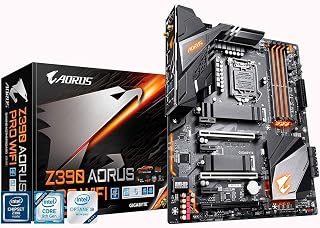
The GIGABYTE Z390 AORUS PRO Wi-Fi is a premium ATX motherboard engineered for gamers and PC enthusiasts who demand stability, features, and performance. It supports Intel's 8th and 9th-generation Core processors, making it an excellent choice for building high-end gaming systems or productivity workstations with processors like the i7-8700K or i9-9900K.
What sets this board apart is its combination of solid engineering and practical features. The 12+1 phase digital VRM with DrMOS ensures clean power delivery even under heavy loads or overclocking. Real-world testing shows the board handles XMP profiles effortlessly, with users reporting stable operation at aggressive RAM timings immediately after installation. Thermal performance is impressive, with first-boot CPU temperatures in the 28-32C range using standard cooling solutions, and the dual M.2 NVMe slots with thermal guards protect your fastest storage from throttling.
The feature set reflects its gaming-focused positioning. Built-in Intel 802.11AC Wi-Fi saves money and space versus add-in cards, while the ALC1220-VB audio codec with WIMA capacitors delivers noticeably better sound than typical motherboard audio. RGB Fusion lighting offers extensive customization with support for both addressable and standard RGB accessories, appealing to builders who want aesthetic control. The Smart Fan 5 controller with multiple temperature sensors gives you granular cooling management without additional hardware.
Build quality is solid throughout, with screw-mounted heatsinks and heatpipes indicating attention to longevity. The integrated I/O shield and comprehensive port layout, including USB 3.1 Type-C and Intel Gigabit LAN with cFosSpeed, minimize bottlenecks for gaming and content creation. The main limitation is processor compatibility: this board only supports 8th and 9th-gen Intel chips, so upgrade paths beyond the 9900K require a new platform.
For builders seeking a reliable, well-featured Z390 platform without excessive RGB or inflated pricing, the GIGABYTE Z390 AORUS PRO Wi-Fi delivers excellent value. Its reputation among users remains strong years after launch, with owners reporting consistent performance and stability across gaming, streaming, and everyday computing tasks.
Chipset and Socket: Intel Z390, LGA1151 (supports 9th and 8th-gen Intel Core)
Memory: Dual-channel DDR4 with 4 DIMM slots, supports up to 2048 GB, 4400 MHz maximum speed, Intel Optane Ready
Storage: Dual M.2 NVMe slots (PCIe Gen3 x4) with thermal guards, multiple SATA ports for traditional drives
Connectivity: Intel 802.11AC 2x2 Wave 2 Wi-Fi, Intel Gigabit LAN with cFosSpeed, Bluetooth 5
Audio: Realtek ALC1220-VB codec, 114dB SNR (rear), 110dB SNR (front microphone), WIMA audio capacitors
Power Delivery: 12+1 phase digital VRM with DrMOS, advanced thermal design with heatsinks and heat pipes
Cooling: Smart Fan 5 with multiple temperature sensors and hybrid fan headers
Form Factor: ATX (305 x 244 mm), includes integrated I/O shield
Warranty: 3-year limited warranty

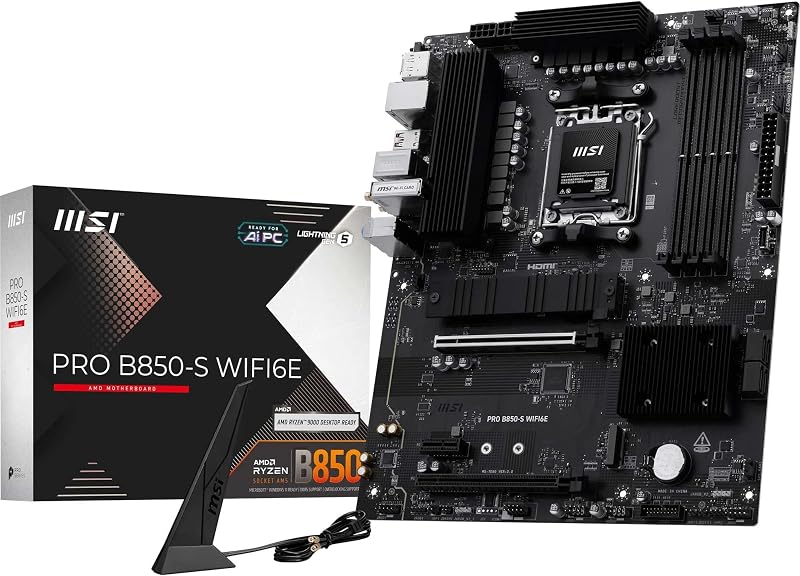
Readers researching whether a board limits RAM speed should note this one supports DDR5 at 4400 MHz, a rated clock speed that reflects genuine high frequency memory tuning built into the AM5 platform. The 14+2+1 power phase design also helps sustain stable voltage delivery to memory controllers when running faster, tighter timed kits.
Pros
- DDR5 support up to 4400 MHz with AMD EXPO
- Four DIMM slots supporting up to 128GB
- Robust 14+2+1 power delivery for stability
- PCIe 5.0 M.2 slot for fast storage
Cons
- Only four SATA ports for traditional drives
- Single HDMI output limits multi-monitor setups
If motherboard impact on RAM speed matters to your build, the B650 AORUS Elite AX is worth a close look because it directly supports the mechanism that affects DDR5 speed most: AMD EXPO. This board runs DDR5 at up to 4400 MHz across four DIMM slots, with EXPO support letting the memory controller apply the RAM kit's rated high-speed profile rather than falling back to default JEDEC speeds. A 14+2+1 power delivery setup and solid thermal design support stability when running memory and CPU at those higher speeds under sustained load. With four DIMM slots and support up to 128GB, there's room to scale capacity without sacrificing speed. For anyone researching whether their board choice is holding back RAM performance, this is a board built specifically to not be the bottleneck, pairing modern DDR5 support with the EXPO tuning path that lets rated speeds actually show up in practice.
Processor Support: AMD Socket AM5, compatible with Ryzen 7000, 8000, and 9000 series.
Memory: 4 DDR5 DIMM slots, up to 128GB maximum, 4400 MHz native speed, AMD EXPO and Intel XMP support.
Power Delivery: 14+2+1 power phases, 70A per stage, 8-layer 2X copper PCB.
Storage: 4 SATA III ports, 1 PCIe 5.0 NVMe M.2 slot, 1 PCIe 4.0 NVMe M.2 slot.
Connectivity: WiFi 6E, 2.5GbE ethernet, 12 USB ports (including USB 3.2 Gen 2 with front/rear USB-C), 1 HDMI output.
Expansion: 3 PCIe slots, comprehensive thermal armor.
Warranty: 5 years with online registration.
Buy this if you're building a Ryzen 7000, 8000, or 9000 system and want a board that actively supports higher DDR5 speeds through EXPO rather than capping memory at default speeds. Skip it if you're still on DDR4 or AM4, since this board only works with AM5 and DDR5 memory and offers no backward compatibility.

For those wondering how chipset choice affects achievable memory frequency, this ITX board's B550 chipset and listed 3200 MHz clock speed show meaningful headroom over budget alternatives. Its 6+2 power phase layout supports steadier voltage regulation, which matters when pushing DDR4 modules toward their rated speeds on a compact AM4 build.
Pros
- DDR4 support rated up to 3200 MHz
- 6+2 power phase design for stable voltage delivery
- PCIe 4.0 and dual M.2 slots for fast storage
- Q-Flash Plus allows BIOS updates without a CPU installed
Cons
- Only two DIMM slots, capping RAM capacity at 128 GB
- Some users reported WiFi and Bluetooth issues needing driver updates
Motherboard choice matters for RAM speed mainly through the memory controller, trace layout, and how many DIMM slots you're populating, and the B550I AORUS PRO AX shows this clearly. Its two-DIMM mini-ITX layout is actually an advantage for memory stability, since fewer slots generally make it easier to hit higher frequencies with full confidence than crowded four-slot boards. It officially supports DDR4 at 3200 MHz, and the 6+2 power phase design keeps voltage delivery steady, which matters for maintaining consistent memory timings under load. If you're building a compact Ryzen rig and wondering whether the board will bottleneck your RAM kit, this one is engineered to avoid that problem rather than cause it. PCIe 4.0 and dual M.2 slots round out a platform that doesn't force compromises just because it's small. Firmware updates via Q-Flash Plus also mean BIOS and memory compatibility tables stay current without needing a CPU installed first.
Socket and Chipset: AMD Socket AM4, B550 chipset with support for Ryzen 3000, 4000, and 5000 series processors.
Memory: 2 DIMM slots supporting DDR4 up to 128 GB with XMP profile support for high-speed kits.
Storage: 1x M.2 PCIe 4.0 slot, 1x M.2 PCIe 3.0 slot, 4x SATA III ports for traditional drives and SSDs.
Power Delivery: 8-phase direct digital VRM with premium chokes and capacitors, 24-pin ATX power connector, 8-pin CPU power connector.
Connectivity: PCIe 4.0 x16 slot with armor, 1x USB 3.2 Gen 2 Type-C, 1x USB 3.2 Gen 2 Type-A, 4x USB 3.2 Gen 1 Type-A, 2x USB 2.0, 2.5 GbE LAN, WiFi 6, 2x HDMI outputs.
Physical: Mini-ITX form factor, 6.69 inches square, 3-year manufacturer warranty.
Buy this if you're building a small-form-factor Ryzen 5000/4000/3000 system and want a board that won't limit your DDR4 kit's rated speed. It suits builders who value stability and simplicity over slot count. Skip it if you need four DIMM slots for high RAM capacity, or if you've had issues with mini-ITX boards before, since the compact layout demands careful cable and component planning during assembly.
How to Choose a Motherboard That Won’t Bottleneck Your RAM
Chipset and Platform Determine Your Speed Ceiling
Every motherboard ships with a chipset that defines the maximum officially supported RAM speed. Budget chipsets like AMD’s A320, found on the GIGABYTE GA-A320M-S2H; cap out at lower official speeds and often do not support overclocking at all. Mid-range and enthusiast chipsets like B550 and Z390 raise that ceiling considerably.
For example, the ASUS TUF Gaming B550M-PLUS, AMD B550 (Ryzen AM4) supports DDR4 up to 4400 MHz with the right kit and BIOS configuration. The GIGABYTE Z390 AORUS PRO Wi-Fi on the Intel side also pushes high-speed DDR4 across four DIMM slots, giving builders more flexibility with memory kits.
XMP and EXPO Profiles: The Shortcut to Advertised Speeds
RAM does not automatically run at its rated speed out of the box. By default, most systems fall back to JEDEC standard speeds, which are significantly lower than what the kit is rated for. To reach advertised speeds, you need to enable an XMP (Intel) or EXPO (AMD) profile in the BIOS, and your motherboard must support it.
The GIGABYTE B650 AORUS Elite AX AMD AM5 ATX supports both AMD EXPO and Intel XMP profiles on its DDR5 slots, which makes enabling full memory speed a one-click process. Similarly, the MSI B550M PRO-VDH WiFi ProSeries Motherboard supports DDR4 up to 4400 MHz through XMP, and its Flash BIOS Button makes it easy to keep firmware current for the best memory compatibility.
VRM Quality Affects Stability at Higher Speeds
Running RAM above stock speeds puts extra demand on the motherboard’s power delivery. A weak VRM can cause instability, crashes, or throttling when you push memory frequencies higher. This is where higher-tier boards earn their place in a build.
The Asus ROG Strix B550-F Gaming WiFi II AMD AM4 features a 12+2 teamed power stage design with high-quality alloy chokes, giving it the headroom to handle aggressive memory profiles without breaking a sweat. The ASUS TUF Gaming B550-PLUS WiFi II AMD AM4 uses 8+2 DrMOS power stages, which strikes a solid balance between cost and power delivery for most Ryzen builds.
Form Factor and DIMM Slot Count Matter for Dual-Channel
Running RAM in dual-channel mode effectively doubles memory bandwidth, and your motherboard’s layout determines whether that is easy or complicated. Full ATX boards like the GIGABYTE Z390 AORUS PRO Wi-Fi offer four DIMM slots, making dual-channel straightforward. Micro-ATX and Mini-ITX boards sometimes limit you to two slots.
The GIGABYTE B550I AORUS PRO AX AMD AM4 ITX is a compact Mini-ITX board with only two DIMM slots, but it still fully supports dual-channel DDR4 and XMP profiles. If you are building a small form factor system and still want fast, stable RAM, it is one of the more capable options in that category.
Final Thoughts
The short answer is yes, your motherboard absolutely affects RAM speed, and choosing the right one is just as important as picking a fast memory kit. If you want strong all-around performance on an AMD Ryzen platform, the Asus ROG Strix B550-F Gaming WiFi II AMD AM4 delivers excellent power delivery and memory headroom in a full ATX package. For builders working with a tighter footprint or a tighter budget, the MSI B550M PRO-VDH WiFi ProSeries Motherboard offers solid DDR4 speed support and reliable stability without sacrificing the features that matter most.
Frequently Asked Questions
Does the motherboard limit RAM speed?
Yes, every motherboard has a maximum supported memory speed determined by its chipset and BIOS firmware. If your RAM is rated faster than what your board officially supports, it will default to a lower JEDEC speed unless you manually enable an XMP or EXPO profile. Always check the motherboard’s QVL (Qualified Vendor List) before purchasing a memory kit to confirm compatibility.
Will faster RAM actually improve performance?
It depends on your use case. For gaming, moving from 2133 MHz to 3600 MHz DDR4 can produce measurable frame rate improvements, especially on AMD Ryzen systems where the CPU’s Infinity Fabric is directly tied to memory speed. For productivity workloads like video editing or 3D rendering, higher bandwidth memory also reduces bottlenecks when handling large data sets.
Do I need a special motherboard to run DDR5 RAM in 2026?
Yes, DDR5 requires a motherboard with DDR5-compatible slots and a compatible CPU platform. DDR4 and DDR5 slots are physically different and cannot be swapped. If you are building on AMD’s AM5 platform, the GIGABYTE B650 AORUS Elite AX AMD AM5 ATX is a strong choice, as it supports DDR5 with both EXPO and XMP profiles right out of the box.
What happens if I install RAM faster than my motherboard supports?
Your system will still boot in most cases, but the RAM will run at the highest speed the motherboard can officially handle rather than the kit’s rated speed. In some cases, using unsupported speeds can cause instability or boot failures. Sticking to speeds listed in your motherboard’s memory support specifications and QVL is the safest approach for a stable, reliable system.
Common questions
Where can you check memory QVL lists before buying RAM?
Check memory QVL lists on the motherboard maker's product support page for your exact model. The QVL is a tested compatibility list showing which RAM kits, speeds, and capacities the board has verified to run reliably. Boards like the GIGABYTE GA-A320M-S2H or ASUS TUF Gaming B550M-PLUS each have their own QVL, so matching your kit against it reduces the risk of boot failures or running below rated speed.
How do chipset and trace layout limits affect maximum RAM speed?
Chipset and trace layout limits cap how fast RAM can run before signal integrity breaks down. The memory controller lives on the CPU, but the board's chipset, trace length, and number of layers determine how clean that signal stays at higher frequencies. This is why two similar B550 boards, like the Asus ROG Strix B550-F and MSI B550M PRO-VDH, can list different rated memory clock speeds despite sharing a chipset.
Is it better to use two slots versus four for RAM?
Two slots generally run faster than four when populated, because fewer electrical loads on the memory trace make it easier to maintain signal stability at higher speeds. Four-slot boards offer more total capacity but often need looser timings or lower clocks to stay stable with all slots filled. If top memory speed matters more than capacity, a two-slot board is the simpler path.