

Building an AMD Ryzen 9000 system means choosing between two chipset families: B850 and X870. Both support the same processors and DDR5 memory, but they diverge in connectivity, expansion options, and power delivery. If you’re pairing your motherboard with a mid-range or high-end graphics card, understanding these differences determines whether you get the ports, lanes, and features your build demands.
This guide breaks down the B850 vs X870 decision with real product examples, so you can match chipset capabilities to your actual workload and budget.
Quick answer
This guide compares 10 picks, with ASUS X870 AYW Gaming WiFi Motherboard - AMD AM5 DDR5 ranked first. GIGABYTE B850 Eagle WiFi6E AM5 Motherboard | PCIe 5.0 holds the highest customer rating among them. ASUS ROG Strix X870-A Gaming WiFi AMD AM5 Motherboard has the most customer reviews.

This X870 board showcases 12+2+1 80A DrMOS power stages, providing robust power delivery that distinguishes the higher chipset tier from B850 alternatives. USB4 and USB 20Gbps Type-C connectivity highlight X870's superior I/O capabilities. Three M.2 slots with PCIe 5.0 readiness ensure fast storage options. For builders comparing chipsets who prioritize premium power design and cutting-edge ports, this board exemplifies X870's advantages.
Pros
- PCIe 5.0 on both GPU and M.2 slots delivers the key bandwidth advantage X870 holds over B850
- Dual USB4 ports at 40Gbps represent a meaningful connectivity step up from the B850 tier
- 256GB DDR5 maximum capacity suits memory-intensive professional and multitasking workloads
- Builder-friendly features like BIOS Flashback and Q-Latch ease the X870 platform transition
Cons
- Wi-Fi 6 rather than Wi-Fi 7 falls short of what higher-end X870 boards deliver at this chipset tier
- Limited real-world user feedback makes long-term reliability harder to assess compared to established alternatives
The ASUS X870 AYW Gaming WiFi W sits at an accessible entry point within the X870 tier, making it relevant to the B850 vs X870 decision for builders who want the higher chipset without committing to flagship spending. Where B850 boards top out on certain connectivity and bandwidth features, this board steps in with PCIe 5.0 on both the x16 GPU slot and the primary M.2, USB4 at 40Gbps on two ports, and DDR5 support scaling to 256GB capacity. The 12+2+1 power stage design using 80A DrMOS components on an 8-layer PCB provides a stable foundation for Ryzen 7000, 8000, and 9000 processors, with enough overhead for overclocking without demanding manual tuning expertise. Fan Xpert 4 AI cooling and quality VRM heatsinks manage thermals effectively. Features like BIOS Flashback, M.2 Q-Latch, and PCIe Q-Release lower the barrier for less experienced builders stepping up to X870 for the first time. The trade-off against B850 is a real but measured cost increase for tangible platform advantages.
Processor and Memory: AMD Socket AM5 compatible with Ryzen 7000, 8000, and 9000 series. Four DDR5 memory slots supporting up to 256GB at speeds up to 8000 MHz.
Connectivity and Expansion: PCIe 5.0 x16 slot, two additional PCIe slots, three M.2 slots with PCIe 5.0 support on one. Four SATA ports, single Realtek 2.5Gb Ethernet, dual USB4 Type-C (40Gbps), USB 20Gbps Type-C with power delivery, six USB 2.0 headers, and 17 total USB ports.
Power and Cooling: 24-pin main power connector, 12+2+1 80A DrMOS power stages, large VRM heatsink, dual M.2 heatsinks, PCH heatsink, and hybrid fan headers with Fan Xpert 4 AI Cooling II.
Additional Features: Wi-Fi 6, HDMI output, M.2 Q-Latch, PCIe Slot Q-Release, BIOS Flashback, 8-layer PCB, 3-year warranty. Dimensions 12 inches x 9.6 inches x 1.5 inches, weight 4.3 pounds.
Builders making the deliberate choice to step up from B850 to X870 who want core chipset advantages, PCIe 5.0, USB4, and a high DDR5 ceiling, without paying for top-tier extras. Especially suitable for less experienced builders who value accessible design features. Those satisfied with B850-level connectivity or on a tight budget will find the chipset premium hard to justify here, and power users wanting maximum VRM headroom should consider a higher-tier X870 option.

For B850 shoppers prioritizing value, this board's 8+2+2 power phase design handles Ryzen 9000 series processors efficiently while keeping costs reasonable. Three M.2 slots with PCIe 5.0 support provide ample storage expansion. The EZ-Latch convenience feature and 5-year warranty add practical value. WiFi6E delivers strong wireless performance, making this a sensible B850 pick for builders who need reliable fundamentals without X870 extravagance.
Pros
- PCIe 5.0 and three M.2 slots provide future-proof storage and GPU bandwidth on a B850 budget
- Supports all current AM5 processors including Ryzen 7000, 8000, and 9000 series
- WiFi6E included without needing an add-in card
- 5-year warranty offers stronger long-term coverage than many competitors
Cons
- Single Gigabit Ethernet limits wired network throughput compared to 2.5G or 5G options on rival boards
- Major BIOS version updates involve extra steps that some competing boards handle more smoothly
The GIGABYTE B850 Eagle WiFi6E makes a compelling case for the B850 chipset in this comparison. If the X870 premium feels hard to justify, this board covers the essentials that matter for most builders: PCIe 5.0 bandwidth, DDR5 memory support up to 256 GB, and triple M.2 slots for storage flexibility. Compatibility stretches across the entire current AM5 lineup, including Ryzen 7000, 8000, and 9000 series, so it works whether you are pairing it with today's hardware or planning a future CPU swap. The 8+2+2 power phase design handles overclocking without instability, and MOSFET heatsinks manage thermals during extended loads. WiFi6E provides fast wireless without requiring a separate adapter. For builders who want a capable B850 board without the additional spend that X870 commands, this board delivers the core feature set reliably. The BIOS is approachable for first-time builders, EXPO profile setup is straightforward, and the ATX layout fits cleanly into standard cases.
Socket and Compatibility: AMD Socket AM5 with support for Ryzen 9000, Ryzen 8000, and Ryzen 7000 series processors. Supports DDR5 memory with four DIMM slots up to 5200 MHz and 256 GB maximum capacity.
Power and Cooling: 8+2+2 power phase design with fully covered MOSFET heatsinks. 24-pin main power connector. Designed for stable performance under load and overclocking scenarios.
Storage and Expansion: Three M.2 slots with NVMe support. Four SATA ports for traditional drive connections. PCIe 5.0 support on GPU slots and NVMe. Four PCIe slots total for expansion cards.
Connectivity: WiFi6E for wireless networking. Single Gigabit Ethernet port for wired connectivity. One HDMI port for display output. Nine USB ports including USB-C. Built-in 24-bit audio.
Physical: Standard ATX form factor measuring 12 inches by 9.6 inches by 1 inch. Weighs 3.5 pounds. Compatible with Windows 11. Includes 5-year manufacturer warranty.
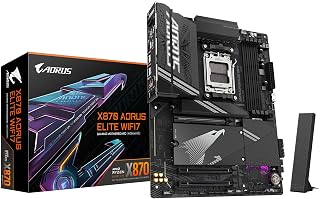
This X870 option emphasizes connectivity with USB4 and WiFi7, technologies that help justify choosing X870 when comparing chipset tiers. Four M.2 slots provide exceptional storage expansion for content creators and enthusiasts. PCIe 5.0 support ensures future graphics card compatibility. The EZ-Latch mechanism adds builder-friendly convenience, while the 5-year warranty provides peace of mind, making this a well-rounded X870 choice for feature-focused builds.
Pros
- Four M.2 slots with thermal guards offer more NVMe expansion than typical B850 boards
- Dual USB4 ports enable Thunderbolt-class speeds absent from B850 platforms
- 16+2+2 power delivery supports aggressive Ryzen 9000 overclocking with thermal confidence
- DDR5 support up to 8200 MHz with EXPO profiles unlocks meaningful memory bandwidth gains
Cons
- Single 2.5GbE LAN port limits wired networking for users managing multi-gigabit connections
- Full ATX form factor requires a spacious case, excluding compact or mid-tower restricted builds
When the B850 vs X870 choice comes down to future-proofing and headroom, the GIGABYTE X870 AORUS Elite WiFi7 is the answer for builders who want the chipset ceiling, not its floor. The step up to X870 is most visible in memory bandwidth, with support reaching 8200 MHz versus B850's 5200 MHz, and in the expanded storage layout with four M.2 slots compared to three. Dual USB4 ports bring Thunderbolt-class transfer speeds that B850 boards do not offer, a meaningful advantage for content creators and external storage workflows. The 16+2+2 power delivery configuration gives demanding Ryzen 9000 series processors genuine overclocking headroom. DDR5 capacity tops out at 256GB, and AMD EXPO profiles ensure validated memory overclocking. WiFi7 and 2.5GbE LAN match what B850 offers on connectivity, but the X870 chipset adds the bandwidth and expansion depth that justifies the higher platform cost for intensive builds. The EZ-Latch mechanism and five-year warranty are shared benefits across both chipsets in the AORUS lineup.
Socket and Compatibility: AMD Socket AM5, supports Ryzen 7000/8000/9000 series processors on Windows 11.
Memory Support: 4 x DDR5 DIMM slots, up to 256GB capacity, 8200 MHz support with AMD EXPO profiles.
Storage and Expansion: 4 x M.2 slots with thermal guards, 4 x SATA ports, PCIe 5.0 support, 3 PCIe slots total.
Connectivity: WiFi7, 2.5GbE LAN, dual USB4, USB-C (front and rear), 11 total USB ports, 1 HDMI output, Sensor Panel Link.
Power Delivery: 16+2+2 phase VRM, 24-pin ATX power connector. Form factor: ATX (9.61in L x 12.01in W x 1.38in H). Weight: 1.23 kg. Warranty: 5 years.
Choose this over a B850 board if you are running a power-hungry Ryzen 9000 series CPU, need USB4 for fast external devices, or plan to fill four M.2 slots with high-speed NVMe drives. Content creators and enthusiasts who will actually use the memory overclocking headroom above 5200 MHz get real value here. Budget-focused builders doing standard gaming or light productivity work will not exhaust what B850 provides and should skip the X870 premium.

This B850 alternative offers 14+2+2 power stages, placing it between budget and premium options for users comparing chipset tiers. DDR5 AEMP support at 8000 MHz provides strong memory performance for gaming builds. Four M.2 slots and USB 20Gbps Type-C deliver expansion options typically reserved for X870 boards, making this an excellent middle-ground choice for builders who want X870-like features at B850 pricing.
Pros
- 14+2+2 power stages at 80A each provide VRM performance that competes with X870 boards
- WiFi 7 with Q-Antenna delivers a connectivity upgrade over the WiFi6E found on many B850 alternatives
- Four M.2 slots including PCIe 5.0 support offer top-tier storage expandability for a B850 board
- DDR5 support up to 8000 MHz pushes memory bandwidth beyond standard B850 expectations
Cons
- Maximum RAM capacity of 192 GB is lower than the 256 GB supported by some competing B850 boards
- Running Ethernet and WiFi simultaneously can trigger connection conflicts, requiring one interface to be disabled
The ASUS ROG Strix B850-A sits at the top of the B850 stack and blurs the line between chipset tiers in a meaningful way. Its 14+2+2 power stages rated at 80A each deliver VRM performance that rivals many X870 offerings, making it a strong argument for choosing B850 when raw power delivery is a concern. Four M.2 slots with PCIe 5.0 support match storage expandability you would expect from pricier platforms. The memory controller pushes DDR5 up to 8000 MHz, well beyond standard B850 expectations. WiFi 7 with Q-Antenna technology is a standout over boards offering only WiFi6E, providing lower latency for competitive gaming. The 2.5G LAN covers wired performance for most users. ASUS AI Advisor and AI Networking II reduce setup complexity for builders new to AM5. Where X870 makes sense for platform-level features, this board demonstrates that B850 can close a significant portion of the gap when built to a higher specification.
Processor and Compatibility: Socket AM5, supports AMD Ryzen 9000, 8000, and 7000 series processors, chipset AMD B850.
Memory: DDR5 support up to 192GB, memory clock speed 8000 MHz, 4 DIMM slots, AEMP technology for enhanced memory performance.
Storage and Connectivity: 4 M.2 slots with PCIe 5.0 support, 2 SATA 6Gb/s ports, 17 USB ports total including USB 20Gbps Type-C, 1 Gigabit Ethernet, WiFi 7 with Q-Antenna, 3 PCIe slots.
Power and Thermal: 14+2+2 power stages at 80A per stage, 8+8-pin ProCool power connectors, integrated I/O cover, thick metal heatsinks with thermal pad coupling to VRMs.
Physical and Warranty: ATX form factor (14.1 inch length x 10.7 inch height x 2.9 inch width), 5 pounds, includes 3-year warranty, 1 unit included.

This B850 option delivers robust power delivery with its 80A SPS VRM, making it ideal for users deciding between chipsets who want strong processor support without overspending. The DDR5 Memory Boost reaching 8400+ MT/s ensures excellent RAM performance for gaming and productivity. With PCIe 5.0 x16 and M.2 Gen5 support, you get future-proof storage and graphics capabilities that match higher-tier boards, making this a compelling B850 choice.
Pros
- 5G LAN and Wi-Fi 7 deliver wired and wireless speeds that match or exceed what most X870 boards offer
- DDR5 support up to 8400+ MT/s provides exceptional memory bandwidth headroom for gaming and productivity
- 14-phase 80A SPS VRM handles top-tier Ryzen CPUs and overclocking without stability concerns
- Tool-free M.2 installation and quick-release GPU latch simplify upgrades and maintenance
Cons
- Only two M.2 Gen5 slots compared to boards offering three or four M.2 options at this tier
- The 4+4-pin main power connector configuration may require adapter cables in some older case and PSU setups
The MSI MAG B850 Tomahawk MAX WiFi is one of the strongest arguments for staying on B850 rather than upgrading to X870. Its 14-phase 80A SPS VRM handles high-end Ryzen processors and aggressive overclocking without compromise, matching power delivery specs you would normally associate with the higher chipset tier. DDR5 support reaching 8400+ MT/s sets a high ceiling for memory bandwidth, and dual M.2 Gen5 slots cover next-generation storage speeds alongside PCIe 5.0 x16 for the GPU. Connectivity is where this board genuinely punches above its chipset: 5G LAN from Realtek, Wi-Fi 7 with Bluetooth 5.4, and USB 20G Type-C rear output are features that typically appear on X870 platforms. The 2oz copper PCB and solid metal heatsinks reflect build quality that prioritizes long-term reliability. For builders asking whether B850 can deliver X870-adjacent performance, this board makes the affirmative case clearly.
Chipset and Socket: AMD B850 Chipset, Socket AM5 (Supports Ryzen 9000/8000/7000 Series)
Memory Support: 4x DDR5 DIMM slots, up to 8400+ MT/s (OC), 1DPC 1R configuration
Storage Connectivity: 1x M.2 Gen5 x4 (128Gbps), 1x M.2 Gen5 x4 (128Gbps), 1x M.2 Gen4 x4 (64Gbps), 1x M.2 Gen4 x2 (32Gbps), 6x SATA ports
Power Delivery: 14-Phase Duet Rail Power System, 80A SPS VRM, dual 8-pin CPU connectors, 24-pin ATX main power
Expansion Slots: 1x PCIe 5.0 x16 (128GB/s) with Steel Armor II, multiple PCIe Gen3/Gen4 slots
Networking: Wi-Fi 7 (802.11be) with Bluetooth 5.4, Realtek 5G LAN, USB 20G Type-C
Audio: 7.1 USB High Performance Audio with Audio Boost 5, S/PDIF output support
Thermal Management: 7W/mK MOSFET thermal pads, extended heatsinks, EZ M.2 Shield Frozr II, Combo-fan header (3A)
Warranty: 3-Year Manufacturer Limited Warranty
A strong match for builders who want X870-level networking and storage performance while staying on the B850 platform, including gamers and content creators working with Ryzen 9000, 8000, or 7000 series CPUs. The tool-free M.2 installation and quick-release GPU latch also suit builders who upgrade components frequently. Less suited for those who specifically require chipset-exclusive X870 features or need more than two M.2 Gen5 slots.

This X870 entry point features 60A SPS VRM and DDR5 support up to 8200 MT/s, offering solid foundations for users weighing chipset differences. The inclusion of both PCIe 5.0 x16 and 4.0 x16 slots provides GPU flexibility alongside M.2 Gen5 storage. Wi-Fi 7 and 5G LAN ensure cutting-edge connectivity, making this a practical X870 choice for builders who want the chipset's advantages without excessive features.
Pros
- 60A SPS 14-phase VRM with dual 8-pin connectors supports demanding Ryzen 9000 CPUs confidently
- M.2 Gen5 slot with Shield Frozr II thermal protection brings true X870-tier storage speed
- WiFi 7 and 5G LAN deliver the connectivity upgrade X870 promises over B850
- Server-grade PCB with 2oz copper traces reflects build quality above its price segment
Cons
- Single PCIe 5.0 x16 slot limits multi-card or expansion-heavy configurations
- Reaching DDR5 8200+ MT/s requires premium memory kits and manual tuning effort
The MSI X870 Gaming Plus WiFi V1 occupies an interesting position in the B850 vs X870 debate: it delivers the X870 chipset without the flagship price tag, making it the board to consider when you want the platform's PCIe 5.0 and DDR5 ceiling but do not want to pay for elaborately premium amenities. The 14-phase Duet Rail VRM rated at 60A SPS with dual 8-pin CPU connectors handles Ryzen 9000 power demands reliably, which is the core reason to choose X870 over B850 in the first place. One M.2 Gen5 slot alongside two Gen4 slots gives meaningful storage flexibility that B850 boards at this price range cannot always match. Frozr Guard thermal management, server-grade PCB materials, and 2oz copper traces reflect build quality that punches above the mid-tier positioning. WiFi 7 and 5G LAN round out a connectivity package that justifies the chipset step-up without demanding flagship spending.
Processor and Memory: Socket AM5 for Ryzen 9000/8000/7000 series, supports up to 4 DDR5 DIMMs with speeds up to 8200+ MT/s (OC), 1 DIMM per channel architecture.
Storage and Expansion: 1x M.2 Gen5 x4 (128Gbps) with Shield Frozr II, 1x M.2 Gen4 x4 (64Gbps), 1x M.2 Gen4 x2 (32Gbps), 4x SATA connectors for traditional drives.
Connectivity: Wi-Fi 7 with Bluetooth 5.4, 5Gbps Realtek LAN, USB4 Type-C 40Gbps with 4K/60Hz display support, 7.1 HD audio with Audio Boost, multiple USB headers for case connectivity.
Power and Cooling: 14-phase Duet Rail VRM with 60A SPS, dual 8-pin CPU power connectors, 24-pin main power, extended heatsinks, MOSFET thermal pads (7W/mK), combo fan header supports both pump and system fans.
Physical: ATX form factor, server-grade PCB with 2oz copper, 3-year manufacturer warranty, Windows 11 compatible.
A strong fit for gamers and builders who want X870 platform benefits, specifically PCIe 5.0 and DDR5 with overclocking headroom, but find fully loaded X870 flagships unnecessary. Single-GPU builds targeting one high-performance Ryzen processor will get full value here. Multi-GPU enthusiasts should look elsewhere given the single PCIe 5.0 x16 slot, and buyers expecting premium RGB ecosystems or high-end audio hardware will be disappointed.

For those leaning toward X870, this board justifies the premium with 16+2+2 power stages that provide superior power delivery for overclocking demanding Ryzen processors. The Dynamic OC Switcher and Core Flex technologies offer advanced tuning capabilities absent from B850 alternatives. Four M.2 slots and USB4 connectivity give you maximum expansion flexibility, making this X870 model perfect for enthusiasts who need every performance advantage.
Pros
- 16+2+2 power stages at 90A each handle the full Ryzen 9000 lineup without thermal stress
- WiFi 7 and USB4 represent the top connectivity tier the X870 platform enables
- AI-driven overclocking and cooling make advanced tuning accessible to newer builders
- Four M.2 slots with PCIe 5.0 storage support maximize X870's bandwidth advantages
Cons
- Price sits firmly in premium territory, hard to justify if B850 covers your actual workload
- Feature depth like AI OCing and AEMP adds complexity that casual builders may never use
When choosing between B850 and X870, the ROG Strix X870-A Gaming WiFi represents the clearest argument for spending up to the higher-tier chipset. The 16+2+2 power stage configuration with 90A per stage is overkill for modest builds but becomes genuinely relevant when pairing an X870 board with a Ryzen 9 processor that demands sustained, clean power delivery. X870 buyers are paying for headroom, and this board provides it in abundance. WiFi 7, USB4, PCIe 5.0 across both the primary x16 slot and M.2 storage, and DDR5 AEMP support make the chipset premium feel earned rather than theoretical. The AI-assisted overclocking and cooling tools lower the barrier for builders who want X870 performance without deep manual tuning expertise. Four M.2 slots with dual heatsinks handle serious storage configurations. For anyone already committed to the X870 tier, this board justifies the platform choice rather than just occupying it.
Power Delivery and Performance: The 16+2+2 power stage design with 90A per stage ensures stable performance with high-core-count Ryzen processors. Dual ProCool II connectors, premium alloy chokes, and durable capacitors minimize voltage ripple and maximize efficiency under sustained load.
Connectivity and Speed: WiFi 7 support and integrated 10G Ethernet deliver cutting-edge network speeds for competitive gaming and professional workflows. Four M.2 slots with dual heatsinks and PCIe 5.0 support future-proof storage expansion with lightning-fast transfer rates.
Smart Optimization: ASUS AI Overclocking, AI Cooling II, and AI Networking technologies work together to automatically tune performance based on workload demands. AEMP (Advanced Engine Memory Profile) simplifies DDR5 compatibility and stability.
Design and Build: Premium white PCB with sleek aesthetics suits high-end builds. Q-Release Slim GPU release mechanism eliminates the need for screwdrivers, while 21 USB ports and extensive I/O options provide maximum flexibility.
Builders who have already decided X870 is the right chipset and want a board that fully exploits what the platform offers, particularly those pairing it with a Ryzen 9 processor for gaming, streaming, or AI workloads. Also well-suited for those who want long-term stability and future-proofed connectivity. B850 builders or anyone on a strict budget should skip it entirely, as the premium feature set carries a premium price.

Pros
- 14+2+2 power phases deliver stable VRM performance across the full Ryzen AM5 lineup
- WiFi7 and 2.5GbE LAN provide genuinely modern wired and wireless connectivity
- Three M.2 slots with thermal guards support flexible NVMe storage expansion
- 5-year warranty offers stronger long-term coverage than most competing B850 boards
Cons
- Power delivery headroom falls short of X870 boards for serious CPU overclocking
- WiFi antenna is not included, requiring a separate purchase to use the WiFi7 feature
In the B850 vs X870 debate, the GIGABYTE B850 AORUS Elite WiFi7 makes the strongest case for builders who want modern AM5 features without the premium X870 asks. The B850 chipset lands here with a 14+2+2 power phase design that handles Ryzen 7000, 8000, and 9000 series processors competently, including overclocking scenarios. Three M.2 slots with thermal guards cover most multi-drive NVMe configurations, and DDR5 support up to 5200 MHz keeps pace with current performance expectations. WiFi7 and 2.5GbE LAN mean the connectivity story is genuinely current-generation, not a compromise. PCIe 5.0 support ensures GPU and storage bandwidth is not a bottleneck. Where B850 concedes ground to X870 is in power delivery headroom and advanced overclocking ceilings, but for the majority of Ryzen builds those limits are never reached. The AORUS branding brings VRM thermal guards and a clean layout that simplifies builds. Backed by a 5-year warranty, this board represents the rational ceiling of what B850 can offer.
Platform: AMD Socket AM5
Chipset: AMD B850
Memory: 4 DIMM slots, DDR5 up to 5200 MHz
Power Delivery: 14+2+2 phase design
Storage: 3x M.2 slots with thermal guards, PCIe 5.0 support
Connectivity: WiFi7, 2.5GbE LAN, USB-C, Sensor Panel Link
Form Factor: ATX
Warranty: 5 years
CPU Compatibility: Ryzen 7000, 8000, 9000 series processors

This X870 board combines USB4 and WiFi 7 with DDR5 8200MHz overclocking support, demonstrating the chipset's connectivity advantages for users evaluating options. Three M.2 slots handle multiple high-speed drives effectively. The 5G LAN ensures maximum wired network performance for file transfers and gaming. For builders deciding between chipsets who need comprehensive I/O and networking capabilities, this X870 model delivers essential premium features.
Pros
- USB4 and WiFi 7 connectivity unavailable on B850
- 14-phase 60A power delivery handles heavy overclocking
- Three M.2 slots with thermal guards prevent throttling
- PCIe 5.0 support future-proofs GPU and storage
Cons
- Antenna sold separately for WiFi functionality
- X870 platform increases total DDR5 system cost
When choosing between B850 and X870, the MSI PRO X870-P WiFi shows exactly what the higher chipset delivers. This ATX board brings USB4, WiFi 7, and PCIe 5.0 support that B850 can't match, giving Ryzen 9000, 8000, and 7000 users a clear upgrade path. The 14-phase power system with 60A stages and Core Boost stabilizes overclocking attempts that would strain entry boards, while three M.2 slots with Frozr cooling handle modern storage arrays without thermal throttling. Four DIMM slots accept up to 256GB of DDR5 with signal isolation designed for stable high-speed operation. The 5G LAN and comprehensive USB header selection address connectivity gaps common in B850 implementations. Extended VRM heatsinks actively manage heat during sustained loads, essential for content work or all-day gaming. Build quality reflects the X870 positioning with proper component spacing and professional layout. The platform trades absolute budget efficiency for capability, making DDR5 costs and separate antenna purchases part of the equation.
Processor Support: Socket AM5 for Ryzen 9000, 8000, and 7000 series
Chipset: AMD X870
Memory: 4x DDR5 DIMM slots, supports up to 256GB at 8200+ MT/s (OC)
Storage: 3x M.2 slots with PCIe support, 20x SATA ports
Power Delivery: 14-phase Duet Rail with 60A SPS stages
Expansion: PCIe 5.0 graphics slot, 4x PCIe slots total
Connectivity: WiFi 7, 5G LAN, USB4, 10 USB ports total, 1 Ethernet
Form Factor: ATX
Power Connector: 24-pin main
Dimensions: Standard ATX format
Best for builders who need X870 features like USB4 and WiFi 7 and plan to use high-core-count Ryzen chips with serious workloads. Content creators handling 4K editing or gamers streaming while playing will use the power delivery and expansion. Skip this if your workload runs fine on Ryzen 7600 or you don't need USB4, as B850 boards cost significantly less without those extras.

This X870 flagship delivers USB 40Gbps connectivity and M.2 Gen5 support, showcasing the premium chipset's superior I/O capabilities for users comparing options. The PCIe 5.0 infrastructure ensures maximum bandwidth for graphics and storage. Wi-Fi 7 and Bluetooth 5.4 provide the latest wireless standards, while 5Gbps LAN rounds out networking. These features collectively demonstrate why enthusiasts choose X870 over B850 for demanding applications.
Pros
- USB 40Gbps and PCIe 5.0 M.2 Gen5 deliver X870-class bandwidth unavailable on B850 boards
- 5Gbps LAN exceeds the 2.5GbE ceiling common on B850 competitors
- Extended heatsink and enhanced circuit topology sustain Ryzen boost clocks under prolonged load
- WiFi7 with Bluetooth 5.4 provides a complete current-generation wireless stack
Cons
- ATX form factor excludes builders working with compact or smaller mid-tower cases
- WiFi7 router availability remains limited, so the wireless upgrade may not deliver immediate real-world gains
For the B850 vs X870 comparison, the MSI MAG X870 Tomahawk WiFi represents the X870 argument from a gaming-first perspective. The chipset upgrade here is backed by practical hardware choices: USB 40Gbps via USB4, PCIe 5.0 for both GPU and M.2 Gen5 storage, and DDR5 support rated to 7800 MHz, all of which exceed what B850 boards typically offer. The extended heatsink design and enhanced circuit topology are engineered to sustain Ryzen boost clocks under the kind of prolonged gaming loads where thermal throttling becomes a real concern. WiFi7 and Bluetooth 5.4 keep the wireless stack current. The 5Gbps LAN port steps above the 2.5GbE commonly found on B850 boards, a tangible advantage for networked content workflows. Supporting Ryzen 7000, 8000, and 9000 series on the AM5 socket, it covers the full current processor range. The ATX form factor and military-inspired build quality reflect MSI's emphasis on durability. Where X870 earns its place in this comparison is sustained performance under load, not just peak specs.
Core Specifications: Socket AM5, AMD X870 chipset, ATX form factor (13.4" x 10.9"), 24-pin main power connector, 3-year warranty
Memory Support: 4 DIMM slots, DDR5 support up to 256GB capacity, 7800MHz memory clock speed
Connectivity: WiFi 7, Bluetooth 5.4, 5Gbps Ethernet (1 port), USB 4.0 (40Gbps), 13 total USB ports, 1 HDMI, 1 DisplayPort, 4 SATA 6Gb/s ports, 3 PCIe slots (including PCIe 5.0 M.2)
CPU Compatibility: AMD Ryzen 9000, 8000, and 7000 series desktop processors. Note: Does not support older AM4 generation CPUs
Dimensions: 13.4" length x 10.9" width x 3" height. Verify clearance in your PC case before purchase
Gamers and content creators building on X870 who want the chipset's bandwidth and thermal advantages without stepping into flagship pricing will find the Tomahawk a well-matched board. It suits builders running Ryzen 9000 series chips at sustained loads across long gaming sessions or rendering workloads. Skip it if your use case fits comfortably within B850 limits, you need a compact form factor, or your networking relies on a single wired device where 5Gbps LAN adds no value.
What to Consider When Choosing Between B850 and X870
PCIe Lane Configuration and Expansion
X870 delivers more PCIe lanes directly from the chipset, which matters when you run multiple NVMe drives or add-in cards. The GIGABYTE X870 AORUS Elite WIFI7 AMD AM5 LGA 1718 provides four M.2 slots and dual USB4 ports, while the GIGABYTE B850 Eagle WIFI6E AMD AM5 ATX caps at three M.2 slots and omits USB4 entirely.
B850 boards typically reserve PCIe 5.0 for the primary x16 slot and one M.2 slot. X870 extends PCIe 5.0 to additional M.2 connectors and often includes a second PCIe 4.0 x16 slot that runs at x4 electrically. If your workflow involves simultaneous NVMe transfers or you plan to add a capture card alongside your GPU, X870’s extra bandwidth prevents bottlenecks.
USB4 and High-Speed Connectivity
USB4 delivers 40Gbps throughput and DisplayPort tunneling, which transforms external storage and docking station performance. X870 boards like the ASUS ROG Strix X870-A Gaming WiFi AMD AM5 X870 ATX and MSI MAG X870 Tomahawk WiFi Gaming Motherboard include USB4 as standard, enabling single-cable workstation setups and fast external RAID arrays.
B850 boards substitute USB 20Gbps Type-C on the rear I/O, which handles most peripherals but lacks the bandwidth for professional video workflows or Thunderbolt docks. The ASUS ROG Strix B850-A Gaming WiFi AMD AM5 B850 ATX demonstrates this trade-off: excellent power delivery and WiFi 7, but no USB4. If you’re building around a high-refresh 4K display and need display connectivity through USB-C, X870 avoids adapter chains.
VRM Configuration and Power Stages
Both chipsets support identical processors, so VRM quality depends on the specific motherboard model rather than chipset tier. The MSI MAG B850 Tomahawk MAX WiFi Motherboard, ATX uses a 14-phase 80A design that matches or exceeds entry-level X870 boards. Similarly, the ASUS X870 AYW Gaming WiFi W AMD X870 AM5 ATX delivers 12+2+1 80A stages at a competitive price point.
Premium X870 models step up to 16-phase solutions with thicker heatsinks and additional thermal pads. The ASUS ROG Strix X870-A Gaming WiFi AMD AM5 X870 ATX pairs 16+2+2 power stages with dual ProCool II connectors, enabling sustained all-core overclocks on Ryzen 9 9950X processors without VRM throttling. If you plan to push a high-core-count chip while running memory at DDR5-8000 or above, X870’s top-tier boards provide headroom that B850 alternatives cannot consistently match.
Network and Wireless Standards
WiFi 7 appears on both chipsets, but implementation quality varies. The GIGABYTE B850 AORUS Elite WIFI7 AMD AM5 ATX and MSI X870 Gaming Plus WiFi V1 Motherboard both include WiFi 7 modules, yet the X870 model adds 5Gbps Ethernet versus 2.5Gbps on the B850. When you’re moving large project files to a NAS or streaming uncompressed footage, that wired speed difference cuts transfer times significantly.
Some B850 boards remain on WiFi 6E to reduce cost, as seen with the GIGABYTE B850 Eagle WIFI6E AMD AM5 ATX. WiFi 6E still delivers low-latency gaming and smooth 4K streaming, but WiFi 7’s multi-link operation and 320MHz channels provide an edge in crowded network environments. If your home office or studio has many wireless devices, WiFi 7 reduces congestion without requiring a wired connection.
Final Thoughts
B850 suits single-GPU gaming builds and productivity workstations that don’t require USB4 or extensive expansion. X870 makes sense when you need four or more M.2 drives, USB4 docking, or the strongest VRM configurations for overclocking high-end Ryzen processors. For balanced performance and value, the MSI MAG B850 Tomahawk MAX WiFi delivers 80A power stages and WiFi 7 without the X870 premium, while the GIGABYTE X870 AORUS Elite WIFI7 adds USB4 and a fourth M.2 slot for workflows that demand maximum connectivity. Match your chipset choice to your actual storage, peripheral, and power requirements rather than defaulting to the higher-tier option.
Frequently Asked Questions
Does B850 support PCIe 5.0 graphics cards?
Yes, both B850 and X870 provide a PCIe 5.0 x16 slot from the CPU, so you get full 128GB/s bandwidth for any modern graphics card. The chipset difference affects secondary slots and M.2 connectors, not the primary GPU slot.
Can I run DDR5-8000 memory on B850 motherboards?
Memory overclocking depends on motherboard trace layout and BIOS tuning, not the chipset. High-end B850 boards like the MSI MAG B850 Tomahawk MAX WiFi and ASUS ROG Strix B850-A support DDR5-8400 and above with EXPO profiles. CPU quality and memory ICs ultimately determine your maximum stable frequency.
Is USB4 necessary for gaming builds in 2026?
USB4 provides no gaming advantage unless you use an external GPU enclosure or high-speed capture device. Gamers benefit more from the B850 chipset’s cost savings, which can go toward a better display or GPU upgrade. Content creators and professionals who regularly transfer large files gain measurable time savings from USB4’s 40Gbps throughput.
Will X870 boards receive longer BIOS support than B850?
AMD treats B850 and X870 as the same platform generation for AM5, so both receive identical BIOS updates and future Ryzen processor compatibility. Chipset tier does not affect support duration. Choose based on features you need now rather than speculating on future support differences that won’t materialize.


Write Your Review
No reviews yet. Be the first to share your experience!