

Building around Intel’s Core Ultra 9 285K means you need a motherboard that can handle 24 cores running at speeds up to 5.7 GHz. The LGA 1851 socket and Z890 chipset bring new capabilities, but not every board delivers the same value. Whether you’re chasing overclocking records, building a content creation workstation, or assembling a high-end gaming rig, the right motherboard affects stability, expansion options, and long-term upgrade potential.
This guide examines 10 motherboards validated for the Core Ultra 9 285K. We focus on power delivery, thermal management, connectivity, and real-world performance to help you match board features with your specific build requirements. If you’re also planning your GPU and display setup, check out our guide to the best 4K monitors for RTX 5080 to complete your high-performance system.
Quick answer
This guide compares 10 picks, with Intel Core Ultra 9 285K LGA 1851 CPU + MAG Z890 ranked first. Intel Core Ultra 9 285K 24-Core Processor 5.7 GHz holds the highest customer rating among them.

Pros
- Exceptional core count and thread efficiency for streaming, rendering, and content creation workflows
- Hybrid P-core/E-core architecture runs cooler and quieter than traditional designs
- Gaming-focused motherboard with extended heatsinks ensures thermal stability under load
- Integrated graphics provide quick-start capability without a separate GPU investment
- Dual DDR5 channels enable massive memory bandwidth for AI and professional applications
Cons
- New LGA 1851 socket limits CPU upgrade options compared to more established platforms
- Requires DDR5 memory and PCIe 5.0 SSDs to fully leverage the platform's capabilities, increasing total build cost
- Limited real-world customer reviews at time of listing, though 5-star ratings indicate strong initial satisfaction
The Micro Center CPU Motherboard Combo pairs the Intel Core Ultra 9 285K with MSI's MAG Z890 Tomahawk WiFi, offering a premium foundation for high-performance PC builds. This bundle targets serious gamers, content creators, and professionals who demand a modern platform capable of handling demanding workloads with efficiency and stability.
The Core Ultra 9 285K stands out with its 24-core architecture, combining 8 performance cores and 16 efficiency cores to deliver both raw power and intelligent workload distribution. Unlocked operation up to 5.7 GHz provides ample headroom for gaming and demanding applications, while 40MB of cache and integrated graphics offer immediate productivity. The hybrid design keeps thermals manageable, allowing the system to run cooler and quieter than traditional high-core-count designs.
The MAG Z890 Tomahawk WiFi complements the processor with gaming-focused engineering, including extended PWM heatsinks and enhanced circuit design for stable operation under sustained loads. DDR5 support up to 256GB and multiple PCIe 5.0 slots future-proof the platform for emerging software and hardware requirements. WiFi 7 and gaming-grade audio round out the feature set for streamlined competitive and casual gaming.
The primary drawback is the new LGA 1851 socket, which limits CPU upgrade paths. Builders committed to the platform will also need to invest in DDR5 memory and modern NVMe storage to fully leverage the capabilities. Secondary cache specifications show 40MB installed, delivering excellent hit rates for demanding gaming and professional workloads.
This combo represents strong value for builders seeking a complete, modern platform without component compatibility concerns. The pairing of Intel's efficient high-core processor with MSI's gaming motherboard creates a well-balanced system ready for 1440p and 4K gaming, streaming, content creation, and professional applications.
Processor: Intel Core Ultra 9 285K, LGA 1851 socket, 24 cores (8P+16E), 24 threads, up to 5.7 GHz, 40MB cache, 125W TDP, integrated graphics.
Motherboard: MSI MAG Z890 Tomahawk WiFi, DDR5 dual-channel support up to 256GB, extended PWM heatsink design, WiFi 7 and gaming audio, multiple PCIe 5.0 slots.
Bundle Contents: CPU and motherboard only. Memory, storage, cooler, and power supply sold separately.
Who Should Buy: High-performance PC builders, serious gamers, content creators, streamers, AI enthusiasts, and professionals requiring a modern, efficient multi-core platform.
What You Need: DDR5 memory (recommend 32GB minimum), modern NVMe SSD, quality CPU cooler for optimal performance, 850W+ power supply for headroom, compatible PC case.
Performance Expectations: Excellent 1440p gaming at max settings, strong 4K performance with optimization, outstanding multithreaded workload handling, AI model inference and training acceleration via integrated graphics and CPU cores.
Value Consideration: This combo offers better value than purchasing components individually, particularly for builders prioritizing both gaming performance and professional workload capability in a single platform.

Pros
- Exceptional core count and threading make this ideal for 4K video editing, 3D rendering, and streaming
- Integrated Intel Graphics eliminates need for discrete GPU for basic tasks
- ASUS TUF Z890-Plus motherboard offers enterprise-level reliability with proven durability testing
- WiFi 7 and Thunderbolt 4 connectivity future-proof your system for emerging technologies
- Excellent thermal design keeps CPU and power delivery cool even during sustained workloads
Cons
- Premium pricing positions this bundle at the high end, making it less suitable for budget-conscious builders
- Requires DDR5 RAM and compatible cooling solutions, adding to overall system cost
- Newcomer to LGA 1851 socket means limited aftermarket CPU upgrade path compared to established platforms
The Intel Core Ultra 9 285K paired with the ASUS TUF Gaming Z890-Plus WiFi represents a premium solution for professionals, content creators, and high-end gamers who demand both power and reliability. This bundle combines cutting-edge processor architecture with a rock-solid motherboard platform designed for sustained performance under demanding workloads.
The 24-core processor excels in multithreaded applications, delivering up to 5.7 GHz boost clocks with 40MB of combined cache. The innovative split between 8 P-cores and 16 E-cores means your system intelligently allocates tasks for optimal efficiency, running cooler and quieter than traditional all-P-core designs. For 4K video work, 3D rendering, or running multiple applications simultaneously, this processing power transforms what's possible on a single desktop.
The ASUS TUF Z890-Plus motherboard justifies its place in this premium bundle with features like WiFi 7, four M.2 slots including one PCIe 5.0 drive bay, Thunderbolt 4 connectivity, and Intel 2.5 Gb Ethernet. The 16+1+2+1 80A power delivery system with ProCool connectors ensures stability even during overclocking adventures. Advanced thermal management through hybrid fan headers and Fan Xpert 4 AI keeps everything cool and quiet.
The main drawback is cost, as this bundle demands a significant investment before factoring in DDR5 RAM, NVMe storage, and compatible cooling. Additionally, LGA 1851 is a newer socket with limited CPU upgrade options compared to more established platforms. However, this architecture represents Intel's future direction, making it a solid long-term investment.
Verdict: If you need maximum CPU performance for professional work or future-proofed gaming, this bundle delivers exceptional value and reliability. The ASUS TUF pairing ensures your investment stays stable and relevant for years to come.
Processor: Intel Core Ultra 9 285K, 24 cores (8 P-cores + 16 E-cores), 24 threads, up to 5.7 GHz boost, 40MB cache, 125W TDP, LGA 1851 socket, integrated Intel Graphics
Motherboard: ASUS TUF Gaming Z890-Plus WiFi, LGA 1851 socket, 16+1+2+1 80A DrMOS power stages, 8-layer PCB, 4x M.2 slots (1x PCIe 5.0, 3x PCIe 4.0), WiFi 7 802.11be, Intel 2.5 Gb Ethernet, Thunderbolt 4 USB Type-C, front panel USB 20Gbps, comprehensive thermal management
Who Should Buy: Professional video editors, 3D animators, content creators, AI developers, competitive gamers with high-end setups, and power users who run multiple demanding applications simultaneously. This bundle is ideal if you plan to keep your system for 3+ years and want cutting-edge performance today.
Who Should Skip: Budget-conscious builders, light users who browse and watch streaming content, anyone uncomfortable spending premium prices, and users with legacy systems as upgrading motherboards and RAM becomes necessary.
Total System Cost Consideration: Factor in DDR5 RAM (minimum 32GB recommended), NVMe SSD, adequate cooling solution, and PSU capacity (850W+) when budgeting. This bundle requires a modern, well-specified system build.
Performance Context: The 24-core architecture excels at streaming while gaming, rendering 4K video, training machine learning models, and handling server workloads. Single-threaded gaming performance comes close to higher-clocked chips, but multithreaded dominance is where this CPU shines.

Pros
- Exceptional build quality using server-grade PCBs with 2oz thickened copper and premium components throughout
- 6 M.2 slots provide unmatched storage expansion potential compared to mainstream Z890 boards
- Optimized for DDR5 overclocking with proven stability and support for extreme memory speeds
- Comprehensive cooling features including cross heatpipes and thermal pads keep VRMs and storage cool during sustained performance
- Future-proof connectivity with Wi-Fi 7, Thunderbolt 4, and PCIe 5.0 support for emerging standards
Cons
- Limited to 2 DIMM slots, which restricts maximum RAM capacity compared to 4-slot boards, though this design choice optimizes overclocking performance
- No integrated video output, HDMI connector missing from rear IO, though Thunderbolt 4 with display support compensates
- High price point positions it above mainstream Z890 options, making it best suited for enthusiasts rather than budget builders
The MSI MEG Z890 Unify-X is a premium enthusiast motherboard engineered for extreme performance and designed specifically for DDR5 memory overclocking. It targets high-end gamers, content creators, and system builders who demand maximum overclocking potential and cutting-edge features. With support for Intel Core Ultra Series 2 processors on the Z890 chipset, this board bridges performance and expandability in a purpose-built platform.
The standout feature is its 2-DIMM dedicated architecture optimized for record-breaking DDR5 speeds up to 9600+ MT/s, backed by server-grade power delivery with 20 direct phases and 110A TLVR inductors. The 6 M.2 slots (1x Gen5, 5x Gen4) provide exceptional storage options, while dual PCIe 5.0 x16 slots support high-end GPUs and multi-card setups. Direct-touch cross heatpipes, aluminum covers, and 9W/mK thermal pads ensure reliable operation during extended overclocking sessions.
Build quality stands out with thick 2oz copper PCBs, PCIe Steel Armor II, and premium components throughout. The design philosophy prioritizes performance over aesthetics, using a minimalist approach with excellent cooling coverage. Assembly is streamlined through EZ M.2 Shield Frozr II, tool-free PCIe release, and a Smart Button for one-finger function activation. Connectivity is comprehensive with Wi-Fi 7, Bluetooth 5.4, Thunderbolt 4 (40Gbps with 8K support), and 5G LAN.
The primary limitation is the 2-DIMM slot configuration, which restricts maximum RAM capacity to around 192GB compared to 4-slot mainstream boards. The lack of HDMI output requires Thunderbolt 4 for video display, which is a non-issue for high-end builds but worth noting. The premium positioning reflects the enthusiast focus, making it best suited for builders with serious overclocking ambitions rather than mainstream users.
The MSI MEG Z890 Unify-X delivers genuine performance advantages for extreme overclocking and high-end gaming builds. Its combination of server-grade components, extensive storage options, and purpose-built DDR5 optimization justifies the investment for enthusiasts seeking a flagship Z890 platform. Highly recommended for builders prioritizing performance and expandability over price.
Processor and Chipset: Socket LGA 1851, Intel Z890 chipset, supports Intel Core Ultra Processors Series 2
Memory Support: DDR5, 2 DIMM slots, up to 9600+ MT/s OC (1DPC 1R configuration)
Storage: 6 M.2 slots (1x Gen5 x4 128Gbps, 5x Gen4 x4 64Gbps), 1x SATA port
Power Delivery: 20-phase direct TLVR (110A, SPS), dual 8-pin CPU power connectors, 4+4-pin main connector
GPU Support: Dual PCIe 5.0 x16 slots with Steel Armor II, additional PCIe 4.0 slots
Connectivity: Wi-Fi 7, Bluetooth 5.4, Intel Killer 5G LAN, Thunderbolt 4 Type-C (40Gbps, 8K display), 7 USB ports, 7.1 audio with Audio Boost 5, S/PDIF optical output
Cooling: Direct-touch cross heatpipes, aluminum covers, 9W/mK MOSFET thermal pads, EZ M.2 Shield Frozr II
Form Factor: ATX, 3-year manufacturer warranty
Who Should Buy: High-end gamers, extreme overclockers, content creators, and system builders seeking the best Z890 platform for DDR5 memory overclocking and maximum storage expansion. Ideal if you plan to push performance limits and need 6 M.2 slots and dual GPU support.
Who Should Look Elsewhere: Budget-conscious builders, users needing more than 192GB RAM (limited by 2-DIMM slots), or those prioritizing RGB aesthetics over performance. Standard gamers will not benefit from the premium price tag without overclocking plans.
Best Paired With: Intel Core Ultra 9 or 7 Series 2 processors, high-capacity DDR5 memory kits (especially CU-DIMMs for overclocking), premium AIR or AIO liquid cooling, PCIe 5.0 graphics cards, and high-wattage 1200W+ power supplies to support the system fully.
Key Considerations: Requires Thunderbolt 4 monitor or adapter for video output (no HDMI). The 2-DIMM design is intentional for OC optimization but limits maximum RAM. BIOS requires manual RAM configuration in some cases. Best results come with enthusiast-grade cooling and power delivery matching the board's capabilities.

Intel Core Ultra 9 285K 24-Core Processor 5.7 GHz
Pros
- 24 cores with up to 5.7GHz boost deliver benchmark results in the 99th percentile
- Reported thermals run 10 to 20 degrees Celsius cooler than expected, easing cooler selection
- Fully unlocked multiplier enables overclocking on compatible Z890 boards
- PCIe 5.0 and DDR5 support provide forward platform compatibility
Cons
- No cooler included, requiring a separate thermal solution investment from day one
- High core count performance gains are most apparent in multi-threaded workloads; lighter users will not see proportional benefit
The Core Ultra 9 285K is the natural centerpiece for any build this article is concerned with. Its 24-core layout combines 8 performance cores and 16 efficiency cores to handle the workloads that push high-end systems hardest: video editing, 3D rendering, large compilation jobs, and demanding gaming sessions. Boost speeds reach 5.7GHz, and the hybrid architecture manages thermals well enough that owners report running 10 to 20 degrees Celsius cooler than anticipated, making the processor workable with standard tower coolers or modest AIO solutions rather than elaborate custom loops. The 125W base power draw is reasonable given the core count and performance tier. PCIe 5.0 and DDR5 support keep the platform current, and the fully unlocked multiplier opens the door for overclocking on a compatible Z890 board. With 40MB total cache and 36MB secondary cache, latency-sensitive workloads are well served alongside the raw multi-threaded throughput the core count provides.
Core Configuration: 24 cores (8 P-cores plus 16 E-cores), 24 threads with Integrated Intel Graphics
Performance: Base speed with Turbo Boost Max 3.0 up to 5.7 GHz, unlocked multiplier for overclocking
Memory and Cache: 40MB total cache (L2/L3 combined), DDR5 memory support
Connectivity: PCIe 5.0 and 4.0 support, Intel Optane Memory support capability
Power and Thermal: 125W Processor Base Power, no thermal solution included
Compatibility: LGA1851 socket, Intel 800 series chipset motherboards required
Warranty: 3-year manufacturer warranty

Pros
- 80A Smart Power Stages with VRM Thermal Armor provide stable delivery for the 285K under load
- Four PCIe 5.0 M.2 slots cover demanding NVMe storage needs
- WiFi 7 and Thunderbolt 4 deliver modern connectivity at a mid-range position
- EZ-Latch design simplifies installation in a high-end build
Cons
- Single SATA port is a real restriction for builds that include multiple legacy drives
- No user reviews yet to confirm real-world stability with the Core Ultra 9 285K specifically
Pairing the Core Ultra 9 285K with a board that can handle its power demands without overspending on features you will never use is a legitimate strategy, and the GIGABYTE Z890 AORUS Elite WiFi7 makes a credible case for that approach. The 16+1+2 power delivery with 80A Smart Power Stages is competent for the 285K's TDP, and VRM Thermal Armor helps sustain that delivery under extended loads. Four M.2 slots with PCIe 5.0 support cover most storage configurations a 285K build will realistically need. WiFi 7 and 2.5GbE LAN handle modern network demands, and Thunderbolt 4 adds utility for external device connectivity. EZ-Latch components reduce friction during the build process, which matters when working inside a high-end system. The 285K deserves a board with solid fundamentals, and this one delivers them without unnecessary excess. The main constraint is the single SATA port, which limits legacy drive configurations. The 5-year warranty adds confidence for a processor investment at this level.
Processor and Socket: Socket LGA 1851, supports Intel Core Ultra 200 processors, Intel Z890 chipset.
Memory: 4x DDR5 DIMM slots, supports up to 256GB at 5600MHz with XMP memory module support.
Storage and Expansion: 4x M.2 slots with PCIe 5.0 support, 1x SATA port, 3x PCIe ports total.
Connectivity: WiFi7, 2.5GbE LAN, Thunderbolt 4, 10x USB ports, Front USB-C, Sensor Panel Link.
Power Delivery: 24-pin main connector, 16+1+2 power design, 80A Smart Power Stages.
Thermal Management: VRM Thermal Armor, M.2 Thermal Guard.
Form Factor: ATX, 694g weight.
Warranty: 5 years manufacturer support with 5-year EU spare part availability.
Builders who drop a Core Ultra 9 285K into a system focused on gaming or light content creation, and want strong fundamentals without paying for features like Thunderbolt 5 or 10GbE, will find this board well matched to that brief. The 5-year warranty suits anyone treating this as a long-term platform. Those planning heavy professional workloads with external high-bandwidth peripherals or multiple 2.5-inch SATA drives should look higher up the stack.

Pros
- 18+2+1+2 power stages with ProCool II connectors handle the 285K's full power draw with headroom to spare
- Seven PCIe 5.0 M.2 slots offer storage expandability that few competing boards can match
- AI Overclocking and NPU Boost extract Core Ultra performance without requiring manual expertise
- WiFi 7 with Q-Antenna and 25 USB ports ensure comprehensive, future-ready connectivity
Cons
- Premium positioning makes this a hard sell for builders who will not stress the 285K or use the advanced feature set
- Fully leveraging AI overclocking and cooling features requires user familiarity with the platform
The Core Ultra 9 285K is Intel's most demanding consumer processor, and the ROG Strix Z890-E Gaming WiFi is one of the few boards that meets it without compromise. The 18+2+1+2 power stage design with ProCool II connectors is purpose-built for processors that push power delivery hard across all cores, giving the 285K a stable foundation whether it is gaming, rendering, or running AI inference workloads. Seven M.2 slots with PCIe 5.0 support is an unusually high count that gives this platform genuine longevity as fast storage options continue to evolve. The AI-specific feature set, including NPU Boost, AI Overclocking, and AI Cooling II, maps directly onto what the Core Ultra architecture is designed to do, reducing the manual tuning burden while still extracting performance. WiFi 7 with Q-Antenna technology and 25 USB ports mean connectivity is never a limiting factor. MicroFine alloy chokes and premium capacitors back up the performance claims with build quality that matches the processor's tier. This is a board that grows with the 285K rather than holding it back.
Socket and Compatibility: Intel LGA 1851, supports Intel Core Ultra processors (Series 2), Windows 11 compatible.
Memory Support: DDR5 with NitroPath Technology, 4 DIMM slots, maximum capacity 192 GB, operates at 320 MHz with DIMM Fit and DIMM Flex for flexible configurations.
Power Delivery: 18+2+1+2 power stages (110A/90A/90A/80A), ProCool II connectors, MicroFine alloy chokes, premium metallic capacitors.
Storage and Expansion: Seven M.2 slots with PCIe 5.0 support, 4 SATA ports, 2 PCIe ports, PCIe 5.0 x16 slot with Q-Release Slim.
Connectivity: WiFi 7 with Q-Antenna, Thunderbolt 4, 25 USB ports total, 1 Gigabit Ethernet port, 1 HDMI port, optical S/PDIF connector, DMI interface.
Form Factor and Dimensions: ATX platform, 14.1 inches length, 3.5 inches width, 11.2 inches height, weighs 1.7 kg.
Warranty: 3-year manufacturer's warranty.
The ROG Strix Z890-E is the natural partner for builders who chose the Core Ultra 9 285K specifically to run demanding workloads, overclocked gaming rigs, or AI-accelerated applications and want the board to keep pace across every dimension. Enthusiasts who plan to push the platform hard over a long ownership period will use every feature here. Anyone building a modest gaming system or working within a tight budget should step down to a less fully equipped option.

Pros
- PCIe 5.0 and three M.2 slots prevent storage and GPU bottlenecks alongside the 285K
- WiFi6E and 2.5GbE LAN provide capable wireless and wired connectivity
- DDR5 support up to 256GB suits demanding multitasking workloads
- EZ-Latch design and ongoing BIOS updates simplify the build and improve compatibility
Cons
- B860 chipset restricts overclocking compared to Z890 boards, limiting the 285K's full tuning potential
- DDR5 memory compatibility requires checking the qualified vendor list, as some kits need a BIOS update to boot
Not every Core Ultra 9 285K build needs to spend flagship money on the motherboard itself. The GIGABYTE B860 Eagle WiFi6E makes a case for pairing Intel's top processor with a capable mid-range platform. PCIe 5.0 support ensures the board does not limit GPU or NVMe performance, and three M.2 slots provide ample fast storage. The 12+1+2+1 VRM topology handles power delivery competently for the 285K, though builders planning aggressive overclocking should note that this is a B860 chipset rather than a Z890. WiFi6E and 2.5GbE LAN cover modern connectivity needs, DDR5 support accommodates up to 256GB of memory, and the EZ-Latch system simplifies the build process. BIOS updates have expanded memory compatibility over time, which matters when pairing with high-capacity or high-speed DDR5 kits. For builders who want to allocate budget toward the processor, cooling, or GPU rather than the board, this is a practical and well-rounded platform.
A good fit for builders who prioritize the Core Ultra 9 285K itself and prefer to manage costs elsewhere in the build. Content creators and gamers who need modern connectivity and PCIe 5.0 without flagship board pricing will find genuine value here. Those planning heavy overclocking should move to a Z890 board instead, since the B860 chipset limits that headroom. Builders should also verify DDR5 kit compatibility against the qualified vendor list before purchasing.

Pros
- Excellent power delivery architecture with 80A DrMOS for stability and overclocking headroom
- Comprehensive storage expansion with PCIe 5.0 and four PCIe 4.0 M.2 slots
- Clean, minimalist white design with full PCB cover appeals to modern builders
- Strong feature set at competitive price point for Z890 segment
- Three-year manufacturer warranty provides peace of mind
Cons
- Limited customer reviews (only 3) make it harder to assess long-term reliability and user experiences
- PCIe 5.0 GPU slot may be underutilized until more graphics cards support the standard
- Overkill power delivery for non-overclocking builds, representing unused capability
The NZXT N7 Z890 is a feature-rich ATX motherboard built for enthusiasts and content creators upgrading to Intel's Core Ultra Series 2 processors. This board targets builders who want a balanced mix of performance, modern connectivity, and aesthetic appeal without paying for ultra-premium features. The design philosophy centers on providing genuine value through practical upgrades rather than gimmicks.
The standout features include robust power delivery with a 16+1+2 phase design, PCIe 5.0 support for both GPUs and NVMe storage, and comprehensive thermal management. Real-world performance benefits come from the stable power architecture during gaming and content creation, the ultra-fast PCIe 5.0 storage speeds for reduced load times, and the Thunderbolt 4 connectivity for external device workflows. The five M.2 slots give builders exceptional storage flexibility, a genuine advantage over competitor boards in this price tier.
The build quality reflects NZXT's design strengths. The full PCB cover in white creates a cohesive, polished look that works seamlessly in modern PC builds. The six-layer PCB with 2-ounce copper traces ensures signal integrity and heat dissipation during extended gaming sessions or rendering tasks. Thermal management is thoughtfully executed with dedicated heatsinks on the VRM and PCIe 5.0 NVMe slot, keeping temperatures controlled without excessive cooling requirements.
Potential drawbacks include limited user reviews so far, making it difficult to assess long-term reliability and specific real-world quirks. The PCIe 5.0 GPU slot offers future-proofing but may feel like overkill until next-generation graphics cards become mainstream. For non-overclocking users, the power phase design slightly exceeds practical needs, though this doesn't hurt performance or pricing.
Verdict: The NZXT N7 Z890 delivers strong value for builders seeking a modern, capable platform. The combination of PCIe 5.0 expansion, premium connectivity, clean aesthetics, and competitive pricing makes it an excellent choice for gaming, content creation, and enthusiast builds. Recommended for anyone ready to embrace Core Ultra Series 2 without compromise on core features.
Processor Socket: Intel LGA 1851 for Core Ultra Series 2 processors
Chipset: Intel Z890
Form Factor: ATX
Memory Support: DDR5, 4 dual-channel DIMM slots, up to 8000+ MT/s
Power Delivery: 16+1+2 power phases, 80A DrMOS, 24-pin main connector
Storage Expansion: 1 PCIe 5.0 M.2 slot, 4 PCIe 4.0 M.2 slots
GPU Expansion: 1 PCIe 5.0 x16 slot, 2 PCIe 4.0 x16 slots
Networking: 2.5GbE Ethernet, Wi-Fi 6E
Connectivity: Thunderbolt 4, 40 total ports, USB headers
Warranty: 3 years manufacturer coverage
Best For: Gamers building high-performance systems, content creators with storage-heavy workflows, enthusiasts planning long-term platform investment with Core Ultra Series 2 processors.
Consider If You: Need multiple M.2 storage slots, want PCIe 5.0 future-proofing, prioritize clean aesthetic design, require Thunderbolt 4 connectivity, plan to overclock moderately to heavily.
Skip If You: Are building a budget workstation where power delivery overkill adds unnecessary cost, don't need Wi-Fi 6E or Thunderbolt 4, prefer boards with more RGB customization, are uncertain about core performance needs.
Related Considerations: Pair with DDR5 RAM rated for 7000+ MT/s to maximize platform performance. Ensure your power supply supports stable 16+1+2 phase delivery during peak loads. Check CPU compatibility as Socket LGA 1851 is exclusively for Core Ultra Series 2 processors.
Pros
- Thunderbolt 5 Type-C delivers class-leading external bandwidth for creative workflows
- Five M.2 slots with PCIe 5.0 support keep storage from bottlenecking the 285K
- 10GbE plus 2.5GbE dual LAN suits high-speed local network environments
- DDR5 support up to 9066 MHz gives strong headroom for memory-sensitive workloads
Cons
- Feature set skews toward professional and creative use, making it overkill for gaming-only builds
- No existing user reviews available to validate real-world performance and reliability
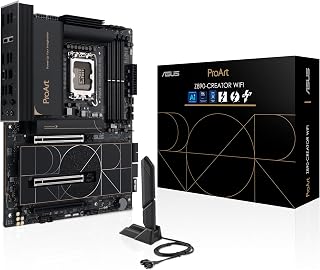
The ASUS ProArt Z890-CREATOR WIFI is built around a creative-professional identity that aligns well with what the Core Ultra 9 285K demands from a platform. The 16+2+1+2 power stage configuration gives the 285K's high-core-count architecture the stable, clean power it needs under sustained workloads like video encoding or 3D rendering. Five M.2 slots with PCIe 5.0 support mean storage bandwidth will never be a bottleneck when the processor is running flat out. Thunderbolt 5 Type-C is the headline connectivity feature here, offering the kind of external bandwidth that content creators moving large assets between devices genuinely need. The dual LAN setup, combining 10GbE and 2.5GbE, suits studio environments where fast local network transfers matter. DDR5 support up to 9066 MHz gives the 285K room to breathe on the memory side. WiFi 7 rounds out the wireless picture. For anyone pairing the 285K with a professional or creative workload rather than a pure gaming rig, the ProArt's feature set is purpose-matched rather than merely adequate.
Core Specifications: Socket LGA1851 for Intel Core Ultra Series 2 processors, Z890 chipset, 4x DDR5 DIMM slots supporting up to 192GB at 9066MHz, 24-pin main power connector with 8-pin CPU power.
Storage and Expansion: 5x M.2 slots (four PCIe 4.0, one PCIe 5.0), 4x SATA ports, 3x PCIe slots with PCIe 5.0 support on primary GPU slot, extensive USB header support including USB 20Gbps front-panel header.
Connectivity: 2x Thunderbolt 5 ports, 1x Thunderbolt 4 port, 1x 10Gb Ethernet, 1x 2.5Gb Ethernet, WiFi 7, 15x USB ports total, 1x HDMI output, comprehensive audio connectors.
Physical: ATX form factor, 14"W x 11"H x 3.4"L, weight 2.7kg, includes 3-year manufacturer warranty.
This board is the right fit for content creators, video editors, and studio professionals who chose the Core Ultra 9 285K for its compute horsepower and need the platform to keep up across storage, networking, and external peripherals. Thunderbolt 5 and 10GbE are meaningful differentiators for that audience. Pure gamers or budget-conscious builders should skip it, as those connectivity features carry a cost that gaming workloads will not justify.

Pros
- 110A SPS power stages support sustained overclocking headroom on the 285K
- DDR5 up to 9200MHz and 256GB capacity matches flagship processor demands
- Thunderbolt 4, Wi-Fi 7, and 10Gbps LAN suit professional and high-performance workflows
- PCIe 5.0 and multiple M.2 slots prevent storage or GPU bottlenecks
Cons
- Feature complexity and board size require careful planning, especially in smaller cases
- Full performance potential demands high-end cooling and premium components, increasing total system cost
Pairing the Core Ultra 9 285K with anything less than a board capable of sustaining its power demands risks leaving performance on the table. The MSI MEG Z890 ACE addresses that directly. Its 24+1+2+1 DRPS configuration with 110A SPS stages gives the 285K the clean, stable current it needs for sustained all-core loads and aggressive overclocking. DDR5 support up to 256GB at 9200MHz means memory bandwidth is never a bottleneck for the processor's 24 cores during compilation, rendering, or gaming. PCIe 5.0 ensures GPU bandwidth keeps pace with what the 285K can push, and Thunderbolt 4 serves the professional workflows that motivate buying a flagship processor in the first place. Wi-Fi 7 at 5.8Gbps and 10Gbps LAN round out a connectivity suite that matches the caliber of the processor it supports. For builders who are already committing to the Core Ultra 9 285K, this Z890 board removes every potential platform bottleneck.
Socket and CPU Support: LGA 1851, Intel Core Ultra Series 2 processors
Memory: Dual Channel DDR5, up to 256GB capacity, 9200MHz speed support
Expansion: PCIe 5.0 support, multiple M.2 slots, SATA connectors
Connectivity: Wi-Fi 7 (5.8Gbps max), 10Gbps LAN, Thunderbolt 4, USB Type-C, Bluetooth 5.4
Power Delivery: 24+1+2+1 DRPS, 110A SPS with OC engine
Form Factor: ATX
Platform Support: Windows 11
Best suited for content creators, developers, and enthusiast gamers who chose the 285K for its full 24-core capability and want a platform that can sustain peak performance without compromise. Those who plan to overclock or run memory at high frequencies will benefit most. Builders on tighter budgets or running lighter workloads that do not stress the 285K should look elsewhere, since the advanced feature set exceeds what casual use requires.
Buying Guide
Power Delivery Architecture
The Core Ultra 9 285K draws significant current under sustained workloads. A motherboard’s VRM (voltage regulator module) must supply clean, stable power without throttling performance.
Look for boards with at least 16+1+2 power stages using 80A or higher DrMOS components. The MSI MEG Z890 Unify-X Motherboard, ATX employs a direct 20-phase design with 110A SPS specifically for extreme overclocking. Premium boards like the ASUS ROG Strix Z890-E Gaming WiFi Intel® Z890 LGA feature 18+2+1+2 stages with ProCool II connectors and MicroFine alloy chokes for sustained high-frequency operation. Budget-conscious builders can still find solid 12+1+2+1 designs with 50A components on B860 boards, sufficient for stock or moderate overclocks.
Memory Support and Overclocking Headroom
DDR5 memory performance directly impacts system responsiveness and application throughput. The Z890 chipset officially supports DDR5, but actual achievable speeds depend on motherboard trace layout and DIMM slot configuration.
Four-DIMM boards offer more capacity but typically plateau around 7200-8000 MT/s for stability. Two-DIMM designs like the Unify-X push beyond 9600 MT/s by reducing signal complexity. If you need 128GB or 256GB capacity, prioritize boards with optimized four-slot layouts and features like ASUS DIMM Flex or MSI Memory Boost. For maximum speed with 32-48GB kits, a two-DIMM board delivers better overclocking margins. When planning a complete system, consider pairing your motherboard choice with a case that accommodates high-end GPUs for balanced performance.
Storage and Expansion Lanes
PCIe 5.0 support for both GPUs and NVMe drives defines the Core Ultra platform. Confirm how the board allocates lanes before committing.
Most Z890 boards provide one PCIe 5.0 x16 slot for graphics and at least one PCIe 5.0 M.2 slot for storage. The ASUS ProArt Z890-CREATOR WIFI Z890 LGA 1851 ATX includes dual Thunderbolt 5 ports and five M.2 slots total, ideal for content creators managing large media libraries. Gaming-focused boards like the GIGABYTE Z890 AORUS Elite WIFI7 Intel Core balance four M.2 slots with Thunderbolt 4 and front USB-C connectivity. Budget B860 options reduce M.2 count to three slots and may limit secondary PCIe slots to Gen 4, acceptable if you’re running a single GPU and moderate storage array.
Thermal Management and Cooling Features
High power stages generate substantial heat. Inadequate cooling causes VRM throttling, reducing CPU performance even when core temperatures remain acceptable.
Effective boards use large aluminum heatsinks with cross-heatpipe designs to spread thermal load across the VRM zone. M.2 drives also benefit from double-sided thermal shields, especially Gen5 SSDs that can hit 80°C under sustained writes. The NZXT N7 Z890 – Intel Z890 LGA 1851 ATX Motherboard integrates VRM and PCIe 5.0 NVMe heatsinks with optimized airflow paths across the full PCB cover. MSI’s Frozr Guard combines direct-touch heatpipes with 9W/mK thermal pads for aggressive cooling. Budget boards may use simpler heatsink designs; verify reviews confirm stable VRM temperatures under load before purchasing. For more guidance on building a properly cooled system, explore our recommendations for cases that support high-end RTX 5080 builds.
Final Thoughts
The best motherboard for Core Ultra 9 285K depends on your specific workload and expansion needs. Overclockers chasing record DDR5 speeds should consider the MSI MEG Z890 Unify-X with its dedicated two-DIMM architecture and 110A power stages. Content creators managing multiple high-speed storage devices and Thunderbolt peripherals will appreciate the ASUS ProArt Z890-CREATOR WIFI with dual Thunderbolt 5 ports and five M.2 slots. Match your board’s feature set to your actual requirements rather than chasing specifications you won’t use, and confirm thermal performance meets the demands of sustained high-core-count workloads.
Frequently Asked Questions
Do I need a Z890 board or will B860 work for the Core Ultra 9 285K?
The Core Ultra 9 285K works on both chipsets, but Z890 unlocks full overclocking and memory tuning. B860 boards support the processor at stock settings with reduced PCIe lanes and fewer USB ports. If you plan to push DDR5 beyond JEDEC speeds or overclock the CPU, Z890 is necessary. For stock operation with moderate workloads, B860 offers acceptable performance at lower cost.
How much RAM can I install on a Core Ultra 9 285K motherboard in 2026?
Most Z890 boards support up to 256GB across four DIMM slots using 64GB modules. Two-DIMM overclocking boards cap at 96GB but achieve higher memory frequencies. Confirm your motherboard’s QVL (qualified vendor list) for validated memory kits at your target speed. Mixing different capacity modules or exceeding validated configurations may force lower speeds or require manual tuning.
What’s the difference between WiFi 6E and WiFi 7 on these motherboards?
WiFi 7 introduces 320MHz channel bandwidth and Multi-Link Operation for theoretical speeds up to 5.8Gbps, double WiFi 6E’s maximum. In practice, you’ll see lower latency and better performance in congested environments. WiFi 6E still delivers excellent speeds (up to 2.4Gbps) and costs less. Choose WiFi 7 if you have a compatible router and need maximum wireless performance, or save money with WiFi 6E for typical home network usage. If you’re building a complete setup and need display recommendations, check our guide to the best monitors for RTX 5070 Ti.
Can I use my existing CPU cooler with LGA 1851 motherboards?
LGA 1851 uses the same mounting hole pattern as LGA 1700, so most modern coolers compatible with LGA 1700 will fit LGA 1851 boards. Some manufacturers ship updated mounting brackets or standoffs to account for the Reduced Load ILM socket design. Verify your cooler manufacturer’s compatibility page or contact support to confirm bracket availability before assuming full compatibility.


Write Your Review
No reviews yet. Be the first to share your experience!