

Building a system around Intel’s Core Ultra 9 285K means choosing a cooler that can handle sustained high-performance workloads. With 8 P-cores and 16 E-cores pushing up to 5.7 GHz, this processor generates significant heat that air cooling struggles to manage efficiently.
This guide focuses on 360mm AIO liquid coolers that provide the thermal headroom the 285K needs for gaming, content creation, and demanding multithreaded applications. If you’re also building around the new Z890 platform, you’ll want a cooler with native LGA 1851 support and modern features like offset mounting.
Quick answer
This guide compares 10 picks, with Noctua NL-LC1-36 360mm AIO Liquid CPU Cooler ranked first. ARCTIC Liquid Freezer III Pro 360 AIO CPU Cooler, 120mm has the most customer reviews.
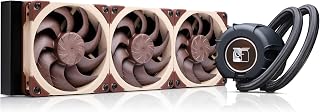
Noctua's 360mm radiator tackles the 285K's thermal output while maintaining exceptional silence at just 22.5 dB, making this ideal for professionals running extended workloads where fan noise disrupts focus. The robust 4-pin PWM control ensures precise speed adjustments as the processor scales between its efficient base and 5.7 GHz boost clocks across mixed P-core and E-core workloads.
Pros
- Industry-leading 22.5 dB noise level keeps 285K cooling silent
- Copper base and 360mm radiator handle high-power CPU loads
- SecuFirm2 offset mounting targets LGA 1851 hotspots precisely
- NT-H2 thermal paste included eliminates separate purchase
Cons
- 360mm radiator requires substantial case clearance
The Core Ultra 9 285K generates substantial heat under load, making the Noctua NL-LC1-36 an ideal pairing for builders who refuse to compromise on acoustics. This 360mm AIO tackles the 285K's thermal demands while maintaining whisper-quiet operation at 22.5 dB, thanks to Noctua's pump noise absorber with 3-layer acoustic soundproofing and tuned-mass damper. Three NF-A12x25 G2 fans with speed-offset acoustic optimization deliver 107.3 cubic meters per hour of airflow without the typical AIO whine. The copper base ensures optimal heat transfer from the processor's integrated heat spreader, while the aluminum radiator dissipates heat efficiently during extended rendering or compilation tasks. SecuFirm2 mounting with offset options lets you target the 285K's hotspot precisely. The comprehensive accessory kit includes NT-H2 thermal paste and an AM5 thermal paste guard, though the LGA 1851 socket compatibility matters most here.
Cooling Platform: Asetek Emma V2 closed-loop liquid cooling system
Radiator: 360mm with copper base and aluminum core
Fans: Three Noctua NF-A12x25 G2 PWM 120mm fans, 1800 RPM max, 107.3 cubic meters per hour airflow
Noise Level: 22.5 dB (ultra-quiet operation)
Power Consumption: 1.8 watts, 4-pin connector, 12V
Mounting: SecuFirm2 multi-socket system compatible with AMD AM5, Intel LGA1851, with offset options for hotspot optimization
Dimensions: 15.75 inches L x 4.72 inches W x 2.32 inches H
Weight: 1980 grams
Included Accessories: NT-H2 thermal paste, thermal paste guard for AM5
Warranty: 6-year manufacturer's warranty
Buy this if you're running the Core Ultra 9 285K in a workstation or content creation build where fan noise disrupts your workflow. The acoustic engineering makes extended rendering sessions tolerable without headphones. Skip it if your 285K lives in a gaming rig where GPU fans already dominate the noise floor, or if your case lacks clearance for a 360mm radiator. Budget-conscious builders should consider whether the acoustic premium over competing 360mm AIOs matters for their specific use case.

The Kraken Core 360 RGB pairs a 360mm radiator with straightforward installation for the LGA 1851 socket, handling the 285K's thermal demands without excessive complexity. Its 31.9 dB operating noise strikes a practical balance for users who need reliable cooling during gaming sessions or content creation without intrusive fan whine at moderate to high loads.
Pros
- 360mm radiator handles 285K thermal loads at accessible pricing
- Single-frame fan design simplifies installation and cable management
- 31.9 dB operation quieter than many competing AIOs
- 5-year warranty backs reliability for long-term builds
Cons
- Marginal performance gains over quality air coolers for extreme overclocking
- Full RGB customization requires CAM software ecosystem
For Core Ultra 9 285K builds prioritizing value over acoustics, the NZXT Kraken Core 360 RGB delivers competent cooling without premium pricing. The 360mm radiator provides adequate thermal capacity for the 285K's 125W base power and higher turbo loads, while the 3,100 RPM pump maintains consistent flow rates during gaming and multitasking sessions. At 31.9 dB, this cooler runs quieter than many competing AIOs, though it sacrifices the extreme acoustic refinement found in premium options. The single-frame fan design simplifies installation by consolidating three fans into one solid assembly, reducing mounting hardware and cable management complexity. Direct motherboard connectivity eliminates controller requirements, making setup straightforward for first-time AIO users. RGB Core fans integrate with CAM software for lighting synchronization across your system. The optimized fan blade design generates 75.05 CFM with efficient static pressure through radiator fins, translating to stable temperatures during typical workloads. A 5-year warranty backs the cooler's reliability. While extreme overclockers pushing the 285K to its limits may find marginal performance gains over quality air cooling, mainstream users running stock or modest overclocks will appreciate the balance between thermal capability and accessible pricing.
Cooling Method: All-in-one liquid cooling
Radiator Size: 360mm
Pump Speed: 3,100 RPM maximum
Noise Level: 31.9 dB
Air Flow: 75.05 CFM
Power Connector: 4-Pin PWM
Voltage: 12V DC
Power Consumption: 12.12 watts
Dimensions: 15.62 inches L x 4.72 inches W x 5.7 inches H
Weight: 1.78 kg
Warranty: 5 years manufacturer
Included: 360mm AIO cooler with pre-installed fans

The Atmos delivers 70.7 CFM airflow through its Sickleflow Edge fans, providing headroom for the 285K's 125W base and higher turbo power draws. Native LGA 1851 support eliminates mounting adapter hassles, while the dual-chamber pump design improves coolant flow efficiency when this 24-core processor sustains all-core loads during rendering or compilation tasks.
Pros
- Delivers 7 to 10 degree Celsius temperature drops compared to air coolers and poor stock solutions
- Nearly silent operation at 25dB makes it ideal for quiet builds and long gaming sessions
- Simple installation with included brackets and adapters for multiple platforms
- Impressive build quality and eco-conscious design appeal to environmentally minded builders
- Five-year warranty provides long-term peace of mind
Cons
- RGB software control is optional but requires additional setup if motherboard RGB controller is unavailable
- Installation instructions could be clearer, particularly for RGB pin connections
- 360mm radiator requires adequate case space, may not fit compact builds or cases with clearance limitations
The Cooler Master MasterLiquid 360 Atmos is a next-generation all-in-one liquid cooler built for high-performance CPUs like AMD Ryzen 9 and Intel i9 processors. It's designed for enthusiasts and gamers who need superior thermal performance, whether upgrading from inadequate stock coolers or stepping up from traditional air cooling solutions.
What sets the Atmos apart is its patented dual chamber pump design, which optimizes water pressure and flow directly to the CPU hotspot for exceptional cooling efficiency. Real-world testing shows temperature reductions of 7 to 10 degrees Celsius compared to air coolers, and users report CPU throttling issues completely resolved. The precision-engineered ultra-thin spade fins in the water block target heat dissipation exactly where it matters most, keeping even demanding processors like the Ryzen 9 7950X under control.
The build quality is solid, with aluminum and copper construction that feels premium and robust. The customizable 3D-printed pump cover with aRGB Gen 2 lighting adds a personalization factor, while the eco-conscious materials and 35% recyclable metal content appeal to environmentally minded builders. Pre-installed SickleFlow Edge PWM fans deliver strong airflow at just 25dB, making this cooler practically silent even during stress testing or intensive gaming.
The main drawback is installation documentation could be more detailed, especially regarding RGB pin connections. Additionally, the 360mm radiator requires adequate case space, so compact or clearance-limited builds may face fit issues. RGB control is optional but adds setup complexity if your motherboard lacks a compatible controller.
The MasterLiquid 360 Atmos represents excellent value for enthusiasts seeking reliable, quiet cooling with a five-year warranty backing your investment. If you're tired of thermal throttling or fan noise, this cooler delivers on both fronts.
Cooling Performance
Noise Level: 25dB | Max RPM: 2500 | Air Flow: 70.7 CFM | Cooling Method: Closed-Loop Liquid
Compatibility
AMD Platforms: AM5 | Intel Platforms: LGA 1851, LGA 1700 | Recommended CPUs: AMD Ryzen 9, Intel i9
Physical Specifications
Radiator Dimensions: 15.51L x 4.71W x 1.07H inches | Weight: 4 pounds | Power Connector: 4-Pin
Materials and Construction
Components: Aluminum, Copper, Plastic | Pump Top Cover: Recyclable plastic with 3D customization support | Warranty: 5 years
In the Box
360mm Radiator with pump block, Three SickleFlow 120 Edge fans, Installation kits for AMD and Intel, Controller, Manual
Who Should Buy This?
This cooler is ideal for PC builders with high-end CPUs like Ryzen 9 or Intel i9 processors who want temperatures 7 to 10 degrees lower than air cooling. It's perfect for gaming enthusiasts, content creators, and anyone experiencing thermal throttling with existing coolers.
Case Compatibility
The 360mm radiator requires adequate mounting space. Check your case specifications before purchase. Most mid-tower and full-tower cases support 360mm radiators without issue, but compact or mini-ITX builds may face clearance challenges.
Installation Tips
While installation is straightforward, first-time liquid cooler users should carefully read included documentation and watch installation videos for your specific platform. RGB pin connections require attention but are covered in the manual. Plan 30 to 60 minutes for full setup including mounting and cable management.
Maintenance
Sealed closed-loop design requires no refilling or maintenance. Simply ensure fans and radiator fins stay dust-free through regular cleaning. The five-year warranty covers defects and reliability issues.

The Nautilus 360 RS handles the 285K's demanding thermal profile with direct motherboard connection for cleaner cable management and daisy-chain capability for multi-cooler setups. Its LGA 1851 socket compatibility ensures drop-in installation for Intel's latest platform, while the 36 dB noise level keeps acoustics reasonable under the sustained loads this flagship chip generates during productivity work or sustained gaming sessions.
Pros
- 20 dBA pump operates nearly silently under load
- Pre-applied thermal paste and straightforward installation
- Daisy-chained ARGB reduces cable management complexity
- Direct motherboard connection eliminates separate controllers
Cons
- ARGB control depends on motherboard compatibility
- No LCD pump display for status monitoring
The CORSAIR Nautilus 360 RS delivers the thermal capacity and quiet operation the Core Ultra 9 285K demands without unnecessary complexity. Its 360mm radiator and RS120 ARGB fans with AirGuide technology handle the processor's thermal output effectively, while the 20 dBA pump ensures near-silent operation during heavy workloads. The convex cold plate with pre-applied thermal paste simplifies installation, and daisy-chained ARGB lighting reduces wiring clutter in your build. Direct motherboard connection eliminates the need for separate controllers, though iCUE software remains available for advanced RGB tuning. Aluminum and copper construction throughout ensures durability, and Magnetic Dome bearings in the fans promise long-term reliability. Users report strong thermal performance under sustained load with minimal acoustic intrusion, making this cooler particularly effective for content creation and gaming sessions where silence matters. The absence of an LCD pump display keeps the design straightforward and focused purely on cooling performance. Socket compatibility covers Intel LGA 1851/1700 and AMD AM5/AM4, providing flexibility across current platforms.
Installation is remarkably straightforward and takes approximately 15-30 minutes depending on experience level. The pre-applied thermal paste eliminates the guesswork, and the convex cold plate design ensures proper contact with Intel and AMD CPU integrated heat spreaders without requiring additional paste application.
Compatibility spans a wide range of modern platforms: Intel LGA 1851, LGA 1700, and AMD AM5, AM4 sockets. Connection is simplified through a single 4-pin PWM fan header and one 5V ARGB header on your motherboard, with daisy-chaining capability for the three included RS120 fans. Cable lengths are well-designed to accommodate most modern case layouts without excessive excess or tension.
The Nautilus 360 RS excels in thermal performance, consistently keeping high-end CPUs cool even during extended gaming sessions or heavy workloads. The high-flow pump circulates coolant efficiently while maintaining its exceptionally quiet 20 dBA operation. Users report CPU temperatures remaining stable and low even with demanding processors like the i7-12700KF under sustained load.
Acoustic performance is exceptional by AIO standards. The pump runs at whisper-quiet levels, and the RS120 fans generate minimal noise despite providing strong static pressure and airflow. This combination makes the cooler ideal for noise-sensitive builds, streaming setups, and professional environments where acoustic performance is a priority.

Lian Li's Hydroshift II pushes 90.1 CFM through its radiator, directly addressing the 285K's heat output when all 24 cores ramp to maximum frequency. The curved OLED display adds real-time temperature monitoring, letting overclockers and enthusiasts track thermal behavior as this processor shifts workloads between its 8 P-cores and 16 E-cores under demanding applications.
Pros
- Exceptional visual appeal with smooth animations and real-time performance metrics on premium OLED screen
- Motorized adjustment system ensures optimal display positioning without manual tweaking
- Whisper-quiet operation at 33 dB makes it suitable for silent-build enthusiasts
- Hot-swappable design significantly reduces risk of accidental damage during setup or maintenance
- Comprehensive socket compatibility covers nearly all modern CPU platforms
Cons
- Display feature adds complexity and potential points of failure compared to traditional coolers
- Motorized components require power and software control, adding setup complexity for some users
The Lian Li Hydroshift II is a premium all-in-one liquid cooler designed for PC enthusiasts and content creators who want their cooling system to be both functional and visually stunning. It pairs robust thermal performance with a curved OLED display that transforms your cooler from a passive component into an active focal point of your build.
The standout feature is undoubtedly the 6.67-inch curved 2K OLED panel with 500 nits brightness. This display delivers vibrant colors and exceptional contrast for real-time monitoring of CPU temperature, clock speeds, and custom animations. The motorized pump head offers lift, rotation, and dual-axis adjustment, so you can position the screen perfectly regardless of your case orientation or viewing preference. All controls flow through the intuitive L-Connect 3 software, making customization accessible even for less technical builders.
Build quality is impressive throughout. The radiator measures a compact 400 x 122 x 24 mm, fitting approximately 90% of mainstream cases while maintaining optimal cooling performance. The unit ships with three UNI FAN TL FLEX fans that combine excellent airflow performance with remarkably quiet operation at just 33 dB, even when running up to 2600 RPM. Server-grade tubing and adjustable routing options provide both durability and aesthetic flexibility for custom loops.
The innovative hot-swappable design deserves special mention. The magnetic display module uses spring-pin connectors for tool-free attachment and removal without powering down your system, dramatically reducing installation damage risk and simplifying future maintenance or upgrades.
If you prioritize cooling performance and efficiency above all else, traditional 360mm AIOs offer equivalent thermal results at lower cost. However, if you value visual impact and want a cooler that doubles as a display component, the Hydroshift II delivers luxury features that justify its premium positioning. This is the cooler for builders who view their PC as artwork.
Cooling Specifications: 360mm radiator (400 x 122 x 24 mm), compatible with LGA 1700, LGA 1851, AMD AM5, and AMD AM4 sockets
Fan Details: Three 120mm x 124mm x 28mm UNI FAN TL FLEX fans, speed range 0-2600 RPM, airflow 90.1 CFM, noise level 33 dB-A
Display: 6.67-inch curved 2K OLED panel, 500 nits brightness, motorized control with lift, rotation, and dual-axis adjustment
Design: Hot-swappable magnetic display module with spring-pin connectors, aluminum construction, server-grade tubing, adjustable routing
Dimensions and Weight: 15.75 inches L x 4.8 inches W x 0.94 inches H, 9.5 pounds
Software: L-Connect 3 software control, L-Wireless and motherboard integration support
Who Should Buy: This cooler is ideal for high-end PC builders and enthusiasts who value aesthetics and want a conversation-starting centerpiece. It suits content creators who benefit from real-time system monitoring and gamers building showcase PCs with RGB-focused designs.
Who Should Skip: Budget-conscious builders seeking pure cooling performance should consider traditional 360mm AIOs. Users with minimalist builds or those who prioritize stealth over visual impact may find the display unnecessary. If your case limits radiator positioning or has poor pump head visibility, the motorized display feature won't deliver its intended impact.
Installation Considerations: The hot-swappable design makes installation straightforward, but the motorized components and software control require more setup time than passive coolers. Ensure your case accommodates the 400 x 122 x 24 mm radiator dimensions and that your motherboard supports the control integration options.
Long-Term Value: The OLED display and motorized components represent luxury additions beyond traditional cooling. Plan for potential maintenance or replacement of the display module over time. The premium price reflects these advanced features rather than superior thermal performance compared to mid-range 360mm AIOs.
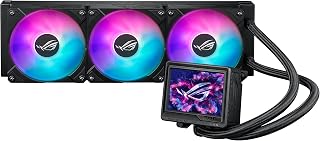
The Ryujin III's exceptional 16 dB noise floor makes it the quietest option for cooling the 285K in noise-sensitive environments like recording studios or late-night work sessions. Its robust water cooling handles sustained turbo frequencies across the processor's hybrid architecture, while server-grade compatibility hints at the industrial-strength thermal performance needed for this flagship chip.
Pros
- Exceptional thermal performance handles flagship processors without throttling
- Premium build quality with aluminum, copper, and reinforced materials throughout
- Magnetic fan mounting eliminates traditional fasteners for faster, easier installation
- VRM fan provides crucial cooling for high-end motherboards during sustained load
- High-quality ARGB fans deliver impressive static pressure with minimal noise
Cons
- Armoury Crate software has occasional complexity and user experience issues
- Large 360mm radiator requires careful case compatibility planning before purchase
The ASUS ROG Ryujin III 360 ARGB Extreme is a flagship all-in-one liquid CPU cooler engineered for high-performance computing. This cooler targets serious enthusiasts, overclockers, and content creators who demand exceptional thermal management paired with premium aesthetics and robust build quality.
The standout feature is undoubtedly the 3.5-inch LCD screen offering 640x480 resolution with a smooth 60Hz refresh rate. Beyond visual appeal, this display serves as a practical monitoring hub for CPU temperatures, voltages, clock speeds, and coolant flow rates. Combined with the Asetek Gen8 V2 pump delivering higher flow rates and lower impedance, real-world cooling performance matches the premium positioning. The embedded VRM fan in the pump housing extends cooling protection to motherboard power delivery circuits, crucial during extended overclocking sessions.
Installation impresses with magnetic ARGB fan mounting that eliminates traditional fasteners. Three specially designed fans magnetically daisy-chain together with a single cable connection, significantly streamlining setup compared to traditional radiators. The thickened aluminum fan blades optimize both static pressure and airflow while maintaining a remarkably quiet 16dB operating noise level. Premium materials throughout, including aluminum, copper, and reinforced components, communicate ASUS's commitment to durability and longevity backed by a 6-year warranty.
The primary drawback involves software experience. While ASUS Armoury Crate provides comprehensive control over pump and fan speeds plus custom AIDA64 themes, some users report the software feels overly complex or occasionally intrusive. Additionally, the large 360mm radiator footprint demands careful case planning to ensure compatibility before purchase. The premium price tag also positions this above mainstream cooling solutions.
Verdict: The ROG Ryujin III 360 ARGB Extreme represents the pinnacle of consumer CPU cooling, delivering outstanding thermal performance, exceptional build quality, and truly functional RGB integration. For enthusiasts and professionals seeking the best available cooling solution regardless of cost, this is a justified investment that will serve systems reliably for years.
Cooling System: 360mm All-In-One Liquid Cooler with magnetic radiator fans
Pump: Asetek Gen8 V2 with 3-phase motor, 3.5-inch 640x480 LCD display at 60Hz refresh rate
Fan Configuration: Three 120mm ARGB fans with high airflow and static pressure, magnetically daisy-chainable
Compatibility: Intel LGA1700, LGA1851, AMD AM4, AM5 socket processors
Power Connection: 4-pin connector, 1.2 kWh wattage, 2V nominal
Noise Level: 16dB
Materials: Aluminum, Copper, Metal, Plastic, Glass construction
Warranty: 6-year manufacturer coverage
Included: ROG RYUJIN III 360 ARGB EXTREME cooler, mounting hardware for AM4/AM5/LGA1700/LGA1851
Who Should Buy: High-end PC gamers, professional overclockers, content creators with flagship processors (Ryzen 9 7950X3D, Intel Core Ultra, or equivalent). Best suited for enthusiasts prioritizing cooling performance, aesthetics, and premium build quality over budget constraints.
Case Compatibility: Verify your case supports 360mm radiators in the desired mounting location. Check both radiator dimensions and hose routing clearance. Most modern full-tower and many mid-tower cases accommodate this cooler comfortably.
Installation Considerations: Magnetic fan mounting is intuitive, but ensure you have the correct mounting brackets for your CPU socket. The embedded VRM fan provides added stability during overclocking, justifying the premium over standard 360mm AIOs.
Software Setup: Install ASUS Armoury Crate for full pump speed, fan control, and LCD customization. While some users find the software interface complex, it enables powerful customization including custom GIF animations on the display and integrated AIDA64 themes with ROG branding.
Comparison Point: This cooler positions above mainstream 360mm AIOs but below custom loop systems. It bridges the gap between practicality and premium performance for users who want factory-sealed reliability with enthusiast-grade thermal results.

This processor's 125-watt base TDP and ability to boost 24 cores to 5.7 GHz generate substantial heat under load, making a capable AIO essential for sustained performance. The LGA 1851 socket and 36 MB secondary cache enable high-frequency workloads that demand consistent thermal management. An AIO cooler prevents thermal throttling during extended rendering or gaming sessions, ensuring those eight P-cores maintain their maximum clock speeds when you need them most.
Pros
- 24 cores handle demanding productivity workloads efficiently
- Runs 10-20°C cooler than expected under sustained loads
- Unlocked for overclocking with PCIe 5.0 and DDR5 support
- 125W base power balances performance with manageable thermals
Cons
- No cooler included requires separate thermal solution purchase
- Substantial investment demands commitment to proper cooling infrastructure
Intel's Core Ultra 9 285K sets the thermal baseline for this entire cooling discussion. With 24 cores split between 8 performance cores hitting 5.7 GHz and 16 efficiency cores, this processor demands serious cooling infrastructure despite its surprisingly manageable thermal profile. The hybrid architecture delivers exceptional multi-threaded performance for compilation, rendering, and content creation while running 10 to 20 degrees Celsius cooler than anticipated under sustained loads. At 125W base power, the 285K strikes a balance between performance density and thermal output, making it compatible with quality tower coolers or mid-range AIO solutions rather than requiring extreme cooling setups. The unlocked multiplier invites overclocking, though even at stock settings the processor maintains stability during intensive stress testing. PCIe 5.0 and DDR5 support future-proof the platform. No cooler ships in the box, so pairing this processor with appropriate thermal management from day one is non-negotiable. For developers cutting compilation times dramatically or 3D artists rendering complex scenes, the 285K represents Intel's strongest desktop offering, particularly when thermal efficiency translates directly into sustained performance.
Core Configuration: 24 cores (8 P-cores plus 16 E-cores), 24 threads with Integrated Intel Graphics
Performance: Base speed with Turbo Boost Max 3.0 up to 5.7 GHz, unlocked multiplier for overclocking
Memory and Cache: 40MB total cache (L2/L3 combined), DDR5 memory support
Connectivity: PCIe 5.0 and 4.0 support, Intel Optane Memory support capability
Power and Thermal: 125W Processor Base Power, no thermal solution included
Compatibility: LGA1851 socket, Intel 800 series chipset motherboards required
Warranty: 3-year manufacturer warranty

ARCTIC's 3000 RPM maximum fan speed provides aggressive thermal headroom when the 285K hits peak boost across its 24 cores during intensive rendering or simulation workloads. The liquid cooling method efficiently dissipates heat from the LGA 1851 socket, while the 4-pin connector enables motherboard-controlled fan curves that scale with the processor's dynamic power demands.
Pros
- Integrated VRM fan prevents motherboard thermal throttling
- Offset mounting targets CPU hotspots directly
- P12 PRO fans balance silence and high RPM capability
- Strong thermal performance with demanding processors
Cons
- Mounting frame requires careful alignment during installation
- Fan curves need manual tuning to minimize noise
The ARCTIC Liquid Freezer III Pro 360 brings serious thermal management to the Core Ultra 9 285K with features typically reserved for custom loops. The integrated VRM fan actively cools motherboard voltage regulators, preventing thermal throttling during sustained workloads that push the processor hard. Native offset mounting shifts the cold plate toward CPU hotspots, addressing thermal distribution directly rather than relying on centered contact alone. Users running similarly demanding processors report maintaining 70 to 80C under stress testing, demonstrating the headroom this cooler provides. The P12 PRO fans offer quiet operation at lower speeds while scaling to 3000 RPM when thermal demands increase. Copper cold plate construction and quality hose sheathing contribute to long-term reliability. The radiator supports both traditional 3-wire and simplified single-wire configurations, adapting to different motherboard setups. Clean RGB lighting integrates without dominating the aesthetic. Socket support spans Intel LGA1700/LGA1851 and AMD platforms, covering current and recent generation processors. This cooler represents strong value for builders seeking flagship-level cooling performance without flagship pricing.
Cooling Specifications: Liquid cooling system with 360mm radiator, 3x ARCTIC P12 PRO fans (3000 RPM max, 77 CFM airflow). Integrated PWM-controlled VRM fan for voltage converter cooling.
Compatibility: Intel LGA1851, LGA1700. AMD platforms with native offset mounting. Requires appropriate mounting hardware for your CPU socket.
Dimensions: 15.7 inches L x 4.7 inches W x 2.9 inches H. Weight 2020g. Includes cable management integration for single visible motherboard connection.
Power & Warranty: 4-pin connector, 12V, 3.96W typical operation. 6-year manufacturer warranty. All connections PWM-enabled for fan curve customization.
Buy this if you need maximum cooling capacity for the Core Ultra 9 285K while staying budget-conscious, especially for overclocking or sustained rendering workloads. The VRM fan benefits high-end motherboards under heavy load. Enthusiasts willing to invest time in fan curve tuning will appreciate the thermal headroom. Skip this if you prefer plug-and-play simplicity, as installation requires careful mounting alignment and fan curves need manual optimization. Builders with compact cases may struggle with longer included cables and radiator fitment.
Pros
- Outstanding display quality with vibrant colors and wide viewing angles for visual customization
- Efficient cooling performance with low noise output, ideal for silent PC builds
- Extensive software integration through CAM software for system monitoring and RGB control
- Universal socket compatibility ensures broad CPU support across current generation platforms
- Premium build quality with metal construction and thoughtful design integration
Cons
- Premium pricing at $279.99 may be steep for budget-conscious builders
- LCD display adds complexity compared to traditional RGB coolers, potentially increasing software dependency
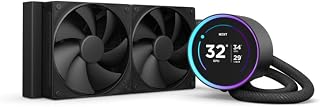
The NZXT Kraken Elite 360 is a flagship all-in-one liquid cooler designed for PC builders who demand both superior cooling performance and visual customization. This cooler targets enthusiasts and content creators who view their PC as a platform for expression, combining the practical benefits of efficient CPU cooling with the aesthetic appeal of a large customizable display.
The standout feature is undoubtedly the 2.72-inch IPS LCD display with 640x640 resolution and exceptional brightness. Users can display custom GIFs, images, or real-time performance metrics directly from the pump head. Integration with Spotify, YouTube, and Google Photos adds practical functionality, while the ability to sync RGB lighting with on-screen content creates a cohesive visual ecosystem. The custom NZXT Turbine pump delivers measurable cooling performance with a claimed 10% improvement over traditional designs, all while maintaining a whisper-quiet 33.88 dB operation level.
Build quality feels premium, with metal construction and thoughtful engineering throughout. Installation is straightforward thanks to pre-applied thermal paste, tool-free mounting brackets, and broad socket compatibility covering the latest AMD and Intel platforms. The single breakout cable simplifies cable management compared to traditional multi-connector AIOs. The RGB Core fan on the radiator provides both reliable airflow and vibrant lighting integration.
The primary drawback is the premium price point at $279.99, which positions this as a luxury option rather than a value proposition. Additionally, the advanced LCD display and software features introduce more complexity than traditional RGB coolers, creating potential dependency on NZXT's CAM software for full functionality and customization options.
The Kraken Elite 360 is an excellent choice for enthusiasts who prioritize both cooling performance and visual appeal, and who appreciate software-driven customization. For purely functional cooling on a budget, traditional AIO options offer better value. For those who view their PC as a statement, this cooler delivers premium cooling wrapped in cutting-edge display technology.
Cooling System: 360mm All-In-One Liquid Cooler
Pump: Custom NZXT Turbine pump with 2.72-inch IPS LCD display, 640x640 resolution, 690 cd/m² brightness, 60 Hz refresh rate
Radiator and Fans: RGB Core single-frame fan, 2800 RPM maximum, noise level 33.88 dB, dimensions 15.79in L x 4.72in W x 1.06in H
Power Requirements: 8-Pin connector, 12V DC, 28.44W
Compatibility: AMD AM5, AM4, Intel LGA 1851, LGA 1700, LGA 1200, LGA 115X
Build Quality: Metal construction, pre-applied thermal paste, tool-free mounting brackets
Warranty: 2-year manufacturer coverage
Model Number: RL-KR36E-B2, UPC 810074844277
Best For: PC enthusiasts, content creators, and builders prioritizing both cooling performance and visual customization who want a statement piece in their build.
Consider This Cooler If: You value the ability to display custom content on your cooler, want effective quiet cooling for high-end CPUs, and appreciate software-driven RGB synchronization across your entire system.
Skip This Cooler If: You need basic, cost-effective cooling without premium display features, prefer simple plug-and-play cooling solutions without software dependencies, or have strict budget constraints under $200.
Socket Compatibility Check: Verify your CPU socket matches AM5, AM4, LGA 1851, LGA 1700, LGA 1200, or LGA 115X before purchasing to ensure compatibility.
Software Integration: Plan to install and configure NZXT CAM software to unlock full display and RGB customization capabilities, including third-party integrations with Spotify and Google Photos.

Pros
- Exceptional cooling performance that handles even high-end CPUs like the Ryzen 7 9800X3D with impressive temperature stability
- Outstanding value for money, delivering premium cooling performance at a fraction of competitor pricing
- Integrated VRM fan meaningfully reduces voltage regulator temperatures for improved system reliability and longevity
- Straightforward installation with all necessary mounting hardware included for both Intel and AMD platforms
- Excellent build quality with premium materials and secure, stable mounting that requires no ongoing maintenance
Cons
- Large radiator dimensions require advance case clearance verification to ensure proper fit before purchase
- Installation can be challenging for first-time users, particularly with spring-loaded water block screws on AMD brackets
- Fan noise increases noticeably at maximum speed, though adjustable BIOS settings allow users to find their optimal balance
The ARCTIC Liquid Freezer III Pro 360 is a 360mm all-in-one liquid CPU cooler designed for gamers, content creators, and PC enthusiasts who demand high-performance cooling without enterprise-level pricing. It supports both Intel LGA1700/LGA1851 and AMD AM5 platforms, making it a versatile choice for modern high-end builds.
This cooler's standout feature is its native offset mounting technology, which intelligently positions the cold plate center directly over your CPU's hotspot rather than the physical center. Combined with ARCTIC's P12 PRO fans that deliver more airflow at lower speeds, the result is cooler temperatures and quieter operation under sustained load. Real-world testing shows idle temperatures in the mid-40s for flagship CPUs, with stress test temperatures remaining remarkably stable even during intensive workloads.
Build quality is excellent throughout, with a thicker 38mm radiator that holds more coolant for better sustained cooling performance. The integrated VRM fan independently manages voltage regulator temperatures, contributing meaningfully to overall system stability and longevity. Cable management is thoughtfully integrated into the hose sheathing, leaving just one clean connection to your motherboard.
The primary consideration is physical size. The radiator dimensions are substantial, and case clearance must be verified before purchase to avoid disappointment. Installation requires patience and care, especially on AMD platforms where the spring-loaded mounting screws can feel fiddly initially. Fan noise at maximum speed is audible but easily managed through BIOS fan curve adjustments.
The ARCTIC Liquid Freezer III Pro 360 represents exceptional value for enthusiasts seeking premium cooling performance. If your case accommodates its size and you're willing to invest time in careful installation, this cooler delivers temperatures and reliability that rival competitors costing significantly more.
Cooling System: Liquid cooling with 360mm radiator, 3x 120mm P12 PRO fans
Compatibility: Intel LGA1700, Intel LGA1851, AMD AM5
Fan Specifications: Maximum 3000 RPM, 77 CFM airflow, 4-pin PWM connectors
Power Requirements: 12V, 3.96W total
Integrated Features: PWM-controlled VRM fan, optimized contact frame with pressure distribution, offset mounting for CPU hotspots
Dimensions: 15.7 inches length, 4.7 inches width, 2.9 inches height
Weight: 2020 grams
Materials: Metal, plastic, rubber construction
Warranty: 6-year manufacturer coverage
Pre-Installation: Verify case clearance for the 360mm radiator dimensions (15.7" x 4.7" x 2.9"). Ensure your motherboard socket is compatible (LGA1700, LGA1851, or AM5). Gather all mounting hardware and read the included instructions carefully before beginning.
Intel Installation: Install the contact frame on the water block, then apply thermal paste to the CPU. Position the mounting bracket and secure with the provided screws, ensuring even pressure distribution. Tighten gradually in a cross pattern to avoid tilting.
AMD Installation: Loosen the top screws of the left and right brackets slightly to allow more wiggle room when inserting the spring-loaded water block screws. Start both screws before tightening fully. This approach prevents misalignment and reduces installation stress.
Radiator Mounting: Connect all fans to the radiator before mounting in your case. Route the single integrated cable management through your case to the motherboard CPU fan header. Use case fans or radiator mounting brackets to secure the radiator firmly.
Fan Tuning: After installation, adjust fan curves in BIOS to balance cooling performance with noise levels. Start with moderate curves and stress test to find your optimal settings.
Buying Guide: Choosing the Right AIO for Core Ultra 9 285K
Radiator Size and Cooling Capacity
The Core Ultra 9 285K’s thermal demands make 360mm radiators the practical minimum for sustained performance. A 360mm radiator with three 120mm fans provides the surface area needed to dissipate heat during extended rendering sessions or competitive gaming marathons without thermal throttling.
Premium options like the Noctua NL-LC1-36, High-Performance 360mm AIO CPU pair Asetek’s Emma V2 platform with exceptional Noctua NF-A12x25 G2 fans. Budget-conscious builders can achieve excellent results with the ARCTIC Liquid Freezer III Pro 360, which includes an integrated VRM fan for additional motherboard cooling.
Socket Compatibility and Mounting Systems
Verify that your chosen cooler explicitly supports Intel LGA 1851, the socket for Core Ultra processors. Many recent AIO models include updated mounting brackets, but compatibility varies by manufacturer and product line.
Look for coolers with offset mounting capability, which shifts the cold plate toward the CPU hotspot for improved thermal transfer. Both ARCTIC’s Liquid Freezer III Pro models and the Cooler Master 360 Atmos Performance-Driven offer this feature. If you’re pairing your 285K with high-speed DDR5 memory, check radiator and tube placement to ensure clearance.
Pump Design and Noise Levels
Pump quality directly affects cooling performance and system noise. High-flow pumps like the Asetek Gen8 V2 in the ASUS ROG Ryujin III ARGB Extreme 360mm AMD/Intel deliver superior coolant circulation with lower impedance, resulting in better heat transfer.
The CORSAIR Nautilus 360 RS ARGB Liquid CPU Cooler achieves whisper-quiet 20 dBA operation while maintaining efficient flow rates. For builders prioritizing silence, Noctua’s pump noise absorber technology uses acoustic soundproofing and tuned-mass dampers to minimize vibration.
Additional Features and Ecosystem Integration
Modern AIO coolers offer features beyond core cooling performance. LCD displays on models like the Lian Li Hydroshift II OLED Curved 360TL-Liquid CPU and the NZXT Kraken Elite 240-240mm AIO CPU Cooler, LCD provide real-time system monitoring and customization options.
RGB integration varies significantly across products. The NZXT Kraken Core 360 RGB – 360mm AIO CPU Cooler connects directly to motherboard headers without additional controllers, simplifying cable management. If you’re working with a budget motherboard, verify that your board has sufficient fan and RGB headers before committing to a specific cooler.
Final Thoughts
The Core Ultra 9 285K rewards proper cooling with sustained performance across gaming and productivity workloads. For premium builders seeking absolute thermal performance with minimal noise, the Noctua NL-LC1-36 combines legendary fan quality with Asetek’s proven pump technology. Budget-focused systems achieve excellent results with the ARCTIC Liquid Freezer III Pro 360, which includes VRM cooling and offset mounting at an accessible entry point.
Frequently Asked Questions
Is a 360mm AIO necessary for the Core Ultra 9 285K?
A 360mm AIO provides the thermal capacity to prevent throttling during sustained high-performance workloads. While 280mm coolers can manage the 285K under moderate use, 360mm radiators offer better thermal headroom for overclocking and extended rendering sessions. The larger radiator also allows fans to run at lower speeds, reducing system noise.
Do I need offset mounting for the Core Ultra 9 285K?
Offset mounting shifts the cold plate toward the CPU’s thermal hotspot, improving heat transfer efficiency by several degrees. Intel’s LGA 1851 socket benefits from this feature, especially under sustained loads. Most current AIO models from ARCTIC, Cooler Master, and Noctua include offset mounting options specifically designed for this processor generation.
What fan configuration works best for 360mm radiators in 2026?
Mount the radiator as intake at the front or top of your case for optimal CPU temperatures. Front mounting typically provides the coolest CPU temperatures by feeding fresh air directly through the radiator. Top mounting works well in cases with excellent airflow but may result in slightly higher CPU temperatures since the radiator receives pre-heated air from internal components.
How important is pump speed for Core Ultra 9 cooling?
Higher pump speeds increase coolant flow rate, which improves heat transfer from the CPU block to the radiator. Modern pumps like Asetek’s Gen8 V2 and NZXT’s custom Turbine design achieve high flow rates while maintaining low noise levels. Most AIO coolers allow pump speed adjustment through BIOS or software, letting you balance cooling performance against acoustic preferences.





Write Your Review
No reviews yet. Be the first to share your experience!