

Your gaming PC was running fine, then mid-match it stutters, frame rates tank, and your CPU temperatures are reading dangerously high. Overheating is one of the most common and damaging issues a gaming rig can face, and it rarely has just one cause. Whether you have a budget build or a high-end system, understanding why your PC runs hot is the first step toward fixing it for good.
This guide covers the main reasons a gaming PC overheats and reviews eight of the best CPU coolers available right now to help you solve the problem at the source. If you are also looking at platform-specific options, our roundup of the best CPU coolers for AM5 in 2026 is a great companion read.
Quick answer
This guide compares 8 picks, with Noctua NH-U12S chromax.Black CPU Cooler: Award-Winning ranked first. Noctua NH-D15 Dual Tower CPU Cooler: Premium Air has the most customer reviews.

If your gaming PC has been running hot and you're ready to swap in a proven tower cooler, this single tower option carries Noctua's reputation for sustained thermal control in desktop builds. It's a straightforward upgrade path for anyone whose stock cooler simply can't keep pace with modern gaming loads.
Pros
- Works on both Intel and AMD, avoiding compatibility guesswork
- Compact 158mm height avoids RAM and case clearance issues
- Quiet at idle with full cooling power available under load
- 6-year manufacturer warranty backs long-term reliability
Cons
- Single-tower design has less headroom than dual-tower options
- Not intended for extreme overclocking scenarios
If your gaming PC is overheating because the stock cooler can't keep up with sustained load, the NH-U12S chromax.Black is built to fix exactly that without moving to liquid cooling. Its NF-F12 fan and Low-Noise Adaptor are tuned to ramp up cooling power under gaming load while staying quiet at idle, which matters for a cooler that's actually meant to run hard for hours. At 158mm tall it fits most tower cases without the RAM or PCIe clearance issues that cause people to under-cool their build in the first place. It works across both Intel and AMD platforms, so it's a safe recommendation regardless of which overheating gaming rig you're troubleshooting. The main tradeoff relevant to this article is that it's a single-tower design, so if your heat problem comes from an extreme overclock or a very high-TDP chip, you may outgrow its ceiling. For the typical gaming overheating case, though, it has the thermal headroom to spare.
Core Specs: 120mm single-tower design with 5 copper heatpipes, height 158mm (4.92in x 2.8in x 6.22in), weight 580g. Fan features 120x120x25mm NF-F12 PWM with Low-Noise Adaptor included.
Compatibility: Intel LGA1851, LGA1700, LGA1200, LGA1156, LGA1155, LGA1151, LGA1150. AMD AM5, AM4 sockets. SecuFirm2 mounting system supports offset mounting for optimal efficiency.
Materials: Heatsink constructed from copper and aluminum for superior thermal conductivity. All-black chromax design includes black anti-vibration pads, black fan clips, and black case badge. Includes high-grade NT-H1 thermal compound.
Warranty: 6-year manufacturer's warranty with 6-year EU spare part availability. Noctua's commitment to long-term support and reliability.
Buy this if your gaming PC runs hot under normal to heavy gaming loads and you want air cooling that won't need replacing as temperatures climb. It fits Intel and AMD builds with zero RAM overhang. Skip it if you're chasing extreme overclocks or run a very high-TDP processor, where a dual-tower cooler would give more thermal ceiling.

For gamers chasing lower temps without redesigning their whole case, this single tower cooler draws just 1.08 watts while still managing heat effectively. Its 25.1 db noise level keeps things reasonably quiet under load, making it a practical upgrade when the stock cooler has been the clear cause of recurring overheating.
Pros
- Nickel-plated copper base and heat pipes for efficient heat transfer
- 1700 RPM fan with PWM control balances cooling and quiet operation
- 158mm height avoids RAM and PCIe clearance issues
- Pre-applied thermal paste and SecuFirm2 mount simplify installation
Cons
- Single-fan design limits headroom for extreme overclocking
- Minimal clearance margin in ultra-compact cases
Overheating usually traces back to one thing: the stock cooler can't keep up. The NH-U12S Redux tackles that directly with a nickel-plated copper base and heat pipes paired with aluminum fins, a combination built to pull heat away fast and keep it moving. Its NF-P12 redux fan spins up to 1700 RPM under load for real cooling capacity during gaming sessions or overclocking, then throttles back via PWM control when things cool down, so you get thermal headroom without constant fan noise. At 158mm tall, it clears high-profile RAM and avoids PCIe slot conflicts, so you're not trading one overheating risk for a clearance problem. SecuFirm2 mounting and pre-applied NT-H1 thermal paste mean the install itself won't be the reason heat transfer suffers. For a gaming PC that's been running hot, this is a straightforward, well-engineered fix that addresses the root cause rather than masking it.
Cooling Design: Tower-style air cooler with 5 nickel-plated copper heat pipes, aluminum fin stack
Dimensions: 5.67in L x 4.76in W x 7.95in H (158mm height)
Weight: 710g
Fan: NF-P12 redux-1700 PWM, 120x120x25mm, maximum 1700 RPM
Noise Level: 25.1 dB
Power Consumption: 1.08W at 12V via 4-pin PWM connector
Socket Compatibility: Intel LGA1851, LGA1700, LGA1200, LGA115x; AMD AM5, AM4
Included Accessories: NT-H1 thermal paste (pre-applied), SecuFirm2 mounting kit, 4x NA-AVP1 anti-vibration pads, fan mounting clips
Warranty: 6 years manufacturer's warranty
Buy this if your gaming PC runs hot under load and you want a proven air cooler without paying for premium branding. It suits mid-range Intel or AMD builds on standard ATX or Micro-ATX cases. Skip it if you're in an ultra-compact SFF case with tight clearance, or if you're running extreme overclocks that demand a dual-fan or liquid setup for maximum heat dissipation.

At a 1500 rpm max speed, this cooler can run noticeably quieter than higher rpm alternatives while still handling the heat load from gaming CPUs, and its 22.4 db rating is among the lowest in its class. That combination suits anyone whose overheating fixes have made their PC louder than they'd like.
Pros
- 22.4 dB fan keeps cooling quiet under load
- Copper base with five soldered heatpipes for efficient heat transfer
- 158mm height avoids RAM and PCIe clearance conflicts
- Simple install with SecuFirm2 mount and NT-H1 thermal paste
Cons
- Single-tower design caps out under sustained heavy load
- Not ideal for aggressive overclocking scenarios
An overheating gaming PC isn't always about raw cooling power, sometimes it's about a cooler that fights its own case or runs loud trying to compensate. The NH-U12S addresses both. Its NF-F12 120mm fan runs at just 22.4 dB, so it can spin to cool the system down without adding noise to the problem. The copper base and five soldered heatpipes with nickel-plated aluminum fins are built for efficient heat transfer, and the compact 158mm tower height means no RAM slot conflicts or PCIe clearance issues, common culprits when a bigger cooler creates fitment problems that lead to poor airflow. SecuFirm2 mounting and NT-H1 thermal paste make installation straightforward, removing a frequent source of weak thermal contact. The tradeoff is that single-tower coolers have a ceiling: under sustained heavy load or aggressive overclocking, a dual-tower or liquid cooler will pull ahead. For typical gaming thermals, though, this is a reliable way to bring temperatures under control.
Cooling Design: Single 120mm tower with 5 soldered heatpipes and nickel-plated aluminum fins on copper base
Fan: NF-F12 120mm PWM fan with Low-Noise Adaptor, 1500 RPM maximum, 22.4dB noise level
Dimensions: 4.92 inches L x 2.8 inches W x 6.22 inches H (158mm height)
Weight: 755 grams
Socket Compatibility: Intel LGA1851, LGA1700, LGA1200, LGA115x and AMD AM5, AM4
Power Connector: 4-pin PWM at 12 volts
Warranty: 6-year manufacturer's warranty
Included: NT-H1 thermal paste, SecuFirm2 mounting kit, Low-Noise Adaptor, anti-vibration pads, fan clips, and Noctua metal case badge
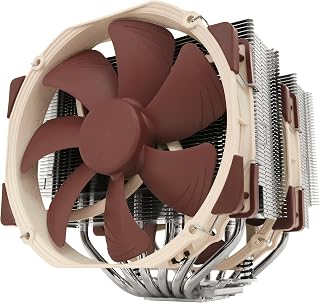
When a gaming CPU keeps spiking under load, a dual tower design gives it more surface area and airflow to dump heat fast. Running at just 24.6 db, it keeps thermals in check without turning your rig into a wind tunnel, which matters if overheating has been pushing your fans into constant high speed, noisy mode.
Pros
- Dual-tower, six-heatpipe design rated for high-end CPUs
- Two 140mm fans with strong 140.2 m3/h airflow capacity
- Quiet operation at 24.6dB even under heavy load
- Includes thermal compound and multi-socket mounting hardware
Cons
- Large 168mm height needs ample case clearance
- May overhang RAM slots with tall heatspreaders
When a gaming PC keeps overheating despite a decent case and airflow, the problem is often that the CPU cooler simply isn't big enough for the chip. The NH-D15 addresses that directly with a dual-tower design, six heatpipes, and two 140mm fans moving 140.2 cubic meters of air per hour, built specifically for high-end Intel and AMD processors under sustained load. It's one of the few air coolers that can match liquid cooling performance, which matters if you've ruled out an AIO and want fewer failure points. The copper base, soldered joints, and nickel-plated fins are built for heavy, continuous heat transfer rather than light use. This is the fix for overheating caused by genuinely demanding hardware or overclocking, not for a case that's just a bit cramped. That's also its limitation here: at 168mm tall and with a wide dual-tower footprint, it needs real clearance, so it can introduce a new problem, fitment, while solving the thermal one.
Cooling Design: Dual-tower, 6 heatpipes, 2x 140mm PWM fans
Fan Specifications: 140.2 cubic meters per hour airflow, 1500 RPM max, 24.6dB noise level
Power Consumption: 1.56 watts (4-pin PWM connector, 12V)
Socket Compatibility: Intel LGA1851, LGA1700, LGA1200, LGA115x; AMD AM5, AM4 (with offset mounting option)
Dimensions: 9.33L x 8.62W x 6.53H inches; Height: 168mm
Materials: Copper (base and heatpipes), aluminum (fins), soldered joints with nickel plating
Weight: 1.3kg
Included Accessories: 2x NF-A15 PWM fans, 2x NA-RC7 Low-Noise Adaptors, NA-YC1 4-pin PWM y-cable, NT-H1 thermal paste, SecuFirm2 mounting kit
Warranty: 6-year manufacturer's warranty
Buy this if your overheating is happening on a high-end or overclocked Intel or AMD CPU and you have a mid-tower or larger case with room to spare. Skip it if you're troubleshooting overheating in a compact or small form factor case, or if your RAM has tall heatspreaders, since clearance becomes the new issue.

Hitting thermal throttling during long gaming sessions usually means the stock cooler can't keep up, and this single tower design with a 2000 rpm max speed is built to move more air across the heatsink. At 22.6 db it does this quietly, so fixing the overheating doesn't mean living with a louder PC.
Pros
- 7-heatpipe design keeps high-end CPUs well under thermal limits
- Quiet at idle, ramps up only under load
- Fits most cases with no RAM or PCIe interference
- Comes with mounting hardware and thermal paste
Cons
- Installation requires more patience than budget coolers
- Premium pricing relative to simpler air coolers
Chronic overheating in a gaming PC often traces back to a cooler that simply can't move enough heat, and the NH-U12A is built to close that gap. Its 7-heatpipe design paired with two NF-A12x25 fans is engineered to keep high-end Intel Core and AMD Ryzen systems stable under gaming loads, with load temperatures staying well under 80C even on demanding processors. That matters if your current overheating issue shows up specifically during extended gaming sessions rather than at idle. PWM speed control and Low-Noise Adaptors mean the fans stay quiet during lighter tasks and only ramp up when your CPU is actually generating heat, which is the behavior you want from a cooling fix rather than a cooler that's either always loud or always underpowered. At 158mm tall with no RAM overhang and clear PCIe access, it fits into most gaming towers without requiring you to rework your build just to solve a heat problem.
Cooling Performance: 7 copper heatpipes, dual NF-A12x25 120mm fans, 102.1 CFM airflow capacity, 22.6dB noise level at max speed.
Compatibility: Intel LGA1851, LGA1700, LGA1200, LGA115x, AMD AM5, AM4. Height: 158mm. Width: 4.41 inches. No RAM overhang on LGA17xx, LGA1200, AM4. No PCIe blocking on standard ATX and Micro-ATX boards.
Power: 4-pin PWM connector, 12V operation, maximum 2000 RPM, includes Low-Noise Adaptors for reduced noise.
Materials: Copper base and heatpipes with nickel plating, aluminum cooling fins, soldered joints for durability.
Included Accessories: 2x NF-A12x25 PWM fans, 2x NA-RC14 Low-Noise Adaptors, NA-YC1 4-pin PWM Y-cable, SecuFirm2 mounting kit, NT-H1 thermal compound, metal case badge, 6-year manufacturer's warranty.
Worth buying if your gaming PC overheats under load with a high-end CPU and you want proven thermal headroom with quiet everyday operation. Good for enthusiasts who want performance without a liquid cooling loop. Skip it if you're on a budget build or a lower-power CPU, where the overheating fix doesn't require this level of cooling capacity and simpler coolers would do the job.

Overheating often traces back to a cooler that can't move enough air during sustained gaming sessions. With a maximum rotational speed of 2000 rpm and a noise level of just 22.6 db, this tower cooler pushes serious airflow across the heatsink while staying quiet, addressing both the thermal spikes and the fan noise that usually comes with them.
Pros
- Handles heavy loads without constant fan noise
- Strong build quality for long-term reliability
- No RAM or PCIe clearance issues
- Includes mounting system and thermal paste
Cons
- Premium cost for the performance offered
- Overkill for low-power or office-use processors
Overheating is usually a mismatch between heat output and cooling capacity, and that's exactly where the NH-U12A chromax.Black earns its spot. If your gaming PC runs hot under load because you've paired a high-core-count chip like a Ryzen 9000 or Intel Core Ultra with inadequate cooling, this tower cooler addresses the root cause rather than masking symptoms. The dual NF-A12x25 fans with Low-Noise Adaptors handle sustained gaming loads without the fan noise spike that usually comes with real cooling power, so you fix the thermal problem without turning your rig into a jet engine. The copper base, soldered heat-pipes, and nickel-plated construction are built to hold thermal performance steady over years, not just out of the box. At 158mm tall with no RAM overhang and clean PCIe clearance, it slots into a gaming case without forcing you to swap other parts just to solve your heat issue.
Cooling Performance: Dual NF-A12x25 120mm fans, 102.1 CFM airflow, 2000 RPM maximum speed, 22.6 dB noise level
Compatibility: Intel LGA1851, LGA1700, LGA1200, LGA115x and AMD AM5, AM4 (offset mounting available). Height: 158mm. Fits most tower cases with zero RAM overhang and minimal PCIe obstruction.
Build Quality: Copper base and heat-pipes, aluminum cooling fins, soldered joints, nickel plating. Dimensions: 4.92 x 4.41 x 6.22 inches. Weight: 1.2 kg.
Included Accessories: High-end NT-H1 thermal paste, SecuFirm2 mounting system, mounting kit for all compatible sockets, Low-Noise Adaptors, PWM control.
Warranty: 6-year manufacturer's warranty. Power: 4-pin connector, 12V. Cooling Method: Air cooling.
Buy this if your gaming PC overheats under sustained load with a modern high-core-count CPU and you want a permanent air-cooling fix rather than a stopgap. It suits builders who care about quiet operation as much as temperatures. Skip it if your overheating issue is from a low-power or budget processor, a dusty case, or poor airflow, since you won't need this much cooling capacity and the cost won't be justified.
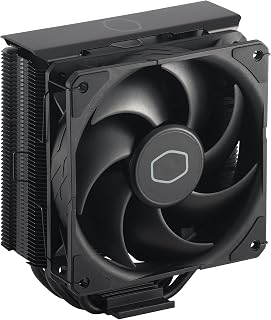
Four heat pipes give this cooler more contact area to pull heat away from a CPU that's running hot, and the PWM fan ramps up automatically when temps climb during gaming. At 26 db it's not the quietest option here, but for a budget rebuild aimed squarely at fixing overheating, the extra heat pipes do the heavy lifting.
Pros
- Four heat pipes handle mid-range CPU heat effectively
- PWM fan stays quiet until cooling is actually needed
- Compact size keeps RAM clearance clear
- Simplified brackets for easier installation
Cons
- Lower thermal ceiling than premium air or liquid coolers
- Needs occasional cleaning to avoid dust buildup
If your gaming PC is overheating but you don't want to spend a fortune fixing it, the Hyper 212 Black is a logical first upgrade to try. Its four copper heat pipes pull heat away from mid-range CPUs like a Ryzen 7 or Core i7, which covers a large share of gaming rigs that run hot simply because the stock cooler can't keep pace during long sessions. The SickleFlow 120 Edge fan uses Dynamic PWM to spin between 690 and 2,500 RPM, so it ramps up only when your system actually needs the extra cooling during gaming, then quiets down afterward. Its 152mm profile keeps RAM clearance intact, which matters if your overheating case already has tight airflow. For anyone diagnosing heat issues and wanting a dependable, no-frills fix rather than a top-tier solution, this cooler addresses the problem without demanding a big budget commitment.
Cooling Performance: Four copper heat pipes, 42 CFM airflow capacity, maximum 2,500 RPM fan speed
Acoustics: 26dB operating noise level with Dynamic PWM control (690-2,500 RPM range)
Power & Connectivity: 4-pin fan connector, 12V operation, 2.4W wattage
Compatibility: AMD AM5, AM4 platforms; Intel LGA1851, LGA1700 sockets
Physical Dimensions: 4.84 inches length, 3.03 inches width, 6.25 inches height (152mm total height)
Materials: Copper base plate, aluminum fin stack, plastic shroud
Included: Hyper 212 Black cooler unit, SickleFlow 120 Edge fan, installation kit, CryoFuze thermal paste, 2-year warranty

Overheating in a cramped case is often an airflow problem, not just a cooler problem, and this low-profile design fits into tight small form factor builds where a tower cooler won't clear the side panel. Running at 23.6 db with a 2500 rpm max speed, it still delivers real cooling where space has been the root cause.
Pros
- Fits tight small form factor cases at just 37mm tall
- Very quiet operation at 23.6dB
- Durable copper, aluminium, and nickel-plated construction
- Includes thermal compound and tool-free mounting system
Cons
- Intel sockets only, no AMD support
- Limited headroom for high heat or overclocked loads
Overheating in a cramped case usually comes down to one thing: not enough room for a proper heatsink. The NH-L9i solves that by going the opposite direction from most anti-overheat advice. Instead of a bigger cooler, it's a 37mm-tall low-profile unit built for small form factor and HTPC cases where airflow is already restricted. The copper base and heat-pipes, soldered joints, and nickel-plated aluminium fins pull heat away efficiently despite the compact size, while the 92mm fan keeps noise down to 23.6dB thanks to the included Low-Noise Adaptor. For an overheating mini-ITX build running an Intel i3, i5, or i7 under moderate load, this addresses the root cause directly: a stock or undersized cooler fighting for space. It won't tame a high-wattage overclocked chip, but for the thermal-throttling small-case scenario this article covers, it's a targeted fix rather than a generic upgrade.
Cooling Performance: Noise Level: 23.6dB, Maximum RPM: 2500, Airflow: 57.5 cubic meters per hour
Physical: Height: 37mm (1.46 inches), Footprint: 95x95mm (3.74 inches), Weight: 443g, Construction: Copper base and heat-pipes with aluminium fins, nickel-plated
Compatibility: Intel LGA1200, LGA1151, LGA1155, LGA1156, LGA1150, Fan Size: 92x92x14mm slim, Power: 4-pin PWM connector, 12V
Included Accessories: NT-H1 thermal compound, SecuFirm2 mounting kit, Low-Noise Adaptor, mounting screws, metal case badge
Warranty: 6-year manufacturer warranty
Buy this if your overheating problem is happening inside a mini-ITX, HTPC, or small form factor case with limited vertical clearance, and you run an Intel CPU under moderate loads. Skip it if you're on AMD, since it's Intel-only, or if your overheating is tied to heavy overclocking or sustained high-wattage workloads, where its compact size limits how much heat it can realistically dissipate.
How to Choose the Right CPU Cooler for a Hot Gaming PC
Cooling Capacity and TDP Rating
The single most important spec is whether a cooler can handle your CPU’s thermal design power. High-performance chips like the AMD Ryzen 9 9950X or Intel Core Ultra 285K generate serious heat under sustained gaming loads, and a cooler that is undersized will struggle from day one.
For demanding CPUs, a dual-tower design like the Noctua NH-D15, Quiet High-Performance Dual Tower is the gold standard. Its six heatpipes and two NF-A15 fans deliver class-leading airflow, giving you thermal headroom even during long gaming sessions or light overclocking.
Case and Motherboard Compatibility
A great cooler is useless if it does not fit your case or clears your RAM. Tall dual-tower coolers can conflict with high-profile memory kits, and wide heatsinks sometimes block PCIe slots on Micro-ATX boards.
The Noctua NH-U12S chromax.Black is designed specifically with this in mind. At 158mm tall and a slim single-tower form factor, it clears most RAM slots and does not interfere with PCIe on ATX or Micro-ATX motherboards, making it a versatile fit across a wide range of builds. If you are shopping for AM5 specifically, our guide on the best air coolers for AM5 goes deeper on socket compatibility.
Fan Quality and Noise Level
Fan quality directly affects both cooling efficiency and how loud your system gets under load. Cheap fans move less air, create more turbulence, and wear out faster. PWM control is essential because it lets the fan ramp up when your CPU needs it and quiet down at idle.
Noctua’s NF-A12x25 fans, found in the Noctua NH-U12A, Quiet High-Performance Single and the Noctua NH-U12A chromax.Black, are widely regarded as the finest 120mm fans available. Their dual-fan configuration brings 140mm-class performance in a compact 120mm footprint, which is a meaningful advantage in tight builds.
Form Factor for Small and Compact Builds
Mini-ITX and small form factor builds have unique cooling challenges. Airflow is restricted, and full-size tower coolers simply will not fit. In these cases you need a low-profile solution that still keeps temperatures in check.
The Noctua NH-L9i, Quiet High-Performance Low-Profile is purpose-built for this scenario. At just 37mm tall, it fits virtually any HTPC or ITX case while the NF-A9x14 slim fan and Low-Noise Adaptor keep noise minimal. For budget-conscious builders who want solid cooling without the premium price, the Noctua NH-U12S Redux, Quiet High-Performance and the Cooler Master Hyper 212 Black CPU Air Cooler are both excellent options. The Hyper 212 Black in particular has earned a strong reputation thanks to its four heatpipes, copper base, and the SickleFlow 120 Edge fan, offering solid performance at an accessible price point. You can explore more options across the PC Cooling category if you want to compare liquid and air solutions side by side.
Final Thoughts
If your gaming PC is overheating, the right CPU cooler makes an immediate and measurable difference. For most mid-tower and full-tower builds, the Noctua NH-D15, Quiet High-Performance Dual Tower is the most capable air cooler you can buy, handling even the hottest modern CPUs with ease and backed by over 250 industry awards. If you need an all-black aesthetic or are working in a tighter space, the Noctua NH-U12A chromax.Black delivers top-tier 140mm-class performance in a compact 120mm package that fits a much wider range of cases.
Frequently Asked Questions
Why does my gaming PC overheat even with the stock cooler installed?
Stock coolers are designed to meet the minimum thermal requirements for a CPU at stock settings, not for sustained gaming workloads. When you run demanding games for hours, a stock cooler often cannot dissipate heat fast enough, causing temperatures to climb. Upgrading to a dedicated aftermarket air cooler is the most direct solution.
Can a dusty PC cause overheating?
Absolutely. Dust buildup on heatsink fins, fan blades, and case filters dramatically reduces airflow and trapping heat inside the case. Cleaning your PC every few months with compressed air is one of the easiest and most overlooked maintenance steps. Even a high-quality cooler like the Noctua NH-U12S, Quiet High-Performance Single will underperform if its fins are clogged with dust.
Does thermal paste actually matter for gaming PC temperatures?
It matters more than most people realize. Dried-out or poorly applied thermal paste creates air gaps between the CPU heat spreader and the cooler base, raising temperatures by several degrees. Most premium coolers, including every Noctua model in this roundup, ship with NT-H1 high-grade thermal compound pre-applied or included in the box. Reapplying fresh paste to an older CPU can drop idle and load temperatures noticeably.
Is liquid cooling better than air cooling for an overheating gaming PC in 2026?
Liquid cooling moves heat away from the CPU more efficiently and keeps the area around the socket cleaner, which can help with overall case temperatures. That said, high-end air coolers like the Noctua NH-D15, Quiet High-Performance Dual Tower match or outperform many 240mm all-in-one liquid coolers while being simpler and more reliable long-term. If you are considering a liquid option, our review of the best 360mm AIO coolers covers the top liquid coolers available right now.
Common questions
Can dust buildup in the radiator cause a gaming PC to overheat?
Yes, dust in the radiator is a common overheating cause. Dust clogs the fin channels and blocks airflow through the radiator, so heat can't transfer away from the coolant efficiently. This raises coolant and component temperatures even if fans are spinning normally. Regularly blowing out the radiator with compressed air, especially the side facing intake fans, keeps airflow unobstructed and prevents gradual thermal creep over months of use.
Which case airflow direction gives the best cooling for a gaming PC?
Front-to-back and bottom-to-top is the best case airflow direction for most builds. Cool air should enter through the front and bottom panels, then exit through the rear and top where heat naturally rises. Fans should be set so intake and exhaust work together rather than fighting each other. Mismatched fan direction creates pressure imbalances and hot air pockets, which is a frequent hidden cause of higher-than-expected temperatures.
How often should you redo thermal paste to avoid overheating issues?
Repasting intervals of every two to three years are generally recommended to avoid overheating. Thermal paste dries out and loses conductivity over time, creating a gap between the CPU and cooler base. A dual tower air cooler like the Noctua NH-D15 or a single tower like the NH-U12S still needs fresh paste on schedule since even premium coolers can't compensate for degraded thermal contact.





Write Your Review
No reviews yet. Be the first to share your experience!