

You’re building a new AMD Ryzen 9000 system, and the motherboard you choose will determine your upgrade path, connectivity options, and overclocking potential for years to come. The X870 chipset brings PCIe 5.0 support, faster USB4 connectivity, and Wi-Fi 7 to the AM5 platform, but not all boards deliver the same feature set or build quality.
This guide covers 10 X870 motherboards we’ve evaluated across different price points and form factors. Whether you need robust VRM for heavy overclocking, multiple M.2 slots for storage expansion, or just a reliable board that won’t bottleneck your CPU, you’ll find options that fit your build. We’ve also covered essential considerations in our GPU selection guide if you’re planning a complete system.
Quick answer
This guide compares 10 picks, with ASUS X870 AYW Gaming WiFi Motherboard - AMD AM5 DDR5 ranked first. MSI X870 GAMING PLUS WIFI AM5 Motherboard - PCIe 5.0 holds the highest customer rating among them. ASUS ROG Strix X870-A Gaming WiFi AMD AM5 Motherboard has the most customer reviews.

Pros
- Excellent power delivery system ensures stability under heavy loads and overclocking scenarios
- PCIe 5.0 readiness future-proofs your build for upcoming GPU and storage technologies
- Comprehensive connectivity with Wi-Fi 6, USB4, and high-speed Ethernet for all use cases
- User-friendly design with quick-release features reduces assembly time and frustration
- Strong thermal management keeps components cool during intense gaming and workloads
Cons
- Limited real-world reviews available means user feedback on long-term reliability is sparse
- Premium feature set comes at a mid-range price point, leaving some budget builders looking elsewhere
- Requires compatible DDR5 RAM and newer Ryzen CPUs for full performance realization
The ASUS X870 AYW Gaming WiFi W is a full-featured ATX motherboard designed for gamers and creators building or upgrading systems around AMD's latest Ryzen 7000, 8000, and 9000 series processors. This board targets users who want robust performance and modern connectivity without opting for premium-tier options.
The standout feature is the 12+2+1 80A DrMOS power delivery system backed by an 8-layer PCB, ProCool connectors, and quality capacitors. This architecture handles high-end CPUs with confidence and leaves room for stable overclocking. The dual PCIe 5.0 support across the x16 slot and M.2 slot positions your build for next-generation graphics cards and NVMe SSDs, though current-gen adoption remains limited.
Connectivity is impressive with Wi-Fi 6, dual USB4 ports offering 40Gbps speeds, 2.5Gb Ethernet, and a front USB 20Gbps Type-C with power delivery. The four DDR5 memory slots with support for up to 256GB provide ample headroom for multitasking and professional workloads. Thermal design includes large VRM heatsinks, dual M.2 heatsinks, and ASUS's Fan Xpert 4 AI cooling, keeping components at safe temperatures during demanding use.
Design focuses on accessibility with pre-mounted I/O shield, M.2 Q-Latch, PCIe Slot Q-Release, and BIOS Flashback, making this board approachable for builders of all skill levels. The main drawback is minimal user feedback in the wild, though the feature set and engineering appear solid for the price.
The ASUS X870 AYW Gaming WiFi W delivers excellent value for Ryzen builders seeking a well-rounded board with future-ready features and thoughtful design choices.
Processor and Memory: AMD Socket AM5 compatible with Ryzen 7000, 8000, and 9000 series. Four DDR5 memory slots supporting up to 256GB at speeds up to 8000 MHz.
Connectivity and Expansion: PCIe 5.0 x16 slot, two additional PCIe slots, three M.2 slots with PCIe 5.0 support on one. Four SATA ports, single Realtek 2.5Gb Ethernet, dual USB4 Type-C (40Gbps), USB 20Gbps Type-C with power delivery, six USB 2.0 headers, and 17 total USB ports.
Power and Cooling: 24-pin main power connector, 12+2+1 80A DrMOS power stages, large VRM heatsink, dual M.2 heatsinks, PCH heatsink, and hybrid fan headers with Fan Xpert 4 AI Cooling II.
Additional Features: Wi-Fi 6, HDMI output, M.2 Q-Latch, PCIe Slot Q-Release, BIOS Flashback, 8-layer PCB, 3-year warranty. Dimensions 12 inches x 9.6 inches x 1.5 inches, weight 4.3 pounds.
Gamers: If you're building a high-performance gaming PC with a current or upcoming flagship Ryzen CPU, this board provides the stable power delivery and modern connectivity needed for competitive gaming at high refresh rates.
Content Creators: The robust DDR5 support, PCIe 5.0 readiness, and comprehensive thermal management make this ideal for video editing, 3D rendering, and streaming workflows.
System Builders: DIY builders appreciate the user-friendly design, ample connectivity options, and future-proofing through PCIe 5.0 without paying flagship prices.
Overclockers: The strong power delivery system and quality components support stable overclocking for those looking to squeeze extra performance from their CPU.

Pros
- Exceptional value for money with high-end X870 features at under $170
- Robust power delivery and overclocking capability with intuitive BIOS interface
- Multiple M.2 slots including PCIe Gen5 and Gen4 options for fast storage expansion
- Versatile I/O with dual USB4, multiple USB 3.2 Gen2 ports, and comprehensive rear connectivity
- Strong real-world performance confirmed by users running demanding workloads and high-speed RAM
Cons
- Onboard audio quality is disappointing with reported crackling and hiss at various volume levels
- IO shield assembly feels loose and some users report low BIOS quality in certain areas
The ASRock X870 Pro-A WiFi is a feature-rich ATX motherboard built for AMD Ryzen 9000, 8000, and 7000 series processors. It targets budget-conscious builders and content creators who want premium connectivity and performance without the premium price tag. This board punches well above its weight in the competitive X870 segment.
The standout features include PCIe 5.0 support for next-gen GPUs, dual USB4 Type-C ports for rapid data transfer, and WiFi 7 connectivity that future-proofs your network setup. The 16+2+1 power phases with 80A Dr.MOS deliver stable power for overclocking, while multiple M.2 slots accommodate fast NVMe storage. Real-world users confirm strong performance with high-speed DDR5 memory and the ability to run demanding capture and streaming setups simultaneously.
Build quality is solid overall with good component selection and accessible BIOS menus that don't require constant manual reference. The layout is intuitive and installation is straightforward. The heatsinks are generous, particularly the M.2 cooler which eliminates the need for aftermarket thermal solutions. The 24 total ports provide ample connectivity for expansions and peripherals.
The main drawback is the onboard audio implementation, which users report as problematic with scratching, hiss, and distortion issues. This is surprising for an X870 board at this price and may frustrate content creators or audiophiles. Additionally, some users noted the IO shield feels loose and minor BIOS quirks exist, though these don't impact functionality.
The ASRock X870 Pro-A WiFi is a smart choice for PC builders prioritizing connectivity, storage options, and overclocking potential. The value proposition is outstanding, though audio-sensitive users should plan for an external DAC or dedicated sound card.
Socket and Compatibility: AMD Socket AM5, supports Ryzen 9000, 8000, and 7000 series processors. Compatible with Windows 10 and Windows 11.
Memory: 4 x DDR5 DIMM slots, dual channel, supports up to 8000+ MHz (OC). Native support for JEDEC DDR5 standards with flexibility for high-speed overclocking.
Storage Expansion: 1 PCIe Gen5 x4 M.2, 1 PCIe Gen4 x4 M.2, 1 PCIe Gen3 x2 and SATA3 hybrid M.2, plus 4 SATA3 ports for traditional drives.
PCIe Slots: 1 PCIe 5.0 x16, 3 PCIe 4.0 x16 slots, 1 additional PCIe slot, providing flexibility for GPUs, capture cards, and expansion adapters.
Connectivity: Dual USB4 Type-C (rear), 2 USB 3.2 Gen2 (rear), 1 USB 3.2 Gen1 Type-C (front), 5 USB 3.2 Gen1, 8 USB 2.0 ports. Realtek 2.5GbE Ethernet and WiFi 7 802.11be with Bluetooth support.
Audio: Realtek ALC897 7.1 channel HD audio codec with Nahimic audio enhancement. Note: Users report audio quality concerns.
Power and Display: 24-pin ATX power connector, 1 HDMI output, USB4 Type-C display output. 16+2+1 power phases with 80A Dr.MOS for stable power delivery.
Best For: Content creators, gamers, and enthusiasts building AMD Ryzen systems who need multiple expansion slots, fast storage options, and modern connectivity. The dual USB4 and PCIe 5.0 support make it future-proof for next-gen components.
Not Ideal For: Users prioritizing premium onboard audio quality. If audio is critical to your workflow, budget for an external sound card or dedicated DAC. Also, those who need extensive onboard RGB lighting customization may find this board more utilitarian.
Value Consideration: At under $170, this board offers exceptional value. Comparable X870 boards often cost $50-100 more while offering fewer PCIe expansion slots or slower USB connectivity. The aggressive pricing makes it an outstanding choice for budget-conscious builders without sacrificing core features.
Compatibility Checklist: Verify your CPU is a Ryzen 7000, 8000, or 9000 series processor. Confirm your case has standard ATX mounting. Note that some high-end M.2 SSDs with integrated heatsinks may have clearance issues with the board's M.2 slot heatsink. Use the PCIe Gen3 x2 hybrid slot if needed.
Warranty: Includes 1-year manufacturer warranty covering defects. Contact ASRock support directly through Amazon with any issues.

Pros
- Exceptional VRM design ensures stable, high-performance power delivery for demanding CPUs
- PCIe 5.0 x16 slot with Steel Armor provides future-proof GPU support and durability
- Wi-Fi 7 offers significantly faster wireless speeds than Wi-Fi 6 for reduced latency
- Comprehensive cooling solution with multiple thermal pads and extended heatsinks keeps components cool
- User-friendly EZ DIY features make building and upgrading straightforward for enthusiasts
Cons
- Premium pricing reflects high-end feature set, making it less accessible for budget builders
- Full feature set may be overkill for users with mid-range GPU or CPU configurations
- Limited to AM5 socket, restricting CPU upgrade path to AMD Ryzen 7000/8000/9000 series only
The MSI X870 GAMING PLUS WIFI is a high-performance ATX motherboard engineered for enthusiasts building premium AMD Ryzen 9000 gaming and content creation systems. This board caters to users who prioritize cutting-edge connectivity, robust power delivery, and thermal management in a full-size platform.
The standout features include its PCIe 5.0 x16 slot with Steel Armor protection, Wi-Fi 7 module with Bluetooth 5.4, and comprehensive M.2 storage options spanning PCIe Gen5, Gen4, and additional slots. The 14-phase 60A SPS VRM with Core Boost Architecture provides exceptional stability for high-performance Ryzen processors. DDR5 support up to 8200+ MT/s (overclock) enables extreme memory performance for gaming and workloads.
Build quality is solid with a focus on thermal management. The FROZR GUARD cooling system features 7W/mK MOSFET thermal pads, extra choke thermal pads, and extended heatsinks that work together to prevent thermal throttling during sustained gaming or rendering sessions. The inclusion of an EZ M.2 Shield FROZR II protects your fastest storage drives from excessive heat.
The main consideration is cost. This motherboard targets enthusiasts willing to invest in premium components and may include features that mid-range builds won't fully utilize. Additionally, the AM5 socket limits future CPU upgrades to AMD's Ryzen lineup, which may matter if you switch platforms later.
Overall, the X870 GAMING PLUS WIFI delivers excellent value for high-end gamers and creators prioritizing future-proof connectivity, thermal performance, and stable power delivery. If your budget accommodates it, this is a capable foundation for a powerful gaming or workstation build.
Processor Compatibility: AMD Ryzen 9000, 8000, and 7000 series, Socket AM5
Memory: 4x DDR5 DIMM slots, supports up to 256GB, speeds up to 8200+ MT/s (OC)
Storage: 1x M.2 PCIe 5.0 x4 (128 Gbps), 1x M.2 PCIe 4.0 x4 (64 Gbps), 1x M.2 PCIe 4.0 x2 (32 Gbps)
Expansion Slots: 1x PCIe 5.0 x16 with Steel Armor, 1x PCIe 4.0 x16
Connectivity: Wi-Fi 7 with Bluetooth 5.4, 5Gbps LAN, USB 4 Type-C 40Gbps with display output, 7.1 HD audio
Power Delivery: 14-phase 60A SPS VRM, 4+4-Pin CPU power connector
Form Factor: ATX, 5.91inx5.91inx3.94in, approximately 1 kg
Who Should Buy: Gamers building high-end Ryzen 9000 systems, content creators needing stable power and fast storage, enthusiasts prioritizing Wi-Fi 7 and PCIe 5.0 connectivity
Who Might Pass: Budget-conscious builders, users with mid-range GPUs, anyone planning to upgrade CPUs outside the AM5 ecosystem
Best Paired With: Ryzen 9 9900X or 9950X processors, RTX 4090 or RX 7900 XTX graphics cards, DDR5 8200+ MHz memory kits, PCIe 5.0 NVMe drives
When to Buy: If you're building a future-proof system that won't need replacement for 3-5 years, or if you need Wi-Fi 7 for competitive online gaming or low-latency streaming
Pros
- 16+2+2 VRM with thermal management sustains Ryzen 9000 boost clocks under load
- Four M.2 slots with thermal guards support multi-drive PCIe 5.0 and NVMe setups
- WiFi7 and dual USB4 ports deliver next-generation wired and wireless connectivity
- Five-year warranty and AMD EXPO DDR5 support up to 8200 MHz
Cons
- Single 2.5GbE LAN limits multi-device wired networking scenarios
- Full ATX form factor requires a spacious mid-tower or larger case
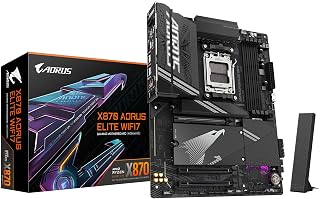
The GIGABYTE X870 AORUS Elite WiFi7 earns a firm place on any X870 shortlist for Ryzen 9000 builders. Its 16+2+2 power delivery architecture gives even the most demanding Ryzen 9000 chips the headroom they need to hold boost clocks under sustained workloads, and AMD EXPO support means DDR5 memory up to 8200 MHz is validated rather than experimental. Four M.2 slots with dedicated thermal guards let you build a multi-drive storage stack without thermal throttling creeping in. PCIe 5.0 keeps the platform relevant for the next GPU and storage generation, while dual USB4 ports handle fast external peripherals and docks at Thunderbolt-class speeds. WiFi7 rounds out the connectivity story for wireless-first setups. EZ-Latch simplifies RAM swaps during iterative builds, and GIGABYTE backs the whole package with a five-year warranty, which is reassuring for a flagship investment. The full ATX footprint accommodates a generous fourteen USB headers and four SATA ports, so expansion rarely becomes a constraint.
Socket and Compatibility: AMD Socket AM5, supports Ryzen 7000/8000/9000 series processors on Windows 11.
Memory Support: 4 x DDR5 DIMM slots, up to 256GB capacity, 8200 MHz support with AMD EXPO profiles.
Storage and Expansion: 4 x M.2 slots with thermal guards, 4 x SATA ports, PCIe 5.0 support, 3 PCIe slots total.
Connectivity: WiFi7, 2.5GbE LAN, dual USB4, USB-C (front and rear), 11 total USB ports, 1 HDMI output, Sensor Panel Link.
Power Delivery: 16+2+2 phase VRM, 24-pin ATX power connector. Form factor: ATX (9.61in L x 12.01in W x 1.38in H). Weight: 1.23 kg. Warranty: 5 years.
Best for enthusiasts and content creators committing to a full Ryzen 9000 build who want PCIe 5.0, WiFi7, and multi-drive M.2 storage in one board and intend to keep the platform for years. The five-year warranty adds peace of mind for long-term owners. Skip it if your case is compact, if you need multi-port wired networking beyond single 2.5GbE, or if your workload does not benefit from the premium connectivity tier.
This board features a 60A SPS VRM design that provides stable power delivery for Ryzen 9000 CPUs during sustained computing tasks and moderate overclocking. The DDR5 Memory Boost technology supports speeds up to 8200 MT/s when overclocked, allowing users to extract maximum memory performance from high-end RAM kits. With both PCIe 5.0 x16 and an M.2 Gen5 slot, it accommodates cutting-edge graphics cards and next-generation NVMe storage for a well-rounded modern build.
Pros
- 14-phase 60A SPS VRM with dual 8-pin power delivers stable delivery for Ryzen 9000 under heavy loads
- M.2 Gen5 slot plus two Gen4 slots provide fast, flexible NVMe storage expansion
- Wi-Fi 7 and 5G LAN offer future-ready networking out of the box
- Server-grade PCB with 2oz copper traces supports DDR5 up to 8200+ MT/s overclocking
Cons
- Single PCIe 5.0 x16 slot limits the board to single-GPU configurations only
- Reaching top DDR5 speeds requires premium memory modules and manual tuning
The MSI X870 Gaming Plus WiFi V1 earns its place among the best X870 boards for Ryzen 9000 by pairing a genuinely capable power delivery system with the connectivity features modern AMD builds demand. The 14-phase Duet Rail VRM rated at 60A SPS, backed by dual 8-pin CPU power connectors, keeps Ryzen 9000 processors running stable under sustained workloads without thermal throttling. Frozr Guard cooling with 7W/mK thermal pads and extended heatsinks handles MOSFET and choke heat effectively, while server-grade PCB materials and 2oz copper traces underpin signal integrity across the board. Storage is well-covered: one M.2 Gen5 slot with Shield Frozr II protection handles your fastest NVMe drive, and two M.2 Gen4 slots accommodate additional storage. DDR5 memory can reach 8200+ MT/s with the right modules, offering meaningful headroom for memory-sensitive Ryzen 9000 workloads. Wi-Fi 7 and 5G LAN keep networking current, and PCIe 5.0 x16 ensures the GPU slot is ready for next-generation graphics cards. The logical layout and solid component spacing make building and upgrading straightforward.
Processor and Memory: Socket AM5 for Ryzen 9000/8000/7000 series, supports up to 4 DDR5 DIMMs with speeds up to 8200+ MT/s (OC), 1 DIMM per channel architecture.
Storage and Expansion: 1x M.2 Gen5 x4 (128Gbps) with Shield Frozr II, 1x M.2 Gen4 x4 (64Gbps), 1x M.2 Gen4 x2 (32Gbps), 4x SATA connectors for traditional drives.
Connectivity: Wi-Fi 7 with Bluetooth 5.4, 5Gbps Realtek LAN, USB4 Type-C 40Gbps with 4K/60Hz display support, 7.1 HD audio with Audio Boost, multiple USB headers for case connectivity.
Power and Cooling: 14-phase Duet Rail VRM with 60A SPS, dual 8-pin CPU power connectors, 24-pin main power, extended heatsinks, MOSFET thermal pads (7W/mK), combo fan header supports both pump and system fans.
Physical: ATX form factor, server-grade PCB with 2oz copper, 3-year manufacturer warranty, Windows 11 compatible.
Builders targeting a high-performance Ryzen 9000 system without flagship-tier spending will find this board hits the right marks. It suits single-GPU gaming rigs and creator workstations equally well. Skip it if you need multi-GPU support, an elaborate RGB ecosystem, or high-end onboard audio amplification. Those wanting to run DDR5 above 8200 MT/s should also note that doing so requires premium memory and manual configuration.

The ROG Strix X870-A delivers robust power delivery with its 16+2+2 power stages, essential for maximizing the performance potential of power-hungry Ryzen 9000 processors under heavy workloads. The inclusion of USB4 support provides 40Gbps connectivity for high-speed external storage and peripherals, while WiFi 7 ensures future-proof wireless networking. Its Q-Release Slim mechanism simplifies graphics card installation and removal, making system maintenance straightforward for enthusiasts building around the latest AMD platform.
Pros
- 90A-per-stage 16+2+2 power delivery handles the full Ryzen 9000 lineup without throttling
- AI OCing and AEMP simplify DDR5 and CPU tuning for Ryzen 9000's memory controller
- WiFi 7, USB4, and PCIe 5.0 cover all current bandwidth needs on the AM5 platform
- Q-Release Slim and premium white PCB reflect thoughtful build-quality decisions
Cons
- Premium pricing puts it above mid-range X870 options where the power headroom may go unused
- Maximum supported memory is 192 GB, below some competing X870 boards that reach 256 GB
The ASUS ROG Strix X870-A Gaming WiFi is built around one principle: give Ryzen 9000 processors everything they need to perform without compromise. The 16+2+2 power stage design rated at 90A per stage means even the top-tier Ryzen 9 chips in the 9000 series never run into power delivery constraints, a real differentiator at this tier. Dynamic OC Switcher and Core Flex give the platform flexibility for workload-specific tuning, while AI OCing automates the complexity for builders who want performance without manual BIOS deep-dives. AEMP support for DDR5 validates memory profiles beyond standard XMP, which pairs naturally with Ryzen 9000's improved memory controller. Four M.2 slots, PCIe 5.0, WiFi 7, and USB4 cover every current and near-future bandwidth requirement. Q-Release Slim addresses a genuine quality-of-life complaint from experienced builders doing iterative GPU swaps. The premium white PCB and ProCool II connectors reflect build quality that reviewers consistently cite as free of BIOS stability issues or RAM compatibility problems.
Power Delivery and Performance: The 16+2+2 power stage design with 90A per stage ensures stable performance with high-core-count Ryzen processors. Dual ProCool II connectors, premium alloy chokes, and durable capacitors minimize voltage ripple and maximize efficiency under sustained load.
Connectivity and Speed: WiFi 7 support and integrated 10G Ethernet deliver cutting-edge network speeds for competitive gaming and professional workflows. Four M.2 slots with dual heatsinks and PCIe 5.0 support future-proof storage expansion with lightning-fast transfer rates.
Smart Optimization: ASUS AI Overclocking, AI Cooling II, and AI Networking technologies work together to automatically tune performance based on workload demands. AEMP (Advanced Engine Memory Profile) simplifies DDR5 compatibility and stability.
Design and Build: Premium white PCB with sleek aesthetics suits high-end builds. Q-Release Slim GPU release mechanism eliminates the need for screwdrivers, while 21 USB ports and extensive I/O options provide maximum flexibility.
Ideal for enthusiasts and content creators building a flagship Ryzen 9000 system who value AI-assisted tuning, premium component quality, and a white aesthetic for tempered-glass cases. The 90A power stages make it particularly well-suited to Ryzen 9 9000-series chips running extended workloads. Skip it if budget is a primary concern or if you are pairing it with a mid-range Ryzen 5 chip where the power delivery headroom goes unused.

Pros
- Excellent power delivery via 14+2+2 phase VRM ensures stable performance for Ryzen 9000 CPUs
- PCIe 5.0 slot future-proofs your system for next-generation graphics cards and storage
- WiFi 7 and USB 4 connectivity puts this board ahead of competing X870M platforms
- User-friendly installation features like EZ-Latch and EZ Plug antenna design reduce setup complexity
- Strong 3-year warranty and GIGABYTE's proven AORUS support reputation offer peace of mind
Cons
- Micro-ATX form factor limits expansion slots compared to full-size ATX alternatives
- Premium pricing reflects the cutting-edge feature set, making it less budget-friendly for entry-level builds
- Limited real-world performance gains from PCIe 5.0 until more compatible hardware becomes mainstream
The GIGABYTE X870M AORUS Elite WiFi7 is a compact yet powerfully-equipped motherboard designed for AMD Ryzen 9000 users who demand cutting-edge features and reliability. This micro-ATX board caters to enthusiasts, competitive gamers, and content creators looking to maximize performance without sacrificing case compatibility.
The standout feature is the combination of PCIe 5.0 support and WiFi 7 connectivity, which positions this board well ahead of the competition. The 14+2+2 phase VRM delivers impressive power delivery for stable overclocking, while the X3D Turbo Mode optimization ensures consistent gaming performance. DDR5 memory support up to 8200MHz, paired with AMD EXPO compatibility, gives users flexibility in choosing fast, validated memory configurations.
Build quality is excellent, with thoughtful design choices like screwless EZ-Latch M.2 slots, quick-release PCIe retention, and the intuitive WiFi antenna plug system. The board includes dual USB4 Type-C ports with DisplayPort Alt Mode, 2.5GbE LAN, and comprehensive rear I/O that won't leave you wanting for connectivity options.
The main trade-off is the micro-ATX form factor, which limits expansion compared to full-size alternatives. Additionally, while PCIe 5.0 is impressive on paper, real-world performance gains remain modest until compatible hardware becomes more widespread in consumer markets.
Overall, the X870M AORUS Elite WiFi7 is an exceptional choice for anyone building a compact, high-performance AM5 system. It combines premium features, solid construction, and forward-looking tech at a fair price point for the segment. Highly recommended for enthusiasts and content creators with space constraints.
Socket and Compatibility: AMD Socket AM5, supports Ryzen 9000, 8000, and 7000 series processors. Maximum memory capacity of 256GB with 4 DIMM slots.
Power and Performance: Digital VRM solution with 14+2+2 phases ensures stable power delivery. DDR5 memory support up to 8200MHz (OC). X3D Turbo Mode optimizes gaming performance.
Connectivity: PCIe 5.0 x4 and PCIe 4.0 slots, dual USB4 Type-C with DisplayPort Alt Mode, 2.5GbE LAN, WiFi 7, 2 M.2 slots, 6 SATA ports, and 12 total USB ports including 1 HDMI output.
Physical: Micro-ATX form factor measuring 9.61 x 9.61 x 1.38 inches, weighing approximately 1000g. Includes 3-year manufacturer warranty and comprehensive driver support for Windows 11.
Who Should Buy: This motherboard is ideal for PC enthusiasts, competitive gamers, and content creators building compact high-performance systems around AMD Ryzen 9000 CPUs. It's perfect if you need PCIe 5.0 future-proofing, want WiFi 7 connectivity, or prefer micro-ATX form factors for smaller cases.
Who Should Consider Alternatives: Budget builders seeking the lowest possible price should explore entry-level X870M or B850M options. Users needing maximum PCIe expansion slots may prefer full-size ATX boards, though they sacrifice the compact form factor advantages.
Key Considerations: Verify your PC case supports micro-ATX motherboards before purchasing. Pair this board with high-quality DDR5 memory validated on the QVL list for optimal stability. Consider your GPU choice carefully, as the single PCIe 5.0 slot is best reserved for graphics cards to leverage bandwidth improvements.
Value Assessment: While premium-priced for the segment, the combination of PCIe 5.0, WiFi 7, strong VRM, and exceptional build quality justifies the investment for users who will utilize these features. Excellent for 3-5 year system longevity and performance reliability.

Pros
- Excellent value for an X870 board with strong VRM and modern I/O options
- Easy-to-use BIOS with multi-theme support and straightforward overclocking controls
- Outstanding build quality and layout make assembly and cable management intuitive
- Full support for latest AMD Ryzen 9000, 8000, and 7000 series processors
- Abundant connectivity with 11 total USB ports, four SATA ports, and dual USB4
Cons
- Gigabyte Control Center software has reliability issues and attempts bloatware installation, making third-party alternatives preferable
- BIOS documentation is minimal and outdated firmware requires significant effort to update
- Premium pricing relative to competitors, though sales typically offer better value
The GIGABYTE X870 AORUS Elite WiFi7 is a mid-range AM5 socket motherboard designed for builders upgrading to AMD's latest Ryzen 9000 series processors or consolidating their system around X870 features. This board targets enthusiasts and gamers who want strong performance foundations without paying for high-end extras.
The standout technical feature is the robust 16+2+2 phase VRM solution, which handles CPU power delivery with confidence for both stock and overclocked workloads. Paired with four DDR5 DIMM slots supporting up to 8000MHz speeds with AMD EXPO profiles, this board provides the headroom serious users need. Storage expansion is generous with four M.2 slots, three delivering full PCIe 5.0 x4 speeds for rapid NVMe performance. The WiFi 7 and 2.5GbE LAN setup positions this board ahead of the connectivity curve, and dual USB4 ports with DisplayPort Alt Mode add versatility for external displays and high-speed devices.
Design quality is where GIGABYTE excels here. The screwless M.2 mounting system, quick-release PCIe latches, and thoughtful front-panel header layout make assembly straightforward. The metal PCIe slot armor and M.2 thermal guards show attention to durability and thermals. The physical build feels solid with good component spacing and heatsink coverage.
The software ecosystem represents the main weakness. The bundled Gigabyte Control Center is buggy and pushes unwanted software, making it practically unusable for most users. BIOS documentation is sparse and updating firmware requires more effort than expected. These friction points matter less as your skill level increases, but newer builders may struggle.
Verdict: This is a capable, well-built X870 board that delivers excellent value when purchased on sale. The strong VRM, modern connectivity, and smart design make it ideal for Ryzen 9000 builds. Avoid full retail pricing and watch for promotions to maximize value proposition.
Processor: Socket AM5, supports AMD Ryzen 9000, 8000, and 7000 series
Chipset: AMD X870
Memory: 4x DDR5 DIMM slots, up to 256GB, 8200MHz native support, AMD EXPO profiles
Storage: 4x M.2 slots (3x PCIe 5.0 x4, 1x PCIe 4.0 x4), 4x SATA III ports
Expansion: 3x PCIe 5.0 slots, 1x PCIe UD Slot X with 10X strength
Networking: WiFi 7 (with directional antenna), 2.5GbE Ethernet
Connectivity: 2x USB4 Type-C, 1x HDMI, 11 total USB ports (including 2x USB 2.0), optical S/PDIF
Power: 24-pin ATX main connector, robust VRM with thermal armor
Audio: Realtek ALC1220 HD codec with audiophile-grade capacitors
Dimensions: 9.61 inches L x 12.01 inches W x 1.38 inches H
Weight: 2 kg
Who Should Buy This? Enthusiasts and gamers building or upgrading a Ryzen 9000 system on a budget-to-mid-range motherboard. The robust VRM and modern I/O make it suitable for moderate overclocking, content creation, and gaming at competitive pricing.
Who Should Skip It? Builders with minimal budgets should explore budget X870 alternatives. High-end overclockers seeking premium VRM and features would benefit from higher-tier AORUS models. Users requiring integrated WiFi alternatives should compare conventional 2.4GHz + 5GHz boards if WiFi 7 support is not critical.
Purchasing Tips: Monitor this listing for sales and promotions. Reviewers consistently note the value proposition improves dramatically at discounted prices. Budget time for BIOS updates before your first boot if the firmware is dated. Plan to use alternative software like CPU-Z or Hwinfo64 rather than relying on Gigabyte Control Center.
Compatibility Check: Verify your CPU, RAM, and GPU support is listed on GIGABYTE's official compatibility charts before purchasing, especially if running early BIOS versions. Ensure your power supply can handle your processor and GPU configuration.

Pros
- Excellent power delivery architecture ensures stable overclocking and handles high-end Ryzen processors with ease
- Modern I/O with WiFi 7, 5G LAN, and USB4 covers all contemporary connectivity needs
- Comprehensive thermal design keeps VRMs and M.2 drives running cool during sustained gaming sessions
- Solid build quality with good component isolation for stable memory overclocking
- Strong 4.4-star rating from 102 reviewers reflects real-world reliability and user satisfaction
Cons
- No integrated WiFi antenna included in the box, requiring separate purchase or case-mounted options
- Premium pricing sits above some competing X870 models with similar feature sets
- DDR5 memory and high-end components increase total system cost for new builds
The MSI PRO X870-P WiFi is a mid-to-high range ATX motherboard designed for PC builders seeking strong performance and modern features without paying flagship prices. It's ideal for gamers, streamers, and content creators running Ryzen 9000, 8000, or 7000 series processors who want room to overclock and plan for future upgrades.
The 14-phase power delivery system with 60A stages and Core Boost technology delivers exceptional stability under load. Whether you're running sustained gaming sessions or pushing CPU overclocks, this board supplies clean power. The three M.2 slots with Frozr thermal guards keep NVMe drives running cool, and the extended VRM heatsinks actively manage heat dissipation during demanding workloads.
Connectivity stands out with WiFi 7, 5G LAN, USB4, and traditional USB headers. The board supports up to 256GB of DDR5 memory across four DIMM slots with optimized signal isolation for stable high-speed operation. PCIe 5.0 support future-proofs your GPU and storage investments for the next several years of hardware evolution.
Build quality is solid with good component isolation and a clean, professional design aesthetic. The four memory slots and three M.2 slots provide genuine expansion flexibility for multi-drive and multi-memory configurations. The main drawback is that WiFi performance requires purchasing a separate antenna, and the premium X870 platform makes DDR5 memory costs a consideration for budget-conscious builders.
Verdict: The MSI PRO X870-P WiFi delivers excellent value for enthusiasts building powerful AMD systems. Strong power delivery, modern I/O, and proven reliability make it a smart choice for future-proof builds.
Processor Support: Socket AM5 for Ryzen 9000, 8000, and 7000 series
Chipset: AMD X870
Memory: 4x DDR5 DIMM slots, supports up to 256GB at 8200+ MT/s (OC)
Storage: 3x M.2 slots with PCIe support, 20x SATA ports
Power Delivery: 14-phase Duet Rail with 60A SPS stages
Expansion: PCIe 5.0 graphics slot, 4x PCIe slots total
Connectivity: WiFi 7, 5G LAN, USB4, 10 USB ports total, 1 Ethernet
Form Factor: ATX
Power Connector: 24-pin main
Dimensions: Standard ATX format
Who Should Buy This: Gamers and enthusiasts building high-end AMD systems with Ryzen 7000 or newer processors. Creators who benefit from four RAM slots and multiple M.2 storage drives. Users who want modern connectivity standards like WiFi 7 and USB4 in a mid-range priced board.
Who Should Look Elsewhere: Budget builders seeking entry-level AM5 boards may find cheaper alternatives. Users with existing WiFi 6 requirements won't leverage WiFi 7. Builders needing USB-C directly on the I/O shield should verify port availability.
Important Notes: This is an AM5 socket board, so ensure your CPU and cooler are AM5 compatible. DDR5 memory is significantly more expensive than DDR4, so factor this into your total budget. WiFi requires a separate antenna purchase. PCIe 5.0 benefits depend on pairing with compatible GPUs and NVMe drives.

The MAG X870 Tomahawk includes a PCIe 5.0 M.2 Gen5 slot that unleashes the full potential of the fastest NVMe SSDs available, critical for users demanding maximum storage throughput with Ryzen 9000 systems. Its USB 40Gbps port provides exceptional connectivity for external devices and high-speed data transfers. WiFi 7 and Bluetooth 5.4 integration ensure cutting-edge wireless capabilities, while the 5Gbps LAN port supports high-bandwidth wired networking for demanding applications and competitive gaming.
Pros
- USB 4.0 at 40 Gbps and PCIe 5.0 fully exploit Ryzen 9000 platform bandwidth
- Extended heatsink and enhanced circuit topology sustain boost clocks during long gaming sessions
- Audio Boost 5 delivers quality onboard sound without a discrete card
- 4.4-star rating from 600-plus verified buyers confirms real-world stability
Cons
- Single 5GbE LAN port restricts high-throughput wired network configurations
- WiFi 7 advantages are limited until compatible routers become widely available
The MSI MAG X870 Tomahawk WiFi approaches the Ryzen 9000 platform from a gaming-first angle, and it delivers where gamers actually feel the difference. PCIe 5.0 and M.2 Gen 5 storage support ensure the board keeps pace with the fastest SSDs paired with Ryzen 9000 chips, while USB 4.0 at 40 Gbps covers fast external peripherals without compromise. The extended heatsink and enhanced circuit topology hold the line on sustained boost performance, which matters in long gaming sessions where VRM temperatures typically climb. WiFi 7 and Bluetooth 5.4 future-proof wireless connectivity, and the Audio Boost 5 processor is a meaningful upgrade for gamers who use headsets or speakers without a discrete sound card. Over 600 verified buyers giving this board 4.4 stars reflects genuine reliability across diverse Ryzen 9000, 8000, and 7000 configurations. The military-inspired component selection and robust power delivery suggest longevity that matches a Ryzen 9000 platform's lifespan.
Core Specifications: Socket AM5, AMD X870 chipset, ATX form factor (13.4" x 10.9"), 24-pin main power connector, 3-year warranty
Memory Support: 4 DIMM slots, DDR5 support up to 256GB capacity, 7800MHz memory clock speed
Connectivity: WiFi 7, Bluetooth 5.4, 5Gbps Ethernet (1 port), USB 4.0 (40Gbps), 13 total USB ports, 1 HDMI, 1 DisplayPort, 4 SATA 6Gb/s ports, 3 PCIe slots (including PCIe 5.0 M.2)
CPU Compatibility: AMD Ryzen 9000, 8000, and 7000 series desktop processors. Note: Does not support older AM4 generation CPUs
Dimensions: 13.4" length x 10.9" width x 3" height. Verify clearance in your PC case before purchase
A strong pick for gamers building around Ryzen 9000 who want proven reliability, Wi-Fi 7, and PCIe 5.0 in an ATX package without overpaying for features they will never use. Also suits content creators on a tighter budget who need USB 40 Gbps for external drives. Skip it if you need more than single 5GbE wired throughput, run a compact ITX or mATX case, or require a multi-LAN configuration.
What to Consider When Choosing an X870 Motherboard
Power Delivery and VRM Quality
The Ryzen 9000 series processors can draw significant power under heavy workloads, especially the higher-core-count models. Look for boards with at least 14+2+2 phase VRM designs using 60A or 80A power stages.
The ASRock X870 Pro-A WiFi ATX Motherboard uses a 16+2+1 configuration with 80A DrMOS, while the MSI X870 GAMING PLUS WIFI Motherboard, ATX employs a 14 DuetRail system with 60A stages. Both handle sustained loads without thermal throttling, but the ASRock configuration provides more headroom for extreme overclocking scenarios.
Storage Configuration and PCIe Lane Allocation
X870 boards typically offer three to four M.2 slots, but the PCIe generation support varies. Most flagship models include at least one PCIe 5.0 M.2 slot, with additional slots running at Gen4 or Gen3 speeds.
The GIGABYTE X870 AORUS Elite WIFI7 AMD AM5 LGA 1718 provides four M.2 slots with comprehensive thermal solutions, while the ASUS ROG Strix X870-A Gaming WiFi AMD AM5 X870 ATX includes M.2 Q-Latch for tool-free installation. If you’re building a high-performance system with multiple NVMe drives, verify that your chosen board won’t share lanes with SATA ports or secondary PCIe slots.
Connectivity: USB4, Wi-Fi 7, and Networking
USB4 support delivers 40Gbps bandwidth for external storage, displays, and docking stations. Most X870 boards include at least one USB4 Type-C port on the rear I/O, with some models offering dual USB4 connectivity.
Wi-Fi 7 is becoming standard on 2026 motherboards, offering significant improvements over Wi-Fi 6E in congested environments. The MSI X870 Gaming Plus WiFi V1 Motherboard and GIGABYTE X870 AORUS Elite WIFI7 Motherboard both feature Wi-Fi 7 modules paired with 5Gbps Ethernet, giving you wired and wireless options that won’t bottleneck your network. For content creators working with large files, this combination is particularly valuable when paired with the right display setup.
Form Factor and Cooling Design
Standard ATX boards dominate the X870 lineup, but microATX options like the GIGABYTE X870M AORUS Elite WIFI7 Motherboard provide full-featured platforms in smaller cases. Consider your case dimensions and airflow path before committing to a form factor.
VRM heatsink design matters more than size alone. Extended heatsinks with direct heatpipe connections move thermal energy more efficiently than tall fin arrays with poor contact. The MSI MAG X870 Tomahawk WiFi Gaming Motherboard uses an extended PWM heatsink design that keeps VRM temperatures stable even during sustained all-core workloads. If you’re building in a compact case, check our case recommendations for optimal component compatibility.
Final Thoughts
The X870 platform delivers meaningful improvements over its B650 predecessor, with better connectivity standards and more robust power delivery across the board. For builders prioritizing value without sacrificing essential features, the ASRock X870 Pro-A WiFi offers exceptional VRM quality and dual USB4 ports at an accessible price point. If you need premium aesthetics and advanced overclocking tools, the ASUS ROG Strix X870-A Gaming WiFi brings dynamic OC switching and Core Flex technology to handle even the most demanding Ryzen 9000 processors.
Frequently Asked Questions
Do I need an X870 motherboard for Ryzen 9000 processors?
No, Ryzen 9000 processors work on B650 and X670 boards with a BIOS update. However, X870 boards ship with native support and typically include newer connectivity standards like USB4 and Wi-Fi 7. If you’re building a new system in 2026, X870 provides better long-term compatibility and feature parity with current standards.
What’s the difference between X870 and X870E chipsets?
X870E boards mandate PCIe 5.0 support for both the primary GPU slot and at least one M.2 slot, plus USB4 connectivity. Standard X870 boards must include USB4 but can implement PCIe 5.0 more selectively. In practice, many X870 boards offer PCIe 5.0 anyway, making the distinction less significant than the specific feature set of each model.
How much RAM can X870 motherboards support?
Most X870 boards support up to 192GB across four DIMM slots, with official speeds reaching DDR5-5600 at JEDEC specifications. With AMD EXPO profiles enabled, many boards achieve DDR5-8000 or higher speeds, though stability depends on your specific CPU’s integrated memory controller and the quality of your RAM modules. Running four DIMMs at maximum speeds is more challenging than two DIMMs due to increased memory controller load.
Can X870 boards run PCIe 4.0 graphics cards?
Yes, PCIe slots are backward compatible. Your PCIe 4.0 GPU will work perfectly in a PCIe 5.0 slot, running at its native 4.0 speeds. The reverse is also true; PCIe 5.0 drives and cards work in older 4.0 slots, just at reduced bandwidth. For gaming and most creative workloads in 2026, PCIe 4.0 bandwidth remains sufficient, so you won’t see performance losses from using current-generation hardware on these boards.


Write Your Review
No reviews yet. Be the first to share your experience!