

Building your first gaming PC or upgrading on a tight budget? You need a case that balances cost with essential features like proper airflow, cable management space, and room for future upgrades. The market offers dozens of budget cases, but only a handful deliver genuine value without cutting corners on build quality or thermal performance.
This guide covers the top 10 budget PC cases in 2026, each offering different strengths for various build types. Whether you prioritize RGB lighting, silent operation, or maximum cooling potential, you’ll find a case that fits your needs and budget. For builders planning high-end GPU upgrades, check out our guide on the best PC case for RTX 5090 builds to ensure proper clearance and cooling.
Quick Comparison
Ratings reflect the most recent data pull. Check each listing for current price and availability.
Quick answer
This guide compares 10 picks, with Lian Li V100 ATX Mid-Tower PC Case with 4 ARGB Fans ranked first. Cooler Master Q300L Micro-ATX Mini-Tower PC Case has the most customer reviews.

This mid-tower delivers essential features without compromising functionality for budget-conscious builders. The included RGB lighting and built-in fan eliminate immediate accessory costs, while four internal bays provide ample storage expansion as your system grows. ATX motherboard support and bottom-mount PSU design ensure compatibility with standard components, and the dust filter helps maintain airflow efficiency over time without requiring premium maintenance accessories.
Pros
- Four ARGB fans and LED strip included, reducing extra cooling costs
- Supports GPUs up to 420mm, 360mm radiators, and up to nine 120mm fans
- Tempered glass and stainless steel construction feels premium for the price
- Tool-less side panels simplify access and maintenance
Cons
- Large glass panels provide minimal sound dampening
- Open showcase design requires regular cleaning to stay presentable
For budget-conscious builders who still want a visually striking result, the Lian Li V100 punches well above its price bracket. It arrives with four pre-installed ARGB fans and an integrated LED strip, meaning you skip a separate cooling purchase and get a lit-up build straight away. The panoramic tempered glass panels let that lighting do its job, turning the interior into a genuine display piece without requiring extra spend. Compatibility is broad: GPUs up to 420mm, CPU coolers up to 178mm, and support for 360mm radiators mean the case can house a capable gaming or productivity system without forcing compromises. Up to nine 120mm fans can be fitted if you want to expand cooling later. The hydraulic-bearing PWM fans run quietly, a welcome trait when the case lives on a desk. Stainless steel and tempered glass construction gives the chassis a solid feel that belies its affordable positioning, and tool-less side panel removal keeps maintenance straightforward. Cable routing runs neatly to the rear, and the angled PSU shroud keeps the visible chamber tidy.
Form Factor: Mid-Tower ATX
Motherboard Support: ATX, Micro-ATX, Mini-ITX
GPU Clearance: Up to 420mm
CPU Cooler Height: Up to 178mm
Radiator Support: Top radiator up to 360mm
Fan Configuration: Supports up to nine 120mm fans
Pre-Installed Fans: 4x 120mm PWM ARGB fans
Fan Speed: 1800 RPM max
Airflow: 61.47-60.4 CFM
Air Pressure: 2.54-2.17 mm-H2O
Noise Level: 26.5-30.8 dBA
Bearing Type: Hydraulic
Lighting: Integrated 26-LED ARGB strip with full spectrum color control and daisy-chain connectivity
Materials: Tempered Glass, Stainless Steel, Plastic
Internal Bays: 4
Dust Filters: Yes
Weight: 8200g
Warranty: 1 Year
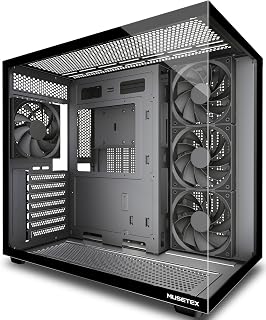
Pros
- Four 120mm fans included, eliminating immediate cooling costs
- 270-degree tempered glass showcases hardware from multiple angles
- Dual-chamber design separates PSU heat for better component cooling
- Supports 410mm GPUs and 360mm radiators for future upgrades
Cons
- Large footprint at 16.73 inches deep requires dedicated desk space
- Some Micro-ATX builds reported missing motherboard standoff holes
Budget builds often force you to choose between looks and cooling, but the MUSETEX Y6 includes four 120mm fans right in the box, saving you the cost of aftermarket cooling while delivering solid thermal performance out of the gate. The dual-chamber layout keeps PSU heat isolated from your CPU and GPU, letting those pre-installed fans focus where it matters most. The 270-degree tempered glass design gives you a showcase-worthy view without the premium case price tag, and the black matte finish avoids the cheap plastic look common in this price range. Expansion support is genuinely flexible: 410mm GPU clearance, 160mm CPU cooler height, and room for a 360mm radiator if you want to upgrade to liquid cooling later. The magnetic dust filters and tool-free panels make maintenance straightforward. Cable management is well thought out with Velcro ties and routing channels included. At 13.1 pounds and over 16 inches deep, it's a substantial case that needs proper desk space, and some users reported missing standoff holes for Micro-ATX boards, which could complicate certain builds.
Case Type: Mid Tower ATX
Motherboard Support: ATX, Micro-ATX, Mini-ITX
Cooling Capacity: CPU cooler up to 160mm, GPU up to 410mm, Radiator up to 360mm, PSU up to 230mm
Pre-Installed Fans: 4x 120mm (3 reverse on side, 1 forward on rear, non-LED)
I/O Ports: 1x USB 3.0, 1x USB 2.0, 1x Type-C, Audio, Microphone
Materials: Metal, Plastic, Tempered Glass
Dimensions: 16.73"D x 10.83"W x 15.67"H
Weight: 13.1 lbs
Color: Black Matte
Warranty: 10 Years
This case is ideal for first-time builders who want a complete cooling solution without buying fans separately, and for anyone upgrading from a basic chassis who values tempered glass aesthetics on a budget. It suits standard ATX and Mini-ITX builds best. Skip it if you're building Micro-ATX and can't verify standoff compatibility, or if your desk space is tight and you need a compact footprint. Also not the right pick if you prefer a minimalist case without large glass panels.

Three pre-installed 120mm RS fans provide immediate high-airflow cooling without requiring additional fan purchases upfront. The InfiniRail mounting system offers flexible component positioning that simplifies cable management and hardware installation for first-time builders working within tight budgets. Compatibility with modern back-to-front connector motherboards from major manufacturers means cleaner builds with fewer visible cables, enhancing aesthetics without extra cost.
Pros
- Three pre-installed RGB fans deliver strong out-of-box airflow
- InfiniRail system supports dual 360mm radiators and flexible fan layouts
- FRAME Modular System allows motherboard tray swaps and I/O customization
- Alloy steel and aluminum build with fully toolless panel removal
Cons
- Large physical size demands significant desk or floor space
- Pre-installed fans require directional verification to optimize airflow
The CORSAIR 4000D RS ARGB earns a spot on a best-budget list not by being the cheapest option available, but by delivering a level of feature density that makes the outlay feel justified. Three pre-installed 120mm RGB fans handle airflow from day one, and the 3D Y-Pattern front panel keeps thermals strong, with reported GPU temperatures as low as 29 degrees Celsius under load. The InfiniRail mounting system accommodates dual 360mm radiators and varied fan layouts, so the case can grow alongside your components rather than becoming a bottleneck. The FRAME Modular System lets you swap the motherboard tray and customize the front I/O panel, extending the useful life of the chassis across multiple future builds. Cable management is handled through rear routing, integrated shrouds, and rear-mounted SSD slots, keeping the interior camera-ready without extra effort. Seven expansion slots and three USB 3.0 ports cover standard connectivity needs. Alloy steel and aluminum construction feels robust, and toolless removal of side, top, and front panels makes the building process noticeably faster.
Case Design: Mid-tower ATX modular system with removable panels and customizable frame components
Motherboard Support: ATX, mATX, ITX
Cooling Capacity: Dual 360mm radiators, up to 10 total fans (120mm or 140mm)
Expansion Slots: 7 total slots for expansion cards and GPUs
Storage Bays: 3 internal bays with SSD mounting on motherboard tray rear and HDD mounting on case floor
Power Supply: Rear-mounted, supports up to 1600W
Pre-Installed Fans: 3x CORSAIR RS ARGB PWM with 8 LEDs each, daisy-chainable 4-pin connectors
USB Ports: 3x USB 3.0 ports
Material: Alloy steel and aluminum construction
Dimensions: 19.17" D x 9.41" W x 19.13" H
Weight: 22.7 pounds
Warranty: 2-year manufacturer coverage
A strong pick for budget-aware builders planning a mid-to-high-end system who want a case that will last across several upgrade cycles. Gamers, streamers, and content creators benefit most from the cooling headroom and modular options. Less suited to compact-space setups given its large footprint, and builders new to fan orientation may need extra care during installation to ensure correct airflow direction.

Pros
- Perforated PSU shroud enables direct bottom-to-GPU airflow
- Supports 360mm front and 240mm top radiators
- Two pre-installed 120mm fans reduce initial costs
- Wide cable routing channels simplify management
Cons
- Mesh design makes rear cables visible
- Limited to one 3.5-inch drive bay by default
When budget matters but cooling and build quality cannot be compromised, the NZXT H5 Flow delivers exceptional value in a compact mid-tower package. This case supports ATX and Micro-ATX motherboards while maintaining a smaller footprint than many competitors, making it ideal for desk setups where space is limited. The perforated PSU shroud creates a dedicated bottom intake pathway that feeds cool air directly to the GPU, while ultra-fine mesh panels across the front, top, and side maximize ventilation throughout the chassis. Two 120mm Quiet Airflow fans arrive pre-installed, eliminating the immediate need for additional cooling purchases. Radiator support extends to 360mm front and 240mm top configurations, providing a clear upgrade path for liquid cooling without requiring a new case. The interior layout features thoughtful cable management with multiple anchor points and wide routing channels that simplify the build process. Metal construction ensures durability without adding unnecessary weight, and the tempered glass panel showcases your components while maintaining structural integrity. The smooth edges and spacious internal volume make component installation straightforward, reducing common first-build frustrations.
Case Type: Compact ATX Mid-Tower
Motherboard Support: ATX, Micro-ATX, Mini-ITX, E-ATX compatible
Dimensions: 16.93in W x 18.31in H x 8.86in D
Weight: 8 kg
Material: Metal with tempered glass panel
Cooling Support: Front 360mm radiator, top 240mm radiator
Pre-installed Fans: Two 120mm Quiet Airflow fans (front intake, rear exhaust)
Fan Size Support: 120mm standard
Power Supply: Bottom mount
Internal Bays: 4 total
Drive Support: One 3.5-inch bay, two 2.5-inch bays
I/O Ports: Two USB 2.0, two USB 3.0
Expansion Slots: 7 total
Cable Management: Wide channels, hooks, and straps included
Warranty: 2-year manufacturer warranty
First-time builders on a tight budget will appreciate the straightforward assembly and effective cooling performance straight from the box. Experienced enthusiasts building compact systems for LAN events or smaller desks benefit from the reduced footprint without sacrificing component compatibility. Skip this case if you need extensive 3.5-inch drive storage beyond one bay, or if visible rear cable routing through the mesh panels conflicts with your aesthetic standards. Builders prioritizing absolute silence may also want alternatives, as the airflow design favors thermal performance over noise reduction.

Pros
- Seven PWM ARGB fans pre-installed save substantial costs
- 270-degree dual tempered glass maximizes component visibility
- Front USB Type-C and dual USB 3.0 ports
- 10-year warranty unusual for budget segment
Cons
- Fan noise increases at higher speeds
- RGB control requires compatible motherboard headers
Budget-conscious builders seeking maximum out-of-the-box value will find the MUSETEX K2 hard to beat. Seven pre-installed PWM ARGB fans eliminate the substantial cost of aftermarket cooling solutions, providing robust thermal management from the moment you start building. The 270-degree dual tempered glass design offers far more visual access than typical single-panel cases, transforming your components into a centerpiece without requiring expensive display upgrades. Front-panel connectivity includes USB Type-C alongside dual USB 3.0 ports, a feature often reserved for higher-priced enclosures. The case accommodates modern hardware with clearance for graphics cards up to 400mm and CPU coolers reaching 165mm, while 360mm radiator support enables liquid cooling upgrades when budget allows. Internal partitioning separates cable management from the main chamber, helping even inexperienced builders achieve clean results. Dust filters protect components during long gaming sessions, reducing maintenance requirements. The metal frame with tempered glass construction feels substantial, and the 10-year warranty provides long-term protection that budget cases rarely offer. Motherboard RGB software integration allows full lighting customization without standalone controllers, though this does require compatible motherboard headers for functionality.
Case Dimensions: 16.73 inches (D) x 8.35 inches (W) x 18.5 inches (H), weighing 15 pounds
Motherboard Support: ATX, Micro-ATX, Mini-ITX
Cooling: 7 pre-installed 120x120x25mm PWM ARGB fans (600-1300 RPM, 24.72 CFM max airflow, 20.8dB noise level). Expandable to 10 total fans.
Component Compatibility: GPU up to 400mm (15.7 inches), CPU cooler up to 165mm (6.5 inches), top-mounted liquid cooler up to 360mm (14.2 inches), PSU up to 140-180mm with or without hard drive cage
Front Panel I/O: 1x USB Type-C, 2x USB 3.0, microphone and audio jacks, power and restart buttons
Storage: 8 internal bays supporting 3.5-inch hard drives
Materials: Metal frame, plastic accents, tempered glass front and side panels
Additional Features: Dust filters, RGB lighting with motherboard control, bottom-mounted power supply
Warranty: 10-year manufacturer warranty
Gamers building their first RGB system gain tremendous value from the included fans and dual glass panels that would otherwise cost significantly more as separate purchases. Builders working with Mini-ITX, Micro-ATX, or ATX motherboards benefit from the versatile compatibility. Those planning eventual liquid cooling upgrades appreciate the 360mm radiator support at this entry-level cost. Skip this case if you require extensive hard drive storage beyond the limited internal bays, or if you prefer quieter operation over maximum cooling performance. Builders without RGB-compatible motherboards will miss out on the lighting control features.

Pros
- Supports 360mm GPUs and full ATX PSUs in a compact micro-ATX chassis
- Modular I/O panel adjusts to six positions for flexible cable routing
- Fully perforated sides with five-fan support for strong airflow
- Edge-to-edge transparent panel and patterned dust filters add visual appeal
Cons
- Compact interior requires careful planning and precise installation
- No user reviews available to verify long-term build quality
Small cases usually limit your hardware choices, but the Cooler Master Q300L handles 360mm graphics cards, 240mm AIO coolers, and full-size ATX power supplies in a micro-ATX footprint, giving budget builders component flexibility without the cost or space of a mid-tower. The fully perforated design on all sides creates natural airflow paths, and support for up to five fans means you can tailor cooling to your workload without cramped thermal conditions. The modular I/O panel adjusts to six different positions on the front or back, solving cable reach and desk layout issues that often plague compact builds. Edge-to-edge transparent paneling showcases your hardware cleanly, and the magnetic dust filters feature a patterned design that adds character while keeping internals clean. The cube design avoids flashy gamer aesthetics, making it suitable for office or living room environments. Alloy steel and plastic construction feels sturdy for the class. The compact interior does require careful planning during assembly, so first-time builders should take measurements before ordering parts. The case includes three fans, though exact placement and performance aren't detailed.
Physical Dimensions: 15.39 inches deep, 9.06 inches wide, 15 inches tall. Weight: 480 grams.
Motherboard Support: Micro-ATX and Mini-ITX. Total expansion slots: 4. Internal bays: 1 (3.5-inch hard disk form factor). USB 3.0 ports: 2.
Component Compatibility: CPU coolers up to 159mm height, graphics cards up to 360mm length, power supplies up to 160mm length and 500 watts maximum output.
Cooling: 240mm liquid cooler and 5 fans supported. Three fans included by default. Fully ventilated with perforated design on all sides and magnetic dust filters.
Materials and Build: Alloy steel and plastic enclosure. Dark gray color. Model MCB-Q300L-KANN-S00. Includes 2-year warranty. PSU mounting type: bottom mount.
This is the right choice for space-constrained builders who need serious component compatibility in a small package, and for anyone building a capable gaming or productivity rig where desk real estate is limited. It works well for Micro-ATX and Mini-ITX builds with standard-sized GPUs and PSUs. Skip it if you're new to building and want a roomy interior with simple assembly, or if you need more than four expansion slots and one internal drive bay for storage-heavy builds.

Pros
- Three ARGB fans included eliminate separate cooling and lighting expenses
- Dual tempered glass panels provide premium look at accessible pricing
- Supports 280mm radiators and 340mm GPUs despite compact size
- Cable management space allows clean builds in budget-friendly package
Cons
- RGB control requires compatible motherboard header instead of built-in controller
- Compact interior works best with slimmer micro-ATX boards for optimal aesthetics
Budget-focused builders typically sacrifice aesthetics or bundled extras, but the Thermaltake View 170 TG ARGB breaks that pattern by including three 120mm ARGB fans right in the box. That alone saves you the cost of separate RGB fans, which often run fifteen to twenty dollars each. The micro-ATX form factor uses less material than full towers, helping keep manufacturing costs down while still offering 340mm GPU clearance for modern graphics cards and room for up to 280mm radiators if you want liquid cooling later. The dual tempered glass panels on the front and side deliver premium visibility without pushing the case into higher pricing tiers. The metal construction feels solid during assembly, and the internal layout provides enough cable management space to achieve clean results even on a first build. The included fans run at 22.3 dBA and sync with ASUS, Gigabyte, MSI, and ASRock motherboard RGB headers, eliminating the need for separate controllers. Four expansion slots and support for up to seven total fans give you upgrade flexibility as your budget grows. The compact footprint saves desk space while the bottom-mounted power supply keeps the overall design clean.
Case Type: Micro-ATX Mini Tower
Dimensions: 438 x 212 x 377.5mm (17.24 x 8.35 x 14.86 inches)
Weight: 6.35kg / 14 lbs
Motherboard Support: Micro-ATX (up to 9.6x9.6 inches) and Mini-ITX (up to 6.7x6.7 inches)
Cooling: Includes 3x 120mm ARGB Lite Fans (1000 RPM, 22.3 dBA)
Radiator Support: Top mount up to 280mm/240mm, rear mount 120mm
Fan Expansion: Up to 7x 120mm fans total
Storage: 1x 3.5 inch HDD bay, 2x 2.5 inch SSD bays
GPU Clearance: Up to 340mm length
CPU Cooler Clearance: Up to 160mm height
PSU Clearance: Up to 180mm length
Power Supply: Standard PS2 mounting (bottom mounted)
Expansion Slots: 4 total
I/O Ports: 2x USB 3.0, 1x HD Audio
Warranty: 3-year manufacturer warranty

Pros
- Mesh front panel provides unrestricted airflow for demanding builds
- Supports eight 120mm fans and 360mm radiators for cooling flexibility
- USB-C front I/O and seven expansion slots for modern hardware
- Magnetic dust filters simplify maintenance without tools
Cons
- Only one pre-installed fan requires additional cooling investment
- No user reviews to confirm long-term durability or build quality
Airflow is the defining feature of the DARKROCK EC2, and that mesh front panel delivers unrestricted cooling without forcing you into a premium case tier. Support for eight 120mm fans and a 360mm radiator gives you room to scale your cooling setup as your budget allows, starting simple and upgrading over time. The tempered glass side panel and door-opening design add visual appeal without the typical budget-case compromises, and the USB-C port future-proofs your front I/O. Seven expansion slots and compatibility with ATX, Micro-ATX, and Mini-ITX boards mean this case can accommodate a wide range of builds. Magnetic dust filters on top and bottom reduce maintenance effort while preserving the airflow advantage. The metal, plastic, and glass construction feels solid for the segment. The main limitation is that only one fan comes pre-installed, so you'll need to budget for additional cooling to fully leverage that mesh front and multi-fan support. The lack of user reviews means long-term durability is unproven, which adds some uncertainty for budget-conscious buyers weighing reliability.
Cooling capability is where this case truly excels. The mesh front panel allows unrestricted airflow, paired with support for up to eight 120mm fans and one 360mm radiator. This configuration is suitable for high-end gaming rigs and overclocked systems that generate significant heat.
The bottom-mounted PSU placement helps separate heat sources, improving overall thermal efficiency. Magnetic dust filters prevent clogging, maintaining consistent airflow performance over time without frequent maintenance.
This case accommodates ATX, Micro-ATX, and Mini-ITX motherboards, offering flexibility for various build sizes. It supports graphics cards up to 340mm in length and power supplies up to 200mm, making it compatible with modern high-end GPUs including 50-series cards.
With seven expansion slots and three internal bays, you have room for multiple storage devices and expansion cards. The bottom PSU mount maximizes internal space and improves cable routing compared to front-mounted alternatives.

Pros
- Excellent thermal performance with mesh front panel and 4 included ARGB fans creating strong front-to-back airflow
- Tempered glass and ARGB lighting provide premium aesthetics at a budget price point
- Great cable management space with dedicated routing channels and tie-down points for clean builds
- Robust motherboard support for ATX, Micro-ATX, and Mini-ITX with plenty of expansion slots
- Tool-free tempered glass panel makes component access and maintenance quick and hassle-free
Cons
- Some users report plastic build quality in non-structural areas, particularly the front panel cover and fan frames
- Top front fan ships in exhaust configuration by default, requiring manual repositioning before component installation for optimal intake
- Rear panel feels thin and flexes slightly, though this does not impact overall structural integrity or function
The GAMDIAS AURA GC1 ELITE ARGB is a mid-tower PC case designed for budget-conscious gamers and PC builders who refuse to compromise on cooling performance or aesthetics. At under $60, it delivers features typically found in cases costing significantly more, making it an excellent choice for first-time builders or budget-focused upgrades.
The standout feature is undoubtedly the inclusion of 4 pre-installed 120mm ARGB fans paired with an airflow-focused mesh front panel. Users consistently report that thermal performance is exceptional straight out of the box, with noticeable air movement visible through the tempered glass side panel. The case supports up to 6 additional 120mm fans, 360mm AIO radiators, and 160mm CPU coolers, providing ample room to grow your cooling setup as needs evolve.
Design and build quality present a mixed picture. The tempered glass side panel is substantial and tool-free to remove, offering excellent visibility of your components and RGB lighting. However, the front plastic panel cover and fan frames feel noticeably cheaper, though they remain fully functional. Cable management is solid with good spacing at the rear, dedicated routing channels, and numerous tie-down points that make organizing cables straightforward even for first-time builders.
The case supports ATX, Micro-ATX, and Mini-ITX motherboards with 7 PCIe slots and includes a PSU shroud, magnetic dust filters, and convenient top-mounted USB 3.0 and audio headers. One quirk to note: the top front fan ships in exhaust mode by default and should be repositioned before installing components for optimal intake airflow.
The AURA GC1 ELITE ARGB represents outstanding value for entry-level and budget builds where thermal performance and aesthetics matter. While plastic components indicate cost-cutting in non-critical areas, the case delivers reliable cooling, expandability, and visual appeal that belies its affordable price tag. Recommended for anyone building a gaming PC on a tight budget without sacrificing performance.
Case Type: Mid Tower ATX
Motherboard Support: ATX, Micro-ATX, Mini-ITX
Fan Support: Up to 6x 120mm fans, 360mm AIO radiator, 160mm CPU cooler
Pre-installed Fans: 4x 120mm ARGB fans
Drive Bays: 2x 3.5 inch or 1x 2.5 inch + 1x 3.5 inch HDD cage, 2x 2.5 inch SSD trays
Expansion Slots: 7 PCIe slots
Connectivity: 1x USB 3.0, 2x USB 2.0, 1x HD Audio, 1x LED Control header
GPU Clearance: Up to 340mm
Materials: SPCC steel with ABS plastic, tempered glass side panel
Dimensions: 17.72 inch H x 7.68 inch W x 15.55 inch D
Weight: 4900 grams
Warranty: 1 Year Manufacturer
Color: Stealth Black
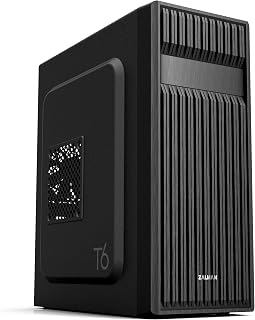
Pros
- Accepts three motherboard sizes for maximum build flexibility
- Mesh panels and fan support allow cooling upgrades as budget permits
- Multiple drive bays let you expand storage over time
- Powder-coated steel provides durability at entry-level pricing
Cons
- Single pre-installed fan may require additional purchases for demanding builds
- Incompatible with certain ATX boards featuring side-facing SATA ports
For builders working within tight budget constraints, the Zalman T6 delivers fundamental case features without unnecessary extras that inflate cost. The mid-tower design accepts ATX, Micro-ATX, and Mini-ITX motherboards, giving you flexibility to build around whatever components offer the best value at purchase time. The mesh front and side panels provide airflow pathways that help budget CPUs and GPUs stay cool, while the included 120mm rear fan means you can complete a basic build without buying additional cooling immediately. The powder-coated steel construction resists corrosion and holds up to repeated modifications. Four internal drive bays plus a 5.25-inch external bay give you room to add storage as funds allow, rather than forcing immediate investment in expensive high-capacity drives. Front I/O offers one USB 3.0 and two USB 2.0 ports for peripherals. The acrylic side panel lets you see your components without the premium tempered glass carries. Seven expansion slots provide upgrade headroom. One compatibility note: some ATX motherboards with side-facing SATA ports may not fit properly, so verify your board layout beforehand.
Motherboard Support: ATX, Micro-ATX, Mini-ITX
Cooling: Air cooled with pre-installed 120mm rear fan, supports up to 4 fans total
Storage Bays: 4 internal bays (2x 2.5-inch, 2x 3.5/2.5-inch), 1 external 5.25-inch bay
Connectivity: 1x USB 3.0, 2x USB 2.0, 1x audio in/out
Expansion Slots: 7 total slots
Dimensions: 14.84-inch depth x 7.87-inch width x 16.92-inch height
Weight: 8 pounds
Materials: Alloy steel, metal, plastic with acrylic side panel
Warranty: 1 year manufacturer warranty
Buying Guide: What to Consider When Choosing a Budget PC Case
Airflow Design and Cooling Capacity
Budget cases often compromise on airflow, but the models in this guide prioritize thermal performance. Look for mesh front panels rather than solid acrylic, which restricts air intake by up to 40%. Cases like the NZXT H5 Flow – Compact ATX Mid-Tower PC Case feature perforated designs on multiple surfaces to maximize cooling potential.
Check how many fans come pre-installed and where additional fans can be mounted. The MUSETEX ATX PC Case 7 PWM ARGB Fans Pre-Installed stands out with seven fans included, eliminating the need for additional cooling purchases. Verify radiator support if you’re planning liquid cooling now or in the future.
Component Compatibility and Clearance
Budget doesn’t mean small. Verify GPU length clearance, especially if you’re targeting modern graphics cards. Most cases in this range support GPUs up to 340-420mm, but always confirm against your specific card dimensions. The Lian Li V100-ATX Mid-Tower PC Case-Black-V100RX accommodates cards up to 420mm while maintaining compact external dimensions.
CPU cooler height matters for tower coolers. Budget cases typically support 159-178mm clearance, enough for most air coolers but limiting for some high-end models. If you’re building a system around newer GPUs, our RTX 5080 case recommendations provide additional guidance on optimal configurations.
Build Quality and Cable Management
Steel construction beats plastic in durability and noise dampening. Check panel thickness and how side panels attach. Tool-less mechanisms save time during builds and maintenance. The CORSAIR 4000D RS ARGB Frame Modular Mid-Tower ATX introduces modular components that let you swap panels and upgrade individual sections over time.
Cable management space behind the motherboard tray directly impacts build cleanliness. Look for cases with 20-25mm clearance, routing channels, and Velcro straps. Poor cable management restricts airflow and makes upgrades frustrating. Some cases include PSU shrouds to hide cables and create a cleaner aesthetic even with basic cable routing.
Front Panel Connectivity
Modern budget cases increasingly include USB-C ports alongside standard USB 3.0 connections. The MUSETEX Y6 PC Case, Pre-Installed 4 Non-LED Fans and DARKROCK EC2 ATX Mid Tower Gaming Computer PC offer Type-C connectivity at budget prices. Verify your motherboard has the corresponding header before prioritizing USB-C.
Audio jacks, power buttons, and reset switches seem basic but vary in placement and quality. Top-mounted I/O panels work better on desk setups, while front-mounted panels suit floor placement. RGB control buttons are convenient for cases with built-in lighting, letting you adjust effects without software. Builders working with RTX 5070 configurations should also consider power supply clearance for larger wattage units.
Final Thoughts
Budget PC cases in 2026 deliver features that were premium-only just a few years ago. The Cooler Master Q300L V1 Micro-ATX PC Case remains the most affordable entry point for compact builds, while the MUSETEX ATX PC Case 7 PWM ARGB Fans Pre-Installed offers unmatched cooling and lighting value for mid-tower builds. Your choice depends on whether you prioritize size, cooling capacity, or RGB aesthetics, but every case here provides solid construction and room for upgrades without demanding premium pricing.
Frequently Asked Questions
What is a good budget for a PC case in 2026?
A quality budget PC case ranges from forty to ninety dollars, depending on features like pre-installed fans, tempered glass panels, and RGB lighting. Cases below forty dollars often sacrifice airflow or build quality, while spending above ninety typically adds premium aesthetics rather than functional improvements. The sweet spot balances essential features with long-term durability.
Do budget PC cases have good airflow?
Modern budget cases prioritize airflow through mesh front panels and multiple fan mounting points. The NZXT H5 Flow – Compact ATX Mid-Tower PC Case and similar models achieve thermal performance comparable to premium cases through intelligent design. Avoid solid front panel cases regardless of price, as they restrict intake and increase component temperatures. For high-performance builds, explore our recommendations for complete RTX 5090 system configurations.
Can budget cases fit large graphics cards?
Most budget ATX and Micro-ATX cases support GPUs between 340mm and 420mm in length, accommodating virtually all consumer graphics cards in 2026. Verify clearance specifications against your specific GPU model, especially if using a thick triple-fan design. The Lian Li V100-ATX Mid-Tower PC Case-Black-V100RX exemplifies generous clearance at a budget price point. Micro-ATX cases may limit GPU length compared to full-size ATX towers.
Is tempered glass worth it on a budget case?
Tempered glass side panels showcase your build and components, adding visual appeal without affecting performance. Many budget cases now include tempered glass as standard, making it worthwhile unless you specifically prefer a closed design for noise reduction. Cases with 270-degree glass panels like the MUSETEX Y6 PC Case, Pre-Installed 4 Non-LED Fans maximize visibility. Glass panels are heavier and require careful handling during installation compared to acrylic alternatives.





Write Your Review
No reviews yet. Be the first to share your experience!