

The RTX 5090 represents the pinnacle of gaming performance, but pairing it with inadequate components wastes its potential. You need a balanced system that can feed this powerhouse GPU without throttling, overheating, or running into compatibility issues.
This guide walks through eight essential components for a high-performance RTX 5090 build. Whether you prioritize maximum framerates, content creation, or future-proofing, these picks deliver the headroom and reliability this flagship card demands.
Quick answer
This guide compares 8 picks, with WD_BLACK SN850X 4TB NVMe SSD - 7,300 MB/s Gaming ranked first.

The 7,300 MB/s read speeds eliminate loading bottlenecks when streaming high-resolution textures to the GPU during gameplay. The 4TB capacity accommodates modern game installations that exceed 100GB while leaving room for operating system and applications. PCIe 4.0 interface and M.2 2280 form factor ensure compatibility with the latest motherboards while maximizing storage performance.
Pros
- Lightning-fast performance meets or exceeds advertised specifications in real-world use
- Massive 4TB capacity eliminates frequent game library management and uninstalls
- Compatible with PlayStation 5 expansion and high-performance gaming PCs
- WD_BLACK Dashboard software enhances gaming experience with automated optimization
- Reliable thermal performance under continuous load without throttling issues
Cons
- Premium pricing is significantly higher than comparable Gen4 competitors
- Heatsink version has compatibility issues with some external enclosures and dock accessories
- Game Mode 2.0 delivers marginal real-world gaming benefits despite marketing emphasis
The WD_BLACK SN850X 4TB is a high-performance NVMe SSD designed for gamers, content creators, and power users who demand top-tier storage speeds. This Gen4 PCIe drive targets users building premium gaming PCs or expanding PlayStation 5 storage, where load times and performance consistency matter.
Real-world performance testing confirms the drive delivers on its promises, hitting 7,133 MB/s read speeds and maintaining 6,500 MB/s under sustained loads. The 4TB capacity provides ample room for large game libraries without constant file juggling. The M.2 2280 form factor ensures broad compatibility across modern systems, while optional heatsink variants help maintain performance during intensive workloads.
Build quality is solid, with the drive weighing just 7.5 grams and featuring a compact 3.15-inch form factor. The included WD_BLACK Dashboard software offers Game Mode 2.0 features, though performance improvements are subtle in practice. Thermal management remains stable even during extended gaming sessions or content creation workflows.
The main drawback is the premium price point, which sits noticeably above competing Gen4 options with similar performance. Additionally, the heatsink variant may not fit certain external enclosures or docking stations. The Game Mode 2.0 feature, while convenient, doesn't deliver transformative real-world benefits.
The WD_BLACK SN850X 4TB is an excellent choice for gamers and creators who want reliable, fast storage and don't mind paying for proven performance and the WD brand reputation. If budget is flexible and you value consistency over cost, this drive delivers premium speeds and capacity.
Storage Capacity: 4TB (also available in 1TB, 2TB, and 8TB)
Interface: PCIe 4.0 NVMe
Form Factor: M.2 2280
Read Speed: Up to 7,300 MB/s
Write Speed: Up to 6,300 MB/s
Cache Memory: 4GB LPDDR4
NAND Technology: SanDisk TLC 3D NAND
Warranty: 5-year limited warranty
Compatibility: PC, Laptop, PlayStation 5, M.2 slot motherboards
Dimensions: 3.15in L x 0.87in W x 0.09in Th
Weight: 7.5g
Features: WD_BLACK Dashboard software with Game Mode 2.0
Who Should Buy: Gamers building high-end PCs, PlayStation 5 owners seeking expansion storage, content creators working with large files, and users who prioritize speed and capacity over cost.
Who Should Skip: Budget-conscious buyers, users who don't need extreme speeds, or those seeking the best value-for-money option in the Gen4 market.
Heatsink Considerations: The drive is available with or without a heatsink. The heatsink version provides better thermal management but may not fit some external enclosures. Verify compatibility with your specific dock or case before purchasing the heatsink variant.
PlayStation 5 Users: This drive is fully compatible with PS5 expansion. Ensure your console has the latest firmware to recognize the drive fully.
Gaming vs. General Use: While marketed for gaming, the 7,300 MB/s speeds benefit any task involving large file transfers, video editing, or working with demanding applications.

The 360mm radiator provides the thermal capacity needed to cool high-end processors under sustained loads without thermal throttling. Direct motherboard connection simplifies installation while maintaining low noise levels at 36 dB, keeping the system quiet during gaming. Compatibility with LGA 1851 and AM5 sockets ensures flexibility for both Intel and AMD builds.
Pros
- 360mm radiator handles heat from high-performance CPUs
- 20 dBA pump with 36 dB fans maintain quiet operation
- Pre-applied paste and convex cold plate simplify installation
- Direct motherboard connection reduces controller clutter
Cons
- No pump display for temperature monitoring
- ARGB requires compatible motherboard headers
The RTX 5090 demands serious cooling infrastructure, and a high-end CPU paired with it needs equally capable thermal management. This 360mm AIO brings aluminum and copper construction with a convex cold plate and pre-applied thermal paste for secure contact with today's demanding processors. The RS120 ARGB fans use AirGuide technology and Magnetic Dome bearings to push air through the radiator while maintaining 36 dB operation, with pump noise measured at just 20 dBA. Direct motherboard connection eliminates extra controllers, and daisy-chained ARGB simplifies wiring in builds where GPU length and cable routing are already constrained. The 360mm radiator provides the surface area needed to dissipate heat from processors running alongside power-hungry graphics cards, preventing thermal throttling during extended gaming or rendering sessions. Socket compatibility covers Intel LGA 1851/1700 and AMD AM5/AM4, ensuring support for current and recent platforms that pair naturally with flagship GPU builds.
Installation is remarkably straightforward and takes approximately 15-30 minutes depending on experience level. The pre-applied thermal paste eliminates the guesswork, and the convex cold plate design ensures proper contact with Intel and AMD CPU integrated heat spreaders without requiring additional paste application.
Compatibility spans a wide range of modern platforms: Intel LGA 1851, LGA 1700, and AMD AM5, AM4 sockets. Connection is simplified through a single 4-pin PWM fan header and one 5V ARGB header on your motherboard, with daisy-chaining capability for the three included RS120 fans. Cable lengths are well-designed to accommodate most modern case layouts without excessive excess or tension.
The Nautilus 360 RS excels in thermal performance, consistently keeping high-end CPUs cool even during extended gaming sessions or heavy workloads. The high-flow pump circulates coolant efficiently while maintaining its exceptionally quiet 20 dBA operation. Users report CPU temperatures remaining stable and low even with demanding processors like the i7-12700KF under sustained load.
Acoustic performance is exceptional by AIO standards. The pump runs at whisper-quiet levels, and the RS120 fans generate minimal noise despite providing strong static pressure and airflow. This combination makes the cooler ideal for noise-sensitive builds, streaming setups, and professional environments where acoustic performance is a priority.
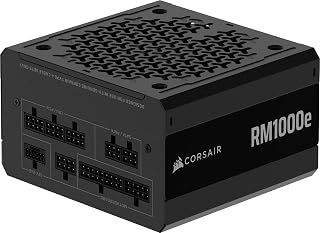
The ATX 3.1 and PCIe 5.1 compliance ensures native support for the 5090's power delivery requirements without adapter cables. The 1000W output provides sufficient headroom for the GPU's transient power spikes while maintaining efficiency under sustained loads. Air cooling keeps the unit reliable during extended gaming sessions when paired with high-end components that demand stable voltage rails.
Pros
- Native 12V-2x6 connector eliminates adapter cables for RTX 5090
- ATX 3.1 compliance handles transient power spikes without shutdown
- Fully modular cables enable clean routing around flagship components
- 140mm compact depth fits most full-size cases without clearance issues
Cons
- 1000W capacity leaves minimal headroom for future GPU upgrades
- Single-fan cooling design requires good case ventilation for sustained loads
Building around the RTX 5090 means planning for extreme power draw, and the CORSAIR RM1000e delivers the headroom and modern connectivity this flagship GPU demands. The native 12V-2x6 connector is purpose-built for next-generation graphics cards, eliminating adapter cables and their associated failure points. ATX 3.1 compliance ensures this unit handles transient power spikes without triggering protection shutdowns, a critical capability when your GPU briefly demands 600W or more during intensive workloads. The fully modular design becomes essential in high-end builds where cable management directly impacts airflow around expensive components. Industrial-grade 105°C capacitors provide the electrical stability required when sustained loads approach 800W or higher. The 120mm rifle bearing fan and intelligent power curve keep noise minimal even under heavy gaming loads. At 140mm depth, this PSU fits most full-size cases without blocking motherboard standoffs or drive cages. Four-screw mounting and clearly labeled modular ports make installation straightforward even in complex builds.
Power Output: 1000W continuous
Form Factor: ATX, 5.91 x 5.51 x 3.35 inches, 3.6 pounds
Modular Design: Fully modular with removable cables
Cooling: 1x 120mm rifle bearing fan
Efficiency: Cybenetics Gold certified
Standards: ATX 3.1, PCIe 5.1 compatible
Input Voltage: 100-240V AC
Warranty: 7 years manufacturer
Model: CP-9020297-NA
Connectors Include: 1x 24-pin ATX, 2x 8-pin ATX 12V, 1x 8-pin PCIe, 1x 600W 12V-2x6 native cable, 1x adapter cable to dual 8-pin, 6x SATA, 2x PATA
Pros
- Stunning design with genuine blackened oak and tempered glass that elevates any gaming setup aesthetically
- Excellent airflow and cooling performance with included Momentum fans that keep systems quiet and efficient
- Spacious interior with generous component clearance makes building and upgrading straightforward
- Outstanding cable management system with pre-routed Velcro straps delivers professional-looking builds
- Proven Fractal Design quality and attention to detail throughout every aspect of the case
Cons
- Premium pricing reflects the quality but may exceed budget-conscious builders' expectations
- Thumb screws can be finicky and benefit from using a proper screwdriver rather than fingers alone
- Maximum GPU clearance is tight when using a 420mm front radiator, limiting extreme GPU configurations
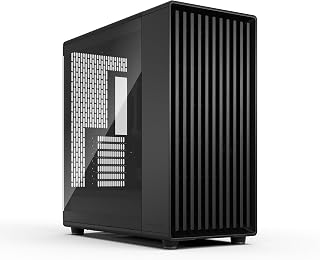
The Fractal Design North XL Momentum is a premium full-tower case designed for builders who refuse to compromise on aesthetics or performance. This case targets enthusiasts running high-end gaming systems, content creators with demanding workloads, and anyone who wants their PC to look like a piece of furniture rather than a box under the desk.
The standout feature is the genuine blackened oak front panel combined with dark alloy accents, creating a cohesive luxury aesthetic that reviewers consistently praise. Beyond looks, the three included Momentum 14 fans with LCP blades deliver strong airflow through the iconic open front mesh design. The case accommodates GPUs up to 413mm, and paired with extensive radiator support, it handles complex liquid cooling setups that many competitive cases cannot.
Build quality is exceptional throughout. The tempered glass side panel, alloy steel frame, and thoughtful interior layout reflect Fractal Design's reputation for precision engineering. Cable management stands out as a particular strength, with pre-installed Velcro straps positioned strategically throughout the interior, making even inexperienced builders achieve professional-looking results with minimal effort.
The main drawback is pricing, which reflects the premium materials and engineering but may stretch some budgets. Additionally, thumb screws can be frustrating to operate without a screwdriver, and maximum GPU clearance becomes constrained when using a 420mm front radiator, limiting extreme hardware configurations.
The North XL Momentum delivers on its promise to merge design-first thinking with practical performance engineering. For builders who value aesthetics as much as functionality and have the budget to invest in quality, this case is exceptional and worth the premium cost.
Case Type: Full Tower
Motherboard Support: E-ATX, ATX, Micro-ATX, Mini-ITX
Max GPU Length: 413mm (380mm with 420mm front radiator)
Radiator Support: Front up to 420mm, Top up to 360mm
Included Fans: Three Momentum 140mm fans with LCP blades
Ports: 2x USB 3.0
Materials: Alloy Steel, Tempered Glass
Color: Black with blackened oak front
Dimensions: 19.8in D x 9.4in W x 20in H
Weight: 26.2 lbs
Warranty: 2 Years

The 16-core configuration with 144 MB of cache eliminates CPU bottlenecks when driving a 5090 at high refresh rates or resolutions. The 4.3 GHz base clock and Socket AM5 compatibility provide the single-threaded performance needed for gaming while offering multi-threaded headroom for streaming or content creation. This processor keeps frame times consistent when the GPU is pushed to its limits.
Pros
- 16 cores prevent CPU bottlenecks when RTX 5090 pushes high frame rates
- 128MB L3 cache and 5.7 GHz boost clocks feed GPU data without latency
- Second-gen 3D V-Cache positioning eliminates thermal throttling issues
- AM5 socket provides broad motherboard compatibility and upgrade flexibility
Cons
- 170W power envelope requires premium cooling to avoid throttling
- Significantly more expensive than gaming-only processors with similar FPS
Pairing the RTX 5090 with anything less than a flagship CPU creates an immediate bottleneck in CPU-limited scenarios, and the Ryzen 9 9950X3D eliminates that weakness entirely. The 16 cores and 32 threads handle background processes, streaming encoding, and system overhead without stealing cycles from your game. The 128MB total L3 cache, combined with second-generation 3D V-Cache positioned beneath the compute cores, delivers sustained 5.7 GHz boost clocks that previous X3D chips could not maintain. This architecture change directly benefits RTX 5090 owners running high-refresh displays where frame pacing and CPU responsiveness determine perceived smoothness. Zen 5 efficiency means the processor feeds your GPU data fast enough to utilize all 32GB of GDDR7 memory during complex scenes. The 170W power envelope and thermal density demand serious cooling infrastructure, but builders investing in a 5090 are already planning for premium AIO coolers and robust case airflow. AM5 socket compatibility ensures broad motherboard selection and potential future upgrade paths without platform changes.
This CPU targets RTX 5090 owners who stream while gaming, run AI workflows alongside rendering tasks, or demand maximum performance in CPU-intensive simulations and strategy titles. Skip this if you only game and never multitask, where a 9800X3D delivers identical gaming performance at lower cost and simpler cooling requirements. Also reconsider if your cooling budget cannot accommodate a quality 280mm or 360mm AIO, as inadequate thermal solutions will throttle this chip well below its potential.
Processor: AMD Ryzen 9 9950X3D, 16 cores, 32 threads
Architecture: Zen 5, Granite Ridge
Socket: AM5
Base Clock: 4.3 GHz
Boost Clock: Up to 5.7 GHz
Cache: 16MB L2, 128MB L3
Power: 170W TDP
Platform: Windows
Form Factor: Boxed desktop processor

The 64GB capacity prevents memory bottlenecks when running games alongside streaming software, browser tabs, or recording tools. AMD EXPO support ensures the 6000 MT/s speed and CL30 timings are achieved automatically on AM5 platforms, optimizing performance for Ryzen processors. Dual-channel configuration maximizes bandwidth for CPU-GPU communication during intensive workloads.
Pros
- Exceptional 64GB capacity eliminates memory bottlenecks for heavy multitasking, video editing, and 3D rendering
- AMD EXPO profile delivers validated overclocking stability without manual tuning, saving setup time
- Tight CAS latency of 30 improves responsiveness compared to standard DDR5 modules
- Matte black design and RGB lighting integrate seamlessly into modern gaming and workstation builds
- Strong 4.7/5 rating reflects reliability and performance validation from real-world users
Cons
- Requires compatible AMD X870, X670, or B850 motherboards; not compatible with Intel platforms or older AM4 boards
- 6000MT/s speed requires BIOS overclocking adjustments; runs at JEDEC default speeds without manual configuration
- Premium pricing reflects high capacity and performance tier, making it a significant investment for budget builders
The G.SKILL Trident Z5 Neo RGB is a high-capacity DDR5 memory kit designed for AMD Ryzen 7000 series and newer users who demand premium performance. This 64GB kit, comprising two 32GB modules, targets content creators, professional streamers, and enthusiast gamers who need substantial memory headroom without compromise.
Performance stands out with 6000MT/s speed and CAS latency 30, delivering faster data access and reduced system latency compared to standard DDR5 modules. The AMD EXPO profile eliminates guesswork from overclocking, allowing users to activate validated performance settings directly in BIOS. Real-world benefits include snappier application launches, smoother multitasking, and measurable improvements in professional workloads like 3D rendering and video encoding.
Build quality matches G.SKILL's premium positioning. The matte black finish resists fingerprints and dust better than glossy alternatives, while integrated RGB lighting adds visual appeal when visible through windowed cases. Dual 32GB modules ensure balanced memory bandwidth utilization, critical for maximizing CPU efficiency in modern workstations.
The main limitation is platform exclusivity. AMD EXPO profiles require X870, X670, or B850 motherboards, making this kit incompatible with Intel systems and older Ryzen builds. Additionally, achieving the advertised 6000MT/s speed requires BIOS configuration; the kit defaults to slower JEDEC speeds until overclocking is enabled. At this price point, commitment to a specific platform is a significant consideration.
The Trident Z5 Neo RGB earns recommendation for users building high-end AMD Ryzen systems where 64GB memory is essential. Its combination of capacity, speed, and validated performance makes it a smart choice for creators and gamers willing to invest in future-proof hardware.
Core Specs: DDR5 UDIMM, 64GB total (2x32GB), 6000MT/s, CAS Latency 30, 1.40V nominal voltage, 288-pin, non-ECC.
Compatibility: AMD X870, X670, B850, B840, and B650 platforms. Requires overclocking or BIOS EXPO profile activation for maximum speed. Default JEDEC speed available on all compatible boards.
Features: AMD EXPO certified, integrated RGB lighting, matte black heatspreader, limited lifetime warranty, GTIN 04713294232762, Model F5-6000J3040G32GX2-TZ5NR.
Who Should Buy: Content creators, professional streamers, 3D artists, and high-end gamers building AMD Ryzen 7000 series systems. The 64GB capacity and 6000MT/s speed deliver tangible benefits for multitasking-heavy workflows and future-proof workstations.
Who Should Skip: Intel system builders, users with budget constraints under $500 for RAM, or those whose workloads fit comfortably within 32GB. Older Ryzen 5000 series users should verify motherboard compatibility before purchasing.
Before Buying: Confirm your motherboard supports AMD EXPO or DDR5 overclocking. Verify the kit appears on G.SKILL's QVL list for your specific motherboard model. Ensure your power supply and cooling setup can handle slightly elevated voltage during overclocking.
Installation: Simply insert both modules into available DIMM slots, then enable EXPO or manually configure BIOS settings. G.SKILL provides online resources and community support for setup optimization.

The X870 chipset and Socket AM5 compatibility provide native PCIe 5.0 support for both the GPU and storage, maximizing bandwidth for the 5090. Five M.2 slots accommodate multiple high-speed drives without sacrificing expansion options, while WiFi 7 delivers low-latency connectivity for online gaming. The 18+2+2 power stages ensure stable voltage delivery for overclocked Ryzen processors.
Pros
- Extremely stable power delivery supports high-end CPUs and extreme overclocking scenarios
- WiFi 7 and comprehensive USB connectivity provide years of future-proof performance
- AI tools significantly reduce setup complexity while maintaining enthusiast-level control
- Excellent cooling design keeps high-performance components at safe temperatures
- DIY-optimized design with intuitive quick-release mechanisms and helpful debug features
Cons
- Premium pricing targets enthusiasts and professionals rather than budget-conscious builders
- Extensive feature set may overwhelm users who don't plan to overclock or use advanced connectivity
- High-end components add weight and complexity compared to entry-level boards
The ASUS ROG Strix X870E-E Gaming WiFi is a flagship AM5 motherboard engineered for power users, high-end gamers, and content creators who demand maximum performance from their systems. This board is built around AMD's latest X870 chipset and supports the full range of Ryzen 9000, 8000, and 7000 series processors, making it a future-proof investment for AMD enthusiasts.
The standout feature is its robust 18+2+2 power delivery system rated for 110A per stage, paired with premium components like ProCool II connectors, quality alloy chokes, and durable capacitors. This translates to exceptional stability under demanding workloads and overclocking scenarios. Combined with ASUS-exclusive AI Overclocking and AI Cooling II, the board automatically optimizes performance and thermals, while enthusiasts can still access Dynamic OC Switcher, Core Flex, and other advanced tuning tools for granular control.
Connectivity is where this board truly shines. Dual USB4 Type-C ports, WiFi 7, 5Gb Ethernet, multiple USB 10Gbps ports, and five M.2 slots (three PCIe 5.0, two PCIe 4.0) ensure you're not bottlenecked by storage or network speeds. The thermal design is equally impressive, with massive integrated heatsinks, high-conductivity pads, and L-shaped heat pipes keeping M.2 drives and power stages cool even under sustained load.
The DIY-friendly design shows thoughtful engineering: Q-Release mechanisms for PCIe slots and M.2 drives make installation painless, while the pre-mounted I/O shield, Q-Code debug display, and BIOS FlashBack button speed up troubleshooting. The only real drawback is the premium pricing and feature complexity, which may intimidate builders seeking a simpler, more affordable solution.
Verdict: The ROG Strix X870E-E Gaming WiFi is a top-tier motherboard for anyone building a high-performance system with Ryzen 9000 series chips. The combination of exceptional power delivery, next-gen connectivity, intelligent optimization, and DIY-friendly design makes it worth the investment for enthusiasts and professionals.
Socket and Compatibility: AMD AM5 Socket, compatible with Ryzen 9000, 8000, and 7000 series processors. Supports up to 192GB DDR5 memory across 4 DIMM slots at speeds up to 320MHz.
Power and Storage: 18+2+2 power stages rated for 110A per stage. Six SATA 3 ports for traditional drives. Five M.2 slots total: three PCIe 5.0 slots and two PCIe 4.0 slots, all with robust cooling.
Connectivity: Dual USB4 Type-C ports, one USB 20Gbps Type-C front-panel connector, one USB 10Gbps port with PD 3.0 up to 30W, nine additional USB 10Gbps ports. WiFi 7 (802.11be) with Realtek 5Gb Ethernet. One HDMI port and optical S/PDIF output.
Physical Specs: Standard ATX form factor measuring 14.4 x 11.1 inches. Weighs 2.4kg. Three-year manufacturer warranty. Pre-mounted I/O shield included.
Best For: High-end gamers, overclockers, content creators, and enthusiasts building flagship systems with Ryzen 9000 series processors. Ideal for users who value premium power delivery, next-gen connectivity, and comprehensive overclocking tools.
Consider This Board If: You're investing in a top-tier CPU and high-performance components. You plan to use PCIe 5.0 storage, WiFi 7 connectivity, or multiple high-speed USB devices. You appreciate AI-assisted optimization but want manual control when needed. You value robust thermal management and DIY-friendly design.
Skip This Board If: You're building a budget or mid-range system where a more affordable X870 or B850 board would suffice. You don't need WiFi 7, USB4, or PCIe 5.0 connectivity. You prefer simpler boards with fewer features and complexity. You're not planning to overclock or use advanced performance tuning.
Pro Tips: Pair this board with quality DDR5 memory and an 850W+ power supply to handle high-end Ryzen chips. Use the AI Overclocking tools first to establish baseline stability before attempting manual tuning. Take advantage of the Q-Release mechanisms when installing or removing components to avoid damage.

The 32GB of GDDR7 memory handles demanding textures and ray tracing workloads at 4K and beyond without compromise. Native DisplayPort 2.1a outputs support the latest high-refresh monitors, while the 2580 MHz boost clock extracts maximum performance from the 5090 architecture. This OC Edition ensures thermal headroom for sustained performance during extended sessions.
Pros
- 32GB GDDR7 handles 4K textures and ray tracing without memory limits
- DLSS 4 and 772 AI TOPS enable cutting-edge visual fidelity
- Axial-tech fans and 0dB technology balance cooling with noise control
- Dual BIOS switch allows instant performance or quiet mode selection
Cons
- 13.7-inch length and 2.5-slot width demand full-size case compatibility
- Requires mandatory 1200W PSU minimum to prevent power throttling
The ASUS TUF Gaming RTX 5090 represents the performance ceiling for 2026 gaming and professional workloads, delivering 772 AI TOPS through NVIDIA's Blackwell architecture. The 32GB GDDR7 memory buffer handles 4K textures, ray tracing data, and AI frame generation simultaneously without compromising frame pacing. DLSS 4 integration multiplies effective performance, making native 4K ultra settings viable in demanding titles. The 2580 MHz boost clock sustains high frequencies under load thanks to the Axial-tech fan design, which uses longer blades and optimized air pressure to move heat efficiently while maintaining low acoustic signatures. The 0dB technology stops fans entirely during desktop use and light workloads. Military-grade PCB coating and dual-ball fan bearings reflect ASUS's focus on longevity under sustained heavy use. The dual BIOS switch provides immediate toggling between maximum performance and quieter operation without software intervention. Physical dimensions of 13.7 inches length, 5.7 inches width, and 2.5-slot depth require careful case planning and GPU sag prevention.
GPU and Memory: NVIDIA GeForce RTX 5090 with 32GB GDDR7 memory, 2580 MHz boost clock (OC mode), 2550 MHz default mode.
Performance: 772 AI TOPS, NVIDIA Blackwell architecture, DLSS 4 support, 7680x4320 maximum resolution output.
Connectivity: 3x Native DisplayPort 2.1a, 2x Native HDMI 2.1b, PCIe 5.0 x16 interface.
Cooling: 3x Axial-tech fans with dual-ball bearings, vapor chamber, 0dB technology, 2.5-slot design.
Power: Up to 600W draw, requires 1200W+ power supply minimum.
Dimensions: 13.7 inches length x 5.7 inches width, 5 pounds weight.
Warranty: 3-year manufacturer warranty, includes GPU Tweak III software and mounting accessories.
This GPU suits builders creating flagship systems for competitive sim racing, multi-monitor productivity, AI-accelerated rendering, or maximum-detail 4K gaming who refuse performance compromises. Skip this if you game at 1440p or below, where mid-range cards deliver identical visual quality at a fraction of the system cost. Also reconsider if your case cannot accommodate 14-inch cards or your PSU falls below 1200W, as insufficient power delivery or thermal constraints will throttle performance and void warranty coverage.
Buying Guide for RTX 5090 Builds
CPU Performance and Core Count
The RTX 5090 needs a CPU that won’t create bottlenecks at high refresh rates or during CPU-intensive tasks. The AMD Ryzen 9 9950X3D brings 16 cores with 3D V-Cache technology, delivering exceptional gaming performance alongside workstation-grade multithreading. Its 5.7 GHz boost clock handles single-threaded workloads while the additional cache reduces memory latency in games.
For builds focused purely on gaming, fewer cores with higher cache can outperform raw thread count. The 3D V-Cache architecture specifically targets frame time consistency, which matters more than peak FPS when you’re already hitting triple digits.
Cooling Solutions for High TDP Components
Modern high-end builds generate substantial heat. The CORSAIR Nautilus 360 RS ARGB Liquid CPU Cooler handles up to 450W TDP with its 360mm radiator and convex cold plate design. The pre-applied thermal paste and simple motherboard connectivity eliminate installation headaches.
AIO coolers with 360mm radiators provide better thermal headroom than tower air coolers when overclocking or running extended workloads. The magnetic dome bearings in the RS120 fans reduce noise while maintaining airflow, keeping your system quiet even under load. If you want visual customization, check out options with LCD screens for real-time monitoring.
Power Supply Capacity and Efficiency
The RTX 5090 demands clean, stable power delivery. The CORSAIR RM1000e (2025) ATX 3.1 PCIe 5.1 Ready supplies 1000W with native 12V-2×6 connectivity and handles 2x transient power spikes without triggering protection circuits. Its fully modular design keeps cable management clean in larger cases.
ATX 3.1 compliance matters for GPU stability. Older PSUs without proper transient handling can shut down during brief power spikes, even when total wattage stays within limits. The 105°C-rated capacitors ensure longevity under sustained high loads.
Storage Speed for Asset Streaming
Modern games stream textures and assets continuously during gameplay. The WD_BLACK SN850X 4TB NVMe SSD – M.2 2280 delivers 7,300 MB/s read speeds with TLC 3D NAND for sustained performance. Its 4TB capacity holds your entire game library without constant reshuffling.
PCIe 4.0 drives like the SN850X offer better value than PCIe 5.0 options for gaming workloads. The real-world performance difference in game loading and texture streaming remains negligible, while PCIe 4.0 drives provide more capacity per dollar. Consider pairing with external storage for backup and archival purposes.
Final Thoughts
Building around the RTX 5090 means choosing components that match its capabilities without introducing bottlenecks. For gaming-focused builds, the AMD Ryzen 9 9950X3D delivers exceptional frame times with its 3D V-Cache, while creators handling video editing or 3D rendering benefit from the full 16-core multithreading. Pair either with the Fractal Design North XL Momentum Black case for superior airflow and room for multiple radiators, ensuring your high-performance components stay cool under extended workloads.
Frequently Asked Questions
What motherboard features matter most for RTX 5090 builds?
Look for PCIe 5.0 x16 slots, multiple M.2 slots with heatsinks, and robust VRM cooling. The ASUS ROG Strix X870E-E Gaming WiFi AMD AM5 X870 provides 18+2+2 power stages for stable overclocking, along with five M.2 slots and USB4 connectivity. Dynamic OC Switcher automatically adjusts settings based on workload, while AI Cooling II optimizes fan curves without manual tuning.
How much RAM does an RTX 5090 system need in 2026?
32GB handles current games comfortably, but 64GB future-proofs for upcoming titles and multitasking scenarios. The G.SKILL Trident Z5 Neo RGB Series DDR5 RAM runs at 6000 MT/s with AMD EXPO profiles, delivering low latency for gaming while providing headroom for content creation. Dual-channel configuration maximizes memory bandwidth, which matters for CPU-intensive scenarios. For budget-conscious builders, explore quality DDR5 options under $150.
Does case airflow really affect GPU temperatures?
Absolutely. Restricted airflow can raise GPU temperatures by 10-15°C, triggering thermal throttling that reduces performance. The Fractal Design North XL Momentum Black includes three 140mm fans with open-front ventilation and supports up to 413mm GPUs with front radiator clearance. Proper airflow maintains boost clocks and extends component lifespan by preventing heat buildup.
Should I buy the RTX 5090 now or wait?
If you need the performance today for 4K gaming or professional work, the ASUS TUF Gaming GeForce RTX 5090 32GB GDDR7 OC delivers 772 AI TOPS with Blackwell architecture and DLSS 4 support. The 32GB GDDR7 memory handles large textures and AI workloads that overwhelm smaller GPUs. Stock availability fluctuates, so securing one when available makes sense if it fits your budget and performance needs.





Write Your Review
No reviews yet. Be the first to share your experience!