

Your CPU deserves better than basic cooling. Whether you’re pushing a high-core-count processor through heavy workloads or building a showcase rig that demands attention, an AIO cooler with an LCD screen delivers both premium thermal management and eye-catching customization. These coolers let you display real-time system stats, custom animations, or your favorite GIFs directly on the pump head.
We’ve evaluated ten standout models across different radiator sizes and price points. From budget-friendly 240mm options to flagship 360mm units with curved AMOLED displays, this guide covers what matters: cooling capacity, screen quality, noise levels, and compatibility with modern platforms like Intel LGA 1851 and AMD AM5.
Quick answer
This guide compares 10 picks, with Thermalright FW240 Black 240mm AIO Cooler with IPS LCD ranked first. TRYX Panorama SE 360mm AIO Liquid Cooler with 6.67" holds the highest customer rating among them. PCCOOLER DC360 360mm AIO Cooler with 2.4in LCD Display has the most customer reviews.

Pros
- Standout IPS LCD display pump provides visual customization and system monitoring in one component
- Exceptionally quiet at 23dB noise level, among the lowest for 240mm AIO coolers
- Excellent compatibility across multiple CPU generations and platforms with included mounting hardware
- Solid aluminum construction with S-FDB bearings for durability and reliability
- Outstanding price-to-performance ratio compared to competitors in the 240mm segment
Cons
- LCD display requires USB 9PIN motherboard header connection and software download for full functionality
- Limited cooling capacity compared to larger 280mm or 360mm AIO systems for extreme overclocking
- Software-dependent features may have limited support or updates over time
The Thermalright FW240 Black is a 240mm all-in-one liquid CPU cooler designed for mainstream PC builders and enthusiasts seeking reliable thermal performance without breaking the bank. This cooler targets budget-conscious builders who want modern features like an LCD display without sacrificing cooling effectiveness. It works across both AMD and Intel platforms, making it a versatile choice for various system builds.
What sets this cooler apart is its IPS LCD display integrated into the pump head. Unlike standard pump covers, you can customize it with static or dynamic images through included software, adding a personalization layer rarely seen at this price. Performance-wise, the 3000RPM pump paired with dual TL-P12 fans delivers efficient heat dissipation while keeping acoustic output to just 23dB, making it genuinely quiet for sustained gaming or workloads. The 70.84 CFM airflow from the fans combined with the 277x120mm radiator handles modern CPUs like the Ryzen 7 or i7 without throttling.
Build quality impresses for the price. The aluminum radiator and cold head feel solid, while the dual fans feature S-FDB ball bearings and optimized 7-blade designs that reduce vibration and noise. The all-metal SS2 mounting bracket is tool-free and compatible across multiple platforms. Installation is straightforward with pre-installed radiator fans and included water guide clips. The modular design lets you swap between this and air coolers without re-mounting hardware.
The main limitation is the LCD display's dependency on USB connectivity and software. You'll need an available 9PIN header on your motherboard and must download drivers from Thermalright's website to use it, which adds a setup step beyond typical plug-and-play coolers. Additionally, while 240mm cooling handles mainstream CPUs well, it won't match larger 280mm or 360mm systems for extreme overclocking scenarios. The relatively modest 3.4W power draw is actually an advantage, placing minimal load on your PSU.
The Thermalright FW240 Black is a smart choice if you value quiet operation, broad compatibility, and a unique LCD display feature at an affordable price. It delivers reliable performance for everyday gaming and productivity without requiring premium pricing. Recommended for anyone upgrading from stock cooling or building a budget to mid-range system who appreciates both style and substance.
Cooling System: 240mm all-in-one liquid cooler with pump, radiator, and dual fans
Pump Specifications: 3000RPM rated speed, 12V DC power, operates at 23dB noise level, equipped with IPS LCD display (320x240 resolution)
Radiator Dimensions: 277 x 120 x 52mm (approximately 10.9 x 4.72 x 2.05 inches)
Cold Head Dimensions: 69.2 x 69.2 x 60mm
Fans: Dual TL-P12 fans with PWM temperature control, S-FDB bearings, 7-blade noise-optimized design, maximum 2000RPM, 70.84 CFM airflow
Power Connector: 4-pin connector, 3.4 watts total consumption
Material: Aluminum construction
CPU Compatibility: AMD AM4, AM5; Intel LGA1150, LGA1151, LGA1155, LGA1156, LGA1200, LGA2011, LGA2066, LGA1700
Mounting: SS2 all-metal bracket system, tool-free installation

Pros
- Distinctive customizable LCD display with high brightness output provides system monitoring and aesthetic appeal
- Exceptionally quiet operation at 29.8 dBA keeps your build silent even under load
- Wide socket compatibility covers most current AMD and Intel CPU platforms
- Excellent cooling performance from the 360mm radiator and triple fan setup
- Durable construction with protective water pipes and nano-painted radiator resists degradation over time
Cons
- LCD display customization requires software configuration that may not appeal to users seeking simplicity
- Installation requires socket-specific mounting hardware and reference to provided manuals or video guides
- Limited independent review availability for this specific model compared to established competitors
The Thermalright FW PRO 360 ARGB is a feature-packed all-in-one liquid cooler designed for builders who want high-end performance and customization without breaking the bank. This 360mm cooler targets enthusiasts, gamers, and content creators who need reliable thermal management and appreciate personalized aesthetics in their systems.
The standout feature is undoubtedly the 2.73-inch LCD display with 450 NITS brightness and true 24-bit color support. Unlike standard RGB lighting, this display lets you monitor real-time system parameters, display custom graphics and text, and rotate personalized images. Paired with a 2000 RPM high-speed fan setup and a low-noise water pump rated at just 29.8 dBA, the cooler delivers impressive thermal performance while remaining whisper-quiet under typical loads.
Build quality reflects careful engineering with a fully blackened nano-painted 360mm radiator, protective polymer water pipes, and a robust cold block measuring 69x69x60mm. The 397x120x52mm radiator dimensions fit standard 360mm mounting locations, while silicone corner pads on the fans reduce vibration and operating noise. The DC 12V pump operates reliably with PWM temperature control for responsive fan speed adjustments.
The main consideration is installation complexity. The cooler supports AMD AM4/AM5 and Intel LGA1150/1151/1155/1156/1200/2011/2066/1700/1851 sockets with socket-specific mounting fasteners. Following the provided manual or installation video carefully ensures proper installation and optimal cooling performance. Software configuration for the LCD display adds another setup step but opens extensive customization possibilities.
The Thermalright FW PRO 360 represents excellent value for builders seeking advanced features and reliable cooling. The combination of customizable LCD display, ultra-quiet operation, broad compatibility, and solid thermal performance makes this cooler competitive with mainstream options while offering features typically found on premium models.
Cooling System: All-in-One Liquid Cooler with 360mm Radiator
Radiator Dimensions: 397 x 120 x 52 mm
Cold Block Dimensions: 69 x 69 x 60 mm
Power Requirements: 12V DC, 4-Pin connector
Fan Speed: 2000 RPM (plus or minus 10 percent)
Noise Level: Less than or equal to 29.8 dBA
Air Flow: 70.84 CFM
Display: 2.73-inch IPS LCD, 320 x 320 resolution, 450 NITS brightness, 24-bit true color
Socket Compatibility: AMD AM4/AM5, Intel LGA 1150/1151/1155/1156/1200/2011/2066/1700/1851
Fans: Three 120mm PWM pressure fans with silicone corner pads
Materials: Metal, Plastic
Weight: 100 g
Package Contents: CPU water cooler with mounting hardware for all supported platforms
Who Should Buy This Cooler? This model suits enthusiasts and gamers wanting feature-rich cooling with aesthetic customization. If you value real-time monitoring, personalized visuals, and ultra-quiet operation, this cooler delivers. It works best for AM5 or Intel 1700/1851 builders seeking modern platform support.
Installation Considerations: Different socket mounting requires the correct fastener kit included with your package. Review the installation video or manual before starting. Budget 20-30 minutes for proper installation and thermal paste application. Proper installation directly impacts cooling performance and system stability.
LCD Display Setup: The customizable display elevates this cooler above standard offerings but requires software configuration. Plan time to download drivers, customize visuals, and test real-time parameter displays on your first boot.
Performance Expectations: Expect solid thermal performance suitable for modern multi-core processors under typical gaming and workstation loads. The 360mm radiator with triple fans handles sustained cooling demands effectively. Actual temperatures depend on ambient conditions, thermal paste application quality, and case airflow.
Long-Term Reliability: The low evaporation design, protective water pipes, and quality construction suggest solid longevity. Regular case cleaning to prevent dust accumulation on the radiator fins helps maintain performance over years of use.

Pros
- Display is a genuine differentiator, allowing custom visuals, GIFs, and video playback for a premium look
- Exceptional cooling capacity handles high-end CPUs and sustained gaming loads with confidence
- Quiet operation thanks to FDB bearing technology and speed reduction cable for customization
- Broad socket compatibility covers Intel LGA 115X/1200/1700/1851 and AMD AM4/AM5 platforms
- All-metal construction suggests longevity compared to plastic-heavy competitors
Cons
- Requires Windows 10/11 and USB 2.0 connection, plus manual software installation from official website
- Display software must be whitelisted in security settings, adding setup friction for some users
- Limited real-world reviews available yet to verify long-term reliability claims
The Ocypus Sigma PRO L36 is a premium 360MM all-in-one liquid CPU cooler designed for PC enthusiasts, content creators, and high-performance gamers who demand both cooling excellence and visual customization. The standout feature is its integrated 3.5-inch LCD display, which sets it apart from typical AIO coolers and appeals to builders wanting aesthetic control over their systems.
Performance-wise, this cooler delivers serious credentials with a 310W TDP capacity, ceramic-bearing pump capable of 3100 RPM, and an oversized copper base for efficient heat transfer. The 360MM radiator paired with three FDB-bearing fans produces 90 CFM of airflow while maintaining a whisper-quiet 29dB noise level. The floating ARGB lighting around the pump head adds another layer of visual appeal and syncs smoothly with the customizable display themes.
Build quality reflects premium positioning across the board. All mounting brackets and installation tools are metal rather than plastic, promising durability through multiple system builds. The magnetic attachment between pump head and display screen makes installation and removal genuinely convenient. Broad socket support (Intel LGA 115X/1200/1700/1851 and AMD AM4/AM5) ensures compatibility with current and recent platforms.
The main friction point is software setup. The Ocypus Display software must be downloaded from the official website and added to Windows Defender/security whitelist to function, creating an extra barrier for less tech-savvy users. Additionally, this product is still new to market with minimal user reviews, so long-term reliability data remains limited.
Bottom line: The Ocypus Sigma PRO L36 justifies its premium price through exceptional cooling performance, innovative LCD customization, and robust build quality. It's the right choice for builders who prioritize both thermal performance and system aesthetics, though setup complexity may deter casual users.
Cooling System: 360MM all-in-one liquid cooler with FDB bearing fans
Display: 3.5-inch ultra-narrow bezel IPS screen, 640x480 resolution, customizable via software
Pump Performance: Ceramic bearing design, up to 3100 RPM, 310W TDP capacity
Fan Performance: 90 CFM airflow capacity, 29dB noise level, includes speed reduction cable
Power: 12V DC, 3-pin connector, 310W maximum wattage
Socket Compatibility: Intel LGA 115X/1200/1700/1851 and AMD AM4/AM5
Dimensions: 16.7"L x 1.06"W x 4.72"H
Materials: Alloy steel, aluminum, copper, metal, plastic, rubber
Software: Ocypus Display (Windows 10/11 required, USB 2.0 connection)
Warranty: 5-year global warranty with dedicated support
Who Should Buy: This cooler suits high-end PC builders, gaming enthusiasts with performance systems, and content creators who value aesthetics alongside thermal performance. If you're running flagship CPUs (Ryzen 7000, Intel 13th gen or higher) and want to showcase your system visually, this is an excellent fit.
Who Should Skip: Budget-conscious builders or those seeking no-frills cooling will find better value in simpler AIO options. If you lack tech comfort with software installation and security settings management, the setup process may frustrate you.
Installation Tips: Ensure your case supports 360MM radiators and has at least one USB 2.0 port free for display connectivity. Download the Ocypus Display software before installation and add it to your security whitelist in advance to avoid post-install complications.
Performance Expectations: You can confidently cool high-performance CPUs with sustained gaming or workloads. Actual temperatures will depend on your specific CPU, case airflow, and ambient temperature, but the 310W TDP capacity covers even enthusiast-grade processors.

Pros
- Unique LCD display sets this cooler apart from competitors and provides practical system monitoring capability
- Exceptional cooling performance with three high-speed fans and intelligent temperature control keeps CPUs cool under load
- Quiet operation at 28.2 dB makes it suitable for both gaming rigs and content creation workstations
- S-FDB bearing technology reduces vibration and noise while extending fan lifespan significantly
- Excellent compatibility across multiple CPU platforms with included mounting solutions for straightforward installation
Cons
- AMD platform users must provide their own backplane from the original motherboard for installation
- LCD screen functionality requires motherboard ARGB header support and TRCC software setup, which may complicate initial setup for some users
- Higher price point compared to traditional AIO coolers without display features
The Thermalright Peerless Vision 360 is a premium all-in-one liquid cooler designed for PC enthusiasts and builders who want both high-end cooling performance and distinctive aesthetics. The standout feature is its 3.95-inch IPS LCD display with 480x480 resolution, which sets it apart in the AIO market. This cooler targets gamers, content creators, and system builders who value real-time performance monitoring and custom personalization.
Cooling performance is where this cooler delivers the most practical value. The three TL-M12Q fans running at 2000 RPM combined with S-FDB bearing technology efficiently dissipate heat while operating at just 28.2 dB, making it whisper-quiet during everyday use. The PWM intelligent temperature control automatically adjusts fan speeds based on CPU temperature, removing the need for manual fan curve tuning. This combination of speed and precision keeps even high-end processors cool under sustained loads.
Build quality and design feel premium throughout. The magnetic pump head allows quick installation and removal without tools, the IPS display reproduces colors accurately, and the infinity mirror lighting effects on all three fans create a polished look inside any case. The 15.63-inch radiator dimensions fit most modern builds, and compatibility spans both AMD (AM4/AM5) and Intel (LGA1150 through LGA1851) platforms with appropriate mounting hardware included.
Two factors warrant consideration before purchase. AMD users need to source their own motherboard backplane for installation, which can complicate setup. Additionally, the LCD display requires compatible motherboard headers and TRCC software configuration to unlock its full potential, which adds a minor setup complexity compared to standard coolers.
The Peerless Vision 360 justifies its premium pricing for builders seeking distinctive cooling that performs and looks exceptional. The LCD display transforms a functional component into a conversation piece, while the reliable cooling capability ensures your system stays cool and quiet during intensive tasks.
Cooling System: 360mm Liquid CPU Cooler with 3 120mm Fans
Compatibility: AMD AM4/AM5, Intel LGA1150/1151/1155/1156/1200/2011/2066/1700/1851
Display: 3.95-inch IPS LCD with 480x480 resolution, 60Hz refresh rate
Fans: TL-M12Q PWM fans, Maximum 2000 RPM, 68.9 CFM airflow, S-FDB bearings
Noise Level: 28.2 dB
Power Consumption: 45 watts
Radiator Dimensions: 15.63"L x 4.72"W x 1.06"H
Fan Connectors: 4-Pin PWM, 5V 3-Pin ARGB lighting interface
Material: Aluminum construction
Features: Magnetic pump head, DIY screen themes, automatic temperature control
What to Expect During Setup: Installation typically takes 20-30 minutes with the included mounting hardware. The magnetic pump head design speeds up placement and removal compared to traditional coolers. Follow the installation video provided by Thermalright for your specific platform to ensure proper seating.
Important Platform Notes: Intel platform users receive all necessary mounting fasteners. AMD users on AM4/AM5 platforms must use their original motherboard's backplane, which this cooler does not include. ARGB lighting configuration requires connecting the 5V 3-Pin header to your motherboard's ARGB connector and using TRCC software to customize effects and display themes.
Display Customization: After installation, download TRCC software to unlock the LCD display's full potential. You can display system parameters, upload custom images, create dynamic animations, and design personalized text overlays that reflect your build aesthetic.

Pros
- Exceptional display quality with 372PPI pixel density and 1,000,000:1 contrast ratio surpasses standard LCD cooler screens
- Reliable Asetek cooling solution proven for handling intensive CPU workloads without thermal throttling
- Innovative rotatable design eliminates awkward viewing angles and improves case aesthetics
- Seamless GIPHY integration and multi-format media support provide endless customization possibilities
- Remarkably quiet performance with FDB bearings and corner damping pads minimize noise distraction
Cons
- Premium pricing reflects the display technology, making it less accessible than traditional AIO coolers
- AMOLED screen may attract fingerprints and requires occasional cleaning to maintain clarity
- Advanced customization features require software updates to unlock full GIPHY functionality
The TRYX Panorama SE 360mm AIO cooler represents a new category of hybrid cooling solutions that blend serious thermal performance with entertainment value. This product targets PC enthusiasts and creative professionals who want their cooling system to double as a display canvas for GIFs, animations, and system monitoring data. It's not just a cooler; it's a showcase piece for your build.
The standout feature is undoubtedly the 6.67-inch AMOLED curved screen. With 2K resolution, 60Hz refresh rate, and 372PPI pixel density, this display rivals many smartphone screens in visual quality. The rotatable design is genuinely practical, allowing you to adjust the viewing angle to match your case orientation and PC layout. The Asetek Adela cooling system delivers on the thermal side, with a 280W TDP capacity and high-density fin radiator that handles video encoding, AI processing, and sustained gaming without compromise.
Build quality is solid throughout. The all-metal mounting hardware ensures balanced pressure distribution across modern CPU sockets, supporting Intel and AMD platforms comprehensively. The three included 120mm ROTA ARGB fans feature FDB bearings that contribute to the sub-28dB noise floor even under full load, a testament to thoughtful engineering. The integration with GIPHY through the KANALI software is seamless, giving you instant access to thousands of animated content options without local file management overhead.
Potential drawbacks include the premium price point, which reflects the display technology investment. The AMOLED screen is also susceptible to fingerprints and may need occasional cleaning to maintain that pristine look. Additionally, unlocking full GIPHY functionality requires keeping the KANALI software updated, which is a minor but ongoing requirement.
The TRYX Panorama SE is the right choice if you value both cooling performance and visual customization. If your primary concern is getting the absolute best thermal performance at the lowest cost, traditional AIOs offer better value. But for builders who spend time looking at their systems and want cooling that makes a statement, this cooler justifies its premium price through genuine innovation and reliable engineering.
Display: 6.67-inch AMOLED curved screen, 2K resolution, 60Hz refresh rate, 400 nit brightness, 372PPI pixel density, 1,000,000:1 contrast ratio
Cooling System: Asetek Adela professional cooling system, 280W TDP capacity, 27mm high-density fin radiator
Fans: Three 120mm ROTA ARGB fans with FDB bearings and ARGB GEN2 LEDs, maximum 3600 RPM
Noise Level: Below 27.86dB(A) under full load operation
Compatibility: Intel LGA1851, LGA1700, LGA1200, LGA1151, LGA1150, LGA1155, AMD AM4, AM5
Dimensions: 16.93"L x 8.74"W x 5.71"H
Materials: Aluminum, Copper, Polybutylene Terephthalate
Power: 7-pin connector, 12V DC, 5.5W operating wattage
Software: KANALI software with GIPHY integration, supports PNG, JPG, GIF, MP4, AVI files
Who Should Buy This: PC enthusiasts who want a feature-rich cooler that combines cooling performance with visual appeal. Content creators who appreciate the display customization options. Anyone building a high-end gaming or workstation PC where the system is prominently displayed.
Who Should Look Elsewhere: Budget-conscious builders prioritizing cooling efficiency over aesthetics. Users with tight case constraints where the 16.93" length may not fit. Those seeking the absolute lowest noise levels, where even sub-28dB may still be noticeable in silent environments.
Key Considerations: Verify socket compatibility with your motherboard before purchase. Ensure your case has sufficient radiator mounting space for a 360mm AIO. Plan for screen maintenance, as AMOLED panels benefit from occasional cleaning. Keep KANALI software updated to access full GIPHY features.
Performance Expectations: Expect reliable cooling for high-end CPUs including latest-generation processors under sustained loads. The display adds minimal thermal overhead. Thermal performance is comparable to other premium 360mm AIOs in the same segment, with the display being the differentiator rather than the cooling advantage.

Pros
- Outstanding value for an AIO cooler with integrated LCD display functionality
- Quiet operation at 29.8dB makes it suitable for noise-sensitive builds and streaming setups
- Impressive socket compatibility eliminates upgrade concerns across multiple platforms
- Magnetic display module allows full customization and easy removal for maintenance
- Efficient cooling performance with dual optimized fans handles sustained thermal loads effectively
Cons
- No customer reviews available yet, making real-world performance validation difficult
- 240mm radiator size limits cooling capacity for high-end or heavily overclocked processors
- LCD display adds complexity compared to traditional AIOs and may have durability concerns long-term
The Thermalright FW 240 SE ARGB is a budget-friendly all-in-one liquid cooler designed for mainstream builders who want reliable CPU cooling without breaking the bank. It targets enthusiasts building mid-range gaming or workstation PCs who value both performance and customization options.
The standout feature is undoubtedly the integrated 2-inch IPS LCD display mounted magnetically to the pump head. This 320x240 resolution screen lets you display real-time CPU temperatures, custom artwork, or animated GIFs, adding a premium visual element to your build. The dual TL-P12W-S fans with noise-optimized blade design spin at 2000 RPM while maintaining impressively low 29.8dB noise levels, making this cooler suitable for quiet build environments.
Build quality emphasizes practical durability with an aluminum radiator, S-FDB bearings, and all-metal SS2 mounting brackets. The cooler supports an impressive range of sockets from Intel LGA1150 through the latest LGA1851, plus AMD AM4 and AM5, with pre-installed fans and included water guide clips simplifying installation significantly.
The main limitation is the 240mm radiator size, which caps cooling capacity for high-wattage CPUs or aggressive overclocking scenarios. Additionally, without user reviews available, long-term reliability of the LCD module and pump longevity remain unverified by the community.
The FW 240 SE delivers excellent value as an entry-level AIO with unique customization features. It excels for builders prioritizing aesthetics and compatibility over extreme cooling performance, particularly those building gaming or creative workstations with mid-range processors.
Cooling System: 240mm All-in-One Liquid Cooler with dual PWM fans and ARGB lighting
Radiator Dimensions: 277 x 120 x 52mm, Overall Product: 10.91 x 4.72 x 2.05 inches
Pump Head: 67 x 68 x 59mm with magnetic 2-inch IPS LCD display module
Fan Specifications: TL-P12W-S fans, 2000 RPM nominal speed (±10%), 70.84 CFM airflow, 29.8dB noise level maximum
Electrical: 12V DC, 4-pin connector with PWM temperature control
Display: 2-inch IPS LCD screen with 320x240 resolution, supports JPG, PNG, GIF formats, freely customizable content
Socket Compatibility: AMD AM4, AM5; Intel LGA1150, 1151, 1155, 1156, 1200, 2011, 2066, 1700, 1851
Material: Aluminum construction with all-metal mounting brackets
Best For: This cooler suits mid-range gaming builds, streaming setups, and content creation workstations. It works excellently with mainstream processors from Intel 12th/13th gen and AMD Ryzen 5000/7000 series, providing solid thermal performance without excessive bulk or cost.
Avoid If: You're building around high-core-count processors (Ryzen 9, i9 K-series) or planning aggressive overclocking, as the 240mm radiator may struggle to handle sustained thermal loads. Also avoid if you want a simpler, maintenance-free cooler without the LCD feature complexity.
Installation Considerations: The broad socket compatibility means checking your specific CPU platform and using the correct mounting hardware from the included components. Pre-installed fans and simple bracket design make installation straightforward, though following the included manual or video installation guide is recommended.
Maintenance: The magnetic LCD module can be removed for easy cleaning and system maintenance. Standard AIO practices apply, including occasional liquid level checks and fan cleaning to maintain optimal performance over time.
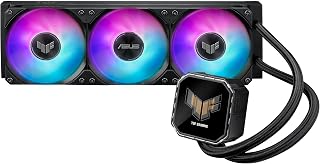
Pros
- Excellent cooling capacity for high-end processors and overclocking scenarios
- Visually striking design with customizable LCD display and ARGB lighting
- Quiet operation at 37.4 dB with efficient airflow of 90.78 CFM
- Straightforward installation with pre-applied thermal compound and included accessories
- Strong community support and positive user feedback across multiple platforms
Cons
- LCD display requires additional ASUS InfoHub software setup and occasional troubleshooting
- Stock MF-12 fans may feel louder to some users, driving aftermarket fan upgrades
- Premium pricing reflects the feature set and may not suit budget-conscious builders
The ASUS TUF Gaming LC III 360 is a premium all-in-one liquid cooler designed for enthusiasts building high-performance gaming and workstation PCs. This 360mm AIO combines effective thermal management with an eye-catching 2.8" IPS LCD display, making it a centerpiece for showcase builds.
The standout feature is the integrated LCD screen, which displays live CPU metrics like clock speed, temperature, and voltage, or custom animated GIFs for personalization. Real-world testing shows the cooler efficiently handles overclocked Ryzen 9 and Intel Core i9 processors, maintaining safe temperatures even at 130W+ loads. The pre-installed TUF Gaming MF-12 fans streamline setup while delivering solid airflow and static pressure for effective heat dissipation.
Build quality impresses with reinforced 400mm sleeved tubing that resists kinking and improves chassis compatibility. The copper water block and aluminum radiator use proven materials for long-term reliability. Universal socket support covers current-generation Intel and AMD platforms, ensuring broad compatibility. The included TUF Gaming software provides intuitive control over fan speeds and ARGB lighting synchronized with compatible motherboards.
Drawbacks are minor: the LCD display requires ASUS InfoHub software installation and occasional reconfiguration, and the stock fans tend toward audible operation for some users, leading many to swap them for quieter alternatives like Noctua models. At this price point, the cooler caters to enthusiasts prioritizing performance and aesthetics over budget constraints.
The ASUS TUF Gaming LC III 360 delivers reliable high-end cooling with distinctive visual appeal. It excels for overclocked builds, content creation workstations, and gamers wanting both performance and customization. Recommended for builders who value features beyond pure cooling capacity.
Cooling System: 360mm All-In-One Liquid Cooler with 2.8" IPS LCD Display
Water Block: 80.9 x 77 x 67.1mm, Copper CPU plate, Integrated LCD display
Radiator: 397 x 120 x 27mm, Aluminum construction, 360mm form factor
Tubing: 400mm reinforced sleeved rubber tubing
Fans: 3x TUF Gaming MF-12 120mm fans, 650-2600 RPM, 90.78 CFM airflow, 37.4 dB(A), 3.82 mmH2O static pressure, PWM/DC control
Socket Support: Intel LGA1851, LGA1700, LGA1200, AMD AM5, AM4
Power Connector: 4-pin
Warranty: 6 years
Weight: 6.6 pounds
Included: CPU cooler with pre-applied thermal compound, TUF Gaming sticker, Quick Start Guide, accessory pack with screws and brackets

Pros
- Outstanding value for money with premium features at mid-range pricing
- LCD display is bright, responsive, and genuinely customizable with simple software setup
- Delivers excellent thermal performance, keeping even high-power CPUs like the Ryzen 9 5900X cool under load
- Quiet pump operation with fans running at low RPM during everyday use
- Wide platform compatibility and flexible radiator placement options
Cons
- Fans become noticeably loud when running at maximum RPM during sustained heavy workloads or overclocking
- Requires adequate case clearance: needs 394 x 120 x 27mm space plus internal USB connection for LCD functionality
- Performance gains diminish with lower-end CPUs, making this cooler overspecified for budget builds
The PCCOOLER DC360 is a 360mm all-in-one liquid cooler designed for gamers and content creators who want premium aesthetics without the premium price tag. It combines solid thermal performance with a standout feature: a fully customizable 2.4-inch IPS LCD display that sits on the pump block, allowing you to display system information, custom images, or video content through simple software.
What makes this cooler stand out is its cooling capability relative to cost. Users report keeping CPUs like the Ryzen 9 5900X at impressively low temperatures, with some seeing 30C at idle and 50C during gaming. The 360mm aluminum radiator paired with a 2600 RPM pump and three high-static-pressure fans creates efficient heat transfer without constant high-speed operation. In real-world testing, the pump remains whisper-quiet, and fans stay below 1000 RPM during browsing and streaming, only ramping up under sustained gaming or rendering loads.
Build quality feels solid with thoughtful design touches. The pre-installed radiator fans and organized cabling significantly reduce setup time, while the bright IPS display remains clear at various viewing angles. The ARGB fans offer simple connectivity through standard 5V 3-pin motherboard headers, making RGB synchronization straightforward. Socket support covers current and recent Intel and AMD platforms, with flexible mounting for top or front radiator placement depending on your case layout.
The main drawback appears at maximum fan speeds: running the cooler at full capacity for extended periods produces noticeable noise, though this is necessary for optimal performance and represents a reasonable tradeoff for the cooling output. Additionally, you'll need adequate case clearance, both for the radiator dimensions and an available internal USB header for the LCD functionality.
Verdict: The PCCOOLER DC360 delivers excellent thermal performance and unique LCD customization at a price that undercuts most competing 360mm AIOs. It's an outstanding choice for mid-range and enthusiast builders who want effective cooling with visual appeal and genuine customization options.
Cooling Configuration: 360mm aluminum radiator, 2600 RPM pump, three 120mm high-static-pressure fans
Fan Performance: 500 to 2500 RPM, 90.56 CFM airflow capacity, PWM controlled
LCD Display: 2.4-inch IPS LCD with adjustable orientation, supports PNG, JPG, GIF, and MP4 content via PCCOOLER software
RGB Lighting: Three ARGB PWM fans with addressable RGB, connects through standard 5V 3-pin motherboard header
Socket Compatibility: Intel LGA1851, LGA1700, LGA1200, LGA115X; AMD AM5, AM4
Dimensions: Radiator 394 x 120 x 27mm (plus 25mm fans), total package 15.51in L x 1.06in W x 4.72in H
Power: 12V DC, 310W max, 3-pin power connector
Acoustic Performance: 15 dB noise level
Material: Copper construction, 400mm tubing
Who Should Buy This: Mid-range to enthusiast PC builders looking for effective CPU cooling with aesthetic customization. Ideal if you have a modern gaming or content creation build with an exposed pump block or windowed case where the LCD display will be visible and appreciated.
Who Might Want to Look Elsewhere: If you own a budget-focused build with a low-power CPU, a smaller cooler would be more appropriate. If your case cannot accommodate 360mm radiators or lacks internal USB headers, this cooler won't function. Users who prioritize silence above all else during maximum performance should note the fan noise at top speeds.
Before You Buy: Confirm your case supports a 394 x 120 x 27mm radiator plus 25mm fans. Verify your motherboard has an available 5V 3-pin RGB header and an internal USB header for LCD operation. Check that your CPU socket is listed in the compatibility section. Consider radiator placement options in your case layout, as the screen orientation is adjustable.
Installation Tips: The pre-installed fans significantly speed up setup. Download the PCCOOLER software before installation to customize your LCD display. Setting fans to full speed in BIOS is recommended for optimal thermal performance, though you can adjust them lower if noise becomes problematic during everyday use.

Pros
- Superior display technology with AMOLED screen delivers crisp, vibrant visuals that outperform standard LCD AIO coolers
- Proven thermal performance from professional reviewers and users running high-end processors without thermal throttling
- Exceptional customer service with real-time chat support and willingness to assist with desktop sharing for troubleshooting
- Quiet operation with adjustable fan curves allows balanced cooling and silence in gaming or work scenarios
- Flexible media customization supports GIFs, videos, and images up to 500MB for true personalization
Cons
- Software customization interface has limited RGB presets with mostly identical spin animations rather than diverse effects
- Internal pump noise at idle may be noticeable to some users despite generally quiet operation under load
The TRYX Panorama 360 is a premium all-in-one liquid cooler designed for PC enthusiasts and high-performance builders who want both exceptional cooling capability and visual customization. It targets users upgrading from mainstream AIO coolers or seeking an alternative to software-heavy solutions like Corsair's iCue ecosystem.
The standout feature is undoubtedly the 6.67" AMOLED curved screen, which delivers 2K resolution at 60Hz with 500nit brightness and a 1,000,000:1 contrast ratio. This display genuinely outperforms LCD screens found on competing AIO coolers, offering sharper visuals and vibrant colors. The native GIPHY integration is a clever differentiator, allowing users to stream thousands of animated GIFs directly to the display without local downloads or manual file imports. Combined with support for custom videos and images up to 500MB, the screen transforms the cooler into a personalized display centerpiece rather than just a functional component.
Cooling performance matches the visual appeal. The Asetek 8th Gen V2 pump handles 320W TDP with a 3600RPM maximum speed, and real-world testing confirms excellent thermals even on flagship processors like the AMD 9950X3D and 9800X3D. Users report keeping these high-end CPUs at 58 degrees Celsius under heavy loads, often 10 degrees cooler than previous-generation AIO solutions. The upgraded 40% thicker tubing, 30mm high-density fin radiator, and pogo-pin ROTA SL ARGB Gen 2 fans create an efficient cooling loop that operates at only 28.87dB in normal operation.
Build quality feels premium with full metal mounting hardware and aluminum and copper construction. The pogo-pin fan design eliminates daisy-chain cable clutter, and the TRYX KANALI software offers comprehensive customization including split-screen display modes, CPU and GPU temperature monitoring, and granular ARGB control with negligible system resource usage. However, RGB customization is limited to roughly 12 presets, most featuring similar color-spin animations rather than diverse lighting effects.
The main consideration is price: at $299.99, the Panorama 360 sits at a premium tier. However, users consistently note that the combination of display quality, thermal performance, and customer service justifies the investment for showcase builds and high-performance systems. A 2-year radiator warranty and 1-year screen warranty provide solid protection. This cooler is worth every penny for builders who prioritize both function and form.
Display Specifications: 6.67 inch AMOLED curved screen, 2K resolution, 60Hz refresh rate, 500nit brightness, 372PPI pixel density, 1,000,000:1 contrast ratio
Cooling System: Asetek 8th Gen V2 pump, 320W TDP capacity, 3600RPM maximum pump speed, 30mm high-density fin radiator, 40% thicker tubing, three 120mm ROTA SL ARGB Gen 2 fans with 2.49mmAq static pressure
Electrical Specifications: 6-Pin power connector, 12V DC, 5.5W power consumption, 28.87dB noise level, 65.64 CFM airflow capacity
Compatibility: Intel LGA 1851, 1700, 1200, 1151, 1150, 1155 and AMD AM4, AM5 sockets. Includes all-metal mounting brackets and thermal paste.
Media Support: PNG, JPG, GIF, MP4, AVI formats up to 1080P resolution and 500MB file size. Native GIPHY integration via KANALI software.
Physical Specifications: 16.9 inches L x 8.7 inches W x 5.7 inches H, 6.1 pounds weight, aluminum and copper construction with polybutylene terephthalate components
Warranty: 2-year manufacturer warranty on radiator, 1-year manufacturer warranty on screen
Ideal For: PC enthusiasts building high-performance or showcase systems, users running flagship processors like the 9950X3D or 9800X3D, builders prioritizing both cooling performance and visual customization, users seeking an alternative to Corsair or NZXT ecosystems
Best For Video Creators: Content creators can display YouTube intros, business videos, or promotional content on the 2K AMOLED screen, turning the cooler into a conversation starter and branding element in showcase builds
Gaming and Streaming Builders: Streamers and competitive gamers benefit from reliable cooling of high-end CPUs under sustained loads, combined with the ability to display custom overlays or animated graphics
Upgrade From: Users with older AIO coolers experiencing thermal throttling, builders unhappy with mainstream RGB software complexity, anyone currently using Corsair iCue or NZXT Cam seeking simplified, hardware-focused control
Consider Alternatives If: Budget is under $250, you prefer minimal software setup and don't value screen customization, you want RGB effects beyond simple color spins, you prefer air cooling or have space constraints limiting 360mm radiator installation
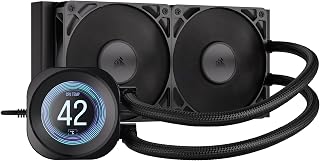
Pros
- Exceptional noise-to-performance ratio, running below ambient noise levels even under load
- Eye-catching LCD display adds personalization and real-time monitoring to your build
- Straightforward installation with pre-applied paste, making it beginner-friendly
- Strong cooling performance keeps high-end CPUs like the 5700X3D at excellent temperatures
- Wide socket support future-proofs your investment across Intel and AMD platforms
Cons
- Premium pricing limits value for users seeking basic cooling without the LCD feature
- Lack of single-cable control and rotatable display compared to pricier competing models
- Tube routing can be rigid and difficult to position aesthetically in compact cases
The CORSAIR Nautilus 240 RS is a 240mm all-in-one liquid cooler designed for PC builders who value both cooling performance and system aesthetics. This AIO is particularly appealing to enthusiasts building mid-range gaming or workstation PCs who want quiet operation without sacrificing thermal performance, and it's especially suitable for first-time AIO installers thanks to its straightforward setup.
The standout feature is its 2.1-inch IPS LCD display, which sets it apart from traditional AIOs by letting you display live CPU temperatures, animated GIFs, or custom images through CORSAIR's iCUE software. Beyond aesthetics, the cooler delivers solid real-world performance, with users reporting CPU temperatures around 40 degrees Celsius during demanding AAA gaming and stable thermals even on high-end chips under sustained load. The pump operates at just 20 dBA, and paired with the high-pressure RS120 fans, the cooler runs below the ambient noise floor of most rooms, making it genuinely quiet in practice.
Build quality is solid with a copper cold plate featuring a slightly convex design that maximizes contact with modern CPU heat spreaders. The pre-applied thermal paste eliminates guesswork and accelerates installation, while daisy-chain fan connections and PWM headers simplify wiring. The 400mm sleeved tubing uses low-permeation rubber to prevent coolant degradation, and the aluminum radiator pairs well with the dual 120mm fans included in the box. Dimensions of 276mm x 120mm x 27mm make it compatible with most standard tower cases.
A minor drawback is that tube routing is somewhat rigid, making it challenging to position the tubing exactly as desired in compact or densely-packed builds. Additionally, while the LCD is a premium feature, the cooler lacks some quality-of-life conveniences found on higher-priced alternatives, such as a single unified cable for all controls or a rotatable display module. Some users may also find the higher price point difficult to justify when more basic 240mm AIOs offer comparable thermal performance without the display.
Overall, the CORSAIR Nautilus 240 RS is an excellent choice for builders seeking the sweet spot between quiet cooling, aesthetic customization, and reliable performance. With broad socket support including the latest Intel and AMD platforms, a 5-year warranty, and proven thermal and acoustic performance in real-world use, it represents strong value for anyone prioritizing both silence and visual appeal alongside cooling capability.
Cooling Performance: 240mm radiator, copper cold plate, pump operates at 20 dBA
Fans: 2x RS120 fans, 120 x 25mm, 0-2100 RPM, 13.3-72.8 CFM, 0.20-4.15 mm-H2O static pressure, 10-36 dB(A) noise range
Compatibility: Intel LGA1851, LGA1700, AMD AM5, AM4 sockets
Tubing: 400mm, black sleeved, low-permeation rubber
Connector: 4-pin PWM
Dimensions: 276mm L x 120mm W x 27mm H
Weight: 2.7 lbs
Warranty: 5 years
Who Should Buy: This cooler is ideal for PC builders and gamers seeking a balance of quiet operation, aesthetic customization, and reliable cooling on mid to high-end systems. It excels for first-time AIO users thanks to its straightforward installation, and it's a great fit for anyone with an ITX, micro-ATX, or standard ATX case where compact radiator dimensions matter.
Who Should Skip: If you're strictly focused on maximum cooling at minimum cost, a traditional air cooler or basic 240mm AIO without the LCD display may offer better value. Similarly, if your case has extremely tight tube routing constraints or you prioritize having every quality-of-life control feature at premium price points, consider alternatives with rotatable displays or unified cable systems.
Key Installation Tips: The pre-applied thermal paste speeds setup, but ensure your CPU's heat spreader is clean before mounting. Take time routing the tubing to avoid kinks that restrict flow. Plan tube positioning before final pump placement, as repositioning afterward is difficult. Verify your case supports a 240mm radiator and that pump orientation allows cable connections to reach your motherboard PWM headers.
Buying Guide: What to Look for in an AIO Cooler with LCD Screen
Screen Size and Resolution
Screen quality separates premium coolers from basic models. Smaller 2-inch displays work well for simple temperature readouts and static images, but larger screens between 2.4 and 3.95 inches provide room for detailed animations and split-screen layouts. Resolution matters equally: a 480×480 IPS panel delivers sharper text and smoother GIF playback compared to lower-resolution alternatives.
The best Z890 motherboards pair naturally with high-resolution LCD coolers since both showcase your system’s capabilities. AMOLED screens like those on the TRYX Panorama series offer superior contrast ratios and deeper blacks, making them ideal for dark-themed builds or environments with ambient lighting.
Radiator Size and TDP Rating
Match your radiator size to your CPU’s thermal output. A 240mm radiator handles mainstream processors up to 180W effectively, while 360mm units manage high-end CPUs like the Intel Core Ultra 9 285K or AMD Ryzen 9 9950X that can push 250W or more under load. The Asetek-based TRYX Panorama models deliver up to 320W TDP capacity, making them suitable for overclocked systems.
Verify your case supports the radiator dimensions before purchasing. Most 360mm radiators measure around 397mm in length and require front or top mounting positions with sufficient clearance for fans. If you’re building a compact system, 240mm coolers like the Thermalright FW240 offer excellent value without sacrificing performance for mid-range processors.
Software Customization and Connectivity
The LCD screen only matters if you can customize it effectively. Look for coolers with dedicated software that supports multiple file formats including PNG, JPG, GIF, and MP4. Thermalright’s TRCC software and TRYX KANALI offer extensive customization including screen rotation, split-screen displays, and real-time hardware monitoring with minimal system resource usage.
Check connectivity requirements before installation. Most LCD screens need a USB 2.0 connection to your motherboard’s internal header for data transmission, while the pump and fans connect via standard PWM headers. The TRYX Panorama series integrates GIPHY natively, giving you instant access to thousands of animated GIFs without manual downloads. Some budget motherboards have limited USB headers, so plan your peripheral connections accordingly.
Fan Quality and Noise Profile
Premium AIO coolers bundle high-static-pressure fans optimized for radiator airflow. Fluid dynamic bearing (FDB) fans outlast cheaper sleeve bearings and maintain quieter operation over time. Models like the Ocypus Sigma PRO include speed reduction cables, letting you prioritize silence during light workloads or ramp up performance when needed.
PWM temperature control automatically adjusts fan speed based on CPU temperature, balancing cooling and acoustics without manual intervention. The best implementations keep noise below 28 dBA during typical use. ARGB lighting integration adds visual appeal, especially when paired with white motherboards or cases featuring tempered glass panels. Verify your motherboard has appropriate ARGB headers or plan to use an RGB controller hub.
Final Thoughts
Choosing the right AIO cooler with an LCD screen comes down to balancing thermal performance with visual impact. For builders seeking maximum customization and premium aesthetics, the TRYX Panorama 360mm AIO White Curved Screen delivers a stunning 6.67-inch AMOLED display with exceptional 320W cooling capacity. If you prioritize value without compromising features, the Thermalright FW PRO 360 ARGB Black offers a capable 2.73-inch IPS screen, solid 360mm cooling, and wide platform compatibility at a fraction of flagship pricing. Both support Intel LGA 1851 and AMD AM5, ensuring compatibility with current and upcoming builds.
Frequently Asked Questions
Do LCD screens on AIO coolers affect cooling performance?
No, the LCD screen is a separate component mounted on the pump housing and doesn’t interfere with the cooling system’s thermal efficiency. The screen draws minimal power through a USB connection and generates negligible heat. Cooling performance depends on radiator size, pump speed, and fan quality rather than display features.
Can I display custom animations on any AIO LCD screen?
Most modern LCD coolers support custom content through dedicated software, but file format support varies. Check that your chosen model accepts the formats you plan to use, typically PNG, JPG, GIF, and MP4. Some coolers like the TRYX Panorama series include GIPHY integration for instant access to thousands of animations. Resolution limits and file size restrictions apply depending on the model’s specifications.
Are 240mm or 360mm AIO coolers better for gaming in 2026?
For mainstream gaming CPUs like the Intel Core i5 or AMD Ryzen 5 series, a quality 240mm AIO provides sufficient cooling capacity. High-end processors such as the Intel Core Ultra 9 or AMD Ryzen 9 benefit from 360mm radiators, especially when overclocked or running demanding productivity workloads alongside gaming. Consider your CPU’s TDP rating and whether you plan to overclock. If you’re also upgrading your graphics card, check out options for the best GPU under various budgets to complete your build.
Do I need additional software to control the LCD display?
Yes, you’ll need to download manufacturer-specific software to customize the LCD screen content, monitor system stats, and adjust display settings. Thermalright uses TRCC software, TRYX uses KANALI, and ASUS offers TUF Gaming software for their LCD coolers. These applications typically require Windows 10 or 11 and connect via the USB cable that powers the screen. Make sure to download software only from official manufacturer websites to avoid security risks.





Write Your Review
No reviews yet. Be the first to share your experience!