

If you manage a work PC and a personal desktop, run a home lab, or need to jump between a laptop and a tower without shuffling cables, a KVM switch is the cleanest solution. Instead of buying duplicate monitors, keyboards, and mice, one switch lets everything share a single set of peripherals. If you care about high-refresh displays or a tidy dual-monitor arrangement, pairing your setup with great PC speakers for gaming and the right KVM can transform your desk into a genuinely productive workspace.
This guide covers ten of the strongest KVM switch options available in 2026, from budget-friendly single-monitor models to advanced dual-display and remote-access devices. Whether you need 4K@60Hz, 4K@144Hz, or even 8K support, there is a pick here that fits your use case.
Quick Comparison
Ratings reflect the most recent data pull. Check each listing for current price and availability.
Quick answer
This guide compares 10 picks, with TJCXELE Dual Monitor KVM Switch 2 PC HDMI DisplayPort ranked first.

Pros
- Seamless 4K video quality at 60Hz with no loss of resolution or color accuracy
- Fast USB 3.0 peripheral sharing keeps workflow smooth across both computers
- Flexible switching via physical buttons or remote controller offers desktop-friendly cable management
- Supports true dual-monitor setup with extended mode, matching user review experiences
- Works reliably with Mac and Linux alongside Windows systems
Cons
- Requires computers to have both HDMI and DisplayPort outputs, limiting compatibility with older or entry-level systems
- No keyboard hotkey switching support, only physical buttons or remote control
- Requires precise USB 3.0 port connections or devices won't be recognized
The TJCXELE KVM Switch is a dual-monitor solution designed for professionals and gaming enthusiasts who operate multiple computers simultaneously. Whether you're managing a work and gaming setup or running multiple workstations, this device consolidates your keyboard, mouse, and display management into one elegant hub.
The standout feature is genuine 4K@60Hz support across both HDMI and DisplayPort connections, backed by four USB 3.0 ports delivering 5Gbps transfer speeds. Users consistently report crisp video quality and zero lag when switching between machines, with extended and copy display modes accommodating various workspace configurations. The dual switching methods, both physical buttons and a wireless controller, provide flexibility in desk organization.
Built from aluminum with a compact 5.5 x 3.5 x 1.5 inch footprint, this KVM maintains a professional aesthetic while demanding minimal desk real estate. The 12V dedicated power adapter ensures stable operation without compromising USB bandwidth, a thoughtful design choice that prevents peripheral conflicts.
The main limitation is that both computers must have native HDMI and DisplayPort outputs, which excludes older machines or entry-level laptops. Additionally, setup requires correct USB 3.0 cable connections, and the device lacks keyboard hotkey switching for purists seeking maximum convenience.
For dual-PC setups demanding 4K display fidelity and responsive peripheral control, this TJCXELE switch delivers solid performance at an accessible price point. Recommended for professionals with multi-monitor workstations and gamers managing separate gaming and streaming systems.
Before purchasing, verify that both your computers support dual monitor outputs. Each computer needs one HDMI port and one DisplayPort connection to function properly with this KVM switch.
Your display setup must also support the connection types you're using. HDMI outputs connect only to HDMI monitors, and DisplayPort outputs connect to DisplayPort or USB-C monitors. The device does not perform signal conversion, so mismatched connections won't work.
Ensure your HDMI cables and peripherals support high-bandwidth requirements for 4K@60Hz operation. Budget-grade cables may cause resolution drops or stability issues. All USB devices should connect to the device's USB 3.0 ports rather than computer ports directly for proper sharing.
This KVM excels for home office professionals, developers managing multiple projects, and gamers running dedicated streaming setups. It's less suitable for single-monitor users or setups where computers lack matching port configurations.

Pros
- Dual-monitor control for two computers
- 4K at 144Hz with 48Gbps video bandwidth
- Four 5Gbps USB 3.0 ports
- Extended and copy display modes
Cons
- Requires two DisplayPort outputs on each computer
- No keyboard-hotkey switching; DisplayPort cables are not included
For a desk that needs two computers and two monitors to behave as one workspace, the TJCXELE DisplayPort model is a strong high-spec KVM candidate. It lets one keyboard, mouse, and up to four USB devices serve both systems while preserving a dual-display layout. The central appeal for a best-KVM roundup is its 4K at 144Hz capability and 48Gbps video bandwidth, specifications aimed at setups where high refresh output matters alongside sharp resolution. Each of its four USB 3.0 ports operates at up to 5Gbps, so the switch is not limited to basic keyboard-and-mouse duty. Extended and copy modes give the two monitors different roles, either expanding a desktop or mirroring it. An aluminum chassis, panel controls, and a separate desktop controller make the hardware suitable for a desk where the main unit can sit out of the way. It uses a 12V adapter for stable peripheral operation. The trade-off is strict video connectivity: each computer needs two DisplayPort outputs, and switching is done with physical controls rather than keyboard hotkeys.
Video Performance: 4K (3840x1920) @ 144Hz, DisplayPort 1.4, backward compatible with DP 1.2, 48Gbps video bandwidth
USB Connectivity: Four USB 3.0 ports, 5Gbps data transfer rate (10x faster than USB 2.0)
Display Modes: Extended mode and copy mode supported
Physical: 7.8 x 5.7 x 2.2 inches, aluminum construction, 1.3 lbs, white color
Power: 12V DC adapter, 0.6A current rating, external power design for stable operation
Switching: Panel button control and desktop controller cable included, no hotkey support
Package Contents: KVM Switch unit, 2x USB-A 3.0 cables, 1x desktop controller, 1x DC12V adapter, user manual
Warranty: 12-month return or replacement coverage
Choose it for a two-computer workstation with two DisplayPort monitors when 4K at 144Hz, a 48Gbps video path, and four fast USB 3.0 connections are priorities. It makes particular sense for professionals, content creators, designers, gamers, studios, trading desks, and home offices described by the product information. Skip it if either computer cannot provide two DisplayPort outputs, if you only need one monitor, or if keyboard-hotkey switching is essential. Buyers must also supply DisplayPort cables.
Pros
- Exceptional 4K video quality with zero lag or resolution drops during switching
- USB 3.0 speeds make sharing peripherals and transferring files between systems seamless
- Wired remote control provides convenient switching when the unit is out of arm's reach
- Complete plug-and-play package with all necessary cables and mounting hardware included
- Robust build quality and reliable performance praised by users across home offices and homelabs
Cons
- Wired remote limits flexibility compared to wireless remote options
- No hotkey switching support, so manual button or remote selection is required for computer changes
- Limited to 4 computers, which may not scale for larger multi-system environments
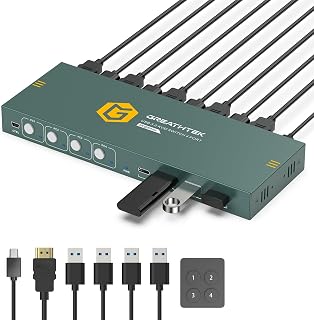
The GREATHTEK 4-Port HDMI KVM Switch is a practical solution for anyone managing multiple computers in a limited desk space. Whether you are setting up a professional workstation, a home office, or a homelab environment, this device consolidates your workspace by letting you control up to 4 separate computers using a single monitor, keyboard, mouse, and shared USB peripherals. It eliminates the frustration of repeatedly swapping cables and keeps your desk organized.
The standout feature is its 4K@60Hz video capability with HDMI 2.0 support, which delivers crisp, sharp visuals without lag or resolution drops when switching between computers. The built-in EDID adaptive technology automatically detects your display and adjusts resolution settings appropriately, making transitions seamless. The USB 3.0 connectivity with 3 USB-A and 1 USB-C port lets you share keyboards, mice, webcams, printers, and external drives at 5Gbps transfer speeds, making it genuinely useful for productivity tasks.
The physical design is compact and well-built, with a metal construction that feels durable and professional. The one-touch switching via front-panel buttons or the included wired desktop remote makes accessing different computers quick and intuitive. The package comes complete with all necessary cables, power adapter, and mounting brackets, so setup is truly plug-and-play with no hidden purchases required.
The main limitations are the wired remote, which restricts movement compared to wireless options, and the lack of hotkey switching support. These design choices keep the price point accessible but may feel restrictive to power users. Additionally, the 4-computer limit may not suit users building very large multi-system environments.
Overall, this KVM switch represents excellent value for home offices, IT workstations, and homelabs. It delivers reliable performance, strong video quality, and practical peripheral sharing in an affordable package that simplifies multi-PC management without the expense of multiple displays.
This KVM switch is ideal for home office professionals who need to switch between work and personal computers without monitor swapping. It is equally suited for IT technicians managing test benches, developers maintaining multiple development environments, and homelab enthusiasts running several servers or machines.
The 4-port configuration and USB 3.0 speeds make it perfect for users who work with multiple systems regularly and need fast, stable peripheral sharing. If your workspace is constrained and you want to eliminate display clutter, this device solves that problem affordably.
Setup requires connecting each of your 4 computers to the KVM switch with one HDMI cable and one USB cable per system. Then connect your monitor, keyboard, mouse, and shared USB devices to the KVM switch outputs. The entire process takes under 10 minutes with the included cables and straightforward design.
This device is compatible with Windows PCs, Macs, and Linux systems. The manufacturer provides setup assistance through Amazon messaging for any compatibility questions, which is a helpful support touchpoint. No special drivers or software installation is needed, making true plug-and-play operation possible.
Unitek KVM Switch Dual Monitor 4K HDMI DisplayPort
Pros
- Dual 4K monitor support with HDMI and DisplayPort inputs handles professional displays
- Fast USB 3.0 connectivity enables quick file transfers and peripheral responsiveness
- Two switching methods offer flexibility in how you control system switching
- Aluminum construction feels solid and professional for office or home setup
- Plug-and-play design means immediate use without driver installation headaches
Cons
- Not compatible with laptops, limiting it to desktop users only
- Requires all cables connected to both hosts for simultaneous HDMI and DisplayPort output
- Desktop controller and remote add extra cables to manage, potentially cluttering the workspace
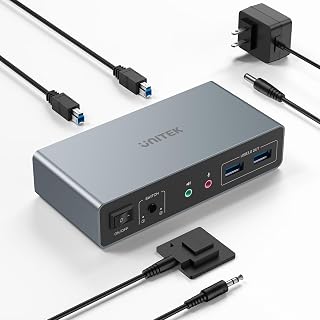
The Unitek KVM switch is a dual-monitor KVM solution designed for desktop users who need to control two computers from a single keyboard, mouse, and display setup. It's built for professionals working from home, content creators managing multiple systems, and office workers looking to consolidate their desk setup without sacrificing screen real estate or connectivity.
The standout feature is its 4K@60Hz support across HDMI and DisplayPort inputs, paired with USB 3.0 connectivity offering 5Gbps data transfer speeds. The device supports HDCP 2.2 for content protection and works seamlessly with Windows, Mac, and Linux. Two switching methods, a one-button switch and a wired desktop controller, give you flexibility in how you manage system switching. Setup is straightforward with plug-and-play installation and no required drivers.
Build quality is solid thanks to its aluminum chassis, which feels professional and durable. The compact 5.15 x 2.44 x 1.2 inch footprint keeps your desk organized, and the wired remote allows you to position the switch out of sight. The inclusion of USB A-to-B cables, a desktop controller, and a 5V/2A power adapter means everything you need arrives in the box.
The main limitation is that this KVM is designed exclusively for desktop computers and will not work with laptops. Additionally, to use both HDMI and DisplayPort simultaneously, both host devices must have all necessary cables connected, which adds some setup complexity. The multiple cables involved may introduce clutter unless you're careful with cable management.
Overall, the Unitek KVM switch delivers professional-grade switching and display support at an accessible price point. If you're a desktop user managing two systems and need 4K support with fast USB 3.0 connectivity, this is a solid choice that will streamline your workflow and reclaim desk space.
Display Outputs: HDMI 2.0 and DisplayPort with support for 4K@60Hz, 2K, 3D, and 1080P resolutions. HDCP 2.2 and HDCP 1.4 compliant.
Connectivity: 4x USB 3.0 ports with 5Gbps data transfer. Compatible with keyboards, mice, hard drives, flash drives, printers, and other USB devices. Audio support via mic and headset ports.
Switching: One-button mechanical switch or wired desktop controller. Operating voltage 5V, current rating 2A. Power adapter included.
Compatibility: Desktop computers only, Windows 7/8/10/11/Vista/XP, Linux, macOS, and PS4. Not compatible with laptops.
Physical: Aluminum construction, dimensions 5.15 x 2.44 x 1.2 inches, IP40 rating. Includes USB A-to-B cables, desktop controller, and 5V/2A power adapter. 1-year warranty.
Best For: Desktop users managing two computers who need 4K display support and fast USB 3.0 connectivity. Remote workers consolidating desk space. Content creators needing multiple systems with professional displays. Office environments where desk real estate is premium and system switching needs to be seamless.
Not Ideal For: Laptop users, as this KVM only works with desktop computers. Users with single-monitor setups seeking simpler solutions. Anyone unwilling to manage multiple cables for HDMI and DisplayPort simultaneously.

Pros
- Wi-Fi 6 dual-band support combined with Ethernet provides redundant connectivity and reliability
- 4K video passthrough with two-way audio creates natural, lag-free remote interaction for meetings and support
- Intuitive touchscreen eliminates steep learning curves and reduces training time
- Self-hosted option keeps your data private with no personal information collection by GL.iNet
- Remote power control via optional ATX Board or Fingerbot extends management capabilities
Cons
- Limited to 4K@30FPS rather than higher refresh rates, which may not satisfy users needing 60FPS performance
- Requires additional accessories like ATX Board or Fingerbot for power management features, increasing total cost
- IP30 rating indicates limited dust protection compared to more rugged industrial KVM solutions
The GL-RM10 Comet Pro is a desktop KVM switch engineered for professionals who need out-of-band remote access to computers. Whether you're an IT admin managing multiple systems, a system engineer troubleshooting servers, or a remote worker requiring secure access to your workstation, this device bridges the gap between local and remote control without relying on OS-level software.
The standout feature is the combination of 4K video passthrough at 30FPS with two-way audio delivered over Wi-Fi 6. The H.264 encoding keeps latency low while maintaining ultra-clear video quality, making it practical for remote support sessions and collaborative troubleshooting. The built-in touchscreen provides an accessible interface for managing connectivity and cloud services without needing to memorize commands or navigate complex menus.
Connectivity is a major strength. The dual-band Wi-Fi 6 support (2.4GHz and 5GHz) works alongside wired Ethernet to eliminate bottlenecks. Built-in Tailscale with WireGuard encryption adds a security layer, and the self-hosted cloud option means your remote access infrastructure stays under your control on any Linux or Ubuntu server with minimal resources.
The main tradeoff is performance ceiling. At 4K@30FPS, refresh rate is limited compared to higher-end solutions, which matters if you need smooth video for fast-moving tasks. The device also positions power management features like hard reset behind optional accessories, adding to the total investment. The IP30 rating suggests it's designed for clean office environments rather than harsh conditions.
Verdict: The GL-RM10 Comet Pro delivers professional-grade remote KVM capability in a compact, user-friendly package. It's best suited for IT departments, system administrators, and organizations requiring secure, reliable out-of-band access without operational complexity. The privacy-first self-hosted option and cross-platform support make it a strong choice for security-conscious teams.
Connectivity and Performance: Wi-Fi 6 dual-band (2.4GHz and 5GHz), Ethernet via RJ45, 4K video passthrough at 30FPS, H.264 encoding, two-way audio support.
Physical and Control: 2.22-inch touchscreen interface, desktop placement, dimensions 3.3 x 1.85 x 3.7 inches, 3 watts power consumption, USB Type-C connection.
Compatibility: Windows, macOS, Linux, iOS, Android, Linux servers, Ubuntu servers. Cloud-based and self-hosted deployment options available.
Security and Standards: Built-in Tailscale with WireGuard encryption, CE/FCC/REACH/RoHS/WEEE certified, IP30 protection rating, 2-year manufacturer warranty.
Included Accessories: 1x GL-RM10 unit, 2x USB cables, 2x HD cables, 1x Ethernet cable, 1x power adapter with US plug.
Who Should Buy This: IT administrators and system engineers needing reliable out-of-band access, remote support technicians managing multiple client systems, security-conscious organizations requiring self-hosted infrastructure, home lab enthusiasts building redundant connectivity setups.
Who Might Want to Wait: Users requiring 4K@60FPS or higher refresh rates for video-intensive tasks, those needing industrial-grade environmental protection (IP67 or higher), budget-conscious buyers seeking entry-level KVM solutions without touchscreen interfaces.
Key Decision Factors: Prioritize Wi-Fi 6 dual-band redundancy for uptime-critical applications. Choose self-hosted deployment if data privacy is non-negotiable. Budget for optional ATX Board or Fingerbot if remote power cycling is essential. Verify your network infrastructure supports Wi-Fi 6 for optimal performance.
Total Cost of Ownership: Plan for the base device cost plus optional accessories (ATX Board, Fingerbot) if you need full power management. Self-hosted deployment requires a Linux or Ubuntu server with 2 cores and 2GB RAM minimum. Factor in integration with existing network and monitoring tools.

Pros
- 4K at 60Hz on a compact metal unit
- Button and wired-controller switching
- LED active-computer indicators
- Plug-and-play with no external power source
Cons
- No Mac support or hotkey switching
- 4K stability calls for HDMI 2.0 cables up to 3.3 feet
The CMSTEDCD is the straightforward choice in a best-KVM guide for a two-computer, one-monitor desk. Rather than targeting a complex multimonitor station, it focuses on consolidating a monitor, keyboard, and mouse for two PCs in a small metal enclosure measuring 3.86 by 2.36 by 0.63 inches. Its 4K at 60Hz support keeps it relevant for everyday computing and visual work, while USB 2.0 handles shared peripherals. Switching can happen from the button on the enclosure or its wired controller, a useful arrangement when the KVM is placed out of sight. LED indicators identify the selected computer, and plug-and-play operation means no driver installation is required. It does not need an external power source, instead drawing minimal current through USB connections. This is a sensible KVM pick where desk space and uncomplicated physical control outweigh advanced features. Its boundaries are clear: it supports Windows and Linux rather than Mac, has no hotkey switching, and depends on HDMI 2.0 cables no longer than 3.3 feet for stable 4K output.
Video and Display: HDMI 2.0 input and output, 4K@60Hz support, backward compatible with 3840x2160@30Hz, 1920x1080p@60Hz, and 1920x1080p@30Hz. Requires cables under 3.3 feet in length.
USB and Data: Two USB 2.0 ports with 480Mbps data transfer speed for keyboard, mouse, and other USB 2.0 devices. Hot-swappable without reboot required.
Physical Specs: Dimensions 3.86 x 2.36 x 0.63 inches, metal construction, lightweight and compact. Operating voltage 5V DC, current rating 1A. Push button control with normally open contact type.
Control and Indicators: Dual switching modes (direct button on unit or wired remote controller). Green LED for PC1 active, blue LED for PC2 active.
Power and Setup: No external power supply required. Plug and play with no driver installation. Includes KVM switch, desktop controller, 2x USB 2.0 cables, user manual, and after-sales service card (HDMI cables not included).
Buy this for a Windows or Linux workspace where two computers need to share one HDMI monitor, keyboard, and mouse without occupying much desk room. It suits people who want 4K at 60Hz, visible source indicators, and a choice between an on-unit button and wired controller. Skip it for Mac systems, dual-monitor arrangements, or workflows that require hotkey switching. It is also a poor fit if your HDMI cable run cannot use HDMI 2.0 cables within the specified 3.3-foot maximum.

Pros
- True 4K@60Hz capability outperforms budget KVM switches that max out at 30Hz or 1080p
- Three USB 3.0 ports plus USB-C port provide ample connectivity for keyboards, mice, external drives, and cameras
- Dual control options (buttons and wireless remote) give you flexibility based on your setup
- Robust metal construction and IP54 rating suggest durability in multi-device environments
- Well-reviewed product with 4.2-star rating backed by hundreds of verified customer purchases
Cons
- Hotkey switching not supported, requiring manual button presses or remote clicks to change computers
- Some users may find the included wired remote controller less convenient than wireless alternatives
- Limited to 4 computers, which may not scale for larger multi-system setups
The GREATHTEK 4-Port KVM Switch is purpose-built for professionals juggling multiple computers on a single workstation. Whether you're a day trader monitoring multiple screens, a content creator switching between production and admin systems, or an IT professional managing several machines, this switch eliminates the chaos of multiple keyboards, mice, and cables. The compact metal chassis fits neatly between your monitor and desk, freeing up valuable real estate.
Performance-wise, the standout feature is legitimate 4K@60Hz support through HDMI, which is rare at this price point and delivers the visual clarity needed for design work, video editing, and detailed spreadsheet analysis. The three USB 3.0 ports run at full 5Gbps speeds, so transferring large files between computers or accessing external storage happens fast. The adaptive EDID detection handles resolution switching automatically, saving you from manual configuration headaches.
Build quality reflects the metal housing and copper contacts, which should withstand daily use in demanding environments. The LED indicators are bright enough to see from across the desk, and the dual control options (physical buttons plus the included wired remote) mean you can switch computers without leaving your chair or reaching around your monitor.
The main limitation is the lack of hotkey switching, so you'll always need to manually press a button or use the remote rather than triggering a keyboard shortcut. The 4-computer ceiling also means it won't scale if you're planning to expand to five or more systems in the future. Additionally, the wired remote has a fixed cable length, which could be restrictive depending on your desk layout.
Overall, this KVM switch delivers genuine 4K performance and thoughtful connectivity at a competitive price. It's the right choice if you need reliable multi-computer control with solid build quality and no software complexity.
Video Performance: HDMI connectivity with 4K resolution at 60Hz (3840x2160), backward compatible with 4K@30Hz, 1080p, and lower resolutions. Adaptive EDID for automatic display detection.
USB Connectivity: 3x USB 3.0 ports plus 1x USB-C port, supporting high-speed data transfer and peripheral sharing. All cables included in the box.
Control Methods: Push-button switching on the front panel with LED status indicators, plus included wired remote controller with clearly labeled 1/2/3/4 buttons for direct computer selection.
Build and Durability: Metal construction with copper contacts, IP54 protection rating, operating temperature range up to 70°C, 16-ounce weight, compact 8.3 x 0.9 x 3 inch footprint.
Power and Connectivity: 5-volt operation at 4A current rating, plug-and-play installation with no drivers required. Includes HDMI cable, 4x USB 3.0 cables, power cable, and controller cable.
Best For: Multi-system professionals including day traders and financial analysts monitoring multiple computers, content creators and video editors switching between production and admin machines, IT professionals and system administrators managing several devices, and anyone seeking to declutter their workspace while maintaining fast computer access.
Consider Alternatives If: You need hotkey switching capability for faster workflow, plan to expand beyond 4 computers in the near future, require wireless remote control, or work exclusively with Mac systems that may have different HDMI compatibility profiles.
Value Proposition: You save money on redundant peripherals and desk space while gaining legitimate 4K performance and fast USB 3.0 data transfer. The plug-and-play setup means immediate productivity gains without technical configuration.

Pros
- 4K at 60Hz with USB 3.0
- Supports Windows, Mac, and Linux
- Button and wired-remote control
- Aluminum chassis with anti-slip pads
Cons
- No audio switching
- Switching takes a few seconds; some wireless peripherals may not work
For a single-monitor setup that must move shared peripherals between two computers, the Hearvo S7232H earns its place as a versatile KVM option. It pairs HDMI video at 4K and 60Hz with USB 3.0, so the design goes beyond basic keyboard and mouse sharing. The switch supports Windows, Mac, and Linux, making it an especially relevant choice when the two systems do not use the same operating system. A button on the unit and a wired remote provide two ways to select the active computer, allowing the main box to be kept away from the immediate desktop area. Its aluminum chassis and anti-slip pads complement a workspace-focused design. Setup is plug and play, needs no drivers, and usually requires no external power. This KVM is best for users whose priority is a neat one-monitor desk with 4K at 60Hz and USB 3.0 connectivity across mixed platforms. Keep its limitations in mind: it has no audio switching, some wireless peripherals can have compatibility issues, and a changeover takes a few seconds. Power availability also depends on the connected setup, since there is no dedicated adapter.
Choose the S7232H if two computers share one HDMI monitor and you want USB 3.0 alongside 4K at 60Hz. It is particularly suited to a mixed Windows, Mac, and Linux setup, as well as desks where the wired remote helps keep the KVM itself out of the way. Skip it if audio must switch with the computers, if instant transition is required, or if your essential peripherals are wireless and cannot tolerate possible compatibility issues. Those needing a dedicated power adapter should look elsewhere.

Pros
- Exceptionally clean single-cable solution for hybrid workers using USB-C laptops, cutting desk clutter
- Delivers professional-level performance for both productivity and gaming with exceptional refresh rate support
- Compact metal design fits neatly on any desk while supporting high-speed peripherals and data transfer
- Both computers stay connected to network simultaneously, enabling background work without switching
- Includes all necessary cables and has earned strong customer loyalty from repeat AV Access buyers
Cons
- macOS users see mirrored rather than extended displays due to limitations with MST technology
- Some users report slower video switching on laptop side (up to 10 seconds) due to graphics card performance
- Generates noticeable heat when docked with a laptop for extended periods
The AV Access iDock B10 is a hybrid-focused KVM docking station that merges two typically separate products into one compact device. Built for professionals and power users juggling a work laptop and desktop PC, it eliminates the frustration of unplugging cables and rebuilding your workspace every time you switch machines. A single USB-C connection to your laptop delivers video output, data transfer, and 100W charging simultaneously.
Where this dock shines is raw performance versatility. The desktop side supports up to dual 8K@60Hz or dual 4K@165Hz with variable refresh rate support, making it genuinely usable for gaming, video editing, and streaming. The gaming experience is smooth with G-Sync and FreeSync support, and switching between computers happens instantly from the desktop while the laptop side takes about 10 seconds as the graphics card powers up. For hybrid workers, the ability to keep both machines online means downloads and cloud synchronization continue running in the background.
Build quality is solid with a metal chassis that stays discreetly small on your desk. The included cable package is generous: HDMI 2.1, DisplayPort 1.4a, USB-C, and a wired remote eliminate the need for separate purchases. The 11-in-1 hub features Gigabit Ethernet, four 10Gbps USB ports for fast SSDs and cameras, plus SD card support. Setup is straightforward, and repeat customers consistently praise the value and reliability of AV Access products.
Some real-world tradeoffs exist. macOS users get mirrored displays rather than extended ones due to MST limitations, making it less ideal for Mac-based creative work. Heat generation during extended laptop docking is noticeable though not problematic. Occasional keyboard and mouse dropout has been reported by a small number of users, typically resolvable through port reassignment.
This is a thoughtfully designed solution for a specific use case: professionals with one work laptop and one desktop who value simplicity and performance. It delivers on its promise to keep two computers synchronized at one desk without constant reconnection. The build quality, included cables, and strong customer satisfaction make it worth the investment if your workflow matches its strengths.
Display Support: Desktop: Dual 8K@60Hz, Dual 4K@165Hz, or Dual 1080p@480Hz. Laptop: Dual 4K@60Hz (USB-C, Windows/Linux). Both support DisplayPort 2.0, HDMI 2.1, variable refresh rates, G-Sync, FreeSync, and HDR.
Connectivity: 1x USB-C (10Gbps), 3x USB-A (10Gbps), 2x USB-A (5Gbps), 1x Gigabit Ethernet, 1x SD card reader, audio input/output. Video inputs: 1x DisplayPort 1.4a, 1x HDMI 2.1.
Power: 120W power adapter (20V/6A). Provides up to 100W charging to connected USB-C laptop. Operating voltage: 20V DC, 3A current rating.
Physical: Metal construction, compact form (5.61 x 0.91 x 1.03 inches), surface mount design. IP00 rating.
Included Accessories: HDMI 2.1 cable (1.5m), DisplayPort 1.4a cable (1.5m), USB-C to USB-C cable (1m), USB-A to USB-C cable (1.8m), wired remote control (EXB01), 120W power adapter, user manual.
Warranty: 1-year limited warranty plus 30-day hassle-free return policy.
Best For: Hybrid workers with a USB-C work laptop and desktop PC, content creators switching between work and creative machines, gamers who also work from home, software developers managing multiple systems, and professionals tired of cable swapping.
Not Recommended For: Mac users requiring independently extended displays (macOS shows mirrored displays only), anyone with only USB-A laptops (though adapters can work), or users with legacy equipment unable to support modern video standards.
Value Consideration: At this price point, you're paying for a premium all-in-one solution that replaces buying separate KVM switches, docking stations, and USB hubs. If you frequently need high-refresh gaming and 8K video on one device while running professional work on another, the investment pays for itself in convenience and desk space savings.

UGREEN 8K@60Hz HDMI KVM Switch 4 Computers with 4
Pros
- Ultra-high resolution capability at 8K@60Hz future-proofs your setup for emerging technologies
- Aluminum build feels premium and durable, built to withstand heavy daily use
- USB 3.0 speeds are significantly faster than older standards, perfect for creative professionals handling large files
- Wired controller option keeps the switch out of sight for a cleaner, more organized desk
- Broad device compatibility covers PCs, Macs, gaming consoles, and modern handhelds
Cons
- Requires both HDMI and USB-A to USB-C cables for each connected computer, adding setup complexity
- Does not support hotkey switching, limiting quick navigation between computers
- Power adapter connection is mandatory for stable operation, reducing portability and adding desk clutter
The UGREEN 8K@60Hz HDMI KVM Switch is a professional-grade solution for anyone managing multiple computers. Whether you're a developer juggling test machines, a content creator working across platforms, or a gamer streaming from multiple systems, this switch centralizes control from a single input setup. Its aluminum construction and thoughtful design make it a premium addition to any workspace.
The standout feature is its 8K@60Hz resolution support paired with 4 USB 3.0 ports that deliver genuine productivity gains. File transfers max out at 5Gbps, making it practical for creative work with large video or image files. The dual switching methods (one-button and wired controller) give you flexibility in how you organize your desk. HDMI 2.0/1.4 support with HDR and 3D ensures your content displays with vibrant color accuracy and depth.
Build quality is solid throughout. The aluminum chassis feels substantial and should hold up to years of daily use. The compact 7.87 x 2.76 inch footprint fits neatly beside monitors without dominating desk real estate. Two switching options mean you can either place the unit front and center or tuck it away completely with the desktop controller handling navigation.
The main drawback is setup requirements. Each connected computer needs both an HDMI cable and a USB-A to USB-C data cable, which means multiple cables behind your desk. The switch also requires a power adapter and does not support hotkey switching, so you cannot assign keyboard shortcuts for rapid computer changes. Laptops need to be awakened from sleep before switching, adding a minor workflow friction.
Overall, this KVM switch delivers excellent value for professionals who need reliable multi-computer control with future-proof resolution support. The 4-star rating reflects strong real-world performance, though potential buyers should confirm their specific device compatibility and cable setup before purchasing.
Display and Resolution: Supports 8K@60Hz, 4K@60Hz, 4K@30Hz, 2560x1440@120Hz, 1920x1080@240Hz. HDMI 2.0/1.4 compatible with HDCP 2.3/2.2/1.4 support. 3D and HDR capable.
Connectivity: 4 USB 3.0 ports (3 USB-A + 1 USB-C) with 5Gbps transfer speeds. Requires USB-A to USB-C data cables for each connected computer. Dual HDMI input and output configuration for 4 computers.
Controls and Features: One-button switching and wired desktop controller included. Driver-free operation on Windows, macOS, and Linux. No hotkey switching support. Requires external power adapter for stable use.
Physical Specs: Aluminum construction. Dimensions: 7.87 x 2.76 x 0.83 inches. Weight: 1.32 kg (2.9 lbs). Model 55397 by UGREEN Group Limited. Color: Black.
Compatibility: Works with desktops, laptops, MacBooks, gaming consoles (PS4, PS5, PS3, Xbox One, Xbox Series X), Nintendo Switch, ROG Ally, Lenovo Legion Go, and most HDMI-equipped devices.
Who Should Buy This: Software developers managing multiple test environments, creative professionals working across Windows and macOS, content creators needing fast file transfers between machines, gamers with multi-platform setups, and office teams consolidating workstations. If you need to switch between more than one computer without constant cable swapping, this is worth considering.
Setup Considerations: Plan your cable routing before purchasing. Each of your 4 computers needs an HDMI cable (for video) and a USB-A to USB-C cable (for keyboard and mouse). The switch must connect to a power adapter at all times. If you use a docking station, know that this switch is not compatible with docked configurations.
Performance Reality: This is an HDMI KVM switch, not a DisplayPort switch. If your displays or computers rely on DisplayPort connections, you will need DisplayPort adapters or a different solution. Do not press the button or controller while connecting or disconnecting cables to avoid potential data loss.
When to Look Elsewhere: If you need hotkey shortcuts for instant switching, prefer wireless control, or work exclusively with DisplayPort connections, consider alternatives. If your workspace cannot accommodate an external power supply or you use docking stations heavily, this may create compatibility issues.
KVM Switch Buying Guide
Single Monitor vs. Dual Monitor Support
The most fundamental decision is how many displays you need to share. A single-monitor switch like the HDMI KVM Switch 1 Monitors 2 Computers 4K@60Hz USB keeps things simple and compact, which is ideal for a basic home office setup. If you already run a dual-monitor workflow, you will want something like the Unitek KVM Switch 2 Monitors 2 Computers HDMI, which handles both displays and lets you switch your entire extended desktop with one button press.
Dual-monitor switches require both video ports on each computer to be connected correctly, so check that your machine has both HDMI and DisplayPort outputs before buying a mixed-input model.
Video Resolution and Refresh Rate
Most switches on this list support at least 4K@60Hz, which is the minimum worth considering for modern monitors. If you are driving a high-refresh gaming display, the Displayport KVM Switch 2 Monitors 2 Computers pushes up to 4K@144Hz over DP 1.4, a meaningful upgrade for competitive gaming or fast-paced creative work. For resolution-critical workflows like video production or 3D rendering, the UGREEN 8K@60Hz HDMI KVM Switch 4 Computers and the AV Access KVM Switch 2 Monitors 2 Computers both support 8K output with the right hardware.
Keep in mind that your cable, graphics card, and monitor all need to support the target resolution and refresh rate. The switch is only one part of the chain. If you are pairing this with a high-speed storage drive, check out the best portable SSDs for gaming to keep your fast files accessible across both machines.
Number of Computers and USB Ports
Two-computer switches cover most home and hybrid-work scenarios, but if you manage a small IT rack, a development bench, or a multi-machine lab, a four-port model makes more sense. The HDMI KVM Switch for 4 Computers 1 Monitor,4K@60HZ and the USB3.0 KVM Switch HDMI 4K@60Hz for 4 Computers both handle four hosts on a single display, with wired remote controllers for one-touch access to any port.
USB port count also matters. Look for at least three USB 3.0 ports so you can share a keyboard, mouse, and one additional peripheral simultaneously. Models with a USB-C data port, like the Hearvo USB 3.0 HDMI KVM Switch for 2 Computers 1, add flexibility for newer devices without needing an adapter. For builds where USB throughput matters alongside storage speed, pairing the right KVM with one of the fastest PCIe 5.0 SSDs keeps your workflow moving without bottlenecks.
Local Switch vs. Remote KVM Access
Every switch on this list supports local switching via a physical button or a wired desktop remote. That covers most users. But if you manage machines remotely, need BIOS-level access over a network, or want to control a headless server from another room, a remote KVM is a different product category entirely.
The GL.iNet GL-RM10 Comet Pro Remote KVM Over Wi-Fi 6 is the only true remote KVM on this list. It connects over Wi-Fi 6 or wired Ethernet, streams 4K@30FPS video with H.264 encoding, and supports BIOS access and OS reinstallation from anywhere. It is a fundamentally different tool aimed at IT professionals and home lab enthusiasts rather than everyday desktop users. If your home lab also includes a high-end build, the best PC cases with glass panels make a solid pairing for a setup you can actually show off.
Final Thoughts
For most people sharing two computers across a dual-monitor desk, the Unitek KVM Switch 2 Monitors 2 Computers HDMI delivers a well-rounded combination of compatibility, USB 3.0 speed, and reliable switching backed by a large base of verified user feedback. If your priority is a no-fuss single-monitor setup on a tight budget, the HDMI KVM Switch 1 Monitors 2 Computers 4K@60Hz USB is a compact, plug-and-play option that handles the basics without any unnecessary complexity.
Frequently Asked Questions
What does a KVM switch actually do?
KVM stands for Keyboard, Video, and Mouse. A KVM switch lets two or more computers share a single monitor, keyboard, and mouse, so you can control multiple machines from one desk setup without buying duplicate peripherals. You switch between computers by pressing a physical button or using a wired desktop remote. Most models also share USB devices like printers, webcams, and flash drives.
Do I need a powered KVM switch?
It depends on the model and how many USB devices you plan to share. Basic two-port single-monitor switches like the HDMI KVM Switch 1 Monitors 2 Computers 4K@60Hz USB draw power from the connected computers and do not need an external adapter. More capable dual-monitor or four-port switches typically require a 12V or 5V DC adapter to maintain stable USB performance when multiple high-draw peripherals are connected. Always check the specs before assuming bus power is sufficient.
Can a KVM switch handle 4K gaming displays in 2026?
Yes, most current KVM switches support 4K@60Hz at minimum, and several on this list go further. The Displayport KVM Switch 2 Monitors 2 Computers reaches 4K@144Hz via DP 1.4, which is genuinely useful for high-refresh gaming monitors. For the highest resolution workflows, both the UGREEN and AV Access options support 8K output. Just confirm that your GPU, monitor, and cables are all rated for the same spec. You can also pair your setup with the right RAM for 4K gaming to make sure your system keeps up with the display.
What is the difference between extended mode and copy mode on a dual-monitor KVM?
Extended mode spreads your desktop across both monitors as a continuous workspace, letting you move windows between screens independently. Copy mode mirrors the same image on both displays, which is useful for presentations or when both monitors need to show identical content. Dual-monitor switches like the HDMI+Displayport KVM Switch 2 Monitors 2 Computers support both modes, so you can choose whichever suits your workflow without needing a separate setting in your OS.


Write Your Review
No reviews yet. Be the first to share your experience!