

Building a PC deserves more than a boring black box. You want to see your components working together, watch your RGB lighting dance across fans and memory, and actually enjoy the hardware you invested in. A quality glass panel case delivers that showcase experience without sacrificing the cooling performance your system needs.
This guide covers six glass panel cases that excel at both visibility and thermals. Whether you’re building a high-end RTX 5090 system or a compact gaming rig, you’ll find options that match your build style and cooling requirements.
Quick Comparison
| Model | Link | Rating | Case Type | Motherboard Compatability | Cooling Method |
|---|---|---|---|---|---|
| 1 MUSETEX Y6 ATX Mid Tower PC Case, 270° Tempered Glass, 4... | Check price | 4.7 of 5723 ratings | Mid Tower | ATX, Micro-ATX, Mini-ITX | Air, Water |
| 2 MONTECH XR Mid-Tower PC Case, 360mm Radiator, 3 ARGB...Highest rated | Check price | 4.7 of 5778 ratings | Mid Tower | ATX | Air |
| 3 NZXT H5 Flow Compact ATX Mid-Tower PC Case with Mesh...Most reviewed | Check price | 4.6 of 51,217 ratings | Mid Tower | Micro-ATX, ATX | Air |
| 4 CORSAIR 3500X RS ARGB Mid-Tower PC Case with... | Check price | 4.6 of 5591 ratings | Mid Tower | Mini ITX, Extended ATX | Air |
| 5 darkFlash DS900 ATX Mid-Tower PC Case with 270° Tempered... | Check price | 4.5 of 5332 ratings | Mid Tower | ATX | Air, Water |
| 6 DARKROCK EC2 ATX Mid Tower PC Case with Tempered Glass,... | Check price | 4.4 of 5589 ratings | Mid Tower | ATX, Micro-ATX, Mini-ITX | Air, Water |
Ratings reflect the most recent data pull. Check each listing for current price and availability.
Quick answer
This guide compares 6 picks, with MUSETEX Y6 ATX Mid Tower PC Case, 270° Tempered Glass ranked first. MONTECH XR Mid-Tower PC Case, 360mm Radiator, 3 ARGB holds the highest customer rating among them. NZXT H5 Flow Compact ATX Mid-Tower PC Case with Mesh has the most customer reviews.
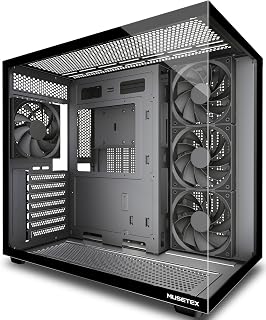
The 270-degree full-view tempered glass wraparound is the headline feature here, giving a near-complete sightline into the build from virtually any angle. Four pre-installed fans handle airflow immediately, and compatibility with ATX, Micro-ATX, and Mini-ITX boards means it fits a wide range of builds. The Type-C front port and dust filter round out a practical package for anyone prioritizing both visual impact and long-term maintenance.
Pros
- Dual 270-degree glass panels provide exceptional multi-angle component visibility
- Dual-chamber design isolates PSU heat from main component airflow
- Supports up to 360mm radiators and nine total fans
- Tool-free panels and magnetic dust filters simplify maintenance
Cons
- Substantial size at 13.1 pounds and 16.73 inches deep
- Some units missing Micro-ATX standoff holes suggest quality control issues
The MUSETEX Y6 takes glass visibility seriously with dual 270-degree tempered glass panels that expose your hardware from front and side in a sweeping transparent enclosure. This design choice creates an aquarium-like effect where components appear suspended and visible from nearly every viewing position. The black matte finish frames the glass without distraction. Four pre-installed 120mm fans arrive configured for immediate airflow, with three front intakes and one rear exhaust establishing positive pressure through the main chamber. The dual-chamber architecture separates the PSU into its own ventilated zone, keeping power supply heat isolated while the main compartment focuses thermal attention on CPU and GPU. Support extends to 360mm radiators and nine total fans for builders planning liquid cooling or high-performance air setups. Interior space accommodates graphics cards to 410mm and CPU coolers to 160mm height, providing clearance for substantial hardware. Tool-free side panels speed access while magnetic dust filters on top and bottom reduce cleaning frequency. Included Velcro ties and complete screw assortments demonstrate build-ready preparation.
Case Type: Mid Tower ATX
Motherboard Support: ATX, Micro-ATX, Mini-ITX
Cooling Capacity: CPU cooler up to 160mm, GPU up to 410mm, Radiator up to 360mm, PSU up to 230mm
Pre-Installed Fans: 4x 120mm (3 reverse on side, 1 forward on rear, non-LED)
I/O Ports: 1x USB 3.0, 1x USB 2.0, 1x Type-C, Audio, Microphone
Materials: Metal, Plastic, Tempered Glass
Dimensions: 16.73"D x 10.83"W x 15.67"H
Weight: 13.1 lbs
Color: Black Matte
Warranty: 10 Years
This case fits builders prioritizing maximum glass exposure for RGB-heavy systems or premium component showcases. The dual-chamber design benefits anyone concerned about PSU heat management or cable visibility. It works well for liquid cooling projects with substantial radiator plans. Skip this if desk space is tight, as the 16.73-inch depth and 13.1-pound weight demand sturdy placement. Micro-ATX builders should verify standoff alignment before purchasing due to reported quality control inconsistencies.

Pros
- Dual tempered glass panels provide panoramic component visibility
- Three pre-installed ARGB PWM fans with optimized blade configurations
- Supports 360mm radiators and up to nine total fans for robust cooling
- Accommodates high-end 40-series GPUs in mid-tower form factor
Cons
- Compact layout requires careful planning for large PSUs and storage
- 14.5-pound weight and generous footprint demand adequate desk space
The MONTECH XR delivers an unobstructed showcase for your build through dual tempered glass panels that span both side and front, giving you panoramic visibility from nearly every angle. The glass construction doesn't sacrifice thermal performance: three pre-installed ARGB PWM fans arrive preconfigured with two reverse-blade units on the side and one standard fan at the rear, creating airflow paths optimized for glass-enclosed builds. The case supports up to nine total fans and fits 360mm radiators at the top, ensuring you can scale cooling as needed. High-end GPUs from the 40-series lineup fit without issue despite the mid-tower footprint. A three-stage dust filtration system across top, bottom, and side keeps glass surfaces cleaner and components protected. The mature wood-grain I/O interface adds visual warmth that complements the glass aesthetic. Standard ATX motherboard compatibility and seven expansion slots provide flexibility for multi-GPU or expansion card configurations. At 14.5 pounds with generous dimensions, the XR commands desk presence while offering the clear component views and intelligent cooling integration that glass-panel enthusiasts demand.
Case and Dimensions
Case Type: Mid Tower
Dimensions: 17.1 inches deep x 9 inches wide x 17.7 inches high
Weight: 14.5 pounds
Material: Tempered Glass (dual panels)
Motherboard Support: ATX, Micro-ATX, Mini-ATX
Cooling and Fans
Pre-installed Fans: 3 (2 reverse-blade side fans, 1 rear fan)
Fan Size: 120mm
Maximum Fan Speed: 1500 RPM
Total Fan Support: Up to 9 fans
Radiator Support: 360mm at top
GPU Clearance: Up to 420mm
Connectivity and Ports
USB 3.0 Ports: 2
USB 2.0 Ports: 2
USB-C: Yes
Total Expansion Slots: 7
Internal Bays: 3 (3.5 inch)
Power Supply: Bottom mount (750W maximum)
Additional Features
Dust Filters: Top, bottom, and side panels (magnetic)
Fan Lighting: Multi-color ARGB
I/O Interface: Mature wood-grain design
Warranty: 1 year
Buy the MONTECH XR if you want maximum glass coverage to display your components from multiple angles, especially if you're building a high-end gaming or enthusiast rig with modern GPUs and custom cooling. The pre-installed ARGB fans and support for extensive fan arrays make it ideal for builders who prioritize both aesthetics and thermal performance. Skip this case if desk space is limited or if you prefer minimalist setups without RGB lighting. Compact PSU and storage planning is required, so builders with multiple large drives or oversized power supplies should verify fitment before purchasing.

This compact NZXT mid-tower is a strong pick for builders who want a clean glass-panel aesthetic without the bulk of a full-tower footprint. Seven expansion slots offer solid flexibility for multi-GPU or capture card setups, and the bottom-mount PSU placement keeps the glass-facing interior uncluttered. Its 120mm fan support across multiple positions gives straightforward airflow tuning for an ATX or Micro-ATX build on display.
Pros
- Tempered glass panel provides clear view of components
- Ultra-fine mesh front, top, and side panels maximize visible airflow
- Supports 360mm front and 240mm top radiators for showcase cooling
- Spacious interior with cable management points for clean glass-ready builds
Cons
- Mesh design exposes rear cable routing from outside angles
- Limited to one 3.5-inch drive bay without adapters
The NZXT H5 Flow delivers exceptional visibility through its tempered glass side panel while maintaining the cooling performance necessary to keep visible components running optimally. Ultra-fine mesh panels across the front, top, and side create an open aesthetic that complements the glass, allowing you to see both the hardware inside and the airflow architecture that protects it. The perforated PSU shroud enables bottom intake fans to feed cool air directly to the GPU, a setup that looks as purposeful as it performs. Support for 360mm front and 240mm top radiators gives builders flexibility to showcase custom liquid cooling loops behind the glass. Two pre-installed 120mm fans provide immediate cooling capability. The spacious interior with smooth edges and multiple cable anchor points makes it straightforward to achieve the clean routing necessary when every cable is on display. Metal construction feels substantial while the compact mid-tower footprint fits ATX and Micro-ATX builds without dominating desk space. The glass panel itself maintains structural integrity while providing an unobstructed view of the build inside.
Case Type: Compact ATX Mid-Tower
Motherboard Support: ATX, Micro-ATX, Mini-ITX, E-ATX compatible
Dimensions: 16.93in W x 18.31in H x 8.86in D
Weight: 8 kg
Material: Metal with tempered glass panel
Cooling Support: Front 360mm radiator, top 240mm radiator
Pre-installed Fans: Two 120mm Quiet Airflow fans (front intake, rear exhaust)
Fan Size Support: 120mm standard
Power Supply: Bottom mount
Internal Bays: 4 total
Drive Support: One 3.5-inch bay, two 2.5-inch bays
I/O Ports: Two USB 2.0, two USB 3.0
Expansion Slots: 7 total
Cable Management: Wide channels, hooks, and straps included
Warranty: 2-year manufacturer warranty
First-time builders wanting to showcase their work through glass without sacrificing thermal performance should consider this case, as should experienced enthusiasts building compact systems with visible custom cooling. The mesh design combined with glass makes it ideal for RGB-heavy builds where airflow and aesthetics both matter. Skip this if you prioritize rear cable concealment, since the mesh panels make back-side routing visible from certain angles. Also pass if you need extensive 3.5-inch drive storage, as the case includes only one bay by default.
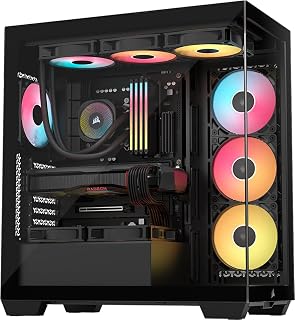
For builders who want a stunning glass showcase without sacrificing airflow, this Corsair mid-tower delivers ARGB lighting built right in, meaning no extra fan purchases to achieve that lit interior look. Its support for both Mini ITX and Extended ATX boards makes it unusually flexible for a glass-panel case, and the bottom-mount PSU keeps cables tidy behind a clean, panoramic view. Dust filters protect that display-worthy build long term.
Pros
- Wraparound tempered glass provides exceptional multi-angle visibility
- Exceptional cable management keeps all wiring hidden behind the motherboard
- Supports Mini-ITX through EATX with room for 360mm radiators
- Included GPU stabilizer and magnetic dust filters maintain showcase quality
Cons
- Nearly 20-inch depth requires significant desk or floor space
- No dedicated 3.5-inch drive bays for traditional hard drives
The CORSAIR 3500X RS delivers one of the most striking glass showcases available in a mid-tower format. Its wraparound tempered glass design extends beyond typical side-panel implementations, wrapping visibility around multiple faces to create an immersive hardware display. The high-quality glass construction ensures clarity without distortion, making every component visible from nearly every angle. Three pre-installed RS120-R ARGB fans provide synchronized lighting that dances across the transparent surfaces while moving substantial air through the chassis. The interior supports builds from Mini-ITX up to EATX, accommodating radiators to 360mm and large graphics cards without compromising the clean sightlines. Cable management infrastructure is exceptional, with generous routing channels and a dedicated rear compartment that hides every wire from view. The included GPU anti-sag stabilization arm protects your most visible component while magnetic dust filters on front, side, and top surfaces maintain pristine glass clarity. Removable panels grant easy access for cleaning and upgrades. Build quality throughout reflects premium construction that matches the visual ambition.
This case supports a broad range of motherboard form factors, from Mini-ITX compact builds to Extended ATX high-end platforms. Cooling capacity is impressive with support for up to 10x 120mm fans across side, roof, and PSU mounting points, allowing flexible thermal configurations. The case accommodates radiators up to 360mm, making it suitable for both air and all-in-one liquid cooling solutions.
The CORSAIR 3500X is compatible with the latest reverse-connection motherboards including ASUS BTF, MSI Project Zero, and Gigabyte Project Stealth, enabling cable-free interior builds for an exceptionally clean aesthetic. Storage flexibility includes multiple drive mounting options, though traditional 3.5-inch hard drive bays are limited. Front connectivity includes two USB 3.0 ports plus standard audio connectors for convenient access.
Model: CORSAIR 3500X RS-R ARGB (CC-9011322-WW). Case type: Mid-tower. Supported motherboards: Mini-ITX to Extended ATX. Dimensions: 18.11W x 19.92D x 9.45H inches, weighing 9.02 kg. Material: Tempered glass front and side panels with metal chassis. Power supply: Bottom-mounted. Includes 3x RS120-R ARGB fans with simple +5V motherboard header control.
Cooling capacity: 10x 120mm fan mounting points, supports radiators up to 360mm. Connectivity: 2x USB 3.0 ports. Features include removable glass panels, magnetic dust filters, GPU anti-sag stabilization arm, double-shot cable grommets, and rear cable storage. Warranty: 2-year manufacturer coverage. Best Sellers Rank: #13 in Computer Cases.

Gamers chasing an unobstructed view of their components get exactly that here, with dual tempered glass panels wrapping the build in a full panoramic display. The four pre-installed PWM ARGB fans mean the interior is illuminated and actively cooled right out of the box, and support for up to a 360mm radiator means there is headroom to push cooling performance as far as a serious gaming rig demands.
Pros
- 270-degree tempered glass panel showcases build from three sides
- Four pre-installed PWM ARGB fans provide immediate cooling and lighting
- Supports up to 360mm radiators and ten total fans
- Magnetic dust filters and Type-C connectivity add practical value
Cons
- RGB hub controller sold separately for full ARGB control
- Dense multi-fan builds may challenge cable management space
The darkFlash DS900 brings panoramic glass to the mid-tower segment with a 270-degree tempered glass panel that wraps around three sides of the chassis. This expansive transparent surface transforms the case into a display piece, offering unobstructed views of your build from front, side, and partial top angles. Four pre-installed PWM ARGB fans come ready to illuminate the interior while providing genuine cooling capacity across the airflow path. The case handles ATX motherboards comfortably and supports radiators up to 360mm, with total fan capacity reaching ten units for builders pursuing aggressive thermal solutions. Modern I/O includes USB 3.0 alongside a Type-C port for current connectivity standards. The high-strength tempered glass maintains clarity while the magnetic dust filters simplify maintenance without tools. Cable management routing is well-planned for standard builds, keeping wires organized behind the motherboard tray. The bottom-mount PSU design and anti-slip base structure contribute to both aesthetics and stability. Professional black finish throughout complements the glass without competing for attention.
Brand: darkFlash
Model: DS900
Case Type: ATX Mid-Tower
Motherboard Compatibility: ATX
Recommended Use: Gaming
Color: Black
Material: Metal and Tempered Glass
Glass Panel: 270-degree panoramic tempered glass
Pre-installed Fans: 4x 120mm PWM ARGB fans
Maximum Fan Support: 10 fans total
Water Cooling Support: Up to 360mm radiator
Cooling Method: Air and water
Power Supply Mounting: Bottom mount
Fan Size: 12 centimeters
I/O Ports: USB 3.0 and USB Type-C
Dust Filtration: Magnetic top filter and panel dust filter
Gaming builders seeking maximum component visibility at an accessible price point will appreciate this case. It works well for first builds where bundled fans reduce initial costs and for RGB enthusiasts who want their lighting fully visible. Skip this if you need integrated ARGB control, as the hub controller is sold separately. Also pass if you plan extremely dense fan configurations, where cable routing may become challenging in the available space behind the motherboard.

For anyone building a glass-panel showcase PC, this ATX mid tower delivers on both visibility and airflow. It supports ATX, Micro-ATX, and Mini-ITX motherboards, making it versatile across build sizes, while the bottom-mounted PSU keeps the interior clean and camera-ready. With 120mm fan support and compatibility with both air and water cooling, it handles thermal demands without cluttering the view inside.
Pros
- Tempered glass side panel combined with high-airflow mesh front
- Supports up to eight 120mm fans and 360mm radiator
- USB-C ready I/O with modern connectivity options
- Magnetic dust filters on top and bottom for easy maintenance
Cons
- Only one pre-installed fan requires additional cooling investment
- Limited user reviews leave long-term durability unproven
The DARKROCK EC2 pairs a full tempered glass side panel with a high-flow mesh front, giving you the component visibility glass enthusiasts want without thermal compromise. The mesh design channels unrestricted airflow directly to your hardware, while the glass showcases your build and any RGB lighting you've installed. Support for up to eight 120mm fans and one 360mm radiator means you can build aggressive cooling configurations that work in harmony with the glass enclosure. The case accommodates ATX, Micro-ATX, and Mini-ITX motherboards across seven expansion slots, offering flexibility for various build scales. Magnetic dust filters on top and bottom keep glass cleaner and prevent particulate buildup on visible components. USB-C connectivity on the I/O panel brings modern port options to the front. Metal, plastic, and tempered glass construction provides the structural integrity needed to support heavy cooling hardware. Three internal 3.5-inch bays give storage flexibility. The single pre-installed fan means you'll want to add more cooling to fully leverage the mesh front and glass design, but the foundation for a high-visibility, well-cooled build is solidly established.
Cooling capability is where this case truly excels. The mesh front panel allows unrestricted airflow, paired with support for up to eight 120mm fans and one 360mm radiator. This configuration is suitable for high-end gaming rigs and overclocked systems that generate significant heat.
The bottom-mounted PSU placement helps separate heat sources, improving overall thermal efficiency. Magnetic dust filters prevent clogging, maintaining consistent airflow performance over time without frequent maintenance.
This case accommodates ATX, Micro-ATX, and Mini-ITX motherboards, offering flexibility for various build sizes. It supports graphics cards up to 340mm in length and power supplies up to 200mm, making it compatible with modern high-end GPUs including 50-series cards.
With seven expansion slots and three internal bays, you have room for multiple storage devices and expansion cards. The bottom PSU mount maximizes internal space and improves cable routing compared to front-mounted alternatives.
Buying Guide: Choosing Your Glass Panel Case
Glass Coverage and Viewing Angles
The amount of glass determines how much of your build remains visible. Standard side panel cases show your motherboard and GPU area clearly, but 270-degree panoramic designs like the MUSETEX Y6 and darkFlash ATX Mid-Tower extend glass to the front panel, giving you unobstructed views from multiple angles.
Dual tempered glass configurations provide the best showcase potential but require careful positioning of your desk setup. Consider where you’ll place the case and which angles matter most before committing to a specific glass layout.
Cooling Performance with Glass Fronts
Glass front panels look stunning but can restrict airflow compared to mesh alternatives. Cases like the NZXT H5 Flow solve this with strategic mesh sections and perforated shrouds that maintain aesthetics while channeling cool air directly to your GPU and CPU.
Pre-installed fan configurations matter significantly. The MONTECH XR Panoramic includes three ARGB PWM fans positioned for optimal intake and exhaust, while the CORSAIR 3500X RS features reverse rotor fans that improve airflow patterns. If you’re planning a powerful RTX 5080 build, verify the case supports enough fan mounting points and radiator space.
Build Space and Component Compatibility
Modern graphics cards push length limits, and tower coolers demand vertical clearance. The MUSETEX Y6 accommodates GPUs up to 410mm and CPU coolers up to 160mm, providing room for high-end components without compromise.
Dual-chamber designs separate your power supply and cables from the main compartment, improving both thermals and aesthetics. Look for cases with magnetic dust filters on all intake points and cable management features like routing channels and velcro straps. These details transform a challenging build into a smooth assembly process.
Front Panel Connectivity
Your case’s I/O panel determines daily convenience. Type-C ports handle modern peripherals and fast storage devices, while USB 3.0 connections remain essential for legacy gear. The darkFlash ATX Mid-Tower includes both Type-C and USB 3.0 options, covering all connection scenarios.
Audio jacks positioned on the front panel save you from reaching behind your desk constantly. Some builders also appreciate separate power and reset buttons, particularly when troubleshooting or overclocking. If you’re pairing your case with a Z890 motherboard, confirm the front panel connectors match your board’s header layout.
Final Thoughts
Your choice ultimately depends on whether you prioritize maximum visibility or pure airflow efficiency. For panoramic glass that showcases every component, the MUSETEX Y6 PC Case delivers 270-degree views with solid cooling from four pre-installed fans. If you need mesh airflow with glass aesthetics and compact dimensions, the NZXT H5 Flow balances both priorities in a refined mid-tower design. Either option gives you the visibility to enjoy your build while keeping components properly cooled.
Frequently Asked Questions
Do glass panel cases get hotter than mesh cases?
Glass front panels can restrict airflow compared to full mesh designs, but modern glass cases mitigate this through strategic ventilation channels, perforated PSU shrouds, and higher fan counts. Cases like the NZXT H5 Flow combine mesh sections with glass panels to maintain strong thermal performance. Your component temperatures depend more on fan configuration and radiator support than glass presence alone.
How do I clean tempered glass panels without scratches?
Use a microfiber cloth with glass cleaner or a 50/50 mixture of distilled water and isopropyl alcohol. Spray the solution onto the cloth rather than directly on the glass to prevent liquid seeping into edges. Wipe in straight lines instead of circles to avoid streaks, and never use paper towels or abrasive materials that can leave micro-scratches on the tempered surface.
Can I mount a 360mm radiator in most glass panel cases?
Many mid-tower glass cases support 360mm radiators, but mounting location varies by model. The MONTECH XR Panoramic and CORSAIR 3500X RS both accommodate 360mm radiators at the top or front, while compact cases may limit you to 240mm configurations. Always verify radiator clearance specifications before purchasing, especially if you’re planning a high-performance RTX 5070 build with aggressive cooling requirements.
Are 270-degree glass cases harder to build in?
Panoramic glass cases offer better access during assembly since both side and front panels remove easily. The extra visibility helps with cable routing and component alignment. However, you’ll need to be more careful with cable management since more of the interior remains visible from multiple angles. Most 270-degree cases in 2026 include improved cable channels and routing systems specifically to address this challenge.
Common questions
What are the best tempered glass PC cases you can buy right now?
The MUSETEX Y6 stands out among tempered glass PC cases thanks to its 270-degree full-view tempered glass panels, which wrap around three sides for a dramatic interior showcase. It supports ATX, Micro-ATX, and Mini-ITX motherboards and comes with four pre-installed fans. The CORSAIR 3500X RS ARGB is another strong pick, offering a panoramic glass design with ARGB lighting and wide compatibility from Mini-ITX up to EATX boards. Check each listing for the live price.





Write Your Review
No reviews yet. Be the first to share your experience!