

Wi-Fi is convenient until it isn’t. Whether you’re on a video call that keeps freezing, gaming with frustrating lag, or transferring large files at a crawl, a wired connection solves the problem immediately. The challenge for most modern laptops is that Ethernet ports have disappeared, making a USB-C to Ethernet adapter an essential accessory. If you’re also building out a fast, low-latency setup, check out our guide to the best WiFi extender for gaming to cover all your bases.
This guide covers ten of the best USB-C to Ethernet adapters available right now, from lean single-port dongles to multi-port hubs. We’ve evaluated each one on speed, build quality, compatibility, and real-world reliability so you can pick the right fit for your device and workflow.
Quick Comparison
Ratings reflect the most recent data pull. Check each listing for current price and availability.
Quick answer
This guide compares 10 picks, with Anker USB-C to Gigabit Ethernet Adapter, 1 Gbps ranked first. uni USB-C to Ethernet Adapter, 1Gbps Gigabit RJ45 LAN has the most customer reviews.

Pros
- Compact and lightweight design perfect for travel and mobile professionals
- Delivers consistent 1 Gbps speeds, more reliable than most WiFi connections
- Premium build quality with aluminum casing and reinforced braided cable
- Easy plug-and-play setup, no drivers or configuration needed
- Backed by strong customer reviews and Anker's reputation for reliability
Cons
- Only one Ethernet port, so you cannot connect multiple wired devices simultaneously
- Requires USB-C 3.0 device compatibility, limiting use with older laptops and tablets
- No built-in power delivery, so it draws power from the host device's USB port
The Anker USB-C to Gigabit Ethernet Adapter is a compact networking solution designed for laptop and tablet users who need reliable wired internet connectivity while traveling or working remotely. It bridges the gap for modern devices that lack traditional Ethernet ports, offering a practical solution for anyone prioritizing stable connections over WiFi convenience.
The standout feature is its ability to deliver consistent 1 Gbps speeds with minimal latency, making it ideal for video conferencing, large file transfers, and online gaming. The device connects instantly to any USB-C 3.0 port without requiring drivers or software installation. Its premium aluminum exterior and braided-nylon cable reflect thoughtful design that appeals to professionals and creative users.
Build quality is impressive for the price point. The half-inch thickness and 22.68-gram weight make it genuinely pocket-sized, rivaling the portability of most USB dongles while maintaining durability through its aluminum construction. The compact footprint ensures it won't add noticeable bulk to your travel setup.
The main limitation is its single Ethernet port, which means you can only connect one wired device at a time. Additionally, compatibility is restricted to USB-C 3.0 devices, so older machines or those with only USB-C 2.0 may not achieve optimal speeds. Power consumption is drawn directly from the host device's USB port.
For remote workers, students, and travelers seeking portable, stable internet connectivity, the Anker USB-C to Ethernet Adapter delivers solid performance backed by an 18-month warranty and millions of satisfied users worldwide. It's a reliable investment for anyone tired of unreliable WiFi.
Connectivity: USB Type-C to RJ45 Ethernet
Speed: Up to 1 Gigabit per second (1 Gbps)
Dimensions: 3.94 x 0.55 x 2.05 inches
Weight: 22.68 grams (approximately one AA battery)
Color: Black Metallic Finish
Cable Type: Braided-nylon reinforced connector
Ports: 1 Ethernet RJ45 port
Compatibility: USB-C 3.0 devices including tablets and laptops
Model: A83130A1
Warranty: 18-month limited warranty with customer support

Pros
- Genuine 10Gbps speeds deliver real-world performance for large file transfers and external SSD workflows
- Plug and play functionality works immediately on Windows, macOS, ChromeOS, and Linux without driver headaches
- Gigabit Ethernet port solves WiFi reliability issues in hotels, offices, and congested home networks
- 100W power delivery keeps modern laptops fully charged while connected to peripherals
- Slim aluminum construction resists adding bulk to travel laptop bags
Cons
- Does not support video output or external monitor connections, limiting use as a full docking station
- 10Gbps speed requires compatible USB-C port, cable, and devices; basic flash drives will transfer slower
- Gigabit Ethernet requires CAT6+ cable and compatible network infrastructure to reach advertised speeds
The Acer 6-in-1 USB-C Hub is a practical solution for MacBook users, remote workers, and anyone dealing with limited USB-C ports on their laptop. It transforms a single port into six separate connections, including two USB-C 3.2 ports, one USB-A 3.2, one USB-A 3.0, a Gigabit Ethernet jack, and a 100W power delivery pass-through. This makes it perfect for professionals who need to connect external drives, cameras, keyboards, mice, and networking simultaneously.
Real-world performance impresses where it matters most. The 10Gbps data transfer speed holds up in practice for large file workflows, as confirmed by user testing. The Gigabit Ethernet port solves a genuine pain point: unreliable WiFi at hotels and offices. Users report that setup is genuinely plug and play across all major operating systems, with no driver downloads or configuration needed. The 100W charging support keeps modern laptops at full power while all other ports remain active.
Build quality reflects the Acer brand reputation. The aluminum enclosure feels premium and compact, avoiding the bulk that many docking stations add to a laptop bag. The design is minimalist and intentional, avoiding unnecessary extras that would drive up cost or complexity. At 70 grams, it's lightweight enough for travel without feeling flimsy.
The key limitation is the lack of video output. This hub cannot drive external monitors, which disqualifies it for users building a complete desktop dock. Additionally, achieving the advertised 10Gbps speed requires matching hardware on all sides: a compatible USB-C port, a compatible cable, and compatible storage devices. Budget flash drives will not benefit from the fast speeds.
The Acer 6-in-1 delivers excellent value for professionals who need reliable networking, fast data transfers, and simultaneous charging without video output requirements. Its plug and play simplicity and consistent real-world performance make it a worthwhile investment for laptop productivity.
Connectivity: 2x USB-C 3.2, 1x USB-A 3.2, 1x USB-A 3.0, 1x Gigabit Ethernet (RJ45), 1x USB-C Power Delivery input
Performance: Up to 10Gbps shared bandwidth across USB 3.2 ports, 5Gbps on USB-A 3.0 port, 1000Mbps Ethernet
Power Delivery: 100W input, 90W output for host device charging
Compatibility: MacBook Pro/Air/Neo, Windows laptops, tablets, Chromebooks, Linux devices with full-function USB-C ports
Physical: Aluminum enclosure, silver color, 70g weight, model ODK5W0
Warranty: 1 year manufacturer coverage
Best For: MacBook users needing Ethernet and multiple USB ports, remote workers traveling frequently, content creators transferring large files daily, anyone frustrated with WiFi dropouts during video calls.
Consider Alternatives If: You need external monitor support, work in a static desktop setup that doesn't require portability, or use older USB-A only devices exclusively.
Setup Tips: Ensure your laptop's USB-C port supports both data and power delivery, not charge-only mode. Use a CAT6 or higher Ethernet cable to achieve Gigabit speeds. High-speed external drives maximize the 10Gbps benefit.
Value Assessment: At this price point, this hub competes well against larger docking stations while remaining travel friendly. The ethernet inclusion alone justifies the cost for anyone dealing with unreliable WiFi.
Pros
- Instant setup with no driver downloads on current operating systems saves time and frustration
- Aluminum construction provides superior heat dissipation compared to plastic alternatives
- Works across an exceptionally wide range of devices including smartphones, tablets, and gaming systems
- Strong customer satisfaction with 4.7 star rating reflects real-world reliability
Cons
- Drivers required for older Windows versions (XP, Vista, 7) and Linux systems add extra setup steps
- Limited to 1Gbps speeds, so may not leverage faster fiber or multi-gigabit connections if available
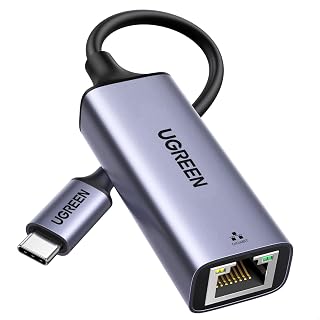
The UGREEN USB-C to Ethernet Adapter is a straightforward solution for anyone needing a wired internet connection on modern laptops, tablets, or phones. This adapter targets professionals working remotely, content creators uploading large files, gamers requiring stable connectivity, and anyone in environments where WiFi is unreliable or unavailable.
Performance-wise, the adapter delivers solid gigabit speeds up to 1000Mbps with backward compatibility for legacy networks. Setup is genuinely plug-and-play on Windows 11/10, macOS, Chrome OS, and Android, meaning no hunting for drivers or wrestling with installation wizards on current systems. The LED indicator gives instant visual feedback about connection status, which proves helpful during troubleshooting.
Build quality stands out with an aluminum alloy case instead of cheaper plastic, resulting in better heat management during sustained use. The reinforced cable tail and wear-resistant RJ45 port show attention to durability. At just 30 grams, this adapter travels effortlessly without adding noticeable weight to your setup or laptop bag.
The main limitation is compatibility with older systems, Windows XP/Vista/7 and Linux require manual driver installation which adds friction compared to modern OS support. Additionally, 1Gbps represents the ceiling, so if you have multi-gigabit internet or networking infrastructure, this adapter won't fully utilize those speeds.
This adapter delivers exactly what it promises: reliable ethernet on USB-C devices without complexity. The strong rating and versatile compatibility make it a dependable choice for anyone upgrading to modern devices without built-in ethernet ports.
Connectivity: USB 3.0 Type-C to RJ45 Gigabit Ethernet
Speed: 1000Mbps (Gigabit), backward compatible with 100/10Mbps networks
Compatibility: MacBook Pro/Air, iPad, iPhone Pro models, XPS, Dell, HP laptops, Chromebook, Nintendo Switch, Steam Deck, and most USB-C or Thunderbolt 3/4 devices
Operating Systems: Driver-free on Windows 11/10/8.1/8, macOS (10.15+), Chrome OS, Android. Drivers required for Windows XP/7/Vista and Linux
Design: Aluminum alloy case, space grey color, compact form factor
Weight: 30 grams
Dimensions: 7.09 inches length
Model: UGREEN CM199 (B082K62S48)
Remote Workers: If your new laptop lacks an ethernet port and you need rock-solid internet for video calls and file uploads, this adapter eliminates WiFi reliability issues instantly.
Content Creators: Video editors and photographers uploading large files benefit from gigabit speeds that WiFi often cannot sustain reliably over time.
Gamers: Competitive gamers and console players using Switch or Steam Deck can eliminate lag and latency issues with wired connectivity.
Travelers: The lightweight aluminum design fits easily into carry-ons and laptop bags without adding bulk or weight to your mobile setup.
MacBook and iPad Users: Apple's ecosystem dropped ethernet years ago, and this adapter is the standard solution for restoring wired connectivity.

Pros
- Driver-free installation with native OS support across Windows, Mac, Linux, and Chrome OS
- Achieves full gigabit speeds when used with CAT6 cables, matching or exceeding most Wi-Fi connections
- Dual USB connectivity (USB-A and USB-C) makes it compatible with older and newer laptop models
- Lightweight and ultra-portable design perfect for remote workers and frequent travelers
- Consistently rated highly by users who rely on it for stable internet during travel and remote work
Cons
- Requires CAT6 or higher quality Ethernet cables to reach advertised 1 Gbps speeds
- Some users report needing a laptop restart for initial setup despite plug-and-play claims
- Disabling Wi-Fi may be necessary to ensure the adapter takes priority as the primary connection
The BENFEI USB 3.0 to Gigabit Ethernet Adapter solves a common frustration for modern laptop owners: the missing Ethernet port. Whether you work remotely, travel frequently, or need rock-solid internet for gaming and video conferencing, this adapter restores wired connectivity on USB-equipped devices from MacBooks to Windows ultrabooks.
Performance is where this adapter shines. It delivers consistent gigabit speeds up to 1 Gbps when paired with quality CAT6 cables, making it significantly faster and more reliable than Wi-Fi, especially in crowded networks. The USB 3.0 interface minimizes latency, making it suitable for online gaming, large file transfers, and HD video streaming without the dropouts common with wireless connections.
Build quality impresses for the price point. The aluminum shell and nylon cable feel solid and durable, and the 1-gram weight means it's genuinely pocketable. Real-world users report it holding up well through multiple trips and daily use, with no quality degradation over time. Setup takes seconds: just plug it in, and driver-free operation kicks in automatically on most systems.
The main drawbacks are minor but worth noting. Some users report needing a laptop restart for the initial connection to work properly, and reaching full gigabit speeds requires investing in quality CAT6 cables. Additionally, Wi-Fi should be disabled to ensure the adapter gets priority as your primary connection.
Overall, the BENFEI USB 3.0 to Gigabit Ethernet Adapter delivers excellent value and reliability for anyone needing wired internet on a modern laptop. It's particularly valuable for remote workers, travelers, and serious gamers who can't afford connection drops or slowdowns.
This adapter works with Windows 11, 10, 8, 7 and earlier versions, plus Mac OS X 10.6 and newer, Linux kernel 2.6+, Chrome OS, and Android. It's compatible with both USB-A and USB-C ports, making it versatile across device generations.
Important limitations: Not compatible with Windows RT or Nintendo Switch. For optimal performance, use IEEE 802.3 compliant Ethernet cables, ideally CAT6 or better. The adapter draws all power from the USB port, requiring no external power supply.

Pros
- Exceptional reliability and speed stability compared to wireless networks
- Genuinely plug-and-play with zero configuration on supported systems
- Extremely portable at under 0.7 ounces with foldable design
- Superior chipset hardware delivers consistent full gigabit performance
- Broad cross-platform and cross-device compatibility
Cons
- Requires CAT6 or better ethernet cables to achieve maximum 1Gbps speeds
- Older USB-C devices or certain peripherals may have compatibility issues
- Foldable design means occasional users might misplace such a small adapter
The TP-Link UE300C is a USB-C to Gigabit Ethernet adapter designed for modern device users who need wired internet stability. It's ideal for MacBook Pro/Air owners, remote workers, content creators, online gamers, and anyone frustrated with unreliable Wi-Fi connections. At just 2.8 by 1 inch, it's meant to travel with you without taking up space.
The standout feature is its complete lack of setup friction. No drivers, no configuration, no hidden steps. Plug it into your USB-C port, connect an ethernet cable, and you're online within seconds. Real-world users report noticeable stability improvements for video conferencing, large file uploads, and competitive gaming. The ASIX AX88179B chipset inside handles full gigabit speeds reliably, even under sustained load.
Build quality matches the compact design philosophy. The adapter is lightweight yet durable enough for daily carry. The foldable design protects the connectors and reduces pocket bulk. At under 20 grams, you won't notice it's there until you need stable internet. Construction feels solid without any flex or wobble at connection points.
The main limitation is that hitting true 1Gbps speeds requires CAT6 or newer ethernet cables. Some older USB-C devices or specific accessories may show compatibility quirks, though the adapter supports a massive range of systems. The extreme portability means a small device could get misplaced if not given a dedicated spot in your bag.
The TP-Link UE300C is a straightforward, no-compromise solution for wired ethernet on USB-C devices. It solves a real problem (Wi-Fi instability) at an accessible price point with proven performance backed by genuine user feedback and a two-year warranty.
Buy this adapter if you use a USB-C laptop or tablet and experience Wi-Fi drops, slow uploads, or need guaranteed stable internet for work or gaming. It's also essential for anyone traveling with a modern MacBook or iPad who relies on conference room networks.
Skip this if your USB-C device rarely needs ethernet, you have consistently excellent Wi-Fi coverage, or you're unwilling to invest in a quality ethernet cable. Also check device compatibility on TP-Link's support page if you own unusual or very new hardware.
Pair it with a CAT6 or CAT6A ethernet cable for maximum performance. Consider buying a small cable organizer pouch to keep the adapter and a coiled cable together. Some users appreciate keeping one at the office and one while traveling.

Pros
- Supports Gigabit Ethernet speeds up to 1Gbps on compatible networks.
- Plug-and-play setup works well for convenient wired connectivity.
- Compact aluminum construction with a durable braided cable.
- Positive user feedback includes use with Galaxy S24 Ultra, Peloton Bike+, and OBD2 network equipment.
Cons
- Reaching the maximum 1Gbps speed requires a compatible network and CAT6 or newer Ethernet cable.
- Not compatible with Nintendo Switch.
- Device compatibility can vary, so users should confirm their USB-C hardware is supported before buying.
The uni USB-C to Ethernet Adapter gives compatible laptops, tablets, smartphones, and other USB-C devices access to a wired RJ45 network connection. It is best suited to users who want steadier connectivity than unreliable or congested Wi-Fi can provide.
Its Gigabit Ethernet interface supports speeds up to 1Gbps and remains compatible with 100Mbps and 10Mbps networks. The plug-and-play design is convenient for everyday use, while customer feedback reports successful connections with devices such as the Galaxy S24 Ultra, Peloton Bike+, and OBD2 networking equipment.
Build quality is a strong point for a compact adapter. The aluminum casing supports heat dissipation, the braided nylon cable is designed for repeated handling, and the non-slip exterior helps with plugging and unplugging. Its lightweight form also helps keep it portable.
There are a few important limitations to consider. Maximum performance depends on the network, host device, and a CAT6 or newer cable, and the adapter is not compatible with Nintendo Switch. Users should also verify device compatibility before purchase.
Overall, the uni USB-C to Ethernet Adapter is a practical choice for reliable wired networking on supported USB-C devices. Its Gigabit capability, compact construction, and simple setup make it especially useful for home offices, troubleshooting, travel, and streaming setups.

Pros
- Future-proof 2.5Gb speed supports next-generation network infrastructure
- Durable aluminum build with reinforced ports resists wear from frequent plugging and unplugging
- Low power consumption keeps devices cool during extended use
- Broad device compatibility covers laptops, tablets, and smartphones across major brands
- Reliable Realtek chip ensures consistent performance without driver issues on major operating systems
Cons
- Requires compatible 2.5Gb network equipment like switches or routers to achieve full speed potential
- Higher price point compared to standard gigabit adapters limits appeal to casual users
- Performance caps at 1Gb if connected to older network infrastructure
The UGREEN USB-C to 2.5G Ethernet Adapter solves a real problem for anyone using modern laptops that abandoned physical Ethernet ports. Designed for content creators, gamers, remote workers, and anyone who needs rock-solid internet reliability, this adapter bridges the gap between wireless convenience and wired performance.
The standout feature is the 2.5Gb speed capability paired with the Realtek RTL8156BG chip, which balances performance with efficiency. In practical terms, this means faster file transfers to NAS devices, buttery-smooth 4K streaming, and lower latency for online gaming. The adapter runs cool even at full throttle, making it suitable for hours of heavy use without thermal issues.
Build quality reflects the aluminum construction and reinforced port design. The compact form factor (2.4 inches long) doesn't bulk up your USB-C hub setup, and the transmission status lights provide useful feedback. This feels like a device built to last through years of daily laptop switching.
The main limitation is practical rather than technical: you'll only see full 2.5Gb speeds if your network infrastructure (router, switch, NAS) supports it. If you're still on gigabit equipment, the adapter works fine but caps out at 1Gb. For budget-conscious shoppers accustomed to cheaper gigabit adapters, the price may require justification.
This is a solid investment for anyone actively upgrading to faster networks or working in environments where connection reliability matters more than price. For casual web browsing over Wi-Fi, it's overkill. For professionals and enthusiasts, it delivers genuine value.
Connection Type: USB 3.0 Type-C
Maximum Speed: 2.5 gigabits per second
Chip: Realtek RTL8156BG
Build Material: Aluminum
Color: Space Grey
Dimensions: 2.4 inches (L) x 1 inch (W) x 0.6 inches (H)
Weight: 33.5 grams
Compatible Devices: Laptops, tablets, smartphones, desktops with USB-C ports
Who Should Buy This? If you own a modern USB-C laptop (MacBook Pro/Air, Dell XPS, ThinkPad X series) and have invested in 2.5Gb network equipment, this adapter delivers measurable performance gains. Content creators moving large files, remote workers on slow Wi-Fi, and gamers seeking lower latency are ideal candidates.
Who Might Skip It? If your network maxes out at gigabit speeds or you're a casual internet user, the standard 1Gb adapters offer better value. Also consider whether your device has USB-C ports; older laptops won't benefit from this particular model.
Network Setup Considerations: To maximize this adapter's potential, ensure your router, switch, NAS, or modem supports 2.5Gb speeds. Legacy gigabit infrastructure will limit the adapter to 1Gb performance, which is still respectable but underutilizes the hardware. Check your network specifications before purchasing if speed is your primary motivation.
Pros
- Fast, stable 1Gbps speeds eliminate WiFi connectivity issues
- Incredibly compact and lightweight design fits easily in laptop bags
- Wide device compatibility covers Apple, Dell, Samsung, Google, and more
- Durable aluminum casing and braided cable withstand frequent plugging
- Excellent value at under ten dollars for reliable enterprise-grade connectivity
Cons
- Requires CAT6 or higher ethernet cables to achieve full 1Gbps speeds
- Not compatible with Nintendo Switch, limiting gaming console use
- No active cooling means prolonged use in hot environments may cause minor throttling
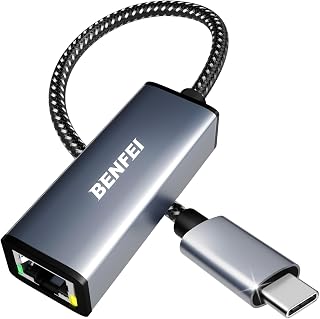
The BENFEI USB-C to Ethernet Adapter is a no-frills, plug-and-play solution for anyone working with modern laptops, tablets, or phones who needs reliable wired internet. Whether you are a remote worker facing WiFi dropouts, a content creator uploading large files, or a traveler working in hotels with spotty wireless, this adapter solves real connectivity problems at an exceptional price point.
Performance is the standout feature here. Delivering true gigabit speeds up to 1Gbps, this adapter handles large downloads, video streaming, and online meetings without the lag typical of weaker WiFi signals. The adapter automatically supports slower networks too, so you maintain compatibility whether connecting in a modern office or older building. One caveat: you will need quality CAT6 ethernet cables to hit the full 1Gbps threshold, as cheaper cables cap out at lower speeds.
Build quality punches well above its price. The aluminum casing provides durability and heat dissipation, while the braided nylon cable resists fraying and kinks from daily commuting. The compact design means it takes up minimal space in your bag, and the non-slip grip ensures it stays secure in tight USB-C ports without forcing or straining the connector.
The main limitation is the Nintendo Switch exclusion if gaming matters to you. Beyond that, this adapter simply does one thing and does it well, making it an invaluable tool for professionals and students who value connection reliability over aesthetic frills.
Bottom line: at this price with an 18-month warranty and rock-solid performance across major device ecosystems, the BENFEI adapter is an essential backup for anyone with a USB-C device. Highly recommended for anyone tired of unreliable wireless connectivity.
This adapter works with virtually every major USB-C device released in the past five years. Apple users get full support for all MacBook Pro, MacBook Air, and iPad Pro models from 2017 onward, plus iPhone 15 series. Windows laptop owners can connect Dell XPS models (13, 15, 17), ASUS ZenBook, and Microsoft Surface Book 2.
Android compatibility is excellent, supporting Samsung Galaxy S8 through S23 series, Galaxy Tablets, and Google Pixel phones. Chromebook users will find this adapter bridges the gap between wireless limitations and enterprise connectivity. The key exclusion is Nintendo Switch, which uses a proprietary USB-C implementation incompatible with standard adapters.
For best results, confirm your device has a standard USB-C port rather than a proprietary variant. Most modern laptops and tablets use standard USB-C, but a quick spec check prevents frustration. If you see Thunderbolt 3 or Thunderbolt 4 listed in your device specs, this adapter is fully compatible and recommended.

Pros
- No external power adapter needed, making it truly portable and convenient
- Aluminum construction feels premium and durable for daily use
- Works instantly with zero setup or driver requirements
- Reversible USB-C connector eliminates the frustration of incorrect orientation
- Solid gigabit performance for streaming, gaming, and work-from-home setups
Cons
- Single ethernet port limits use to one connection at a time
- Some users may experience compatibility issues with specific older devices despite broad USB-C support
- No included cable management or carrying case for travel protection
The Amazon Basics USB-C to Ethernet Adapter is a straightforward solution for anyone needing reliable wired internet on devices with USB-C ports. This adapter is ideal for remote workers, frequent travelers, content creators, and gamers who demand stable connectivity without the hassles of wireless networks.
The standout feature is its no-fuss operation. Simply plug it in and you get instant gigabit ethernet connectivity supporting 10M, 100M, or 1000M bandwidth. The reversible USB-C connector is a thoughtful touch that eliminates the common frustration of getting the orientation wrong, and the fact that it requires no external power makes it genuinely portable.
Build quality reflects the AmazonBasics approach: functional and reliable without unnecessary flourishes. The gray aluminum housing feels solid and compact at just 2.07 inches long, while the black TPE cable provides flexibility. At 0.02 kg, it disappears into any laptop bag or travel pack.
The main limitation is that you get one ethernet port, so this adapter handles a single connection. Additionally, while USB-C compatibility is broad, some older or specialized devices may have quirks, though this is relatively rare.
Overall, this is a no-nonsense ethernet adapter that delivers on its core promise. For the price and build quality, it's a solid choice for professionals and gamers who value reliable wired connectivity and portability in equal measure.
Remote Workers and Digital Nomads: Unreliable WiFi in coffee shops and coworking spaces? This adapter ensures your video calls and file uploads stay stable.
Content Creators and Streamers: Gigabit speeds mean faster uploads and zero lag during live streams. The aluminum build handles daily use without complaint.
Nintendo Switch Players: Boost your online gaming experience with wired stability instead of relying on WiFi connectivity, especially for competitive multiplayer titles.
Travelers on Any Budget: At under $25, this is an affordable insurance policy against WiFi dead zones and unreliable hotel networks.

Pros
- Exceptional value: four ports in one compact adapter for under ten dollars
- Convertible USB-A to USB-C connector eliminates the need for separate adapters
- True gigabit performance when paired with CAT6 cables and USB-C connection
- Highly portable with minimal footprint, perfect for laptop bag or desk setup
- Strong customer satisfaction with 4.4-star rating reflecting real-world reliability
Cons
- USB-A connection limits ethernet speeds to approximately 400-500Mbps, requiring USB-C for full gigabit performance
- Maximum output current of 900mA means it cannot charge devices while in use
- Windows 7 systems require additional drivers, limiting legacy system compatibility
The TechMeetsLuck 4-in-1 USB adapter solves a common problem for modern laptop users: the shortage of available ports combined with the need for reliable wired internet. This compact hub bridges that gap by adding gigabit ethernet connectivity and three additional USB ports to any device with USB-A or USB-C. It is ideal for remote workers, students, and professionals who depend on stable network performance and frequently connect multiple peripherals.
Performance is where this adapter excels. The gigabit ethernet port delivers speeds up to 1000Mbps when connected via USB-C and paired with a CAT6 cable, providing noticeably faster and more stable internet than Wi-Fi. The three USB 3.0 ports support 5Gbps data transfer rates, allowing simultaneous connection of mice, keyboards, external drives, and other accessories without noticeable slowdown. Customer reviews consistently highlight the rock-solid connectivity and quick data transfer speeds for daily productivity tasks.
Build quality reflects the price point without obvious compromises. The ABS plastic enclosure feels durable enough for regular travel, and the dual USB-A and USB-C connector design is genuinely clever, letting you adapt to any device without carrying multiple adapters. At just 60 grams, it adds virtually no weight to a laptop bag. The captive connector design prevents lost adapters, a thoughtful feature for on-the-go users.
One important caveat: the USB-A connection maxes out around 400 to 500Mbps ethernet speed, while USB-C reaches full gigabit performance. Users need to be aware of this difference to get the advertised 1000Mbps speeds. Additionally, the 900mA maximum output current means you cannot charge devices while using the adapter, which may limit functionality for power-hungry setups.
This adapter represents strong value for anyone needing affordable, portable connectivity expansion. It won't replace a full docking station for power users, but it delivers reliable performance in a form factor that fits in any tech bag. Recommended for laptop users, remote workers, and anyone frustrated by limited port availability on modern machines.
Connectivity: 3x USB 3.0 ports (5Gbps), 1x Gigabit Ethernet (1000Mbps)
Connectors: Convertible USB-A and USB-C design
Compatibility: Mac OS, Windows 10/11, Chrome OS, iPad OS. Windows 7 requires drivers.
Physical: 4.3 inches L x 0.55 inches W x 1.2 inches H, 60 grams, ABS plastic enclosure
Power: Maximum 900mA output current. Does not support device charging.
Warranty: 1-year manufacturer coverage
What to Look for in a USB-C to Ethernet Adapter
Network Speed: 1Gbps vs. 2.5Gbps
Most adapters in this category top out at 1Gbps, which is more than enough for streaming 4K video, video conferencing, and everyday downloads. The UGREEN USB C to Ethernet Adapter and the Anker USB C to Ethernet Adapter both deliver reliable gigabit performance at a straightforward price point.
If you work with NAS drives, large media files, or a 2.5G-capable router, the UGREEN USB C to Ethernet Adapter 2.5G is worth the upgrade. Its RTL8156BG chip handles 2.5Gbps throughput while keeping heat and power draw low, a genuine advantage over standard gigabit options.
Build Quality and Portability
If the adapter lives in your bag, durability matters as much as specs. Look for aluminum housings and braided nylon cables. The uni USB C to Ethernet Adapter 1Gbps uses a premium aluminum casing with a reinforced braided cable and a non-slip grip, making it a solid choice for frequent travelers.
For a more compact form factor, the TP-Link USB C to Ethernet Adapter (UE300C) measures just 2.8 x 1.0 x 0.6 inches and folds neatly into any pocket or laptop sleeve. Small size does not mean a compromise on performance here.
Single Port vs. Multi-Port Hub
A dedicated Ethernet adapter is the lightest solution if all you need is a wired connection. But if your laptop is also short on USB ports, a hub adapter gives you more room to work. The acer USB C Hub 10Gbps, 6-in-1 USB C to Ethernet adds Gigabit Ethernet alongside two USB-C 3.2 ports, a USB-A 3.0 port, and 100W pass-through charging in one compact unit.
Similarly, the USB A/C to Ethernet Adapter combines three USB 3.0 ports with a Gigabit RJ45 port and supports both USB-A and USB-C connectors via a convertible plug. It’s a practical pick for a shared desk setup or a classroom environment. For a clean workspace to pair with it, take a look at the top vertical laptop stand options that help reduce desk clutter.
Compatibility and Driver Requirements
The best adapters are plug-and-play across Windows, macOS, Chrome OS, and Linux without any driver installation. Most options here, including the BENFEI USB 3.0 to Ethernet Adapter and the BENFEI USB-C to Ethernet Adapter, work natively on modern operating systems with no setup required.
Do check for Nintendo Switch compatibility if that matters to you. The Amazon Basics Aluminum USB-C to RJ45 Gigabit explicitly supports the Switch, while several other adapters in this list do not. It’s a small but important detail that’s easy to miss before purchasing. If you’re building a full gaming station, our roundup of the best 240Hz 1080p monitors is a useful companion read.
Final Thoughts
For most users who want a simple, reliable wired connection without spending much, the UGREEN USB C to Ethernet Adapter is the easiest recommendation, offering gigabit speeds, plug-and-play convenience, and a durable aluminum build at a low entry point. If you need more from your setup, whether that’s 2.5Gbps throughput for a NAS or extra ports for peripherals, the UGREEN USB C to Ethernet Adapter 2.5G delivers a meaningful performance step up with the same quality construction.
Frequently Asked Questions
Do USB-C to Ethernet adapters work with MacBooks?
Yes, the majority of adapters in this guide are fully compatible with MacBook Pro and MacBook Air models. macOS recognizes these adapters natively, so no driver installation is needed. Options like the UGREEN USB C to Ethernet Adapter and the Anker USB C to Ethernet Adapter have both been confirmed to work reliably across recent macOS versions.
Will a USB-C to Ethernet adapter actually reach 1Gbps speeds?
It can, but your Ethernet cable matters. To hit full gigabit throughput, you need a CAT6 or higher cable. Most adapters are backward compatible with 100Mbps and 10Mbps networks, so they’ll work with any cable, but the speed ceiling depends on your cable, router, and internet plan all aligning. In 2026, CAT6 cables are widely available and inexpensive, so there’s no reason not to use one.
Is a USB-C to Ethernet adapter worth it for gaming?
Absolutely. A wired connection consistently delivers lower latency and more stable ping compared to Wi-Fi, which directly impacts online gaming performance. Even a basic gigabit adapter will eliminate the packet loss and jitter that can ruin a session. For a deeper look at wired and wireless network performance for gaming, our guide to the best WiFi extender for gaming covers the full picture.
What’s the difference between a 1Gbps and a 2.5Gbps USB-C Ethernet adapter?
A 1Gbps adapter handles up to 1000Mbps, which covers virtually all home broadband and most office networks. A 2.5Gbps adapter, like the UGREEN USB C to Ethernet Adapter 2.5G, supports up to 2500Mbps and is worth the upgrade if your router or network switch is 2.5G-capable. The practical benefit shows up most in local network transfers, such as moving large files to a NAS or a local server, rather than standard internet browsing.


Write Your Review
No reviews yet. Be the first to share your experience!