

Prime Big Deal Days is one of the best windows of the year to upgrade your display without overpaying. Whether your current screen is years behind on refresh rates, too small for your workflow, or simply overdue for a replacement, the deals that surface during this event cover nearly every category, from compact 22-inch office monitors to expansive 32-inch flat panels. If you’re building or refreshing a PC setup, pairing a quality monitor with the right components matters as much as the display itself, and our guide to the best RAM for 4K gaming is worth a read alongside this one.
This roundup covers ten monitors currently available through Amazon, each reviewed for image quality, refresh rate, eye comfort, and overall value. Whether you prioritize silky-smooth gaming performance, eye-friendly office use, or a clean multi-monitor setup, there is an option here that fits your needs.
Quick answer
This guide compares 10 picks, with Dell SE2426H 24 inch 144Hz IPS Monitor - FHD 1080p ranked first. Sceptre 24-inch 1080p LED Monitor with 99% sRGB has the most customer reviews.

Pros
- Exceptional value at under $90 with premium 144Hz performance typically found in higher-priced models
- Excellent color accuracy and consistency thanks to IPS panel technology
- Low power consumption makes it environmentally friendly and cost-effective long-term
- Wide viewing angles mean multiple people can view content simultaneously without color shift
- Includes HDMI cable in the box, ready to use out of the box
Cons
- 1080p resolution may feel limiting on a 24-inch screen for detailed design work or text-heavy tasks
- 8ms standard response time spec conflicts with the marketed 1ms MPRT, which measures motion clarity differently
- Limited to HDMI connectivity without DisplayPort or USB-C options
The Dell SE2426H is a 24-inch gaming and productivity monitor that punches well above its price point. It's designed for gamers, content creators on a budget, and professionals who want smooth performance without breaking the bank. The 1920x1080 resolution delivers crisp visuals on a matte anti-glare screen that minimizes reflections in bright environments.
What sets this monitor apart is its 144Hz refresh rate paired with AMD FreeSync technology, delivering buttery-smooth motion for competitive gaming and fast-paced content. The IPS panel ensures colors remain accurate from side angles, making it suitable for design work and multi-viewer scenarios. The TUV 3-star eye comfort certification reduces harmful blue light, a meaningful feature for anyone spending 8+ hours daily at a screen.
Build quality is solid for the price tier. The ultra-thin bezels create a modern aesthetic, and the included stand offers tilt adjustment for ergonomic positioning. At 7.4 pounds with modest 7-inch depth, it's lightweight enough for flexible desk arrangements. The dual HDMI inputs provide straightforward connectivity, though the absence of DisplayPort may frustrate professional users.
The main compromise is 1080p resolution on a 24-inch screen, which some may find pixelated during close inspection. Additionally, the 8ms standard response time differs from the marketing emphasis on 1ms MPRT (motion picture response time), a distinction that matters to competitive gamers but proves negligible for most users.
The Dell SE2426H represents excellent value for gamers and budget-conscious professionals seeking a high-refresh-rate monitor. Its combination of 144Hz performance, IPS color accuracy, eye comfort features, and aggressive pricing makes it one of the smartest monitor purchases under $100 available today.
Display: 23.8-inch IPS LCD, 1920x1080 (16:9 aspect ratio), 72% color gamut, 300 nits brightness, 1000:1 contrast ratio
Performance: 144Hz refresh rate, 8ms response time, 178-degree viewing angles (horizontal/vertical)
Connectivity: 2x HDMI ports, AMD FreeSync adaptive sync
Design: Matte anti-glare finish, ultra-thin bezels, tilt adjustment, 21.21 inches wide, 7.04 inches deep
Power: 13.3 watts consumption, 240V AC input
Warranty: 1-Year Advanced Exchange Service
Included: Monitor with stand, 1.8m HDMI cable, power cable, safety documentation

Pros
- Exceptional value for the price with gaming-grade features like 100Hz and 1ms response time
- ZeroFrame design is perfect for dual or triple monitor setups without visual interruption
- Bright 250-nit panel with VA display technology provides excellent contrast and color accuracy
- Tilt adjustment and lightweight 3.3kg design make it easy to position and move
- 3-year parts and labor warranty provides strong peace of mind
Cons
- Limited connectivity with only one HDMI port and VGA input, requiring adapters for some devices
- 21.5-inch screen may feel cramped for productivity work requiring large amounts of screen real estate
- No USB ports or built-in speakers, so peripherals require separate connections
The Acer KB220Q H2bi is a 21.5-inch Full HD monitor designed for office workers and casual gamers seeking an affordable entry point into higher refresh rate displays. Its compact size and budget-friendly price make it ideal for small home offices, dorm rooms, and secondary workstations where space and cost are concerns.
Performance is the main draw here. The 100Hz refresh rate combined with a lightning-fast 1ms response time and FreeSync support creates a noticeably smoother experience than standard 60Hz monitors. Whether you're scrolling through spreadsheets or playing fast-paced games, motion appears fluid and responsive. The VA panel delivers rich contrast ratios (1000:1) and impressive color accuracy at 99 percent color gamut, making it suitable for both productivity and content consumption.
The ZeroFrame bezel-less design is a smart feature that sets this monitor apart from typical budget options. The minimal bezels allow you to place multiple units side by side without large black borders interrupting your view, creating an effective multi-monitor workspace. The matte screen finish reduces glare for comfortable extended viewing sessions, and flicker-free technology minimizes eye fatigue during long work days.
The main limitation is connectivity. With just one HDMI port and a VGA connection, you may need adapters if you're using modern devices or connecting multiple sources simultaneously. The lack of USB ports and speakers means you'll need standalone options for peripherals and audio. For a 21.5-inch monitor, the screen real estate is somewhat limited for heavy multitasking, though the high refresh rate partially compensates for the smaller size.
Overall, the Acer KB220Q H2bi delivers impressive gaming capabilities and smooth motion handling at a price point that won't strain your budget. It's a solid choice for anyone building their first higher refresh rate setup or looking for a compact secondary monitor with responsive performance.
The 100Hz refresh rate with FreeSync support makes this monitor surprisingly capable for gaming on a tight budget. Adaptive sync technology eliminates screen tearing by synchronizing the monitor's refresh rate with your graphics card's output, resulting in a smoother visual experience without artificial stuttering.
The 1ms response time is exceptional for the price. Fast-moving action sequences render without ghosting or smearing, making competitive shooters and action games feel more responsive. Combined with the VA panel's high contrast, you'll spot enemies and details more easily in darker game environments.
Keep in mind this monitor tops out at 100Hz, so it works best with mid-range GPUs that naturally fall in this refresh range. High-end graphics cards capable of 144Hz+ will be slightly bottlenecked, but the smooth motion will still be noticeable compared to standard 60Hz displays.
The KB220Q H2bi ships with a stand, power cord, and HDMI cable, so you can get up and running immediately. The monitor supports HDMI and VGA connections, with tilt adjustment for ergonomic positioning. The compact 21.5-inch footprint takes up minimal desk space, making it perfect for space-constrained environments.
For multi-monitor setups, the ZeroFrame design shines. Position two or three units side by side, and you'll get an almost seamless wide display for productivity or gaming. The lightweight 3.3kg construction makes repositioning easy if you need to adjust your layout later.
If you're connecting older devices with VGA-only outputs, this monitor is one of the few modern options that still supports legacy connectivity. For newer devices with DisplayPort or USB-C, you'll need active adapters.
Pros
- Exceptional value at this price point with quality VA panel and modern features
- 100Hz refresh rate punches above typical 60Hz budget monitors for smoother gaming and scrolling
- Eye-care features including blue light filter and flicker-free technology protect against screen fatigue
- Sturdy build quality backed by 4-year manufacturer warranty for peace of mind
- Low 4ms response time delivers responsive performance for both work and gaming
Cons
- Limited connectivity with only single HDMI port and VGA, no USB-C or DisplayPort options
- 22-inch size may feel cramped for professionals requiring extensive multitasking or detailed CAD work
- Glossy screen finish can reflect ambient light and cause glare in bright environments
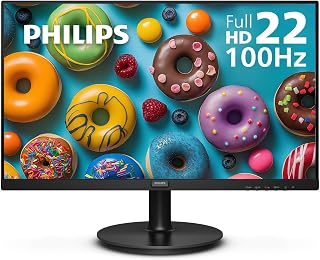
The Philips 221V8LB is a budget-friendly 22-inch monitor designed for everyday users who need reliable performance without premium pricing. This 1920x1080 Full HD display works well for office workers, students, content consumers, and casual gamers who value smooth visuals and eye comfort over cutting-edge specs.
The standout feature is the combination of 100Hz refresh rate and VA panel technology. Unlike typical 60Hz budget monitors, the higher refresh rate delivers noticeably smoother scrolling and video playback. The VA panel produces impressive contrast with deeper blacks and brighter whites, making streaming content and everyday work feel more vibrant. Adaptive-Sync technology eliminates screen tearing, so action scenes in movies and gaming sequences render without stuttering.
Build quality feels solid for the price. The compact 22-inch frame is lightweight and portable, while the sturdy stand supports the panel securely. VESA mounting compatibility adds flexibility for different desk setups. The included HDMI cable, power cord, and user manual get you started immediately, and the 4-year warranty provides genuine peace of mind.
The blue light filter and flicker-free technology are meaningful additions for extended screen time. These features genuinely help reduce eye fatigue during long work days, especially in dimly lit environments. However, the glossy screen finish can produce noticeable glare under bright lighting conditions.
The Philips 221V8LB delivers solid performance and genuine value for budget-conscious buyers. It excels as a primary monitor for everyday computing, office work, or gaming, though the 22-inch size and limited ports may restrict flexibility for power users managing multiple displays or specialized workflows.
This monitor is ideal for office workers and professionals who spend extended hours at their desks and need eye-friendly technology. Students working on coursework, note-taking, and research benefit from the crisp Full HD resolution and comfortable viewing experience.
Content creators and casual gamers appreciate the 100Hz refresh rate for smoother video playback and gaming performance without paying premium prices. Budget-conscious buyers seeking reliable performance with modern features like Adaptive-Sync and blue light protection will find excellent value here.
This monitor may not suit professionals requiring large multi-monitor setups, specialized color accuracy for photo editing, or high-end gaming performance. Those needing DisplayPort connectivity or USB-C integration should consider alternative options.
Display: 21.5 inch viewable (22 inch class) Full HD 1920x1080 IPS/VA, 16.7 million colors, 3000:1 contrast ratio
Performance: 100Hz refresh rate, 4ms response time, Adaptive-Sync technology
Panel Technology: VA with 178-degree wide viewing angles, SmartImage game enhancement
Eye Care: Flicker-free technology, blue light filter, reduced eye strain features
Connectivity: 1x HDMI, 1x VGA component output
Design: 19.4 inch width, 14.5 inch height, 8.7 inch depth, 4.21kg weight, VESA mount compatible
Power: 22 watts consumption, 12 volt operation
Warranty: 4-year manufacturer warranty on parts and labor

Pros
- Exceptional value at the price point with solid build quality and reliable performance
- VA panel technology provides superior contrast and color accuracy compared to TN panels
- Eye care features including flicker-free and blue light filter benefit office workers
- Ultra-wide viewing angles make this ideal for collaborative work environments
- Lightweight and VESA mount compatible for flexible workspace configurations
Cons
- 4ms response time is adequate but may lag slightly behind gaming-focused monitors for competitive play
- Glossy screen finish can attract fingerprints and reflect ambient light in bright rooms
- 100Hz refresh rate, while smooth, does not match high-end gaming monitors at 144Hz or higher
The Philips 241V8LB is a 24-inch Full HD monitor designed for professionals, office workers, and casual gamers who prioritize value and eye comfort. With its VA LCD panel delivering 1920x1080 resolution and crisp visuals, this monitor bridges the gap between budget offerings and premium displays, making it an excellent choice for home offices, corporate environments, and content consumption.
The standout features include the 100Hz refresh rate with AMD FreeSync technology for smooth motion during work tasks and light gaming, coupled with a robust 3000:1 contrast ratio that produces rich blacks and vibrant colors. The flicker-free technology and blue light filter work together to reduce eye fatigue during long work sessions, a genuine benefit for anyone spending hours at their desk. The 178-degree viewing angles ensure consistent color reproduction whether you're viewing straight-on or from an angle, perfect for multi-monitor setups where angle variation is inevitable.
Design-wise, the nearly bezel-less frame on three sides creates an immersive viewing experience and enables seamless multi-monitor configurations without visual gaps. The lightweight construction and VESA mount compatibility make it easy to position and adjust. At just 36 watts power consumption, this monitor won't significantly impact your energy bills, and the included HDMI cable plus VGA connectivity ensure broad compatibility with most devices.
Potential drawbacks include the glossy screen finish that can show fingerprints and reflect light in bright environments, and the 4ms response time that, while acceptable for general use, may feel slightly sluggish for competitive gaming. The 100Hz refresh rate is smooth for everyday tasks but doesn't match the 144Hz or higher standards of dedicated gaming monitors.
Overall, the Philips 241V8LB delivers excellent performance and build quality for the price. The four-year manufacturer warranty provides peace of mind, and the combination of eye-care features, wide viewing angles, and reliable panel technology makes this monitor a smart choice for professionals and home office users seeking comfort and productivity without premium pricing.
Display Specifications: 24-inch VA LCD panel, 1920x1080 Full HD resolution, 16:9 aspect ratio, 3000:1 contrast ratio, 250 nits brightness, 178-degree viewing angle, glossy screen finish.
Performance: 100Hz refresh rate, 4ms response time, AMD FreeSync adaptive sync, 16.7 million colors.
Features: Flicker-free technology, blue light filter, EasyRead mode, virtually bezel-free design on three sides, VESA mount compatible.
Connectivity: HDMI, VGA ports. Includes HDMI cable and power cord.
Physical: Dimensions 21.3 inches wide x 16.4 inches tall x 8.7 inches deep, weighs approximately 6.4 pounds. Power consumption 36 watts at 12 volts.
Warranty: 4-year manufacturer warranty covering parts and labor. EU spare parts available for 4 years.
Who Should Buy This Monitor: Office professionals working long hours on documents and spreadsheets, content creators needing reliable color accuracy, students requiring a second monitor, gamers seeking smooth 100Hz performance on a budget, and anyone setting up a multi-monitor workspace.
Who Might Look Elsewhere: Competitive gamers requiring 144Hz or higher refresh rates, users in bright rooms bothered by glossy reflections, those needing USB-C connectivity or advanced color grading capabilities, and professionals requiring Thunderbolt or Display Port connections exclusively.
Key Considerations: The glossy screen requires regular cleaning and benefits from desk positioning away from direct window light. The 4ms response time is suitable for office work and casual gaming but not ideal for fast-paced competitive titles. Verify your computer has HDMI or VGA outputs before purchase. The lightweight design makes wall mounting simple with VESA-compatible arms.
Value Assessment: This monitor delivers exceptional value by combining eye-care technology typically found in premium models with VA panel quality at an entry-level price point. The four-year warranty justifies confidence in reliability and longevity.

Pros
- Smooth 120Hz performance reduces motion blur and gaming input lag
- 99% sRGB coverage and 1500:1 contrast ratio deliver vibrant, accurate colors
- Flicker-free display with low blue light technology protects eye health
- Versatile connectivity and built-in speakers simplify setup
- Narrow bezels maximize screen real estate and enable professional multi-monitor setups
Cons
- Requires compatible graphics card and 120Hz-capable cables to achieve maximum refresh rate
- 14ms response time may not satisfy competitive esports gamers seeking sub-5ms performance
- 1080P resolution on 23.8 inches results in moderate pixel density for detailed design work
The Amazon Basics 23.8-inch monitor is a compelling all-rounder designed for office professionals, content creators on a budget, and casual gamers who want smooth performance without premium pricing. Its combination of 1080P clarity, 120Hz refresh rate, and built-in speakers creates a complete, single-cable solution for modern workspaces and home setups.
What truly sets this monitor apart is its 99% sRGB color accuracy and 1500:1 contrast ratio, which typically appears on monitors costing significantly more. The 120Hz Adaptive Sync technology delivers noticeably smoother scrolling and reduced motion blur compared to standard 60Hz displays. For gamers, this translates to improved responsiveness, though the 14ms response time suggests it targets casual rather than competitive play. The IPS panel's 178-degree viewing angles make it suitable for collaborative work environments.
The design impresses with its four-sided narrow bezels, which not only maximize usable screen space but also enable clean, edge-to-edge multi-monitor arrangements ideal for productivity setups. The matte screen finish minimizes glare and reflections. Build quality feels solid for the price point, and the inclusion of built-in 2W x2 speakers with 3.5mm audio-out eliminates the need for separate speakers in many use cases.
The main limitation is achieving the full 120Hz performance, which requires compatible graphics hardware, proper cables, and manual configuration in display settings. Additionally, 1080P on a 23.8-inch display results in approximately 92 PPI, which is acceptable for general use but falls short of the clarity desired by designers or photographers. The 14ms response time is slower than specialized gaming monitors, though acceptable for non-competitive gaming.
This monitor delivers genuine value for budget-conscious buyers seeking professional features without compromise. It excels for office environments, creative professionals prioritizing color accuracy over screen real estate, and gamers who value smooth motion over ultra-responsive inputs. The combination of capable specs, thoughtful design, and genuine connectivity makes it a smart choice in its category.
Display: 23.8-inch IPS LCD, 1920 x 1080 FHD, 16:9 aspect ratio, 120Hz refresh rate, 14ms response time, 1500:1 contrast ratio, 99% sRGB coverage, 178-degree viewing angles, matte finish
Connectivity: HDMI 1.4, DisplayPort 1.2, 3.5mm audio-out, built-in 2W x2 stereo speakers
Features: Adaptive Sync technology, low blue light technology, flicker-free display, four-sided narrow bezel design, VESA compatible
Physical: Dimensions 21.3"W x 16.4"H x 7.3"D, weight 3.16 kg (7 lbs), black color, model 24E40
Best For: Office professionals needing color-accurate displays, small businesses setting up multi-monitor workstations, content creators with budget constraints, casual gamers prioritizing smooth motion, and home office users seeking an all-in-one solution with built-in audio.
Consider Alternatives If: You need higher pixel density for detailed design work, require sub-5ms response times for competitive esports, or need premium color accuracy (look for 100% sRGB or Adobe RGB monitors instead).
Setup Tips: To maximize 120Hz performance, verify your graphics card supports 120Hz output, use HDMI 2.0 or certified DisplayPort 1.2 cables, and enable 120Hz in your system's advanced display settings. For multi-monitor setups, the narrow bezels create nearly seamless visual continuity. The matte finish performs best in naturally lit environments without harsh direct light sources.

Pros
- Exceptional color accuracy with 99% sRGB gamut at this price point
- Integrated speakers and audio inputs reduce desk clutter and cable management
- Responsive 1ms display with dedicated game modes enhances gaming experience
- Blue Light Shift and flicker-free technology protect eyes during long sessions
- Wide 178-degree viewing angles and tilt adjustment for flexible setup
Cons
- 60Hz refresh rate limits performance in fast-paced competitive games compared to 144Hz+ alternatives
- Glossy screen finish may reflect light and create glare in bright environments
- Built-in speakers provide basic audio quality suitable for work but not audiophile use
The Sceptre E248W-19203R is a 24-inch Full HD monitor designed for everyday users, content creators, and casual gamers seeking reliable performance at an accessible price point. Its 1920 x 1080 resolution and compact size make it ideal for desk setups where space is at a premium, while its feature set punches above its weight class.
The standout feature is its 99% sRGB color gamut, which ensures accurate color reproduction for photo editing, design work, and streaming. The 1ms response time combined with FPS and RTS game modes delivers smooth, responsive visuals during gaming sessions. Dual HDMI ports and VGA connectivity provide flexibility for connecting multiple devices, while integrated speakers and audio inputs offer surprisingly practical convenience for a monitor at this price.
Build quality is solid with a sleek machine black finish and ultra-thin frameless design that looks modern on any desk. The monitor includes tilt adjustment, a 100mm VESA mounting pattern for flexibility, and weighs just 5.8 pounds, making repositioning or wall mounting straightforward. Eye care features like Blue Light Shift and flicker-free technology help reduce fatigue during extended use.
The main limitation is the 60Hz refresh rate, which is standard for productivity but won't satisfy players of fast-paced competitive games. The glossy screen finish, while vibrant, may produce glare in bright offices or gaming rooms. Built-in speakers deliver adequate audio for video calls and casual listening but lack the depth for serious multimedia use.
For budget-conscious buyers needing a capable, color-accurate monitor for work, creative projects, or relaxed gaming, the Sceptre E248W-19203R offers excellent value. It won't replace a high-end gaming or professional monitor, but it delivers reliable performance and thoughtful features that justify its price.
Display: 24-inch LED, 1920 x 1080 (1080p FHD), 16:9 aspect ratio, 250 cd/m2 brightness, 16:7 contrast ratio
Color: 99% sRGB gamut with Blue Light Shift technology
Refresh Rate: 60Hz with up to 100Hz via HDMI
Response Time: 8 milliseconds
Viewing Angle: 178 degrees
Connectivity: 2x HDMI, 1x VGA, audio input, headphone jack
Audio: Built-in speakers, eye care and flicker-free certified
Power: 25.4W consumption, 110V AC adapter (12V/2.5A)
Physical: 21.25W x 15.53H x 7.03D inches, 5.8 pounds
Mounting: 100mm x 100mm VESA pattern with tilt adjustment
Warranty: Limited 1-year manufacturer coverage
Best For: Budget-conscious professionals, students, casual gamers, content creators on a tight budget, home office setups, and anyone needing reliable color accuracy without premium pricing.
Consider Alternatives If: You need high refresh rates (144Hz+) for competitive gaming, require professional-grade color accuracy for critical design work, or want premium audio quality integrated into your display.
Pros
- Excellent color accuracy with 99% sRGB coverage and HDR10 support for creative professionals and content consumers
- Fast 120Hz refresh rate and 1ms response time eliminate stuttering and blur during multitasking and gaming
- Modern borderless design with slim stand creates a clean, professional aesthetic for any workspace
- Comprehensive connectivity with HDMI input and included cables ready for immediate use
- Budget-friendly pricing delivers surprising feature richness for the cost
Cons
- Single HDMI port limits simultaneous multi-source connectivity without switching cables
- Full HD resolution at 24 inches may feel less sharp compared to 1440p alternatives for detailed work
- Limited professional features and color grading tools compared to premium business-class monitors
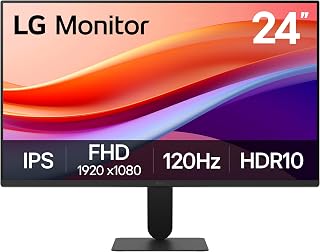
The LG 24U411A-B is a well-rounded 24-inch Full HD IPS monitor designed for home office professionals, content creators, and casual gamers. Its combination of 120Hz refresh rate, HDR10 support, and accurate color reproduction makes it suitable for productivity tasks, streaming, creative projects, and light gaming without breaking the bank.
Performance-wise, this monitor excels with its 120Hz refresh rate and 1ms Motion Blur Reduction technology, delivering noticeably smoother motion during scrolling, video playback, and fast-paced gameplay. The 99% sRGB color gamut ensures vibrant, accurate colors across applications, while HDR10 enhancement brings richer contrast and color depth to compatible content. Dynamic Action Sync further improves responsiveness by reducing input lag, making quick reactions feel more natural during gaming.
The design emphasizes minimalism with ultra-slim bezels on three sides, creating a modern, borderless aesthetic that maximizes usable screen space. The sleek stand provides a floating appearance while supporting tilt adjustment from minus 5 to plus 20 degrees, allowing you to dial in the perfect viewing angle. At just 7.1 pounds with compact dimensions, it fits easily into dual-monitor setups or space-conscious workspaces without dominating your desk.
The main limitation is the single HDMI port, which requires cable switching if you need to connect multiple devices simultaneously. Additionally, Full HD resolution at 24 inches is adequate for most tasks but delivers less pixel density than 1440p monitors, which some detail-focused professionals may notice. The monitor also lacks advanced professional features like factory calibration or extensive color management tools.
Overall, the LG 24U411A-B offers compelling value as a versatile productivity and gaming monitor, combining smooth performance, good color accuracy, and modern design. It's an excellent choice for upgrading a basic office setup or adding a secondary display to a gaming workstation.
Display Specifications
Screen Size: 23.8 inches (24-inch class)
Resolution: Full HD 1920 x 1080 (16:9 aspect ratio)
Display Type: IPS LED
Brightness: 250 cd/m2
Contrast Ratio: 1500:1
Viewing Angle: 178 degrees
Pixel Pitch: 0.27mm
Screen Finish: Matte
Performance
Refresh Rate: 120Hz
Response Time: 1ms (Motion Blur Reduction)
Color Gamut: 99% sRGB
HDR Support: HDR10
Adaptive Sync: FreeSync
Features: Dynamic Action Sync, Black Stabilizer, Reader Mode
Connectivity & Power
Ports: 1x HDMI
Included Cables: HDMI and power cable
Power Consumption: 13 watts
Warranty: 1 year manufacturer
Physical Dimensions
Dimensions (D x W x H): 8.7 x 21.2 x 16.4 inches
Weight: 7.1 pounds
Tilt Adjustment: minus 5 to plus 20 degrees
Who Should Buy This Monitor?
This LG monitor is ideal for home office workers, students, content creators on a budget, and casual gamers. If you need reliable Full HD performance for productivity, streaming, or light gaming, plus modern features like 120Hz and HDR10 without premium pricing, this is a solid choice. It works especially well as a secondary display or upgrade from older 60Hz monitors.
Who Might Want to Look Elsewhere
Professional photographers, video editors, and designers requiring precise color calibration should consider higher-end monitors with factory profiling and more advanced color management tools. Competitive esports gamers may prefer 144Hz or higher refresh rates, though 120Hz provides a good balance for most gaming scenarios. If you need multiple simultaneous device connections, the single HDMI port could be limiting.
Key Performance Expectations
Expect smooth, stutter-free scrolling and video playback thanks to the 120Hz refresh rate. Colors will appear vibrant and true-to-life across typical productivity and entertainment content. Gaming performance benefits from reduced motion blur and responsive input handling. Comfortable extended viewing is enhanced by Reader Mode, which minimizes blue light fatigue.
Setup Tips
Position the monitor at arm's length with the top of the screen at or slightly below eye level. Use the tilt adjustment to reduce glare and reflections from overhead lights. Take advantage of the included HDMI cable for immediate setup. Download the Switch app from LG to split your screen into multiple workspace sections if multitasking is a priority.

Pros
- Curved design genuinely enhances immersion and reduces eye strain during long sessions
- 100Hz refresh rate and 4ms response time provide noticeable improvement over standard 60Hz monitors
- TÜV-certified eye care technology with blue light filter and flicker-free display
- Excellent value for a curved gaming monitor at this price point
- Versatile for gaming, productivity work, and multimedia consumption
Cons
- FHD 1080p resolution may feel limiting compared to higher-resolution 27-inch monitors for detailed work
- No USB hub or higher-end gaming features like G-Sync or FreeSync support
- Curved design takes up more desk space than flat alternatives
The Samsung Essential S3 is a 27-inch curved monitor designed for gamers, video enthusiasts, and professionals seeking an immersive viewing experience without premium pricing. Its 1800R curve creates an engaging wraparound effect that enhances depth perception and minimizes peripheral distractions, making it suitable for both competitive gaming and creative work.
Performance-wise, the 100Hz refresh rate and 4ms response time deliver smooth visuals and reduced motion blur during fast-paced gaming and video playback. Game Mode intelligently adjusts color and contrast levels, revealing details hidden in dark scenes and giving players a competitive edge. The TÜV-certified eye comfort technology, which includes a blue light filter and flicker-free display, effectively reduces strain during extended viewing sessions, a key benefit for remote workers and content creators.
Build quality is solid with an ultra-slim design that complements modern workspaces. The monitor features dual connectivity options through HDMI and D-Sub ports, allowing seamless connection to multiple devices. At 8.4 pounds, it is reasonably lightweight and comes with essential cables included, though wall mounting hardware is separate.
The main limitation is the FHD 1080p resolution, which is standard for 27-inch panels at this price point but may feel soft if you are accustomed to higher-resolution displays. Additionally, the monitor lacks advanced gaming features like variable refresh rate support, making it better suited for casual gamers than esports competitors.
The Samsung S3 represents excellent value for anyone seeking a curved monitor that balances immersion, eye comfort, and affordability. It excels as a primary display for gaming, streaming, or productivity work, though pixel density may disappoint those demanding maximum sharpness at 27 inches.
This monitor is ideal for casual to mid-level gamers who want smooth 100Hz performance without spending significantly. Content creators, video editors, and remote workers benefit from the curved design, eye comfort tech, and ample screen real estate.
Streamer setups and dual-monitor gaming rigs gain from the affordable curved option. Budget-conscious buyers seeking a modern curved experience rather than flat panels will find strong value here. Avoid this monitor if you require ultra-high resolution, esports-grade refresh rates above 100Hz, or adaptive sync technologies.

Pros
- Exceptional screen size for the price, offering significant screen real estate for productivity and entertainment
- Flicker-Free and Eye Saver Mode technologies genuinely reduce eye strain for long computing sessions
- Borderless three-sided design enables seamless multi-monitor setups without visible bezels
- AMD FreeSync support provides smooth gaming without tearing at reasonable frame rates
- Solid 3-year manufacturer warranty with dedicated B2B support and extended warranty options
Cons
- 1920x1080 resolution on a 32-inch screen results in lower pixel density, which may show visible pixelation when sitting close
- 75Hz refresh rate is modest by gaming standards, limiting appeal to competitive esports players seeking 144Hz or higher
- No USB hub or advanced connectivity options like USB-C limit peripheral integration and charging capabilities
The Samsung S32B304NWN is a 32-inch flat monitor built for professionals, content creators, and casual gamers who prioritize screen real estate and eye comfort over cutting-edge specs. Its large borderless design makes it an excellent choice for productivity work, creative applications, and multi-monitor setups where seamless aesthetics matter.
The standout features include AMD FreeSync technology for smooth, tear-free gaming and video playback, plus advanced eye care capabilities. Flicker-Free technology and Eye Saver Mode with blue light reduction are genuinely useful for anyone spending 8+ hours daily at their desk. The 75Hz refresh rate paired with an 8ms response time handles most content smoothly, though competitive gamers will find it underpowered compared to 144Hz alternatives.
Build quality is solid with a sturdy flat panel, anti-glare coating, and a clean borderless aesthetic on three sides. The monitor is wall-mountable, offering flexibility for space-constrained setups. At 32 inches, the large diagonal provides impressive viewing space, though the 1920x1080 resolution means pixel density is lower than smaller high-resolution displays, visible when sitting very close to the screen.
The main limitation is resolution. For a 32-inch panel, 1920x1080 feels stretched, making text slightly softer and details less crisp than a higher-resolution alternative. Additionally, 75Hz refresh rate is entry-level for gaming and may disappoint users seeking competitive esports performance.
Verdict: The Samsung S32B304NWN delivers excellent value for budget-conscious buyers who want a large, comfortable display for work or casual gaming. Its eye care technology and borderless design set it apart in its price category. However, if you're seeking high refresh rates or pixel-perfect clarity, look elsewhere. For office work, creative tasks, and relaxed entertainment, this monitor excels.
Display: 32-inch flat LED LCD panel with 16:9 aspect ratio and 1920x1080 FHD resolution.
Performance: 75Hz refresh rate, 8ms response time, 250 cd/m² brightness, 4000:1 contrast ratio, 178-degree viewing angle.
Eye Care: Flicker-Free technology, Eye Saver Mode with blue light reduction.
Gaming: AMD FreeSync for smooth gameplay, Game Mode for enhanced color and contrast.
Connectivity: 1x HDMI port, DisplayPort, 2x component outputs.
Design: Three-sided borderless design, anti-glare screen, wall-mountable. Dimensions: 28.09 x 20.97 x 8.71 inches, 11 pounds.
Warranty: 3-year manufacturer warranty with dedicated B2B call center and extended warranty options available.
Best For: Office professionals, creative workers, home office setups, casual gamers, and anyone prioritizing screen size and eye comfort on a budget.
Not Ideal For: Competitive esports players needing 144Hz+, professionals requiring pixel-perfect 4K resolution, or those sitting extremely close to the screen regularly.
Workspace Setup: Excellent for multi-monitor productivity setups thanks to the three-sided borderless design. Wall mount compatibility makes it flexible for adjustable arm mounts or fixed wall installations.
Gaming Use: Suitable for single-player games, narrative-driven titles, and casual multiplayer. The 75Hz FreeSync combo handles most modern games smoothly, but competitive shooters may feel limited.
Work Use: Highly recommended. The combination of large screen space, flicker-free technology, and eye-saver mode makes it an excellent investment for extended work sessions, reducing fatigue and improving productivity.

Pros
- Impressive contrast and color quality from VA panel at this price point, with certified eye-care features
- 120Hz refresh rate eliminates motion blur and stuttering for smooth gaming and everyday computing
- VESA mount compatible with compact footprint makes it ideal for multi-monitor setups and space-constrained desks
- Proven reliability with 3-year warranty and consistently praised build quality from verified buyers
- Versatile connectivity with both HDMI 1.4b and legacy VGA support for broad device compatibility
Cons
- 22-inch FHD resolution may feel limiting for detailed work, design, or competitive esports at close viewing distances
- Single HDMI port limits simultaneous multi-source connection capability compared to premium alternatives
- Entry-level brightness at 300 nits may struggle in very bright ambient lighting conditions
The MSI PRO MP225 E12VL is a 22-inch Full HD gaming monitor built for budget-conscious users who refuse to compromise on core performance. This VA panel monitor targets casual gamers, students, and professionals who spend hours in front of a screen and need smooth motion without breaking the bank.
The standout feature is the 120Hz refresh rate paired with Adaptive-Sync, which delivers noticeably smoother gameplay and eliminates the stuttering common on standard 60Hz displays. The 4000:1 contrast ratio produces exceptionally deep blacks and shadow detail, while the certified flicker-free and low blue light technology meaningfully reduces eye fatigue during extended sessions. With a 1ms response time and 178-degree viewing angles, color accuracy remains consistent whether you are gaming competitively or working side-by-side with colleagues.
The design reflects practical priorities over flash. The tool-less stand, VESA mount compatibility, and built-in accessory slot make ergonomic setup and cable management straightforward. The monitor ships with necessary cables and mounts securely to any standard arm, wall bracket, or multi-monitor configuration. The matte screen finish eliminates reflections, and the compact 22-inch footprint saves valuable desk real estate.
The primary limitation is resolution. At 1920x1080 on a 22-inch panel, sharp text and fine detail require positioning at typical viewing distance. The single HDMI port forces choices when connecting multiple sources. Brightness maxes at 300 nits, which may strain in direct sunlight or highly reflective environments.
Verdict: The MSI PRO MP225 E12VL ranks among the smartest monitor purchases under $100. It delivers genuine 120Hz performance, excellent color contrast, eye-care features, and bulletproof reliability with a 3-year warranty. For gaming, productivity, or everyday computing on a reasonable budget, this monitor outperforms its price class.
This monitor is ideal for budget gamers seeking 120Hz performance, students needing flicker-free displays for extended study sessions, and professionals building affordable multi-monitor setups. Casual esports players, content creators on a tight budget, and anyone upgrading from 60Hz will appreciate the smooth motion and certified eye-care features.
Skip this if you require ultra-sharp text for design work, need brightness exceeding 300 nits, or plan simultaneous multi-source connections via multiple HDMI ports.
Display: 22-inch VA panel, 1920x1080 FHD, 16:9 aspect ratio, matte finish
Performance: 120Hz refresh rate, 1ms response time, 4000:1 contrast ratio, 300 cd/m2 brightness
Color and Vision: 100 color gamut, 178-degree viewing angles, TUV Rheinland flicker-free and low blue light certified
Connectivity: 1x HDMI 1.4b, 1x D-Sub VGA, VESA 100x100mm mount
Adaptive Sync: FreeSync compatible, G-Sync compatible
Dimensions: 19.4 inches wide, 14.88 inches deep, 7.18 inches high
Power: 15 watts typical consumption
Warranty: 3-year manufacturer warranty
Monitor Buying Guide for Prime Big Deal Days
Walking into a monitor sale without a clear idea of what you need is a fast way to regret a purchase. A few focused criteria will help you cut through the noise and land on a display that actually serves your setup well.
Panel Type: IPS vs. VA
IPS panels, like the ones found in the Dell 24 Monitor – SE2426H and the LG 24U411A-B 24-inch Full HD (1920 x 1080), deliver accurate colors and wide 178-degree viewing angles that stay consistent from virtually any seat. They are ideal for color-sensitive work, multi-monitor setups, and anyone who shares their screen frequently.
VA panels, like those in the Philips 22 Inch Computer Monitor FHD 100Hz VA VESA and the msi PRO MP225 E12VL, 22-inch1920 x 1080 (FHD), trade some color accuracy for dramatically deeper blacks and higher contrast ratios. If you watch a lot of movies or play darker games, a VA panel can feel noticeably more cinematic.
Refresh Rate and Response Time
For competitive gaming or fast-paced content, refresh rate is one of the most meaningful specs on the list. The Dell 24 Monitor – SE2426H leads this group with a 144Hz refresh rate and 1ms MPRT, making motion feel genuinely smooth and tear-free alongside AMD FreeSync support.
If 144Hz is more than you need, options like the Amazon Basics 23.8-inch 1080P Computer Monitor and the LG 24U411A-B 24-inch Full HD (1920 x 1080) offer a solid 120Hz with Adaptive Sync, which is more than enough for everyday gaming and fluid video playback. Budget-conscious shoppers can still get 100Hz from several monitors in this lineup, including both Philips models and the Acer 21.5in FHD 1920×1080 100Hz Office Monitor. If you want to make sure your PC can keep up, our breakdown of the best RAM for Core Ultra processors covers pairing your system for smooth frame delivery.
Screen Size and Workspace Fit
Screen size is ultimately a workspace decision. The 22-inch monitors in this roundup, including the Philips 22 Inch Computer Monitor FHD 100Hz VA VESA and the msi PRO MP225 E12VL, 22-inch1920 x 1080 (FHD), are a smart fit for compact desks or secondary display roles.
If you want more real estate for multitasking or immersive gaming, the Samsung 27″ Essential S3 (S36GD) and the Samsung 32″ Flat Computer Monitor offer progressively larger canvases with borderless designs that keep the look clean. The Samsung 27-inch even adds an 1800R curved screen for a more enveloping viewing experience. For audio-focused setups where external sound matters, pairing a larger display with the right speakers makes a difference, and our guide to the best PC speakers for gaming is a helpful companion resource.
Eye Comfort and Long-Session Use
If you spend long hours in front of a screen, eye comfort certifications are worth prioritizing. The Dell 24 Monitor – SE2426H carries TÜV Rheinland 3-star eye comfort certification, one of the most rigorous standards available, and the msi PRO MP225 E12VL, 22-inch1920 x 1080 (FHD) is TÜV Rheinland certified for both flicker-free operation and low blue light.
Most monitors in this group include some form of flicker-free or blue light reduction technology. The Sceptre 24-inch Prime Monitor Thin 1080p LED includes Blue Light Shift, and the Samsung 32″ Flat Computer Monitor combines Eye Saver Mode with flicker-free technology for extended comfort during long work or gaming sessions. If your whole build is coming together around an efficient, long-session workstation, our roundup of quiet CPU coolers that stay silent under load is worth a look too.
Final Thoughts
Prime Big Deal Days monitor deals are genuinely worth watching in 2026, especially with this range of strong performers available at competitive prices. For the sharpest all-around performance in a 24-inch form factor, the Dell 24 Monitor – SE2426H earns its spot at the top with its 144Hz IPS panel and TÜV 3-star eye certification. If you want to go bigger with an immersive curved experience, the Samsung 27″ Essential S3 (S36GD) delivers a wide, enveloping view that transforms both gaming and day-to-day computing.
Frequently Asked Questions
When are the best monitor deals available on Amazon?
Amazon typically runs its deepest monitor discounts during Prime Day in July and Prime Big Deal Days in October. Both events offer significant markdowns on displays from major brands like Dell, Samsung, LG, and Acer. Setting a deal alert or checking the event page early gives you the best chance of grabbing top-rated monitors before stock runs low.
Is a 100Hz monitor good enough for gaming in 2026?
For most casual and mid-level gamers, 100Hz is a meaningful upgrade over a standard 60Hz display and delivers noticeably smoother motion in fast-paced games. Competitive players who need every frame advantage may want to step up to 120Hz or 144Hz options like the Dell 24 Monitor – SE2426H. For demanding games that push your system hard, pairing your monitor with capable hardware helps, and our guide to the best PCIe 5.0 SSDs covers fast storage options that reduce load times noticeably.
What is the difference between IPS and VA panels?
IPS panels are known for accurate color reproduction and consistent image quality across wide viewing angles, making them a strong choice for office work, content creation, and shared viewing. VA panels offer higher contrast ratios with deeper blacks, which benefits movie watching and darker game environments. Neither panel type is universally superior since the right choice depends on how and where you use your monitor.
Should I get a curved or flat monitor?
Curved monitors like the Samsung 27″ Essential S3 (S36GD) wrap more closely around your field of vision, which enhances depth perception and reduces peripheral distractions during gaming or movie watching. Flat monitors are generally preferred for productivity tasks, coding, and multi-monitor setups where visual consistency across a straight edge matters more. Your desk size and primary use case are the two best factors to weigh when making this call.




Write Your Review
No reviews yet. Be the first to share your experience!