

Your mouse keeps bumping into your keyboard during low-sensitivity FPS play, yet a normal workday still has you reaching for arrow keys, Home, and F-keys. The 60 percent vs TKL keyboard decision is really a choice between the smallest possible footprint and immediate access to more commands.
This guide covers that tradeoff for gamers, students, programmers, and hybrid desk users. We focus on the nine wired mechanical options below, and our Keyboards & Mice collection can help if you are building out the rest of your peripheral setup.
Quick answer
This guide compares 9 picks, with Redragon K617 60% Compact Hot-Swap RGB Mechanical ranked first. Womier WK61 PRO 60% Mechanical Gaming Keyboard holds the highest customer rating among them. Redragon K617 60% Compact Hot-Swap RGB Mechanical has the most customer reviews.
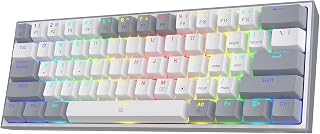
For readers comparing 60% against TKL mainly to save desk space without sacrificing visual flair, this layout pairs a compact wired frame with RGB backlighting and mixed color keycaps, so the smaller footprint still has personality. Hot-swap sockets let you adjust feel later, and since it's built specifically for PC, it suits someone who's settled on 60% for a dedicated gaming setup rather than multi-device use.
Pros
- 60% layout frees up significant mouse space versus TKL
- Hot-swap sockets let you change switches without soldering
- 20 RGB modes with per-key customization via software
- 50 million keypress durability rating
Cons
- No dedicated arrow keys or numpad, requires function layer adjustment
- Some units reported loose stabilizers out of the box
If you're weighing 60% against TKL, the Redragon K617 makes the strongest case for going smaller. Dropping the numpad and nav cluster isn't just about saving desk space, it gives your mouse arm a full open lane, which matters more than people expect once they try it. The hot-swap sockets mean you're not locked into the stock linear switches either, so if the 60% layout appeals but the feel doesn't, you can swap switches without soldering. That flexibility softens the usual tradeoff of going compact, since you're committing to a form factor but not to a single typing feel. RGB and the companion software add some polish, with 20 lighting modes and per-key programming through macros. At 61 keys, it's about as stripped down as the format gets, which is exactly the point if your TKL board feels bulky but you're nervous about losing too much. The learning curve is the function layer, not the hardware, and that's a fair trade for the desk space you get back.
Form Factor: 60% Compact
Keys: 61 total
Connectivity: USB-C (corded)
Switch Type: Hot-swappable linear (stock: Redragon red)
Switch Rating: 50 million keypresses
Lighting: RGB with 20 preset modes
Layout: QWERTY (ambidextrous)
Dimensions: 12.2 inches L x 5.31 inches W x 1.57 inches H
Weight: 9.6 ounces
Material: ABS plastic enclosure
Color: Grey with mixed-color keycaps
Compatibility: Windows PC
Warranty: 1 year
Included Accessories: Keycap puller, USB-C cable, pro customization software
Good for anyone comparing 60% to TKL who prioritizes mouse space and arm movement over dedicated arrow keys and a numpad. Also fits buyers who want to try switch customization without a big investment. Skip it if you rely on frequent numpad entry or can't adjust to a function layer for arrows and navigation, since that's the real cost of going this compact rather than staying at TKL.

If you want to try 60% without committing to a niche switch ecosystem, this one keeps things simple with hot-swappable sockets and POM linear switches already installed, so you can test the layout first and swap switches later. The ambidextrous QWERTY layout and broad device compatibility list make it a sensible entry point for someone just deciding whether losing the function row and arrow cluster actually works for their workflow.
Pros
- Hot-swappable POM linear switches for feel customization
- VIA software enables full remapping and macros on any OS
- Multi-layer dampening reduces hollow sound common in compact boards
- Works with PS4, Xbox Series X/S, and Xbox One
Cons
- Wired-only connection limits mobility
- Not water resistant, so spills are a real risk
For the 60% side of this comparison, the Womier WK61 PRO leans into what makes compact boards appealing beyond just saving space. The hot-swappable POM linear switches mean you can adjust the feel to taste, which matters since 60% boards ask you to compromise on layout and many buyers want to dial in everything else to compensate. VIA software opens up full remapping and macro creation across any OS, so the missing keys from going sub-TKL can be rebuilt into layers that fit your workflow. The multi-layer sound dampening is a genuine upgrade over typical budget boards at this size, cutting the hollow sound that often plagues compact mechanical keyboards. PBT pudding keycaps with north-facing RGB give even lighting, and the included extras like sublimation keycaps add some personality out of the box. Console compatibility with PS4 and Xbox is a bonus if you split time between platforms. If you're choosing 60% specifically to maximize desk space for mouse movement or a smaller setup, this covers the fundamentals without skipping on build quality.
Keyboard Type: 60% mechanical gaming keyboard with hot-swappable switches
Switch: POM linear red mechanical, rated for 50 million keypresses
Key Count: 61 keys with QWERTY layout
Keycaps: PBT pudding keycaps with cherry profile, north-facing RGB LEDs
Connectivity: USB-C wired connection with high-speed transmission
Customization: Open-source VIA software for key remapping, macro commands, and lighting effects
Build Material: Plastic and silicone enclosure
Compatibility: Windows, macOS, Linux; compatible with PC, PS4, Xbox Series X/S, Xbox One
Included Items: Keyboard, 3 sublimation keycaps, USB-C cable
Water Resistance: Not water-resistant
Warranty: 1-year manufacturer warranty
Fits buyers set on the 60% layout who still want switch flexibility and solid sound dampening, including gamers, programmers, and students working in tight desk spaces. Skip it if you need wireless freedom or work somewhere spills are a real risk, since it's wired only and not water resistant.

For anyone the article nudges toward TKL instead of 60%, this model shows what you gain by keeping the number pad's row structure and a dedicated knob for volume control, something no 60% board offers. QMK/VIA programmability lets you remap the keys you do have, which matters to readers worried that trimming down from full-size still leaves them short on quick media control.
Pros
- Keeps function row and arrow keys unlike 60% layouts
- Smaller footprint than full TKL thanks to dropped numpad
- Hot-swappable switches with QMK/VIA programmability
- Gasket mount design reduces vibration and typing noise
Cons
- Wired USB-C only, no wireless option
- Full knob customization requires firmware familiarity
The R87 Pro sits outside the strict 60% vs TKL split, since it's a 75% board, but that's exactly why it's worth considering if you're on the fence between the two. You get the full function row and dedicated arrow keys that TKL fans don't want to give up, while still trimming the numpad to claw back desk space closer to what 60% boards offer. The hot-swap sockets plus QMK/VIA support mean the layout you land on today isn't permanent either, you can remap keys or change switches as your preferences shift. The gasket-mounted 5-layer design and Alpaca V2 linear switches add a quieter, more cushioned typing feel than most boards in this size range, which helps during long sessions whether you're gaming or typing. The programmable knob is a nice extra for volume or custom functions, though getting the most out of it means being comfortable with firmware tweaks. If the idea of choosing between 60% and TKL feels like picking between two things you don't fully want, this is the middle path.
Layout and Keys: 75% TKL design with 88 keys total, QWERTY layout, ambidextrous orientation
Switches: Hot-swappable 3/5-pin compatible, pre-installed Alpaca V2 Linear switches, supports custom switch replacement without soldering
Connectivity: Wired USB-C connection, compatible with Windows and Linux systems
Customization: Programmable multi-function knob, QMK/VIA firmware support, 15+ RGB lighting effects with adjustable brightness and speed
Build: Gasket mounting structure with 5-layer design, Cherry profile keycaps, recycled and standard ABS plastic with metal accents
Dimensions: 14.37 inches length x 5.47 inches width x 1.57 inches height, weighs 1.62 kg
Warranty: 1 year manufacturer warranty, includes keycap puller and replacement keycaps
Suited to buyers who want TKL's navigation keys but TKL's footprint feels too large, or 60% buyers who miss arrow keys and function row access. Skip it if you've already decided you want the smallest footprint possible, since 75% still takes more desk space than true 60% boards.

If you're weighing a 60% layout against a TKL for the sake of portability, this one leans hard into the compact side of that choice. Dropping the function row and nav cluster keeps the footprint small enough to toss in a bag, while blue switches give tactile, clicky feedback for typing or gaming. RGB backlighting and water resistance round out a board built for travel and desks with limited real estate.
Pros
- Exceptional value at $23 with premium mechanical switches and RGB lighting found on keyboards costing 3x more
- Responsive blue switches provide deep key travel and clear tactile feedback ideal for gaming and typing
- Compact footprint reduces desk clutter while maintaining full functionality with accessible arrow keys
- 18 LED modes and customizable brightness levels let you personalize lighting for any mood or game
- Plug-and-play setup requires no software installation or driver downloads
Cons
- Blue mechanical switches produce a loud clickety-clack sound that may disturb others in shared workspaces
- Older Windows operating system compatibility listed (XP/Vista) may not reflect modern update priorities
The CACKBIRD 60% mechanical keyboard is engineered for gamers, programmers, content creators, and anyone who demands responsive, tactile feedback from their input devices. Its compact 61-key layout makes it ideal for traveling professionals and desk-conscious users who refuse to sacrifice performance for portability. At this price point, it delivers features typically found on premium gaming keyboards.
The standout feature is the responsive blue mechanical switch technology, which provides deep key travel, satisfying audible feedback, and the tactile resistance that serious gamers rely on for competitive advantage. Real-world reviews confirm that the mechanical feel is genuinely excellent, with users praising the smooth keystroke action and comfortable typing experience. The 18 LED backlight modes with adjustable brightness levels and speeds allow you to customize the aesthetic for different gaming genres or work environments, from subtle office lighting to vibrant rainbow effects.
Build quality is solid, featuring double-injection ABS keycaps that deliver crystal-clear backlighting and a steel plate for durability. The ergonomic stair-step keycap design and foldable kickstands minimize hand fatigue during extended use. Water-resistant construction protects against accidental spills, making this keyboard practical for real-world use. The included keycap puller adds convenience for maintenance and customization.
The primary drawback is the distinctive mechanical clicking sound, which is intentional but may disturb coworkers or family members in quiet environments. Additionally, the detachable USB-C cable and compact size, while beneficial for portability, mean this keyboard is less suitable for users who prefer cable-free wireless connectivity.
Verdict: The CACKBIRD 60% mechanical keyboard represents exceptional value, delivering mechanical gaming-grade performance in a travel-friendly form factor at an unbeatable price. Recommended for gamers, professionals, and enthusiasts who prioritize responsive tactile feedback and portability over wireless convenience or silent operation.
Layout and Keys: 61-key 60% ultra-compact mechanical keyboard layout with intelligent arrow key arrangement accessible via Fn+Space shortcut.
Switches: Blue mechanical switches with advanced spring sheet technology, providing tactile feedback and responsive performance. Water and dust resistant construction.
Lighting: 18 LED rainbow backlight modes with 5 brightness levels and speeds, plus 1 customization mode. Double-injection ABS keycaps ensure uniform backlight clarity.
Design: Ergonomic stair-step keycap design with stable foldable kickstands. Dimensions: 11.4 inches long, 3.93 inches wide, 1.3 inches tall. Premium black color with contemporary gaming aesthetic.
Connectivity: Wired via detachable USB Type-C cable. Plug-and-play, no drivers or software required. Compatible with Windows 10/8/7/XP/VISTA and Mac OS. Also works with gaming consoles featuring USB Type-C ports.
Build Materials: Acrylonitrile Butadiene Styrene (ABS) with steel plate construction. Includes keycap puller and USB cable in the box. Full anti-ghosting technology supports simultaneous key presses.
Who Should Buy: Competitive gamers seeking mechanical responsiveness in a portable form factor, programmers and writers who value tactile feedback, travelers who need a space-efficient keyboard, and budget-conscious users who refuse to compromise on build quality. Anyone working in low-light environments will appreciate the customizable LED backlighting.
Who Should Avoid: Users in shared office environments or quiet workspaces sensitive to loud mechanical clicking sounds. Those requiring wireless connectivity, as this keyboard uses a wired USB-C connection. Anyone preferring silent keyboards or membrane key switches.
Best Use Cases: FPS and competitive gaming where response time matters. Long typing sessions at home, coffee shops, or while traveling. Content creation and programming where tactile feedback enhances productivity. Minimalist desk setups where space is premium. Night work or low-light environments where RGB backlighting improves visibility.
Value Assessment: This keyboard punches well above its price point, offering mechanical switches and LED lighting typically found on keyboards costing $75 to $150. The compact design adds portability value, and the plug-and-play setup eliminates frustration. For gamers and professionals, the exceptional tactile feedback justifies the purchase even before considering the affordable price tag.
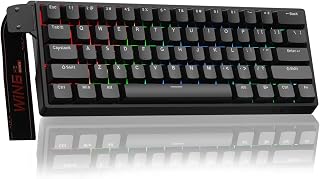
Readers leaning toward 60% for competitive gaming rather than just desk space will care about the 8000 Hz polling rate and adjustable actuation with rapid trigger mode, both tied to its Hall effect magnetic switches. That combination targets the exact tradeoff this layout comparison raises: losing dedicated keys in exchange for faster, more precise input, which matters more to gamers than typists choosing between 60% and TKL.
Pros
- Hall Effect magnetic switches with adjustable actuation
- 8000Hz polling rate and rapid trigger for competitive play
- Compact 60% layout maximizes desk and mouse space
- Hot-swappable sockets for future switch changes
Cons
- Stock keycaps feel cheap and limit typing comfort
- Web-based driver is functional but less polished than desktop software
Choosing between 60% and TKL often comes down to one question: how much are you willing to give up for speed and desk space? The AULA WIN60 HE makes that trade-off easy to justify. Dropping the function row, nav cluster, and numpad entirely, it leans all the way into the 60% philosophy, built specifically for players who want the smallest possible footprint and the fastest possible input path. Hall Effect magnetic switches with adjustable actuation and rapid trigger mode mean every millimeter of key travel is tuned for competitive response, backed by an 8000Hz polling rate that TKL boards rarely bother offering. If you're on the fence about losing dedicated arrow keys or a numpad, this keyboard shows what you gain instead: more mouse room, less wrist travel, and a layout built around speed rather than convenience. It's a clear case for going smaller, provided you're a gamer first and a numpad user never.
Switch Technology: Hall Effect Magnetic Switches (Graywood V3), Linear actuation, 0.02mm rapid trigger distance
Performance: 8000Hz polling rate, adjustable actuation, rapid trigger mode support
Layout: 60% compact, 61 keys, QWERTY
Connectivity: USB-C wired connection
Lighting: RGB backlit, 16.8 million color options, illuminates PBT keycaps
Customization: Hot-swappable switches, programmable keys, web-based driver for macros and settings
Dimensions: 11 inches L x 5 inches W x 1.1 inches H
Build: Plastic enclosure, sturdy frame
Included Items: Keyboard, USB-C cable, keycap puller
Compatibility: Windows PC and laptops (not compatible with PlayStation or Mac)
Warranty: 6 months
Power: USB powered, no batteries required
Buy this if you're committed to the 60% side of the debate for gaming performance and don't miss a numpad or arrow cluster. Skip it if you need dedicated navigation keys, use a console, or want a board that doubles comfortably as a typing-first daily driver, since stock keycaps hold it back there.

Pros
- Rapid trigger magnetic switches deliver measurably faster response times than traditional mechanical switches
- Hot-swappable switches provide future-proof customization and easy maintenance
- Web-based driver eliminates system compatibility issues and unnecessary software bloat
- Compact 60% design doesn't sacrifice key functionality while maximizing desk real estate
- Strong 4.5-star rating from over 1,000 verified reviews demonstrates real-world reliability
Cons
- Windows only, not compatible with PlayStation, Xbox, or Mac systems
- No wireless connectivity option, limited to wired USB-C connection
- Limited information about long-term durability of hall effect switches compared to traditional mechanical alternatives
The AULA WIN60 HE is a purpose-built competitive gaming keyboard for FPS enthusiasts who demand speed and precision. Its compact 60% form factor makes it ideal for gamers transitioning to smaller layouts or those working with limited desk space. The keyboard targets serious Valorant and CS2 players where every millisecond of response time matters.
The standout feature is the hall effect magnetic switch technology with an ultra-low 0.02mm rapid trigger distance, combined with an impressive 8000Hz polling rate. This combination delivers genuinely faster response times compared to traditional mechanical switches, giving you a measurable competitive advantage in high-stakes moments. The magnetic switches activate based on magnetic field changes rather than physical contact, enabling customizable actuation points and the lightning-quick rapid trigger functionality.
Build quality reflects its budget-friendly price point. The plastic enclosure keeps weight down and cost low, while the side-printed PBT keycaps resist shine and feel premium underhand. The hot-swappable switch design means you can experiment with different switch types or replace worn switches without soldering, extending the keyboard's lifespan. The web-based driver is genuinely lightweight and accessible from any device, avoiding the bloated software that plagues many gaming keyboards.
The main limitation is Windows-only compatibility, making it unsuitable for PS5, PS4, or Xbox gaming. The wired USB-C connection means no wireless freedom, though this actually benefits competitive gaming by eliminating latency concerns. Some gamers may worry about the long-term durability of hall effect switches since they're newer technology compared to mechanical switches with decades of proven reliability.
The WIN60 HE delivers tournament-grade performance at an entry-level price. For Windows PC gamers serious about competitive FPS titles, this keyboard offers excellent value and tangible performance benefits that justify its place in your gaming setup.
Switch Technology: Hall Effect Magnetic Switches (Graywood V3), 0.02mm rapid trigger distance, hot-swappable design
Performance: 8000Hz polling rate, USB-C wired connection, Windows compatible
Layout: 60% compact, 61 total keys, QWERTY, side-printed PBT keycaps
Customization: Web-based driver, key remapping, macro programming, 16.8 million RGB color options
Build: Plastic enclosure, ambidextrous design, 11 inches long, 5 inches wide, 1.1 inches tall
Package Contents: Keyboard, USB-C cable, keycap puller, manual
Warranty: 6 months
Competitive FPS Gamers: The rapid trigger and high polling rate give measurable advantages in games like Valorant and CS2 where reaction time is critical.
Desk Space Conscious: The 60% compact layout provides full functionality without requiring a full-size keyboard footprint, perfect for small desks or travel.
Budget-Conscious Upgrades: At under $45, this keyboard offers premium magnetic switch technology at entry-level pricing, making it accessible to gamers upgrading from budget boards.
Customization Enthusiasts: Hot-swappable switches and extensive RGB options appeal to gamers who want to personalize their setup without soldering skills.
Windows PC Gamers Only: Not suitable for console gaming or Mac users due to compatibility limitations.

This fits readers torn between 60%'s compactness and TKL's extra controls, since it packs a volume knob and 66 keys into the smaller 60% footprint instead of forcing a tradeoff. Gasket mount construction with PBT keycaps in MDA profile adds a typing feel upgrade, and QMK/VIA programming means missing keys from the TKL layout can be remapped rather than mourned.
Pros
- Gasket-mount design with sound-dampening layers for a quieter feel
- Pre-lubed cream linear switches, hot-swappable
- PBT double-shot keycaps in MDA profile resist fading
- QMK/VIA programmability plus a dedicated volume knob
Cons
- No dedicated arrow keys or numpad, requiring an adjustment period
- Limited verified user reviews to confirm long-term durability
If the 60% vs TKL decision for you is really about typing feel rather than raw competitive speed, the RK R65 sits in an interesting middle ground. At 66 keys, it's still firmly in 60% territory for footprint, but it's built like a board that wants to be used for more than gaming. The gasket-mount design with five layers of sound-dampening material and pre-lubed cream linear switches targets the acoustics and feel typists associate with larger, pricier boards, while PBT double-shot keycaps and an MDA profile add durability and tactile quality often missing from compact gaming keyboards. A CNC aluminum volume knob and full QMK/VIA programmability round it out, letting you reclaim some of the control a TKL layout would normally give you through dedicated keys. For anyone deciding between the two layouts because they want desk space without sacrificing typing quality, this is the compact option that doesn't feel like a compromise.
Dimensions and Weight: 12.6 inches L x 4.6 inches W x 1.6 inches H, weighing 1.4 pounds. USB-C connectivity for modern device compatibility.
Key Configuration: 66 keys total with QWERTY layout. Hot-swappable mechanical switches support both 3-pin and 5-pin designs for maximum flexibility. Pre-lubed cream linear switches included.
Lighting and Controls: RGB backlight with 20+ dynamic modes. Metal volume knob with press-to-mute functionality. Three status indicator lights. QMK/VIA programmable software support for full customization.
Keycaps and Build: PBT double-shot keycaps in MDA profile. Gasket-mount construction with five sound-absorbing layers. Aluminum and recycled ABS enclosure materials. Compatible with Windows 10 and MacOS.
Included Accessories: R65 keyboard, four spare cream switches, USB-C cable, keycap and switch puller, user manual. One-year warranty included.

Pros
- Hall effect switches are durable and require no physical contact, preventing the wear and noise of traditional mechanical switches
- 8000Hz polling rate combined with 0.02mm rapid trigger actuation gives you measurable competitive advantages in FPS titles
- 60% compact form factor saves desk space without sacrificing gaming or typing performance
- Web-based driver eliminates bloated software installations and works across any device or OS
- Hot-swappable design allows customization and future upgrades without replacing the entire keyboard
Cons
- Only compatible with Windows PCs and laptops, not PlayStation or Xbox consoles
- Magnetic switches may feel unfamiliar to users accustomed to traditional mechanical switches
- 6-month warranty is shorter than some competitors in this price range
The AULA WIN60 HE PRO is a compact 60% gaming keyboard engineered for competitive FPS players who prioritize response speed and durability. This keyboard is ideal for Valorant and CS2 enthusiasts, as well as any gamer who values precision and zero-lag performance in fast-paced titles.
The standout feature is its hall effect magnetic switch technology, which operates with no physical contact between components. This means zero switch wear, consistent actuation across thousands of hours of gameplay, and a 0.02mm rapid trigger distance that enables lightning-fast actions. Combined with an impressive 8000Hz polling rate, this keyboard delivers measurably faster response times than standard mechanical keyboards, giving you a genuine edge in competitive matches.
Design and build quality are solid for the price point. The compact 60% layout maximizes desk real estate without compromising functionality, and hot-swappable switches let you experiment with different switch types or replace worn components. The RGB under-led lighting illuminates keycaps beautifully with 16.8 million color options, and the web-based driver simplifies customization without requiring software bloat.
The main drawback is Windows-only compatibility, which eliminates console gamers from consideration. Additionally, users transitioning from traditional mechanical switches may need time to adjust to the magnetic actuation feel, though this is subjective and many gamers prefer the responsiveness.
Verdict: The WIN60 HE PRO delivers competitive-grade performance at an accessible price. If you play FPS titles on PC and want the speed advantage of hall effect switches without premium pricing, this keyboard is a smart investment.
Key Specs: 60% layout with 68 keys, Hall Effect magnetic switches, 8000Hz polling rate, 0.02mm rapid trigger actuation, RGB backlighting with 16.8 million colors, hot-swappable design, USB-C wired connection.
Connectivity: USB-C wired, Windows PC and laptop compatible only. Not compatible with PlayStation or Xbox.
Customization: Web-based driver for key remapping, macro creation, and RGB lighting control. No software downloads required.
Build: Plastic enclosure, 11 inches long by 5 inches wide by 1.1 inches tall. Weighs approximately 400g. Includes USB-C cable and keycap puller.
Warranty: 6-month manufacturer warranty covering defects in materials and workmanship.
Who Should Buy: Competitive FPS gamers on Windows, esports enthusiasts, and anyone seeking a performance-first gaming keyboard in a compact form factor at mid-range pricing.
Who Should Skip: Console gamers, Mac users, and those who prefer traditional mechanical switch tactile feedback. If you need a 75% or full-size layout, look elsewhere.
Performance Expectations: You'll notice smoother peeking, faster reaction times in gunfights, and more consistent shots in high-pressure moments. The 8000Hz polling rate combined with rapid trigger technology is most noticeable in competitive FPS titles where milliseconds matter.
Customization Level: The web-based driver is beginner-friendly but powerful enough for advanced users to create complex macros. Hot-swappable switches mean you can experiment with different brands and actuation profiles without commitment.

Pros
- Excellent portability with compact 60% layout that doesn't sacrifice essential function keys or arrow keys
- Smooth, linear red switches provide fast, quiet operation ideal for offices and shared environments
- Impressive build quality and mechanical feel at an entry-level price point
- Full anti-ghosting support ensures reliable performance for gaming and fast typing
- Wide OS compatibility makes it work seamlessly across Windows, Mac, and Linux systems
Cons
- Switches are not hot-swappable, so customizing or replacing switches requires tedious disassembly work
- Light build quality may feel cheap to some users when compared to premium gaming keyboards
- USB-C cable connection can occasionally fail to register keystrokes and requires re-plugging to fix
The MageGee MK-Box is a 68-key mechanical keyboard designed for users who value portability and functionality over premium build materials. It bridges the gap between ultra-compact 40% keyboards and full-size boards, making it ideal for gamers with SteamDecks, remote workers who travel, and anyone looking to maximize desk space without sacrificing usability.
The standout feature is the smooth linear red switch mechanism, which delivers fast key actuation with minimal tactile feedback. This makes the keyboard significantly quieter than clicky blue switches, a major advantage in shared workspaces and offices. Real-world feedback shows the keyboard performs surprisingly well for its price point, with users reporting it feels better than keyboards costing several times more. The 16 LED backlight modes add visual customization without bloat, and the dual-color injection keycaps look professional despite the modest price tag.
Build quality is straightforward and functional. The black and grey aesthetic works for modern setups, and the adjustable kickstand feet allow for comfortable typing angles. The double-shot keycaps resist fading over time. However, the overall construction feels lighter than premium gaming boards, which some users interpret as inexpensive rather than minimalist.
The main limitations worth considering are the non-hot-swappable switches (customization requires disassembly) and occasional USB-C connection hiccups that require a simple unplug-and-replug cycle. These aren't deal-breakers for most users but worth knowing about if you plan heavy use.
For the price, the MK-Box delivers excellent value as a portable secondary keyboard or entry-level gaming board. It's not a premium enthusiast keyboard, but it punches well above its weight in performance and design, making it a smart purchase for budget-conscious buyers and travelers.
Physical Specifications - Layout: 68 keys, 60% compact | Dimensions: 12.13 inches L x 3.98 inches W x 1.54 inches H | Weight: 1.26 lbs (510-570g) | Connection: Detachable USB-C cable (included)
Switch and Keycap Details - Switch Type: Linear red mechanical switches | Keycap Material: ABS plastic, ergonomic double-shot injection | Backlighting: 16 LED blue backlight modes with adjustable speed and brightness via Fn keys
Compatibility - Operating Systems: Windows (2000, XP, ME, Vista, 7, 8), Linux, macOS | Connection: USB 2.0 | Driver Support: Plug and play, no software or drivers required | Device Types: Desktop PCs, compatible with SteamDeck
What's Included - 1x MK-Box mechanical keyboard | 1x Detachable USB-C cable | 16x red replacement keycaps | 1x key puller tool | 1x instruction manual | 1-year manufacturer warranty
Buying Guide: 60% vs TKL Keyboards
Decide Which Missing Keys Will Slow You Down
A conventional 60% layout usually has about 61 keys. It removes the numpad, function row, navigation cluster, and often dedicated arrows, putting those commands on an Fn layer. That is easy to learn for game controls and basic writing, but repeated document navigation can become less fluid.
Compact labels are not identical from one board to another. The MageGee Portable 60% Mechanical Gaming Keyboard has 68 keys with separate arrows and Fn access to F1-F12, while the RK ROYAL KLUDGE R65 Wired Gaming Keyboard adds arrows and a volume knob in a small frame. The RK ROYAL KLUDGE R87 Pro Wired Mechanical Keyboard is an 88-key 75% TKL-style option, giving you a much more familiar arrangement without a numpad. For broader desk planning, browse the Electronics collection.
Match the Footprint to Your Game and Mouse Space
For FPS players who use broad, low-sensitivity mouse movements, a 60% board can make an immediate difference in posture and available desk room. The Redragon K617 Wired 60% Compact Hot-Swap RGB is a straightforward example, pairing a small layout with hot-swap sockets, linear red switches, RGB effects, and macro support.
If speed-focused features matter more than a traditional mechanical feel, both Aula WIN60 HE – 60% Mechanical Gaming Keyboard listings use Hall Effect magnetic switches, adjustable actuation, Rapid Trigger, and a listed polling rate up to 8,000 Hz. The AULA WIN60 HE PRO 60% Mechanical Gaming Keyboard follows the same compact competitive-gaming direction with web-based remapping and RGB controls. These boards make the strongest case for 60% when Valorant, CS2, or similar games are your priority.
Choose Switch Feel and Sound for Your Environment
Layout is only half the daily experience. The 60% Wired Mechanical Gaming Keyboard with Blue uses clicky, tactile blue switches that give clear feedback but can be loud in shared rooms or voice calls. The Redragon K617 and MageGee Portable 60% Mechanical Gaming Keyboard use linear red switches, which feel smoother and usually produce a more restrained sound.
For a more refined compact typing feel, the Womier 60% Percent Keyboard combines POM linear switches, sound-dampening layers, PBT pudding keycaps, and VIA remapping. The RK ROYAL KLUDGE R65 Wired Gaming Keyboard goes further with a gasket structure, multiple sound-absorbing layers, pre-lubed cream switches, PBT keycaps, and QMK/VIA support. Those details matter if you care about reducing hollowness and tailoring each keypress.
Look Beyond the Layout at Controls and Compatibility
Fn layers are manageable when the software is flexible. The Womier 60% Percent Keyboard supports VIA for key remapping and macros, while the RK ROYAL KLUDGE R65 Wired Gaming Keyboard supports QMK/VIA and offers a physical aluminum volume knob. Redragon also provides software for lighting and macro changes, so decide whether you prefer on-board shortcuts, a knob, or deeper key-by-key customization.
All nine options use a wired connection, which keeps setup simple and avoids charging routines. A detachable USB-C cable is especially useful if you travel, and our cable and adapter coverage is useful when you need a replacement or a tidier routing solution. The Womier supports several consoles, while the CACKBIRD and MageGee models support Windows and Mac systems, so check your platform before choosing; console-focused shoppers can also explore our Controllers category.
Final Thoughts
If competitive FPS play and maximum mouse freedom drive your choice, Aula WIN60 HE – 60% Mechanical Gaming Keyboard brings magnetic rapid-trigger features to a compact desk. If you need dedicated keys and a more familiar daily workflow, RK ROYAL KLUDGE R87 Pro Wired Mechanical Keyboard is the calmer middle ground, so choose the layout you will use without reaching for Fn constantly.
Frequently Asked Questions
Is a 60 percent keyboard better than a TKL for FPS games?
A 60% keyboard is better for FPS play only when the extra mouse room improves your comfort and aim. It does not automatically make every keypress faster than a TKL with similar switches. A Hall Effect model such as the Aula designs can add adjustable actuation and Rapid Trigger, while a TKL remains easier for players who regularly use F-keys, arrows, or navigation commands.
Can you use a 60 percent keyboard for work in 2026?
Yes, especially if your day centers on writing, chat, browser work, and shortcuts you can memorize. It is less convenient for frequent spreadsheet movement, coding commands that rely on function keys, or extensive document navigation. A compact layout with dedicated arrows, such as the MageGee or RK R65, eases that adjustment while preserving a smaller desk footprint.
Do 60 percent keyboards have arrow keys?
Many traditional 61-key 60% boards place arrows on an Fn layer, but compact boards vary substantially. The CACKBIRD model uses Fn plus Space to access direction keys, while the MageGee and RK R65 retain dedicated arrows. Check the actual key map instead of relying only on the percentage label.
Which switch style is easier to live with every day?
Linear switches are often the easier all-around choice if you want smooth presses and lower noise, while blue switches provide more pronounced tactile and audible feedback. Consider who shares your room and whether you use open-back audio during calls or games. If switch noise is part of a larger desk setup decision, our Headphones & Audio guides can help you balance keyboard sound with your listening gear.



Write Your Review
No reviews yet. Be the first to share your experience!