

Your mouse keeps running out of room. You nudge it to the edge of the pad mid-game, lose your aim, and lose the fight. A 60% keyboard strips away the numpad, nav cluster, and function row, giving you a wide-open desk that lets your mouse move freely. Whether you game competitively or just want a cleaner workspace, a compact mechanical board changes how your setup feels every single day.
This guide breaks down the top 60% keyboards available right now, covering everything from budget picks to hall effect boards with cutting-edge polling rates. If you are also eyeing something slightly larger, check out our roundup of the best 65 percent keyboards for a bit more key real estate. Otherwise, read on to find the right compact board for your setup.
Quick answer
This guide compares 7 picks, with Womier SK80 75% Mechanical Gaming Keyboard ranked first. HyperX Alloy Origins 60 Mechanical Gaming Keyboard holds the highest customer rating among them. Redragon K617 60% Compact Hot-Swap RGB Mechanical has the most customer reviews.

Gamers who want their 60% class board to double as a hub for stats or media will like the color display built into this layout, which shows custom animations or keybind info at a glance. Hot-swappable sockets support switch tinkering, and the slightly roomier 75% layout keeps arrow keys and function row intact for those who don't want to give those up.
Pros
- Color display adds unique customization not found on standard compact boards
- Hot-swappable PCB supports 3-pin and 5-pin switches
- Gasket-mounted design with pre-lubed switches for smooth typing
- South-facing RGB diffusers with 19 effects across 9 colors
Cons
- 75% layout is larger than true 60% boards, limiting desk space savings
- No dedicated numpad for users who need one
If you're hunting for a 60% keyboard but keep getting pulled toward something with a bit more personality, the Womier SK80 is worth a look even though it's technically a 75% board. For gamers who want compact dimensions without losing the arrow cluster and function row, this hits a sweet spot between tiny footprint and usability. The color multimedia display sets it apart from typical compact boards, letting you show GIFs, caps lock status, or RGB settings right on the keyboard itself, tilted at an 11-degree angle for easy viewing. Underneath the gimmick is a genuinely solid gaming board: gasket-mounted construction, pre-lubed linear switches, and a hot-swappable PCB that takes 3-pin or 5-pin switches. South-facing diffusers push RGB through the keycaps cleanly across 19 effects and 9 colors. The metal build and Kanagawa styling give it a distinct look on a gaming desk. For anyone comparing 60% boards and willing to go slightly larger for display customization and switch flexibility, the SK80 belongs on the shortlist.
Form Factor: 75% Mechanical Keyboard
Brand: Womier
Model: SK80
Color: Kanagawa Black
Connection: USB-C (Detachable)
Compatibility: Windows and Mac
Switch Type: Hot-Swappable (3-pin and 5-pin compatible)
Mounting System: Gasket Mount with EVA Positioning Plate
Keycaps: Cherry Profile Theme Keycaps
Backlighting: RGB with 19 effects and 9 colors
Special Features: Color Multimedia Display Screen, Music Syncing Mode, Pre-Lubed Linear Switches
Material: Metal Construction

For gamers who want a true 60% board without sacrificing durability, the linear HyperX Red switches paired with double shot PBT keycaps deliver fast, consistent actuation that resists shine over long sessions. USB-C to USB-A connectivity keeps the setup flexible across PC and console rigs, while RGB backlighting and NGENUITY software let you tune the compact layout to match your exact playstyle.
Pros
- Aircraft-grade aluminum body feels premium and rigid
- Linear switches with reported zero dead keys after a year
- Double-shot PBT keycaps resist wear and fading
- Multi-platform support for PC, PlayStation, and Xbox
Cons
- NGENUITY software frequently fails to detect the keyboard
- No number pad or full function row
When you're hunting for the best 60% board for gaming in 2026, the Alloy Origins 60 earns its spot through sheer build confidence. The aircraft-grade aluminum frame gives it a density and rigidity that cheaper compact boards can't match, and the linear HyperX Red switches strip away tactile bump and click noise so every keystroke registers fast and clean, which matters when you're chasing frame-perfect inputs. Owners report zero dead or sticky switches even after a year of hard use, a reliability signal that counts for a lot in a category full of unknowns. Double-shot PBT keycaps hold their legends and texture over time instead of going shiny and slick. Three tilt angles let you dial in a comfortable angle for long sessions, and the exposed-switch RGB looks sharp without needing third-party keycaps. A detachable USB-C cable and genuine multi-platform support across PC, PlayStation, and Xbox round out a board built to travel between setups. The 60% layout trims the number pad and function row, but that's the tradeoff this whole category makes.
Buy this if you want a 60% gaming board with premium aluminum construction, proven long-term switch reliability, and the flexibility to move between PC and consoles. It suits gamers who type on Red linear switches without needing tactile feedback. Skip it if you rely heavily on NGENUITY for macros and lighting profiles, since multiple owners report detection issues, or if losing the number pad and function keys would disrupt your workflow.
Layout: 60% compact, 61 keys
Switches: HyperX Red linear, rated for 80 million keypresses
Keycaps: Double-shot PBT with side printing
Lighting: Per-key RGB LED with customizable effects
Connectivity: USB-C to USB-A (detachable)
Compatibility: PC, PlayStation 4/5, Xbox One, Xbox Series X/S
Build: Aluminum plate and casing, PBT keycaps
Dimensions: 11.7L x 6W x 1.5H inches
Weight: 970 grams
Warranty: 2 years
Software: HyperX NGENUITY for macros, lighting profiles, and Game Mode
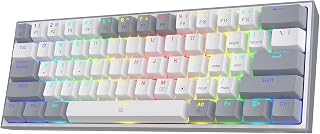
Gamers who like to experiment with switch feel will appreciate the hot-swap sockets here, letting you tweak actuation without soldering anything. The lightweight 60% chassis and mixed color keycaps give it a distinct look on a crowded desk, and USB-C wired connectivity keeps latency low, which matters most when every reaction counts in fast-paced matches.
Pros
- True 60% layout maximizes desk and mouse space
- Hot-swappable sockets support 3-pin and 5-pin switches
- 50 million keypress durability rating
- 20 RGB modes with per-key customization software
Cons
- No dedicated arrow keys or numpad, requiring a function layer
- Some units reported loose stabilizers out of the box
The Redragon K617 is a straightforward answer to anyone searching for a true 60% gaming keyboard. It drops the numpad and navigation cluster entirely, giving competitive gamers the extra mouse room that defines the appeal of this form factor. The hot-swappable sockets take nearly any 3-pin or 5-pin switch, so if the stock red linear switches don't suit your taste, you can swap them without soldering, an easy entry point for anyone curious about building their own switch setup. Those stock switches are smooth and quiet, rated for 50 million keypresses, which should hold up over heavy gaming use. The white and grey ABS housing keeps things light and clean looking, and the 20 preset RGB modes paired with per-key customization through the included software give you real control over lighting and macros. For a 60% board aimed squarely at gaming performance and desk efficiency, this is a solid, no-frills option that covers the fundamentals well without overcomplicating things.
Form Factor: 60% Compact
Keys: 61 total
Connectivity: USB-C (corded)
Switch Type: Hot-swappable linear (stock: Redragon red)
Switch Rating: 50 million keypresses
Lighting: RGB with 20 preset modes
Layout: QWERTY (ambidextrous)
Dimensions: 12.2 inches L x 5.31 inches W x 1.57 inches H
Weight: 9.6 ounces
Material: ABS plastic enclosure
Color: Grey with mixed-color keycaps
Compatibility: Windows PC
Warranty: 1 year
Included Accessories: Keycap puller, USB-C cable, pro customization software
Best for competitive gamers and office users who want a true 60% layout for maximum mouse space and don't mind using a function layer for arrow keys and numbers. Also a good pick for anyone wanting an affordable entry into switch swapping. Skip it if you frequently need number entry or dedicated arrow keys without extra key combinations.
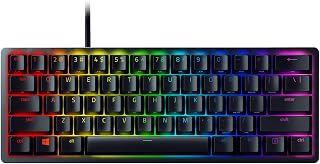
This board targets gamers who prioritize raw speed, since its linear optical switches register keystrokes faster than traditional mechanical ones, cutting input lag in competitive play. The detachable USB-C cable and genuinely compact 60% footprint make it easy to toss into a bag for LAN parties or travel, and RGB backlighting rounds out the setup for low-light gaming sessions.
Pros
- Optical switches reach 1.0mm actuation, 15-30% faster than typical linear switches
- Matte aluminum frame with oil-resistant PBT keycaps
- Chroma RGB syncs with 30+ brands and smart home systems
- Detachable USB-C cable for easy transport
Cons
- No wireless connectivity option
- 60% layout has a learning curve
For gamers specifically shopping a 60% form factor in 2026, the Huntsman Mini stands out because it solves the usual tradeoff of compact size versus top-tier speed. Razer's optical switches use light-based actuation to hit a 1.0mm actuation point, 15-30% faster than conventional linear mechanical switches, which shows up as measurably quicker response in rhythm games and fast shooters where every millisecond counts. That speed advantage is paired with a matte aluminum top frame and PBT keycaps with a textured, oil-resistant finish, so the compact chassis doesn't feel like a compromise in hand. A detachable USB-C cable keeps it wired and reliable while still being easy to pack for a tournament table or streaming desk. Chroma RGB syncs with over 30 gaming brands and even smart home gear like Philips Hue, and Razer Synapse 4 adds real depth with macro programming and Snap Tap movement control. The main catch is no wireless option, plus the usual adjustment period that comes with any 60% layout.
Physical Specifications: Dimensions are 11.56 inches L x 4.07 inches W x 1.45 inches H. Weight is 1.1 pounds. The keyboard features an aluminum top frame and aluminum keyboard plate with a classic black matte finish. Button quantity is 61 keys in QWERTY layout.
Switch Technology: Uses Razer Linear Optical switches with 1.0mm actuation distance. This is the company's proprietary optical beam-based technology that achieves faster registration than traditional mechanical switches.
Lighting and Customization: Full RGB backlighting on individual keys supports 16.8 million colors. Lighting syncs with 30+ gaming brands and third-party devices. Fully programmable macros via Razer Synapse 4 with Snap Tap technology for advanced input prioritization.
Connectivity and Compatibility: Wired via USB-C to USB-A connection with detachable cable. Compatible with Windows 11, macOS 14 Sonoma, Linux Mint 22, and Android 14.0+. Works with laptops and PCs running supported operating systems.
Warranty and Support: Includes 2-year manufacturer warranty. Package includes detachable USB-C to USB-A cable, user manual, and keyboard. Model number RZ03-03393200-R3U1.
This fits gamers who want the fastest possible switch response in a genuinely portable 60% board, especially for competitive shooters or rhythm games. It also suits anyone who wants deep RGB and software customization through Synapse 4. Skip it if you need wireless connectivity, since this is wired only, or if you're not ready to adapt to a 61-key compact layout.

Pros
- Tactile, clicky blue switches suited to fast gaming input
- 61-key compact layout frees up desk space for mouse movement
- 18 RGB backlight modes with adjustable brightness and speed
- Steel plate plus water-resistant build adds durability
Cons
- Audible clicking may bother others nearby
- Wired-only connection limits setup flexibility
When you're hunting for a 60% board built for gaming, the layout is only half the story, and this CACKBIRD board covers the other half well. The 61-key footprint clears room for low, fast mouse swings, a real plus in shooters where elbow space wins fights. Blue switches give you the tactile bump and audible click that make it easier to confirm inputs during fast exchanges, with deep key travel that rewards deliberate, snappy presses. RGB backlighting with 18 modes lets you match your setup to whatever game or stream aesthetic you're going for. The steel plate under the double-injection ABS keycaps keeps the frame stable even during intense sessions, and foldable kickstands help you dial in a typing angle that holds up over long matches. Water-resistant construction is a nice safety net for desks that double as snack stations. For a compact gaming board, it checks the boxes that matter: tactile response, visual customization, and a build that can take a beating.
Layout and Keys: 61-key 60% ultra-compact mechanical keyboard layout with intelligent arrow key arrangement accessible via Fn+Space shortcut.
Switches: Blue mechanical switches with advanced spring sheet technology, providing tactile feedback and responsive performance. Water and dust resistant construction.
Lighting: 18 LED rainbow backlight modes with 5 brightness levels and speeds, plus 1 customization mode. Double-injection ABS keycaps ensure uniform backlight clarity.
Design: Ergonomic stair-step keycap design with stable foldable kickstands. Dimensions: 11.4 inches long, 3.93 inches wide, 1.3 inches tall. Premium black color with contemporary gaming aesthetic.
Connectivity: Wired via detachable USB Type-C cable. Plug-and-play, no drivers or software required. Compatible with Windows 10/8/7/XP/VISTA and Mac OS. Also works with gaming consoles featuring USB Type-C ports.
Build Materials: Acrylonitrile Butadiene Styrene (ABS) with steel plate construction. Includes keycap puller and USB cable in the box. Full anti-ghosting technology supports simultaneous key presses.
Good for gamers who want a travel-friendly board with real mechanical feedback and don't mind a bit of key noise. Also fits anyone building a minimalist gaming desk who still wants RGB flair. Skip it if you share a room or office and need near-silent typing, or if you specifically want wireless freedom, since this one is wired with a detachable USB-C cable.
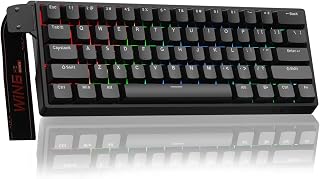
Competitive players chasing split-second reactions will benefit from the adjustable actuation and rapid trigger mode, since magnetic Hall effect switches let you fine-tune exactly how light or deep a keypress registers. An 8000 Hz polling rate ensures your inputs reach the PC almost instantly, making this a strong pick for ranked shooters where every millisecond of response time matters.
Pros
- Hall Effect magnetic switches avoid contact wear over time
- 0.02mm rapid trigger distance for microsecond-level response
- 8000Hz polling rate built for competitive FPS play
- Hot-swappable switches with a sturdy, pleasant-sounding frame
Cons
- Stock keycaps feel cheap and hurt typing feel
- Not compatible with PlayStation or Xbox
If the goal is a 60% gaming keyboard that keeps up with serious FPS play, the WIN60 HE leans on Hall Effect magnetic switches, an 8000Hz polling rate, and rapid trigger technology to deliver the kind of response speed Valorant and CS2 players look for. The magnetic switches actuate without physical contact, so they avoid the wear and performance drop-off that traditional mechanical switches eventually show, and a 0.02mm rapid trigger distance pushes response down to the microsecond level. Despite its accessible positioning, the frame feels sturdy and the key action produces a subtle, satisfying sound rather than the loud clack common on gaming boards. It's hot-swappable too, so you can experiment with switches down the line. The web-based driver skips software bloat and handles actuation and rapid trigger setup fine, even if it's less polished than a dedicated app. The stock keycaps are the clear weak point, feeling cheap and holding back typing comfort and acoustics until you swap them out.
Switch Technology: Hall Effect Magnetic Switches (Graywood V3), Linear actuation, 0.02mm rapid trigger distance
Performance: 8000Hz polling rate, adjustable actuation, rapid trigger mode support
Layout: 60% compact, 61 keys, QWERTY
Connectivity: USB-C wired connection
Lighting: RGB backlit, 16.8 million color options, illuminates PBT keycaps
Customization: Hot-swappable switches, programmable keys, web-based driver for macros and settings
Dimensions: 11 inches L x 5 inches W x 1.1 inches H
Build: Plastic enclosure, sturdy frame
Included Items: Keyboard, USB-C cable, keycap puller
Compatibility: Windows PC and laptops (not compatible with PlayStation or Mac)
Warranty: 6 months
Power: USB powered, no batteries required
This is a strong pick for competitive FPS players on PC who want Hall Effect precision and rapid trigger response in a 60% footprint without paying premium prices. The hot-swap sockets also suit anyone who likes tinkering with switches. Skip it if you need PlayStation or Xbox compatibility, since it's PC and laptop only, or if you're not willing to budget for better keycaps eventually.

Shooter fans who need split-second precision will find the Hall effect magnetic switches and adjustable fast trigger mode let them dial in actuation points for quicker taps or sustained sprints. Combined with an 8000Hz polling rate, inputs register with minimal delay, and programmable keys plus RGB backlighting round out a layout built for serious ranked play across console and PC.
Pros
- Hall Effect switches with adjustable actuation from 0.02mm to 3.44mm
- 8000Hz polling rate and 0.3ms latency for fast response
- Retains arrow keys and function access despite compact size
- Detachable USB-C cable aids portability for travel
Cons
- Web-based driver only, no downloadable software
- No macOS support
For gamers specifically chasing performance in a 60% footprint, the AULA WIN68 HE stands out because it pairs the compact layout with Hall Effect magnetic switches, something most budget 60% boards don't offer. At 14 inches wide it still manages to keep arrow keys and function access on hand, a detail that matters when you're giving up a full-size layout. The real draw is the combination of an 8000Hz polling rate, 0.3ms latency, and per-key adjustable actuation from 0.02mm to 3.44mm, letting you tune sensitivity to match specific games. That level of control is usually reserved for keyboards costing far more. Build quality feels weighty enough to resist desk shift during intense play, and the 16.8 million color RGB with south-facing LEDs lights up keycaps evenly across 14 preset effects. The detachable USB-C cable adds portability for anyone bringing their setup to LAN events or tournaments. For a 60% board built around raw gaming responsiveness rather than aesthetics alone, this is one of the more technically capable options in the category.
Technical Specs: 68-key 60% layout, Hall Effect magnetic switches with 0.02mm-3.44mm adjustable actuation, 8000Hz polling rate, 0.3ms response latency, USB-C wired connection.
Lighting: 16.8 million RGB colors, 14 preset effects, south-facing LEDs, adjustable brightness via driver or FN combinations.
Physical: Dimensions 14"L x 6"W x 1.7"H, weight 686g, plastic enclosure, contemporary black styling.
Compatibility: Windows PC and laptops, USB-C connectivity, includes 2 extra magnetic switches, keycap puller, portable ribbon cable, and standard USB cable.
Support: 6-month manufacturer warranty, web-based driver customization (Windows only, no macOS support).
Ideal for competitive and esports-focused gamers who want Hall Effect precision and ultra-low latency in a compact layout, especially those who travel to tournaments. Not a fit for macOS users, since the keyboard excludes Mac support entirely, or for anyone who dislikes browser-based configuration tools instead of downloadable software.
How to Choose the Best 60% Keyboard
Not every compact keyboard is built the same. Switch type, build quality, and customization features vary widely across this category. Knowing what to prioritize makes it much easier to land on a board you will actually enjoy using long-term.
Switch Type and Feel
The switch is the single biggest factor in how a keyboard feels under your fingers. Linear switches like the HyperX Red are smooth and quiet, making them ideal for gaming. Tactile and clicky options like blue switches add physical feedback, which many typists prefer.
Hall effect magnetic switches, found in boards like the Aula WIN60 HE – 60% Mechanical Gaming Keyboard, represent the cutting edge. They use magnets instead of physical contact, so they never wear out and allow adjustable actuation points down to fractions of a millimeter.
Hot-Swap Support
Hot-swap PCBs let you pull out switches and replace them without soldering. This is a major advantage if you want to experiment with different switch feels over time. The Redragon K617 Wired 60% Compact Hot-Swap RGB and the Womier SK80 75% Keyboard with Color Multimedia both support 3-pin and 5-pin switches out of the box.
If you plan to keep the stock switches forever, hot-swap is less critical. But for anyone curious about switch modding, it is worth prioritizing even on a first board.
Build Quality and Typing Feel
The case material and mounting style shape how a keyboard sounds and feels. An aircraft-grade aluminum body, like the one on the HyperX Alloy Origins 60, adds rigidity and a premium feel. Gasket-mounted designs, used in the Womier SK80 75% Keyboard with Color Multimedia, absorb flex and dampen sound for a softer, bouncier typing experience.
For gaming peripherals in general, pairing a solid keyboard with a quality surface makes a real difference. Our guide to the best mouse pads for gaming covers the top options that complement a compact keyboard setup well.
Software and Customization
Most competitive gamers want per-key RGB control, macro remapping, and the ability to tweak actuation. Boards like the Razer Huntsman Mini 60% Gaming Keyboard use Razer Synapse 4, while the AULA WIN68 HE Mechanical Gaming Keyboard 60% and Aula WIN60 HE – 60% Mechanical Gaming Keyboard rely on a web-based driver that requires no software download at all.
If you prefer a plug-and-play experience with no configuration required, the CACKBIRD 60% Wired Mechanical Gaming Keyboard with Blue switches works right out of the box on Windows and Mac with zero driver installation. For deeper personalization, a board with dedicated software or a web driver gives you far more control over every keypress. If you are building out a full FPS rig, our picks for the best mouse for FPS pair naturally with any of these keyboards.
Polling Rate and Competitive Performance
Standard mechanical keyboards poll at 1000Hz, meaning they report their state to your PC one thousand times per second. The AULA WIN68 HE Mechanical Gaming Keyboard 60% and Aula WIN60 HE – 60% Mechanical Gaming Keyboard push that to 8000Hz, cutting input latency down to fractions of a millisecond.
For casual gaming and everyday typing, 1000Hz is more than sufficient. But if you compete seriously in titles like Valorant or CS2, an 8000Hz hall effect board with rapid trigger mode offers a measurable edge in quick-stop shooting and fast peeking scenarios.
Final Thoughts
The right 60% keyboard comes down to how you plan to use it. For a premium all-rounder with a solid aluminum build and reliable switches, the HyperX Alloy Origins 60 is one of the most consistently well-reviewed options in this form factor. If competitive gaming is your focus and you want the latest in switch technology, the AULA WIN68 HE Mechanical Gaming Keyboard 60% delivers hall effect precision and an 8000Hz polling rate at a price that does not require a premium tier commitment.
Frequently Asked Questions
What is a 60% keyboard and what keys does it leave out?
A 60% keyboard removes the numpad, navigation cluster, arrow keys, and function row found on full-size boards, leaving roughly 61 keys. Most functions are still accessible through Fn key combinations, so you do not lose any real capability. The result is a much smaller footprint that frees up desk space for your mouse.
Are 60% keyboards good for gaming?
Yes, they are a popular choice among FPS and MOBA players precisely because the compact size allows wider, lower-sensitivity mouse movements. Boards like the Redragon K617 Wired 60% Compact Hot-Swap RGB and the Razer Huntsman Mini 60% Gaming Keyboard were designed with competitive play in mind. The trade-off is the learning curve of adapting to Fn layer access for less-used keys.
Is a 60% keyboard good for typing and office use?
Many people use 60% keyboards daily for writing, coding, and office work without any issues. The key is finding a switch type that matches your preference. If you spend more time writing than gaming, a tactile or clicky switch tends to feel more satisfying. You can also explore our full category page of keyboards and mice for more options across different form factors.
What should I look for in a 60% keyboard in 2026?
In 2026, the standout features to prioritize are hot-swap switch support, build material, and polling rate. Hall effect magnetic switches are increasingly available at accessible price points and offer longer lifespan with adjustable actuation. RGB customization and software support have also become more refined, with web-based drivers removing the need for bulky desktop applications entirely.



Write Your Review
No reviews yet. Be the first to share your experience!