

Your processor generates serious heat under load, and stock coolers often struggle to keep temperatures in check while ramming fan speeds into noisy territory. Whether you’re building a new gaming rig, upgrading an older system, or simply tired of thermal throttling during intensive workloads, a quality aftermarket cooler makes an immediate difference.
This guide evaluates five exceptional CPU coolers that deliver outstanding thermal performance while staying comfortably under the fifty-dollar mark. From compact single-tower designs to aggressive dual-tower monsters and even all-in-one liquid solutions, we’ve covered the range of options available to budget-conscious builders in 2026.
Quick answer
This guide compares 5 picks, with Thermalright Phantom Spirit 120 EVO CPU Cooler - 7 Heat ranked first. Cooler Master Hyper 212 Black CPU Cooler has the most customer reviews.

Seven 6mm heat pipes deliver significantly more thermal mass than entry-level coolers, handling higher TDP processors without thermal throttling. The dual PWM fans spin up to 2150 RPM when needed, yet maintain 27 dB acoustic output at typical loads. Native support for AM5 and Intel 1851 ensures compatibility with the latest platforms, avoiding adapter hassles during installation.
Pros
- Seven 6 mm heat pipes and dual-tower fins
- Up to 69 CFM airflow
- Broad AMD and Intel socket support
- Stated 27 dB noise level
Cons
- Large 6.18-inch height
- Needs clearance and adequate case airflow
A budget cooler needs to concentrate its design on thermal hardware, and the Phantom Spirit 120 EVO is built around a substantial air-cooling layout. Seven 6 mm copper heat pipes draw heat from a precision micro-engraved pure-copper contact base into a dual-tower aluminum fin stack. Two PWM fans then push up to 69 CFM, reaching 2,150 RPM when the system needs more airflow. That is a more performance-focused arrangement than a basic single-fan tower, while avoiding the added complexity of liquid cooling. It also keeps the platform checklist broad: AMD AM4 and AM5 are covered alongside Intel 1150, 1151, 1200, 1700, 17XX, 2011, and 1851 sockets. The stated 27 dB noise level gives this high-airflow design a quieter target than maximum speed alone suggests. Its black frosted aluminum top provides a restrained finished look for budget-conscious builds. The trade-off is size. At 5.3 by 4.92 by 6.18 inches, this is not a casual fit for a compact case or boards with tall memory, and its heat remains inside the case. For builders who can accommodate it and have solid case airflow, it focuses on a capable dual-fan, seven-heat-pipe air cooler.
Cooler Dimensions: 125mm length x 135mm width x 157mm height (4.92 x 5.3 x 6.18 inches)
Weight: 100 grams
Material: Anodized aluminum fins with precision-engraved pure copper base
Heat Pipes: 7 fully plated and blackened copper pipes
Fan Model: TL-K12 120mm PWM
Fan Dimensions: 120 x 120 x 25mm
Maximum RPM: 2150 RPM (plus or minus 10 percent)
Air Flow: 69 CFM maximum
Noise Level: 27dB(A) or less
Power Connector: 4-pin PWM
Voltage: 12V DC
Power Consumption: 2.4 watts
Socket Compatibility: Intel LGA1700, LGA1150, LGA1151, LGA1155, LGA1156, LGA1200, LGA2011, LGA2066; AMD AM4, AM5
Mounting System: Includes universal mounting brackets with tool-free installation
Buy it for a desktop build that needs compatibility with modern AM5 or Intel 1700/1851 hardware, or an older listed Intel socket, and has room for a 6.18-inch-tall dual-tower cooler. It is especially suited to builders seeking two PWM fans, strong stated airflow, and an air-cooling setup instead of liquid cooling. Skip it for compact cases, motherboards where tall RAM crowds the cooler, or systems with weak case ventilation. Those limitations can matter more here than its wide socket support.

The dual tower design provides exceptional surface area for heat dissipation, making this suitable for mid-range CPUs that would overwhelm single-tower coolers. At 1850 RPM maximum speed, the fans balance airflow with a 29.5 dB noise profile that remains unobtrusive during gaming or productivity tasks. The SE V2 revision refines mounting pressure for improved contact across Intel and AMD sockets.
Pros
- Exceptional cooling performance that rivals 240mm/280mm AIO liquid coolers at a third of the cost
- Quieter operation and far simpler installation compared to water cooling systems
- Intelligent PWM fan control keeps noise low during light tasks and ramps up intelligently under load
- Well-engineered mounting system with excellent pressure distribution and no installation guesswork
- Three-year manufacturer warranty and proven reliability without moving pump components
Cons
- Substantial footprint requires checking case clearance and RAM height compatibility before purchase
- Dual-tower design may obstruct some RGB lighting or competing for space on smaller motherboards
- Maximum 1850 RPM speed caps performance gains versus some specialty coolers in extreme-overclocking scenarios
The Thermalright Peerless Assassin 120 SE V2 is a high-performance dual-tower air cooler engineered for gamers, content creators, and system builders who demand serious thermal performance without the complexity or cost of liquid cooling. It targets users running flagship processors like the Ryzen 9 9950X3D or high-wattage Intel chips who need reliability and quiet operation under sustained loads.
The cooler's standout achievement is matching the performance of premium 240mm and 280mm AIO liquid coolers while remaining significantly quieter and more straightforward to install. Six 6mm heat pipes working across dual aluminum fin stacks deliver exceptional heat transfer, and the S-FDB bearing fans operate at up to 1850 RPM, pushing 88.89 CFM of airflow at just 29.5 dB of noise. Real-world testing shows it keeping high-end CPUs in safe temperature ranges even during full Cinebench R23 benchmarks and continuous heavy workloads, all without pump noise or complexity.
The build quality reflects Thermalright's attention to detail, with a pure copper base that is nickel-plated for corrosion resistance and fully electroplated, reflow-soldered construction that ensures durability and consistent contact. The dual 28mm thick PWM fans integrate seamlessly with motherboard fan controllers, allowing automatic speed adjustment based on load to maintain silence during everyday tasks while providing cooling headroom when needed. Installation is straightforward with included thermal paste and mounting hardware for Intel and AMD platforms.
The main consideration is physical footprint. The cooler measures 125mm x 110mm x 155mm, and the front fan can be raised to clear tall RAM, so verify your case has adequate CPU cooler height clearance and check RAM compatibility before ordering. The dual-tower design occupies more space than single-tower coolers but delivers proportionally better cooling performance and airflow.
For budget-conscious builders and upgrade seekers, the Peerless Assassin 120 SE V2 represents exceptional value that challenges premium liquid coolers on pure performance while eliminating pump failures, water leaks, and complexity. It earns strong user ratings across every thermal and reliability metric, making it a top choice for anyone prioritizing cooling performance and long-term dependability.
Cooler Dimensions: 125mm L x 110mm W x 155mm H (4.92" x 5.31" x 6.1")
Fan Type: Dual TL-C12C-X28 V2 120mm PWM fans, 28mm thickness
Heat Pipes: Six 6mm copper heat pipes with AGHP Gen 5.0 technology
Base Material: C1100 pure copper, nickel-plated
Fan Specifications: Up to 1850 RPM, 88.89 CFM airflow, 2.21 mm H2O static pressure, 29.5 dB noise level
Power: 12V DC, 2.4W, 0.30A, 4-Pin PWM connector
Platform Support: Intel LGA1851, LGA1700, LGA1200, LGA115X, AMD AM5, AM4
Warranty: 3-year manufacturer warranty
Included: Cooler, dual fans, mounting plates, fasteners, TF7 thermal paste, installation manual
Who Should Buy This: Gamers and content creators with high-performance CPUs seeking reliable, quiet cooling without AIO complexity or cost. Ideal for Ryzen 9 9950X3D, Intel Core Ultra 7, and similar flagship processors in systems with adequate case space.
Before You Purchase: Verify your PC case supports a cooler of 155mm height (or up to 165mm with the front fan raised). Check that your RAM modules are not taller than the cooler's footprint, as tall RAM may require adjusting the front fan position. Confirm your motherboard socket matches one of the supported platforms listed in the specifications.
Installation Expectations: Mounting is straightforward with included hardware and thermal paste. Installation typically takes 15-30 minutes on either Intel or AMD platforms. The mounting pressure is firm and well-engineered, with secure fastening that feels deliberate and reliable.
Performance Expectations: Expect thermal performance comparable to premium 240mm/280mm AIO coolers under gaming and sustained workloads. Fan noise stays low during light use and ramps intelligently during heavy loads. The cooler benefits from BIOS or motherboard fan-control software to fully customize performance curves for your specific use case.
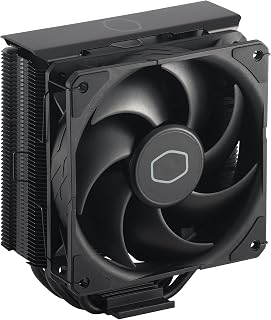
The four heat pipes and 26 dB noise level make this an excellent entry point for builders prioritizing quiet operation without sacrificing cooling capacity. Its 4-pin PWM connector ensures automatic fan speed adjustment, keeping temperatures stable during light workloads while ramping up only when needed. Broad socket compatibility covers most modern Intel and AMD platforms, making it a versatile choice for budget builds.
Pros
- Four copper heat pipes combined with a 42 CFM fan deliver solid thermal performance for mid-range CPUs
- PWM fan control between 690 and 2,500 RPM keeps noise at or below 26 dB during light use
- Compact 152mm profile fits most mid-tower cases with minimal RAM clearance impact
- Included CryoFuze thermal paste and simplified brackets make installation quick and straightforward
Cons
- Thermal headroom is limited for extreme overclockers pushing high voltages beyond typical mid-range use
- Fin stack requires periodic cleaning to prevent dust buildup from reducing long-term cooling efficiency
When your goal is keeping CPU temperatures in check without blowing your build budget, the Cooler Master Hyper 212 Black is one of the most dependable answers in its price range. Four copper heat pipes pull heat away from the CPU and push it through an aluminum fin stack, while the SickleFlow 120 Edge fan moves up to 42 CFM to clear that heat efficiently. PWM control spans 690 to 2,500 RPM, so the fan ramps up only when the workload demands it and settles back to near-silence during lighter tasks, topping out at just 26 dB. That combination of active cooling and quiet operation makes it genuinely practical for everyday use. The 152mm tower fits inside most standard mid-tower cases without forcing RAM clearance compromises, and the included CryoFuze thermal paste means you can drop it in and get results right away. Simplified socket brackets cover modern AMD and Intel platforms and keep installation straightforward. For mid-range processors running 1440p gaming or multithreaded workloads, this cooler provides stable thermals at a fraction of what premium solutions cost.
Cooling Performance: Four copper heat pipes, 42 CFM airflow capacity, maximum 2,500 RPM fan speed
Acoustics: 26dB operating noise level with Dynamic PWM control (690-2,500 RPM range)
Power & Connectivity: 4-pin fan connector, 12V operation, 2.4W wattage
Compatibility: AMD AM5, AM4 platforms; Intel LGA1851, LGA1700 sockets
Physical Dimensions: 4.84 inches length, 3.03 inches width, 6.25 inches height (152mm total height)
Materials: Copper base plate, aluminum fin stack, plastic shroud
Included: Hyper 212 Black cooler unit, SickleFlow 120 Edge fan, installation kit, CryoFuze thermal paste, 2-year warranty

The 240mm radiator and dual PWM fans deliver strong thermal performance for mid-range builds without breaking the bank. Its S-FDB bearings keep noise at just 25 dB, making it ideal for users who want effective cooling without the distraction of loud fans. Broad socket support covers both current AMD AM5 and Intel LGA1700/1851 platforms, so you won't need a new cooler when upgrading within the same generation.
Pros
- Quiet operation at 25.6dB even at maximum fan speed
- Wide platform compatibility covering current AMD and Intel sockets
- Pump head rated for up to 40,000 hours of operation
- ARGB lighting on fans and pump syncs via standard 5V 3-pin header
Cons
- ARGB sync requires a compatible motherboard RGB header, no standalone control
- Requires adequate case clearance to mount a 240mm radiator
For builders hunting capable liquid cooling without breaking the budget, the Thermalright Aqua Elite 240 V3 makes a strong case. The 240mm radiator paired with dual 120mm PWM ARGB fans delivers up to 66.17 CFM of airflow while staying at a measured 25.6dB, which is genuinely quiet for an AIO at this price tier. The fourth-generation pump head runs rated for up to 40,000 hours, so longevity is not a concern you need to lose sleep over. Aluminum fin construction and protective mesh water tubing add durability that cheaper coolers tend to skip. Compatibility is broad, covering AMD AM4 and AM5 alongside Intel LGA1150, 1151, 1200, 1700, and 1851, with all mounting hardware included, so the install process is straightforward regardless of your platform. The synchronized ARGB on both fans and the pump head connects via a standard 5V 3-pin header, keeping aesthetics cohesive with modern builds.
Cooling System: 240mm all-in-one liquid cooler with aluminum fin radiator and protective mesh water tubing
Pump: Fourth-generation design with octagonal shape, 2800 RPM maximum speed (±10%), 40,000-hour rated lifespan
Fans: Dual 120mm TL-C12B-S V2 with S-FDB bearings, 1500 RPM maximum speed (±10%), 66.17 CFM maximum airflow, 25.6dB noise level
Connectors: 4-pin PWM fan headers, 5V 3-pin ARGB headers for both fans and pump
Power Consumption: 2.64 watts total system power
Dimensions: 4.72 inches long by 0.98 inches wide by 4.72 inches high
Weight: 100 grams
CPU Compatibility: AMD AM4, AM5; Intel LGA1150, LGA1151, LGA1155, LGA1156, LGA1200, LGA1700, LGA1851
Materials: Aluminum, metal, and plastic components
Included: One complete AIO water cooler unit with mounting accessories for all supported platforms
A solid pick for mid-range gamers or productivity builders on AMD or Intel who want liquid cooling performance without the premium AIO price tag. Also works well for anyone upgrading from a stock cooler who wants a noticeable thermal improvement with some RGB flair. Skip it if your case lacks space for a 240mm radiator, or if your motherboard has no 5V RGB header and lighting sync matters to you.

Pros
- Ceramic bearing pump with 3-phase motor for efficient heat transfer
- Low 30db noise level even with liquid cooling running
- Daisy-chained PWM fans simplify cabling during install
- Wide compatibility with Intel LGA1851/1700 and AMD AM5/AM4
Cons
- 3-pin RGB fans may not sync with 4-pin RGB headers on some boards
- Radiator size requires checking case clearance before buying
If you want to keep a modern CPU quiet and cool on a tight budget rather than settling for a basic air cooler, this is the pick that pushes further. The ceramic bearing pump and 3-phase motor combo is built to maximize heat transfer while keeping noise down, rated at just 30db, so you are not trading silence for cooling power. Three PWM ARGB fans add a visual upgrade too, and the daisy-chained wiring means you are not fighting a mess of cables during install. Copper and aluminum construction gives the radiator real substance, and broad socket support across Intel LGA1851/1700 and AMD AM5/AM4 means it fits almost any budget build you are pairing it with. For anyone chasing AIO-level cooling at an entry-level price, this covers the need directly.
Cooling System: 360mm AIO liquid cooler with ceramic bearing pump
Pump Specifications: High-speed ceramic bearing pump, 3000 RPM, 3-phase 4-pole motor
Radiator: 12-channel design with optimized fin density
Fans: Three 120mm PWM ARGB fans, daisy-chain configuration, maximum 1600 RPM
Noise Level: 30 dB at full speed
Power Consumption: 5 watts, 12 volts, 4-pin connector
Socket Compatibility: Intel LGA1700, LGA1851, AMD AM5, AMD AM4
Materials: Ceramic, metal, plastic, rubber, copper, aluminum, glass
Included: Pump block, 360mm radiator, three 120mm fans, all mounting brackets, installation manual
Pre-Installation: Verify your CPU socket compatibility and available case space for a 360mm radiator. The cooler supports Intel LGA1700/1851 and AMD AM5/AM4 platforms. All necessary mounting brackets are included in the box.
Key Steps: Mount the radiator and fans to your case first, ensuring proper airflow direction. Connect the pump power to a 4-pin PWM header on your motherboard, then connect the daisy-chained fans to a single PWM header. Finally, install the pump block onto your CPU using the provided brackets. The daisy-chain design means all three fans connect through one cable, significantly reducing the cable clutter compared to traditional setups.
RGB Setup: Connect the 5V ARGB header to your motherboard's RGB/ARGB header. Note that compatibility depends on your motherboard manufacturer. ASUS ROG Strix boards use 4-pin RGB headers, while these fans employ 3-pin connectors, which may cause lighting issues. Consult your motherboard manual for adapter options if needed.
Buying Guide: What to Consider Before Choosing Your Cooler
Tower Height and Case Clearance
CPU cooler height matters more than most builders realize until installation day arrives. Dual-tower coolers like the Thermalright Phantom Spirit 120 EVO CPU measure around 157mm tall, while single-tower options like the Cooler Master Hyper 212 Black CPU Air Cooler sit at 152mm.
Check your case specifications before committing to any cooler. Compact cases often cap CPU cooler height at 160mm or less, and exceeding that limit means the side panel won’t close. Similarly, verify RAM clearance, especially if you’re running tall RGB memory modules that might interfere with the front fan or heatsink overhang.
Air Cooling vs. AIO Liquid Cooling
Air coolers dominate the budget segment because they’re simple, reliable, and maintenance-free. Multi-heatpipe towers move heat through direct contact with the CPU, then dissipate it through aluminum fins and PWM fans. No pumps, no tubes, no liquid to evaporate or leak over time.
AIO liquid coolers like the Thermalright Aqua Elite 240 V3 Water Cooling CPU and Minorsonic AIO CPU Cooler offer different advantages. They mount the radiator separately, freeing up space around the CPU socket and improving airflow to VRMs and RAM. For builders with compact cases that support radiator mounting but restrict tower cooler height, a 240mm or 360mm AIO becomes the smarter choice.
Heat Pipe Count and Base Design
Heat pipes act as thermal highways, rapidly transferring heat from the CPU to the cooler’s fin array. Budget coolers typically feature four to seven heat pipes, with direct-contact designs placing the pipes flush against the processor’s heat spreader for maximum efficiency.
The Thermalright Peerless Assassin 120 SE V2 CPU packs six 6mm heat pipes into a dual-tower configuration, rivaling coolers that cost significantly more. Pure copper bases with nickel plating resist corrosion while maintaining excellent thermal conductivity, and precision-machined surfaces ensure complete contact with your CPU.
Fan Performance and Noise Levels
PWM fans adjust speed dynamically based on CPU temperature, spinning faster under heavy loads and slowing down during idle or light tasks. This variable speed control keeps noise levels reasonable while ensuring adequate cooling when you need it most.
Look for fans rated between 1500 and 2200 RPM maximum, with noise levels staying below 30 dBA at full speed. Fluid dynamic bearings or sleeve bearings offer long service life, and ARGB lighting adds visual appeal if you’re building in a windowed case. When comparing options, remember that dual-fan configurations generally move more air and handle heat spikes better than single-fan setups, especially when paired with mid-range graphics cards that contribute additional heat to your case environment.
Socket Compatibility and Installation
Modern coolers support multiple socket types, but always verify compatibility with your specific platform. Intel’s LGA1700 and the newer LGA1851 require different mounting pressure than older LGA1200 or LGA115X sockets, while AMD’s AM4 and AM5 platforms share the same mounting hole pattern but may need different brackets.
Most budget coolers include all necessary mounting hardware and thermal paste in the box. Some AMD installations reuse the stock backplate already mounted on your motherboard, simplifying the process. Check the manufacturer’s compatibility list and installation video before purchasing to avoid surprises when it’s time to build.
Final Thoughts
Budget-conscious builders no longer need to sacrifice cooling performance or acoustic comfort. If you’re running a mainstream gaming CPU or workstation processor, the Thermalright Peerless Assassin 120 SE V2 delivers exceptional value with dual-tower cooling and whisper-quiet operation. For builders with limited vertical clearance or those who prefer liquid cooling aesthetics, the Thermalright Aqua Elite 240 V3 brings AIO performance to the budget segment without compromise.
Frequently Asked Questions
Do budget CPU coolers work with high-end processors?
Budget coolers handle mainstream processors like Intel i5 and i7 or AMD Ryzen 5 and 7 without issues. High-end chips with TDPs above 150W may run warmer under sustained all-core loads, but dual-tower designs still maintain safe operating temperatures. For extreme overclocking or flagship CPUs, you might need to step up to premium cooling solutions.
How often should I replace thermal paste on my CPU cooler?
Quality thermal paste remains effective for three to five years under normal conditions. If you notice rising temperatures without increased ambient heat or dust buildup, consider reapplying paste. Most budget coolers include a tube of thermal compound sufficient for multiple applications, so keep the excess for future maintenance.
Can I install RGB fans on a budget CPU cooler?
Most tower coolers accept standard 120mm fans, making aftermarket RGB fan swaps straightforward. Verify the fan mounting clips or screw holes match your cooler’s design, and ensure your motherboard has available RGB headers if the new fans require them. AIO coolers typically use proprietary fan mounts, limiting swap options.
What’s the difference between PWM and DC fan control?
PWM fans use a four-pin connector and adjust speed through pulse-width modulation signals from your motherboard, offering precise control across the entire speed range. DC fans use three-pin connectors and regulate speed by varying voltage, which can result in less granular control and potential issues at very low speeds. PWM fans are the superior choice for modern builds in 2026.





Write Your Review
No reviews yet. Be the first to share your experience!