

You’ve got a sharp 1440p monitor and you want smooth, high-framerate gaming without draining your wallet. It’s a familiar situation for PC builders in 2026: the gap between entry-level and flagship GPUs has never been wider, which means finding the sweet spot takes some real research. This guide is built for exactly that, covering ten strong options for 1440p gaming that punch well above their size.
Whether you’re building a new rig or upgrading an aging card, the options here span multiple architectures from AMD, NVIDIA, and Intel. Each one has been carefully evaluated for real-world 1440p relevance, cooling quality, memory capacity, and overall value.
Quick Comparison
Ratings reflect the most recent data pull. Check each listing for current price and availability.
Quick answer
This guide compares 10 picks, with ASRock Radeon RX 9060 XT Challenger 16GB GDDR6 PCIe 5.0 ranked first. ASUS Dual GeForce RTX 3050 6GB OC Edition - Compact has the most customer reviews.

The generous 16GB GDDR6 memory completely eliminates VRAM bottlenecks at 1440p, ensuring maximum texture quality and future-proofing for upcoming releases. RDNA 4 architecture delivers excellent efficiency, while the 3290 MHz boost clock pushes frame rates well into high refresh territory. The dual fan 0dB silent mode keeps noise minimal during lighter gaming, and DisplayPort 2.1a ensures full bandwidth for the fastest 1440p monitors available.
Pros
- 16GB GDDR6 is exceptionally generous for a budget 1440p card
- 3290 MHz boost clock and RDNA 4 architecture deliver strong frame rates at 1440p high settings
- Sustained mid-60s Celsius thermals with 0dB idle keep the system quiet
- Single 8-pin connector and 550W PSU requirement make system integration straightforward
Cons
- Dual-fan cooler is adequate but not as aggressive as triple-fan premium designs
- 4K gaming and intensive professional workflows may strain even the 16GB VRAM ceiling
The ASRock Radeon RX 9060 XT Challenger 16GB is purpose-built for exactly the use case this article covers. RDNA 4 architecture with a 3290 MHz boost clock and 16GB of GDDR6 memory delivers the kind of performance gap over previous mid-range cards that makes 1440p gaming feel genuinely comfortable rather than just technically possible. Users running demanding modern titles report 60-plus fps at high settings, with headroom to spare in less intensive games. The 16GB VRAM buffer is the headline spec here: at 1440p it is ample for today's most demanding titles and gives the card a longer useful lifespan as VRAM requirements creep upward. Thermal behavior is a real strength too. Sustained temperatures in the mid-60s Celsius under full load, combined with 0dB idle behavior, make for a quiet and efficient system. A single 8-pin connector and a 550W PSU requirement mean most existing mid-range systems can accommodate this card without additional upgrades. At 249mm, it fits standard cases without fuss. Ray tracing support and DisplayPort 2.1a connectivity round out a well-considered 1440p package.
GPU: AMD Radeon RX 9060 XT (RDNA 4, 32 Compute Units)
Memory: 16GB GDDR6 at 20 Gbps on 128-bit bus
Clock Speeds: 3290 MHz boost, 2700 MHz game clock
Output: DisplayPort 2.1a, HDMI 2.1b
Max Resolution: 7680x4320 pixels
Power: Single 8-pin connector, 550W PSU recommended
Size: 249mm (L) x 132mm (W) x 41mm (H), 2-slot design
Cooling: Dual fans, 0dB idle mode
Interface: PCIe 5.0 x16
Weight: 0.98 kg
Warranty: 2 years manufacturer
The obvious pick for budget-conscious 1440p gamers who want strong performance, plenty of VRAM, and efficient thermals without flagship card pricing or power demands. Also a sensible upgrade for anyone coming from a card like the RTX 3060 Ti. Less compelling for users who want to push into 4K or run intensive professional workloads like heavy 3D rendering where even 16GB may eventually feel limiting.

While the 6GB GDDR6 configuration is modest, the RTX 3050's Ampere architecture includes DLSS upscaling technology that can stretch 1440p performance beyond what raw specs suggest. This makes it viable for gamers willing to enable quality modes in supported titles. The 1500 MHz boost clock provides adequate processing power for less demanding games at this resolution, and the dual fan design from ASUS maintains reasonable thermals during gameplay.
Pros
- 20cm, 2-slot form factor fits small-form-factor cases and space-limited prebuilts
- DLSS 3 support boosts frame rates in compatible titles beyond raw rasterization performance
- IP5X dust resistance and stainless steel bracket support long-term reliability
- Dual Axial-tech fans maintain controlled temperatures quietly under sustained load
Cons
- 6GB VRAM is inadequate for demanding 1440p gaming, the core need of this article
- 1500 MHz clock and Ampere architecture trail current mid-range options at higher resolutions
Honesty matters when matching a GPU to a use case: the ASUS Dual RTX 3050 6GB OC Edition is not a 1440p card in any meaningful sense. Its 1500 MHz clock, 6GB GDDR6 buffer, and Ampere architecture are calibrated for 1080p gaming, where the card delivers smooth frame rates in esports titles and lighter AAA games at medium to high settings. Pushing to 1440p in demanding modern titles will expose the 6GB VRAM limit quickly, leading to texture pop-in and frame-rate drops that DLSS 3 support can partially offset in compatible games but cannot fully remedy. The card's real strengths lie elsewhere: a 20cm footprint that slides into small-form-factor cases and prebuilts where larger GPUs simply won't fit, dual Axial-tech fans with IP5X dust resistance for long-term reliability, and a 2-slot profile that leaves room for airflow. For a dedicated 1440p gaming build, this card asks too much of its VRAM. It belongs in compact systems where physical and power constraints are the binding limit, not resolution ambition.
Best for builders with strict physical or power constraints who game primarily at 1080p and need a card that fits where larger GPUs cannot. DLSS 3 support adds value in supported titles. Not recommended for 1440p gaming as the primary use case; the 6GB VRAM buffer is insufficient for demanding titles at that resolution and will limit both quality settings and performance headroom.
GPU Architecture: NVIDIA GeForce RTX 3050 with Ampere SM, 2nd Gen RT Cores, and 3rd Gen Tensor Cores for DLSS 3 support.
Memory: 6GB GDDR6 with 1500 MHz memory clock speed, delivering adequate bandwidth for 1080p and light 1440p workloads.
Clock Speeds: OC Mode: 1500 MHz boost clock, Default Mode: 1470 MHz boost clock for flexible performance tuning.
Thermal Design: Dual Axial-tech fans, 2-slot form factor (20cm length, 7.9in x 4.7in), IP5X dust resistance, and stainless steel bracket.
Power: No external power connector required. PCIe x16 slot power delivery only, making it ideal for systems with limited PSU capacity.
Connectivity: HDMI 2.1, DisplayPort 1.4a, and DVI-D for multi-monitor setups and modern display standards.

The 10GB GDDR6 allocation strikes a practical balance for 1440p, offering more headroom than 8GB cards without unnecessary excess. Intel's Arc B570 brings competitive rasterization performance at this resolution, and the 2600 MHz clock speed handles modern games effectively. The 0dB cooling mode keeps your system silent during lighter workloads, while DisplayPort 2.1 connectivity ensures compatibility with the latest high refresh rate 1440p displays.
Pros
- 10GB GDDR6 provides a comfortable VRAM buffer at 1440p
- XeSS 2 upscaling extends performance headroom in demanding titles
- Three DisplayPort 2.1 and one HDMI 2.1a output cover all modern 1440p displays
- 0dB dual-fan cooling stays silent at idle and whisper-quiet under load
Cons
- Intel's driver ecosystem is still maturing compared to AMD and NVIDIA
- Not designed for 4K gaming despite supporting up to 8K display resolution
For 1440p gaming on a budget, the ASRock Arc B570 Challenger 10GB punches well above its class. The Xe2-HPG architecture paired with 10GB of GDDR6 memory gives it a meaningful VRAM advantage over many rivals at this price tier, and the 2600 MHz clock keeps frame rates competitive in demanding modern titles at high settings. XeSS 2 AI upscaling adds another layer of headroom, letting the GPU maintain smooth performance in heavier scenes without visible image quality loss. Connectivity is a genuine strength: three DisplayPort 2.1 outputs and one HDMI 2.1a port cover virtually every 1440p monitor configuration, including high-refresh-rate setups. The dual 0dB fans stay completely off at idle and quiet under load, which matters for long gaming sessions. The metal backplate prevents sag and gives the build a more finished feel. The one caveat worth flagging is Intel's driver ecosystem, which is younger than AMD's or NVIDIA's. Most modern titles run without issue, but occasional optimization patches are part of the ownership experience.
The Arc B570 excels at 1440p gaming, maintaining high frame rates with maxed or near-maxed settings in modern AAA titles like Assassin's Creed Resync, Subnautica 2, and God of War. The 10GB VRAM buffer ensures smooth performance without stuttering even in VRAM-intensive scenarios with multiple monitors or intensive applications running simultaneously.
XeSS 2 technology provides meaningful performance boosts through AI-powered upscaling without sacrificing perceived image quality. Users report stable gameplay and low thermal temps, with the card operating at just 45-56 degrees Celsius at zero RPM and averaging around 68 degrees under sustained gaming loads. Idle power consumption is remarkably low at 18-21 watts during light tasks like streaming and multi-monitor work.
The card handles both 1080p ultra settings and 1440p high settings comfortably. While not positioned as a 4K solution, users seeking budget-friendly 1440p gaming will find this card highly capable and reliable across current and near-future game libraries.
GPU: Intel Arc B570 (Xe2-HPG Architecture)
Memory: 10GB GDDR6, 160-bit bus
Clock Speeds: 2600 MHz GPU, 19 Gbps Memory
Power: Single 8-pin connector
Interface: PCIe 4.0 x8
Display Outputs: 3x DisplayPort 2.1, 1x HDMI 2.1a
Max Resolution: 7680 x 4320
Cooling: Dual striped axial fans with 0dB Silent Cooling
Backplate: Metal with structural reinforcement
Weight: 0.99 kg
Warranty: 2 Years Manufacturer
Media Engine: Advanced with AV1 encoding support
DirectX Support: 12 Ultimate

Pros
- Compact 8.1-inch length
- No external power connection required
- Dual-fan cooling
- HDMI and DisplayPort outputs
Cons
- Performance evidence favors 1080p gaming
- Demanding ray tracing can fall below 30 fps
An affordable 1440p gaming list needs clear lower limits, and the MSI GeForce RTX 3050 6GB defines one. Its Ampere-based design, 6GB GDDR6 memory, and 1507MHz boost clock give older desktop systems a modern PCIe x16 graphics option, but the available performance evidence points principally to 1080p play with moderate settings rather than gaming at higher resolutions. Esports games are reported to run smoothly, while most games operate smoothly at 1080p. For a reader whose 1440p plan also includes an aging PC or a restricted power supply, its bus-powered design is the relevant advantage: it needs no external power connector. The 8.1-inch card and dual-fan cooling also make it a practical physical fit for smaller cases and sustained workloads. HDMI and DisplayPort connectivity add monitor flexibility, including reported success with two 4K displays. Ray tracing is supported, yet demanding games can fall below 30 fps when it is enabled, so it should not shape the buying decision here. Treat this RTX 3050 as a low-power legacy upgrade, not as the card to target for high-resolution settings.
Buy this card only if your budget 1440p setup begins with an older desktop, a small case, or a power supply that cannot accommodate an external GPU power connection, and you can prioritize lighter esports play or 1080p gaming at moderate settings. Its compact length, dual fans, and bus-powered installation suit that constrained upgrade path. Skip it if 1440p is the main reason for the purchase, if you expect high settings in demanding games, or if ray tracing matters. Higher-resolution performance and demanding ray-traced workloads expose its limitation.
GPU: NVIDIA GeForce RTX 3050 (Ampere Architecture)
Memory: 6GB GDDR6 at 14 Gbps
Memory Interface: 96-bit
Boost Clock: 1507 MHz
Output Connectors: 1x DisplayPort 1.4a, 2x HDMI 2.1a
Maximum Resolution: 7680x4320
Cooling: Dual fans
Power Draw: Bus powered, no external PSU connection
Dimensions: 8.1 inches length x 4.3 inches width
Weight: 1.5 pounds
Interface: PCI-Express x16
Warranty: 3 years

The compact Ventus design's 6GB GDDR6 memory limits headroom, but DLSS technology helps compensate by rendering at lower resolutions and upscaling intelligently to 1440p. The 1492 MHz boost clock provides baseline performance for less intensive titles at this resolution. Ampere architecture brings ray tracing capabilities to the budget segment, though you'll need to manage settings carefully to maintain playable frame rates in demanding games.
Pros
- 70W power draw needs no external connector, ideal for OEM system upgrades
- DLSS and ray tracing available on a budget
- Compact 7.4-inch length fits virtually any case
- 3-year MSI warranty provides peace of mind
Cons
- 6GB VRAM on a 96-bit bus is limiting for demanding 1440p titles
- 1492 MHz boost clock trails newer-generation cards at this resolution
At 1440p, the MSI RTX 3050 Ventus 2X 6GB sits at the edge of what is realistic for this resolution. Built on NVIDIA's Ampere architecture with a 1492 MHz boost clock and 6GB of GDDR6 on a 96-bit bus, it can handle 1440p at medium-to-high settings in many titles, though 6GB of VRAM starts to feel constrained in newer AAA games at this resolution. Where this card genuinely earns its place in a 1440p budget conversation is power: drawing only 70 watts directly from the PCIe slot with no external power connector required, it is the right answer for gamers stuck with OEM power supplies that cannot support more demanding cards. DLSS and ray tracing are available, bringing a measure of future flexibility. The compact 7.4-inch dual-fan Ventus cooler manages thermals competently and carries a 3-year warranty. For pure 1440p frame rates, newer options outclass it, but for constrained system upgrades where power delivery is the hard limit, it remains a workable path to this resolution.
GPU Specifications: NVIDIA GeForce RTX 3050 with Ampere architecture, 96-bit memory interface, 1492 MHz boost clock. Memory: 6GB GDDR6 running at 14 Gbps. Power consumption: 70W. Video outputs: 1x DisplayPort 1.4a, 2x HDMI 2.1a. Maximum supported resolution: 7680x4320.
Physical Design: Dimensions 7.4 inches (L) x 4.3 inches (W). Weight 0.58 kg. Dual-fan cooling design. PCIe x16 slot required. No external power connectors needed. Compatible with desktop systems. Includes quick setup guide and 3-year warranty.
Best for gamers upgrading OEM desktops from HP, Dell, or similar brands where the power supply cannot support cards with external connectors. Also useful for anyone with a very tight wattage budget who still wants basic 1440p capability and DLSS support. Buyers with a standard PSU and a free 8-pin connector should look at more capable options for 1440p gaming.

The 12GB of GDDR6 memory provides the frame buffer headroom that 1440p gaming demands, especially in texture-heavy modern titles where 8GB cards often struggle. The RDNA 3 architecture delivers strong rasterization performance at this resolution, while the 2584 MHz boost clock ensures smooth frame rates in demanding scenarios. Dual fan cooling keeps temperatures manageable during extended sessions, and DisplayPort 2.1 support future-proofs your setup for high refresh rate monitors.
Pros
- 12GB GDDR6 with 48MB Infinity Cache handles 1440p texture loads without bottlenecks
- Three DisplayPort 2.1 outputs pair directly with high-refresh 1440p monitors
- 0dB idle fan mode keeps the system silent during light workloads and desktop use
- Metal backplate adds rigidity and assists with heat dissipation
Cons
- Dual 8-pin PCIe power requirement and physical size demand compatibility checks with prebuilt systems
- White LED lighting is fixed and cannot be customized to match other RGB components
The ASRock RX 7700 XT Challenger is built with 1440p gaming as its clear target. RDNA 3 architecture with 54 compute units, 12GB GDDR6 on a 192-bit bus, and 48MB Infinity Cache combine to handle high-resolution workloads without the memory bottlenecks that plague smaller-buffer cards at this resolution. The 2584 MHz boost clock keeps frame rates competitive in demanding AAA titles, with reviewers logging 70-plus FPS in popular games at maximum settings. That 12GB buffer is a genuine differentiator at this tier, giving texture-heavy 1440p titles room to breathe and extending the card's useful life as game assets grow. Three DisplayPort 2.1 outputs pair naturally with high-refresh 1440p monitors, the format where this card is most at home. The dual-fan cooling with 0dB idle mode keeps things quiet during everyday use, and the metal backplate adds structural rigidity. Upgraders coming from a GTX 1070 or RTX 3060 will notice an immediate and meaningful step up in 1440p fidelity and frame consistency.
Core Specifications: AMD Radeon RX 7700 XT GPU with RDNA 3 architecture, 54 Compute Units, RT and AI accelerators. 12GB GDDR6 memory on 192-bit bus with 48MB Infinity Cache. Game Clock 2226 MHz, Boost Clock up to 2584 MHz, Memory Clock 18,000 MHz.
Connectivity: 3x DisplayPort 2.1, 1x HDMI 2.1. PCIe 4.0 x16 interface. Dual 8-pin auxiliary power connectors. Maximum display resolution up to 7680x4320 pixels.
Physical: Dimensions 10.5 x 5.1 x 2.0 inches. Weight 2.2 pounds. Dual-fan cooling design. Metal backplate. 2-year spare part availability. 1-year warranty.
Well suited to 1440p gamers upgrading from a GTX 1070, RTX 3060, or similar mid-range card who want reliable high-settings performance without paying for more GPU than the resolution demands. The 12GB GDDR6 and DisplayPort 2.1 outputs future-proof the setup for higher-refresh 1440p monitors. Skip it if you have a prebuilt with a cramped case or a weak PSU, and note the 1-year warranty is shorter than some rivals offer.

The 16GB GDDR6 allocation completely eliminates memory concerns at 1440p, allowing maximum texture quality in every title without compromise. RDNA 4 architecture in the RX 9070 XT delivers exceptional performance at this resolution, while the 3030 MHz boost clock drives high frame rates consistently. Native DisplayPort 2.1a connectivity maximizes bandwidth for high refresh rate monitors, and the OC Edition ensures you're getting enhanced clocks right out of the box.
Pros
- 16GB GDDR6 provides ample VRAM headroom for current and upcoming 1440p titles
- 3030 MHz boost clock delivers strong 1440p frame rates with no thermal throttling
- 180-190W power draw runs 15-20W below competing cards at the same performance tier
- Dual BIOS lets users toggle between near-silent Quiet mode and full Performance mode
Cons
- 12.3-inch length requires case compatibility checks before purchase
- Early adopters encountered initial driver issues, though updates resolved them within weeks
At 1440p, the ASUS Prime Radeon RX 9070 XT sits in a compelling spot: enough GPU muscle to max out modern titles at that resolution while staying well clear of flagship pricing. The 16GB GDDR6 buffer is genuinely generous for 1440p, ensuring texture-heavy games and future releases won't hit a memory wall anytime soon. Boost clocks reach 3030 MHz in Performance mode without thermal throttling, and real-world reports put frame-rate gains at roughly 50% over older mid-range cards. Sustained GPU temps below 60C during stress tests and a power draw of 180-190W, typically 15-20W under competing cards at the same performance tier, mean this card punches above its weight on efficiency. The 2.5-slot form factor keeps airflow compatibility broad, and the dual BIOS option lets users dial back to Quiet mode for a near-silent 28-32C idle if the rig doubles as a workstation. For anyone stepping up from a mid-range card and targeting 1440p as their primary resolution, this card covers the need cleanly.
Memory and Bus: 16GB GDDR6, 256-bit interface, 3030 MHz memory clock
Architecture: AMD Radeon RX 9070 XT, PCIe 5.0 x16, 3030 MHz boost clock (OC mode), 2480 MHz game clock (OC mode)
Connectivity: 3x DisplayPort 2.1a, 1x HDMI 2.1b, maximum resolution 7680 x 4320
Cooling: 3x Axial-tech fans with dual-ball bearings, phase-change thermal pad, 0dB idle technology, 2.5-slot design
Software: Dual BIOS switch (Quiet and Performance profiles), GPU Tweak III for performance tuning and monitoring, ASUS GPU Guard protection
Dimensions and Power: 12.3 inches long, 5.1 inches wide, approximately 1500g, estimated 180-190W typical draw
Warranty: 3-year manufacturer coverage
A great fit for 1440p gamers upgrading from mid-range cards who want headroom for demanding titles without overspending on a flagship. The efficient power draw also suits systems with modest PSUs. Skip it if you need the absolute highest frame rates at 1440p or plan to push into 4K competitively, where top-tier cards have a clear edge. Linux users will appreciate the solid software support.
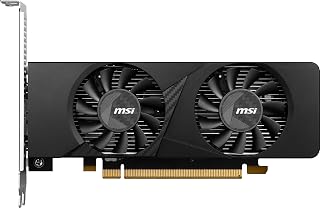
The low-profile form factor makes this suitable for compact builds, though the 6GB GDDR6 memory requires careful settings management at 1440p. DLSS upscaling becomes essential here, rendering internally at lower resolutions to maintain playable frame rates. The 1492 gigahertz boost clock handles less demanding esports titles reasonably well at this resolution, making it a space-conscious option for gamers with specific case constraints and moderate expectations.
Pros
- DLSS support extends 1440p viability in compatible titles
- No external power connector required, drawing solely from the PCIe slot
- Low-profile, 6.9-inch form factor fits builds where full-size cards cannot
- Ray tracing and hardware encoding included despite compact design
Cons
- 6GB VRAM is a noticeable constraint for demanding AAA titles at 1440p
- Native 1440p performance at high settings is limited compared to higher-tier budget options
At 1440p, the MSI RTX 3050 LP 6G is a card you need to approach with clear expectations. Its Ampere architecture and DLSS support mean that in less demanding titles, and especially esports games, you can lean on AI upscaling to reach playable frame rates at 1440p where native performance would otherwise fall short. The 6GB of GDDR6 running at 14 Gbps and a 1492 MHz boost clock keep things moving in lighter workloads, and DLSS quality mode can recover a surprisingly clean image. For competitive games at 1440p, the card holds up well. For graphically intensive AAA titles at that resolution, performance is limited, and ultra settings are not realistic. Where this card genuinely stands apart in a budget 1440p roundup is its unique constraint: it draws no external power, pulls everything from the PCIe slot, fits in a 6.9-inch low-profile slot, and still delivers RTX features including ray tracing and hardware video encoding. For builders targeting a compact 1440p gaming machine on a strict power budget, no other card in this class offers that combination.
GPU and Memory: NVIDIA GeForce RTX 3050 with 6GB GDDR6 memory at 14 Gbps, 96-bit memory interface.
Clock Speeds: Base and boost clock speeds up to 1492 MHz for consistent high-performance gaming and creative workloads.
Physical Design: Low-profile form factor measuring 6.9 inches in length and 2.7 inches in width. Weighs 1.2 pounds. Features dual cooling fans optimized for compact spaces.
Connectivity: 1x DisplayPort 1.4a and 2x HDMI 2.1a for flexible multi-monitor configurations. PCI-Express x16 interface.
Power: No external power connectors required. Powered entirely through PCIe slot.
Maximum Resolution: Supports up to 3840 x 2160 (4K) displays through HDMI 2.1a.
Warranty: 3-year manufacturer warranty covering hardware defects.
Best suited for small form factor builders who want a 1440p-capable card without an external power connector or case modifications. DLSS-enabled titles at 1440p are where it performs most convincingly. Skip it if your game library is dominated by demanding open-world or graphically intensive AAA titles at 1440p where a larger, more powerful card would serve you better.

The 8GB GDDR6 configuration provides adequate memory for most current 1440p titles, though some texture-heavy games may push this limit. RDNA 3 architecture delivers strong efficiency and solid rasterization performance at this resolution. The Speedster design emphasizes cooling effectiveness, maintaining stable clocks during extended sessions. Three DisplayPort outputs offer flexibility for multi-monitor setups, useful for gamers who want secondary displays alongside their primary 1440p panel.
Pros
- 130W power draw keeps total system power low at 1440p
- Dual-fan cooler maintains mid-to-upper 70s Celsius with fans off at idle
- 9.49-inch compact length suits builds where larger cards will not fit
- RDNA 3 architecture with FSR support extends 1440p playability in compatible titles
Cons
- Performance ceiling limits ultra-settings viability in demanding AAA titles at 1440p
- Driver update required after installation to resolve early thermal and stability issues
The XFX Speedster SWFT210 RX 7600 makes a practical case for itself in the 1440p budget conversation through a combination of thermal discipline, efficient power draw, and AMD's RDNA 3 architecture. At 1440p the 8GB of GDDR6 running at 17.5 Gbps provides enough bandwidth to handle most modern titles at high settings with consistent, playable frame rates. The card's 130W power draw is notably low for a 1440p-capable GPU, which benefits smaller power supplies and reduces long-term electricity costs. Thermal performance is a genuine highlight: the SWFT dual-fan cooler keeps temperatures in the mid-to-upper 70s at 60 percent fan speed, and the card sits nearly silent at idle with fans off. At 9.49 inches and 900 grams, it fits in builds where larger cards would cause clearance problems. AMD FSR support broadens 1440p frame-rate headroom in compatible titles. Windows and Linux compatibility is solid after driver updates. The tradeoff is performance ceiling: this is not a card for pushing 1440p ultra settings in the most demanding titles, and 4K is outside its intended scope.
GPU Architecture: AMD RDNA 3
Memory: 8GB GDDR6 at 17.5 GHz
Boost Clock: Up to 2655 MHz
Power Consumption: 130W typical gaming load
Cooling: XFX SWFT Dual Fan solution
Dimensions: 9.49" L x 5.16" W
Weight: 900g
Outputs: HDMI + 3x DisplayPort
Max Resolution: 7680x4320
Interface: PCI Express
Warranty: 3-year manufacturer coverage
Ideal For: 1080p and 1440p gaming at 60fps, indie and retro games, esports titles, emulation, VR gaming at moderate settings, small-form-factor PC builds, office and CAD workstations that need basic GPU support, Linux gaming environments, and upgrades from GTX 1600-series cards.
Not Recommended For: High-end 4K gaming, rendering and 3D modeling workloads, machine learning projects, extreme overclocking, or competitive settings where 144+ fps is critical.

The 12GB GDDR6 memory ensures comfortable headroom for 1440p gaming without paying for unnecessary excess, handling demanding textures and effects smoothly. Intel's Arc B580 delivers competitive performance at this resolution with strong driver maturity by 2026. The 2740 MHz clock speed provides solid frame rates across modern titles, while 0dB silent operation during idle keeps your system quiet between gaming sessions and light workloads.
Pros
- 12GB GDDR6 is the most generous VRAM buffer in the budget 1440p category
- 2740 MHz clock and XeSS 2 upscaling deliver smooth 1440p high-settings performance
- 0dB silent fan stop ensures quiet operation outside gaming loads
- DisplayPort 2.1 and HDMI 2.1a support high-refresh 1440p displays
Cons
- Requires a 650W minimum power supply, raising total build cost
- Linux HDMI 2.1 support is still pending, and some titles need manual configuration
The ASRock Intel Arc B580 Challenger is one of the most purpose-built cards for the 1440p budget segment available right now. Intel's Xe2-HPG architecture combined with 12GB of GDDR6 gives it a substantial memory advantage over most rivals at this tier, which pays dividends at 1440p where VRAM headroom matters. The 2740 MHz GPU clock delivers smooth, consistent frame rates across a wide range of titles at 1440p high settings, and user reports confirm stable thermal performance with temperatures typically below 75 degrees Celsius under load. XeSS 2 with 160 XMX engines provides an upscaling path similar to DLSS and FSR, boosting performance further in supported games. The 0dB fan stop keeps the card silent during light desktop use. DisplayPort 2.1 and HDMI 2.1a outputs are ready for high-refresh 1440p monitors. The dual-fan Challenger cooler and metal backplate reflect solid build quality. The one practical note for 1440p desktop builders: confirm your chassis clears 249mm, and plan for a 650W power supply minimum.
GPU and Memory: Intel Arc B580, 12GB GDDR6, 192-bit bus, 19 Gbps memory clock, 2740 MHz GPU clock
Architecture: Intel Xe2-HPG with 160 XMX engines for AI acceleration and XeSS 2 support
Connectivity: 3x DisplayPort 2.1, 1x HDMI 2.1a, supports up to 4 displays at 8K resolution
Power and Interface: PCIe 4.0 x8, 1x 8-pin power connector, 650W PSU minimum required
Cooling: Dual-fan axial design with 0dB Silent operation, metal backplate with thermal pads
Form Factor: 2-slot card, 249mm length, requires chassis clearance verification
Warranty: 2-year manufacturer warranty with dedicated Amazon support
Ideal for 1440p gamers who want the largest VRAM buffer available at a budget-tier price and prioritize smooth frame rates over brand loyalty. Also a strong fit for SteamOS and Linux desktop users, with the caveat that HDMI 2.1 support on Linux is still pending. Skip it if your primary display relies on HDMI 2.1 on Linux, or if your power supply is below 650W.
What to Look for in a Budget 1440p GPU
VRAM: How Much Do You Actually Need?
At 1440p, texture memory becomes a genuine bottleneck in modern titles. Cards with 6GB of VRAM, like the ASUS Dual GeForce RTX 3050 6GB GDDR6 OC Edition, can handle a solid range of games, but you may hit limits in more demanding or open-world titles.
If future-proofing matters to you, options like the ASRock Intel Arc B580 Challenger 12GB OC Graphics with 12GB GDDR6 on a 192-bit bus give you meaningful headroom. The general guidance for 1440p in 2026 is to aim for at least 8GB, with 12GB or 16GB being ideal for longevity.
Architecture and Upscaling Support
Raw clock speeds only tell part of the story. The underlying architecture determines how efficiently a card handles ray tracing, AI-driven upscaling, and shader workloads. NVIDIA’s Ampere cards bring DLSS support, AMD’s RDNA 3 and RDNA 4 GPUs offer FSR, and Intel’s Xe2-HPG architecture powers XeSS 2, as seen on the ASRock Intel Arc B570 Challenger 10GB OC GDDR6.
Upscaling technology is no longer optional at 1440p on a budget. It lets a mid-range card deliver high-framerate visuals that would otherwise require a much more expensive GPU. Make sure the card you choose supports the upscaler that works best with your favorite game library.
Cooling Solution and Noise Levels
Budget GPUs sometimes cut corners on cooling, which leads to thermal throttling and fan noise during extended sessions. Cards like the ASRock Radeon RX 9060 XT Challenger 16GB OC and the ASRock Radeon RX 7700 XT Challenger 12GB OC both feature 0dB silent cooling, meaning the fans stay off entirely at low loads.
For small form factor builds, the MSI Gaming RTX 3050 LP 6G OC Graphics Card is worth noting since it uses a low-profile design that fits in compact chassis where standard dual-slot cards simply won’t. Always verify card dimensions against your case clearance before purchasing.
Power Supply Requirements and Connector Compatibility
Most budget 1440p GPUs in this list use a single 8-pin power connector, which keeps installation straightforward and minimizes strain on older power supplies. The ASRock Radeon RX 7700 XT Challenger 12GB OC is an exception, requiring dual 8-pin connectors to feed its higher TDP.
A good rule of thumb is to match your PSU rating to the card’s recommended wattage with at least 50W to spare. The ASRock Intel Arc B580 Challenger 12GB OC Graphics recommends a 650W supply, while lighter options like the RTX 3050 variants run comfortably on 550W. Getting this right upfront saves headaches down the road.
Final Thoughts
The budget 1440p GPU market in 2026 is genuinely competitive, with strong options across all three major GPU vendors. For most builders who want modern architecture, ample VRAM, and a clean feature set, the ASRock Radeon RX 9060 XT Challenger 16GB OC stands out as the headline option, combining RDNA 4 efficiency with 16GB of GDDR6 memory. If you need a more compact solution or have a tighter build constraint, the msi Gaming RTX 3050 LP 6G OC Graphics Card covers the low-profile niche without sacrificing DLSS or ray tracing support.
Frequently Asked Questions
Is 6GB of VRAM enough for 1440p gaming in 2026?
It depends on the games you play. Many esports and older titles run without issue at 1440p on 6GB cards like the MSI Gaming RTX 3050 Ventus 2X 6G OC Graphics Card. However, newer open-world and AAA titles are increasingly pushing past the 6GB limit, causing stutters or requiring texture quality reductions. For a more future-proof setup, 10GB or 12GB is the safer choice.
Can an Intel Arc GPU really compete with AMD and NVIDIA at 1440p?
Yes, the Xe2-HPG generation has closed the gap significantly. Cards like the ASRock Intel Arc B580 Challenger 12GB OC Graphics deliver strong rasterization performance and 12GB of GDDR6 memory, which puts them in direct competition with AMD’s RDNA 3 offerings. Intel’s XeSS 2 upscaling also continues to improve, making Arc a legitimate option for budget-conscious 1440p builders in 2026.
What’s the difference between RDNA 3 and RDNA 4 for gaming?
RDNA 4, as featured in the ASRock Radeon RX 9060 XT Challenger 16GB OC, brings third-generation ray tracing cores and second-generation AI accelerators, which are notable upgrades over RDNA 3. In practical terms, RDNA 4 delivers better performance per watt and improved ray tracing fidelity. RDNA 3 cards like the ASRock Radeon RX 7700 XT Challenger 12GB OC are still strong performers but represent the previous generation.
Do I need a high-refresh-rate monitor to benefit from a budget 1440p GPU?
A high-refresh-rate monitor helps you take full advantage of what these cards can deliver. At 1440p, many of the GPUs in this list can push well beyond 60fps in optimized titles, especially with upscaling enabled. Pairing your card with a 144Hz or 165Hz 1440p display gives you a noticeably smoother experience. If you’re still planning your full build, it’s worth researching display options alongside your GPU choice.





Write Your Review
No reviews yet. Be the first to share your experience!