

Your CPU runs hot under load, and you need reliable cooling that won’t consume your entire build budget. Whether you’re pushing a Ryzen 7 through marathon gaming sessions or rendering video on an Intel Core i7, thermal management directly impacts performance and longevity.
This guide reviews seven standout CPU coolers that balance cooling power, noise levels, and features. Each option delivers strong thermal performance for mainstream and enthusiast processors while staying accessible. If you’re also planning a complete system upgrade, check out our guide to the best Z890 motherboards for Intel’s latest platform.
Quick answer
This guide compares 7 picks, with Thermalright FW PRO 360 ARGB CPU Cooler with 2.73in LCD ranked first. Cooler Master MasterLiquid ML240L RGB V2 240mm AIO holds the highest customer rating among them.

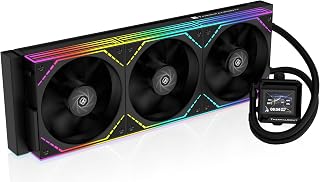
The 360mm radiator delivers exceptional heat dissipation for high-performance CPUs that demand serious cooling headroom. Its removable 2.73-inch IPS LCD screen with 320×320 resolution adds visual flair and real-time monitoring without compromising function. With 2000 RPM fans and support for both Intel 1851/1700 and AM5 sockets, it handles modern processors while giving you customization options most budget AIOs skip.
Pros
- 360mm radiator with 70.84 CFM airflow handles demanding CPUs effectively
- 2.73-inch LCD with 450 NITS brightness displays custom graphics and real-time monitoring
- Low 29.8 dBA pump noise remains unobtrusive during typical operation
- Silicone corner pads reduce fan vibration and operating noise
Cons
- Installation complexity requires careful attention to socket-specific mounting and LCD software setup
- 360mm radiator demands spacious case with proper mounting clearance
The triple-fan configuration with 2000 RPM high-speed fans and 70.84 CFM airflow handles demanding processors with authority, while the water pump maintains a low 29.8 dBA noise profile that stays unobtrusive during typical workloads. What separates this cooler from basic alternatives is the 450 NITS brightness LCD screen with 320x320 resolution and true 24-bit color support, letting you monitor real-time system parameters or display custom graphics without external hardware. The fully blackened nano-painted 397x120x52mm radiator fits standard 360mm mounting locations, and silicone corner pads on the fans reduce vibration noise during operation. Polymer water pipes resist permeation, and the 69x69x60mm cold block provides substantial contact area for heat transfer. DC 12V pump operation with PWM temperature control adjusts fan speeds responsively based on thermal demand. Socket support spans AMD AM4/AM5 and Intel LGA1150 through LGA1851, covering multiple generations. The tradeoff is installation complexity requiring careful attention to socket-specific mounting fasteners and LCD software configuration, adding setup steps compared to plug-and-play alternatives.
Cooling System: All-in-One Liquid Cooler with 360mm Radiator
Radiator Dimensions: 397 x 120 x 52 mm
Cold Block Dimensions: 69 x 69 x 60 mm
Power Requirements: 12V DC, 4-Pin connector
Fan Speed: 2000 RPM (plus or minus 10 percent)
Noise Level: Less than or equal to 29.8 dBA
Air Flow: 70.84 CFM
Display: 2.73-inch IPS LCD, 320 x 320 resolution, 450 NITS brightness, 24-bit true color
Socket Compatibility: AMD AM4/AM5, Intel LGA 1150/1151/1155/1156/1200/2011/2066/1700/1851
Fans: Three 120mm PWM pressure fans with silicone corner pads
Materials: Metal, Plastic
Weight: 100 g
Package Contents: CPU water cooler with mounting hardware for all supported platforms
This cooler targets enthusiasts and content creators running high-end CPUs who want both aggressive thermal performance and personalized system aesthetics through the customizable LCD display. It suits builders comfortable with multi-step installations and software configuration who appreciate monitoring real-time parameters or displaying custom graphics. The 360mm radiator works best in full tower or spacious mid-tower cases with proper mounting clearance. Skip it if you want simple plug-and-play installation without software setup, or if your case lacks 360mm radiator mounting support. Also avoid it if you prefer minimalist aesthetics without display elements or need the quietest possible operation at all times.

The 360mm radiator handles heat-dense CPUs without throttling, making it a solid choice for gaming rigs or workstations running sustained loads. At 31.9 dB, it stays reasonably quiet under load. The RGB lighting and clean aesthetic fit well in windowed builds where looks matter as much as thermals.
Pros
- Single-frame fan assembly simplifies installation and cable management
- Quiet 31.9 dB operation during normal use
- Works without software for basic operation
- 5-year warranty provides long-term confidence
Cons
- Performance gains over quality air coolers can be marginal for extreme overclockers
- Full RGB control requires NZXT CAM software ecosystem
The NZXT Kraken Core 360 RGB offers a straightforward path into liquid cooling for builders working within a budget. Its 360mm radiator handles heat from modern CPUs without requiring software dependencies for basic operation, and the 3,100 RPM pump maintains consistent thermal performance across gaming and productivity workloads. The 31.9 dB noise profile stays quiet during typical use, and direct motherboard connectivity means you can run it without NZXT's CAM software if you prefer. RGB lighting adds visual polish, though full customization does require CAM. The 12-volt 4-pin configuration ensures broad compatibility across Intel and AMD platforms. While extreme overclockers might push beyond what this cooler offers, it delivers reliable thermal management for mainstream builds. The 5-year warranty backs the investment, making it a sensible choice when balancing performance, ease of installation, and cost.
Cooling Method: All-in-one liquid cooling
Radiator Size: 360mm
Pump Speed: 3,100 RPM maximum
Noise Level: 31.9 dB
Air Flow: 75.05 CFM
Power Connector: 4-Pin PWM
Voltage: 12V DC
Power Consumption: 12.12 watts
Dimensions: 15.62 inches L x 4.72 inches W x 5.7 inches H
Weight: 1.78 kg
Warranty: 5 years manufacturer
Included: 360mm AIO cooler with pre-installed fans
The 2-inch LCD screen lets you monitor temps at a glance without opening monitoring software, which is helpful when you're pushing a modern CPU hard and want real-time feedback. The 28.2 dB noise level keeps things quiet during gaming or rendering sessions. Its 360mm radiator provides serious cooling capacity for high-end chips that demand more than air can deliver.
Pros
- 2-inch LCD screen supports custom images and system monitoring
- Daisy-chain ARGB fans reduce cable routing complexity significantly
- Quiet 28.2 dB operation with reliable thermal performance
- Straightforward installation with quality construction
Cons
- LCD customization software consumes CPU resources during operation
- Screen functionality requires motherboard USB connectivity
Thermalright's FW360 SE ARGB V2 combines capable thermal performance with visual customization through its 2-inch LCD pump display. The 360mm aluminum radiator and 3000 RPM pump handle heat from demanding CPUs effectively, with users reporting comfortable temperatures on high-end Ryzen processors during gaming and streaming. Three daisy-chain ARGB fans spin up to 2000 RPM while maintaining a 28.2 dB noise profile, and the daisy-chain architecture deserves attention because it dramatically simplifies cable routing without sacrificing airflow. The LCD screen displays system status, custom images, or animated GIFs through Thermalright's software, adding personality to your build. Installation is straightforward, and the overall construction quality meets expectations for this segment. The 68.9 CFM airflow capacity keeps modern CPUs in check across gaming and productivity workloads, and the vibrant RGB lighting integrates well with most builds. Where this cooler stands out in the budget AIO space is delivering both reliable cooling fundamentals and customizable aesthetics without asking you to compromise on either front. The 4-pin 12-volt configuration ensures compatibility across Intel and AMD platforms.
Cooling System: 360mm All-in-One Liquid CPU Cooler
Display: 2-inch LCD, 320x320 resolution with custom image and GIF support
Pump: 3000 RPM (plus or minus 10%), 67x68x59mm dimensions
Radiator: 397x120x27mm aluminum construction with 400mm tube length
Fans: 3x TL-M12Q 120mm PWM ARGB fans, up to 2000 RPM, 68.9 CFM airflow, 2.21 mmH2O pressure, 28.2 dB noise level
Power: 4-pin PWM connector, 5V 3-pin ARGB connector, 3 watts
Compatibility: AMD AM5, AM4; Intel LGA1851, LGA1700, LGA1200, LGA115X
Warranty: 5 years manufacturer coverage
Weight: 200 grams; Dimensions: 15.63L x 2.09W x 4.72H inches

The 240mm radiator provides solid cooling capacity for mid-range builds without breaking your budget. Its 20 dB noise level ensures whisper-quiet operation during gaming or intensive workloads, making it ideal when performance and peace matter equally. The direct motherboard connection simplifies installation and cable management, while daisy-chain capability keeps your build tidy if you're adding multiple RGB components.
Pros
- Handles high-performance CPUs like Ryzen 9950X with consistent thermal control
- Whisper-quiet 20 dBA pump operation at baseline
- Daisy-chain connections reduce cable clutter and motherboard header usage
- Direct PWM control through BIOS without proprietary software
Cons
- Pump and fan noise increases noticeably under heavy gaming loads
- 240mm radiator may not fit smaller form factor cases
The 240mm radiator paired with RS120 fans handles modern high-performance processors like the Ryzen 9950X and 5900X with consistent thermal control, keeping chips well within safe operating ranges during gaming sessions and sustained workloads. The pump runs at a whisper-quiet 20 dBA baseline, and the convex copper cold plate with pre-applied thermal paste simplifies installation while optimizing heat transfer from your CPU's integrated heat spreader. Direct 4-pin PWM control through your motherboard BIOS eliminates proprietary software dependencies, a feature enthusiasts appreciate for long-term stability. The daisy-chain connection system reduces cable clutter and conserves fan headers. Compatible with Intel LGA1851, LGA1700, and AMD AM5/AM4 sockets, this cooler covers current and recent-generation platforms. Build quality reflects CORSAIR's reliable metal and plastic construction standards, and the design prioritizes thermal efficiency over visual flair. Where it falters is under heavy gaming loads, when pump and fan noise climbs noticeably beyond the rated spec. The 240mm footprint also demands careful case compatibility checking for smaller builds.
Cooling Solution: Liquid (AIO), 240mm radiator
Pump Noise Level: 20 dBA
Power Connector: 4-pin PWM
Voltage: 12V DC
Power Consumption: 1.5W
Fans Included: 2x RS120 fans
Material: Metal, Plastic
Weight: 2.7 lbs
Warranty: 5-year manufacturer warranty
Model: CW-9060088-WW
Socket Compatibility: Intel LGA1851, LGA1700, AMD AM5, AM4
Cold Plate: Slightly convex with pre-applied thermal paste
Fan Bearing: Magnetic Dome
Radiator Technology: AirGuide airflow optimization

Cooler Master MasterLiquid ML240L RGB V2 240mm AIO
The 240mm radiator offers a good balance of cooling power and case compatibility, fitting mid-towers that can't accommodate larger AIOs. Its dual-chamber pump design improves coolant flow for better heat transfer. At 30 dB, it runs quietly enough for office work while still handling gaming loads on mainstream CPUs effectively.
Pros
- 3rd gen dual chamber pump improves cooling efficiency
- Quiet operation under 30dB during typical loads
- Industrial EPDM sealing resists leaks
- Pre-applied thermal paste simplifies installation
Cons
- 240mm radiator limits headroom for hot CPUs
- Requires both PWM and RGB headers on motherboard
Its 3rd Generation Dual Chamber Pump works alongside an enlarged radiator and two SickleFlow 120mm RGB fans to keep modern CPUs from thermal throttling during extended workloads. Users consistently see temperatures drop 5 to 10 degrees compared to stock coolers during gaming sessions, all while noise stays under 30dB. The industrial-grade EPDM sealing material and aluminum radiator construction provide durability you'd expect from higher-priced units. Pre-applied thermal paste simplifies installation, and the RGB lighting syncs smoothly with major motherboard ecosystems including ASUS Aura, MSI Dragon Center, and Gigabyte RGB Fusion. Socket compatibility covers both modern AMD Ryzen AM5/AM4 and Intel LGA1700/1200 platforms, making it a versatile option for current builds. While the 240mm radiator won't satisfy extreme overclockers or users with particularly hot-running chips, it hits the sweet spot for mainstream gaming and productivity rigs where consistent thermal performance matters more than breaking records.
Core Specs: 240mm radiator with dual 120mm SickleFlow RGB fans, 3rd Gen Dual Chamber Pump, 30dB noise level, 1800 RPM maximum fan speed, 62 CFM airflow capacity.
Power: 4-pin connector, 12V supply, 260W maximum wattage.
Compatibility: AMD AM5, AM4, AM3+, AM3, AM2+, AM2, FM2+, FM2, FM1 and Intel LGA1700, LGA1200, LGA1151, LGA1150, LGA1155, LGA1156, LGA1366, LGA2066, LGA2011-v3, LGA2011 sockets. Requires 2x 120mm fan mounting space on radiator area.
Materials: Industrial-grade EPDM seals, aluminum radiator, copper pump base. Weight: 1340g. Warranty: 2 years from Cooler Master.
This cooler suits builders assembling mid-range gaming PCs or workstations with Ryzen 5000/7000 series or Intel 12th/13th gen processors who want better thermals than air cooling provides without overspending. It's ideal if you value RGB aesthetics and have a modern motherboard with proper PWM and RGB headers. Skip this if you're planning aggressive overclocking, running particularly hot CPUs that demand 280mm or 360mm radiators, or building in older systems lacking the necessary motherboard headers for full functionality.

With a maximum fan speed of 3000 rpm, this cooler can ramp up aggressively when you need extra headroom during overclocking or heavy multitasking. The 360mm radiator spreads heat across a large surface area, keeping temperatures in check on power-hungry CPUs. The A-RGB lighting adds visual flair without compromising cooling performance.
Pros
- Integrated VRM fan prevents motherboard thermal throttling
- Offset mounting targets CPU hotspots for better cooling
- P12 PRO fans balance quiet operation with high airflow capacity
- Copper cold plate and quality construction at competitive cost
Cons
- Mounting frame requires careful alignment during installation
- Requires manual fan curve tuning to minimize noise out of the box
ARCTIC's Liquid Freezer III Pro 360 brings enthusiast-grade cooling within reach of budget-conscious builders through thoughtful engineering rather than flashy features. The integrated VRM fan actively cools motherboard voltage regulators, preventing thermal throttling during sustained loads and extending stability in ways most AIOs ignore. Offset mounting shifts the copper cold plate toward CPU hotspots, and real-world results show temperatures holding steady in the 70-80C range even with high-end processors under stress. The P12 PRO fans deliver 77 CFM airflow while running quieter at lower speeds than competing designs, and the higher 3000 RPM ceiling provides headroom when you need it. Cable integration reduces visible clutter, and the radiator supports both traditional 3-wire and simplified single-wire setups for installation flexibility. The build quality reflects ARCTIC's reputation with solid materials and quality hose sheathing. RGB lighting remains understated and integrates cleanly into most builds without dominating the aesthetic. This cooler prioritizes thermal performance and system stability over gimmicks, making it ideal for users who care more about what happens inside their case than what appears on a display.
Cooling Specifications: Liquid cooling system with 360mm radiator, 3x ARCTIC P12 PRO fans (3000 RPM max, 77 CFM airflow). Integrated PWM-controlled VRM fan for voltage converter cooling.
Compatibility: Intel LGA1851, LGA1700. AMD platforms with native offset mounting. Requires appropriate mounting hardware for your CPU socket.
Dimensions: 15.7 inches L x 4.7 inches W x 2.9 inches H. Weight 2020g. Includes cable management integration for single visible motherboard connection.
Power & Warranty: 4-pin connector, 12V, 3.96W typical operation. 6-year manufacturer warranty. All connections PWM-enabled for fan curve customization.
This cooler targets performance enthusiasts and gamers running high-end CPUs who need serious thermal capacity without flagship pricing. It excels for builders who value motherboard VRM cooling and are comfortable tuning fan curves to optimize noise levels. Skip this if you want plug-and-play simplicity or prefer tool-free mounting systems, as installation requires careful alignment and the longer cables demand attention during routing. Also not ideal if you avoid any post-installation configuration.
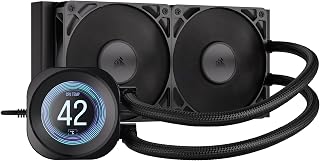
The integrated 2.1-inch IPS LCD screen transforms system monitoring into a visual centerpiece, displaying temps and custom images without separate hardware. Its 20 dB noise profile keeps distractions minimal during demanding tasks, while the 240mm configuration balances cooling power with case compatibility. The daisy-chain feature streamlines cable routing, making this a smart pick when you want monitoring and performance without clutter.
Pros
- 2.1-inch IPS LCD displays live temperatures, GIFs, or custom images through iCUE
- Maintains around 40°C CPU temps during demanding AAA gaming
- 20 dBA pump runs below ambient noise floor in most rooms
- Pre-applied thermal paste and daisy-chain connections simplify installation
Cons
- Rigid tube routing complicates positioning in compact or densely-packed builds
- LCD features require iCUE software configuration
Real-world performance shows CPU temperatures around 40 degrees Celsius during demanding AAA gaming, with stable thermals even on high-end chips under sustained workloads. The 240mm aluminum radiator paired with dual high-pressure RS120 fans delivers consistent cooling capacity, while the 20 dBA pump operates below the ambient noise floor of most rooms for genuinely quiet baseline performance. The copper cold plate features a slightly convex design that maximizes contact with modern CPU heat spreaders, and pre-applied thermal paste eliminates installation guesswork. Where this cooler distinguishes itself is the LCD screen, which displays live CPU temperatures, animated GIFs, or custom images through CORSAIR's iCUE software for functional monitoring or personalized aesthetics. Daisy-chain fan connections and PWM headers simplify wiring, and 400mm sleeved tubing with low-permeation rubber prevents coolant degradation over the 5-year warranty period. Dimensions of 276x120x27mm fit most standard tower cases. Socket compatibility covers Intel LGA1851, LGA1700, and AMD AM5/AM4 platforms. The main limitation is somewhat rigid tube routing that complicates positioning in compact or densely-packed builds.
Cooling Performance: 240mm radiator, copper cold plate, pump operates at 20 dBA
Fans: 2x RS120 fans, 120 x 25mm, 0-2100 RPM, 13.3-72.8 CFM, 0.20-4.15 mm-H2O static pressure, 10-36 dB(A) noise range
Compatibility: Intel LGA1851, LGA1700, AMD AM5, AM4 sockets
Tubing: 400mm, black sleeved, low-permeation rubber
Connector: 4-pin PWM
Dimensions: 276mm L x 120mm W x 27mm H
Weight: 2.7 lbs
Warranty: 5 years
This cooler suits builders who want balanced thermal performance and visual customization through the IPS LCD display, particularly those assembling mid-range gaming or workstation PCs with modern Intel or AMD processors. It works well for first-time AIO installers thanks to straightforward setup with pre-applied thermal paste and simplified wiring. The quiet 20 dBA pump operation appeals to users sensitive to system noise. Skip it if you're building in a compact case where rigid tube routing creates clearance challenges, or if you prefer minimal software interaction since the LCD features require iCUE configuration. Also avoid it if you need aggressive cooling for extreme overclocking beyond what a 240mm radiator provides.
Buying Guide: What to Consider Before You Buy
Radiator Size and Cooling Capacity
Radiator dimensions directly determine thermal headroom. A 240mm AIO handles mid-range CPUs comfortably, while 360mm radiators provide the surface area needed for high-core-count processors or overclocking.
The Thermalright FW PRO 360 ARGB Black CPU AIO and NZXT Kraken Core 360 RGB – 360mm AIO CPU Cooler both use 360mm radiators with triple-fan configurations, delivering exceptional heat dissipation for demanding workloads. Smaller cases may require 240mm options like the CoolerMaster MasterLiquid ML240L RGB V2, which still provides solid cooling for mainstream builds.
Pump Performance and Noise Levels
Pump speed affects coolant circulation and operational noise. High-RPM pumps move fluid efficiently but can generate audible vibration, while optimized designs balance flow rate with acoustics.
The CORSAIR Nautilus 240 RS Liquid CPU Cooler operates at just 20 dBA, making it ideal for quiet workstations. The Thermalright FW PRO 360 ARGB Black CPU AIO runs its pump at 3,000 RPM while maintaining low noise output through vibration dampening and refined impeller design.
Socket Compatibility and Installation
Modern coolers support multiple CPU platforms, but mounting hardware varies. Verify that your chosen cooler includes brackets for your specific socket before purchasing.
All seven coolers reviewed support Intel LGA 1700 and AMD AM5, the current mainstream sockets. The ARCTIC Liquid Freezer III Pro 360 A-RGB includes a contact frame for LGA 1700 and LGA 1851, which optimizes pressure distribution and improves heat transfer on Intel platforms. For builders working with cutting-edge components, our roundup of the best DDR5 7200 RAM covers high-speed memory options that pair well with premium cooling.
RGB Lighting and LCD Displays
Aesthetic features range from addressable RGB fans to full-color LCD screens. These add visual appeal and system monitoring but don’t directly impact thermal performance.
The CORSAIR Nautilus 240 RS LCD Liquid CPU Cooler features a 2.1-inch IPS display that shows temperatures, custom images, and animated GIFs through iCUE software. The Thermalright FW360 SE ARGB V2 360mm AIO Liquid CPU offers a similar 2-inch LCD with 320×320 resolution and Thermalright’s customization software. Both coolers also integrate ARGB lighting on fans for coordinated visual effects.
Cable Management and Daisy-Chaining
Multiple fans create cable clutter unless manufacturers include daisy-chain connections or integrated wiring. Cleaner routing improves airflow and simplifies builds.
The NZXT Kraken Core 360 RGB – 360mm AIO CPU Cooler uses a single-frame design that consolidates three fans into one unit, reducing screws and cables. The ARCTIC Liquid Freezer III Pro 360 A-RGB integrates PWM cables into the hose sheathing, leaving just one visible cable to the motherboard. If you’re planning a clean build with strong airflow, explore our guide to the best PC cases for optimal component layout.
Final Thoughts
Each cooler in this lineup delivers reliable thermal performance for modern CPUs without stretching your budget. If you want exceptional cooling capacity with a customizable LCD display, the Thermalright FW PRO 360 ARGB Black offers premium features at an accessible price point. For builders prioritizing whisper-quiet operation and straightforward installation, the CORSAIR Nautilus 240 RS combines efficient cooling with minimal noise and direct motherboard connectivity.
Frequently Asked Questions
Do 360mm AIO coolers fit in mid-tower cases?
Most modern mid-tower cases support 360mm radiators in the front or top positions, but always verify clearance specifications before purchasing. Check that your case has mounting points for three 120mm fans in a row and sufficient depth to accommodate the radiator thickness plus fans. Some compact mid-towers only support 240mm or 280mm configurations.
How often should I replace AIO coolant?
Sealed all-in-one liquid coolers require no maintenance or refilling during their operational lifespan, which typically ranges from five to seven years. Modern AIOs use low-permeation tubing and long-life coolant that resists evaporation. When performance degrades noticeably or the pump fails, replace the entire unit rather than attempting repairs.
Can these coolers handle overclocked CPUs in 2026?
The 360mm coolers reviewed here provide sufficient thermal headroom for moderate to aggressive overclocking on mainstream platforms. A Ryzen 9 or Core i9 with elevated voltages benefits most from triple-fan radiators with high static pressure fans. If you’re building around Intel’s latest chips, pair your cooling solution with a quality foundation from our best budget motherboards for 270K Plus builds guide.
What’s the difference between PWM and DC fan control?
PWM fans use pulse-width modulation to adjust speed precisely across their entire RPM range, allowing fine-tuned cooling curves and quieter operation at idle. DC voltage control varies power to change speed but offers less granular adjustment. All coolers in this guide use PWM fans, giving you better control through BIOS or software for balanced performance and acoustics.





Write Your Review
No reviews yet. Be the first to share your experience!