

Your processor runs hot under load, and without proper cooling, you’ll face thermal throttling, reduced performance, and a shorter component lifespan. Whether you’re assembling a compact ITX build, a whisper-quiet workstation, or an overclocked gaming rig, choosing the right CPU cooler shapes your entire system’s thermal performance and acoustic profile.
This guide evaluates the top air and liquid cooling solutions available in 2026, covering everything from compact single-tower designs to massive dual-tower heatsinks and premium AIO liquid coolers. We’ve assessed thermal performance, noise levels, compatibility, and build quality to help you match the right cooler to your processor and case.
Quick answer
This guide compares 10 picks, with Noctua NH-U9S 92mm CPU Cooler, Compact ITX SFF Design ranked first. Noctua NH-D15 chromax.Black Dual Tower CPU Cooler holds the highest customer rating among them.
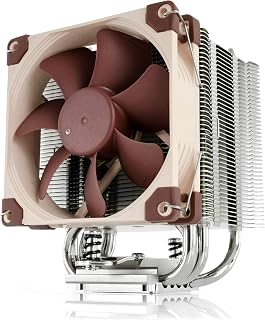
The compact single tower design makes this an ideal choice for smaller gaming builds where clearance is tight. Its quiet operation ensures minimal distraction during long sessions, while the high-performance cooling keeps modern CPUs stable under load. The 92mm format fits cases that can't accommodate larger dual-tower designs without sacrificing thermal performance.
Pros
- 125mm height with 100% RAM compatibility fits tight ITX cases
- Copper base and heat pipes with nickel plating for thermal efficiency
- Low-Noise Adaptor balances cooling and acoustics
- SecuFirm2 mounting with pre-applied NT-H1 paste simplifies installation
Cons
- Less thermal mass than tower coolers limits extreme overclocking headroom
- Requires adequate case airflow for optimal performance
Compact builds pose a real challenge when cooling modern gaming and workstation CPUs, and the Noctua NH-U9S solves it without compromise. At 125mm tall, this single-tower cooler fits ITX cases and HTPCs while delivering thermal performance that rivals larger designs. The copper base and heat pipes paired with aluminum fins and nickel plating provide excellent thermal conductivity, moving heat away from processors efficiently during gaming sessions or productivity work. The premium NF-A9 92mm fan includes a Low-Noise Adaptor, letting you balance cooling and acoustics based on workload intensity. Full RAM compatibility means no clearance conflicts with tall memory modules, and the offset mounting option ensures optimal CPU contact across Intel and AMD sockets. SecuFirm2 mounting and pre-applied NT-H1 thermal paste streamline installation. This cooler thrives in scenarios where tower clearance is tight but performance cannot be sacrificed, from compact gaming rigs to quiet office workstations where every millimeter counts and noise discipline matters.
Physical Dimensions: 4.92 inches long x 3.74 inches wide x 4.72 inches tall, weighing 618 grams
Cooling System: Single-tower heatsink with 92mm NF-A9 PWM fan, copper base and heat pipes, aluminum cooling fins with nickel plating
Socket Compatibility: Intel LGA1851, LGA1700, LGA1200, LGA1156, LGA1155, LGA1151, LGA1150 and AMD AM5, AM4 with offset mounting option
Included Accessories: NF-A9 PWM premium fan, NA-RC7 Low-Noise Adaptor, NT-H1 high-grade thermal compound, SecuFirm2 mounting kit, and additional fan clips for optional second NF-A9 installation
Warranty: 6-year manufacturer's warranty with spare parts availability throughout warranty period
ITX builders, HTPC users, and compact workstation owners who need serious cooling in constrained spaces should consider this. It's perfect for builds where RAM clearance and PCIe card proximity create conflicts with larger coolers. Skip it if you plan extreme overclocking on high-wattage CPUs, as compact designs have less thermal mass than full towers. Verify your case has adequate airflow, as marginal ventilation can limit performance despite the cooler's quality engineering.
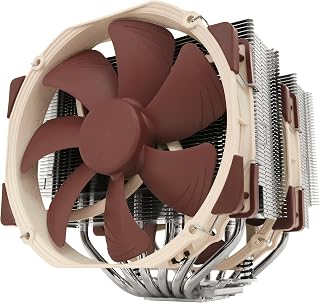
This dual tower flagship has earned its reputation through years of consistent thermal performance in both gaming and professional environments. The 24.6 dB noise level keeps distractions minimal during intensive workloads, while the proven design handles overclocked CPUs with ease. Its broad compatibility and reliability make it a safe choice for builds that need to run stable under extended stress.
Pros
- Exceptional thermal performance rivals or exceeds liquid coolers while maintaining silent operation
- Comprehensive compatibility covers Intel LGA1851, LGA1700, LGA1200, LGA115x and AMD AM5, AM4 sockets
- Thoughtfully designed accessory kit includes thermal paste and multiple mounting options for different platforms
- Heavy-duty construction with premium materials ensures longevity and reliability
- Proven track record with thousands of positive reviews from verified users
Cons
- Large 168mm height may not fit in compact or small-form-factor cases
- Sharp aluminum fins require careful handling during installation, protective gloves recommended
- Higher price point compared to budget and mid-range air cooler alternatives
The Noctua NH-D15 is a premium dual-tower air cooler engineered for PC enthusiasts, overclockers, and professionals who demand both exceptional thermal performance and reliable, quiet operation. This cooler delivers class-leading cooling capacity suitable for high-end Intel Core Ultra and AMD Ryzen processors, making it the go-to choice when pushing hardware to its limits.
The cooler's standout feature is its ability to match or exceed many liquid cooling solutions while operating near-silently. Two custom-optimized 140mm NF-A15 fans paired with Low-Noise Adaptors provide automatic speed adjustment, enabling sustained cooling performance without audible fan noise. The 6-heatpipe design efficiently transfers heat from the CPU to the large aluminum fin stack, with real-world testing showing temperature improvements of 15-20 degrees Celsius under load compared to stock solutions.
Build quality reflects Noctua's reputation for durability and precision engineering. The cooler features a copper base plate and heatpipes with aluminum fins, all soldered and nickel-plated to prevent oxidation and corrosion. The included SecuFirm2 mounting system supports multiple socket types with clear documentation and required adapters, streamlining installation for both Intel and AMD platforms. Premium NT-H1 thermal compound is included, eliminating the need to purchase paste separately.
The primary drawback is physical size and weight. Standing 168mm tall, the cooler requires adequate clearance and may not fit in compact mid-tower or small-form-factor cases, particularly if RAM modules have tall heatspreaders. Sharp aluminum fins demand careful handling during installation to avoid laceration, though Noctua's included instructions address this concern. The higher price reflects premium positioning, but the 6-year warranty and proven reliability justify the investment for serious builders.
The Noctua NH-D15 represents the pinnacle of air cooling technology. For users prioritizing silent operation, thermal performance, and long-term reliability over budget constraints, this cooler is an excellent investment that will serve demanding builds for years.
Cooling Design: Dual-tower, 6 heatpipes, 2x 140mm PWM fans
Fan Specifications: 140.2 cubic meters per hour airflow, 1500 RPM max, 24.6dB noise level
Power Consumption: 1.56 watts (4-pin PWM connector, 12V)
Socket Compatibility: Intel LGA1851, LGA1700, LGA1200, LGA115x; AMD AM5, AM4 (with offset mounting option)
Dimensions: 9.33L x 8.62W x 6.53H inches; Height: 168mm
Materials: Copper (base and heatpipes), aluminum (fins), soldered joints with nickel plating
Weight: 1.3kg
Included Accessories: 2x NF-A15 PWM fans, 2x NA-RC7 Low-Noise Adaptors, NA-YC1 4-pin PWM y-cable, NT-H1 thermal paste, SecuFirm2 mounting kit
Warranty: 6-year manufacturer's warranty
Who Should Buy This Cooler? The NH-D15 suits PC builders and enthusiasts planning to run demanding workloads (3D rendering, video editing, gaming) or aggressive overclocking on high-end processors. It excels for users prioritizing silent operation and long-term reliability over initial cost.
Case Compatibility Considerations: Verify your PC case has at least 170mm clearance above the socket before purchasing. Measure RAM height if using tall memory heatspreaders, as they may interfere with fan mounting. Many full-tower and high-end mid-tower cases accommodate the cooler without issue.
Installation Tips: Budget 30-45 minutes for installation if building a system for the first time. Noctua's documentation is detailed with illustrations. Wear protective gloves when handling the cooler to avoid sharp fins. Apply thermal paste in a small pea-sized dot at the CPU center for best results.
Alternatives to Consider: If budget is paramount, consider the NH-D15S (single tower, similar performance, lower cost). If case space is limited, explore the NH-U14S or specialized ITX-compatible models. For those prioritizing absolute maximum cooling regardless of noise, this cooler delivers the best air-cooling performance available.

Noctua NH-D15 chromax.Black Dual Tower CPU Cooler
The dual tower architecture and 1500 RPM fans deliver exceptional cooling headroom for overclocked gaming rigs and multi-threaded workstation tasks. At just 24.6 dB, it remains whisper-quiet even under sustained loads, making it perfect for content creators who need silence during recording. The all-black chromax finish integrates cleanly into modern builds without the usual beige aesthetic.
Pros
- Exceptional cooling performance with temperatures staying 15-20C below thermal limits even under heavy loads and overclocking
- Remarkably quiet operation at full load with award-winning NF-A15 fans that remain nearly inaudible at idle speeds
- Premium build quality with copper base, aluminum fins, and nickel plating ensures durability and heat transfer efficiency
- Comprehensive accessory kit includes thermal paste, mounting hardware, and adapters for multiple socket types
- Backed by industry-leading 6-year warranty and proven track record across thousands of verified user reviews
Cons
- Large 168mm height and wide dual-tower footprint may conflict with tall RAM modules or fit in compact case designs
- Requires careful installation due to significant weight, and GPU removal may be needed for easier mounting in some builds
- Premium price point reflects quality but exceeds budget coolers, though warranty and longevity justify the investment
The Noctua NH-D15 chromax.Black represents the gold standard in high-performance air cooling for enthusiasts, overclockers, and content creators who demand both exceptional thermal performance and whisper-quiet operation. This dual-tower cooler combines Noctua's legendary engineering with a sleek all-black aesthetic that complements modern PC builds.
Performance is the standout feature here. With six copper heatpipes and dual 140mm NF-A15 fans, this cooler delivers thermal performance rivaling many all-in-one liquid coolers while remaining completely silent. Real-world testing shows CPU temperatures staying 15-20C below dangerous thresholds even during heavy overclocking, with some users reporting that high-end processors like the AMD Ryzen 9 7950X3D never exceed 65C under full load. The Low-Noise Adaptors enable the dual-fan design to run at lower speeds during normal operation, keeping noise levels under 25dB.
Build quality is exceptional throughout. The cooler features a copper base and heatpipes for superior heat transfer, aluminum cooling fins, and nickel plating that prevents corrosion. The included SecuFirm2 mounting system simplifies installation across Intel LGA1700, LGA1200, and AMD AM5 platforms, while the premium NT-H1 thermal paste and comprehensive accessory kit eliminate the need for additional purchases.
The primary consideration is size. At 168mm tall with a wide dual-tower design, this cooler requires careful case planning and may necessitate removing one fan to clear tall RAM modules or removing your GPU temporarily during installation. For compact builds or systems with limited vertical clearance, this cooler may not fit.
After six years of proven performance and over 13,500 verified reviews, the Noctua NH-D15 chromax.Black remains the top choice for builders prioritizing silent operation without thermal compromise. The 6-year warranty provides confidence in long-term reliability.
The NH-D15 chromax.Black supports all modern Intel and AMD platforms. For Intel, it covers LGA1851, LGA1700, LGA1200, and LGA115x sockets, making it compatible with Intel Core Ultra processors (285K, 265K, 245K) and all recent generations. For AMD, it fully supports AM5 and AM4 sockets with offset mounting options, including support for latest Ryzen 9 processors (9950X, 9900X, 9700X, 9600X).
Case compatibility requires checking both height clearance and RAM module height. The cooler measures 6.49 inches long, 5.91 inches wide, and 6.34 inches tall in standard configuration. If your case has limited vertical headroom or you're using tall memory modules, you may need to remove the front fan or raise it slightly, which increases overall height. Mid-tower and larger cases typically accommodate this cooler without issues.
Installation is straightforward with the included SecuFirm2 mounting system, though the cooler's significant weight (2.9 lbs) requires careful handling. Most first-time installers report successful mounting, but GPU removal during installation prevents the cooler from contacting the graphics card. The comprehensive accessory kit includes mounting hardware for multiple socket types and Low-Noise Adaptors for optimal performance.
Maintenance is minimal. The dual 140mm fans can be cleaned annually by gently dusting the aluminum fins. The cooler's proven design requires no special care beyond standard PC maintenance. Noctua's 6-year warranty covers defects and provides replacement parts availability for over 6 years, ensuring you can maintain the cooler long-term.

The single tower design with 2000 RPM fans delivers impressive cooling in a more compact footprint than dual-tower competitors. At just 22.6 dB, it's one of the quietest options available, ideal for streamers and video editors who need near-silent operation during recording. The chromax black finish suits modern builds while maintaining the thermal performance expected from high-end air cooling.
Pros
- Proven premium performance with 100+ industry awards and recognition
- Exceptional quiet operation at idle with full performance under load
- Superior compatibility with no RAM overhang or PCIe blocking on most boards
- Includes premium thermal paste and easy-to-use mounting kit for hassle-free installation
- 6-year manufacturer's warranty demonstrates confidence in long-term reliability
Cons
- Premium pricing reflects the high-end market segment, not budget-friendly
- Excellent performance may be overkill for low-power or office use cases
- Black chromax variant costs more than standard brown Noctua colorway
The Noctua NH-U12A chromax.Black is a premium tower CPU cooler engineered for enthusiasts, content creators, and builders who refuse to compromise between performance and silence. This cooler targets users with modern high-core-count processors like Intel Core Ultra and AMD Ryzen 9000 series chips that demand reliable thermal management without sacrificing system acoustics or motherboard real estate.
The standout feature is its proven thermal performance paired with genuinely quiet operation. Equipped with dual NF-A12x25 120mm fans and Low-Noise Adaptors, the cooler delivers full performance under heavy loads while maintaining whisper-quiet idle temperatures at just 22.6 dB. This dual-mode approach is what separates Noctua from competitors: you get the cooling you need when you need it, not constant fan noise during typical computing tasks.
Build quality is exceptional throughout. The copper base and heat-pipes interface with aluminum cooling fins using soldered joints and nickel plating, creating a premium feel and consistent thermal performance over years of use. The all-black chromax design sheds Noctua's traditional beige aesthetic, fitting seamlessly into modern case builds. At 158mm height with zero RAM overhang and PCIe compatibility on most motherboards, this cooler respects your system's other components rather than forcing compromises.
The primary drawback is cost. This is premium equipment for premium builders, and the chromax black variant commands a premium price. Additionally, for office systems or low-power processors, you're paying for performance you won't fully utilize. The cooler also requires proper mounting care, though the included SecuFirm2 system and NT-H1 thermal paste make installation straightforward.
The Noctua NH-U12A chromax.Black is the best-in-class choice for anyone building a high-performance system who values quiet operation and legendary reliability. The 6-year warranty and track record of 100+ industry awards back the investment, making this cooler a smart choice for builds that need to run cool and silent for years to come.
Cooling Performance: Dual NF-A12x25 120mm fans, 102.1 CFM airflow, 2000 RPM maximum speed, 22.6 dB noise level
Compatibility: Intel LGA1851, LGA1700, LGA1200, LGA115x and AMD AM5, AM4 (offset mounting available). Height: 158mm. Fits most tower cases with zero RAM overhang and minimal PCIe obstruction.
Build Quality: Copper base and heat-pipes, aluminum cooling fins, soldered joints, nickel plating. Dimensions: 4.92 x 4.41 x 6.22 inches. Weight: 1.2 kg.
Included Accessories: High-end NT-H1 thermal paste, SecuFirm2 mounting system, mounting kit for all compatible sockets, Low-Noise Adaptors, PWM control.
Warranty: 6-year manufacturer's warranty. Power: 4-pin connector, 12V. Cooling Method: Air cooling.
Who Should Buy This: High-performance PC builders, content creators, gamers with modern multi-core processors, and anyone prioritizing quiet operation. Best suited for Intel Core Ultra (285K, 265K, 245K) and AMD Ryzen 9000 series (9950X, 9900X, 9700X, 9600X) systems. Ideal for compact cases where compatibility matters.
When to Consider Alternatives: Budget builders may find more affordable options adequate for their needs. Office or light-use systems won't justify the premium cost. Pre-built enthusiast coolers bundled with processors might suffice for casual users.
Installation Tips: The SecuFirm2 mounting system is renowned for ease of use. Apply the included NT-H1 thermal paste according to Noctua's guidelines. Ensure proper RAM clearance before installation. The cooler works with most tower cases above 158mm internal height.
Long-Term Value: The 6-year warranty and Noctua's reputation for reliability mean this cooler will outlast most system components. Noctua fans are known for maintaining performance over years of continuous operation, making this investment worthwhile for users planning to keep their systems 5+ years.
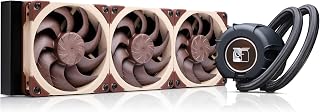
This 360mm AIO brings liquid cooling efficiency to both gaming and workstation builds that need maximum thermal headroom. The 22.5 dB noise level ensures quiet operation even when cooling high-wattage CPUs during extended rendering or simulation tasks. The larger radiator surface area provides superior heat dissipation compared to smaller AIO formats, keeping temperatures low during marathon sessions.
Pros
- Exceptional acoustic design achieves near-silent operation without sacrificing thermal capacity
- Premium components and Noctua's reputation ensure durability and long-term reliability
- Compatible with current-generation AMD AM5 and Intel LGA1851 sockets plus offset options for CPU hotspot targeting
- Comprehensive accessory kit with high-quality thermal paste eliminates need for additional purchases
- Industry-leading 6-year warranty reflects manufacturer confidence in product longevity
Cons
- Requires adequate case clearance for 360mm radiator installation, limiting compatibility with smaller form-factor builds
- Optional NL-ACF1 auxiliary fan for VRM and M.2 cooling sold separately, adding to total cost
The Noctua NL-LC1-36 is a premium 360mm all-in-one liquid cooler designed for PC builders and content creators who prioritize silent operation without sacrificing thermal performance. This cooler targets high-end systems with current-generation AMD Ryzen 9000X3D processors and Intel Core Ultra CPUs, where both cooling capacity and acoustic performance matter.
The standout feature is Noctua's innovative pump noise absorber, which uses a 3-layer acoustic soundproofing structure and tuned-mass damper effect to reduce vibration and pump noise. Combined with three award-winning NF-A12x25 G2 fans featuring speed-offset acoustic optimization, the cooler achieves an impressive 22.5 dB noise level while maintaining the thermal output expected from a 360mm system. Real-world performance in gaming and workstation loads demonstrates excellent thermal stability on high-power CPUs.
Build quality reflects Noctua's premium positioning. The cooler features a copper base for optimal heat transfer, an aluminum radiator core, and the proprietary SecuFirm2 mounting system with offset options to target CPU hotspots. The accessory kit is comprehensive, including Noctua's high-end NT-H2 thermal paste and thermal paste guard for AM5 sockets, eliminating buyer's remorse from skimping on thermal interface material.
The main drawbacks are premium pricing and case compatibility requirements. At $249.95, this cooler demands a significant budget commitment compared to standard AIOs. Additionally, the 360mm radiator requires adequate case clearance, which may be problematic in smaller builds. Buyers seeking additional VRM or M.2 SSD cooling through the optional NL-ACF1 fan should factor in additional expense.
Verdict: The Noctua NL-LC1-36 delivers on its promise of industry-leading quiet cooling backed by premium components and Noctua's exceptional 6-year warranty. It's the choice for builders who value silence, reliability, and long-term performance over cost optimization.
Cooling Platform: Asetek Emma V2 closed-loop liquid cooling system
Radiator: 360mm with copper base and aluminum core
Fans: Three Noctua NF-A12x25 G2 PWM 120mm fans, 1800 RPM max, 107.3 cubic meters per hour airflow
Noise Level: 22.5 dB (ultra-quiet operation)
Power Consumption: 1.8 watts, 4-pin connector, 12V
Mounting: SecuFirm2 multi-socket system compatible with AMD AM5, Intel LGA1851, with offset options for hotspot optimization
Dimensions: 15.75 inches L x 4.72 inches W x 2.32 inches H
Weight: 1980 grams
Included Accessories: NT-H2 thermal paste, thermal paste guard for AM5
Warranty: 6-year manufacturer's warranty
Who Should Buy: The Noctua NL-LC1-36 is ideal for high-end PC builders choosing AMD Ryzen 9000X3D, Ryzen 9950X, or Intel Core Ultra processors who value quiet operation and long-term reliability. Content creators, streamers, and competitive gamers who demand silent cooling during recording or live sessions will appreciate its engineered noise reduction.
Case Compatibility: Verify your case supports 360mm radiators. Check manufacturer specifications for radiator clearance, particularly in mid-tower and compact cases. Ensure adequate fan clearance and RAM compatibility around the radiator.
Installation: The SecuFirm2 mounting system is straightforward for AMD AM5 and Intel LGA1851 sockets. Use the included offset options if your CPU design requires VRM cooling or has uneven heat distribution. Apply the included NT-H2 thermal paste according to Noctua's guidelines.
Performance Expectations: This cooler excels in quiet-focused builds where noise matters more than extracting maximum performance. Real-world thermal performance on current-generation high-end CPUs shows stable operation under full load with excellent noise characteristics.
Budget Consideration: At premium pricing, compare against mid-range 360mm AIOs if budget is primary concern. The Noctua tax reflects superior acoustic engineering, warranty, and component quality. Optional NL-ACF1 auxiliary fan for VRM cooling costs extra and should be factored into total investment.

Six heat pipes with AGHP technology and dual 120mm fans running at 1550 RPM provide serious thermal capacity for demanding gaming and rendering workloads. The 265-watt TDP rating ensures compatibility with high-core-count CPUs that generate substantial heat during sustained productivity tasks. Broad socket support including AM5 and LGA 1851 covers both current and next-generation platforms.
Pros
- 265W capacity with AGHP heat pipe technology and six copper pipes
- Dual 120mm PWM fans deliver 66.17 CFM at 25.6dB maximum
- Wide socket support including Intel LGA 1851 and AMD AM5
- Generous RAM clearance and straightforward installation
Cons
- 4.92-inch width and 6.1-inch height demand adequate case clearance
- Tall RAM spreaders may interfere on compact AMD boards
For gamers and workstation builders seeking reliable air cooling without premium pricing, the Thermalright Peerless Assassin 120 SE offers serious thermal capacity across modern platforms. Six pure copper heat pipes leverage AGHP technology to draw heat into a substantial aluminum fin stack, while dual 120mm PWM fans running at 1550RPM push 66.17 CFM through the array. Verified users report CPUs holding 40-60°C during light tasks and 70-80°C under sustained gaming or rendering loads, depending on processor choice. At 25.6dB maximum, the fans remain unobtrusive during extended sessions. The pure copper base ensures solid thermal contact, and electroplating with reflow welding construction adds durability. Support spans Intel LGA 1700/1150/1151/1200/1851 and AMD AM4/AM5, covering nearly every current gaming and workstation platform. Included fasteners streamline installation, though final screws need firm seating pressure. Generous RAM clearance accommodates most memory modules without interference, a practical consideration for builds using taller heat spreaders. The 265W capacity covers mid-range and many high-performance CPUs comfortably.
Cooler Dimensions: 4.92 inches L x 5.31 inches W x 6.1 inches H (125mm x 135mm x 155mm)
Material: Aluminum fins with pure copper heat pipes and base
Heat Pipes: 6 pure copper pipes with AGHP technology
Socket Compatibility: Intel LGA 1700, 1200, 115X platforms and AMD AM4, AM5 sockets
Fan Specifications: Dual 120mm PWM fans
Fan Speed: 1550 RPM (plus or minus 10%)
Air Flow: 66.17 CFM maximum
Noise Level: 25.6dB or lower
Power Connection: 4-pin connector, 12V
Weight: 907 grams
Entry-level to mid-range builders upgrading from stock coolers or replacing aging solutions will find strong value here. It suits gaming rigs and productivity workstations running modern CPUs without extreme overclocking demands. Skip it if your case has tight dimensions, as the 4.92-inch width and 6.1-inch height require adequate clearance. AMD users should confirm RAM height compatibility, as taller spreaders occasionally contact the heatsink on compact boards.

The G2 revision refines the already legendary dual tower formula with improved fan design and mounting hardware. At 24.8 dB, it operates nearly silently while handling the thermal output of flagship gaming and workstation processors. The latest iteration offers refined compatibility and performance that benefits both high-refresh gaming and multi-hour render sessions.
Pros
- Exceptional thermal performance handles even the most demanding high-end processors with ease
- Near-silent at idle and full-load operation makes it perfect for quiet builds and streaming setups
- Comprehensive accessory kit and intuitive installation process saves setup time and frustration
- Excellent motherboard and RAM clearance thanks to thoughtful offset mounting design
- Premium build quality with copper base, aluminum fins, and nickel plating ensures long-term durability
Cons
- Larger footprint at 168mm height may not fit in compact or smaller PC cases
- Premium pricing reflects the performance and quiet operation, making it an investment for enthusiasts
- Requires mounting adaptors for older Intel socket types, adding slight complexity for legacy systems
The Noctua NH-D15 G2 is a second-generation high-performance air cooler designed for enthusiasts and professionals who refuse to compromise on thermal performance or noise levels. It excels with current-generation flagship CPUs including the AMD Ryzen 9 9950X and Intel Core Ultra 285K, making it the top choice for content creators, streamers, and competitive gamers building premium quiet systems.
The standout feature is its combination of advanced cooling architecture and whisper-quiet operation. Eight heatpipes combined with 20% additional fin surface area deliver superior heat dissipation compared to the original NH-D15. The dual NF-A14x25r G2 140mm fans use speed-offset acoustic tuning and include Low-Noise Adaptors, allowing the cooler to maintain near-silent operation at idle while ramping up only when necessary under load. Real-world performance data shows this cooler handles extreme overclocking and sustained workloads without thermal throttling.
Build quality is exceptional throughout. The copper base and heatpipes make direct contact with the CPU, while aluminum fins provide optimal surface area for heat dissipation. All joints are soldered for reliability, and the nickel plating prevents corrosion. The offset mounting design thoughtfully clears top PCIe x16 slots on most modern motherboards and provides 59mm RAM clearance in dual-fan mode, addressing real compatibility concerns that plague many tower coolers.
The primary drawback is the 168mm height, which requires adequate case clearance and eliminates compatibility with compact builds. The premium pricing reflects its performance class and includes a comprehensive accessory kit with NT-H2 thermal paste and the user-friendly Torx-based SecuFirm2+ mounting system, though some may view this as a significant investment compared to mid-range alternatives.
The Noctua NH-D15 G2 is the definitive choice for anyone building a high-performance system where quiet operation and thermal excellence matter equally. Its award-winning design, broad socket compatibility, and meticulous engineering justify the investment for enthusiasts, professionals, and anyone seeking a cooler that will deliver reliable performance for years to come.
Cooling Performance: 8 heatpipes, 155.6 cubic meters per hour airflow, 24.8 dB noise level at maximum speed, 1500 RPM maximum rotational speed
Fan Configuration: Dual 140mm NF-A14x25r G2 fans with speed-offset tuning, Low-Noise Adaptors, and 4-pin PWM connectors for automatic speed control
Dimensions: 168mm height, 5.98 inches length, 5.91 inches width, 6.61 inches depth. Supports 59mm RAM clearance in dual-fan mode or 32mm with both fans installed
Materials: Copper base and heatpipes, aluminum cooling fins, soldered joints with nickel plating for enhanced durability and corrosion resistance
Socket Compatibility: Intel LGA1851, LGA1700, LGA1200, LGA115x. AMD AM5, AM4. Includes offset mounting and NM-ISW1 washers for LGA1700 CPU warp reduction
Package Contents: NH-D15 G2 cooler, NT-H2 thermal paste, SecuFirm2+ mounting system with NM-SD1 Torx screwdriver, mounting plates, washers, and comprehensive accessory kit
Who Should Buy: The NH-D15 G2 is ideal for high-end PC builders prioritizing quiet cooling performance, content creators with sustained workload demands, overclockers seeking headroom, and anyone building a premium quiet system. Current flagship processors like the Ryzen 9 9950X and Core Ultra 285K are the primary targets.
When to Consider Alternatives: If you have strict case height limitations under 150mm, a smaller tower or AIO cooler may be necessary. Budget-conscious builders should compare mid-range options, though performance per dollar decreases significantly. Very small form-factor builds cannot accommodate this cooler.
Installation Considerations: Installation is straightforward with the included Torx screwdriver and detailed instructions, typically taking 15-20 minutes. Ensure your case provides at least 168mm clearance. The offset design accommodates most modern motherboards, but verify RAM clearance with tall memory modules before purchase.
Long-Term Value: Noctua coolers are known for exceptional longevity and reliability. The dual fans can run for many years, and the comprehensive warranty and spare parts availability mean this cooler will likely outlast multiple CPU generations. The investment pays dividends across multiple system builds.
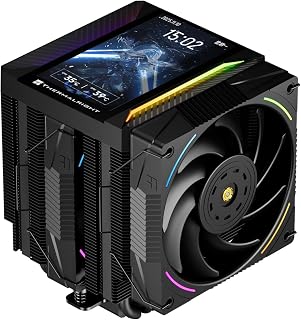
The twin tower design with 2150 RPM fans provides aggressive cooling for overclocked gaming CPUs and multi-core workstation chips. The integrated 5-inch IPS screen adds real-time temperature monitoring directly on the cooler, useful for enthusiasts tracking thermals during benchmarking or heavy rendering. Support for LGA 1851 and AM5 ensures compatibility with the latest Intel and AMD platforms.
Pros
- Exceptional cooling performance with temperature drops of 30-40 degrees Celsius reported by users under load
- Built-in LCD screen is genuinely aesthetically pleasing, not gimmicky, and adds visual appeal to any build
- Straightforward installation process with included mounting kits for both AMD and Intel platforms
- Excellent value for a premium cooler with unique display feature at the $57 price point
- Subtle RGB implementation and solid build quality feel professional and refined
Cons
- LCD display requires motherboard USB 9-pin header connection and TRCC software to function, adding setup complexity
- Display settings do not persist after system shutdown and must be reconfigured on each boot
- Requires backplate verification for AMD installations as original motherboard backplate is not included
The Thermalright Peerless Assassin 120 Vision MAX is a premium air cooler engineered for builders and enthusiasts who want high-end thermal performance paired with visual customization. The standout feature is the integrated 5-inch IPS LCD screen, which displays system parameters in real time and supports custom backgrounds and video playback. This is not a gimmick but a genuinely functional addition that enhances the aesthetic appeal of any build while providing practical monitoring capabilities.
Cooling performance is where this cooler truly excels. The dual-tower design houses 6 pure copper heat pipes with AGHP Gen 5.0 technology, paired with a nickel-plated copper base that maximizes contact with the CPU. Users report keeping high-end processors like the Ryzen 5800X3D and 5950X cool under sustained gaming loads, with temperature reductions of 30-40 degrees Celsius compared to stock solutions. The 2150 RPM fans deliver 69 CFM of airflow while maintaining a remarkably quiet 27 dB(A) noise level, making this cooler suitable for both performance-focused and noise-conscious builds.
Design and build quality are exceptional for the price. The matte black dual-tower configuration is substantial and feels premium without being bulky. The 164mm height ensures compatibility with mainstream ATX cases and accommodates tall RAM heatspreaders and GPUs thanks to thoughtful offset engineering. The magnetic top cover holding the display integrates seamlessly, and the subtle RGB implementation adds personality without overwhelming the system. Installation is straightforward with mounting kits provided for both Intel and AMD platforms.
The main drawback involves the LCD display software. The display requires connection to a motherboard USB header and the TRCC control software to function. Additionally, display settings do not save between shutdowns, requiring reconfiguration on each boot. These are manageable inconveniences for most users but worth noting if you prefer plug-and-play simplicity. AMD users should also verify their backplate before purchasing, as the product does not include one.
The Thermalright Peerless Assassin 120 Vision MAX is a thoughtfully designed cooler that delivers professional-grade thermal performance alongside a genuinely useful visual feature. For builders willing to invest slightly more for premium cooling plus aesthetic customization, this cooler represents excellent value and will serve well across current and next-generation platforms.
Cooling Performance: Dual-tower design, 6x6mm pure copper AGHP heat pipes, nickel-plated copper base, maximum fan speed 2150 RPM, airflow 69 CFM, noise level 27 dB(A).
Physical Dimensions: Cooler 125x135x164mm (LxWxH), fans 120x120x25mm, fits mainstream ATX cases with 164mm clearance requirement.
Display Features: 5-inch IPS LCD screen, 480x854 resolution, magnetic top cover attachment, custom themes and video playback support via TRCC software.
Compatibility: Intel LGA1851, LGA1700, LGA1150, LGA1151, LGA1155, LGA1156, LGA1200. AMD AM4, AM5. Includes mounting kits for both platforms. AMD installations require original motherboard backplate (not included).
Connectivity: 4-pin PWM fan connector, 5V 3-pin ARGB connector, USB 9-pin header for LCD display control.
Bearing Type: S-FDB V2 bearings for extended lifespan and consistent thermal performance.
Who Should Buy This Cooler: Enthusiasts and builders upgrading from stock coolers or basic tower coolers, gamers running high-end CPUs that benefit from premium cooling, and anyone wanting a functional display feature that genuinely enhances system aesthetics without compromise.
Important Considerations Before Purchase: Verify your case has at least 164mm of clearance above the CPU socket. Check that your motherboard has a USB 9-pin header if you want full LCD functionality. If building on AMD, confirm your motherboard includes an original backplate. Ensure RAM modules do not have oversized heatspreaders that conflict with the cooler's offset design.
Installation Notes: Installation is straightforward but requires careful attention to mounting kit selection and proper cable routing. Download the TRCC software from the official Thermalright website before installation to ensure smooth setup. Budget time to configure display themes after the initial boot, as settings require reconfiguration on subsequent startups.
Alternative Options: If you prefer a cooler without LCD display requirements, the standard Peerless Assassin 120 offers identical thermal performance at a lower price point. For higher-end cooling needs on extreme overclocking systems, consider liquid cooling alternatives, though this cooler performs admirably for most users.

The G2 chromax variant combines the refined dual tower cooling architecture with an all-black aesthetic that suits modern case interiors. At 24.8 dB, it delivers near-silent performance while managing the thermal output of enthusiast-grade gaming and workstation processors. The updated mounting system and fan design ensure compatibility with the latest platforms while maintaining the proven thermal performance.
Pros
- Exceptional cooling performance handles flagship CPUs like the 9950X and 14900K with room to spare
- Quiet operation maintains near-silent performance during everyday use and gaming sessions
- Aesthetic appeal with all-black chromax design complements modern PC builds
- Comprehensive compatibility covers current and previous-gen AMD and Intel platforms
- Premium accessory kit and superior thermal paste reduce need for aftermarket upgrades
Cons
- Large footprint at 168mm height may require tall case clearance or impact RAM compatibility
- Premium pricing reflects high-end positioning, making it a significant investment compared to mid-range coolers
- Dual-fan configuration may limit use in compact cases with space constraints
The Noctua NH-D15 G2 chromax.Black is a flagship dual-tower air cooler engineered for high-performance computing enthusiasts and professional builders. This premium solution targets owners of flagship CPUs like the AMD Ryzen 9 9950X3D and Intel Core i9-14900K, delivering the thermal performance needed for sustained gaming, content creation, and overclocking without compromise.
The standout feature is the intelligent balance between cooling capacity and acoustic performance. With 8 heatpipes, 20% more surface area than its predecessor, and novel NF-A14x25r G2 fans, the cooler achieves exceptional thermal dissipation while maintaining one of the market's quietest fan profiles at 24.8dB. PWM speed control automatically adjusts fan performance, running near-silent at idle and ramping up only when thermal demands require it, providing both performance and comfort for extended use.
Build quality exemplifies Noctua's engineering excellence. The all-black chromax finish delivers aesthetic appeal suitable for showcase builds, while the offset fin design cleverly maintains PCIe slot compatibility and offers solid RAM clearance. The included SecuFirm2+ mounting system with premium NT-H2 thermal paste simplifies installation across AMD AM5, AM4, and multiple Intel LGA platforms, though the 168mm height demands adequate case clearance during planning.
The main drawback is form factor constraints. The substantial dual-tower design may require case compatibility verification, particularly in compact builds or with tall RAM modules, though Noctua provides detailed compatibility information for specific setups. Additionally, the premium positioning makes this a significant investment compared to mid-range alternatives, justified primarily for high-end systems where thermal excellence and silent operation justify the cost.
The NH-D15 G2 chromax.Black delivers on its promise as a premium cooling solution for demanding builds. Backed by a 6-year warranty and comprehensive compatibility, this cooler earns its position as an industry benchmark for enthusiast-grade air cooling performance and reliability.
Cooling Specifications: 8 heatpipes, dual 140mm NF-A14x25r G2 fans, 155.6 CFM airflow, 1500 RPM maximum speed, 24.8dB noise level, 2.28W power consumption
Compatibility: AMD AM5, AM4, Intel LGA1851, LGA1700, LGA1200, LGA115x. RAM clearance: 59mm single-fan mode, 32mm dual-fan mode. PCIe slot compatible with most current motherboards
Physical Dimensions: 5.98 inches length x 5.91 inches width x 6.61 inches height. Weight: 1810g. Requires minimum 168mm case height clearance
Package Contents: NH-D15 G2 cooler, two NF-A14x25r G2 fans, NT-H2 thermal paste, Low-Noise Adaptors, SecuFirm2+ mounting hardware, NM-SD1 screwdriver, 6-year manufacturer warranty
Who Should Buy: This cooler suits enthusiasts building high-end systems with flagship CPUs, content creators requiring reliable thermal management, and gamers prioritizing silent operation without thermal throttling. Ideal for anyone upgrading from stock cooling or mid-range solutions who values long-term durability and performance
Consider Alternatives If: Your case height is under 170mm, you need the most compact cooler available, or your budget is under $100. Smaller air coolers or all-in-one liquid coolers may suit tighter build constraints
Installation Considerations: Verify case clearance before purchase using Noctua's compatibility tool. Check RAM height compatibility in dual-fan mode if using tall memory modules. Installation time typically requires 15-20 minutes with included tools
Performance Expectations: Expect 20-30°C CPU temperature drops under load compared to stock coolers on flagship processors. Fan speeds remain inaudible during typical gaming and office work, with audible operation only during sustained heavy loads or overclocking

The curved screen with built-in GIPHY support adds a unique visual element to gaming and creator builds while the Asetek pump handles 280-watt TDP processors. The 360mm radiator provides ample cooling capacity for high-core-count CPUs running sustained workloads like video encoding or 3D rendering. Liquid cooling keeps temperatures lower than air alternatives during extended gaming marathons or productivity sessions.
Pros
- 280W TDP capacity handles high-performance CPUs under sustained load
- 6.67-inch curved AMOLED display with 2K resolution and rotatable mount
- Sub-28dB noise floor with three FDB-bearing 120mm fans
- Integrated GIPHY support and all-metal mounting hardware
Cons
- AMOLED screen prone to fingerprints requiring cleaning
- GIPHY features require ongoing KANALI software updates
When your gaming rig or workstation demands both thermal authority and visual impact, the TRYX Panorama SE 360mm AIO delivers on both fronts. The Asetek Adela cooling platform handles CPUs up to 280W TDP, covering high-core-count processors under sustained rendering loads or extended gaming sessions without throttling. Three 120mm ROTA ARGB fans with FDB bearings keep noise under 28dB even at full tilt, ensuring your workspace stays focused. The real differentiator is the 6.67-inch curved AMOLED screen mounted on the pump block, offering 2K resolution at 60Hz and 372PPI clarity for live system monitoring or animated content via integrated GIPHY support through KANALI software. The rotatable display adjusts to any case orientation, and all-metal mounting hardware provides balanced pressure across Intel and AMD sockets. The high-density fin radiator and copper contact plate extract heat efficiently during video encoding or AI workloads, making this a capable performer for creators who also want their build to stand out visually.
Display: 6.67-inch AMOLED curved screen, 2K resolution, 60Hz refresh rate, 400 nit brightness, 372PPI pixel density, 1,000,000:1 contrast ratio
Cooling System: Asetek Adela professional cooling system, 280W TDP capacity, 27mm high-density fin radiator
Fans: Three 120mm ROTA ARGB fans with FDB bearings and ARGB GEN2 LEDs, maximum 3600 RPM
Noise Level: Below 27.86dB(A) under full load operation
Compatibility: Intel LGA1851, LGA1700, LGA1200, LGA1151, LGA1150, LGA1155, AMD AM4, AM5
Dimensions: 16.93"L x 8.74"W x 5.71"H
Materials: Aluminum, Copper, Polybutylene Terephthalate
Power: 7-pin connector, 12V DC, 5.5W operating wattage
Software: KANALI software with GIPHY integration, supports PNG, JPG, GIF, MP4, AVI files
This AIO suits gamers and creative professionals running powerful CPUs in windowed cases where the display adds function and flair. It's ideal for builds showcasing system stats or animations without separate hardware. Skip it if you prefer straightforward cooling without display complexity, work in tight budgets, or avoid software dependencies. The AMOLED screen requires occasional cleaning to avoid fingerprints, and GIPHY functionality depends on keeping KANALI updated, adding maintenance steps not present in traditional coolers.
Buying Guide: What to Consider Before Choosing a CPU Cooler
Cooling Performance vs. Thermal Design Power
Match your cooler’s thermal capacity to your processor’s heat output. Entry-level chips like the Intel Core i5 or Ryzen 5 run efficiently with compact tower coolers, while high-core-count processors such as the Ryzen 9 9950X or Intel Core Ultra 285K demand substantial cooling capacity. Check your CPU’s TDP rating and ensure your cooler can handle sustained loads with thermal headroom.
Dual-tower air coolers and 360mm AIO liquid coolers deliver the strongest thermal performance, often matching or exceeding the cooling capacity needed for overclocking flagship processors. If you’re building a system for intensive workloads like video rendering or compiling code, prioritize coolers with higher thermal dissipation ratings and larger surface areas.
Case Clearance and RAM Compatibility
Measure your case’s CPU cooler height limit before purchasing. Tower air coolers range from 125mm for compact designs like the Noctua NH-U9S, Quiet High-Performance Single Tower to 168mm for massive dual-tower models. Check clearance for tall RAM modules as well, especially if you’re running RGB memory with bulky heatspreaders.
Some coolers feature offset designs or recessed lower fins to avoid blocking the top PCIe slot or RAM slots. AIO liquid coolers eliminate CPU socket clearance concerns but require adequate radiator mounting space in your case. Verify that your chassis supports 240mm, 280mm, or 360mm radiators in the front, top, or rear positions before committing to a liquid cooling solution.
Noise Levels and Fan Quality
Fan bearing type, blade design, and RPM range directly impact acoustic performance. Premium coolers use fluid dynamic bearings (FDB) or sealed sleeve bearings that deliver quiet operation even at higher speeds. Look for PWM-controlled fans that adjust speed based on CPU temperature, running near-silent during idle and ramping up only under sustained load.
Low-noise adaptors and fan speed offset features let you fine-tune acoustic profiles without sacrificing thermal performance. If you’re building a workstation for content creation or a living room PC, prioritize coolers with documented noise ratings below 28 dB(A) and fans that maintain low speeds during typical desktop use. Many builders find that investing in quality cooling pays off in long-term comfort, especially if you spend hours at your desk each day.
Socket Compatibility and Installation
Confirm that your cooler supports your motherboard socket before purchasing. Modern coolers typically include mounting hardware for Intel LGA1851, LGA1700, LGA1200, and AMD AM5, AM4 sockets, but older or budget models may require separate brackets. Some manufacturers offer offset mounting options that improve thermal contact on specific CPU architectures, particularly AMD’s X3D chips with their asymmetric chiplet layouts.
Installation complexity varies significantly between models. Push-pin mounts offer tool-free installation but may provide inconsistent mounting pressure, while backplate and bracket systems deliver secure, even contact at the cost of more involved assembly. If you’re new to PC building or plan to swap coolers frequently, look for designs with clear instructions and pre-applied thermal paste to simplify the process.
Final Thoughts
Your choice depends on your case dimensions, processor heat output, and acoustic priorities. For compact builds or mid-range processors, the Noctua NH-U9S delivers reliable performance without blocking RAM or PCIe slots. If you’re cooling a flagship chip or pursuing aggressive overclocks, the Noctua NH-D15 G2 offers class-leading thermal capacity with exceptional build quality and whisper-quiet operation under load.
Frequently Asked Questions
What’s the difference between air cooling and AIO liquid cooling?
Air coolers use metal heatsinks and fans to dissipate heat directly from the CPU, while AIO (all-in-one) liquid coolers pump coolant through a closed loop to a radiator mounted elsewhere in your case. High-end air coolers like the Noctua NH-D15 G2, Quiet High-Performance Dual often match or exceed the thermal performance of 240mm AIOs while operating more quietly. Liquid coolers offer better clearance around the CPU socket and can handle extreme overclocking scenarios, but they introduce additional failure points like pump wear and potential leaks.
Do I need to replace thermal paste when installing a new cooler?
Yes, always apply fresh thermal paste when mounting a cooler. Most quality coolers in 2026 include high-performance thermal compound in the package, such as Noctua’s NT-H1 or NT-H2. Clean the CPU heat spreader and cooler base with isopropyl alcohol before applying a small pea-sized amount of paste to the center of the processor. Proper application ensures optimal thermal transfer and prevents hot spots that can trigger throttling or reduce component lifespan.
Will a larger cooler always perform better than a smaller one?
Not necessarily. While larger coolers generally offer more surface area for heat dissipation, fan quality, heatpipe design, and fin density matter just as much. A well-engineered 120mm tower cooler with premium fans can outperform a poorly designed dual-tower model. Consider your processor’s actual thermal output and choose a cooler with verified performance data rather than assuming bigger always equals better cooling capacity.
How often should I clean my CPU cooler?
Inspect and clean your cooler every six to twelve months, depending on your environment. Dust accumulation on fins and fans reduces airflow and degrades thermal performance over time. Use compressed air to blow dust from the heatsink fins and fan blades while holding the fan still to prevent bearing damage. If you notice rising idle temperatures or increased fan noise in 2026, cleaning your cooler should be your first troubleshooting step before considering thermal paste replacement or hardware upgrades.





Write Your Review
No reviews yet. Be the first to share your experience!