

If you spend hours at your desk every day, wrist discomfort and forearm tension can disrupt your workflow and affect your long-term hand health. Traditional mice force your wrist into unnatural positions that increase strain over time.
This guide reviews 10 ergonomic mice designed specifically for extended work sessions. We focus on vertical designs, connectivity options, battery life, and adjustable sensitivity to help you find the right fit for your workspace and hand size.
Quick answer
This guide compares 10 picks, with AOC MS610 Ergonomic Vertical Mouse - 4800 DPI ranked first. TECKNET Ergonomic Vertical Mouse, Bluetooth 5.0/2.4G holds the highest customer rating among them. TECKNET Wireless Mouse 2.4G Ergonomic 2600 DPI Portable has the most customer reviews.
Pros
- 52-degree angle reduces wrist strain during extended sessions
- Silent primary clicks under 35dB prevent distraction
- 200-hour battery supports weeks of full-time use
- Triple connectivity across three devices without hardware switching
Cons
- Only fits small to medium hands properly
- Non-primary buttons produce normal clicking sounds
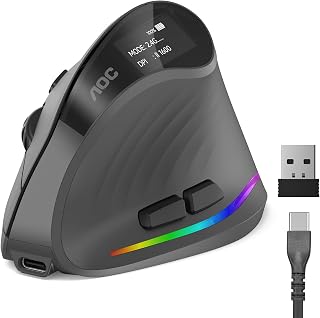
The 52-degree vertical angle is specifically engineered to counter the wrist twisting and forearm tension that builds during long computing sessions, positioning your hand in a natural handshake grip that actively reduces repetitive strain. Whisper-quiet operation under 35dB on primary clicks becomes genuinely valuable after hours at the desk when standard mouse clicking grows into an irritant. The battery delivers 200 hours without RGB or over 40 hours with lighting active, meaning even heavy daily users can work multiple weeks between charges with the LED battery indicator preventing surprise shutdowns mid-session. Triple-mode connectivity across Bluetooth 5.4, 2.4GHz wireless, and wired USB-A lets you maintain consistent comfort across laptop, desktop, and tablet setups without switching hardware. Seven programmable buttons support workflow customization that becomes increasingly valuable during repetitive tasks in extended sessions. The optical sensor reaches 4800 DPI with five adjustable sensitivity levels, accommodating the precision shifts between detailed work and general navigation that naturally occur during varied workdays. Type-C charging supports use-while-charging functionality, eliminating downtime when the battery depletes during critical work periods.
Connectivity and Compatibility: Bluetooth 5.4, 2.4GHz wireless receiver, and USB wired connection. Compatible with Windows, Mac, Linux, and Chrome OS devices. Supports connection to up to three devices simultaneously in Bluetooth mode.
Performance and Input: Optical movement detection with adjustable DPI levels: 1000, 1600, 2400, 3200, and 4800 DPI. Seven programmable buttons with customizable RGB lighting (adjustable via downloadable app). Silent left and right clicks under 35dB.
Power and Battery: 800mAh rechargeable battery provides 200 hours runtime without RGB or 40+ hours with RGB active. Type-C charging cable supports use-while-charging. LED battery percentage display included.
Physical Design: 52-degree vertical ergonomic angle, matte ABS construction, gray color finish. Dimensions: 4.33 inches length x 2.91 inches width. Weight: 3.68 ounces. Optimized for small to medium hands.
Package Contents: Ergonomic vertical mouse, 2.4GHz USB receiver, Type-C charging cable, quick start guide, user manual. Backed by 12-month warranty and 45-day return guarantee.

Pros
- Rechargeable design saves money and reduces e-waste compared to battery-powered alternatives
- Ergonomic vertical shape with 57-degree angle effectively minimizes wrist fatigue during extended use
- Silent clicking mechanism dramatically reduces noise in offices and shared environments
- Flexible multi-device connectivity allows quick switching without re-pairing
- Competitively priced for a feature-rich ergonomic mouse with premium functionality
Cons
- Side buttons are not supported on macOS, limiting functionality for Mac users
- Vertical design may require an adjustment period for users accustomed to traditional mouse shapes
- Requires 2-3 hours charging time, which may be inconvenient for heavy daily users
The TECKNET TK-MS063 is an ergonomic vertical mouse designed for professionals, remote workers, and anyone spending extended hours at a computer. Its standout feature is the combination of thoughtful ergonomic design, silent operation, and practical rechargeable convenience, making it a solid choice for productivity-focused users and those seeking workplace peace and quiet.
The mouse excels in real-world performance through its 6 adjustable DPI levels (800-4800), optical tracking technology that works across various surfaces, and dual connectivity options (Bluetooth 5.3 and 2.4GHz). Multi-device switching works seamlessly, letting you jump between your laptop, tablet, and desktop with a single click and no re-pairing hassle. The silent click mechanism reduces button noise by up to 90%, making it genuinely considerate for shared offices.
Build quality is solid, featuring an ABS enclosure and a distinctive 57-degree ergonomic angle that naturally elevates your wrist and forearms into better alignment. This design detail effectively reduces carpal tunnel pressure and stiffness during long sessions. The rechargeable battery is a genuine convenience, delivering up to 3 months of use from just 2-3 hours of charging, and the included USB cable makes recharging effortless.
One notable limitation is that side buttons do not function on macOS systems, which restricts full feature access for Apple users. Additionally, the vertical form factor requires an adjustment period if you are transitioning from a traditional mouse. The 2-3 hour charge time may also feel inconvenient if you use the mouse heavily throughout the day.
Overall, the TECKNET TK-MS063 delivers excellent ergonomic support, silent performance, and multi-device flexibility at a reasonable price point. The 36-month warranty demonstrates the brand's confidence in durability. This mouse is highly recommended for professionals seeking comfort, quiet operation, and a reliable rechargeable alternative to disposable batteries.
Connectivity: Bluetooth 5.3, 2.4GHz wireless
DPI Levels: 6 adjustable levels (800, 1200, 1600, 2400, 3200, 4800 DPI)
Buttons: 6 buttons (side buttons not supported on macOS)
Tracking: Optical movement detection
Battery: 1 Lithium-Ion (included), up to 3 months per charge (based on 2 hours daily use)
Charge Time: 2-3 hours via USB cable
Operating Systems: Windows, macOS, Chrome OS, Linux
Dimensions: 4.2L x 2.8W inches
Material: ABS plastic enclosure
Warranty: 36 months (registration required)
Included: Mouse, 2.4GHz receiver, USB charging cable
Best For: Remote workers, office professionals, content creators, programmers, and gamers who value ergonomic comfort and prefer quiet peripherals in shared spaces.
Ideal Use Cases: Extended work sessions at a desk, open office environments, coworking spaces, creative workflows requiring precision cursor control, multi-device workflows between laptop and desktop.
Consider Alternatives If: You need full macOS side-button support, prefer instant charging (with no wait time), or strongly prefer a traditional mouse shape over an ergonomic vertical design.

Pros
- 99% noise reduction ideal for long sessions in shared spaces
- Two-month battery life eliminates charging interruptions
- Vertical grip reduces wrist strain during extended use
- Three-device switching supports multi-computer workflows
Cons
- Ergonomic shape only fits small to medium hands
- Forward and back buttons non-functional on Mac
Long computing sessions demand a mouse that won't punish your wrist, and the TECKNET vertical design addresses this head-on with a natural handshake grip that reduces forearm strain. The 99% noise reduction makes it exceptionally well-suited for marathon work periods in shared spaces where clicking distraction becomes a genuine concern after hours of use. Battery anxiety disappears with the 600mAh rechargeable cell delivering two months between charges, meaning you can focus on work rather than hunting for batteries mid-project. The 6 programmable buttons and adjustable DPI range from 800 to 4800 provide the flexibility needed when alternating between detailed tasks and general productivity work. Three-device switching via Bluetooth 5.0/3.0 and 2.4G USB receiver supports modern multi-screen workflows without cable swapping. The optical tracking is rated for 6 million clicks, suggesting it will survive years of intensive daily use. The vertical orientation takes minimal adjustment time but delivers measurable comfort gains during extended sessions when traditional flat mice typically cause discomfort.
Connectivity: Bluetooth 5.0/3.0 and 2.4G USB receiver with 33-foot range
Battery: 600mAh rechargeable, 2-month average lifespan, 1.5-hour charge time, Type-C cable included
Ergonomics: 52-degree vertical angle, designed for small to medium hands
Performance: 4800 DPI maximum with 6 adjustable DPI levels, optical movement detection, 6 programmable buttons
Durability: Rated for 6 million clicks, 36-month support for registered users
Compatibility: Windows 11/10/8/7/XP, Mac OS X 10.4+, Android, Chrome OS, Linux, iOS
Physical: Weight 0.14 kg, plastic construction, right-hand orientation
Best for remote workers and office professionals with small to medium hands who need silent operation during full workdays. The rechargeable battery and multi-device connectivity suit those alternating between laptop and desktop setups. Skip this if you have large hands, as the ergonomic form won't fit properly. Mac users should also look elsewhere since forward and back buttons won't function on macOS.

Pros
- Exceptional value at under $10 with professional-grade performance
- Ergonomic design delivers genuine comfort for all-day use without hand fatigue
- Incredibly long battery life eliminates frequent charging hassles
- Lightweight and portable, perfect for remote workers and frequent travelers
- Reliable 2.4G wireless connection with stable performance across surfaces
Cons
- AAA batteries not included in the box, adding to initial setup cost
- Side button functionality unavailable on Mac systems limits some users
- Not optimized for glass surfaces, requiring a mouse pad in certain environments
The TECKNET Wireless Mouse is a budget-conscious choice for anyone seeking reliable computing without premium pricing. This 2.4G ergonomic mouse combines portability with practical features, making it equally suitable for office professionals, remote workers, and frequent travelers.
The standout feature is undoubtedly the 24-month battery life, which delivers exceptional value and peace of mind. The 5-level DPI adjustment accommodates both precise design work and general computing tasks. Real-world performance proves consistent and responsive, with users consistently praising smooth cursor control and quick connectivity. The ergonomic contoured shape with rubber side grips provides genuine comfort, supported by multiple positive reviews citing all-day usability without hand strain.
Build quality impresses for the price point. Users report durability even after repeated drops and backpack travel, while the sleek black design maintains a professional appearance in office environments. The lightweight construction and compact 4.09x2.68x1.49-inch footprint make this mouse genuinely travel-friendly without sacrificing comfort during use.
Drawbacks exist but remain relatively minor. The mouse requires AAA batteries not included in the box. Mac users lose the side button functionality. Performance suffers on glass surfaces without a pad. Some users note the mouse isn't the lightest when gliding, though this doesn't substantially impact functionality.
This mouse delivers solid value for budget-conscious buyers and professionals who prioritize reliability and battery life over premium features. It's a smart choice for those who work across multiple operating systems and need dependable portable computing solutions.
Connectivity: Wireless 2.4G with 10-meter range and 49-foot wireless receiver connection
Movement Detection: Advanced optical tracking with TruWave Precision
DPI Levels: 5-level adjustment from 800 to 2600 DPI
Buttons: 6 buttons optimized for right-handed use
Battery Life: Up to 24 months with power-saving mode and on/off switch
Power Source: AAA batteries (not included)
Dimensions: 4.09L x 2.68W x 1.49H inches
Weight: Lightweight portable design
Compatibility: Windows, Mac, Chrome OS, Linux
Included: Wireless mouse, nano receiver, user manual
Warranty: 2-year coverage
Model: M003

Pros
- Significantly reduces wrist and arm strain during extended typing and mouse work sessions
- Multiple connectivity options eliminate the need to swap receivers between devices
- Impressively quiet clicking mechanism won't disturb coworkers or family members
- Rechargeable design removes the inconvenience and cost of buying replacement batteries
- Responsive optical tracking with adjustable sensitivity works reliably across different work environments
Cons
- Battery life varies significantly based on usage patterns, making uptime unpredictable for heavy users
- Forward and back navigation buttons are non-functional in macOS, limiting browser efficiency on Apple systems
- Right-hand only design excludes left-handed users from using this ergonomic solution
The POJTK Vertical Ergonomic Mouse is a rechargeable wireless input device designed specifically for professionals and remote workers who spend extended hours at their desks. Its standout feature is the scientifically engineered 58-degree vertical design that positions your hand in a natural 'handshake' posture, directly addressing the wrist strain and carpal tunnel discomfort that plague traditional mice users.
Real-world performance demonstrates strong reliability across connectivity modes. The combination of Bluetooth 5.3, 2.4GHz USB-A, and USB-C connections allows you to seamlessly toggle between multiple devices without physical disconnection, a significant workflow advantage for desk professionals juggling laptops and desktops. The optical tracking sensor responds smoothly at all five DPI levels up to 4800, though most office tasks perform perfectly at lower settings. Battery endurance reaches an impressive 1-3 months per charge depending on daily usage intensity, and the 10-minute auto-standby feature extends operational lifespan further.
Build quality reflects its consumer-grade price point. The ABS plastic construction feels solid despite its lightweight profile, and the matte black finish resists fingerprints effectively. The six-button layout, including forward and back navigation, integrates cleanly into the design without feeling cramped. Most importantly, the silent button mechanism delivers genuinely quiet clicks, a practical benefit in open offices and shared living spaces that reviewers consistently praise.
The primary limitation is platform compatibility. Navigation buttons don't function in macOS, reducing browser efficiency for Apple users. Additionally, this mouse is right-hand optimized, making it inaccessible to left-handed users seeking ergonomic solutions. Battery variability also means heavy daily users might see faster depletion than the advertised timeframe.
Verdict: For desk professionals experiencing wrist discomfort who use Windows or Linux systems, this vertical ergonomic mouse delivers genuine relief through thoughtful design at an accessible price. The multi-device connectivity and silent operation enhance productivity in shared work environments. Macbook users and left-handed workers should explore alternative options.
Carpal tunnel syndrome and repetitive strain injuries affect millions of desk workers annually. This mouse directly counters these issues through its vertically angled design that aligns your forearm, wrist, and hand in a neutral position rather than the pronated posture required by traditional flat mice.
The 58-degree angle encourages your hand to rest naturally, similar to a relaxed handshake. This positioning reduces tension on the median nerve, decreases pressure on the carpal tunnel, and minimizes muscle fatigue in the forearm. Users report noticeably less wrist discomfort after transitioning from conventional mice, particularly during 8+ hour workdays.
The lightweight construction (3.84 ounces) prevents additional strain from lifting or moving the device repeatedly. Combined with smooth optical tracking, you'll find yourself making smaller, more efficient hand movements throughout the day compared to heavier alternatives.
This mouse offers three distinct connection pathways, each suited to different use cases. Bluetooth 5.3 provides the cleanest wireless experience when available, freeing up USB ports on devices with limited connectivity. Simply hold the connection button until the LED indicator confirms pairing, typically within seconds.
The 2.4GHz USB-A receiver provides immediate plug-and-play functionality without software installation. Desktop computers and older laptops benefit from this approach. The included USB-C receiver supports modern laptops and tablets, with the bonus USB-A to USB-C adapter included for devices featuring only Type-C ports.
You can pair this mouse with two devices simultaneously, toggling between them by holding the connection button again. This feature significantly improves workflow efficiency when working across multiple screens or switching between work devices during the day.
Pros
- Stationary hand position eliminates arm strain during long sessions
- Certified 25% reduction in forearm muscle strain
- 18-month battery life minimizes maintenance interruptions
- Quiet clicks reduce distraction during extended use
Cons
- One to two week learning curve slows initial productivity
- Trackball requires periodic cleaning for smooth operation
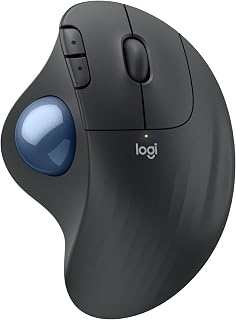
The trackball design fundamentally changes how you work through long sessions by eliminating arm movement entirely. Your hand stays stationary in the sculpted support while your thumb controls cursor movement, a setup ergonomists have certified to reduce forearm muscle strain by 25% compared to traditional mice. This stationary approach prevents the repetitive shoulder and elbow motion that accumulates into discomfort during hours of continuous use. The thumb-controlled ball requires a learning period of one to two weeks, but users consistently report comfort improvements that make the adjustment worthwhile for extended computing work. Quiet clicks maintain focus without the distraction of repeated clicking noise over marathon sessions. The 18-month battery life from a single AA battery means you'll replace batteries roughly twice during a year of full-time use. Dual connectivity through Bluetooth and USB receiver accommodates different work setups without requiring multiple devices. The trackball does need occasional cleaning to maintain smooth sensor response, a minor maintenance task that becomes routine for regular users.
The Ergo M575S was developed in collaboration with Logitech's Ergo Lab and certified by independent ergonomists. Studies show 25% reduction in forearm muscle strain compared to traditional mice, measured through electromyography testing. The benefit comes from eliminating the repetitive reaching and wrist rotation required by standard mice.
The sculpted grip maintains your hand in a neutral, relaxed position for hours without fatigue. By keeping your arm stationary and using only thumb movement, you reduce cumulative strain on muscles, tendons, and nerves. This is particularly valuable for individuals with carpal tunnel syndrome, tendinitis, or general repetitive strain injury (RSI) concerns.
Users report measurable improvements in wrist pain, reduced end-of-day hand fatigue, and better overall posture at the desk. The mouse supports most hand sizes effectively, though very small or very large hands may need a test period to ensure comfort.
Connectivity: Bluetooth and USB Bolt receiver. DPI: up to 2,000 dots per inch. Buttons: 2 primary buttons plus 3 customizable programmable buttons. Battery: 1 AA battery included, lasts up to 18 months. Range: 100mm effective control range. Colors: Graphite with blue ball, or Off-White options.
Compatible with Windows and macOS systems. Supports PC and tablet devices. Full feature support requires Logi Options+ software (free download for recent Windows and macOS versions). Basic mouse functions work without drivers on most operating systems.
Weight and portability make it ideal for traveling professionals or those switching between workstations. The included USB receiver eliminates Bluetooth pairing hassles on shared computers.

Pros
- Dramatically reduces wrist pain and carpal tunnel symptoms within days of use, backed by ergonomist certification
- Exceptional battery life with fast charging makes it practical for mobile professionals
- Smooth, precise optical tracking with low-noise clicks delivers premium feel and performance
- Dual-device connectivity with Easy-Switch button eliminates need to disconnect and reconnect
- Metal baseplate provides solid grip and prevents sliding during extended use sessions
Cons
- USB-C cable not included in the box, requiring separate purchase for charging
- Designed for right-handed users and medium to large hands, limiting accessibility for left-handed users
- Some users report occasional Bluetooth connectivity issues when pairing with newer laptop models
The Logitech MX Ergo S is a premium ergonomic trackball mouse engineered specifically for professionals and remote workers who experience wrist and shoulder pain from traditional mouse use. With its contoured design certified by ergonomists, this mouse is ideal for anyone spending 6+ hours daily at their desk.
The standout feature is its 20-degree tilt angle combined with thumb-controlled ball navigation, which reduces forearm muscle activity by 27% compared to standard mice. Users report relief from wrist pain within days of switching, with the precision optical tracking delivering smooth cursor control. The 6 customizable buttons and Smart Actions through the Logi Options+ app add productivity gains for power users managing multiple workflows.
Build quality is excellent with a metal baseplate for stability, soft rubber grip, and surprisingly low-noise clicks that are 80% quieter than the previous generation. The sculptural design fits naturally in the palm while maintaining neutral wrist posture throughout the workday. USB-C charging is convenient, delivering a full day of work from a 1-minute charge and up to 120 days from a complete charge.
The dual-device connectivity via Bluetooth or the included Logi Bolt receiver with Easy-Switch button is invaluable for professionals juggling multiple computers. The main limitation is that this is a right-hand-only design, and the USB-C charging cable comes separately. Some users have reported occasional Bluetooth pairing issues with newer laptop models.
The MX Ergo S is a worthwhile investment for anyone prioritizing ergonomic comfort and willing to invest in long-term wrist health. It delivers measurable pain relief, premium build quality, and versatile connectivity in a thoughtfully designed package.
Ergonomic posture is critical for preventing repetitive strain injuries during extended computer use. The MX Ergo S addresses this through its 20-degree adjustable tilt, which positions your forearm in a more neutral supinated angle rather than the pronated position required by traditional mice.
The trackball mechanism eliminates large arm movements entirely, concentrating control to your thumb while your hand remains in a relaxed, neutral position. This fundamental difference reduces muscle fatigue and strain on tendons in the wrist and forearm. The contoured shape and soft grip support proper hand positioning without requiring constant micro-adjustments.
For optimal results, pair the MX Ergo S with an ergonomic keyboard like the Logitech ERGO K860, which features an integrated palm rest. Position your desk at elbow height with your screen at eye level and the mouse at the same height as your keyboard. Most users find maximum comfort at the 20-degree tilt setting, though the adjustable angle allows personalization based on individual anatomy.
Battery performance is exceptional with the MX Ergo S, featuring a rechargeable lithium-ion cell that provides up to 120 days of use on a full charge. Quick-charge capability is particularly useful for busy professionals, delivering 24 hours of operation from just 1 minute of charging via USB-C.
Connectivity options include both Bluetooth and the Logi Bolt 2.4GHz USB receiver, giving you flexibility based on your setup. The Bluetooth connection works reliably with Windows 11, macOS 14 Sonoma, and compatible tablets, with an effective range of 10 meters. The included Logi Bolt receiver provides a wired alternative for users preferring USB connectivity, and the Easy-Switch button allows seamless device switching for professionals working across multiple computers simultaneously.
Note that USB-C charging cables are not included, so you will need to provide your own USB-C to USB-C or USB-A to USB-C cable for charging. This is a minor inconvenience offset by the superior battery life and fast-charging capability.

Pros
- Handshake grip eliminates wrist pronation during extended use
- Triple device pairing switches between work setups instantly
- Lightweight 120g build reduces arm fatigue over long periods
- Four DPI levels handle varied task intensities
Cons
- Smooth plastic can feel slippery during intensive work
- Side buttons non-functional on macOS systems
Long sessions demand a mouse that protects your wrist without sacrificing connectivity or responsiveness. This vertical model positions your hand in a natural handshake angle that eliminates the pronation stress flat mice create during extended work. The lightweight 120-gram build prevents arm fatigue when you're deep into hours of editing, coding, or research. What makes this particularly session-friendly is the triple-device pairing capability via Bluetooth 5.0/4.0 and 2.4G wireless, letting you move between workstations or reference materials on a tablet without breaking flow. The four DPI levels (800/1200/1600/2400) adapt to different task intensities throughout your day, from precision CAD work to rapid document navigation. Real-world feedback confirms reliable tracking and responsive clicks across marathon work periods. The 7-color ambient lighting provides visual feedback without creating distraction. The smooth plastic finish stays comfortable but can become slippery during intensive periods. Sized at 4.8 inches long and 3.03 inches wide, it's engineered for small to medium hands. Mac users should note that side buttons lose functionality on that platform.
Vertical ergonomic mice like the UINEER model work by maintaining your hand in a neutral handshake position rather than forcing your wrist into the pronated (palm-down) position of traditional flat mice. This neutral alignment reduces strain on the extensor tendons and muscles in your forearm, helping prevent or alleviate conditions like carpal tunnel syndrome and tendinitis.
Users report noticeable relief within the first few days of use, with many noting that daily forearm and wrist pain diminishes significantly. The ergonomic design is especially beneficial for people who already experience discomfort, repetitive strain symptoms, or those working long shifts at a computer. For prevention-minded users, this mouse helps establish healthier long-term mouse habits before pain develops.
To maximize ergonomic benefits, pair this mouse with an ergonomic desk setup that keeps your keyboard and mouse at or slightly below elbow height. Taking regular breaks remains essential, but the UINEER's design removes much of the structural stress that makes breaks necessary.
The UINEER mouse supports three distinct wireless modes: Bluetooth 5.0, Bluetooth 4.0, and 2.4G USB dongle. This flexibility ensures compatibility with virtually any modern device, from Windows and Mac computers to Android phones and iPad tablets running iOS 13 or later. You can pair and store up to 3 devices in memory simultaneously.
Switching between paired devices is straightforward and requires no re-pairing. This feature transforms workflow efficiency for professionals juggling multiple screens. For example, you could pair your work laptop, personal desktop, and tablet, then switch between them instantaneously as your tasks change throughout the day.
The 33-foot wireless range covers most home and office environments. Bluetooth 5.0 offers improved stability compared to older Bluetooth versions, while the 2.4G USB option provides a wired fallback if needed. One limitation: side buttons function across all platforms except macOS, so Mac users should plan accordingly.

Pros
- Genuine ergonomic comfort reduces hand fatigue during long work sessions
- Reliable optical sensor delivers consistent, precise tracking across different surfaces
- Ambidextrous design accommodates both left and right-handed users equally
- Compact and lightweight, ideal for portable setups or space-conscious desks
Cons
- Wired connection limits mobility compared to wireless alternatives
- No mention of gaming-grade responsiveness, better suited for productivity than competitive gaming
The Anker Vertical Ergonomic Mouse is a purpose-built solution for anyone spending hours at a computer. This wired optical mouse prioritizes comfort and usability over flashy features, making it ideal for office workers, developers, content creators, and anyone concerned about repetitive strain injury.
The standout feature is its vertical grip design, which supports a natural handshake position that reduces wrist twisting and promotes better arm alignment. Paired with 1600 DPI optical tracking, the mouse delivers responsive cursor control across different work surfaces. The five-button layout includes standard left and right clicks, scroll wheel, and dedicated next/previous buttons that speed up document navigation and web browsing without reaching for the keyboard.
Build quality is solid throughout. The lightweight plastic construction weighs just 5.3 ounces, and the 4.9 ft USB cable provides enough reach for typical desk setups. Ambidextrous button placement means the mouse works equally well for left and right-handed users, adding practical value for shared workspaces or mixed-use households.
The main limitation is the wired connection, which trades mobility for reliability. Some users may prefer wireless freedom, though the fixed cable eliminates battery concerns for all-day work. The mouse also skews toward productivity over gaming, with optical tracking that prioritizes consistency over the ultra-high DPI speeds competitive gamers demand.
Overall, the Anker Vertical Ergonomic Mouse delivers genuine comfort and reliable performance at an accessible price point. It is a smart choice for anyone prioritizing ergonomics and long-term wrist health over cutting-edge features.
Connectivity: Wired USB, 4.9 ft cable
Sensor Technology: Optical with 1000/1600 DPI adjustment
Buttons: 5 total (left, right, scroll wheel, next, previous)
Hand Orientation: Ambidextrous
Weight: 5.3 ounces (3.36 oz per unit count)
Dimensions: 4.72 inches L x 2.47 inches W x 2.95 inches H
Compatibility: Windows 10, Linux, Personal Computers
Material: Plastic enclosure
Warranty: 18 months
Model: AK-98ANWVM-BA

Pros
- Vertical grip maintains neutral wrist position during long sessions
- Rechargeable battery eliminates mid-session power interruptions
- Quiet clicks avoid disrupting calls and shared spaces
- Dual connectivity supports multi-device workflows
Cons
- Requires one to two week adjustment period
- Forward/back buttons inactive on macOS
Extended sessions put serious strain on wrists locked in the unnatural pronated position traditional mice enforce. This vertical design counters that by holding your forearm in a relaxed neutral position throughout the workday, directly addressing the repetitive stress that builds during long coding sprints, design marathons, or research deep dives. The rechargeable 500mAh battery via USB-C eliminates the session interruption of swapping disposables. Quiet click technology becomes essential during video calls or shared workspaces where standard mouse clicking disrupts focus. The optical sensor delivers consistent tracking without requiring surface adjustments or calibration breaks that interrupt flow. Three DPI settings (1000/1600/2400) let you match precision needs to task type without leaving your grip. Dual connectivity through Bluetooth and USB-A receiver supports seamless device switching when your workflow spans desktop and laptop setups. The compact sizing specifically targets small to medium hands for proper ergonomic positioning. Expect an adjustment period of one to two weeks as your hand learns the vertical orientation, but that learning curve pays dividends in reduced discomfort during sustained use.
Vertical mice address a real workplace health issue. By positioning your hand vertically rather than flat, they reduce pronation of the forearm and keep your wrist in neutral alignment. This positioning directly reduces strain on the tendons and nerves that run through your wrist and arm, decreasing risk of carpal tunnel syndrome and other repetitive strain injuries.
The EM11 NL's design is particularly effective for users with hand lengths under 7.5 inches, as it fits naturally into smaller hands without requiring awkward gripping adjustments. Users report measurable reduction in end-of-day wrist pain and fatigue after the adjustment period. The manufacturer's recommendation to spend 1-2 weeks adapting is honest feedback, not a marketing excuse, so budget your transition time accordingly.
The EM11 NL supports three simultaneous connections across different devices through dual Bluetooth and a dedicated 2.4G USB-A receiver. Switch between your Windows desktop, MacBook, and Android tablet without manually pairing each time. Compatibility spans Windows 8+, macOS 10.12+, and Android 4.3+, covering most modern devices.
One limitation: the USB-A receiver only, so you'll need an adapter if your primary device uses USB-C. Forward and back buttons don't function on macOS systems, affecting web navigation on Apple computers. The USB-C cable included is for charging only, not data connection, so remember to use the physical receiver for USB connectivity.
Buying Guide: What to Look for in an Ergonomic Mouse
Vertical Angle and Hand Position
The vertical angle determines how your wrist aligns during use. Most ergonomic mice feature angles between 52 and 60 degrees, which encourage a natural handshake grip.
This positioning reduces pronation (the inward rotation of your forearm) and keeps your wrist in a neutral, less strained posture. The AOC Ergonomic Mouse, 2.4GHz Wireless Bluetooth uses a 52-degree angle optimized for small to medium hands, while the TECKNET Ergonomic Mouse, BT5.3/2.4G offers a slightly steeper 57-degree tilt.
Connectivity Options and Multi-Device Support
Modern ergonomic mice offer Bluetooth, 2.4GHz wireless, and wired connections. Bluetooth conserves USB ports and works seamlessly with tablets and laptops, while 2.4GHz delivers lower latency for precision work.
If you switch between devices frequently, look for models that support multi-device pairing. The POJTK Wireless Rechargeable Ergonomic Mouse includes both USB-A and USB-C receivers alongside Bluetooth 5.3, making it compatible with devices that lack traditional USB ports. For those who need a budget-friendly PC build, wired options like the Anker USB Wired Vertical Mouse eliminate battery concerns entirely.
DPI Range and Adjustability
DPI (dots per inch) controls cursor sensitivity. Higher DPI settings move the cursor farther with less physical movement, which reduces arm strain during long sessions.
Most ergonomic mice offer 3 to 6 adjustable DPI levels ranging from 800 to 4800. Lower settings work well for detailed design work, while higher settings suit large monitors and fast navigation. The TECKNET Ergonomic Mouse, Bluetooth 5.0/3.0 & USB provides six levels up to 4800 DPI, giving you flexibility for different tasks throughout your workday.
Battery Life and Charging Convenience
Rechargeable mice eliminate the recurring cost and inconvenience of disposable batteries. Look for models that offer at least 30 days of use per charge and support USB-C for faster, more universal charging.
The AOC Ergonomic Mouse, 2.4GHz Wireless Bluetooth delivers up to 200 hours without RGB lighting and charges via USB-C while remaining operational. If you prioritize longevity, the Logitech Ergo M575S Wireless Bluetooth Trackball offers up to 18 months on a single AA battery, though it uses a trackball design rather than traditional mouse movement. For gamers building a powerful rig, pairing your ergonomic mouse with a high-performance Z890 motherboard ensures smooth, responsive input handling.
Silent Operation for Shared Spaces
If you work in open offices, libraries, or shared home spaces, silent click technology reduces noise without sacrificing tactile feedback. Most silent mice reduce click volume by 80 to 99 percent.
The TECKNET Ergonomic Mouse, BT5.3/2.4G features all-button silent operation, while the ProtoArc EM11 NL Wireless Ergonomic Vertical applies silent clicks to the left and right buttons only. Keep in mind that scroll wheels and side buttons often retain standard click sounds even on silent models.
Final Thoughts
Choosing the right ergonomic mouse depends on your hand size, connectivity preferences, and daily workflow demands. For wireless versatility and silent operation during long sessions, the TECKNET Ergonomic Mouse, BT5.3/2.4G combines multi-device support with up to three months of battery life and quiet clicks across all buttons. If you need a premium trackball design with advanced tilt adjustment and precision control, the Logitech MX Ergo S Advanced Wireless Trackball offers a 20-degree adjustable angle and up to 120 days of use per charge, making it ideal for professionals who prioritize comfort and ergonomist-certified design.
Frequently Asked Questions
How long does it take to adjust to a vertical ergonomic mouse?
Most users adapt to vertical mice within one to two weeks of regular use. The initial learning curve involves retraining your hand to grip and move the mouse in a more upright position. Start by using the ergonomic mouse for a few hours each day, then gradually increase usage as your hand becomes accustomed to the new posture.
Are ergonomic mice suitable for gaming in 2026?
Ergonomic mice work well for casual and strategy gaming but may not suit competitive fast-paced shooters. The vertical design prioritizes comfort over rapid flick movements, and most models lack the extremely high DPI and programmable buttons found on dedicated gaming mice. If you game occasionally while working long hours, an ergonomic mouse offers a better balance for overall hand health. Serious gamers building a new system might also consider upgrading their DDR5 RAM for optimal performance.
Do ergonomic mice work with Mac computers?
Yes, most ergonomic mice connect to Mac computers via Bluetooth or USB receivers and function immediately without additional drivers. However, forward and back side buttons typically do not work on macOS, as the operating system does not natively support these inputs. All primary functions, including left click, right click, scroll wheel, and DPI adjustment, remain fully operational on Mac.
Can I use an ergonomic mouse if I have small hands?
Hand size compatibility varies significantly by model. Measure your hand from the base of your palm to the tip of your middle finger before purchasing. Many ergonomic mice specify their optimal hand length range in product descriptions, typically accommodating small to medium hands (under 7.5 inches). Larger models like the Logitech MX Ergo S Advanced Wireless Trackball suit medium to large hands, while compact options like the TECKNET Wireless Mouse, 2.4G Ergonomic Computer work better for smaller grips.
Common questions
What is the best ergonomic gaming mouse for long sessions?
A vertical or sculpted ergonomic mouse designed for extended use works well for gaming, though most dedicated ergonomic mice prioritize comfort over high-polling-rate gaming features. If gaming performance matters, look for an ergonomic mouse with at least 2600 DPI optical tracking, like the TECKNET Wireless Ergonomic Mouse, which gives you enough precision for casual to mid-level gaming while keeping your wrist in a more neutral position during long sessions.
Which ergonomic mouse is best for both work and gaming use?
A multi-connectivity ergonomic mouse is the most practical choice for switching between work and gaming. The TECKNET Bluetooth and USB wireless vertical mouse supports Bluetooth 5.0 and USB-A, works across Windows, Android, iOS, Chrome OS, and Linux, and offers silent clicks for office use. For gaming moments, its optical tracking keeps inputs accurate. One mouse covering both contexts means less desk clutter and a consistent hand position throughout your day.



Write Your Review
No reviews yet. Be the first to share your experience!