

You have a 1440p 165Hz monitor and you want to feed it properly. That means you need a GPU that can consistently push past 100 frames per second in demanding titles, not just on paper but in actual gameplay. Whether you are building fresh or upgrading an aging card, choosing the right GPU for this resolution and refresh rate is one of the most important decisions in your whole build.
This guide covers ten carefully evaluated graphics cards spanning AMD RDNA 4, RDNA 3, Intel Arc, and NVIDIA Blackwell architectures. We assessed each one for raw 1440p performance, VRAM capacity, cooling efficiency, and overall value so you can make a confident call without digging through spec sheets all day.
Quick Comparison
Ratings reflect the most recent data pull. Check each listing for current price and availability.
Quick answer
This guide compares 10 picks, with ASRock Radeon RX 9060 XT Challenger 16GB GDDR6 PCIe 5.0 ranked first. GIGABYTE Radeon RX 9070 XT Gaming OC 16GB GDDR6 PCIe has the most customer reviews.

RDNA 4 efficiency shines here: a 3290 MHz boost clock is among the highest on this list, giving the RX 9060 XT a strong per-clock advantage that translates to smooth, consistent frame pacing at 1440p 165Hz. Sixteen gigabytes of GDDR6 is generous for its tier and prevents vram-induced frame drops in texture-heavy scenes, while the 0dB silent mode means the card runs passively under light desktop loads.
Pros
- 3290 MHz boost delivers 60+ FPS in modern titles with headroom for competitive games
- 16GB VRAM handles maximum texture detail without stuttering at 1440p
- Mid-60s temps under load with near-silent operation via 0dB idle cooling
- Compact 249mm length and single 8-pin connector simplify installation
Cons
- Dual-fan design less aggressive than triple-fan premium alternatives
- 16GB VRAM ceiling limits headroom for 4K or heavy professional workflows
Driving 165Hz at 1440p means clearing 100 FPS consistently, and the RX 9060 XT Challenger targets exactly this performance band with RDNA 4 efficiency. The 3290 MHz boost clock with 32 compute units delivers 60+ FPS on high settings in modern titles, with headroom climbing higher in competitive games where frame rate matters most. Users report noticeable gains over RTX 3060 Ti class cards, translating to smoother motion on fast-refresh panels. The 16GB GDDR6 buffer ensures texture streaming never chokes frame delivery even when detail settings max out. DisplayPort 2.1a handles high-bandwidth 1440p 165Hz signals without compromise. Thermal performance stays in the mid-60s under sustained load while the 0dB idle feature silences fans during desktop work or light browsing. The compact 249mm length fits mainstream cases without clearance struggles, and the single 8-pin connector works with 550W PSUs, making this an easy drop-in upgrade. Ray tracing support adds visual polish in supported titles without killing frame rates. For the 1440p high-refresh target, this card balances performance delivery with thermal efficiency and straightforward installation.
GPU: AMD Radeon RX 9060 XT (RDNA 4, 32 Compute Units)
Memory: 16GB GDDR6 at 20 Gbps on 128-bit bus
Clock Speeds: 3290 MHz boost, 2700 MHz game clock
Output: DisplayPort 2.1a, HDMI 2.1b
Max Resolution: 7680x4320 pixels
Power: Single 8-pin connector, 550W PSU recommended
Size: 249mm (L) x 132mm (W) x 41mm (H), 2-slot design
Cooling: Dual fans, 0dB idle mode
Interface: PCIe 5.0 x16
Weight: 0.98 kg
Warranty: 2 years manufacturer
Perfect for gamers who invested in 1440p 165Hz monitors and need a GPU that consistently feeds high frame rates without thermal or power drama. Strong choice for users upgrading from older mid-range cards seeking visible performance gains. Skip this if 4K gaming or intensive 3D rendering dominates your workload, as the 16GB ceiling may constrain headroom. Not recommended if you prefer triple-fan cooling solutions or need maximum overclocking potential.

Intel's Xe architecture brings hardware ray tracing and XeSS upscaling to the table, and a 2600 MHz clock keeps the Arc B570 competitive at 1440p where its 10GB GDDR6 frame buffer is sufficient for the textures most titles load at that resolution. The 0dB fan mode keeps the system quiet during lighter workloads, and DisplayPort 2.1 output delivers full-bandwidth signaling to any 165Hz display without needing an adapter.
Pros
- XeSS 2 upscaling boosts frame rates for competitive 165Hz gaming
- 0dB cooling keeps system silent at idle and quiet under load
- Three DisplayPort 2.1 and HDMI 2.1a outputs for flexible display setups
- Single 8-pin connector simplifies installation with mainstream PSUs
Cons
- Intel Arc driver ecosystem still maturing compared to AMD and NVIDIA
- Not positioned for 4K gaming performance
Hitting 165Hz at 1440p requires a GPU that can sustain triple-digit frame rates, and the Arc B570 Challenger delivers exactly that performance window through Intel's Xe2-HPG architecture. The 2600 MHz clock with 10GB GDDR6 on a 160-bit bus maintains playable frame rates in modern titles at high settings, while XeSS 2 upscaling pushes performance higher when you need every frame for competitive advantage. Three DisplayPort 2.1 outputs and HDMI 2.1a cover multi-monitor setups or single high-refresh panels without adapter hassles. The 0dB silent cooling technology keeps fans completely stopped at idle and whisper-quiet under load, eliminating distraction during focused gameplay. Build quality surprises with a metal backplate that prevents sag and adds thermal assistance. The single 8-pin power connector simplifies installation and works with mainstream PSUs. For builders prioritizing frame delivery over brand loyalty, this card converts a 165Hz investment into visible motion clarity. The maturing Intel driver stack handles most modern games smoothly, though occasional optimization updates arrive as the ecosystem develops. This represents genuine value for the 1440p high-refresh target without flagship pricing.
The Arc B570 excels at 1440p gaming, maintaining high frame rates with maxed or near-maxed settings in modern AAA titles like Assassin's Creed Resync, Subnautica 2, and God of War. The 10GB VRAM buffer ensures smooth performance without stuttering even in VRAM-intensive scenarios with multiple monitors or intensive applications running simultaneously.
XeSS 2 technology provides meaningful performance boosts through AI-powered upscaling without sacrificing perceived image quality. Users report stable gameplay and low thermal temps, with the card operating at just 45-56 degrees Celsius at zero RPM and averaging around 68 degrees under sustained gaming loads. Idle power consumption is remarkably low at 18-21 watts during light tasks like streaming and multi-monitor work.
The card handles both 1080p ultra settings and 1440p high settings comfortably. While not positioned as a 4K solution, users seeking budget-friendly 1440p gaming will find this card highly capable and reliable across current and near-future game libraries.
GPU: Intel Arc B570 (Xe2-HPG Architecture)
Memory: 10GB GDDR6, 160-bit bus
Clock Speeds: 2600 MHz GPU, 19 Gbps Memory
Power: Single 8-pin connector
Interface: PCIe 4.0 x8
Display Outputs: 3x DisplayPort 2.1, 1x HDMI 2.1a
Max Resolution: 7680 x 4320
Cooling: Dual striped axial fans with 0dB Silent Cooling
Backplate: Metal with structural reinforcement
Weight: 0.99 kg
Warranty: 2 Years Manufacturer
Media Engine: Advanced with AV1 encoding support
DirectX Support: 12 Ultimate
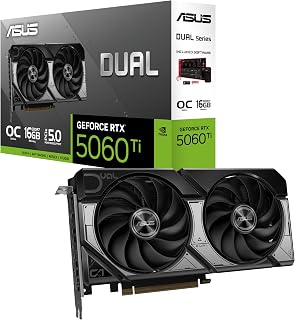
Sixteen gigabytes of GDDR7 on an RTX 5060 Ti is a standout spec: the faster memory type increases effective bandwidth well beyond what GDDR6 delivers, keeping 1440p frame times tight even when frame rates climb toward the 165Hz ceiling. The 2632 MHz clock sustains that throughput under load, and three DisplayPort 2.1b outputs provide native high-bandwidth connections for any current high-refresh monitor.
Pros
- 16GB GDDR7 eliminates VRAM bottlenecks at 1440p
- DLSS 4 boosts frame rates above 165Hz threshold
- Compact 2.5-slot design fits small-form-factor builds
- Dual BIOS switches between silent and maximum performance
Cons
- Compact sizing limits extreme overclocking potential
- Higher price point than entry-level alternatives
Hitting 165Hz at 1440p requires a GPU that can consistently deliver high frame rates without bottlenecking on memory or processing power, and this 16GB GDDR7 card checks those boxes decisively. The 767 AI TOPS from NVIDIA's Blackwell architecture work alongside DLSS 4 to push frames well above the 165Hz threshold in demanding titles, while the generous 16GB buffer ensures texture streaming never becomes a limiting factor during extended sessions. The 2632 MHz boost clock in performance mode provides the raw horsepower needed for ultra settings, and the Axial-tech fan design with barrier ring pressure keeps thermals stable even during marathon gaming. What makes this particularly suitable for high-refresh 1440p is the dual BIOS toggle between Quiet and Performance profiles, letting you prioritize silence during lighter esports titles that easily exceed 165 fps, then switch to maximum cooling when AAA games demand every bit of GPU capability. The 2.5-slot compact design means it fits into a wide range of cases without blocking adjacent slots or requiring chassis upgrades, while dual ball bearing fans ensure longevity during years of high-refresh gaming.
GPU and Memory: NVIDIA GeForce RTX 5060 Ti, 16GB GDDR7, 2632 MHz (OC Mode), 2602 MHz (Default Mode). Supports DLSS 4 and Blackwell architecture for AI-accelerated performance.
Connectivity and Cooling: 3x DisplayPort 2.1b, HDMI 2.1b, PCIe 5.0 x16 interface. Dual Axial-tech fans with dual ball bearings, 2.5-slot compact form factor, 0dB technology for silent idle operation.
Physical and System Requirements: Dimensions 9 inches long by 4.7 inches wide, weighs 0.66 kg. Supports maximum resolution of 7680x4320 pixels. Includes 3-year warranty and SpeedSetup manual. Compatible with standard desktop builds requiring adequate power supply and proper case ventilation.
This card suits competitive gamers and enthusiasts targeting consistent 165Hz performance at 1440p ultra settings, especially those building or upgrading compact systems where physical space is constrained. The 16GB VRAM makes it ideal for users who multitask with streaming software or play texture-heavy modern titles. Skip this if you're building a full-tower system with room for larger three-slot cards that offer more overclocking headroom, or if you primarily play older esports titles where a less expensive 8GB option would saturate your 165Hz display just as easily.

Built on NVIDIA's current-generation architecture, this TUF Gaming card pairs a 2640 MHz clock with 12GB of GDDR7 memory, a bandwidth-dense pairing that lets it sustain consistently high frame rates at 1440p resolution. GDDR7 delivers meaningfully faster data throughput than GDDR6, reducing the micro-stutter that can creep in during fast-paced scenes at high refresh targets, and the triple-output DisplayPort 2.1a panel covers any 165Hz monitor connection without an adapter.
Pros
- Consistent 65u00b0C thermals prevent throttling during extended sessions
- Ray tracing at 1440p maintains smooth frame pacing
- Military-grade components ensure long-term stability
- Included bracket eliminates GPU sag and PCB stress
Cons
- 13-inch length and 3.125-slot thickness require large cases
- 12GB VRAM may limit future game texture settings
For 1440p gaming at 165Hz, raw frame delivery and thermal consistency matter more than peak specs, and this card's engineering prioritizes exactly that. Users report flawless high-setting gameplay with ray tracing enabled at 1440p, which translates to frame rates comfortably exceeding the 165Hz target in most scenarios, especially when DLSS 4 multiplies performance. The 12GB GDDR7 memory handles current game textures without stuttering, and the 2640 MHz boost clock provides enough computational muscle to maintain smooth frame pacing during intense scenes. What separates this from competing options is the 3.125-slot cooling architecture with three Axial-tech fans that maintains 65u00b0C under sustained load, preventing thermal throttling during long gaming sessions where consistent refresh rates matter most. Military-grade components and protective PCB coating ensure the card won't degrade performance over time, while phase-change thermal pads maintain optimal heat transfer as paste ages. The included bracket and stand prevent physical stress from warping the PCB, which can cause intermittent frame drops. PCIe 5.0 connectivity and Blackwell architecture future-proof your 165Hz setup for upcoming titles that will demand more GPU resources.
GPU and Memory: NVIDIA GeForce RTX 5070, 12GB GDDR7, 2640MHz boost clock, PCIe 5.0 interface
Cooling and Design: 3.125-slot form factor, three Axial-tech fans, phase-change thermal pad, protective PCB coating, military-grade components, GPU Guard bracket
Connectivity: 3x DisplayPort 2.1a, 2x HDMI 2.1b, 7680x4320 maximum resolution support
Physical: 13 inches long, 5.5 inches wide, 3.4 pounds, includes cooling bracket and stand
Warranty and Support: 3-year manufacturer warranty, GPU Tweak III software for performance monitoring and thermal control
This GPU targets serious 1440p gamers who want to maximize their 165Hz display with ray tracing and ultra settings, plus have headroom for future game releases. It's ideal for enthusiasts building durable systems who value thermal performance and long-term reliability over compact sizing. Skip this if your case can't accommodate a 13-inch card over 2 inches thick, or if you're satisfied with high settings instead of ultra and would rather save money with a less robust cooling solution.

For gamers who want outright performance at 1440p 165Hz with headroom to spare, the RTX 5080's 2730 MHz clock and 16GB GDDR7 deliver frames well in excess of 165fps in virtually all current titles, meaning the display refresh rate is never the ceiling. Three native DisplayPort 2.1a outputs and dual HDMI 2.1b ports give full flexibility for multi-monitor setups or future display upgrades without requiring active adapters.
Pros
- Blackwell architecture with DLSS 4 delivers substantial frame rate headroom above 165fps at 1440p
- Phase-change thermal pad provides consistent sustained performance without degradation
- Three DisplayPort 2.1a outputs support high-bandwidth multi-monitor setups
- Military-grade components and protective PCB coating built for long-term reliability
Cons
- 348mm length and 3.6-slot thickness require case compatibility verification before purchase
- Minimum 850W PSU requirement demands a power supply upgrade in many existing builds
A 1440p 165Hz monitor is well within the comfort zone of the ASUS TUF Gaming RTX 5080, but that framing undersells what this card actually does at that resolution. Built on NVIDIA's Blackwell architecture with DLSS 4 support, it can sustain frame rates well above 165fps in virtually every current title at 1440p maximum settings, giving a competitive player a meaningful headroom buffer above the display's refresh limit. The 16GB GDDR7 memory and 2730 MHz boost clock ensure no bottleneck on the GPU side. Where the TUF Gaming version specifically earns its place is thermal engineering: the phase-change GPU thermal pad maintains consistent performance under sustained loads without the degradation associated with traditional paste, and the Axial-tech triple-fan design keeps temperatures in check during extended sessions. Military-grade components and protective PCB coating add long-term reliability confidence. The three DisplayPort 2.1a and two HDMI 2.1b outputs offer flexible monitor connectivity. The trade-off is a 348mm card length with a 3.6-slot design and an 850W minimum PSU requirement, both of which demand case and power planning before purchase.
GPU: NVIDIA GeForce RTX 5080
Memory: 16GB GDDR7
Boost Clock: 2730 MHz (OC Mode), 2700 MHz (Default Mode)
Physical Dimensions: 348mm length, 3.6-slot design, 4.3 lbs
Video Outputs: 3x DisplayPort 2.1a, 2x HDMI 2.1b
Power Requirement: Minimum 850W PSU with 16-pin 12V-2x6 (12VHPWR) connector
Manufacturing: Auto-Extreme precision automated manufacturing
Cooling: Three Axial-tech fans, phase-change GPU thermal pad, protective PCB coating
Power Supply: Verify your PSU is rated for 850W minimum and includes the required 16-pin 12V-2x6 (12VHPWR) connector. Standard 6-pin or 8-pin connectors are insufficient for this card.
Physical Clearance: Confirm your case accommodates the 348mm length and can support the 3.6-slot width requirement. Measure internal dimensions and account for storage drives, fans, and other components that may interfere with the card's placement.
System Integration: The card includes a GPU bracket for secure installation. Ensure your motherboard provides adequate PCIe slot access and that your monitor cables support DisplayPort 2.1a or HDMI 2.1b for optimal performance.

Targeting 1440p at 165Hz sits squarely in the RX 7700 XT's wheelhouse, and this ASRock variant's 2584 MHz boost clock gives it the headroom to push frame rates well above that refresh threshold in most modern titles. The 12GB GDDR6 buffer comfortably handles 1440p texture loads without the vram pressure that plagues smaller configs, and three DisplayPort 2.1 outputs mean your high-refresh monitor connects natively at full bandwidth.
Pros
- 54 compute units deliver 70+ FPS in demanding titles at 1440p high settings
- Three DisplayPort 2.1 outputs support multiple high-refresh monitors
- 0dB idle and quiet dual-fan cooling during extended gaming sessions
- 12GB VRAM with Infinity Cache prevents stuttering at maximum texture quality
Cons
- Requires dual 8-pin PCIe connectors and sufficient case space
- Non-customizable white LED may clash with RGB builds
A 165Hz monitor at 1440p demands consistent frame delivery above 100 FPS, and the RX 7700 XT Challenger slots perfectly into that performance tier. The RDNA 3 architecture with 54 compute units pushes sustained high frame rates in AAA titles, with users reporting 70+ FPS maximums that translate to smooth motion on fast-refresh panels. The 12GB GDDR6 buffer paired with 48MB Infinity Cache prevents VRAM bottlenecks when texture detail climbs, keeping frame times stable during intense sequences. Three DisplayPort 2.1 outputs handle high-bandwidth signals without compromise, ensuring your 165Hz panel receives every frame the GPU generates. The dual-fan cooling with ultra-fit heatpipes and 0dB idle mode maintains thermal stability during marathon sessions while staying nearly silent, so coil whine or fan noise never distracts from gameplay. The metal backplate adds structural support and heat dissipation assistance. This card targets the sweet spot where 1440p high-refresh gaming lives: enough horsepower to justify the monitor investment without the thermal or power penalties of flagship silicon.
Core Specifications: AMD Radeon RX 7700 XT GPU with RDNA 3 architecture, 54 Compute Units, RT and AI accelerators. 12GB GDDR6 memory on 192-bit bus with 48MB Infinity Cache. Game Clock 2226 MHz, Boost Clock up to 2584 MHz, Memory Clock 18,000 MHz.
Connectivity: 3x DisplayPort 2.1, 1x HDMI 2.1. PCIe 4.0 x16 interface. Dual 8-pin auxiliary power connectors. Maximum display resolution up to 7680x4320 pixels.
Physical: Dimensions 10.5 x 5.1 x 2.0 inches. Weight 2.2 pounds. Dual-fan cooling design. Metal backplate. 2-year spare part availability. 1-year warranty.
Ideal for competitive gamers and fast-paced title enthusiasts who invested in 1440p 165Hz panels and need GPU performance that justifies the upgrade. Excellent choice if you're coming from GTX 1070 or RTX 3060 class hardware and want meaningful frame rate gains. Skip this if your case lacks dual 8-pin connectors or adequate cooling airflow, or if you demand RGB customization beyond basic white LEDs. Not recommended for users prioritizing 4K over high refresh rates.

A 3060 MHz GPU clock is genuinely exceptional and translates directly into frame-rate headroom that keeps a 165Hz panel fed even in demanding titles at 1440p. The 16GB GDDR6 buffer gives future-proofing headroom as texture budgets grow, and PCIe 5.0 connectivity ensures the bus is never a bottleneck when the GPU is running flat out, making this RDNA 4 card a strong all-round pick for this exact resolution and refresh combination.
Pros
- 160-220 fps in AAA titles exceeds 165Hz target
- 16GB VRAM prevents stutter during high-refresh gameplay
- WINDFORCE cooling stays quiet under sustained load
- 11.34-inch length fits most cases without upgrades
Cons
- Requires 750W power supply minimum
- NVIDIA alternatives offer higher competitive fps ceiling
Achieving 165Hz at 1440p doesn't require flagship pricing when a GPU delivers the right balance of memory bandwidth and clock speeds, which is exactly where this 16GB card positions itself. Users consistently report 160-220 fps in modern AAA titles at high settings, meaning you'll saturate your 165Hz display with frames to spare in most games. The 3060 MHz GPU clock provides the processing speed needed to render complex scenes quickly, while 16GB GDDR6 memory eliminates the stuttering and texture pop-in that plagued earlier cards with smaller buffers when maintaining high refresh rates. AMD's latest architecture handles high-refresh workloads efficiently, and PCIe 5.0 support ensures bandwidth never bottlenecks frame delivery. The WINDFORCE cooling with Hawk fans and server-grade thermal gel keeps temperatures controlled during the sustained loads that 165Hz gaming demands, and users note the system remains quiet even when pushing frames continuously. At 11.34 inches, the card fits most modern cases without requiring chassis upgrades, making it a straightforward drop-in solution for gamers upgrading to hit their display's full potential. The silver and black aesthetic integrates cleanly into builds without RGB overload.
Core Specifications
GPU: AMD Radeon RX 9070 XT
Memory: 16GB GDDR6
Memory Clock: 2600 GHz
GPU Clock: 3060 MHz
Interface: PCIe 5.0 x16
Max Resolution: 7680 x 4320 (8K)
Physical and Connectivity
Dimensions: 11.34 inches (L) x 5.2 inches (W)
Weight: 1.78 kg
Output: DisplayPort
Power Connectors: Dual 8-pin (750W+ PSU recommended)
Cooling: WINDFORCE system with Hawk fans and thermal gel
Warranty and Support
Manufacturer: GIGABYTE
Warranty: 3 years
Model: GV-R9070XTGAMING OC-16GD
Gaming Performance at Common Resolutions
1440p Gaming: 160-220fps on most modern AAA titles at high settings. Excellent for competitive gaming and high-refresh monitors.
4K Gaming: Playable at high settings on most titles, medium settings on demanding new releases. Solid for content creators monitoring in 4K.
Esports Titles: 300+ fps possible on optimized competitive games for ultra-high refresh gameplay.
Real-World Use Cases
Best suited for 1440p gaming at 144+ fps, 4K content creation workflows, professional 3D rendering, and VR gaming. Handles flight simulators like DCS at high settings with 4K head tracking. Eliminates VRAM constraints for media professionals working with large files.
Driver Recommendations
Run DDU (Display Driver Uninstaller) before installation if upgrading from another card. Install latest AMD drivers for maximum stability and performance. Update BIOS if required by your system for PCIe 5.0 compatibility.

GIGABYTE's WINDFORCE cooling keeps the RTX 5080's 2.73 GHz clock stable under sustained load, which matters when you are consistently pushing frame rates to saturate a 165Hz panel at 1440p over long gaming sessions. The 16GB 256-bit GDDR7 memory bus is a significant bandwidth advantage that reduces frame-time variance in memory-intensive scenes, ensuring smooth, tear-free output when paired with a high-refresh display.
Pros
- GDDR7 memory at 30000 MHz and PCIe 5.0 interface eliminate any bandwidth bottleneck
- DLSS 4 with enhanced Tensor Cores extends usable frame rates well above the 165Hz target
- WINDFORCE triple-fan system manages thermals during sustained high-load sessions
- Included VGA holder simplifies installation of the card's 4-pound frame
Cons
- 13.46-inch length and significant weight require case clearance verification and physical support planning
- Substantial power draw demands a robust PSU and good case airflow to complement the cooling system
Running a 1440p 165Hz display with the GIGABYTE RTX 5080 Gaming OC means operating well below this card's ceiling, but that ceiling is the point for competitive players who want every fps available. The Blackwell architecture paired with 16GB of GDDR7 memory running at 30000 MHz handles maximum-settings AAA titles without flinching, and DLSS 4 with enhanced Tensor Cores pushes usable frame rates further still. The 2.73 GHz boost clock sustains performance in the demanding titles where frame pacing matters most for high-refresh gaming. PCIe 5.0 interface bandwidth means the card is never the bottleneck in a modern platform pairing. The WINDFORCE triple-fan cooling system manages thermals under sustained load, though the 13.46-inch length and approximately 4-pound weight require deliberate case selection and potentially a VGA holder, which GIGABYTE includes in the box. Enhanced RT Cores also make 1440p ray-traced content exceptionally smooth. The card's power draw requires a robust PSU with available 8-pin connectors and good case airflow to complement the WINDFORCE system.
GPU Architecture: NVIDIA GeForce RTX 5080 (Blackwell)
Memory: 16GB GDDR7, 256-bit interface
Memory Speed: 30,000 MHz
GPU Clock: 2.73 GHz boost
Interface: PCIe 5.0 x16
Cooling: WINDFORCE triple-fan system
Power Connectors: 1x 12V connector, 2x 6-pin to 3x 8-pin adapter
Display Outputs: DisplayPort, HDMI
Max Resolution: 7680x4320 pixels
Physical Dimensions: 13.46 inches (L) x 5.59 inches (W)
Weight: 4 pounds
Warranty: 3-year manufacturer
Model: GV-N5080GAMING OC-16GD
The right fit for gamers who treat 1440p 165Hz as a baseline and want uncapped performance for esports titles or a clear path to higher-resolution displays without another GPU purchase. Also suitable for users running GPU-accelerated creative or AI workloads between sessions. Skip it if your case is under around 14 inches in GPU clearance or if your power supply cannot handle the card's substantial draw.

The highest boost clock on this list at 3320 MHz gives this XFX triple-fan card a tangible edge in raw frame throughput, which is exactly what sustaining 165 fps at 1440p demands. Its 16GB GDDR6 capacity is double what many competing cards in this tier offer, providing ample overhead for high-resolution texture packs and ensuring the buffer never becomes the limiting factor during extended gaming sessions.
Pros
- 16GB GDDR6 eliminates memory pressure at maximum 1440p settings
- Triple-fan cooler holds 55C at full load with minimal fan noise
- RDNA 4 architecture delivers 25 to 40 percent generational performance uplift
- Strong overclocking headroom with stable results above 3.1 GHz after undervolting
Cons
- Large physical footprint may not fit compact or small-form-factor cases
- RGB lighting is always on and cannot be toggled via software
At 1440p with a 165Hz target, the XFX Swift RX 9060 XT is one of the most capable cards in its class. The RDNA 4 architecture delivers roughly 25 to 40 percent better performance than the RX 6600 generation it succeeds, and the 3320 MHz boost clock gives it plenty of headroom to push high refresh rates in demanding titles like Cyberpunk 2077. The 16GB GDDR6 buffer is a genuine differentiator at this tier, ensuring that texture-heavy AAA games at maximum 1440p settings never run into memory pressure. Overclocking headroom is real, with stable configurations reported above 3.1 GHz after undervolting, nudging performance closer to the RX 9070 XT bracket. Thermals are a highlight: the triple-fan SWFT cooler holds 55 degrees Celsius at full load and stays quiet doing it, which matters for long competitive sessions. The card supports 4K output up to 3840x2160 via DisplayPort or HDMI, so a future monitor upgrade won't require a GPU swap. For a 1440p 165Hz build, this card hits the target frame rates without the thermal or power baggage of flagship-tier options.
1440p Gaming: Handles nearly all modern AAA titles at ultra settings with 70+ fps average. Excellent choice for competitive esports at 1440p 144Hz refresh rates.
4K Gaming: Capable at high settings (60+ fps) for optimized titles. More demanding games like Ark Ascended benefit from resolution scaling to 1350p or balanced settings for consistent 60+ fps performance.
Memory Advantage: 16GB VRAM provides significant headroom for texture-heavy games and enables stable performance in VRAM-intensive scenarios that would bottleneck 12GB cards.
Power Efficiency: RDNA 4 delivers strong performance per watt, making undervolting highly effective without sacrificing stability. Users report 90-110W reductions possible through -130mV voltage tweaking.
Ideal for 1440p 165Hz gamers who want a large VRAM buffer for future-proofing and quiet operation under sustained load. Overclocking enthusiasts who enjoy tuning will find genuine headroom here. Skip it if your case is compact, since the card's substantial size may not fit without a support bracket, or if you dislike always-on RGB lighting that cannot be disabled in software.

A 2810 MHz core clock and 16GB GDDR6 running at 18000 MHz make this RX 7600 XT a capable entry point for 1440p 165Hz gaming, with the large vram buffer ensuring texture-heavy titles do not hit memory limits that would cap frame rates. Dual HDMI 2.1a outputs alongside DisplayPort connections offer flexible hookup options for the range of 165Hz monitors gamers are currently using.
Pros
- 16GB GDDR6 provides significantly more VRAM than typical mid-range cards, reducing texture bottlenecks at 1440p
- RDNA 3 architecture delivers strong rasterization performance tuned for the 1440p high-refresh use case
- Triple Windforce fan cooling sustains the 2810MHz boost clock through extended gaming sessions
- HDMI 2.1a and DisplayPort 1.4 outputs offer flexible, future-ready monitor connectivity
Cons
- 700W recommended PSU requirement may force a power supply upgrade in older or budget builds
- 128-bit memory bus is narrower than higher-tier alternatives, which can limit headroom in the most bandwidth-intensive titles
Hitting a consistent 165Hz at 1440p demands a card that handles modern titles without choking on VRAM, and the Gigabyte Radeon RX 7600 XT's 16GB GDDR6 buffer addresses that concern directly. Most mid-range cards in this segment ship with 8GB, which increasingly becomes a bottleneck as textures grow heavier. The RDNA 3 architecture brings competitive rasterization performance at the 1440p resolution sweet spot, and the 18000MHz memory clock keeps data moving quickly enough to sustain high frame rates in demanding scenes. Three 80mm Windforce fans paired with composite copper heat pipes mean the card can sustain its 2810MHz boost clock through long gaming sessions without thermal throttling undermining frame consistency. Connectivity covers both DisplayPort 1.4 and HDMI 2.1a, so pairing with a 1440p 165Hz monitor is straightforward on either output. AV1 hardware encoding is a bonus for anyone who streams alongside gaming. The 700W PSU recommendation is the main system-level consideration, but for a build already geared toward high-refresh 1440p, that is a reasonable ceiling.
GPU & Memory: AMD Radeon RX 7600 XT with 16GB GDDR6 memory, 128-bit memory interface, 18000 MHz memory clock, and 2810 MHz boost clock.
Architecture: RDNA 3 compute units with advanced raytracing, AI accelerator, and AV1 encoding support. Supports DirectX 12 Ultimate.
Connectivity: PCI-Express 4.0 x16, 2x DisplayPort 2.1, 2x HDMI 2.1a.
Cooling: Windforce system with 3x 80mm blade fans, 5 composite copper heat pipes, and direct GPU contact copper plate.
Physical: 11.06 inches length, 4.61 inches width, 1.2 kg weight. Requires 700W power supply.
Display Support: Up to 8K resolution (7680x4320).
This card suits 1440p gamers upgrading from an older mid-range GPU who want generous VRAM headroom and high-refresh capability without moving to a flagship tier. It also appeals to players who plan to hold onto their build for several years, since 16GB gives more longevity than typical mid-range allocations. Gamers running a lower-wattage power supply or sitting inside a compact case should skip it, as should anyone whose primary goal is native 4K performance.
Buying Guide: What to Look for in a 1440p 165Hz GPU
Raw Rasterization Performance at 1440p
The core goal is simple: you want frame rates that consistently meet or exceed your monitor’s 165Hz ceiling in the games you actually play. Cards like the GIGABYTE Radeon RX 9070 XT Gaming OC 16G Graphics and the ASUS TUF Gaming GeForce RTX 5070 12GB GDDR7 OC sit in the performance tier built specifically for this resolution.
Mid-range options like the ASRock Radeon RX 9060 XT Challenger 16GB OC with its 3290 MHz boost clock deliver excellent 1440p results at a friendlier investment, especially in less demanding or well-optimized titles. Match the card’s tier to your game library and expectations.
VRAM: How Much Do You Actually Need?
At 1440p in 2026, 12GB of VRAM is a workable floor, but 16GB gives you meaningful headroom for texture-heavy games, modding, and the next few years of releases. The ASUS Dual GeForce RTX 5060 Ti 16GB GDDR7 OC and the ASRock Radeon RX 7700 XT Challenger 12GB OC sit on opposite ends of that spectrum.
Cards carrying 16GB GDDR6 or GDDR7 like the XFX Swift AMD Radeon RX 9060 XT OC Triple Fan and the Gigabyte Radeon RX 7600 XT Gaming OC 16GB Graphics future-proof your system against rising VRAM demands without forcing you to step up to flagship pricing. If you also plan to use your GPU for content creation or AI workloads, prioritize 16GB from the start.
Upscaling and AI Frame Generation
Modern upscaling technologies are no longer a crutch; they are a genuine performance multiplier. NVIDIA’s DLSS 4 with Multi Frame Generation, found on the ASUS TUF Gaming GeForce RTX™ 5080 16GB GDDR7 OC and the GIGABYTE GeForce RTX 5080 Gaming OC 16G Graphics, can dramatically boost effective frame output in supported titles.
AMD’s FSR 4 and Intel’s XeSS 2 are strong alternatives. The ASRock Intel Arc B570 Challenger 10GB OC GDDR6 leverages Intel XeSS 2 for AI-powered upscaling that punches above the card’s native rasterization tier, making it an interesting wildcard for budget-conscious 1440p builds.
Cooling, Acoustics, and System Fit
A GPU that runs hot will throttle and get loud, undermining the smooth experience your 165Hz panel deserves. The ASRock Challenger series uses a dual-fan layout with 0dB silent mode that keeps the card quiet during lighter sessions, while the GIGABYTE WINDFORCE system on the RX 9070 XT relies on Hawk Fans and server-grade thermal gel for sustained loads.
Always verify card dimensions against your case before purchasing. The ASUS TUF Gaming GeForce RTX 5070 12GB GDDR7 OC uses a 3.125-slot design, while the ASRock RX 9060 XT Challenger measures 249 mm and requires only a single 8-pin connector, making it friendlier for compact mid-tower builds.
Final Thoughts
For most gamers chasing smooth, high-refresh 1440p performance, the ASRock Radeon RX 9060 XT Challenger 16GB OC delivers an impressive blend of RDNA 4 efficiency, generous VRAM, and a compact cooler that fits a wide range of builds, while enthusiasts who want maximum headroom and future-proofing will find the GIGABYTE Radeon RX 9070 XT Gaming OC 16G Graphics a compelling step up with its stronger rasterization and robust WINDFORCE cooling system.
Frequently Asked Questions
What GPU tier do I need for consistent 1440p 165Hz gaming?
To reliably hit or exceed 165 frames per second at 1440p in modern, demanding titles, you generally want a GPU in the upper mid-range to high-end tier. Cards like the RX 9070 XT or RTX 5070 are built squarely for this target. If your game library leans toward esports or well-optimized titles, a card like the RX 9060 XT can absolutely hold its own at 1440p 165Hz in 2026.
Is 12GB of VRAM enough for 1440p gaming in 2026?
12GB remains sufficient for most 1440p games today, but 16GB is increasingly the safer choice as newer titles ship with higher-resolution texture packs. If you plan to keep your GPU for three or more years, the 16GB options in this list offer better longevity. For creative workloads or modded games, 16GB is worth prioritizing from the outset.
Does DLSS or FSR help reach 165Hz at 1440p?
Absolutely. Upscaling technologies like DLSS 4 and FSR 4 can push frame rates well beyond what native rendering alone achieves, often making the difference between a card that struggles and one that clears 165Hz with room to spare. NVIDIA’s Multi Frame Generation on Blackwell cards is particularly effective in supported games. AMD’s FSR 4, available on RDNA 4 cards, delivers competitive image quality improvements as well.
What power supply do I need for a 1440p 165Hz GPU?
It depends on the card’s tier. Mid-range options like the ASRock RX 9060 XT Challenger require a 550W PSU, making them accessible for older or more modest system builds. High-end picks like the ASUS TUF RTX 5080 demand at least 850W with a 16-pin 12V-2×6 connector. Always check the recommended PSU wattage listed for your specific card and leave a comfortable headroom above the minimum rating.





Write Your Review
No reviews yet. Be the first to share your experience!