

You’ve got a 240Hz QHD monitor and a competitive game library that punishes every dropped frame. The bottleneck holding you back isn’t your display or your CPU; it’s a GPU that can actually sustain frame rates above 200 at 2560×1440 without throttling or memory starvation. Finding the right card means balancing raw throughput, VRAM headroom, and the connectivity your monitor needs to run at its rated speed. This guide covers the top graphics cards for 1440p 240Hz gaming in 2026, whether you’re a budget-conscious builder or chasing every last frame in your favorite competitive titles. You can browse the full Graphics Cards category for additional picks across all price tiers.
Quick Comparison
| Model | Link | Rating | Graphics Ram Size | Graphics Ram Type | GPU Clock Speed |
|---|---|---|---|---|---|
| 1 ASRock Radeon RX 9060 XT Steel Legend 16GB GDDR6 - 1440p...Highest rated | Check price | 4.7 of 5145 ratings | 16 GB | GDDR6 | n/a |
| 2 ASRock Radeon RX 7700 XT Challenger 12GB OC Gaming... | Check price | 4.6 of 5255 ratings | 12 GB | GDDR6 | 2226 megahertz |
| 3 ASUS Prime Radeon RX 9070 XT 16GB OC Gaming Graphics Card...Most reviewed | Check price | 4.6 of 5477 ratings | 16 GB | GDDR6 | 3030 megahertz |
| 4 GIGABYTE Radeon RX 9070 XT Gaming OC ICE 16GB Graphics...Unavailable | Check price | 4.7 of 5551 ratings | 16 GB | GDDR6 | 2520 megahertz |
| 5 Gigabyte Radeon RX 7600 XT 16GB GDDR6 Gaming Graphics...Unavailable | Check price | 4.4 of 5754 ratings | 16 GB | GDDR6 | n/a |
| 6 ASRock Intel Arc A770 Phantom Gaming 16GB Graphics Card -...Unavailable | Check price | 4.2 of 5141 ratings | 16 GB | GDDR6 | 2200 megahertz |
Ratings reflect the most recent data pull. Check each listing for current price and availability.
Quick answer
This guide compares 6 picks, with ASRock Radeon RX 9060 XT Steel Legend 16GB GDDR6 ranked first. ASUS Prime Radeon RX 9070 XT 16GB OC Gaming Graphics has the most customer reviews.

The 3275 MHz boost clock is among the highest available, delivering the raw horsepower necessary to push frame rates toward 240 FPS in demanding 1440p scenarios. Combined with 16GB GDDR6, this card handles both competitive shooters and AAA titles with texture quality maxed out. DisplayPort 2.1a ensures full bandwidth for high refresh rate monitors without compression. The PCIe 5.0 interface future-proofs data transfer capabilities.
Pros
- 3275 MHz boost clock and RDNA 4 architecture sustain high frame rates at 1440p
- 16GB GDDR6 provides ample buffer for current and upcoming titles
- FSR 4 support adds meaningful overhead for hitting 240Hz targets in heavier games
- DisplayPort 2.1a output is fully capable of driving a 1440p 240Hz display
Cons
- 32 compute units limit headroom for locked 240fps in the most demanding AAA titles without upscaling
- Missing ARGB cable in the box complicates independent lighting customization
Hitting 240Hz at 1440p demands a GPU that can sustain triple-digit frame rates across a wide range of titles, and the ASRock RX 9060 XT Steel Legend 16GB positions itself as a compelling entry point for that goal. The RDNA 4 architecture, 32 compute units, and 3275 MHz boost clock generate the kind of raw throughput needed to keep a high-refresh panel fed, while AMD FSR 4 provides a meaningful performance multiplier in supported games when you need extra headroom in heavier titles. The 16GB GDDR6 buffer is generous for this performance tier, reducing the likelihood of memory constraints as game assets grow. Three fans and 0dB idle technology mean the cooler only spins up when the workload justifies it, keeping your setup quiet during lighter sessions. DisplayPort 2.1a output handles 1440p 240Hz without compromise. The card sits below the top tier, so the most demanding AAA titles at maximum settings may fall short of a consistent 240fps ceiling, but with quality settings tuned appropriately, smooth 240Hz gaming is achievable for a broad library.
GPU Specifications: AMD Radeon RX 9060 XT with RDNA 4 architecture, 32 Compute Units, 3rd Gen Ray Tracing, 2nd Gen AI Acceleration. 3275 MHz Boost Clock.
Memory: 16GB GDDR6, 2500 MHz memory clock.
Connectivity: DisplayPort 2.1a, HDMI 2.1b, PCIe 5.0 x16. Supports up to 8K 120Hz or 4K 240Hz displays.
Cooling: Triple striped-ring fans with ultra-fit heatpipes, 0dB passive cooling under low load.
Physical: 11.73 inches length, 2.01 inches width, 1155g weight. Metal backplate included. DisplayPort 2.1a, HDMI 2.1b.
Warranty: 2 years manufacturer coverage.
A good match for builders targeting a 1440p 240Hz setup on a tighter budget who are willing to dial settings to hit frame rate targets. FSR 4 support makes the gap between quality and performance smaller. Skip it if you refuse to touch upscaling and expect a locked 240fps in every demanding title at max settings, or if you are upgrading from a mid-range RDNA 3 card and expect a dramatic generational leap.

The 12GB GDDR6 memory provides sufficient VRAM headroom for high-refresh 1440p titles without texture streaming issues, while the 2584 MHz boost clock delivers the frame rate consistency needed to take full advantage of a 240Hz display. The RDNA 3 architecture offers excellent performance per watt in demanding esports and AAA games at this resolution. DisplayPort 2.1 support ensures you can drive high refresh rates without bandwidth limitations.
Pros
- 54 compute units and 2584 MHz boost clock deliver strong 1440p frame rates in optimized titles
- Three DisplayPort 2.1 outputs natively support high-refresh 1440p monitors
- 48MB Infinity Cache paired with 12GB GDDR6 prevents memory bandwidth from limiting performance
- 0dB idle fan mode keeps the system quiet during non-gaming use
Cons
- Sustained 240fps in the most demanding AAA titles at max settings requires significant setting reductions
- White LED lighting is fixed and cannot be customized to match other RGB components
The 240Hz target at 1440p is demanding, and the ASRock RX 7700 XT Challenger is honest about where it stands in that context. Built on RDNA 3 with 54 compute units and a 2584 MHz boost clock, the card delivers strong performance at 1440p high settings, with reviewers reporting sustained 70-plus fps in demanding titles. For a 240Hz panel that means you will reach the ceiling in lighter or well-optimized games, but the most graphically intensive AAA titles will require setting compromises to approach those frame rates. The 12GB GDDR6 on a 192-bit bus paired with 48MB Infinity Cache handles 1440p workloads without memory bottlenecks. Three DisplayPort 2.1 outputs support high-refresh connections natively. The dual-fan system with 0dB idle keeps noise low, and the metal backplate adds structural rigidity. For competitive or esports-oriented titles at 1440p where 240Hz is most impactful, this card is capable. For cinematic AAA gaming at max settings and 240Hz simultaneously, expectations need calibrating.
Core Specifications: AMD Radeon RX 7700 XT GPU with RDNA 3 architecture, 54 Compute Units, RT and AI accelerators. 12GB GDDR6 memory on 192-bit bus with 48MB Infinity Cache. Game Clock 2226 MHz, Boost Clock up to 2584 MHz, Memory Clock 18,000 MHz.
Connectivity: 3x DisplayPort 2.1, 1x HDMI 2.1. PCIe 4.0 x16 interface. Dual 8-pin auxiliary power connectors. Maximum display resolution up to 7680x4320 pixels.
Physical: Dimensions 10.5 x 5.1 x 2.0 inches. Weight 2.2 pounds. Dual-fan cooling design. Metal backplate. 2-year spare part availability. 1-year warranty.
Best suited for 1440p 240Hz gamers focused on competitive or esports titles where frame rates naturally run higher and the 240Hz advantage is most realized. Also works well for players willing to tune settings to prioritize frame rate over maximum visual fidelity. Skip it if your library is dominated by demanding open-world or ray-traced titles where you want both maximum settings and 240fps without compromise.

The 3030 MHz GPU clock provides the processing power required to consistently reach triple-digit frame rates at 1440p in modern titles. With 16GB GDDR6, you avoid VRAM bottlenecks even with ultra textures enabled across multiple monitors. Native DisplayPort 2.1a support guarantees proper signal bandwidth for 240Hz panels without requiring display stream compression, ensuring the smoothest possible experience.
Pros
- Performance BIOS mode sustains 3030 MHz boost without thermal throttling during extended sessions
- Phase-change thermal setup keeps temps below 60C under load, protecting consistent frame pacing
- 180 to 190W power draw is 15 to 20W below competing cards at the same performance tier
- Three native DisplayPort 2.1a outputs cover multi-monitor or high-refresh single-display setups
Cons
- At 12.3 inches, physical length requires case compatibility checks before purchase
- Some users encountered early driver issues, though these resolved with subsequent driver updates
Sustaining 240Hz at 1440p is less about peak benchmark numbers and more about consistent, unthrottled frame delivery across long sessions. The ASUS Prime RX 9070 XT addresses this directly. The dual BIOS design is particularly relevant here: Performance mode unlocks the full 3030 MHz boost clock without thermal throttling, while the phase-change thermal pad setup holds GPU temps below 60C even under sustained stress. That thermal stability translates to frame times that stay tight rather than spiking when the GPU heats up. Users report 50 percent FPS gains over older mid-range cards, which suggests a meaningful number of titles can reach or approach 240fps at 1440p with settings appropriately configured. The 16GB GDDR6 buffer and PCIe 5.0 interface keep bandwidth from becoming a bottleneck. Power efficiency at 180 to 190W draw means less heat and strain on your system. The compact 2.5-slot form factor also leaves room for airflow, which matters when you are pushing a GPU hard enough to maintain 240Hz. Three native DisplayPort 2.1a outputs and one HDMI 2.1b handle any high-refresh monitor configuration.
Memory and Bus: 16GB GDDR6, 256-bit interface, 3030 MHz memory clock
Architecture: AMD Radeon RX 9070 XT, PCIe 5.0 x16, 3030 MHz boost clock (OC mode), 2480 MHz game clock (OC mode)
Connectivity: 3x DisplayPort 2.1a, 1x HDMI 2.1b, maximum resolution 7680 x 4320
Cooling: 3x Axial-tech fans with dual-ball bearings, phase-change thermal pad, 0dB idle technology, 2.5-slot design
Software: Dual BIOS switch (Quiet and Performance profiles), GPU Tweak III for performance tuning and monitoring, ASUS GPU Guard protection
Dimensions and Power: 12.3 inches long, 5.1 inches wide, approximately 1500g, estimated 180-190W typical draw
Warranty: 3-year manufacturer coverage
The strongest fit here for gamers serious about 1440p 240Hz who want consistent frame delivery rather than just high averages. The thermal headroom and performance-mode BIOS make it well suited for long competitive gaming sessions. Consider skipping it if you need absolute top-tier performance regardless of cost, or if you are on Linux and cannot wait out occasional early driver quirks.
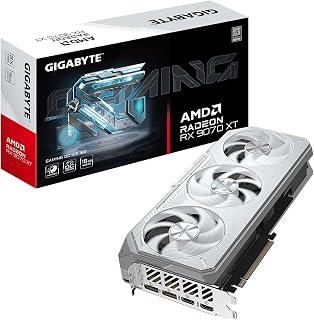
The RX 9070 XT offers strong rasterization performance capable of driving high refresh rates at 1440p, though the 2520 MHz GPU clock sits below some competing models. The 16GB GDDR6 across a 256-bit bus provides ample memory bandwidth for texture-heavy games at this resolution. DisplayPort 2.1 connectivity ensures compatibility with the latest 240Hz monitors, while the reinforced structure prevents GPU sag in tower builds.
Pros
- 2520 MHz clock and RDNA 4 architecture sustain high frame rates at 1440p 240Hz
- 20000 MHz GDDR6 and PCIe 5.0 eliminate bandwidth bottlenecks
- Dual BIOS toggles between Performance and Silent modes
- Server-grade thermal gel and Hawk fans maintain stable temperatures under prolonged load
Cons
- 2.7-slot width requires case clearance planning
- Limited user review data makes real-world 240Hz performance harder to verify independently
Hitting 240Hz at 1440p consistently across demanding AAA titles requires a card with both raw clock speed and efficient frame delivery, and the GIGABYTE RX 9070 XT Gaming OC ICE is built squarely for that job. Its 2520 MHz boost clock on AMD's RDNA 4 architecture drives high frame rates even in GPU-limited scenarios, while the 16GB of GDDR6 at 20000 MHz memory speed ensures the framebuffer never becomes a bottleneck at high settings. PCIe 5.0 support eliminates any interface-level ceiling for current and future CPU pairings. DisplayPort 2.1 handles 1440p 240Hz effortlessly with bandwidth to spare. The WINDFORCE cooling system combines server-grade thermal gel, Hawk fans with alternate-spin technology, and composite copper heat pipes, keeping thermals stable during the kind of prolonged 240Hz sessions that stress lesser coolers. The dual BIOS lets you run Performance mode for maximum frame output or Silent mode when the session calls for a quieter environment. The 2.7-slot footprint is the main physical consideration for smaller builds.
GPU and Memory: AMD Radeon RX 9070 XT, 16GB GDDR6, 2520 MHz GPU Clock, 20000 MHz Memory Clock
Interface and Connectivity: PCIe 5.0 x16, Dual HDMI, Dual DisplayPort 2.1, 4096x2160 maximum resolution support
Cooling: WINDFORCE system with 3 Hawk fans, server-grade thermal gel, composite copper heat pipes, copper plate, 3D active fans
Design: 11.34 inches (L) x 5.2 inches (W), 2.7 slot form factor, reinforced metal backplate, 2.8 lbs
Features: Dual BIOS (Performance/Silent modes), 16.7M RGB color options, GIGABYTE CONTROL CENTER support
Warranty: 3-year manufacturer warranty
The strongest choice for enthusiasts who want a high-refresh 1440p experience with no compromises, including ray tracing and heavy texture loads. The dual BIOS adds flexibility for shared work and gaming rigs. Casual or budget-minded gamers will find the performance exceeds what they need at 1440p 240Hz, and the large 2.7-slot form factor rules it out for compact or tightly packed systems.

The 128-bit memory bus and 2810 MHz core clock position this card for 1080p high refresh gaming rather than sustained 240 FPS at 1440p in demanding titles. While the 16GB GDDR6 capacity seems generous, memory bandwidth becomes the limiting factor at higher resolutions. It handles competitive esports games well at 1440p but struggles to maintain 240 FPS in graphically intensive AAA games even with reduced settings.
Pros
- 2810 MHz core clock supports high frame rates in less demanding titles at 1440p
- 16GB GDDR6 provides ample VRAM headroom at 1440p high settings
- Triple 80mm Windforce cooling handles extended high-refresh sessions
- HDMI 2.1a and DP 1.4 outputs cover current 1440p 240Hz monitor connections
Cons
- 128-bit memory bus limits peak bandwidth compared to wider-bus alternatives at this resolution
- Sustaining 240 fps in demanding AAA titles at high settings requires upscaling or reduced detail
The Gigabyte RX 7600 XT brings 16GB of GDDR6 and AMD's RDNA 3 architecture to 1440p gaming at a position below the flagship tier. For a 240Hz panel, the card leans on AMD's AI accelerators and its 2810 MHz core clock to chase the frame rates that high-refresh play demands. The 128-bit memory bus is a structural constraint at this specification level, though the 18000 MHz memory speed partially compensates by maximizing throughput within that interface. DisplayPort 1.4 and HDMI 2.1a outputs cover current 1440p 240Hz monitors, and the triple 80mm Windforce fans with composite copper heat pipes manage thermals effectively across long sessions. AV1 encoding support adds value if content creation sits alongside gaming. The honest limitation for 240Hz use specifically is that reaching and sustaining 240 fps in modern GPU-demanding titles at 1440p high settings will push this card hard, making upscaling and settings tuning necessary rather than optional in the most demanding releases.
GPU & Memory: AMD Radeon RX 7600 XT with 16GB GDDR6 memory, 128-bit memory interface, 18000 MHz memory clock, and 2810 MHz boost clock.
Architecture: RDNA 3 compute units with advanced raytracing, AI accelerator, and AV1 encoding support. Supports DirectX 12 Ultimate.
Connectivity: PCI-Express 4.0 x16, 2x DisplayPort 2.1, 2x HDMI 2.1a.
Cooling: Windforce system with 3x 80mm blade fans, 5 composite copper heat pipes, and direct GPU contact copper plate.
Physical: 11.06 inches length, 4.61 inches width, 1.2 kg weight. Requires 700W power supply.
Display Support: Up to 8K resolution (7680x4320).
Best suited for 1440p 240Hz players focused on esports titles and less GPU-intensive games, where the clock speed and RDNA 3 efficiency can realistically sustain high frame rates. Also reasonable for those who pair upscaling with quality settings to hit refresh targets in AAA games. Skip it if you want maximum fidelity at 1440p 240Hz in the heaviest current titles without leaning heavily on upscaling.

ASRock Intel Arc A770 Phantom Gaming 16GB Graphics
While the 16GB GDDR6 memory offers generous VRAM capacity for future-proofing at 1440p, the Arc A770's performance tier targets lower refresh rates than 240Hz in demanding titles. The 2200 MHz GPU clock provides competitive frame rates in lighter esports games where Intel's driver optimizations have matured. DisplayPort 2.0 connectivity handles high refresh displays, though sustained 240 FPS requires less graphically intensive games.
Pros
- DisplayPort 2.0 output handles 1440p 240Hz bandwidth natively
- XeSS AI upscaling boosts frame rates in supported titles
- 16GB GDDR6 prevents VRAM bottlenecks at high texture settings
- Triple-fan cooler stays silent at idle and light loads
Cons
- Occasional Vulkan driver instability reported under sustained workloads
- Linux driver maturity is behind competing platforms
At 1440p and 240Hz, the challenge is not just resolution but sustained frame delivery. The ASRock Arc A770 Phantom Gaming addresses this through a combination of its 2200 MHz GPU clock, 16GB of GDDR6, and Intel XeSS AI upscaling, which reconstructs frames intelligently to push refresh rates higher in supported titles without a proportional hit to visual quality. Full support for ray tracing, variable rate shading, and mesh shading keeps the card compatible with the latest engine features that modern titles increasingly rely on. DisplayPort 2.0 output is a genuine asset here, providing the bandwidth needed to feed a 1440p 240Hz display without compromise. The triple-fan Phantom Gaming cooler stays silent below load, which matters during the lower-intensity moments between intense scenes. The 16GB VRAM headroom means texture-heavy titles at high settings will not stall on memory. The main caveat for this use case is driver reliability: occasional Vulkan driver instability under sustained workload has been reported, and at 240Hz sustained workloads are exactly what you are running.
GPU Architecture: Intel Xe HPG Microarchitecture, Intel Arc A770
Memory: 16GB GDDR6 on 256-bit bus with 17.5 Gbps clock speed
Clock Speed: 2200 MHz GPU core clock
Display Support: Maximum 7680x4320 pixels, 3x DisplayPort 2.0, 1x HDMI 2.1
Interface: PCI-Express x16 v4.0
Cooling: Triple striped axial fans with ultra-fit heatpipes, 0dB silent mode
Dimensions: 12.01 inches length, 5.16 inches width
Weight: 2.5 pounds
Power Requirements: 600W minimum power supply recommended
Warranty: 2 years manufacturer coverage
Model Number: A770 PG 16GO
A good fit for 1440p 240Hz players who run XeSS-supported titles and want ample VRAM for high-texture settings. Also suits those who double the card for light Unreal Engine or AI inference work between gaming sessions. Skip it if you game heavily on Linux, where driver maturity lags, or if you need rock-solid stability under hours of uninterrupted high-refresh play without tolerating occasional driver reloads.
What to Look for in a 1440p 240Hz GPU
Raw Performance at QHD Resolution
A 240Hz panel refreshes 240 times per second, which means your GPU needs to consistently render above 200 frames per second in your target titles. Cards built on newer architectures like AMD’s RDNA 4, found in the ASRock Radeon RX 9060 XT Steel Legend 16GB GDDR6 and the ASUS Prime Radeon RX 9070 XT 16GB GDDR6 OC Edition, deliver significantly improved compute efficiency per clock cycle compared to prior generations.
For competitive shooters and esports titles, even a mid-range RDNA 4 card can hit the frame rates your display demands. For AAA open-world games with ray tracing enabled, you’ll want to step up to a more powerful option and lean on upscaling like AMD FSR 4 to fill the gap.
VRAM: How Much Do You Actually Need?
At 1440p with high texture settings, 12GB is a functional floor and 16GB is the comfortable ceiling for 2026 titles. Cards like the ASRock Radeon RX 7700 XT Challenger 12GB OC sit right at that threshold, while options like the GIGABYTE Radeon RX 9070 XT Gaming OC ICE 16G give you overhead for texture-heavy games and future releases.
More VRAM also helps when you multitask, streaming, recording, or running a browser alongside your game. If you plan to push settings to ultra or dip into ray tracing, 16GB gives you meaningful breathing room without forcing you to compromise on visual fidelity.
Display Output and Monitor Compatibility
Running at a true 240Hz over 1440p requires either DisplayPort 1.4 or DisplayPort 2.1, depending on your monitor’s spec. The AOC 27″ Gaming Monitor QHD 260Hz Overclocked IPS uses DisplayPort 1.4 to hit 240Hz, so any modern GPU with DP 1.4 output will pair correctly with it. Cards like the RX 9060 XT and RX 9070 XT ship with DisplayPort 2.1a, which is future-proof for upcoming high-refresh 4K panels as well.
Adaptive sync support is equally important. Screen tearing at 200-plus FPS is jarring, and both AMD FreeSync and NVIDIA G-Sync Compatible monitors can eliminate it. The AOC monitor listed above supports Adaptive-Sync across both GPU brands, so your pairing options stay flexible.
Cooling, Acoustics, and Build Quality
Sustained high frame rates mean sustained GPU load, so thermal performance matters more than the spec sheet suggests. Triple-fan coolers like those on the ASRock Radeon RX 9060 XT Steel Legend 16GB GDDR6 and the GIGABYTE RX 9070 XT ICE use stop-start fan tech, fans cut off entirely under light loads for silent operation. That’s a real quality-of-life improvement during desktop use or less demanding sessions.
Metal backplates, reinforced PCIe slots, and military-grade component ratings aren’t just marketing language. They reduce GPU sag in larger builds and help thermal dissipation across the board. If your case has limited airflow or your GPU will be running long gaming sessions daily, these structural details make a tangible difference over time. For a broader look at electronics that hold up under sustained use, the Electronics hub covers a wide range of verified picks.
Final Thoughts
For most gamers targeting 1440p 240Hz in 2026, the best overall pairing is a capable RDNA 4 card matched with a fast QHD monitor. The ASUS Prime Radeon RX 9070 XT 16GB GDDR6 OC Edition is the strongest all-around choice if you want headroom for demanding titles and ray tracing without compromise, while the ASRock Intel Arc A770 Phantom Gaming 16GB OC is worth serious consideration for builders on a tighter budget who still want 16GB of GDDR6 and solid upscaling through Intel XeSS.
Frequently Asked Questions
What GPU do I need to run 1440p at 240Hz?
You need a GPU that can consistently push above 200 frames per second at 2560×1440 in your target games. In 2026, RDNA 4-based cards like the RX 9060 XT and RX 9070 XT handle this well in most competitive titles, especially when paired with upscaling technologies like FSR 4. For heavier AAA games at ultra settings, stepping up to the RX 9070 XT tier gives you the headroom to stay above your monitor’s refresh rate.
Is 12GB of VRAM enough for 1440p 240Hz gaming?
For most games at 1440p, 12GB is sufficient in 2026, though some recent titles with high-res texture packs can push past that limit at maximum settings. Cards like the ASRock Radeon RX 7700 XT Challenger 12GB OC perform well at QHD in the majority of titles. If you plan to run texture-heavy games or stream simultaneously, 16GB offers noticeably more stability and future-proofing.
Does DisplayPort matter for 240Hz at 1440p?
Yes, and the version matters. DisplayPort 1.4 supports 1440p at 240Hz without issue, while DisplayPort 2.1 opens the door to 4K at 240Hz for future upgrades. HDMI 2.0 is typically limited to 144Hz at QHD, so always use a DisplayPort cable when connecting a 240Hz monitor. Check your monitor’s spec sheet to confirm which input supports its maximum refresh rate, since some displays rate 240Hz only over DisplayPort.
Is Intel Arc a viable option for high-refresh 1440p gaming in 2026?
Intel Arc has matured considerably since its launch, and the A770 is a legitimate option for 1440p gaming when paired with well-optimized titles. The ASRock Intel Arc A770 Phantom Gaming 16GB OC delivers 16GB of GDDR6 on a 256-bit bus, which is competitive at its tier. Driver support has improved steadily, and Intel XeSS upscaling is a useful tool for maintaining frame rates in demanding scenes. It performs best in DX12 and Vulkan titles, so check compatibility with your specific game library before committing.





Write Your Review
No reviews yet. Be the first to share your experience!