

You sit down to render a complex After Effects composition or export a 4K timeline and your current GPU turns a 10-minute job into a 90-minute wait. If that sounds familiar, your hardware is holding your creativity back. Choosing the right graphics card for content creation is about more than raw gaming benchmarks, it comes down to VRAM capacity, AI acceleration, display output flexibility, and thermal reliability under sustained workloads.
This guide is built for video editors, 3D artists, motion designers, and photographers who need a GPU that performs in professional applications, not just games. We evaluated ten of the strongest options available right now, spanning flagship NVIDIA Blackwell cards, next-gen AMD RDNA 4 boards, and a compelling Intel Arc alternative that punches above its weight class.
Quick Comparison
Ratings reflect the most recent data pull. Check each listing for current price and availability.
Quick answer
This guide compares 10 picks, with ASUS ProArt RTX 5080 16GB GDDR7 Graphics Card ranked first. GIGABYTE Radeon RX 9070 XT Gaming OC 16GB GDDR6 PCIe has the most customer reviews.
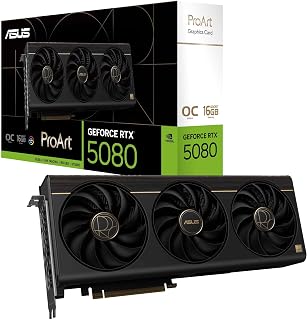
The ProArt RTX 5080 brings together 16GB of GDDR7, a 2730 MHz boost clock, and a USB Type-C output alongside two DisplayPort 2.1b and HDMI 2.1b ports, giving creators flexible monitor and capture device connectivity in a single card. GDDR7 memory bandwidth accelerates GPU-intensive tasks like AI denoising in Blender or real-time color grading in DaVinci Resolve, making it a strong pick for creators who push their workstations hard.
Pros
- 1858 AI TOPS accelerates AI-assisted editing and content creation pipelines
- Up to 2730 MHz clock speed sustains demanding 4K rendering and live streaming workloads
- Built-in USB Type-C eliminates adapters for streamlined studio connectivity
- Quiet triple-fan cooling in a compact 2.5-slot chassis suits professional workspaces
Cons
- Performance uplift over the previous RTX 4080 generation is 15 to 20 percent, which may not justify an upgrade for satisfied existing owners
- PCIe Gen 4 system users may need a motherboard BIOS update before the card operates correctly
The ASUS ProArt RTX 5080 is designed from the ground up with professional creative workflows in mind rather than gaming benchmarks. Running NVIDIA's Blackwell architecture at up to 2730 MHz in OC mode, it brings 1858 AI TOPS to tasks like 4K video rendering, AI-assisted editing, and machine learning pipelines. The 16 GB of GDDR7 memory keeps large project files and multi-stream timelines moving efficiently. Thermal management is a key differentiator for long studio sessions: the combination of a vapor chamber, three Axial-tech fans, and a phase-change GPU thermal pad keeps the card quiet even under heavy compute loads. The 2.5-slot chassis makes this achievable without a full-size footprint. Output connectivity covers creative needs directly, with HDMI 2.1b, two DisplayPort 2.1b outputs, and a built-in USB Type-C port that removes the need for adapters when connecting to modern displays or external devices. The MaxContact heatsink and Auto-Extreme manufacturing process speak to long-term reliability, which matters when a card sits at the center of a professional production environment.
GPU: NVIDIA GeForce RTX 5080, Blackwell Architecture
Memory: 16GB GDDR7
Clock Speed: 2700 MHz (Default), 2730 MHz (OC Mode)
AI Performance: 1858 AI TOPS
Interface: PCIe 5.0 x16
Video Outputs: 1x HDMI 2.1b, 1x USB Type-C, 2x DisplayPort 2.1b
Max Resolution: 7680x4320 pixels
Cooling: 3x Axial-tech Fans, Vapor Chamber, Phase-Change GPU Thermal Pad
Form Factor: 2.5-slot, 12" Length x 5" Width
Weight: 3.1 pounds
Power Connectors: PCIe 5.0 compliant
Warranty: 3 Years
Software: GPU Tweak III for performance monitoring and overclocking
A strong match for video editors, AI researchers, and professional content creators who depend on CUDA acceleration, stable thermals, and clean workspace integration. The USB Type-C output and multi-display connectivity suit complex monitor setups. Less appropriate for users upgrading from an RTX 4080 who will see modest gains, or for anyone whose workflow does not leverage CUDA or AI-accelerated tools.

Creators working within tighter power or space constraints will appreciate the Arc B570's 2600 MHz clock and 10GB GDDR6, which handle 1080p and 1440p video editing workloads in apps like DaVinci Resolve with solid hardware-accelerated decode and encode performance. The 19 Gbps memory speed keeps texture streaming and timeline scrubbing responsive, and the 0dB fan mode keeps the workspace quiet during lighter tasks.
Pros
- 10GB GDDR6 at 19 Gbps bandwidth handles demanding creative applications at 1440p with room to spare
- XeSS 2 AI upscaling adds versatility for creators who also use the system for gaming
- 0dB silent cooling keeps the workspace quiet during light editing and idle periods
- Single 8-pin power connector simplifies builds and reduces cable management complexity
Cons
- Intel Arc driver ecosystem is younger than AMD and NVIDIA alternatives, with occasional optimization updates still rolling out
- Not positioned as a 4K rendering powerhouse, limiting its ceiling for the most demanding production workflows
Creators who need a capable machine for content work without committing to a high-end budget will find a lot to like in the ASRock Intel Arc B570 Challenger. The card runs on Intel's Xe2-HPG architecture and carries 10GB of GDDR6 memory clocked at 2600 MHz with 19 Gbps bandwidth, offering a solid foundation for video editing, graphic design, and light 3D tasks at 1440p. XeSS 2, Intel's AI-powered upscaling technology, extends the card's utility for creators who also game on their workstation. Connectivity covers three DisplayPort 2.1 and one HDMI 2.1a output, supporting up to an 8K display or a multi-monitor editing workflow. A single 8-pin power connector simplifies installation and reduces cable clutter in a clean studio build. The dual-fan 0dB cooling system is whisper-quiet at idle, which matters during long creative sessions. The metal backplate prevents sag and gives the card a premium feel. For budget-conscious creators handling everyday production tasks, the B570 Challenger punches above its class.
The Arc B570 excels at 1440p gaming, maintaining high frame rates with maxed or near-maxed settings in modern AAA titles like Assassin's Creed Resync, Subnautica 2, and God of War. The 10GB VRAM buffer ensures smooth performance without stuttering even in VRAM-intensive scenarios with multiple monitors or intensive applications running simultaneously.
XeSS 2 technology provides meaningful performance boosts through AI-powered upscaling without sacrificing perceived image quality. Users report stable gameplay and low thermal temps, with the card operating at just 45-56 degrees Celsius at zero RPM and averaging around 68 degrees under sustained gaming loads. Idle power consumption is remarkably low at 18-21 watts during light tasks like streaming and multi-monitor work.
The card handles both 1080p ultra settings and 1440p high settings comfortably. While not positioned as a 4K solution, users seeking budget-friendly 1440p gaming will find this card highly capable and reliable across current and near-future game libraries.
GPU: Intel Arc B570 (Xe2-HPG Architecture)
Memory: 10GB GDDR6, 160-bit bus
Clock Speeds: 2600 MHz GPU, 19 Gbps Memory
Power: Single 8-pin connector
Interface: PCIe 4.0 x8
Display Outputs: 3x DisplayPort 2.1, 1x HDMI 2.1a
Max Resolution: 7680 x 4320
Cooling: Dual striped axial fans with 0dB Silent Cooling
Backplate: Metal with structural reinforcement
Weight: 0.99 kg
Warranty: 2 Years Manufacturer
Media Engine: Advanced with AV1 encoding support
DirectX Support: 12 Ultimate
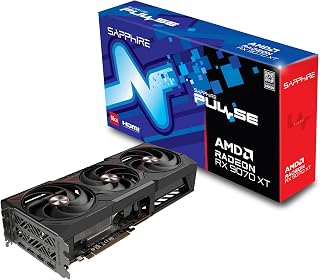
Stepping up to RDNA 4 architecture, this Sapphire card pairs 16GB of GDDR6 with a 2970 MHz clock speed, giving video editors and 3D artists headroom to work with large 8K assets or complex scene files without constant memory pressure. The bump to 16GB is particularly relevant for creators who keep multiple high-resolution textures or footage streams loaded simultaneously in tools like Premiere Pro or Blender.
Pros
- 16 GB GDDR6 memory and 7680x4320 maximum resolution support demanding 4K and 8K creative workflows
- Stable 3100 MHz clock speeds with memory temperatures around 78C under sustained load
- Minimal idle power draw of 10 to 30W benefits long creative sessions with frequent render pauses
- Triple-fan cooling maintains quiet operation relevant for studio and recording environments
Cons
- RDNA 4 drivers are still maturing, and edge-case compatibility issues with specific creative software may surface
- Physically large card requires careful case clearance verification before purchase
For content creators who need a capable GPU for demanding creative workloads without committing to a flagship spend, the Sapphire Pulse RX 9070 XT is worth serious consideration. The 16 GB of GDDR6 memory and RDNA 4 architecture give it real headroom for 4K editing and asset-heavy scenes. A maximum supported resolution of 7680x4320 means it can drive 8K output, relevant for creators working at the top end of resolution. The triple-fan cooling system keeps memory temperatures around 78C under load while staying quiet, and idle power draw is minimal at 10 to 30W, which is a genuine advantage for long creative sessions where the machine idles between renders. Gaming-side performance is well documented, with stable 3100 MHz clock speeds under 50C and strong 1440p results, which is useful for game capture and streaming workflows. The card is physically large, so checking case clearance is necessary. RDNA 4 is still maturing in driver support, and edge-case compatibility issues may appear as software catches up, which is a mild concern for creators who depend on specific software stacks.
Gaming Performance: 60-120 FPS at 1440p ultra settings with AAA titles. 180+ FPS possible in optimized games. Ultrawide support delivers 60+ FPS at 5120x1440 native resolution with quality settings maxed.
Thermal Performance: GPU core under 50C during sustained gaming, memory peaks at 78C. Idle temperatures around 32C. Consistent performance without throttling during extended sessions.
Clock Speeds: Stable overclocks to 3100MHz verified by users. Factory settings at 2970MHz provide reliable baseline performance with headroom for enthusiasts.
Power Efficiency: 10-30W idle, 140-250W gaming load at 1440p. Excellent power efficiency compared to competing high-end cards, reducing system power supply requirements.
Well suited for content creators, streamers, and video editors who want strong 4K and high-resolution performance at a lower cost than Nvidia flagship options. Creators comfortable in the AMD software ecosystem will feel at home. Less ideal for professionals whose production tools rely heavily on CUDA-specific acceleration, or for users in tight cases who cannot accommodate a notably large card.

Built explicitly for professional creative workflows, the ProArt RTX 5070 Ti pairs 16GB of faster GDDR7 memory with a 2610 MHz boost clock and ASUS's creator-focused tuning, making it well-suited for GPU rendering in Blender or AI-assisted upscaling in video apps. GDDR7 delivers higher memory bandwidth than GDDR6, which matters when working with uncompressed 4K or 8K footage where data throughput is the bottleneck.
Pros
- Temperatures held below 60C during sustained rendering loads
- 16 GB GDDR7 memory supports large 4K and 8K creative assets
- USB Type-C port enables direct connection to Apple Studio Displays
- 2.5-slot form factor fits compact and space-constrained workstation builds
Cons
- Requires a 12VHPWR connector and at least an 850W PSU, with 1000W+ recommended
- Power draw can exceed 675W when paired with high-end CPUs, demanding careful system planning
Content creators who push hardware through sustained 4K and 8K rendering sessions need a GPU that stays cool and quiet without sacrificing compute headroom. The ASUS ProArt RTX 5070 Ti delivers on both fronts. Built on NVIDIA's Blackwell architecture, its 16 GB of GDDR7 memory handles large assets, complex node graphs, and multi-layer timelines without breaking a sweat. The thermal engineering is the real story for professional workflows: a vapor chamber, phase-change GPU thermal pad, and three Axial-tech fans keep temperatures below 60C under sustained loads, meaning long render queues stay stable and silent. The integrated USB Type-C port connects directly to Apple Studio Displays and external storage without adapters, a small but genuinely useful feature in a busy edit suite. The 2.5-slot form factor also means the card fits tightly specced workstation towers. Power requirements are serious, so budget accordingly, but for 3D artists, video editors, and motion graphics professionals who need reliable, thermals-first performance in a compact, aesthetically considered package, this card is a strong fit.
GPU: NVIDIA GeForce RTX 5070 Ti, Blackwell Architecture
Memory: 16GB GDDR7, 2610 MHz Clock Speed
Cooling: 3x Axial-tech Fans, Vapor Chamber, Phase-change Thermal Pad, MaxContact Heatsink
Interface: PCIe 5.0 x16, USB Type-C, 2x HDMI 2.1b
Max Resolution: 7680x4320 (8K)
Physical: 2.5-slot, 12 inches Length, 5 inches Width, 3.1 lbs
Warranty: 3-Year Coverage
Best suited for 3D artists, video editors, and motion graphics professionals who need sustained high-performance rendering in a compact or space-constrained workstation. The USB Type-C output is a genuine advantage for Apple Studio Display users. Skip it if your existing workstation PSU is under 850W and you are not prepared to upgrade, or if your workloads are light enough that a mid-range card would suffice.

Content creators who live in GPU-accelerated workflows will benefit from the TUF RTX 5080's 16GB GDDR7 and 2730 MHz boost clock, which together accelerate AI-powered features in apps like Topaz Video AI or DaVinci Resolve's noise reduction. The three DisplayPort 2.1a and two HDMI 2.1b outputs give multi-display creative setups plenty of connection flexibility without needing adapters.
Pros
- 16GB GDDR7 memory and Blackwell architecture deliver elite throughput for 4K editing, 3D rendering, and compute-intensive creative tasks
- Phase-change GPU thermal pad ensures consistent thermal performance under prolonged, heavy production workloads
- DLSS 4 support accelerates AI-enhanced export and preview workflows
- Five outputs including three DisplayPort 2.1a and two HDMI 2.1b support complex multi-monitor studio configurations
Cons
- Requires a minimum 850W PSU and a case that can accommodate 348mm length and a 3.6-slot footprint
- Flagship performance tier demands a significant investment that exceeds what many part-time or hobbyist creators need
For professional content creators who treat performance as non-negotiable, the ASUS TUF Gaming RTX 5080 sits at the top of the stack. Built on NVIDIA's Blackwell architecture with DLSS 4 support, the card brings 16GB of GDDR7 memory and a 2730 MHz GPU clock to GPU-accelerated creative workflows including 4K video editing, 3D rendering, motion graphics, and compute-heavy production tasks. DLSS 4 is particularly relevant for creators who preview or export AI-enhanced content, as it offloads demanding upscaling work efficiently. The thermal engineering is a highlight: a phase-change GPU thermal pad replaces traditional thermal paste for more consistent heat transfer under sustained heavy loads, and three Axial-tech fans with an optimized fin array keep temperatures stable through long render sessions. Military-grade components with protective PCB coating and Auto-Extreme precision manufacturing give long-term reliability confidence. Five display outputs, three DisplayPort 2.1a and two HDMI 2.1b, accommodate complex multi-monitor color-graded reference setups. This is a card built for creators whose livelihood depends on the machine keeping up.
GPU: NVIDIA GeForce RTX 5080
Memory: 16GB GDDR7
Boost Clock: 2730 MHz (OC Mode), 2700 MHz (Default Mode)
Physical Dimensions: 348mm length, 3.6-slot design, 4.3 lbs
Video Outputs: 3x DisplayPort 2.1a, 2x HDMI 2.1b
Power Requirement: Minimum 850W PSU with 16-pin 12V-2x6 (12VHPWR) connector
Manufacturing: Auto-Extreme precision automated manufacturing
Cooling: Three Axial-tech fans, phase-change GPU thermal pad, protective PCB coating
Power Supply: Verify your PSU is rated for 850W minimum and includes the required 16-pin 12V-2x6 (12VHPWR) connector. Standard 6-pin or 8-pin connectors are insufficient for this card.
Physical Clearance: Confirm your case accommodates the 348mm length and can support the 3.6-slot width requirement. Measure internal dimensions and account for storage drives, fans, and other components that may interfere with the card's placement.
System Integration: The card includes a GPU bracket for secure installation. Ensure your motherboard provides adequate PCIe slot access and that your monitor cables support DisplayPort 2.1a or HDMI 2.1b for optimal performance.

Content creators on a budget who work with 4K timelines or 3D renders will find the 12GB GDDR6 frame buffer a meaningful upgrade over 8GB cards, reducing the frequency of memory overflow slowdowns in apps like DaVinci Resolve or Blender. The 2584 MHz boost clock keeps GPU-accelerated effects rendering at a brisk pace, and three DisplayPort 2.1 outputs make driving a multi-monitor color-grading setup straightforward.
Pros
- 12GB GDDR6 with 48MB Infinity Cache provides strong memory headroom for high-resolution creative assets
- 0dB idle fan mode keeps the workspace quiet during non-intensive editing tasks
- Three DisplayPort 2.1 and one HDMI 2.1 support flexible multi-monitor studio setups
- Metal backplate adds rigidity and assists thermal dissipation during sustained workloads
Cons
- Requires dual 8-pin PCIe connectors and adequate chassis space, demanding compatibility checks in compact builds
- White LED lighting is fixed and cannot be customized, which may clash with a coordinated studio setup
Content creators working at 1440p will find the ASRock RX 7700 XT Challenger a capable and dependable workhorse. Built on AMD's RDNA 3 architecture, the card pairs 12GB of GDDR6 memory with a 192-bit bus and 48MB Infinity Cache, giving video editors, 3D artists, and streamers the memory headroom to handle high-resolution assets without constant bottlenecks. The 2584 MHz boost clock keeps GPU-accelerated tasks moving at a brisk pace. Three DisplayPort 2.1 outputs and one HDMI 2.1 connector mean creators can run a multi-monitor editing suite or connect to a high-refresh reference display with no adapters required. The dual-fan cooling system with 0dB idle mode is a genuine quality-of-life win for long editing sessions in a quiet home studio, where fan noise from a spinning GPU can be a real distraction. The metal backplate adds structural rigidity and assists with heat dissipation during sustained render workloads. For creators who do not need to push into heavy 4K rendering but want reliable, whisper-quiet performance across photo editing, video production, and light 3D work, this card delivers a well-rounded package.
Core Specifications: AMD Radeon RX 7700 XT GPU with RDNA 3 architecture, 54 Compute Units, RT and AI accelerators. 12GB GDDR6 memory on 192-bit bus with 48MB Infinity Cache. Game Clock 2226 MHz, Boost Clock up to 2584 MHz, Memory Clock 18,000 MHz.
Connectivity: 3x DisplayPort 2.1, 1x HDMI 2.1. PCIe 4.0 x16 interface. Dual 8-pin auxiliary power connectors. Maximum display resolution up to 7680x4320 pixels.
Physical: Dimensions 10.5 x 5.1 x 2.0 inches. Weight 2.2 pounds. Dual-fan cooling design. Metal backplate. 2-year spare part availability. 1-year warranty.
Ideal for video editors, photographers, and streamers building a capable 1440p workstation on a midrange budget, especially those upgrading from older cards like the GTX 1070 or RTX 3060. The 12GB GDDR6 buffer suits high-resolution creative work comfortably. Skip it if your workflow demands heavy 4K rendering or GPU-compute-intensive tasks that benefit from a larger frame buffer or more compute units.

Among RDNA 4-based options, this GIGABYTE card stands out with a 3060 MHz boost clock, the highest in its class here, which translates to faster GPU render times in Blender Cycles or Premiere Pro hardware-accelerated exports. The 16GB GDDR6 buffer handles large project files comfortably, and PCIe 5.0 support future-proofs the build for creators who regularly move large raw video assets through their pipeline.
Pros
- 16GB GDDR6 removes VRAM constraints for 4K video timelines and complex 3D scenes
- PCIe 5.0 interface ensures compatibility with current and future workstation platforms
- WINDFORCE cooling with server-grade thermal gel sustains quiet operation during long renders
- 8K maximum resolution output supports professional high-end reference monitor setups
Cons
- 750W power supply is the minimum requirement, demanding attention to workstation PSU capacity
- 11.34-inch card length requires case compatibility verification before installation
Content creators working in video editing, 3D rendering, and high-resolution production workflows will find the GIGABYTE Radeon RX 9070 XT a capable workhorse. Its 16GB of GDDR6 memory is a standout advantage here: large frame buffers matter when handling 4K timelines, complex 3D scenes, or texture-heavy assets, and this card removes the VRAM bottlenecks that have frustrated creators on older hardware. The 3060 MHz boost clock keeps renders moving quickly, and PCIe 5.0 support means the card is ready for current and next-generation workstation builds. The WINDFORCE cooling system with Hawk fans and server-grade thermal conductive gel sustains workloads quietly, which matters during long render sessions. Its 8K maximum resolution output (7680x4320) gives professionals the headroom to drive high-end reference monitors. The card also handles 4K gaming at medium to high settings, so creators who want one card for both production and downtime get genuine flexibility. Build quality holds up under sustained load, and the 11.34-inch length fits most standard full-tower and mid-tower workstation cases without modification.
Core Specifications
GPU: AMD Radeon RX 9070 XT
Memory: 16GB GDDR6
Memory Clock: 2600 GHz
GPU Clock: 3060 MHz
Interface: PCIe 5.0 x16
Max Resolution: 7680 x 4320 (8K)
Physical and Connectivity
Dimensions: 11.34 inches (L) x 5.2 inches (W)
Weight: 1.78 kg
Output: DisplayPort
Power Connectors: Dual 8-pin (750W+ PSU recommended)
Cooling: WINDFORCE system with Hawk fans and thermal gel
Warranty and Support
Manufacturer: GIGABYTE
Warranty: 3 years
Model: GV-R9070XTGAMING OC-16GD
Gaming Performance at Common Resolutions
1440p Gaming: 160-220fps on most modern AAA titles at high settings. Excellent for competitive gaming and high-refresh monitors.
4K Gaming: Playable at high settings on most titles, medium settings on demanding new releases. Solid for content creators monitoring in 4K.
Esports Titles: 300+ fps possible on optimized competitive games for ultra-high refresh gameplay.
Real-World Use Cases
Best suited for 1440p gaming at 144+ fps, 4K content creation workflows, professional 3D rendering, and VR gaming. Handles flight simulators like DCS at high settings with 4K head tracking. Eliminates VRAM constraints for media professionals working with large files.
Driver Recommendations
Run DDU (Display Driver Uninstaller) before installation if upgrading from another card. Install latest AMD drivers for maximum stability and performance. Update BIOS if required by your system for PCIe 5.0 compatibility.

Running at 3030 MHz on RDNA 4 architecture with 16GB GDDR6 and three DisplayPort 2.1a outputs, this ASUS Prime card handles demanding creative workloads from multi-stream 4K editing to complex 3D renders without breaking a sweat. The triple DisplayPort layout is a practical advantage for creators who rely on a wide multi-monitor setup for color grading panels, reference monitors, and preview windows simultaneously.
Pros
- Dual BIOS lets creators balance render speed against near-silent fan operation as needed
- Phase-change thermal pads keep GPU below 60 degrees Celsius during sustained production workloads
- Three native DisplayPort 2.1a outputs support multi-monitor 8K production setups
- Power draw runs 15 to 20W below comparable cards, reducing overall system thermal load
Cons
- 12.3-inch length requires careful case clearance verification before purchase
- Some users encountered early driver instability, though updates resolved issues within weeks
The ASUS Prime Radeon RX 9070 XT is built around the qualities content creators actually need day to day: thermal headroom, consistent sustained performance, and reliable stability under prolonged workloads. The dual BIOS system is particularly relevant here. Performance mode pushes boost clocks to 3030 MHz for faster render times, while Quiet mode holds idle temperatures between 28 and 32 degrees Celsius with near-silent fan operation, keeping the workspace comfortable during long editing sessions. Phase-change thermal pads hold GPU temperatures below 60 degrees Celsius even under sustained stress, which matters for creators running overnight renders or extended exports. The 16GB GDDR6 framebuffer handles high-resolution assets comfortably, and the three native DisplayPort 2.1a outputs alongside HDMI 2.1b support multi-monitor color-accurate production setups up to 8K. Power draw of 180 to 190W, typically 15 to 20W below comparable cards, reduces thermal load on the overall system. Axial-tech fans with dual-ball bearings rated for double conventional lifespan add confidence for creators who run hardware hard. The compact 2.5-slot design preserves case airflow, and Linux compatibility broadens its appeal for creators working outside Windows environments.
Memory and Bus: 16GB GDDR6, 256-bit interface, 3030 MHz memory clock
Architecture: AMD Radeon RX 9070 XT, PCIe 5.0 x16, 3030 MHz boost clock (OC mode), 2480 MHz game clock (OC mode)
Connectivity: 3x DisplayPort 2.1a, 1x HDMI 2.1b, maximum resolution 7680 x 4320
Cooling: 3x Axial-tech fans with dual-ball bearings, phase-change thermal pad, 0dB idle technology, 2.5-slot design
Software: Dual BIOS switch (Quiet and Performance profiles), GPU Tweak III for performance tuning and monitoring, ASUS GPU Guard protection
Dimensions and Power: 12.3 inches long, 5.1 inches wide, approximately 1500g, estimated 180-190W typical draw
Warranty: 3-year manufacturer coverage
A strong match for video editors, colorists, and 3D artists who prioritize thermal reliability and quiet operation during intensive workloads. The dual BIOS and Linux support make it particularly useful for creators with diverse production environments. Less suited to professionals whose workflows depend on NVIDIA-exclusive tools or those who need absolute top-tier compute performance that only flagship-tier hardware provides.

Pairing 16GB of GDDR7 memory with a 2730 MHz clock, this GIGABYTE RTX 5080 handles the most demanding creative workloads from 8K video exports to real-time AI upscaling with consistent headroom. The WINDFORCE cooling system is designed to sustain high GPU clocks during long rendering sessions, which matters for creators who run overnight Blender renders or extended batch exports without wanting thermal throttling to stretch deadlines.
Pros
- 16GB GDDR7 at 30,000 MHz handles large creative assets and high-resolution timelines with ease
- Tensor Cores and DLSS 4 accelerate AI-driven creative tools and real-time previews
- 7680x4320 resolution support future-proofs 8K production workflows
- WINDFORCE three-fan cooling sustains full performance during long render and export sessions
Cons
- Substantial power draw demands a robust PSU with available 8-pin connectors, adding to total system cost
- At 13.46 inches and roughly 4 pounds, the card requires careful case planning before purchase
Content creators working at the highest level need a GPU that keeps pace with demanding workflows, and the GIGABYTE GeForce RTX 5080 Gaming OC 16G is built for exactly that. Powered by NVIDIA's Blackwell architecture, it brings enhanced Tensor Cores and RT Cores to bear on tasks like AI-accelerated rendering, complex 3D scene work, and high-resolution video processing. The 16GB of GDDR7 memory running at 30,000 MHz ensures large assets and multi-layered projects load and render without constant VRAM bottlenecks. Support for 7680x4320 output means creators working in 8K have the headroom they need, while PCIe 5.0 bandwidth keeps data moving between the card and the rest of the system. DLSS 4 adds intelligent frame generation useful when previewing real-time effects. The WINDFORCE three-fan cooling system sustains performance under prolonged export and render sessions without thermal throttling. Robust build quality reflects a card designed for long hours of professional use rather than intermittent gaming sessions.
GPU Architecture: NVIDIA GeForce RTX 5080 (Blackwell)
Memory: 16GB GDDR7, 256-bit interface
Memory Speed: 30,000 MHz
GPU Clock: 2.73 GHz boost
Interface: PCIe 5.0 x16
Cooling: WINDFORCE triple-fan system
Power Connectors: 1x 12V connector, 2x 6-pin to 3x 8-pin adapter
Display Outputs: DisplayPort, HDMI
Max Resolution: 7680x4320 pixels
Physical Dimensions: 13.46 inches (L) x 5.59 inches (W)
Weight: 4 pounds
Warranty: 3-year manufacturer
Model: GV-N5080GAMING OC-16GD
Ideal for 3D artists, video editors, and AI-assisted creative workflows that push VRAM limits and demand fast render times at resolutions up to 8K. The Tensor Core acceleration makes it particularly compelling for creators using AI-driven tools integrated into their pipeline. Casual creators or those working primarily in 1080p or light video editing should skip it, as the power requirements, physical size, and premium positioning far exceed what lighter workloads justify.

The PowerColor Reaper RX 9070 XT delivers 16GB GDDR6 and three DisplayPort 2.1 outputs at a more conservative 2400 MHz boost clock, making it a capable pick for creators who prioritize display versatility and VRAM headroom over peak clock speed. Sixteen gigabytes is enough to keep large Premiere Pro or Resolve projects loaded in memory, and DisplayPort 2.1 supports high-refresh 4K monitors that benefit color-critical editing work.
Pros
- 16GB GDDR6 framebuffer handles 4K timelines, large texture sets, and GPU-accelerated rendering
- Triple-fan cooling configuration supports sustained thermal stability during long production sessions
- Four display outputs including HDMI 2.1 and three DisplayPort 2.1 suit flexible multi-monitor setups
- 8K maximum resolution output accommodates high-end finishing and color grading monitors
Cons
- 2400 MHz base clock sits lower than competing RX 9070 XT board partner variants
- No existing user feedback available to confirm real-world production stability or build quality
The PowerColor Reaper AMD Radeon RX 9070 XT brings the same 16GB GDDR6 framebuffer and RX 9070 XT architecture to content creators in a triple-fan configuration focused on sustained thermal performance. For creators, the 16GB memory capacity is the headline: it supports 4K and multi-stream video editing, large texture libraries in 3D production, and GPU-accelerated rendering without the VRAM ceilings that limit smaller cards. The 1x HDMI 2.1 and 3x DisplayPort 2.1 output configuration gives creators flexible multi-monitor options, including high-refresh reference displays or multiple editing screens simultaneously. The triple-fan cooling setup is designed to handle the sustained loads that production workloads demand, keeping thermals stable across extended sessions. Maximum resolution support at 7680x4320 means the card can drive 8K monitors for high-end color grading or finishing work. PCIe 5.0 connectivity keeps the card viable on modern and upcoming creator workstation platforms.
GPU Processor: AMD Radeon RX 9070 XT
Memory: 16GB GDDR6
GPU Clock Speed: 2400 MHz
Memory Clock Speed: 20 GHz
Interface: PCI-Express x16
Power Connectors: Two 8-pin PCI Express connectors
Minimum System Power: 750W
Display Outputs: 1x HDMI 2.1, 3x DisplayPort 2.1
Maximum Resolution: 7680x4320
Card Dimensions: 289 x 111 x 41mm
Card Length: 289mm
Cooling: Triple-fan design
Warranty: 2 Year Limited
How to Choose the Right GPU for Content Creation
VRAM: More Is Almost Always Better
Video memory is the single most critical spec for creative workloads. High-resolution textures in 3D software, large Photoshop canvases, and multi-stream 4K timelines all demand substantial VRAM. Running short on memory mid-project forces the GPU to lean on system RAM, which tanks performance instantly.
Most of the cards on this list carry 16GB of VRAM, which is the sweet spot for 2026 content creation. The ASUS ProArt GeForce RTX 5080 16GB GDDR7 OC Edition and the Sapphire 11348-03-20G Pulse AMD Radeon RX 9070 XT both land at 16GB, making them strong candidates for demanding creative applications.
AI Acceleration and Upscaling Support
AI-powered tools have moved from novelty to necessity in modern creative workflows. NVIDIA’s DLSS 4 and AMD’s AI acceleration features speed up tasks like noise reduction, upscaling, background removal, and generative fill in Adobe apps. The more AI TOPS a card delivers, the faster those operations complete.
The ASUS ProArt GeForce RTX 5080 16GB GDDR7 OC Edition is notable here, rated at 1858 AI TOPS. The ASRock Intel Arc B570 Challenger 10GB OC GDDR6 also brings Intel’s XMX AI acceleration and XeSS 2 upscaling at a fraction of the cost of flagship cards, making it worth considering if your budget is tighter.
Thermal Design and Sustained Performance
Gaming GPUs are built to handle short bursts of peak load. Content creation workloads are different, renders, encodes, and simulations can push a GPU to sustained maximum load for hours. Thermal throttling under those conditions means slower output and inconsistent results.
Cards like the ASUS ProArt GeForce RTX 5070 Ti 16GB GDDR7 OC and the ASUS Prime Radeon RX 9070 XT 16GB GDDR6 OC Edition use vapor chambers, phase-change GPU thermal pads, and Axial-tech fan configurations specifically designed to maintain performance under extended loads. That engineering detail matters more for creative work than it does for gaming.
Display Output Flexibility
Creative professionals often run multi-monitor setups, connect to high-resolution reference displays, or output to a client monitor while working. Modern DisplayPort 2.1 and HDMI 2.1 outputs are essential if you use 4K or 5K displays at high refresh rates.
The GIGABYTE Radeon RX 9070 XT Gaming OC 16G Graphics and the PowerColor Reaper AMD Radeon RX 9070 XT 16GB GDDR6 both offer three DisplayPort 2.1 outputs alongside HDMI 2.1, which gives you real flexibility for multi-display creative rigs. The ASUS ProArt line goes a step further by adding an integrated USB Type-C port, useful for connecting directly to certain professional monitors and peripherals.
Final Thoughts
Whether you need absolute top-end rendering power or a capable card that keeps your creative pipeline moving without breaking the bank, there is a strong option in this lineup for you. For professionals who demand the highest sustained performance and AI acceleration for complex 3D, video, and generative workflows, the ASUS ProArt GeForce RTX 5080 16GB GDDR7 OC Edition is the clear flagship choice, built specifically with content creators in mind. If you want excellent RDNA 4 performance with a well-rounded feature set at a more accessible position on the spectrum, the Sapphire 11348-03-20G Pulse AMD Radeon RX 9070 XT delivers impressive throughput with 16GB GDDR6 and broad display connectivity that suits most professional setups.
Frequently Asked Questions
How much VRAM do I need for video editing in 2026?
For 1080p and 1440p editing, 8GB can work but feels constrained with modern applications. For 4K editing, color grading, and multi-layer timelines, 12GB is a reasonable floor. If you work in 6K or 8K, or run heavy effects stacks, 16GB is the recommended minimum in 2026. Every card on this list that targets serious creative work carries at least 12GB, with most landing at 16GB.
Is AMD or NVIDIA better for content creation?
Both platforms are capable, but the answer depends on your software stack. NVIDIA’s CUDA acceleration is deeply integrated into Adobe Premiere Pro, DaVinci Resolve, and many 3D rendering engines, which gives RTX cards a workflow advantage in those specific apps. AMD’s RDNA 4 architecture, as seen in the Sapphire 11348-03-20G Pulse AMD Radeon RX 9070 XT, delivers competitive performance and OpenCL support across a wide range of tools. Check the GPU acceleration documentation for the apps you use most before deciding.
Can I use a gaming GPU for professional content creation work?
Yes, and most creators do exactly that. Workstation-class cards like the NVIDIA RTX A-series command a significant premium for ECC memory and certified drivers, but consumer GPUs like the ASUS TUF Gaming GeForce RTX 5080 16GB GDDR7 OC handle the vast majority of content creation tasks without issue. The primary trade-off is software certification for certain niche professional applications, which most independent creators never need.
What GPU should a beginner content creator consider in 2026?
Starting out, you do not need a flagship card. The ASRock Intel Arc B570 Challenger 10GB OC GDDR6 is a compelling entry point, bringing AI acceleration, modern display outputs, and solid 1440p performance in a compact, energy-efficient package. The ASRock Radeon RX 7700 XT Challenger 12GB OC is another solid mid-range choice with 12GB GDDR6 and DisplayPort 2.1 connectivity that will serve well for editing and light 3D work without requiring a high-wattage power supply.





Write Your Review
No reviews yet. Be the first to share your experience!