

Cyberpunk 2077 at 1440p is one of the most demanding scenarios you can throw at a graphics card. Between the dense Night City environments, full ray tracing, and the push for 60fps or higher on a high-refresh monitor, choosing the right GPU makes a significant difference in how the game actually feels to play.
This guide covers ten graphics cards ranging from capable mid-range options to top-tier powerhouses, so whether you want a solid everyday card or the absolute best frame rates the game can deliver, there is a pick here for your needs and your build.
Quick Comparison
Ratings reflect the most recent data pull. Check each listing for current price and availability.
Quick answer
This guide compares 10 picks, with EVGA GeForce RTX 3060 XC Gaming 12GB GDDR6 Graphics ranked first.

EVGA's RTX 3060 XC Gaming offers a dual-fan cooling solution and 12GB of GDDR6 on a standard PCIe x16 interface, making it a straightforward fit for a desktop targeting 1440p Cyberpunk 2077 at high settings. DLSS Quality mode meaningfully offsets the GPU's generational performance ceiling, and the full x16 slot connection avoids any bandwidth constraints that could affect frame consistency.
Pros
- Factory-overclocked 1882 MHz boost clock edges ahead of reference RTX 3060 performance
- 12GB GDDR6 handles Cyberpunk 2077's 1440p texture streaming without VRAM pressure
- DLSS support restores playable frame rates at 1440p on high settings
- All-metal backplate improves structural rigidity and aids heat dissipation under load
Cons
- No frame generation support caps high-refresh 1440p potential compared to current-generation cards
- Fans run audibly under the sustained load that Cyberpunk 2077 consistently generates
The EVGA RTX 3060 XC Gaming brings a 1882 MHz boost clock and 3584 CUDA cores to 1440p Cyberpunk 2077, making it a step above the baseline RTX 3060 experience. The 12GB GDDR6 buffer matters in Cyberpunk specifically because the game's texture and asset streaming at 1440p can pressure cards with tighter VRAM budgets, and 12GB provides room to push quality sliders higher without instability. DLSS support is essential here: with it enabled, 1440p becomes genuinely playable on high settings even in Night City's most demanding open areas. The XC designation reflects a factory overclock that gives a small but real advantage over reference speeds in sustained scenes. The all-metal backplate adds structural rigidity and contributes to heat dissipation during long sessions. Dual-fan cooling keeps thermals in check, though the fans run audibly under full load. Ray tracing is available but, as with all Ampere cards, enabling it at 1440p in Cyberpunk requires dialing back other settings. The lack of frame generation remains the generation-level ceiling that separates this card from Ada and Blackwell alternatives for users chasing high-refresh 1440p with visual features fully enabled.
GPU and Memory: NVIDIA GeForce RTX 3060 with 12GB GDDR6, 3584 CUDA cores, 1882 MHz boost clock, 2nd Gen Ray Tracing Cores, 3rd Gen Tensor Cores
Connectivity and Compatibility: PCI-Express x16 interface, DisplayPort and HDMI outputs, compatible with any motherboard featuring a PCI-e x16 slot, supports up to 7680x4320 display resolution
Cooling and Design: Dual-fan cooling system, all-metal backplate, dimensions 8.39L x 4.93W inches, weight 907g
Specifications: Memory clock speed 15000 MHz, 3-year manufacturer warranty included
Best suited to gamers upgrading from GTX 1000-series hardware who want a clear generational leap at 1440p without moving to a current-generation card. The 12GB VRAM makes it viable for Cyberpunk at high settings with DLSS. Skip it if you prioritize ray tracing at high frame rates or need frame generation, and skip it if street pricing has risen significantly above its original value.
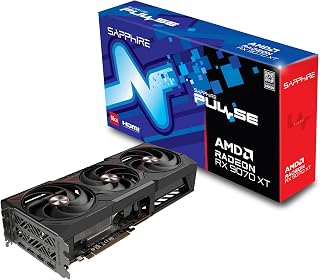
Sapphire's RDNA 4 card brings 16GB of GDDR6 and a 2970 MHz clock speed to 1440p Cyberpunk 2077, giving players comfortable headroom for ray-tracing and the game's demanding path-tracing mode. The extra VRAM over 12GB cards means ultra-texture presets load without compromise, and RDNA 4's updated ray-accelerators handle Night City's neon reflections more efficiently than prior generations.
Pros
- Delivers RTX 5070 Ti performance at significantly lower cost
- 16GB GDDR6 handles Cyberpunk's texture streaming flawlessly
- Maintains 3100 MHz at under 50C during gameplay
- Efficient 140-250W power draw during gaming
Cons
- Weaker anti-aliasing in VR applications
- RDNA 4 drivers still maturing for edge cases
Night City at 1440p becomes accessible without Nvidia pricing through the Sapphire Pulse RX 9070 XT, which delivers performance rivaling the RTX 5070 Ti while costing substantially less. The 16GB GDDR6 buffer ensures Cyberpunk 2077's massive texture assets stream smoothly through densely populated districts, and the 2970 MHz clock speed maintains fluid frame rates during high-speed vehicle chases through Watson. Real-world testing confirms stable 3100 MHz operation under 50C during gameplay, translating to 60-120 FPS at 1440p ultra settings. The RDNA 4 architecture handles ray tracing competently, though not quite matching Nvidia's latest implementation. For ultrawide enthusiasts, the card maintains playable 60+ FPS at 5120x1440 resolution. The triple-fan cooling system excels at thermal management, keeping memory temperatures around 78C while maintaining quiet acoustics. Power efficiency impresses with 10-30W idle draw and 140-250W under load. The Sapphire build quality feels solid, backed by a 2-year warranty. Physical size exceeds expectations, so verify case clearance before purchasing. For gamers prioritizing value without sacrificing Cyberpunk's visual spectacle, this card delivers flagship-tier frame rates at a mid-range investment.
Gaming Performance: 60-120 FPS at 1440p ultra settings with AAA titles. 180+ FPS possible in optimized games. Ultrawide support delivers 60+ FPS at 5120x1440 native resolution with quality settings maxed.
Thermal Performance: GPU core under 50C during sustained gaming, memory peaks at 78C. Idle temperatures around 32C. Consistent performance without throttling during extended sessions.
Clock Speeds: Stable overclocks to 3100MHz verified by users. Factory settings at 2970MHz provide reliable baseline performance with headroom for enthusiasts.
Power Efficiency: 10-30W idle, 140-250W gaming load at 1440p. Excellent power efficiency compared to competing high-end cards, reducing system power supply requirements.
Ideal for value-focused gamers who want Cyberpunk 2077's full visual experience at 1440p without premium pricing. The generous 16GB VRAM and strong ray tracing make it perfect for those upgrading from mid-range cards or reconsidering Nvidia's ecosystem. Ultrawide monitor owners particularly benefit from the frame rate stability. Skip this if you need absolute maximum ray tracing performance or run VR applications with demanding anti-aliasing, where Nvidia cards maintain advantages.
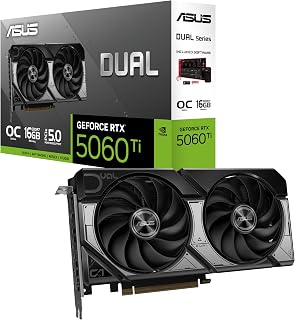
Running Cyberpunk 2077 at 1440p, the RTX 5060 Ti benefits from 16GB of GDDR7 memory, a full 4GB more than competing cards in its tier, ensuring ultra-quality texture packs and ray-traced reflections have ample room to operate. The 2632 MHz boost clock and NVIDIA's current-generation DLSS pipeline combine to keep frame rates competitive at this resolution.
Pros
- 16GB GDDR7 handles Cyberpunk's massive texture streaming demands
- DLSS 4 dramatically boosts ray tracing performance
- 0dB mode provides silent operation during exploration
- Compact 2.5-slot design fits small-form-factor builds
Cons
- Compact cooling limits extreme overclocking headroom
- Higher cost than entry-level alternatives
For Cyberpunk 2077 at 1440p, the ASUS Dual RTX 5060 Ti 16GB strikes an excellent balance between raw horsepower and practical implementation. The 16GB GDDR7 memory buffer is crucial for Night City's dense textures and sprawling open world, ensuring smooth frame delivery even during intense combat sequences in crowded districts. DLSS 4 support transforms performance, letting you push ray tracing settings higher without frame rate penalties. The card's 767 AI TOPS computational capability handles the game's demanding RT Overdrive mode with surprising competence. Thermal management impresses through the Axial-tech fan design, which uses longer blades and focused airflow to maintain 2632 MHz boost clocks during extended play sessions. The 0dB technology means fans stop entirely during menu navigation or lighter exploration segments, creating a quieter experience. The compact 2.5-slot profile fits builds where space matters, and dual BIOS switching lets you prioritize silence during story moments or maximum performance during firefights. PCIe 5.0 readiness and dual ball bearing fans extend the card's useful lifespan well beyond the current generation.
GPU and Memory: NVIDIA GeForce RTX 5060 Ti, 16GB GDDR7, 2632 MHz (OC Mode), 2602 MHz (Default Mode). Supports DLSS 4 and Blackwell architecture for AI-accelerated performance.
Connectivity and Cooling: 3x DisplayPort 2.1b, HDMI 2.1b, PCIe 5.0 x16 interface. Dual Axial-tech fans with dual ball bearings, 2.5-slot compact form factor, 0dB technology for silent idle operation.
Physical and System Requirements: Dimensions 9 inches long by 4.7 inches wide, weighs 0.66 kg. Supports maximum resolution of 7680x4320 pixels. Includes 3-year warranty and SpeedSetup manual. Compatible with standard desktop builds requiring adequate power supply and proper case ventilation.
Perfect for gamers building compact rigs who want ray-traced Cyberpunk 2077 at 1440p without thermal throttling or noise complaints. The generous 16GB VRAM handles the game's memory demands at ultra settings, and DLSS 4 unlocks higher frame rates. Skip this if you have abundant case space and prefer maximum overclocking potential, or if you're gaming at 1080p where cheaper 8GB cards deliver identical results. Budget-conscious players should also look elsewhere.

Targeting 1440p Cyberpunk 2077 with ray tracing enabled, the RTX 5070 leverages GDDR7 memory and a 2640 MHz boost clock to sustain high frame rates even in the game's most taxing scenes. NVIDIA's latest-generation DLSS support pairs well with the 12GB GDDR7 buffer, letting players push visual settings higher at 1440p while maintaining smooth, responsive gameplay.
Pros
- Military-grade components and protective coating ensure longevity
- Maintains 65C under sustained Cyberpunk ray tracing loads
- DLSS 4 unlocks smooth path-traced gameplay
- Anti-sag bracket prevents PCIe slot stress
Cons
- Requires 13 inches of case clearance and 3.125 slots
- 12GB VRAM may limit future AAA titles
Cyberpunk 2077's sprawling Night City at 1440p demands both raw compute power and robust thermal engineering, which is precisely where the ASUS TUF RTX 5070 OC excels. The 12GB GDDR7 allocation provides ample headroom for the game's high-resolution textures and RT Overdrive lighting, while the 2640 MHz boost clock maintains high frame rates even in Pacifica's neon-drenched streets. DLSS 4 support is transformative here, enabling smooth gameplay with path tracing active. The triple Axial-tech fan cooling system proves its worth during marathon sessions, keeping GPU temperatures around 65C even when ray tracing stresses the silicon. Military-grade components and protective PCB coating suggest this card will survive years of demanding use. The 3.125-slot design moves substantial air volume without excessive noise, and phase-change thermal pads maintain consistent performance across extended play. The included anti-sag bracket prevents stress on the PCIe slot, important for this substantial card. While the physical footprint requires case compatibility verification, the engineering quality justifies the space. For players committed to experiencing Cyberpunk 2077 with maximum visual fidelity at 1440p, this card delivers both immediate performance and long-term durability.
GPU and Memory: NVIDIA GeForce RTX 5070, 12GB GDDR7, 2640MHz boost clock, PCIe 5.0 interface
Cooling and Design: 3.125-slot form factor, three Axial-tech fans, phase-change thermal pad, protective PCB coating, military-grade components, GPU Guard bracket
Connectivity: 3x DisplayPort 2.1a, 2x HDMI 2.1b, 7680x4320 maximum resolution support
Physical: 13 inches long, 5.5 inches wide, 3.4 pounds, includes cooling bracket and stand
Warranty and Support: 3-year manufacturer warranty, GPU Tweak III software for performance monitoring and thermal control
Built for serious Cyberpunk 2077 players who want ray-traced visuals at 1440p with high frame rates and refuse to compromise on build quality. The military-grade components and superior cooling justify the investment for those planning years of demanding gaming. Skip this if your case can't accommodate 13 inches of length and 3.125 slots of thickness, or if you're gaming at 1080p where cheaper options perform identically. Budget builders should consider less robust alternatives.

For enthusiasts who want to max out Cyberpunk 2077 at 1440p with full path tracing active, the RTX 5080 is the decisive choice here. Its 16GB of GDDR7, paired with a 2730 MHz boost clock and NVIDIA's top-tier ray-tracing hardware, absorbs the extreme workload of the game's overdrive mode and still leaves overhead for very high frame rates at this resolution.
Pros
- DLSS 4 with multi-frame generation delivers high refresh rates even with full ray tracing enabled
- 16GB GDDR7 and a 2730 MHz boost clock provide substantial headroom for maximum Cyberpunk settings
- Phase-change thermal pad and three Axial-tech fans sustain peak clocks through long gaming sessions
- Native DisplayPort 2.1a outputs pair cleanly with high-refresh 1440p displays
Cons
- Requires an 850W PSU minimum and a case that accommodates a 348mm, 3.6-slot card
- Flagship-tier hardware is more than necessary for 1440p medium or high settings without ray tracing
Cyberpunk 2077 at 1440p is well within the RTX 5080's capabilities, which means the real conversation is about how much quality and frame rate headroom you gain. Built on NVIDIA's Blackwell architecture, this ASUS TUF card brings DLSS 4 and its multi-frame generation to the table, a feature that meaningfully multiplies output frame rates beyond what raw rasterization alone can deliver. At 1440p, that headroom lets you run Cyberpunk's full ray tracing and path tracing modes without watching frame rates collapse. The 2730 MHz boost clock and 16GB GDDR7 memory ensure the GPU is never starved for bandwidth or VRAM even at maximum settings. Thermal engineering is a highlight: the phase-change GPU thermal pad and three Axial-tech fans maintain stability through long Night City sessions in a way that sustains peak clocks rather than throttling under heat. Native DisplayPort 2.1a outputs support high-refresh 1440p monitors without compromise. Military-grade components and protective PCB coating reinforce long-term reliability. The trade-off is system compatibility: a minimum 850W PSU and a 348mm, 3.6-slot physical footprint demand careful case and power planning before purchase.
GPU: NVIDIA GeForce RTX 5080
Memory: 16GB GDDR7
Boost Clock: 2730 MHz (OC Mode), 2700 MHz (Default Mode)
Physical Dimensions: 348mm length, 3.6-slot design, 4.3 lbs
Video Outputs: 3x DisplayPort 2.1a, 2x HDMI 2.1b
Power Requirement: Minimum 850W PSU with 16-pin 12V-2x6 (12VHPWR) connector
Manufacturing: Auto-Extreme precision automated manufacturing
Cooling: Three Axial-tech fans, phase-change GPU thermal pad, protective PCB coating
Power Supply: Verify your PSU is rated for 850W minimum and includes the required 16-pin 12V-2x6 (12VHPWR) connector. Standard 6-pin or 8-pin connectors are insufficient for this card.
Physical Clearance: Confirm your case accommodates the 348mm length and can support the 3.6-slot width requirement. Measure internal dimensions and account for storage drives, fans, and other components that may interfere with the card's placement.
System Integration: The card includes a GPU bracket for secure installation. Ensure your motherboard provides adequate PCIe slot access and that your monitor cables support DisplayPort 2.1a or HDMI 2.1b for optimal performance.

For 1440p play in Cyberpunk 2077, the RX 7700 XT hits a practical sweet spot. Its 12GB of GDDR6 comfortably handles the game's high-texture assets at 1440p without running short on VRAM, and the 2584 MHz boost clock on ASRock's OC tune keeps frame pacing smooth through Night City's dense open-world scenes under AMD's RDNA 3 architecture.
Pros
- 12GB GDDR6 with 48MB Infinity Cache handles 1440p high settings without bottlenecks
- 2584 MHz boost clock sustains strong frame rates in demanding scenes
- 0dB idle mode and quiet dual-fan cooling suit low-noise environments
- Three DisplayPort 2.1 outputs future-proof high-refresh 1440p monitor setups
Cons
- RDNA 3 generation shows a performance gap versus newer RX 9070 XT cards, especially in ray tracing
- White LED lighting is fixed and cannot be customized to match other RGB components
Cyberpunk 2077 at 1440p high settings is precisely the workload the ASRock RX 7700 XT Challenger 12GB OC was designed to handle. Built on RDNA 3 with 54 compute units and a 2584 MHz boost clock, the card delivers sustained performance in demanding AAA titles, and its 12GB GDDR6 on a 192-bit bus, paired with AMD's 48MB Infinity Cache, gives it meaningful headroom at 1440p without the VRAM bottlenecks that affect smaller buffers. Reviewers report 70-plus FPS in graphically intensive games at maximum settings, which positions Cyberpunk 2077 at 1440p high as a comfortable target. The dual-fan cooling with 0dB idle mode is a genuine quality-of-life feature during cutscenes and traversal, when the GPU backs off load. Three DisplayPort 2.1 outputs support high-refresh 1440p monitors directly. The metal backplate adds structural rigidity for long-term use. It is a generation behind the RX 9070 XT cards and will show that gap in ray-tracing-heavy scenes, but for rasterized 1440p Cyberpunk gameplay it remains a capable and practical option.
Core Specifications: AMD Radeon RX 7700 XT GPU with RDNA 3 architecture, 54 Compute Units, RT and AI accelerators. 12GB GDDR6 memory on 192-bit bus with 48MB Infinity Cache. Game Clock 2226 MHz, Boost Clock up to 2584 MHz, Memory Clock 18,000 MHz.
Connectivity: 3x DisplayPort 2.1, 1x HDMI 2.1. PCIe 4.0 x16 interface. Dual 8-pin auxiliary power connectors. Maximum display resolution up to 7680x4320 pixels.
Physical: Dimensions 10.5 x 5.1 x 2.0 inches. Weight 2.2 pounds. Dual-fan cooling design. Metal backplate. 2-year spare part availability. 1-year warranty.
A good fit for gamers upgrading from cards like the GTX 1070 or RTX 3060 who want a real performance step up in Cyberpunk 2077 at 1440p without spending for the newest generation. Works well in quiet home or living room setups thanks to the 0dB idle mode. Less ideal for players who prioritize ray tracing fidelity or want maximum headroom for 2026-era titles.

The GIGABYTE RX 9070 XT stands out for 1440p Cyberpunk 2077 with the highest clock speed in this roundup at 3060 MHz, translating to strong raw performance in the game's GPU-bound city traversal sequences. Its 16GB of GDDR6 via PCIe 5.0 ensures the bandwidth-hungry path-tracing mode has the memory throughput it needs to sustain consistent frame times.
Pros
- 16GB GDDR6 eliminates VRAM pressure at 1440p ultra settings
- 160 to 220fps reported in modern AAA titles at high settings
- WINDFORCE cooling stays quiet during extended gaming sessions
- PCIe 5.0 interface keeps the build relevant for future hardware
Cons
- Requires at least a 750W power supply, which may force an upgrade
- Case compatibility check needed given the 11.34-inch card length
Cyberpunk 2077 at 1440p is one of the most demanding benchmarks any GPU faces, and the GIGABYTE Radeon RX 9070 XT Gaming OC meets that challenge with headroom to spare. AMD's latest architecture pushes this card into territory where users consistently see 160 to 220fps on modern AAA titles at high settings, which translates to a smooth, immersive Night City experience whether you are chasing ultra-high refresh rates or locking to 165Hz. The 16GB GDDR6 framebuffer is a meaningful advantage here: Cyberpunk 2077 is notorious for VRAM pressure at higher quality presets, and 16GB removes that ceiling entirely. The 3060 MHz boost clock keeps frame times tight even during the game's most particle-heavy scenes. PCIe 5.0 support future-proofs the build, and the WINDFORCE cooling with Hawk fans and server-grade thermal gel keeps the card quiet during long sessions. At 11.34 inches it fits most mid-tower cases. For 1440p Cyberpunk specifically, this card sits in an excellent performance bracket without demanding flagship investment.
Core Specifications
GPU: AMD Radeon RX 9070 XT
Memory: 16GB GDDR6
Memory Clock: 2600 GHz
GPU Clock: 3060 MHz
Interface: PCIe 5.0 x16
Max Resolution: 7680 x 4320 (8K)
Physical and Connectivity
Dimensions: 11.34 inches (L) x 5.2 inches (W)
Weight: 1.78 kg
Output: DisplayPort
Power Connectors: Dual 8-pin (750W+ PSU recommended)
Cooling: WINDFORCE system with Hawk fans and thermal gel
Warranty and Support
Manufacturer: GIGABYTE
Warranty: 3 years
Model: GV-R9070XTGAMING OC-16GD
Gaming Performance at Common Resolutions
1440p Gaming: 160-220fps on most modern AAA titles at high settings. Excellent for competitive gaming and high-refresh monitors.
4K Gaming: Playable at high settings on most titles, medium settings on demanding new releases. Solid for content creators monitoring in 4K.
Esports Titles: 300+ fps possible on optimized competitive games for ultra-high refresh gameplay.
Real-World Use Cases
Best suited for 1440p gaming at 144+ fps, 4K content creation workflows, professional 3D rendering, and VR gaming. Handles flight simulators like DCS at high settings with 4K head tracking. Eliminates VRAM constraints for media professionals working with large files.
Driver Recommendations
Run DDU (Display Driver Uninstaller) before installation if upgrading from another card. Install latest AMD drivers for maximum stability and performance. Update BIOS if required by your system for PCIe 5.0 compatibility.

ASUS's PRIME variant of the RX 9070 XT runs a 3030 MHz boost clock under RDNA 4 architecture, delivering consistent high-frame-rate performance in Cyberpunk 2077 at 1440p. The 16GB GDDR6 framebuffer accommodates the game's largest texture presets without forcing compromises, and the triple native DisplayPort 2.1a outputs future-proof connectivity for high-refresh 1440p monitors.
Pros
- Dual BIOS lets you choose between near-silent and full-performance operation
- Phase-change thermal setup keeps temps under 60C under sustained load
- Power-efficient at 180 to 190W, easing PSU requirements
- 16GB GDDR6 handles Cyberpunk 2077 VRAM demands at ultra presets
Cons
- At 12.3 inches, case clearance must be verified before purchase
- Not positioned to match absolute flagship performance levels
Running Cyberpunk 2077 at 1440p demands consistent clock speeds, efficient thermals, and enough VRAM to handle the game's aggressive texture streaming. The ASUS Prime Radeon RX 9070 XT OC Edition addresses all three. Its dual BIOS design is particularly useful for this workload: Performance mode unlocks up to 3030 MHz boost clocks without thermal throttling, while the phase-change thermal pad setup holds GPU temps below 60C during sustained stress, the kind of load Cyberpunk 2077 applies over multi-hour sessions. Users report 50% FPS gains over older mid-range cards, putting 1440p high settings well within reach at high refresh rates. The 16GB GDDR6 buffer handles Cyberpunk's VRAM demands at high and ultra presets without compromise. Power draw of 180 to 190W, typically 15 to 20W below competing cards at the same performance tier, makes it easier to run on a modest PSU. The 2.5-slot form factor and Axial-tech fans with dual-ball bearings rated for extended lifespan round out a card built for long ownership.
Memory and Bus: 16GB GDDR6, 256-bit interface, 3030 MHz memory clock
Architecture: AMD Radeon RX 9070 XT, PCIe 5.0 x16, 3030 MHz boost clock (OC mode), 2480 MHz game clock (OC mode)
Connectivity: 3x DisplayPort 2.1a, 1x HDMI 2.1b, maximum resolution 7680 x 4320
Cooling: 3x Axial-tech fans with dual-ball bearings, phase-change thermal pad, 0dB idle technology, 2.5-slot design
Software: Dual BIOS switch (Quiet and Performance profiles), GPU Tweak III for performance tuning and monitoring, ASUS GPU Guard protection
Dimensions and Power: 12.3 inches long, 5.1 inches wide, approximately 1500g, estimated 180-190W typical draw
Warranty: 3-year manufacturer coverage
Best suited for gamers targeting smooth 1440p Cyberpunk 2077 gameplay who value quiet operation and thermal headroom for long sessions. The Quiet BIOS mode makes it appealing for living room or bedroom setups. Also a solid pick for Linux users. Less appropriate for anyone chasing absolute top-tier benchmark numbers or needing a card shorter than 12.3 inches.
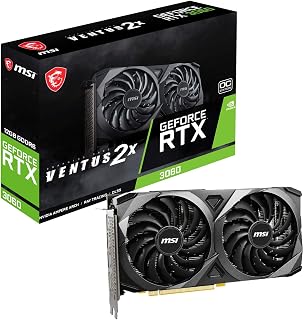
The RTX 3060 is an entry point for 1440p Cyberpunk 2077 at high settings without ray tracing. Its 12GB of GDDR6 on a 192-bit bus provides enough VRAM to avoid texture streaming hitches, and DLSS Quality mode at 1440p can recover meaningful frame rate headroom, making it a workable option for players willing to moderate their ray-tracing expectations.
Pros
- 12GB GDDR6 provides ample VRAM headroom for Cyberpunk's 1440p texture demands
- DLSS support recovers frame rates at 1440p without heavy visual quality loss
- Dual TORX 3.0 fans hold thermals near 70C during extended gaming sessions
- Single 8-pin power requirement keeps system build costs and PSU demands low
Cons
- No frame generation support limits peak frame rates in the most demanding Cyberpunk scenes
- Older Ampere architecture means ray tracing at 1440p requires significant quality trade-offs
At 1440p, Cyberpunk 2077 is one of the most demanding titles a mid-range card can face, and the RTX 3060 VENTUS 2X walks that line carefully. Its 12GB GDDR6 buffer is a genuine advantage here: Cyberpunk's high-resolution texture streaming benefits from the extra headroom, and 12GB outpaces many newer-generation alternatives that shipped with less VRAM. DLSS support is the card's most important asset for this use case, allowing you to recover meaningful frame rates at 1440p by dropping the internal render resolution while preserving visual sharpness. Ray tracing is technically supported, though enabling it at 1440p will push the card hard. The dual TORX 3.0 fans keep temperatures around 70C under sustained load, which matters during Cyberpunk's long open-world sessions. A single 8-pin connector and 650W PSU compatibility keep system demands modest. The absence of frame generation (an Ampere-generation limitation) is the key ceiling: you cannot access the frame-rate multiplier that Blackwell and Ada cards offer, making peak performance in the most demanding Night City scenes harder to achieve.
GPU: NVIDIA GeForce RTX 3060 (Ampere architecture)
Memory: 12GB GDDR6
Memory Bus: 192-bit
Memory Speed: 15 Gbps effective
Core Clock: 1807 MHz
Outputs: 3x DisplayPort 1.4a, 1x HDMI 2.1
Power Connector: 1x 8-pin PCIe
TDP: 170W
Cooling: Dual TORX 3.0 fans with large heatsink
Dimensions: 9.25" L x 4.88" W
Weight: 675g
Warranty: 2-year manufacturer guarantee
This card suits budget-conscious 1440p players willing to tune settings and lean on DLSS to keep Cyberpunk playable. It is a reasonable pick for anyone upgrading from a GTX 1000-series card who cannot stretch to a current-generation GPU. Skip it if you want high-refresh 1440p with ray tracing enabled, or if frame generation is important to your workflow, as Ampere architecture does not support it.
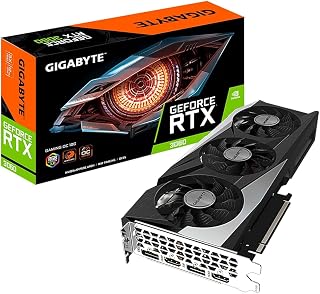
GIGABYTE's triple-fan WINDFORCE cooling keeps the RTX 3060 thermally stable during Cyberpunk 2077's long open-world sessions at 1440p, where sustained GPU load is the norm. The 12GB GDDR6 framebuffer prevents VRAM-related stutters on high texture settings, and while the 1837 MHz base clock is modest, DLSS Quality mode at 1440p brings frame rates into a playable range for players prioritizing visual fidelity over maximum performance.
Pros
- 12GB GDDR6 buffer handles Cyberpunk 2077's high VRAM demands at 1440p
- 2nd-gen RT Cores and DLSS support balance ray tracing quality with playable frame rates
- Triple WINDFORCE fans keep thermals controlled during extended Night City sessions
- DisplayPort 1.4 output supports 1440p high-refresh monitors natively
Cons
- Ultra ray tracing at 1440p will require DLSS to maintain smooth frame rates
- 192-bit memory bus limits peak bandwidth compared to wider-bus competitors at this tier
Cyberpunk 2077 at 1440p demands a card that can balance raw rasterization performance with ray tracing headroom, and the GIGABYTE RTX 3060 Gaming OC 12G REV2.0 holds its own in this regard. The Ampere architecture brings 2nd-generation RT Cores to bear on Night City's dense lighting and reflections, while DLSS support via the onboard Tensor Cores lets you reclaim frame rates when ray tracing loads get heavy. The 12GB GDDR6 frame buffer is a genuine advantage here since Cyberpunk 2077 is known for pushing VRAM at higher resolutions and settings. A 1837 MHz boost clock keeps pacing consistent across demanding city traversal and cutscene sequences. The WINDFORCE 3X triple-fan cooler manages thermals quietly during the long sessions this game tends to encourage, and the PCI-Express x16 interface ensures no bandwidth bottleneck. DisplayPort 1.4 output pairs cleanly with 1440p high-refresh monitors. For 1440p Cyberpunk players targeting high settings with DLSS enabled, this card delivers a stable, well-rounded experience without requiring a flagship GPU.
GPU Specifications: NVIDIA GeForce RTX 3060, NVIDIA Ampere architecture with 2nd generation RT Cores and 3rd generation Tensor Cores.
Memory: 12GB GDDR6, 192-bit memory interface, 15000 MHz memory clock speed.
Core Clock: 1837 MHz base boost clock.
Cooling: WINDFORCE 3X system with three fans and alternate-spinning design, RGB Fusion 2.0 lighting, metal backplate.
Connectivity: 2x HDMI 2.1, 2x DisplayPort 1.4. Maximum display resolution up to 7680 x 4320.
Physical: 11.1-inch length, 4.6-inch width, 340g weight. PCI-Express x16 interface.
Warranty: 3-year manufacturer warranty. Model: GV-N3060GAMING OC-12GD REV2.0.
Best suited for 1440p gamers who want to run Cyberpunk 2077 at high settings with DLSS smoothing out the ray tracing overhead. A strong fit for anyone upgrading from a GTX 1060-era card and stepping into modern open-world titles. Skip it if you plan to push Ultra ray tracing at 1440p without DLSS or if you're targeting a consistent 144 fps ceiling without upscaling assistance.
How to Choose the Right GPU for Cyberpunk 2077 at 1440p
Ray Tracing and Upscaling Support
Cyberpunk 2077 is one of the few games where ray tracing is not just a visual flourish, it fundamentally changes the look of the world. If you want reflections, global illumination, and path tracing to run at a playable frame rate, you need a card built for it.
NVIDIA cards in this list support DLSS 4 with Multi Frame Generation on the Blackwell generation, which allows the ASUS TUF Gaming GeForce RTX 5070 12GB GDDR7 OC and the ASUS TUF Gaming GeForce RTX 5080 16GB GDDR7 OC to push frame rates well beyond what raw rasterization alone could deliver. AMD cards like the RX 9070 XT leverage FSR 4 for similar upscaling gains.
VRAM Capacity and Memory Bandwidth
At 1440p with high texture settings, Cyberpunk 2077 regularly pulls over 8GB of VRAM. Cards with 12GB are the practical minimum, while 16GB gives you room to push texture quality, use mods, or future-proof your setup.
The Sapphire 11348-03-20G Pulse AMD Radeon™ RX 9070 XT and the GIGABYTE Radeon RX 9070 XT Gaming OC 16G Graphics both carry 16GB of GDDR6 on a 256-bit bus, which gives them a comfortable buffer for demanding scenes and high-resolution assets.
Thermal Design and Noise Levels
Cyberpunk 2077 is a sustained load game, not a burst workload. Your GPU will be running near its thermal limits for long sessions, so cooling quality directly affects both performance consistency and long-term reliability.
The ASUS Dual GeForce RTX 5060 Ti 16GB GDDR7 OC and the ASUS Prime Radeon RX 9070 XT 16GB GDDR6 OC Edition both feature 0dB fan technology, which lets fans stop entirely under light loads and ramp up smoothly when the game demands more. Phase-change thermal pads on several ASUS models also help maintain lower GPU temperatures over time compared to traditional thermal paste.
Slot Width and Case Compatibility
High-performance cards have grown significantly in physical size. The ASUS TUF Gaming RTX 5080 occupies 3.6 slots and stretches over 348mm in length, which rules it out for smaller mid-tower cases without careful measurement first.
If your case is on the compact side, the MSI GeForce RTX 3060 Ventus 2X 12G OC and the ASRock Radeon RX 7700 XT Challenger 12GB OC offer more manageable footprints while still delivering solid 1440p performance in Cyberpunk 2077 at moderate ray tracing settings.
Final Thoughts
For most players aiming at 1440p with strong ray tracing and consistent frame rates, the Sapphire 11348-03-20G Pulse AMD Radeon RX 9070 XT delivers outstanding value with its 16GB of GDDR6 and RDNA 4 architecture, while players who want the absolute ceiling of Cyberpunk 2077 performance with DLSS 4 Multi Frame Generation should look closely at the ASUS TUF Gaming GeForce RTX 5070 12GB GDDR7 OC as a compelling step up in capability.
Frequently Asked Questions
Can an RTX 3060 run Cyberpunk 2077 at 1440p?
Yes, the MSI GeForce RTX 3060 Ventus 2X 12G OC and the GIGABYTE GeForce RTX 3060 Gaming OC 12G (REV2.0) can handle Cyberpunk 2077 at 1440p, though you will want to keep ray tracing settings moderate or rely on DLSS Quality mode to maintain smooth frame rates. With DLSS enabled, both cards hold up well for extended play sessions at this resolution.
Is 16GB of VRAM necessary for Cyberpunk 2077 at 1440p in 2026?
12GB is workable for 1440p gameplay, but 16GB gives you headroom for maxed-out texture settings, path tracing, and any graphical mods you want to layer on top. As patches and expansions continue to evolve the game’s rendering demands, having 16GB like the GIGABYTE Radeon RX 9070 XT Gaming OC 16G Graphics provides means you are less likely to run into VRAM-related stuttering or texture pop-in.
Does AMD or NVIDIA perform better in Cyberpunk 2077 at 1440p?
Both platforms are competitive at 1440p, but NVIDIA holds an advantage specifically with path tracing enabled, where its RT hardware and DLSS 4 Multi Frame Generation deliver a meaningful performance lead. AMD’s RDNA 4 cards like the ASUS Prime Radeon RX 9070 XT 16GB GDDR6 OC Edition close the gap significantly at standard ray tracing settings and offer excellent rasterization performance. The right choice depends on whether path tracing is a priority for you.
What else should I check before buying a new GPU for a 1440p gaming build?
Beyond the GPU itself, confirm that your power supply meets the card’s requirements, that your case has the physical clearance for the card’s length and slot width, and that your monitor supports a high enough refresh rate to take advantage of the frame rates your new card can produce. A well-matched build makes a bigger difference than the GPU spec sheet alone suggests.





Write Your Review
No reviews yet. Be the first to share your experience!