

You open a complex DaVinci Resolve timeline, scrub through a 4K HDR grade, and your system stutters. Dropped frames, sluggish node rendering, and sluggish GPU effects are a real workflow killer. The right graphics card changes everything, delivering smooth real-time playback, faster exports, and responsive color grading even on demanding timelines.
This guide covers the top GPUs evaluated for DaVinci Resolve in 2026, ranging from capable mid-range options to high-end powerhouses suited for professional studios. Whether you are a solo colorist, a YouTube creator, or a full-time post-production professional, there is a card here matched to your workload.
Quick Comparison
Ratings reflect the most recent data pull. Check each listing for current price and availability.
Quick answer
This guide compares 10 picks, with ASUS Prime Radeon RX 9070 EVO 16GB GDDR6 Gaming ranked first. GIGABYTE Radeon RX 9070 XT Gaming OC 16GB GDDR6 PCIe has the most customer reviews.

The 16GB GDDR6 memory handles multi-layer 4K timelines without stuttering during playback or color grading. AMD Radeon RX 9070 acceleration works well with DaVinci Resolve's OpenCL engine for effects rendering and noise reduction. The 2610 MHz clock speed ensures smooth scrubbing through high-resolution footage. Three DisplayPort 2.1a outputs let you run multiple reference monitors simultaneously.
Pros
- 16GB VRAM handles multi-layer 4K timelines smoothly
- Phase-change thermal pad and triple fans maintain cool temperatures
- Dual BIOS switch toggles between performance and quiet modes
- Five display outputs support extensive multi-monitor setups
Cons
- Requires robust power supply and proper case airflow
- Linux driver maturity has historically lagged Windows
DaVinci Resolve thrives on GPU horsepower, and the ASUS Prime Radeon RX 9070 EVO delivers exactly that with 16GB of GDDR6 memory. The generous VRAM capacity handles multi-layer 4K timelines and color grading without stuttering, while the 2610 MHz boost clock accelerates rendering and real-time playback. Triple axial-tech fans with dual-ball bearings maintain thermal stability during extended editing sessions, crucial when you're deep into a project deadline. The phase-change GPU thermal pad ensures consistent performance even under sustained workloads. PCIe 5.0 compatibility and multiple display outputs (two HDMI 2.1b, three DisplayPort 2.1a) support advanced multi-monitor workflows at resolutions up to 7680x4320 pixels. ASUS GPU Tweak III software grants precise control over performance parameters, letting you balance speed against acoustics depending on your workspace. The dual BIOS switch offers quick toggling between maximum throughput and quieter operation. At a compact 2.5-slot size, it fits most professional workstations without requiring a chassis upgrade. For editors moving from older cards, the performance jump in timeline scrubbing and export times is substantial.
GPU: AMD Radeon RX 9070, Architecture: RDNA 4
Memory: 16GB GDDR6, 2610 MHz memory clock
Boost Clock: 2610 MHz (OC mode), 2590 MHz (Default mode)
Game Clock: 2140 MHz (OC mode), 2120 MHz (Default mode)
Connectivity: PCIe 5.0 x16, 2x HDMI 2.1b, 3x DisplayPort 2.1a
Dimensions: 12 inches long, 5 inches wide, 2.5-slot design
Fans: 3x Axial-tech with dual-ball bearings
Max Resolution: 7680x4320 pixels
Weight: 2.4 pounds
Features: 0dB technology, Dual BIOS (Quiet/Performance), Phase-change thermal pad, Auto-Extreme manufacturing, GPU Tweak III software
Warranty: 3 years
Model Number: PRIME-RX9070-O16G-EVO
Buy this if you're editing 4K or higher resolution projects with complex color grading and effects stacks, or if you need reliable performance for professional client work with tight deadlines. The 16GB VRAM handles demanding Resolve workloads comfortably. Skip this if you primarily edit 1080p footage with minimal effects, work exclusively on Linux where AMD driver stability may require extra troubleshooting, or lack a power supply and case ventilation adequate for a high-performance GPU.

The 8GB GDDR7 memory suits HD and moderate 4K editing workflows with standard effects stacks. GeForce RTX 5060 acceleration handles basic color grading and transitions smoothly. The 2512 MHz clock provides adequate performance for single-stream playback and standard exports. DisplayPort and HDMI outputs cover typical dual-monitor editing setups for timeline and preview windows.
Pros
- GDDR7 memory at 28000 MHz offers fast data throughput
- PCIe 5.0 maximizes bandwidth for timeline performance
- Compact dual-fan design fits smaller workstation builds
- RTX 50 Series encoding accelerates export times
Cons
- 8GB VRAM restricts heavy 4K multi-layer timelines
- Not suited for intensive VFX or multi-cam workflows
The GIGABYTE GeForce RTX 5060 WINDFORCE OC brings NVIDIA's latest architecture to budget-conscious editors working in DaVinci Resolve. With 8GB of cutting-edge GDDR7 memory running at 28000 MHz, this card handles 1080p and lighter 1440p editing workflows efficiently. The 2512 MHz boost clock provides adequate acceleration for color grading and effects processing on single-stream timelines. PCIe 5.0 interface ensures maximum bandwidth between GPU and system, reducing potential bottlenecks during playback. The WINDFORCE dual-fan cooling system maintains stable operating temperatures during typical editing sessions without excessive noise. DisplayPort and HDMI outputs cover standard monitor configurations for most home and small studio setups. NVIDIA's RTX 50 Series architecture brings improved encoding efficiency, which translates to faster export times compared to previous generations. For editors upgrading from integrated graphics or aging entry-level cards, this represents a meaningful step up in responsiveness and capability. The compact footprint fits smaller cases common in home editing rigs. While not designed for intensive 4K multi-cam or heavy VFX work, it competently serves editors focused on HD delivery or proxy workflows.
GPU: NVIDIA GeForce RTX 5060 (Blackwell architecture)
Memory: 8GB GDDR7, 128-bit interface
Memory Clock: 28,000 MHz
GPU Clock: 2,512 MHz
Interface: PCIe 5.0 x16
Cooling: Dual-fan WINDFORCE system
Outputs: DisplayPort, HDMI
Max Resolution: 7680 x 4320 pixels
Dimensions: 7.83 inches L x 4.57 inches W
Power Profile: Dedicated graphics
Warranty: 3-year manufacturer coverage
Buy this if you edit primarily 1080p projects, work with proxy media for 4K finishing, or need an affordable entry into GPU-accelerated editing with modern encoding features. It suits YouTube creators, wedding videographers, and hobbyist editors building cost-effective workstations. Skip this if you regularly edit native 4K or 6K footage with multiple layers, require extensive OpenFX processing, or work on complex color grading projects where 8GB VRAM becomes limiting.
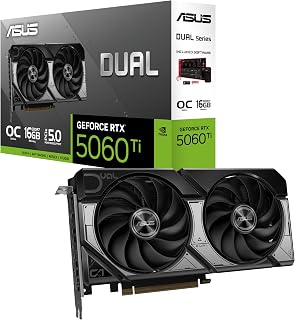
The 16GB GDDR7 memory handles extensive 4K projects with numerous effects layers and fusion compositions. GeForce RTX 5060 Ti supports hardware decode for multiple codec types simultaneously. The 2632 MHz clock maintains responsive playback even with heavy color grading applied. Three DisplayPort 2.1b connections accommodate professional multi-display color grading environments.
Pros
- 16GB GDDR7 handles complex Resolve timelines and AI features
- 0dB mode provides silent operation during playback and grading
- Compact 2.5-slot form fits small editing workstations
- Dual ball bearing fans ensure reliability through long renders
Cons
- Compact design limits extreme overclocking potential
- Higher cost than entry-level editing GPUs
DaVinci Resolve demands substantial GPU memory and compute power for color grading, motion graphics, and AI-driven features like Magic Mask and speed warp effects. The ASUS Dual RTX 5060 Ti delivers 16GB of GDDR7 memory, ensuring complex timelines with multiple color nodes and high-resolution footage stay responsive. Its 767 AI TOPS computational capability accelerates neural engine tasks within Resolve, from object removal to facial recognition tracking.nnThe compact 2.5-slot design fits editing workstations where space is limited, while dual ball bearing fans promise longevity through extended rendering sessions. Axial-tech fan engineering with barrier rings focuses airflow directly onto the heatsink, maintaining thermal stability during long exports. The 0dB technology silences the card during scrubbing and playback, eliminating distraction in quiet editing environments. Dual BIOS switching between Quiet and Performance modes lets you prioritize silence during client reviews or power during final renders.nnPCIe 5.0 connectivity and 2632 MHz boost clock handle GPU-accelerated effects in real time. The barrier to entry is the compact form factor, which trades extreme overclocking potential for compatibility, and the higher cost compared to entry-level alternatives.
GPU and Memory: NVIDIA GeForce RTX 5060 Ti, 16GB GDDR7, 2632 MHz (OC Mode), 2602 MHz (Default Mode). Supports DLSS 4 and Blackwell architecture for AI-accelerated performance.
Connectivity and Cooling: 3x DisplayPort 2.1b, HDMI 2.1b, PCIe 5.0 x16 interface. Dual Axial-tech fans with dual ball bearings, 2.5-slot compact form factor, 0dB technology for silent idle operation.
Physical and System Requirements: Dimensions 9 inches long by 4.7 inches wide, weighs 0.66 kg. Supports maximum resolution of 7680x4320 pixels. Includes 3-year warranty and SpeedSetup manual. Compatible with standard desktop builds requiring adequate power supply and proper case ventilation.
Ideal for editors building compact editing stations or upgrading small-form-factor systems who need 16GB VRAM for 4K timelines and Resolve's AI features. The dual BIOS and silent operation suit professionals working in shared spaces or home studios. Skip this if you need maximum overclocking headroom or work exclusively with 1080p proxy workflows where 8GB cards suffice. Budget-focused editors cutting simpler projects should consider lower-tier options.

The 12GB GDDR7 configuration provides ample headroom for 4K RAW footage processing and heavy grading sessions. GeForce RTX 5070 acceleration speeds up optical flow retiming and AI-based tools. The overclocked 2640 MHz frequency keeps timeline performance fluid during intensive effects work. Dual HDMI 2.1b outputs simplify dual-monitor workflows without adapters.
Pros
- Military-grade components and coating ensure long-term reliability
- 3.125-slot cooling maintains 65C under sustained rendering
- 2640 MHz boost clock accelerates ResolveFX and Fusion effects
- Included bracket prevents sag in any mounting orientation
Cons
- 13-inch length and 3.125-slot thickness require large cases
- 12GB VRAM may constrain future 8K workflows with heavy effects
Serious colorists and effects artists need GPUs that maintain performance under sustained load without throttling. The ASUS TUF RTX 5070 OC brings military-grade components and protective PCB coating, ensuring stability during multi-hour color sessions and overnight renders. Its 12GB of GDDR7 memory handles demanding Resolve workflows: multicam editing with real-time color, Fusion compositions with particle systems, and AI tools like depth map generation.nnThe 2640 MHz boost clock accelerates GPU Effects and OpenFX plugins, keeping playback smooth even with stacked ResolveFX noise reduction and film grain. Users report consistent 65C temperatures under sustained load thanks to the 3.125-slot cooling system with three Axial-tech fans. Phase-change thermal pads transfer heat more efficiently than traditional paste, preventing thermal spikes during long renders. The included bracket and stand eliminate GPU sag, protecting the PCIe slot in vertical or horizontal orientations.nnDLSS 4 support enhances preview quality and performance in supported effects. Blackwell architecture delivers strong AI acceleration for Resolve's neural engine, speeding up object removal, face refinement, and upscaling tasks. The tradeoff is size: at 13 inches long and over 2 inches thick, this card demands a spacious case. While 12GB VRAM serves current 4K production well, next-generation 8K workflows with heavy texturing may eventually need more capacity.
GPU and Memory: NVIDIA GeForce RTX 5070, 12GB GDDR7, 2640MHz boost clock, PCIe 5.0 interface
Cooling and Design: 3.125-slot form factor, three Axial-tech fans, phase-change thermal pad, protective PCB coating, military-grade components, GPU Guard bracket
Connectivity: 3x DisplayPort 2.1a, 2x HDMI 2.1b, 7680x4320 maximum resolution support
Physical: 13 inches long, 5.5 inches wide, 3.4 pounds, includes cooling bracket and stand
Warranty and Support: 3-year manufacturer warranty, GPU Tweak III software for performance monitoring and thermal control
Built for professional colorists and effects artists running extended Resolve sessions who value thermal stability and build quality over cost. The military-grade components and anti-sag bracket suit production environments where reliability is critical. Skip this if your editing case is compact or mid-tower with tight clearances, or if you work primarily with 1080p proxy workflows where the OC premium is unnecessary.

The 16GB GDDR7 memory handles professional 8K workflows and extensive fusion compositions without performance degradation. GeForce RTX 5080 dramatically accelerates neural engine features and complex particle systems. The 2640 GHz clock enables smooth real-time playback of multi-stream HDR projects. Three DisplayPort 2.1b outputs support advanced multi-monitor color grading configurations.
Pros
- 16GB GDDR7 handles multi-layer 4K timelines smoothly
- Vapor chamber cooling stays quiet during long renders
- Blackwell architecture accelerates Resolve's AI features
- Reinforced build with support stand for workstation durability
Cons
- 11.9-inch length requires case clearance verification
- Minor coil whine reported by some users
DaVinci Resolve pushes GPUs hard during color grading, timeline playback, and rendering, making the ZOTAC Gaming RTX 5080 SOLID CORE OC a natural fit for professional editors. The Blackwell architecture delivers the CUDA cores and AI acceleration Resolve relies on for real-time effects processing, while 16GB of GDDR7 memory handles multi-stream 4K timelines without choking. The vapor chamber cooling with three 90mm BladeLink fans keeps thermals in check during extended export sessions, maintaining consistent clock speeds when you need them most. PCIe 5.0 bandwidth ensures smooth data flow between GPU and storage during RAW playback. The reinforced frame and metal backplate signal durability for workstation environments where cards run continuously. Reviewers confirm whisper-quiet operation under sustained load, critical for editors working long hours. The 2640MHz boost clock accelerates OpenFX plugins and Fusion compositions. At 11.9 inches, the card fits most workstation chassis, though verifying clearance before purchase remains essential. The included support stand prevents GPU sag over time, a practical touch for always-on editing rigs.
GPU: NVIDIA GeForce RTX 5080 (Blackwell Architecture)
Memory: 16GB GDDR7, 256-bit, 30 Gbps, PCIe 5.0
Clock Speed: 2640 MHz base with OC support up to +125 MHz confirmed
Cooling: Vapor chamber, composite heatpipes, three 90mm fans, active fan control, FREEZE fan stop
Outputs: 3x DisplayPort 2.1b, 1x HDMI 2.1b, 8K capable, 4-display ready
Form Factor: 2.5 slots, 11.9 inches length, 2.2 inches width
Power: 8-pin to 16-pin cable connectors included
Warranty: 3 years
Buy this if you edit 4K or 6K projects in DaVinci Resolve and need fast renders, smooth color grading performance, and quiet operation during marathon sessions. It suits freelancers and small studios upgrading from older GPUs who need reliable acceleration without stepping up to RTX 5090 territory. Skip it if you work primarily with 1080p proxy workflows where a midrange card suffices, or if your chassis cannot accommodate the 11.9-inch length and three-slot design.

The 16GB GDDR7 configuration excels at intensive 8K editing and multi-layer HDR color grading workflows. GeForce RTX 5080 acceleration significantly speeds up AI tools and complex temporal noise reduction. The overclocked 2730 MHz frequency delivers exceptional real-time playback performance on heavily processed timelines. Dual HDMI 2.1b outputs simplify professional reference monitor setups.
Pros
- Phase-change thermal pad maintains performance during long renders
- Military-grade components with PCB coating for durability
- Blackwell architecture accelerates Resolve's neural engine tools
- GPU Tweak III enables real-time performance monitoring
Cons
- Requires 850W PSU minimum for stable power delivery
- 348mm length and 3.6-slot design demands chassis verification
Professional DaVinci Resolve editors need GPUs that maintain performance under marathon grading sessions and multi-hour renders, which is where the ASUS TUF Gaming RTX 5080 distinguishes itself. The phase-change GPU thermal pad eliminates thermal paste degradation, ensuring consistent boost clocks during extended timeline playback and export queues. Three Axial-tech fans with optimized fin arrays move heat efficiently while staying quiet, essential when working in shared spaces. NVIDIA's Blackwell architecture accelerates Resolve Studio's neural engine features including Magic Mask, object removal, and super scale, while 16GB GDDR7 memory handles complex node trees and 6K timelines without stuttering. Military-grade components and protective PCB coating guard against dust and moisture in less-than-ideal studio environments. GPU Tweak III provides real-time monitoring of thermals and clocks during renders. The robust Auto-Extreme manufacturing suggests longevity for workstations running daily. Native DisplayPort 2.1a and HDMI 2.1b outputs support reference monitors and HDR displays. The 2730MHz boost clock keeps Fusion compositions responsive. At 348mm length and 3.6 slots, verifying chassis compatibility is mandatory.
GPU: NVIDIA GeForce RTX 5080
Memory: 16GB GDDR7
Boost Clock: 2730 MHz (OC Mode), 2700 MHz (Default Mode)
Physical Dimensions: 348mm length, 3.6-slot design, 4.3 lbs
Video Outputs: 3x DisplayPort 2.1a, 2x HDMI 2.1b
Power Requirement: Minimum 850W PSU with 16-pin 12V-2x6 (12VHPWR) connector
Manufacturing: Auto-Extreme precision automated manufacturing
Cooling: Three Axial-tech fans, phase-change GPU thermal pad, protective PCB coating
Power Supply: Verify your PSU is rated for 850W minimum and includes the required 16-pin 12V-2x6 (12VHPWR) connector. Standard 6-pin or 8-pin connectors are insufficient for this card.
Physical Clearance: Confirm your case accommodates the 348mm length and can support the 3.6-slot width requirement. Measure internal dimensions and account for storage drives, fans, and other components that may interfere with the card's placement.
System Integration: The card includes a GPU bracket for secure installation. Ensure your motherboard provides adequate PCIe slot access and that your monitor cables support DisplayPort 2.1a or HDMI 2.1b for optimal performance.

The 16GB GDDR6 capacity excels at handling 6K and 8K timelines with multiple color correction nodes. Radeon RX 9070 XT leverages OpenCL optimization for fast rendering and playback. The impressive 3060 MHz clock speed accelerates noise reduction and temporal effects processing. PCIe 5.0 bandwidth ensures quick media cache transfers during scrubbing.
Pros
- 16GB VRAM prevents memory bottlenecks in multi-layer timelines
- WINDFORCE cooling runs quiet during extended sessions
- PCIe 5.0 ready for high-bandwidth storage workflows
- Fits most standard workstation cases at 11.34 inches
Cons
- CUDA-accelerated effects run slower than RTX equivalents
- Requires 750W PSU minimum for stable operation
DaVinci Resolve Studio's OpenCL acceleration makes the GIGABYTE Radeon RX 9070 XT a viable option for editors who prioritize GPU memory over CUDA-specific workflows. The 16GB GDDR6 buffer eliminates the VRAM bottlenecks that plague 8GB cards when stacking nodes in the color page or working with high-resolution footage. AMD's architecture handles Resolve's Fusion page and basic color grading competently, particularly at 1440p and 4K timelines with standard dynamic range material. The WINDFORCE cooling with Hawk fans and server-grade thermal gel maintains stable performance during sustained renders without excessive noise. PCIe 5.0 compatibility future-proofs the card for upcoming NVMe workflows. The 11.34-inch length fits standard ATX workstation cases. Users report solid stability after driver installation, important for production environments. While NVIDIA cards retain advantages in CUDA-accelerated effects and AI features like Magic Mask, editors working primarily with cuts, transitions, and traditional color wheels will find adequate performance here. The 3060MHz boost clock keeps timeline playback responsive with moderate effect loads.
Core Specifications
GPU: AMD Radeon RX 9070 XT
Memory: 16GB GDDR6
Memory Clock: 2600 GHz
GPU Clock: 3060 MHz
Interface: PCIe 5.0 x16
Max Resolution: 7680 x 4320 (8K)
Physical and Connectivity
Dimensions: 11.34 inches (L) x 5.2 inches (W)
Weight: 1.78 kg
Output: DisplayPort
Power Connectors: Dual 8-pin (750W+ PSU recommended)
Cooling: WINDFORCE system with Hawk fans and thermal gel
Warranty and Support
Manufacturer: GIGABYTE
Warranty: 3 years
Model: GV-R9070XTGAMING OC-16GD
Gaming Performance at Common Resolutions
1440p Gaming: 160-220fps on most modern AAA titles at high settings. Excellent for competitive gaming and high-refresh monitors.
4K Gaming: Playable at high settings on most titles, medium settings on demanding new releases. Solid for content creators monitoring in 4K.
Esports Titles: 300+ fps possible on optimized competitive games for ultra-high refresh gameplay.
Real-World Use Cases
Best suited for 1440p gaming at 144+ fps, 4K content creation workflows, professional 3D rendering, and VR gaming. Handles flight simulators like DCS at high settings with 4K head tracking. Eliminates VRAM constraints for media professionals working with large files.
Driver Recommendations
Run DDU (Display Driver Uninstaller) before installation if upgrading from another card. Install latest AMD drivers for maximum stability and performance. Update BIOS if required by your system for PCIe 5.0 compatibility.

The 16GB GDDR7 capacity powers demanding 8K timelines and complex multi-layer compositions with ease. GeForce RTX 5070 Ti accelerates AI-driven features like magic mask and object removal significantly. The overclocked 2625 MHz frequency ensures real-time playback of heavily graded HDR footage. MaxContact thermal design maintains consistent clock speeds during extended rendering sessions.
Pros
- 16GB GDDR7 handles demanding 4K RAW timelines
- Superior cooling keeps temperatures below 60u00b0C under load
- 1492 AI TOPS accelerate AI-driven Resolve features
- Five outputs support multi-monitor professional setups
Cons
- 13.1-inch length requires mid-tower or larger case
- 3.6-pound weight demands secure mounting support
When DaVinci Resolve pushes your system hard with layered timelines and intensive color grading, the ASUS ROG Strix RTX 5070 Ti responds with authority. Its 16GB of GDDR7 memory provides ample headroom for 4K projects with complex node trees and multiple effects layers. The 2625 MHz boost clock in OC mode drives smooth playback and rapid rendering, while 1492 AI TOPS accelerate machine learning features within Resolve. What sets this card apart for editors is its thermal management: three scaled-up Axial-tech fans combined with a vapor chamber and phase-change thermal pad keep temperatures below 60u00b0C during marathon editing sessions. Consistent cooling means sustained performance without thermal throttling when you're racing toward delivery. GPU Tweak III software lets you monitor temperatures and adjust fan curves specific to your workflow needs. The generous video memory handles high-resolution RAW footage and uncompressed media without choking. Five display outputs (three DisplayPort 2.1b, two HDMI 2.1b) accommodate reference monitors and client displays simultaneously. PCIe 5.0 ensures maximum data transfer rates. For professional editors and serious enthusiasts, this card balances performance and value effectively, delivering near-flagship capability without the extreme cost.
Core Specs: NVIDIA GeForce RTX 5070 Ti, 16GB GDDR7 memory, 2625 MHz OC clock, 2602 MHz standard clock
Connectivity: PCIe 5.0 x16, 3x Native DisplayPort 2.1b, 2x Native HDMI 2.1b, maximum resolution 7680x4320
Cooling: 3x Axial-tech fans, vapor chamber, phase-change thermal pad, MaxContact design, 0dB technology
Physical: 3.2-slot design, 13.1 inches length, 5.8 inches width, 3.6 pounds weight
Software: GPU Tweak III, Aura Sync RGB customization
Warranty: 3-year limited warranty, includes card holder, magnet, velcro strips
Buy this if you edit 4K or higher resolution projects professionally, work with RAW or high-bitrate codecs, or need reliable GPU acceleration for color grading and effects-heavy timelines. The cooling system suits extended sessions and demanding workflows. Skip this if you edit primarily 1080p content, have a compact case unable to accommodate its 13.1-inch length and 3.2-slot width, or work on a tight budget where a mid-range card would suffice for lighter editing tasks.

The 16GB GDDR7 memory provides excellent performance for demanding 8K projects and complex node-based grading. GeForce RTX 5080 powers through AI features and heavy fusion effects with minimal render time. The 2.73 GHz clock ensures fluid playback even with multiple effects stacks applied. WINDFORCE cooling maintains stable performance during marathon grading sessions.
Pros
- 16GB GDDR7 at 30,000 MHz handles large Resolve timelines and high-bitrate media without bottlenecks
- Tensor Cores accelerate Resolve's AI tools, cutting processing time for noise reduction and Magic Mask
- WINDFORCE triple-fan cooling sustains peak performance through long editing and grading sessions
- PCIe 5.0 x16 interface and 7680x4320 resolution support provide headroom for high-end professional deliverables
Cons
- High power draw requires a robust PSU with available 8-pin connectors, adding to overall system cost
- At 13.46 inches and 4 pounds, the card demands careful case planning before purchase
DaVinci Resolve is one of the most GPU-hungry applications in professional post-production, and the GIGABYTE GeForce RTX 5080 Gaming OC meets that demand head-on. Built on NVIDIA's Blackwell architecture, its 16GB of GDDR7 memory running at 30,000 MHz ensures large 4K and even 8K timelines stay fluid, with minimal dropped frames during real-time playback. The enhanced Tensor Cores accelerate Resolve's AI-powered tools, including Magic Mask, Speed Warp, and noise reduction, tasks that can grind lesser cards to a halt. DLSS 4 and the full PCIe 5.0 interface keep data throughput from becoming a bottleneck when scrubbing through high-bitrate media. The WINDFORCE triple-fan cooling system sustains those loads over long grading or editing sessions without thermal throttling. Resolution support up to 7680x4320 means editors working on high-end deliverables have overhead to spare. For colorists and editors who live inside Resolve and cannot afford render waits interrupting their creative flow, this card sits at the very top of what desktop hardware can currently offer.
GPU Architecture: NVIDIA GeForce RTX 5080 (Blackwell)
Memory: 16GB GDDR7, 256-bit interface
Memory Speed: 30,000 MHz
GPU Clock: 2.73 GHz boost
Interface: PCIe 5.0 x16
Cooling: WINDFORCE triple-fan system
Power Connectors: 1x 12V connector, 2x 6-pin to 3x 8-pin adapter
Display Outputs: DisplayPort, HDMI
Max Resolution: 7680x4320 pixels
Physical Dimensions: 13.46 inches (L) x 5.59 inches (W)
Weight: 4 pounds
Warranty: 3-year manufacturer
Model: GV-N5080GAMING OC-16GD
Best suited for professional colorists, video editors, and motion graphics artists who run DaVinci Resolve as their primary tool and work with 4K or higher resolution projects. AI-assisted Resolve features like noise reduction and object masking will benefit most from the Tensor Cores. Skip it if you edit 1080p or occasional 4K projects on a part-time basis; the raw horsepower here exceeds what lighter workflows require.

The 12GB GDDR7 memory delivers fast texture streaming for complex node trees and fusion compositions. GeForce RTX 5070 brings hardware-accelerated encoding for quick exports and proxy generation. The 2542 MHz clock handles real-time playback of multi-cam sequences. Three DisplayPort 2.1b outputs support multiple high-refresh monitoring setups for precision color work.
Pros
- 12GB GDDR7 supports 4K timelines with extensive color grading
- Three Axial-tech fans maintain cool, quiet operation under load
- 2.5-slot design fits most mid-tower editing workstations
- DLSS 4 and Blackwell architecture future-proof AI features
Cons
- 12-inch length and 2.5-slot width require case measurement
- 12GB VRAM may limit complex 8K projects
DaVinci Resolve Studio leverages GPU acceleration for every stage of post-production, from editing and color correction to Fusion compositing and Fairlight audio. The ASUS Prime RTX 5070 pairs 12GB of GDDR7 memory with Blackwell architecture, delivering the throughput needed for multicam timelines, heavy noise reduction, and real-time color grading on 4K footage. The 2542 MHz clock speed keeps the interface responsive even when stacking temporal noise reduction with motion blur and lens effects.nnThree Axial-tech fans with optimized blade geometry maintain consistent cooling during marathon rendering sessions, while phase-change thermal pads transfer heat efficiently away from critical components. The 2.5-slot configuration balances powerful cooling with workstation compatibility, fitting into most mid-tower editing builds without blocking adjacent slots. PCIe 5.0 connectivity and 4000 MHz memory clock ensure data moves quickly between system RAM and GPU memory during cache playback.nnDLSS 4 support future-proofs the card as Resolve integrates more AI-driven tools. The main consideration is physical dimensions: at 12 inches long and 2.5 slots wide, this card requires adequate case clearance, ruling out ultra-compact ITX builds. The 12GB VRAM handles current 4K workflows comfortably but may constrain 8K projects with extensive effects.
GPU and Memory: NVIDIA GeForce RTX 5070, 12GB GDDR7 memory, 2542 MHz boost clock, 4000 MHz memory clock
Connectivity: PCIe 5.0 x16, HDMI 2.1b (1x), DisplayPort 2.1b (3x), HDCP support
Design: 2.5-slot form factor, 12 inches long, 5 inches wide, weighs 3.3 pounds, three Axial-tech fans, phase-change thermal pad
Display Support: Up to 7680x4320 resolution, supports dual-monitor and multi-display configurations
Warranty: 3-year manufacturer warranty, includes cables, Velcro straps, and manual
Best suited for editors working primarily in 4K who need reliable performance across color grading, Fusion compositing, and rendering without flagship pricing. The three-fan cooling and 12GB VRAM serve professionals running extended sessions with GPU-intensive effects. Skip this if your workstation is an ultra-compact ITX case with limited clearance, or if you regularly edit 8K timelines with heavy layering where 16GB or more VRAM is essential.
What to Look for When Buying a GPU for DaVinci Resolve
DaVinci Resolve is one of the most GPU-intensive applications in creative work. It offloads color processing, noise reduction, effects rendering, and AI-powered tools directly to the graphics card. Picking the wrong GPU leaves you with constant buffering and slow exports.
VRAM Capacity
VRAM is arguably the single most important spec for DaVinci Resolve. The application loads entire frames, LUTs, noise reduction models, and effect caches into GPU memory. For 4K and HDR work, 12GB is a practical minimum, and 16GB gives you meaningful headroom.
Cards like the ASUS Prime Radeon RX 9070 EVO 16GB GDDR6 OC and the ASUS Dual GeForce RTX 5060 Ti 16GB GDDR7 OC both carry 16GB of fast memory, which keeps Resolve’s node-based pipeline well-fed even on complex grades. If you regularly cut 6K or 8K footage, stepping up to a card with 16GB is a smart move rather than a luxury.
GPU Architecture and AI Acceleration
DaVinci Resolve’s Magic Mask, Super Scale, and AI noise reduction features rely heavily on dedicated compute cores. NVIDIA’s Blackwell architecture, found in cards like the ASUS SFF-Ready Prime NVIDIA GeForce RTX 5070 and the ASUS TUF Gaming GeForce RTX 5080 16GB GDDR7 OC, delivers DLSS 4 and Tensor core performance that maps well onto Resolve’s AI workloads.
AMD’s RDNA 4 architecture, represented here by the GIGABYTE Radeon RX 9070 XT Gaming OC 16G Graphics, has also matured considerably for compute tasks. Both platforms are fully supported by Resolve’s OpenCL and CUDA/ROCm backends, so the choice often comes down to your existing system and the specific Resolve features you rely on most.
Cooling and Sustained Performance
Resolve export sessions and long grading workflows push a GPU hard for extended periods. A card that throttles under sustained load will hurt render times noticeably. Look for robust cooling solutions: the triple-fan Axial-tech setups on ASUS’s TUF and ROG lines and the IceStorm 3.0 vapor chamber on the ZOTAC Gaming GeForce RTX 5080 Solid CORE OC DLSS 4 are specifically designed to maintain boost clocks through long sessions.
Phase-change GPU thermal pads, featured on several ASUS cards in this roundup, also contribute to more stable thermals compared to standard thermal paste. Consistent temperatures translate directly into consistent clock speeds and predictable render times.
Form Factor and System Compatibility
Not every editing workstation has a full-tower case. If you run a compact or small-form-factor build, a 2.5-slot card like the ASUS SFF-Ready Prime NVIDIA GeForce RTX 5070 or the GIGABYTE GeForce RTX 5060 WINDFORCE OC 8G Graphics fits where a 3.5-slot card simply will not.
For mid-tower and full-tower systems, the larger heatsinks on cards like the ASUS ROG Strix NVIDIA GeForce RTX 5070 Ti 16GB offer better cooling headroom. Always confirm slot width, card length, and your PSU’s connector compatibility before ordering, especially with the newer 12V-2×6 connectors now common on high-end Blackwell cards.
Final Thoughts
For most editors stepping up their DaVinci Resolve workflow in 2026, the ASUS Prime Radeon RX 9070 EVO 16GB GDDR6 OC delivers an impressive combination of 16GB VRAM, efficient RDNA 4 architecture, and a compact 2.5-slot design that suits a wide range of workstations. If you need the absolute peak in AI-accelerated rendering and sustained professional throughput, the ASUS TUF Gaming GeForce RTX 5080 16GB GDDR7 OC is the card to reach for, offering Blackwell’s full compute power and military-grade component durability for demanding studio work.
Frequently Asked Questions
How much VRAM do I need for DaVinci Resolve in 2026?
For 1080p and basic 4K work, 8GB of VRAM can get you started, but you will hit limits quickly with noise reduction and complex node trees. For serious 4K color grading, 12GB is a comfortable floor, and 16GB is the recommended target for professional timelines and multi-stream workflows.
Is NVIDIA or AMD better for DaVinci Resolve?
Both platforms are well-supported in Resolve. NVIDIA’s CUDA backend has historically offered broader compatibility with Resolve’s AI tools like Magic Mask and noise reduction, and the Blackwell architecture extends that advantage with high Tensor core counts. AMD’s RDNA 4 cards, including the RX 9070 series, have strong OpenCL performance and are a solid choice if you prefer the AMD ecosystem or want to pair with an AMD CPU platform.
Can I use a gaming GPU for professional DaVinci Resolve work?
Yes, consumer gaming GPUs work well in DaVinci Resolve for most editorial and color grading tasks. The cards reviewed here, including the ASUS TUF and ROG Strix lines, are validated for demanding creative workloads despite being marketed as gaming hardware. The key difference from professional workstation GPUs is driver certification and ECC memory, which matters more for 3D rendering and scientific work than for video post-production.
Does a faster GPU improve DaVinci Resolve export times?
Absolutely. Resolve uses GPU acceleration for encoding in formats like H.264, H.265, and ProRes, so a faster GPU with more compute throughput shortens export queues significantly. Cards like the ZOTAC Gaming GeForce RTX 5080 Solid CORE OC DLSS 4 and the GIGABYTE GeForce RTX 5080 Gaming OC 16G Graphics offer the highest compute performance in this roundup and will have the most noticeable impact on long-form export workflows in 2026.





Write Your Review
No reviews yet. Be the first to share your experience!