

You fire up a high-end shader pack, and within seconds your frame rate tanks below playable. Minecraft shaders are deceptively demanding, they push ray tracing, ambient occlusion, dynamic lighting, and shadow rendering all at once, and a weak GPU simply cannot keep up. Whether you are running SEUS Renewed, Complementary, or BSL Shaders, the right graphics card makes the difference between a cinematic world and a slideshow.
This guide covers the best GPU for Minecraft shaders in 2026, from budget-friendly picks to high-end powerhouses. We evaluated cards based on shader frame rates, VRAM capacity, ray tracing capability, and real-world driver stability so you can make a confident decision before buying.
Quick Comparison
Ratings reflect the most recent data pull. Check each listing for current price and availability.
Quick answer
This guide compares 10 picks, with ASRock Radeon RX 9060 XT Challenger 16GB GDDR6 PCIe 5.0 ranked first. MSI RTX 3060 12GB Gaming Graphics Card - 1440p High has the most customer reviews.

The generous 16GB GDDR6 memory eliminates stuttering when loading shader packs with extreme view distances and high-resolution resource packs simultaneously. AMD's RDNA 4 architecture handles complex shader calculations efficiently, while the 3290 MHz boost clock maintains high framerates even with intensive configurations like path-traced shaders. Ideal for players who combine multiple visual enhancements without compromises.
Pros
- 16GB GDDR6 handles the most VRAM-intensive ultra-quality shader packs at 1440p
- 3290 MHz boost clock delivers strong frame rates under sustained shader workloads
- RDNA 4 ray tracing hardware accelerates shader-based lighting and shadow rendering
- 0dB silent cooling and mid-60s load temperatures enable long, stable play sessions
Cons
- Dual-fan cooler is less aggressive than triple-fan designs in premium alternatives
- 4K gaming at maximum shader settings may push against the card's performance ceiling
Shader packs stress a GPU in ways that standard Minecraft benchmarks never reveal, and the ASRock Radeon RX 9060 XT Challenger is built for exactly that sustained, visually complex load. The 3290 MHz boost clock is among the highest in the mid-range bracket, which translates directly to smoother frame delivery when RDNA 4's ray tracing hardware is working through shader-generated lighting and shadows. The 16GB GDDR6 buffer is the standout specification for this use case: even the most VRAM-hungry ultra-quality shader packs at 1440p have room to operate without hitting memory limits, and the headroom future-proofs the setup as shader complexity grows. Sustained temperatures holding in the mid-60s under full load mean you can run shaders for hours without thermal throttling affecting frame consistency. The 0dB idle mode keeps things quiet between sessions, and the compact 249mm length makes this card easier to fit into mid-tower cases than many competing designs. A single 8-pin connector and a 550W PSU requirement make it a clean upgrade for existing mid-range systems. PCIe 5.0 x16 provides full bandwidth with no interface bottleneck.
GPU: AMD Radeon RX 9060 XT (RDNA 4, 32 Compute Units)
Memory: 16GB GDDR6 at 20 Gbps on 128-bit bus
Clock Speeds: 3290 MHz boost, 2700 MHz game clock
Output: DisplayPort 2.1a, HDMI 2.1b
Max Resolution: 7680x4320 pixels
Power: Single 8-pin connector, 550W PSU recommended
Size: 249mm (L) x 132mm (W) x 41mm (H), 2-slot design
Cooling: Dual fans, 0dB idle mode
Interface: PCIe 5.0 x16
Weight: 0.98 kg
Warranty: 2 years manufacturer
The top recommendation for players who want to run demanding shader presets at 1440p without compromise. The 16GB VRAM eliminates the memory ceiling that constrains most mid-range competitors, and the RDNA 4 ray tracing hardware handles shader lighting workloads efficiently. Skip it if you are targeting 4K ultra settings in non-Minecraft titles or need triple-fan cooling in a high-ambient-temperature environment.

This entry-level option delivers playable performance with lighter shader packs thanks to its GDDR6 memory and ray tracing support. The 6GB VRAM handles moderate shader configurations like BSL or Sildur's Vibrant at 1080p without overwhelming your system. Perfect for players exploring shaders for the first time or running less intensive visual enhancements alongside vanilla Minecraft.
Pros
- Compact 20cm design fits small-form-factor cases easily
- DLSS 3 boosts frame rates with compatible shaders
- Efficient cooling remains quiet under sustained load
- IP5X dust resistance protects against particle buildup
Cons
- 6GB VRAM limits extremely demanding shader combinations
- Ray tracing capability secondary to traditional rendering
Entry into shader-enhanced Minecraft doesn't require flagship hardware, and the ASUS Dual RTX 3050 6GB proves it. This compact card brings ray tracing capability and DLSS 3 support to 1080p shader gameplay without overwhelming your power supply or budget. The 20cm form factor and 2-slot design slip into small-form-factor cases and pre-built systems where larger cards simply won't fit, opening shader possibilities for players previously limited by chassis constraints. Ampere architecture delivers smooth frame rates with medium-intensity shaders like Sildur's Vibrant or Chocapic13, while DLSS 3 provides meaningful boosts when enabled. Dual Axial-tech fans with barrier ring design keep temperatures controlled and noise levels low during extended building sessions. IP5X dust resistance protects internals from particle buildup over time, valuable for systems in less-than-pristine environments. The stainless steel bracket resists corrosion for longevity. Performance targets 1080p beautifully, handling lighter AAA games alongside Minecraft, making this a versatile choice for players who rotate between titles. While 6GB VRAM limits ultra-high-resolution texture packs and the most extreme shader combinations, it matches perfectly with the card's 1080p focus and accessible positioning.
Ideal for players upgrading from integrated graphics who want to experience shaders at 1080p without overspending or replacing their power supply. The compact size suits small cases and pre-built system upgrades perfectly. Choose this if you play lighter to medium-intensity shaders and value physical compatibility and efficient cooling. Skip if you demand 1440p shader performance, plan to run ultra-demanding shader packs with heavy texture mods simultaneously, or need future-proofing for increasingly VRAM-intensive shader development.
GPU Architecture: NVIDIA GeForce RTX 3050 with Ampere SM, 2nd Gen RT Cores, and 3rd Gen Tensor Cores for DLSS 3 support.
Memory: 6GB GDDR6 with 1500 MHz memory clock speed, delivering adequate bandwidth for 1080p and light 1440p workloads.
Clock Speeds: OC Mode: 1500 MHz boost clock, Default Mode: 1470 MHz boost clock for flexible performance tuning.
Thermal Design: Dual Axial-tech fans, 2-slot form factor (20cm length, 7.9in x 4.7in), IP5X dust resistance, and stainless steel bracket.
Power: No external power connector required. PCIe x16 slot power delivery only, making it ideal for systems with limited PSU capacity.
Connectivity: HDMI 2.1, DisplayPort 1.4a, and DVI-D for multi-monitor setups and modern display standards.

The 10GB VRAM capacity offers headroom for moderately demanding shader packs at higher resolutions without memory bottlenecks. Intel's Arc architecture provides solid ray tracing performance for realistic lighting effects in popular shader configurations. The 2600 MHz GPU clock maintains stable framerates when combining shaders with texture packs and increased render distances during exploration.
Pros
- 10GB GDDR6 provides ample VRAM headroom for high-resolution shader textures
- XeSS 2 AI upscaling recovers frame rates under heavy shader loads
- 0dB silent fan mode keeps the system quiet during extended play sessions
- DisplayPort 2.1 and HDMI 2.1a support virtually any modern display up to 8K
Cons
- Intel Arc driver ecosystem is still maturing compared to NVIDIA and AMD alternatives
- PCIe x8 interface may require checking motherboard slot compatibility
Minecraft shader packs are surprisingly demanding, and the ASRock Arc B570 Challenger punches well above its class for exactly this workload. Its 10GB of GDDR6 memory gives shader-heavy scenes plenty of room to breathe, while the 2600 MHz GPU clock keeps frame rates stable even with complex lighting, water reflections, and volumetric fog active. The Xe2-HPG architecture brings modern rendering capabilities, and XeSS 2 upscaling lets you dial shaders up to their most demanding presets while recovering performance with minimal visual cost. The 0dB dual-fan cooler means your rig stays near-silent during those long survival sessions, since the fans stop entirely at idle and run quietly under load. Three DisplayPort 2.1 and one HDMI 2.1a output cover any monitor setup you might pair with a shader-tuned build. The PCI-Express x8 interface is worth noting if your motherboard slot configuration is a concern. The one honest caveat is Intel's maturing driver ecosystem: most modern titles and shaders run well, but occasional optimization updates are still part of the Arc experience.
The Arc B570 excels at 1440p gaming, maintaining high frame rates with maxed or near-maxed settings in modern AAA titles like Assassin's Creed Resync, Subnautica 2, and God of War. The 10GB VRAM buffer ensures smooth performance without stuttering even in VRAM-intensive scenarios with multiple monitors or intensive applications running simultaneously.
XeSS 2 technology provides meaningful performance boosts through AI-powered upscaling without sacrificing perceived image quality. Users report stable gameplay and low thermal temps, with the card operating at just 45-56 degrees Celsius at zero RPM and averaging around 68 degrees under sustained gaming loads. Idle power consumption is remarkably low at 18-21 watts during light tasks like streaming and multi-monitor work.
The card handles both 1080p ultra settings and 1440p high settings comfortably. While not positioned as a 4K solution, users seeking budget-friendly 1440p gaming will find this card highly capable and reliable across current and near-future game libraries.
GPU: Intel Arc B570 (Xe2-HPG Architecture)
Memory: 10GB GDDR6, 160-bit bus
Clock Speeds: 2600 MHz GPU, 19 Gbps Memory
Power: Single 8-pin connector
Interface: PCIe 4.0 x8
Display Outputs: 3x DisplayPort 2.1, 1x HDMI 2.1a
Max Resolution: 7680 x 4320
Cooling: Dual striped axial fans with 0dB Silent Cooling
Backplate: Metal with structural reinforcement
Weight: 0.99 kg
Warranty: 2 Years Manufacturer
Media Engine: Advanced with AV1 encoding support
DirectX Support: 12 Ultimate

The 12GB GDDR6 memory provides ample capacity for running popular shader packs at 1080p and 1440p without performance drops. Ampere architecture delivers efficient ray tracing for realistic water reflections and dynamic shadows in shaders like Complementary or BSL Shaders. The 192-bit memory bus ensures smooth texture streaming when exploring new chunks with shaders enabled.
Pros
- 12GB GDDR6 handles the combined memory demands of shader packs and high-resolution texture mods
- Twin Fan cooler runs quietly during the steady, sustained GPU loads typical of shader gameplay
- Ray tracing and DLSS support via Ampere enable compatibility with ray-traced shader packs
- 1837 MHz boost clock sustains smooth frame rates at 1080p and 1440p shader presets
Cons
- 2020 Ampere architecture delivers weaker ray tracing performance and worse power efficiency than current-generation options
- 4K maximum shader settings are beyond this card's comfortable performance ceiling
The MSI RTX 3060 Ventus 2X offers a practical entry point for Minecraft shader play, backed by the same 12GB GDDR6 buffer that makes the RTX 3060 competitive above its price tier. Shader packs generate significant memory pressure when combined with large texture packs, and 12GB provides more breathing room than the 8GB found on the RTX 3060 Ti or 3070. The Ampere architecture supports real-time ray tracing and DLSS, which matter for shader packs that implement ray-traced shadows and lighting. At 1080p the card handles even heavier shader packs with ease, and at 1440p performance is smooth on mid-to-high shader presets. The Twin Fan cooler keeps temperatures low and acoustics quiet during extended shader sessions, which is relevant since Minecraft shader loads tend to be prolonged and steady rather than bursty. The 1837 MHz boost clock and support for resolutions up to 7680x4320 give the card more headroom than its mid-range positioning might suggest. The architecture is from 2020, so ray tracing efficiency and power consumption fall behind RTX 40-series and 50-series options, and players who want to push 4K maximum shader settings will find the ceiling limiting.
GPU: NVIDIA GeForce RTX 3060 Ampere Architecture
Memory: 12GB GDDR6
GPU Clock Speed: 1837 MHz
Memory Clock Speed: 1807 MHz
Memory Interface: 192-Bit
Max Power Draw: 170W
Interface: PCI-Express 4.0 x16
Video Outputs: 3x DisplayPort 1.4a, 1x HDMI 2.1
Max Resolution: 7680x4320
Cooling: Twin-Fan Design
Dimensions: 9.25 inches L x 4.88 inches W
Weight: 340g
Warranty: 3 Years
Model: RTX 3060 Ventus 2X 12G OC
Manufacturer: MSI

The 12GB VRAM handles shader packs comfortably at 1080p and 1440p resolutions while maintaining smooth framerates during intensive scenes. Ray tracing support brings realistic lighting and shadow effects to compatible shader configurations without overwhelming the card. The metal backplate provides durability while the dual-fan design keeps temperatures stable during extended shader-enhanced gaming sessions.
Pros
- 12GB GDDR6 prevents memory bottlenecks when combining shader packs with high-resolution texture mods
- DLSS and ray tracing support via Ampere architecture pairs well with ray-traced Minecraft shader packs
- 1882 MHz boost clock delivers fluid shader performance at 1080p and 1440p
- All-metal backplate adds durability for a card that handles sustained GPU loads during shader gameplay
Cons
- Not the strongest choice for players targeting maxed-out shader settings at 4K ultra
- Older Ampere architecture trails newer generations in ray tracing efficiency and power consumption
Minecraft shaders are surprisingly VRAM-hungry: high-resolution texture packs layered beneath shader pipelines can push memory usage well past 8GB, which is where the EVGA RTX 3060 XC Gaming earns its place in a shader-focused build. Its 12GB GDDR6 buffer is a genuine advantage over competing cards in the same generation that ship with 8GB, giving shader players room to crank texture quality without hitting a memory wall mid-session. The Ampere architecture brings real-time ray tracing and DLSS support, so shader packs that lean on ray-traced lighting can be paired with DLSS upscaling to recover frame rates at 1440p. The 1882 MHz boost clock and 3584 CUDA cores deliver smooth performance across the shader workloads that most players actually run. The dual-fan cooler keeps thermals manageable during extended play, and the all-metal backplate adds structural durability. For players upgrading from GTX 1000-series cards, the jump in shader performance will be immediately dramatic. The card's ceiling is moderate 4K rather than maxed-out 4K ultra, so users targeting the very highest shader settings on a 4K panel may eventually feel constrained.
GPU and Memory: NVIDIA GeForce RTX 3060 with 12GB GDDR6, 3584 CUDA cores, 1882 MHz boost clock, 2nd Gen Ray Tracing Cores, 3rd Gen Tensor Cores
Connectivity and Compatibility: PCI-Express x16 interface, DisplayPort and HDMI outputs, compatible with any motherboard featuring a PCI-e x16 slot, supports up to 7680x4320 display resolution
Cooling and Design: Dual-fan cooling system, all-metal backplate, dimensions 8.39L x 4.93W inches, weight 907g
Specifications: Memory clock speed 15000 MHz, 3-year manufacturer warranty included
A great pick for 1080p and 1440p players who want to run popular shader packs like BSL, Complementary, or Sildur's with ray tracing enabled and still maintain smooth frame rates. The 12GB GDDR6 buffer also makes it a safe choice for players who stack shader packs with high-resolution texture mods. Skip it if you are targeting maxed-out 4K shader rendering or want the power efficiency and ray tracing improvements found in newer GPU generations.
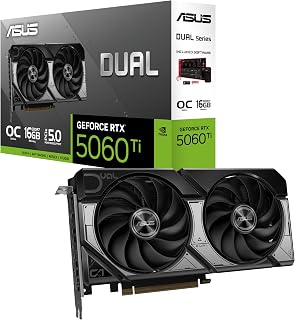
The 16GB GDDR7 configuration provides exceptional memory bandwidth for the most demanding shader packs combined with high-resolution texture mods. Ray tracing cores handle advanced lighting effects smoothly while the 2632 MHz clock ensures consistent performance across various shader configurations. This capacity prevents VRAM bottlenecks when running intricate packs like Continuum or path-traced alternatives at higher resolutions.
Pros
- 16GB GDDR7 handles demanding shader packs with headroom
- Compact 2.5-slot design fits small-form-factor builds
- 0dB mode provides silent operation during light sessions
- Dual BIOS switches between quiet and performance modes
Cons
- Compact sizing limits extreme overclocking headroom
- Higher price point than entry-level shader solutions
Minecraft with shaders demands substantial VRAM and reliable frame delivery, and the ASUS Dual RTX 5060 Ti handles both beautifully. The 16GB GDDR7 memory provides headroom for even the most demanding shader packs like BSL or Complementary while maintaining smooth gameplay at 1440p and beyond. NVIDIA's Blackwell architecture with DLSS 4 support ensures consistent performance when combining complex shaders with high render distances. The compact 2.5-slot design fits into most builds without blocking adjacent slots or requiring chassis modifications. Axial-tech fans with 0dB technology mean your system stays silent during lighter shader exploration, then ramps up cooling capacity when you push render distances to extreme levels. Dual ball bearing fans ensure longevity through countless hours of block placement and exploration. The dual BIOS toggle lets you switch between whisper-quiet building sessions and maximum-performance shader showcases. With 767 AI TOPS and PCIe 5.0 connectivity, this card handles current shader packs effortlessly while remaining capable for future Minecraft updates and increasingly sophisticated lighting mods.
GPU and Memory: NVIDIA GeForce RTX 5060 Ti, 16GB GDDR7, 2632 MHz (OC Mode), 2602 MHz (Default Mode). Supports DLSS 4 and Blackwell architecture for AI-accelerated performance.
Connectivity and Cooling: 3x DisplayPort 2.1b, HDMI 2.1b, PCIe 5.0 x16 interface. Dual Axial-tech fans with dual ball bearings, 2.5-slot compact form factor, 0dB technology for silent idle operation.
Physical and System Requirements: Dimensions 9 inches long by 4.7 inches wide, weighs 0.66 kg. Supports maximum resolution of 7680x4320 pixels. Includes 3-year warranty and SpeedSetup manual. Compatible with standard desktop builds requiring adequate power supply and proper case ventilation.
Perfect for players building compact or small-form-factor rigs who want premium shader performance without compromising on memory or cooling. The 16GB buffer handles texture-heavy modpacks alongside shaders with ease. Ideal if you value quiet operation during creative building but need full power for cinematic flyovers. Skip this if you're running basic shaders at 1080p where less VRAM suffices, or if you have unlimited chassis space and prefer cards with more extreme overclocking potential.

The 12GB GDDR7 memory provides exceptional bandwidth for demanding shader packs that load high-resolution textures and complex lighting calculations. Ray tracing capabilities handle realistic shadows and reflections in modern shader configurations while maintaining smooth framerates. The 2640 MHz clock speed ensures consistent performance even with demanding packs like SEUS PTGI or Complementary Shaders at higher render distances.
Pros
- Exceptional cooling keeps temperatures at 65C under load
- Military-grade components ensure long-term reliability
- DLSS 4 maximizes frame rates with intensive shaders
- Included bracket prevents GPU sag in heavy installations
Cons
- 13-inch length requires careful case compatibility verification
- 12GB VRAM may limit future texture-heavy modpack combinations
Running high-resolution shader packs in Minecraft benefits enormously from robust cooling and stable power delivery, both strengths of the ASUS TUF RTX 5070 OC. The 12GB GDDR7 memory paired with NVIDIA's Blackwell architecture ensures fluid performance with complex shaders at 1440p and capable 4K gameplay when you want maximum visual fidelity. Triple Axial-tech fans across a 3.125-slot cooler maintain temperatures around 65C even during marathon shader-enabled sessions, preventing thermal throttling that ruins immersion. Military-grade components and protective PCB coating provide long-term stability for systems that run continuously. DLSS 4 support amplifies frame rates when using resource-intensive shaders with ray tracing features, letting you maintain smoothness without sacrificing visual drama. The 2640MHz boost clock handles shader compilation and chunk loading without stuttering. The included bracket and stand prevent GPU sag over time, important for heavy cards in systems transported to LAN parties or moved frequently. Phase-change thermal pads ensure consistent cooling performance regardless of ambient temperature fluctuations in your gaming space.
GPU and Memory: NVIDIA GeForce RTX 5070, 12GB GDDR7, 2640MHz boost clock, PCIe 5.0 interface
Cooling and Design: 3.125-slot form factor, three Axial-tech fans, phase-change thermal pad, protective PCB coating, military-grade components, GPU Guard bracket
Connectivity: 3x DisplayPort 2.1a, 2x HDMI 2.1b, 7680x4320 maximum resolution support
Physical: 13 inches long, 5.5 inches wide, 3.4 pounds, includes cooling bracket and stand
Warranty and Support: 3-year manufacturer warranty, GPU Tweak III software for performance monitoring and thermal control
Best suited for serious Minecraft enthusiasts who prioritize visual quality and want reliable performance with demanding shader combinations at 1440p or 4K. The robust cooling and military-grade build quality appeal to players running servers or content creators recording shader showcases. Choose this if durability and thermal management matter as much as raw performance. Avoid if your case cannot accommodate a 13-inch card exceeding 2 inches in thickness, or if you only play vanilla Minecraft or lightweight shaders at 1080p.

The 16GB GDDR7 memory delivers outstanding bandwidth for extreme shader configurations with path tracing and ultra-high render distances. The 2730 MHz clock speed maintains exceptional framerates even when combining demanding shader packs with resource-intensive texture modifications. This high-end option handles the most sophisticated shader packs available while future-proofing your setup for upcoming releases.
Pros
- Blackwell architecture with DLSS 4 handles path-traced shader packs at 4K with frame generation headroom
- 16GB GDDR7 eliminates memory bottlenecks from high-resolution shader texture loads
- Phase-change thermal pad and Axial-tech triple-fan cooling sustain stable performance during long shader sessions
- Five display outputs (3x DisplayPort 2.1a, 2x HDMI 2.1b) support multi-monitor shader builds
Cons
- Requires an 850W minimum PSU and a case that can fit a 348mm, 3.6-slot card
- Flagship-tier power and size requirements make it overkill for players at 1080p or 1440p
For players chasing the most visually spectacular Minecraft shader experience, the ASUS TUF Gaming RTX 5080 sits at the very top of the field. Shader packs like Continuum RT and Patrix push even strong GPUs hard, and the RTX 5080's Blackwell architecture with DLSS 4 support means you can run the heaviest path-traced packs at 4K while DLSS reconstructs frames to maintain fluid performance. The 16GB GDDR7 frame buffer handles the enormous texture loads that high-resolution shader packs demand without stuttering. What makes this card especially compelling for long shader sessions is its thermal engineering: the phase-change GPU thermal pad and three Axial-tech fans keep temperatures stable under the sustained GPU load that complex lighting calculations produce, so performance does not throttle during hours of gameplay. Military-grade components and Auto-Extreme manufacturing add confidence for a machine that runs demanding workloads continuously. GPU Tweak III lets you monitor and tune performance in real time. The catch is real: an 850W PSU minimum and a 348mm, 3.6-slot footprint mean careful system planning is required before committing.
GPU: NVIDIA GeForce RTX 5080
Memory: 16GB GDDR7
Boost Clock: 2730 MHz (OC Mode), 2700 MHz (Default Mode)
Physical Dimensions: 348mm length, 3.6-slot design, 4.3 lbs
Video Outputs: 3x DisplayPort 2.1a, 2x HDMI 2.1b
Power Requirement: Minimum 850W PSU with 16-pin 12V-2x6 (12VHPWR) connector
Manufacturing: Auto-Extreme precision automated manufacturing
Cooling: Three Axial-tech fans, phase-change GPU thermal pad, protective PCB coating
Power Supply: Verify your PSU is rated for 850W minimum and includes the required 16-pin 12V-2x6 (12VHPWR) connector. Standard 6-pin or 8-pin connectors are insufficient for this card.
Physical Clearance: Confirm your case accommodates the 348mm length and can support the 3.6-slot width requirement. Measure internal dimensions and account for storage drives, fans, and other components that may interfere with the card's placement.
System Integration: The card includes a GPU bracket for secure installation. Ensure your motherboard provides adequate PCIe slot access and that your monitor cables support DisplayPort 2.1a or HDMI 2.1b for optimal performance.
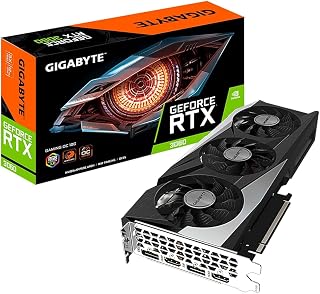
The triple WINDFORCE fan system maintains optimal temperatures during extended sessions with shader packs that stress the GPU consistently. With 12GB GDDR6 across a 192-bit interface, it handles popular shader configurations at 1440p without VRAM constraints. The 1837 MHz clock speed provides reliable performance with moderately demanding packs while ray tracing cores enhance lighting realism.
Pros
- 12GB GDDR6 provides generous VRAM headroom for texture-heavy shader packs
- 2nd-gen RT Cores accelerate ray-traced lighting used by modern Minecraft shaders
- WINDFORCE 3X cooling keeps temperatures in check during long play sessions
- 1837 MHz clock speed sustains solid frame rates at 1440p with shaders enabled
Cons
- Overkill for players who only use lightweight or vanilla Minecraft without shaders
- PCI-Express x16 desktop-only design means no option for laptop or compact mini-PC builds
Minecraft shader packs are surprisingly VRAM-hungry, and the RTX 3060 Gaming OC's 12GB GDDR6 buffer is one of the biggest advantages you can find at this tier. Shader packs like BSL, Complementary, or Continuum push heavy texture loads and lighting calculations that can choke cards with less memory, making that 12GB headroom genuinely useful rather than just a spec-sheet number. The Ampere architecture brings 2nd-generation RT Cores, which handle the ray-traced lighting and shadow work that modern Minecraft shader packs increasingly lean on. At 1440p with demanding shaders enabled, the 1837 MHz boost clock keeps frame rates stable through densely rendered biomes. The WINDFORCE 3X cooling system manages thermals quietly across long build sessions, which matters when you're running Minecraft for hours at a stretch. DisplayPort 1.4 and HDMI outputs cover high-refresh monitors, so shader visuals look their best on a fast display. For players who want lush, shader-heavy Minecraft without constantly trimming settings, this card strikes a strong balance between headroom and efficiency.
GPU Specifications: NVIDIA GeForce RTX 3060, NVIDIA Ampere architecture with 2nd generation RT Cores and 3rd generation Tensor Cores.
Memory: 12GB GDDR6, 192-bit memory interface, 15000 MHz memory clock speed.
Core Clock: 1837 MHz base boost clock.
Cooling: WINDFORCE 3X system with three fans and alternate-spinning design, RGB Fusion 2.0 lighting, metal backplate.
Connectivity: 2x HDMI 2.1, 2x DisplayPort 1.4. Maximum display resolution up to 7680 x 4320.
Physical: 11.1-inch length, 4.6-inch width, 340g weight. PCI-Express x16 interface.
Warranty: 3-year manufacturer warranty. Model: GV-N3060GAMING OC-12GD REV2.0.
Buy this if you play Minecraft with demanding shader packs at 1080p or 1440p and want the VRAM buffer to handle heavy texture and lighting loads without stuttering. It also suits players who run other modded or AAA titles alongside Minecraft on the same machine. Skip it if you only use lightweight shaders or play vanilla Minecraft, where a less powerful card would do the job without the added cost.

PNY NVIDIA GeForce RTX 5050 8GB Blackwell Graphics
The 8GB GDDR6 memory handles most popular shader packs at 1080p with room for additional visual enhancements. Its compact 2-slot design fits smaller cases without sacrificing the ray tracing capabilities needed for realistic water reflections and shadow casting. The RTX 5050 architecture efficiently processes shader calculations while keeping temperatures manageable during extended gaming sessions.
Pros
- Current RTX 50 series architecture with mature NVIDIA driver and shader compatibility
- Compact 2-slot dual-fan design fits smaller cases and tighter builds
- PCIe x8 interface offers broad motherboard compatibility
- GDDR6 memory with 2317 MHz clock handles mainstream shader workloads
Cons
- 8GB VRAM may constrain the most demanding ultra-quality shader presets
- 2317 MHz GPU clock is modest compared to higher-tier options in this generation
The PNY NVIDIA GeForce RTX 5050 brings Blackwell-generation hardware to a dual-slot, dual-fan form factor sized for compact builds. With 8GB of GDDR6 memory and a 2317 MHz GPU clock, it sits in the entry-to-mid tier of the RTX 50 series lineup. For Minecraft shader use, NVIDIA's well-established driver ecosystem is a genuine advantage: shader packs and mods have historically had strong compatibility with GeForce hardware, and driver updates land quickly. The dual-fan cooler manages thermals across the card's 2-slot footprint, and the PCIe x8 interface makes it compatible with a wide range of motherboards. The RTX 50 series architecture brings modern rendering features to the table. The 8GB VRAM allocation is the main variable to watch: most shader presets at 1080p and moderate 1440p will fit comfortably, but the most memory-intensive ultra-quality shader configurations may approach that ceiling. For players who want a compact, NVIDIA-native card from a current generation specifically for a shader-focused Minecraft setup, the RTX 5050 is a straightforward option.
GPU: NVIDIA GeForce RTX 5050 with Blackwell Architecture
Memory: 8GB GDDR6, 128-bit bus
Clock Speed: 2317 MHz (GPU), 2317 MHz (Memory)
Interface: PCIe 5.0 x8
Output Ports: DisplayPort 2.1, HDMI 2.1
Max Resolution: 7680x4320
Form Factor: 2-Slot, SFF-Ready
Power: Efficient design suitable for compact builds
Warranty: 3 Years
Well suited to players who want a current-generation NVIDIA card in a compact 2-slot design for shader-enhanced Minecraft at 1080p or entry-level 1440p. The mature NVIDIA driver stack is a plus for shader compatibility. Skip it if you regularly run the most VRAM-hungry ultra-quality shader packs or plan to push 4K, where 8GB may become a limiting factor.
What to Look for in a Minecraft Shader GPU
VRAM: More Is Almost Always Better
Shader packs load high-resolution texture atlases, shadow maps, and lighting buffers that eat through VRAM fast. At 1080p with a mid-tier shader, 8GB is workable, but 12GB or more gives you headroom for higher shadow distances and texture packs running simultaneously.
Cards like the MSI Gaming GeForce RTX 3060 12GB 15 Gbps GDRR6 and the GIGABYTE GeForce RTX 3060 Gaming OC 12G (REV2.0) offer 12GB of GDDR6, which is a reliable sweet spot for shader-heavy play at 1440p.
Ray Tracing Cores and Architecture Generation
Minecraft’s path-traced shader mode, enabled through RTX on NVIDIA or via mods on AMD cards, relies heavily on dedicated ray tracing hardware. Newer architectures deliver dramatically better performance per watt in this workload. The ASRock Radeon RX 9060 XT Challenger 16GB OC brings AMD’s RDNA 4 architecture with 3rd Gen Ray Tracing support, while Blackwell-based cards like the ASUS TUF Gaming GeForce RTX 5070 12GB GDDR7 OC push the ceiling even further with DLSS 4.
If you plan to run Minecraft’s native RTX path tracing rather than Java shader mods, an NVIDIA card with dedicated RT Cores is the more direct route. For Java Edition shader packs, both AMD and NVIDIA perform well, and architectural generation matters more than brand.
Cooling and Long-Session Stability
Minecraft with shaders is a sustained workload, not a bursty one. Your GPU sits at high utilization for hours, so thermal management matters. Cards with 0dB silent modes, like the ASRock Radeon RX 9060 XT Challenger 16GB OC and the ASUS Dual GeForce RTX 5060 Ti 16GB GDDR7 OC, spin their fans down at idle but ramp up efficiently under load to keep clocks steady.
Triple-fan coolers found on larger cards such as the ASUS TUF Gaming GeForce RTX™ 5080 16GB GDDR7 OC offer more thermal headroom, though they require a larger case. Always confirm your chassis clearance before buying a full-size card.
Budget vs. Performance Tier: Matching the Card to Your Shader Goals
Not every player needs a flagship GPU to enjoy shaders. The ASUS Dual GeForce RTX 3050 6GB GDDR6 OC Edition handles lighter shader packs at 1080p with solid smoothness, making it a smart entry point. The ASRock Intel Arc B570 Challenger 10GB OC GDDR6 adds XeSS 2 upscaling and 10GB of GDDR6 for a compelling mid-range option that punches above its size.
If you are targeting 1440p or 4K with the most demanding shader packs like Continuum or Kappa PT, stepping up to a current-generation card pays dividends in frame consistency and shadow quality. The EVGA GeForce RTX 3060 XC Gaming, 12G-P5-3657-KR hits a strong mid-range balance with its 1882 MHz boost clock and metal backplate build quality. For players who want a newer-generation alternative without going full flagship, the PNY NVIDIA GeForce RTX™ 5050 Dual-Fan Graphics brings Blackwell’s 4th-gen RT Cores and DLSS 4 in a compact, accessible package.
Final Thoughts
For most players chasing smooth shader performance without overspending, the ASRock Radeon RX 9060 XT Challenger 16GB OC delivers an impressive combination of 16GB GDDR6 memory, RDNA 4 ray tracing, and a boost clock of 3290 MHz that handles demanding shader packs at 1440p with ease. If you want the absolute ceiling for Minecraft shader fidelity with path tracing maxed out, the ASUS TUF Gaming GeForce RTX™ 5080 16GB GDDR7 OC is the no-compromise choice, backed by Blackwell architecture, military-grade components, and DLSS 4 to keep frame rates rock solid even at 4K.
Frequently Asked Questions
How much VRAM do I need to run Minecraft shaders smoothly?
For most popular shader packs at 1080p, 8GB of VRAM is the minimum you want to avoid stuttering. At 1440p or when pairing shaders with high-resolution texture packs, 12GB becomes the practical standard in 2026. Cards with 16GB, like the ASRock RX 9060 XT or the ASUS RTX 5060 Ti, give you the most future-proof headroom.
Do I need an NVIDIA card for Minecraft shaders, or does AMD work too?
AMD cards work well for Java Edition shader packs, which run through OptiFine or Iris and do not require NVIDIA-specific hardware. For Minecraft’s built-in RTX path tracing in Bedrock Edition, you do need an NVIDIA RTX card. AMD’s RDNA 4 architecture, featured in the ASRock RX 9060 XT Challenger, offers strong ray tracing performance for Java shaders and is a competitive alternative in 2026.
Can a budget GPU handle Minecraft shaders at all?
Yes, lighter shader packs like Sildur’s Vibrant Shaders on medium settings are manageable on budget cards such as the ASUS Dual RTX 3050 6GB OC Edition. You will need to dial back shadow distance and lower internal resolution compared to what a mid-range card can push, but the visual upgrade over vanilla Minecraft is still significant. Pairing a budget GPU with a lower-intensity shader pack is a great way to get started without a major hardware investment.
Does GPU choice matter for Minecraft Java Edition shaders specifically?
Absolutely. Java Edition relies on OpenGL rendering, and shader loaders like Iris and Sodium heavily utilize GPU compute and memory bandwidth. A faster GPU with more VRAM directly translates to higher shader quality settings and smoother frame rates. In 2026, the jump from an older Pascal or Turing card to an Ampere or newer architecture makes a noticeable difference even at medium shader presets.





Write Your Review
No reviews yet. Be the first to share your experience!