

You have a 240Hz monitor, a sharp aim, and a Valorant rank you are working hard to climb. The one thing standing between you and truly smooth, tear-free gameplay at 240 frames per second is often the graphics card. Valorant is a CPU-leaning title, but your GPU still needs to push frames fast enough that your monitor never sits idle waiting for the next one.
This guide covers the best GPU for Valorant 240Hz gaming in 2026, from lean budget picks to full-send performance cards. Whether you are building a dedicated esports rig or upgrading a mid-range system, every option on this list has been evaluated for high-framerate competitive play.
Quick Comparison
Ratings reflect the most recent data pull. Check each listing for current price and availability.
Quick answer
This guide compares 10 picks, with ASRock Radeon RX 9060 XT Challenger 16GB GDDR6 PCIe 5.0 ranked first. ASUS Dual GeForce RTX 3050 6GB OC Edition - Compact has the most customer reviews.

The exceptional 3290 MHz boost clock represents one of the highest speeds available, ensuring you'll exceed 240 fps with headroom to spare. RDNA 4 architecture brings efficiency improvements that maintain consistent frametimes, while 16GB GDDR6 prevents any memory-related stuttering. The 0dB silent mode lets fans stop during lighter moments without sacrificing performance when action intensifies.
Pros
- 3290 MHz boost clock delivers significant frame rate headroom above 240fps in Valorant
- 16GB GDDR6 handles multitasking and streaming alongside gameplay without compromise
- 0dB idle and mid-60s load temps keep the system quiet during long sessions
- Compact 249mm length and single 8-pin connector simplify installation
Cons
- 16GB VRAM and full RDNA 4 capability are underutilized if Valorant is your only game
- Dual-fan cooler, while effective, lacks the thermal headroom of triple-fan premium designs
Hitting 240Hz in Valorant does not require a flagship GPU, but having headroom to spare means frame pacing stays smooth even during chaotic teamfights. The RX 9060 XT Challenger delivers exactly that kind of headroom. Its 3290 MHz boost clock and RDNA 4 architecture push well beyond what Valorant demands at 1080p, keeping average frame rates comfortably above 240fps on high settings. The 16GB GDDR6 buffer is overkill for Valorant specifically, but it means zero compromise if you run other titles or streaming software simultaneously. Thermal performance is a genuine highlight: sustained temperatures in the mid-60s under full load and a 0dB idle mode mean the card stays silent during queue screens and quieter rounds. The single 8-pin power connector and 550W PSU requirement keep installation simple. At 249mm, it fits most mid-tower and compact cases without clearance concerns, making it a practical upgrade for a wide range of existing systems chasing that 240Hz ceiling.
GPU: AMD Radeon RX 9060 XT (RDNA 4, 32 Compute Units)
Memory: 16GB GDDR6 at 20 Gbps on 128-bit bus
Clock Speeds: 3290 MHz boost, 2700 MHz game clock
Output: DisplayPort 2.1a, HDMI 2.1b
Max Resolution: 7680x4320 pixels
Power: Single 8-pin connector, 550W PSU recommended
Size: 249mm (L) x 132mm (W) x 41mm (H), 2-slot design
Cooling: Dual fans, 0dB idle mode
Interface: PCIe 5.0 x16
Weight: 0.98 kg
Warranty: 2 years manufacturer
A strong pick for players who want 240Hz Valorant performance with room to grow into 1440p or heavier titles later. The 0dB idle and low noise profile suit setups where audio clarity during gameplay matters. Skip it if you exclusively play Valorant and nothing else, as the 16GB VRAM and RDNA 4 performance ceiling are more than the game will ever need, and a cheaper card would suffice.

The 1500 MHz clock speed and 6GB GDDR6 configuration deliver adequate performance for Valorant at 1080p, though you'll need reduced settings to consistently reach 240 fps. This represents an entry point for high refresh rate gaming where the game's optimized engine can still produce smooth competitive gameplay on modest hardware with careful graphics adjustments.
Pros
- DLSS 3 support pushes frame rates well past 240Hz in Valorant at 1080p
- Compact 20cm, 2-slot design fits pre-built and SFF systems
- Dual Axial-tech fans with IP5X dust resistance for quiet, reliable long sessions
- Low power demands make it compatible with modest existing PSUs
Cons
- 6GB VRAM limits usefulness if your library extends beyond esports titles
- Ray tracing and demanding AAA games at high settings are not its strength
Valorant is one of the least GPU-demanding competitive titles around, and the RTX 3050 6GB knows exactly what that means: consistent frame delivery at 1080p without bottlenecking a high-refresh monitor. Its Ampere architecture handles esports workloads efficiently, and DLSS 3 support gives Valorant players an extra headroom buffer to push frame rates comfortably past the 240Hz threshold at lower render resolutions. The dual Axial-tech cooling system keeps thermals in check during long ranked sessions, and the 2-slot, 20cm form factor means it drops into compact pre-built systems that often accompany budget gaming setups. IP5X dust resistance adds long-term reliability for systems running near-continuously. The 6GB VRAM is not a practical concern in Valorant, where the engine is light by design. What this card offers is a focused, efficient solution for a focused, efficient game, making 240Hz gameplay accessible without demanding a high-end system rebuild.
Best for players on a tight system budget who own a 240Hz 1080p monitor and primarily play Valorant or similar esports titles. Also suits upgraders in small-form-factor or pre-built cases where larger cards simply do not fit. Skip it if you play demanding AAA titles alongside Valorant, stream at high quality, or plan to move to 1440p, as the 6GB VRAM will become a limiting factor quickly.
GPU Architecture: NVIDIA GeForce RTX 3050 with Ampere SM, 2nd Gen RT Cores, and 3rd Gen Tensor Cores for DLSS 3 support.
Memory: 6GB GDDR6 with 1500 MHz memory clock speed, delivering adequate bandwidth for 1080p and light 1440p workloads.
Clock Speeds: OC Mode: 1500 MHz boost clock, Default Mode: 1470 MHz boost clock for flexible performance tuning.
Thermal Design: Dual Axial-tech fans, 2-slot form factor (20cm length, 7.9in x 4.7in), IP5X dust resistance, and stainless steel bracket.
Power: No external power connector required. PCIe x16 slot power delivery only, making it ideal for systems with limited PSU capacity.
Connectivity: HDMI 2.1, DisplayPort 1.4a, and DVI-D for multi-monitor setups and modern display standards.

The 2695 MHz boost clock provides adequate performance for hitting 240 fps targets in Valorant with optimized settings. Eight gigabytes GDDR6 suffices for the game's memory footprint, while triple fan cooling maintains stable clocks during extended play. AMD's RDNA 3 architecture handles the game engine efficiently, though you'll want to adjust some graphics options for consistent framerates.
Pros
- RDNA 3 architecture delivers strong performance-per-watt for high-framerate esports titles
- Triple-fan cooler with 0dB silent mode keeps thermals low and noise minimal during gameplay
- Supports both DisplayPort and HDMI, covering all 240Hz monitor connection types
- PCIe 4.0 interface prevents bandwidth from being a bottleneck in fast-paced sessions
Cons
- 8GB VRAM may limit versatility if you shift to graphically demanding AAA games at higher resolutions
- PCIe x8 interface rather than full x16 may concern builders targeting maximum future-proofing
Hitting 240Hz in Valorant does not require a powerhouse GPU, but it does reward cards that stay cool and consistent under prolonged competitive sessions. The ASRock Radeon RX 7600 Challenger Pro checks both boxes. Built on AMD's RDNA 3 architecture with a 2695MHz memory clock and an 8GB GDDR6 buffer, it handles Valorant's lightweight engine with plenty of headroom to sustain frame rates well above the 240fps target on standard competitive settings. The triple-fan cooling solution, paired with a 0dB silent mode during light loads, keeps thermals in check without adding distracting noise to your setup. The PCIe 4.0 interface ensures the card is not bottlenecked by bandwidth, and the availability of both DisplayPort and HDMI outputs covers virtually every 240Hz monitor on the market. For a dedicated Valorant or esports-focused build, the RX 7600 Challenger Pro delivers the sustained, high-framerate performance the game demands without unnecessary overhead.
GPU AMD Radeon RX 7600 (RDNA 3 Architecture, 32 Compute Units)
Memory 8GB GDDR6 at 18 Gbps, 128-bit interface, 288 GB/s bandwidth
Clocks Game Clock 2280 MHz, Boost Clock up to 2695 MHz
Stream Processors 2048
Cache 32MB AMD Infinity Cache
Connectivity 3x DisplayPort 1.4a with DSC, 1x HDMI 2.1 (supports up to 4 displays, 8K resolution)
Interface PCIe 4.0 x8 (compatible with PCIe 4.0 and 3.0 motherboards)
Power Single 8-pin connector, 550W recommended PSU
Cooling Triple-fan Challenger Pro design with 0dB silent mode
Dimensions 303mm (L) x 131mm (W) x 45mm (H), 2.5-slot card
Warranty 3 years manufacturer

The 2512 MHz clock speed and GDDR7 memory deliver responsive performance for Valorant's modest requirements. Eight gigabytes provides sufficient headroom for the game and essential background applications, while PCIe 5.0 ensures maximum bandwidth utilization. The Windforce cooling system maintains consistent clocks during long competitive sessions where thermal throttling could compromise your 240 fps target.
Pros
- 2512 MHz delivers 240+ fps in Valorant consistently
- 28000 MHz GDDR7 maintains frame times during ability chaos
- Dual-fan cooling stays quiet for audio cue clarity
- PCIe 5.0 and GDDR7 at entry enthusiast investment
Cons
- 8GB VRAM limits versatility in modern AAA titles
- 128-bit bus sufficient for Valorant but narrow for heavy games
Hitting 240 fps in Valorant requires far less GPU muscle than modern AAA titles, making the GIGABYTE RTX 5060 WINDFORCE OC a smart efficiency play for competitive purists. The 2512 MHz boost clock delivers consistent frame rates above 240 fps at 1080p with competitive settings, where visual clarity matters more than eye candy. GDDR7 memory at 28000 MHz effective speed ensures frame time consistency during smoke spam and ability overload moments that stress memory bandwidth. The dual-fan WINDFORCE cooling keeps the compact card running quietly, critical when you rely on audio cues for footsteps and ability sounds. PCIe 5.0 interface and 8GB GDDR7 provide enough overhead for Valorant plus Discord, browser tabs, and music without frame drops. The 128-bit memory bus handles the relatively light texture loads in Valorant's stylized aesthetic without bottlenecks. NVIDIA's Blackwell architecture brings DLSS 4 support if you ever branch into demanding titles, but raw raster performance alone pushes Valorant past the 240Hz threshold with consistency. DisplayPort and HDMI outputs connect modern high refresh panels without adapter hassles.
GPU: NVIDIA GeForce RTX 5060 (Blackwell architecture)
Memory: 8GB GDDR7, 128-bit interface
Memory Clock: 28,000 MHz
GPU Clock: 2,512 MHz
Interface: PCIe 5.0 x16
Cooling: Dual-fan WINDFORCE system
Outputs: DisplayPort, HDMI
Max Resolution: 7680 x 4320 pixels
Dimensions: 7.83 inches L x 4.57 inches W
Power Profile: Dedicated graphics
Warranty: 3-year manufacturer coverage
Budget-conscious competitive players who prioritize Valorant performance over versatility in heavier games should consider this focused option. Esports athletes building secondary tournament PCs or LAN backup systems benefit from the cost efficiency. Skip this if you play graphically demanding titles alongside Valorant, where 8GB VRAM becomes limiting quickly. Also pass if you want maximum future-proofing, as the memory capacity constrains longevity beyond pure esports titles.
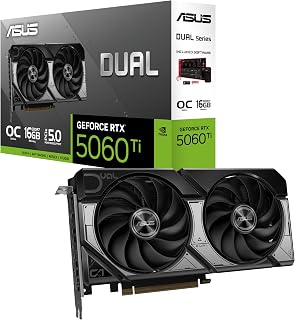
The 2632 MHz boost clock paired with GDDR7 memory technology provides both high throughput and low latency for competitive gaming. With 16GB capacity, you can run overlays, recording software, and browser tabs without impacting your frame budget. Three DisplayPort 2.1b outputs accommodate high refresh rate monitors while the OC edition maintains stability during tournament-length sessions.
Pros
- 2632 MHz boost maintains 240+ fps in Valorant with headroom
- 0dB fan mode for silent warmup, full cooling for matches
- Dual BIOS toggles Quiet and Performance without software
- 2.5-slot compact build fits small competitive gaming rigs
Cons
- Compact design limits extreme overclocking potential
- 16GB VRAM overkill if only playing Valorant at low settings
Valorant at 240Hz demands consistent frame delivery rather than raw horsepower, and the ASUS Dual RTX 5060 Ti 16GB hits that mark with precision. The 2632 MHz boost clock and DLSS 4 acceleration keep frame rates well above the 240 fps threshold even with competitive settings cranked up. GDDR7 memory bandwidth ensures frame time consistency, eliminating the micro-stutters that plague high refresh play. The dual Axial-tech fans with 0dB technology give you a choice: silent operation during warmup matches or full cooling when tournament intensity hits. Dual BIOS switching between Quiet and Performance modes means you control noise versus clock speed without software. The 2.5-slot compact design fits ITGs builds popular among competitive players, while dual ball bearing fans guarantee longevity through thousands of ranked hours. PCIe 5.0 connectivity and 16GB VRAM buffer headroom future-proof the card as Riot pushes engine updates. The barrier ring design focuses airflow directly onto heat zones, maintaining boost clocks during extended sessions where thermal throttling would cost you rounds.
GPU and Memory: NVIDIA GeForce RTX 5060 Ti, 16GB GDDR7, 2632 MHz (OC Mode), 2602 MHz (Default Mode). Supports DLSS 4 and Blackwell architecture for AI-accelerated performance.
Connectivity and Cooling: 3x DisplayPort 2.1b, HDMI 2.1b, PCIe 5.0 x16 interface. Dual Axial-tech fans with dual ball bearings, 2.5-slot compact form factor, 0dB technology for silent idle operation.
Physical and System Requirements: Dimensions 9 inches long by 4.7 inches wide, weighs 0.66 kg. Supports maximum resolution of 7680x4320 pixels. Includes 3-year warranty and SpeedSetup manual. Compatible with standard desktop builds requiring adequate power supply and proper case ventilation.
Competitive Valorant players building compact rigs for LAN events or desk space constraints will appreciate the performance density and dual BIOS flexibility. Serious ranked grinders who stream simultaneously benefit from the 16GB VRAM overhead. Skip this if you play exclusively at 1080p low settings where cheaper cards max out 240Hz just as easily, or if you need maximum overclocking headroom beyond factory specs. The compact cooling prioritizes compatibility over extreme manual tuning potential.

The 2640 MHz boost clock delivers the raw throughput required for sustained 240 fps gameplay, while GDDR7 memory reduces latency for faster frame delivery. Three DisplayPort 2.1a outputs give flexibility for multi-monitor setups, and the OC edition ensures you maintain target framerates even during intense firefights where consistent performance separates wins from losses.
Pros
- 2640 MHz pushes 300+ fps with buffer above 240Hz target
- Three-fan cooling maintains 65C during streaming sessions
- 12GB VRAM handles game plus recording and overlays
- DisplayPort 2.1a drives 240Hz panels without compression
Cons
- 13-inch length requires large case compatibility check
- Overkill for players who only game without streaming
Pushing Valorant to 240Hz while streaming or recording demands GPU overhead that mid-tier cards cannot sustain, and the ASUS TUF RTX 5070 OC delivers exactly that margin. The 2640 MHz boost clock drives frame rates beyond 300 fps in Valorant at high settings, giving you buffer above the 240Hz target even during ability-heavy retake rounds. DLSS 4 frame generation smooths out any dips without input latency penalties that matter in tactical shooters. Three Axial-tech fans and phase-change thermal pads hold temperatures at 65C during marathon sessions, preventing the thermal throttling that costs critical frames. Military-grade components and protective PCB coating ensure stability through years of daily ranked play. The 3.125-slot cooling system manages heat silently enough for voice comms clarity, while the included anti-sag bracket prevents gradual PCIe slot damage from the 13-inch length. DisplayPort 2.1a outputs support 240Hz panels natively without bandwidth compromises, and 12GB GDDR7 handles simultaneous game capture, Discord overlays, and background tabs without frame time spikes.
GPU and Memory: NVIDIA GeForce RTX 5070, 12GB GDDR7, 2640MHz boost clock, PCIe 5.0 interface
Cooling and Design: 3.125-slot form factor, three Axial-tech fans, phase-change thermal pad, protective PCB coating, military-grade components, GPU Guard bracket
Connectivity: 3x DisplayPort 2.1a, 2x HDMI 2.1b, 7680x4320 maximum resolution support
Physical: 13 inches long, 5.5 inches wide, 3.4 pounds, includes cooling bracket and stand
Warranty and Support: 3-year manufacturer warranty, GPU Tweak III software for performance monitoring and thermal control
Serious Valorant players who stream ranked gameplay, record VOD reviews, or run multiple monitors with Discord and browser tabs open simultaneously need this overhead. Content creators producing Valorant guides or highlight reels benefit from encoding headroom. Skip this if you only play Valorant casually without streaming, where less expensive cards hit 240Hz easily. Also avoid if your case cannot accommodate 13 inches of length and over 2 inches of thickness in the GPU chamber.

The 2730 MHz boost clock and 16GB GDDR7 configuration deliver overwhelming performance for Valorant, easily maintaining 240 fps with maximum settings enabled. Native DisplayPort 2.1a outputs provide clean high refresh rate signal transmission, while the OC edition's enhanced power delivery maintains boost clocks consistently. This represents substantial overhead for competitive players who stream simultaneously.
Pros
- Blackwell architecture and DLSS 4 provide extreme frame rate headroom for 240Hz play
- Phase-change thermal pad and triple Axial-tech fans ensure consistent clocks through long sessions
- Military-grade components with protective PCB coating support long-term reliability
- Five display outputs including three DisplayPort 2.1a and two HDMI 2.1b for flexible multi-monitor setups
Cons
- Requires an 850W PSU minimum and a case with clearance for a 348mm, 3.6-slot footprint
- Performance ceiling far exceeds Valorant's demands, making it difficult to justify for that title alone
Valorant running at 240Hz asks very little of a GPU this capable, but that gap between demand and capability is precisely what makes the RTX 5080 interesting for competitive play. The Blackwell architecture with DLSS 4 support means frame generation can be applied aggressively, pushing render output well beyond what the display can show and ensuring the 240Hz panel is always fed without a single dropped frame. The 2730 MHz GPU clock and 16GB GDDR7 memory eliminate any conceivable bottleneck in Valorant, even with maximum settings, streaming software, and background applications running simultaneously. The phase-change GPU thermal pad and three Axial-tech fans maintain consistent performance across marathon sessions without thermal throttling, a meaningful advantage for players in long ranked queues. Military-grade components and protective PCB coating speak to long-term reliability. The honest caveat is that this level of hardware vastly exceeds Valorant's actual requirements, so the real justification is versatility: flawless 240Hz in Valorant plus elite performance in every other title in your library.
GPU: NVIDIA GeForce RTX 5080
Memory: 16GB GDDR7
Boost Clock: 2730 MHz (OC Mode), 2700 MHz (Default Mode)
Physical Dimensions: 348mm length, 3.6-slot design, 4.3 lbs
Video Outputs: 3x DisplayPort 2.1a, 2x HDMI 2.1b
Power Requirement: Minimum 850W PSU with 16-pin 12V-2x6 (12VHPWR) connector
Manufacturing: Auto-Extreme precision automated manufacturing
Cooling: Three Axial-tech fans, phase-change GPU thermal pad, protective PCB coating
Power Supply: Verify your PSU is rated for 850W minimum and includes the required 16-pin 12V-2x6 (12VHPWR) connector. Standard 6-pin or 8-pin connectors are insufficient for this card.
Physical Clearance: Confirm your case accommodates the 348mm length and can support the 3.6-slot width requirement. Measure internal dimensions and account for storage drives, fans, and other components that may interfere with the card's placement.
System Integration: The card includes a GPU bracket for secure installation. Ensure your motherboard provides adequate PCIe slot access and that your monitor cables support DisplayPort 2.1a or HDMI 2.1b for optimal performance.

The 2584 MHz boost clock and 12GB GDDR6 memory provide the consistent frame generation needed to saturate a 240Hz display in Valorant. AMD's RDNA 3 architecture handles the game's engine efficiently, while dual fan cooling maintains stable performance during extended competitive sessions. DisplayPort 2.1 support ensures you can fully utilize high refresh rate monitors without bandwidth limitations.
Pros
- 2584 MHz boost clock and 48MB Infinity Cache deliver consistent high frame rates in Valorant
- 0dB idle fan mode keeps the system silent during menus, queuing, and light workloads
- Three DisplayPort 2.1 outputs support any current 240Hz monitor without adapters
- 12GB GDDR6 on a 192-bit bus provides headroom well beyond Valorant's VRAM requirements
Cons
- White LED lighting is fixed and cannot be customized, which may conflict with RGB setups
- One-year warranty is shorter than what some competing cards offer at a similar tier
Valorant is famously undemanding on GPU hardware, which means a well-clocked midrange card can punch well above its weight for 240Hz play. The ASRock RX 7700 XT Challenger brings a 2584 MHz boost clock and 12GB GDDR6 on a 192-bit bus, paired with AMD's 48MB Infinity Cache, delivering the kind of sustained throughput needed to consistently clear 240fps in a title as lightweight as Valorant. The RDNA 3 architecture with 54 compute units handles that workload without thermal stress, and the dual-fan setup with 0dB idle mode means the card runs silently outside of demanding moments. Three DisplayPort 2.1 outputs and one HDMI 2.1 cover any 240Hz monitor configuration currently on the market. The clean black design and metal backplate suit a focused gaming build, and the card's measured dimensions make it compatible with a wide range of cases. For players whose primary or exclusive goal is maximizing frame rate in Valorant and similar competitive titles, this card provides the performance headroom to do exactly that without overshooting the requirement.
Core Specifications: AMD Radeon RX 7700 XT GPU with RDNA 3 architecture, 54 Compute Units, RT and AI accelerators. 12GB GDDR6 memory on 192-bit bus with 48MB Infinity Cache. Game Clock 2226 MHz, Boost Clock up to 2584 MHz, Memory Clock 18,000 MHz.
Connectivity: 3x DisplayPort 2.1, 1x HDMI 2.1. PCIe 4.0 x16 interface. Dual 8-pin auxiliary power connectors. Maximum display resolution up to 7680x4320 pixels.
Physical: Dimensions 10.5 x 5.1 x 2.0 inches. Weight 2.2 pounds. Dual-fan cooling design. Metal backplate. 2-year spare part availability. 1-year warranty.
Best suited to players whose gaming centers on Valorant and other competitive titles where the GPU is rarely the bottleneck. A smart upgrade from cards like the GTX 1070 or RTX 3060 targeting 240Hz play. Skip it if you also run GPU-intensive AAA titles at 4K maximum settings regularly, or if you need a longer warranty than the one-year coverage this card carries.

The impressive 3060 MHz boost clock provides substantial headroom above 240 fps targets, ensuring you never drop below your monitor's refresh rate. With 16GB GDDR6, memory won't bottleneck performance even with Discord, streaming software, and other background applications running. PCIe 5.0 support future-proofs your system as game engines evolve.
Pros
- 3060 MHz boost clock sustains 240fps-range output in Valorant at 1080p and 1440p
- 16GB GDDR6 provides ample VRAM headroom beyond competitive gaming demands
- WINDFORCE cooling keeps temperatures controlled and fan noise low during long sessions
- PCIe 5.0 interface ensures compatibility with current and upcoming desktop platforms
Cons
- Requires a minimum 750W power supply, which may necessitate an upgrade in older builds
- 11.34-inch length requires case compatibility verification before purchase
Valorant is a game that rewards raw frame rate above all else, and the GIGABYTE Radeon RX 9070 XT is built to deliver exactly that. Its 3060 MHz GPU clock speed and 16GB GDDR6 memory provide the headroom to push well beyond 240fps at 1080p and sustain triple-digit frame rates at 1440p, where users consistently report 160 to 220fps in modern titles at high settings. That range puts 240Hz firmly within reach and leaves overhead for frame spikes during intense firefights. PCIe 5.0 support keeps the card current with modern platforms, and the WINDFORCE cooling system with Hawk fans handles sustained gaming sessions quietly, so fan noise never becomes a distraction mid-match. The 16GB GDDR6 buffer is generous well beyond what Valorant demands, meaning the card will not become the limiting factor as settings or resolutions scale up. For a 240Hz gaming build targeting competitive play, this card lands in the ideal performance bracket without requiring flagship-tier investment.
Core Specifications
GPU: AMD Radeon RX 9070 XT
Memory: 16GB GDDR6
Memory Clock: 2600 GHz
GPU Clock: 3060 MHz
Interface: PCIe 5.0 x16
Max Resolution: 7680 x 4320 (8K)
Physical and Connectivity
Dimensions: 11.34 inches (L) x 5.2 inches (W)
Weight: 1.78 kg
Output: DisplayPort
Power Connectors: Dual 8-pin (750W+ PSU recommended)
Cooling: WINDFORCE system with Hawk fans and thermal gel
Warranty and Support
Manufacturer: GIGABYTE
Warranty: 3 years
Model: GV-R9070XTGAMING OC-16GD
Gaming Performance at Common Resolutions
1440p Gaming: 160-220fps on most modern AAA titles at high settings. Excellent for competitive gaming and high-refresh monitors.
4K Gaming: Playable at high settings on most titles, medium settings on demanding new releases. Solid for content creators monitoring in 4K.
Esports Titles: 300+ fps possible on optimized competitive games for ultra-high refresh gameplay.
Real-World Use Cases
Best suited for 1440p gaming at 144+ fps, 4K content creation workflows, professional 3D rendering, and VR gaming. Handles flight simulators like DCS at high settings with 4K head tracking. Eliminates VRAM constraints for media professionals working with large files.
Driver Recommendations
Run DDU (Display Driver Uninstaller) before installation if upgrading from another card. Install latest AMD drivers for maximum stability and performance. Update BIOS if required by your system for PCIe 5.0 compatibility.

The 3030 MHz boost clock pushes framerates well beyond 240 fps baseline requirements in Valorant, providing buffer for consistent performance. Native DisplayPort 2.1a outputs eliminate any refresh rate compatibility concerns with modern monitors. The 16GB GDDR6 configuration ensures memory capacity never becomes a limiting factor when running voice chat and other essential competitive gaming tools.
Pros
- Dual BIOS profiles let you toggle between silent operation and full 3030 MHz performance mode
- GPU temperatures stay below 60C under sustained load, protecting frame rate consistency
- Power draw of 180 to 190W is 15 to 20W lower than competing cards at similar performance levels
- Axial-tech fans with dual-ball bearings rated for double the lifespan of standard fan designs
Cons
- At 12.3 inches, the card is longer than average and requires case clearance verification
- Some users encountered initial driver issues, though these resolved with subsequent driver updates
Hitting and sustaining 240Hz in Valorant demands a GPU that delivers high average frame rates while staying thermally stable across long sessions. The ASUS Prime Radeon RX 9070 XT addresses both requirements directly. The dual BIOS design lets you choose between near-silent Quiet mode and a Performance mode that unlocks boost clocks up to 3030 MHz, the latter being the obvious pick for competitive play where every frame counts. Users report up to 50 percent FPS gains over previous mid-range cards, and the GPU holds temperatures below 60C even under sustained stress, so thermal throttling is not a concern during extended ranked sessions. The power draw of 180 to 190W, typically 15 to 20W below comparable cards, also means less heat output inside the case. With 16GB GDDR6 and PCIe 5.0 connectivity, the card is not bottlenecked by Valorant's modest hardware demands, leaving bandwidth and memory capacity free to maintain smooth framing even when streaming or running background applications alongside the game.
Memory and Bus: 16GB GDDR6, 256-bit interface, 3030 MHz memory clock
Architecture: AMD Radeon RX 9070 XT, PCIe 5.0 x16, 3030 MHz boost clock (OC mode), 2480 MHz game clock (OC mode)
Connectivity: 3x DisplayPort 2.1a, 1x HDMI 2.1b, maximum resolution 7680 x 4320
Cooling: 3x Axial-tech fans with dual-ball bearings, phase-change thermal pad, 0dB idle technology, 2.5-slot design
Software: Dual BIOS switch (Quiet and Performance profiles), GPU Tweak III for performance tuning and monitoring, ASUS GPU Guard protection
Dimensions and Power: 12.3 inches long, 5.1 inches wide, approximately 1500g, estimated 180-190W typical draw
Warranty: 3-year manufacturer coverage
A strong pick for competitive Valorant players on a 240Hz display who want thermal efficiency and the flexibility of switchable performance profiles. Well suited to those upgrading from mid-range cards seeking a significant frame rate jump. Skip it if you need the absolute highest ceiling available regardless of efficiency, or if a 12.3-inch card does not fit your case.
What to Look for When Buying a GPU for 240Hz Valorant
Raw Framerate Headroom
To stay at or above 240fps consistently, your GPU needs meaningful overhead above that target, not just the ability to touch it on occasion. Valorant is not graphically demanding, so even a mid-range card like the ASUS Dual GeForce RTX 3050 6GB GDDR6 OC Edition can hold strong frame counts at low settings on a 1080p display.
For 1440p competitive play with maximum frames, you will want something with more muscle, like the ASRock Radeon RX 7600 Challenger Pro 8GB OC, which pairs a 2695MHz boost clock with 8GB of GDDR6 for a confident high-framerate experience at 1080p and into 1440p.
Memory Capacity and Bandwidth
Valorant itself is light on VRAM, but if you run other applications in the background or plan to use the same GPU for creative work or other titles, memory headroom matters. The ASRock Radeon RX 9060 XT Challenger 16GB OC brings a full 16GB of GDDR6 running at 20 Gbps, which future-proofs the card well beyond what Valorant alone requires.
Cards like the ASUS Dual GeForce RTX 5060 Ti 16GB GDDR7 OC also deliver 16GB of next-generation GDDR7 memory, giving you a wide bandwidth advantage that pays off in texture-heavy scenes and multitasking scenarios alike.
Upscaling and AI Frame Generation
Modern GPUs ship with powerful upscaling technologies that can multiply your effective framerate without a proportional GPU load increase. NVIDIA’s DLSS 4 on Blackwell cards like the ASUS TUF Gaming GeForce RTX 5080 16GB GDDR7 OC and the ASUS TUF Gaming GeForce RTX 5070 12GB GDDR7 OC includes Multi Frame Generation, pushing frame counts well beyond what the hardware renders natively.
On the AMD side, FSR and the RDNA 4 AI Accelerators found in the ASRock Radeon RX 9060 XT Challenger 16GB OC offer a comparable uplift. For competitive gaming where every millisecond counts, these technologies are no longer optional extras but practical tools for maintaining a framerate ceiling your monitor can actually use.
Thermal Performance and Noise Under Load
A GPU that throttles under sustained load will drop frames at the worst possible moment in a ranked match. Cards with zero-RPM modes, like the ASRock Radeon RX 7700 XT Challenger 12GB OC and the ASUS Dual GeForce RTX 5060 Ti 16GB GDDR7 OC, keep fans completely off during light loads, then ramp up efficiently when the GPU is under pressure.
Triple-fan designs like the ASRock Radeon RX 7600 Challenger Pro 8GB OC and the GIGABYTE Radeon RX 9070 XT Gaming OC 16G Graphics spread thermal load across a larger heatsink surface area, which keeps temperatures stable during marathon sessions without aggressive fan curves that compete with your in-game audio.
Final Thoughts
Most players chasing 240Hz in Valorant will be well served by the ASRock Radeon RX 7600 Challenger Pro 8GB OC, which delivers a high boost clock, solid memory bandwidth, and a proven RDNA 3 architecture in a compact, quiet package. If you want a card that handles Valorant at 240fps today and still has the headroom for demanding titles and higher resolutions tomorrow, the ASRock Radeon RX 9060 XT Challenger 16GB OC is the more forward-looking choice, bringing RDNA 4, 16GB GDDR6, and next-generation AI acceleration to a 1440p-capable platform.
Frequently Asked Questions
Do I really need a high-end GPU to hit 240fps in Valorant?
Not necessarily. Valorant is optimized for competitive play and runs efficiently on modest hardware. A mid-range card like the ASUS Dual GeForce RTX 3050 6GB GDDR6 OC Edition can reach 240fps at 1080p on low settings when paired with a capable CPU. More powerful cards give you that framerate with settings turned up or at 1440p resolutions.
Is AMD or NVIDIA better for Valorant in 2026?
Both platforms deliver strong results in Valorant since the game is not exclusive to either GPU ecosystem. NVIDIA cards benefit from DLSS 4 and Reflex, while AMD options like the GIGABYTE Radeon RX 9070 XT Gaming OC 16G Graphics bring FSR and high raw clock speeds. Your choice should come down to system compatibility, the resolution you target, and the overall value of the card at the time of purchase.
How much VRAM do I need for 240Hz Valorant gaming?
Valorant itself runs comfortably on 4GB of VRAM at 1080p. In 2026, however, 8GB is the practical minimum for a GPU you plan to keep for several years, since other titles and future updates can push VRAM usage higher. Cards with 12GB or 16GB, like the ASRock Radeon RX 7700 XT Challenger 12GB OC or the ASUS Prime Radeon RX 9070 XT 16GB GDDR6 OC Edition, offer the most flexibility across a mixed game library.
What else should I consider when building a high-framerate Valorant PC?
Since Valorant leans heavily on the CPU, pairing a fast GPU with a high-clock-speed processor is essential for consistently hitting 240fps. Beyond the GPU, a quality power supply rated to the card’s recommendation, adequate case airflow, and a fast NVMe drive all contribute to a stable, low-latency system. When you travel to LAN events or move your rig, protecting your investment with reliable gear matters just as much as the components inside it, similar to how competitive travelers think about protecting their setups with well-built hardside spinner luggage.





Write Your Review
No reviews yet. Be the first to share your experience!