

A barking dog, keyboard clatter, or a crowded home office can turn an important video call into a frustrating exchange of repeated questions. The best headset for online meetings helps your voice stay intelligible while giving you comfortable, dependable audio through a full day of calls.
This guide is for remote workers, students, customer-facing teams, and anyone who wants a simpler way to sound more professional on Zoom, Teams, Webex, or Google Meet. If your needs also include casual group chats after work, our guide to headsets for voice chat can help you compare a different set of priorities, while a dedicated USB microphone for podcasting may suit more polished recorded audio.
Quick answer
This guide compares 9 picks, with Soothielec Wireless Headset with Noise Cancelling ranked first. Logitech H390 Wired USB Headset with Noise-Canceling has the most customer reviews.

This Bluetooth option delivers wireless freedom during back-to-back calls without the tether of a USB cable. The on-ear design with noise cancelling helps block distractions in busy home offices, while the 30-ohm impedance ensures consistent audio quality across different devices. Its over-ear form factor provides comfort during marathon meeting days when you need reliable hands-free communication.
Pros
- Environmental noise cancellation blocks household distractions during calls
- 40-hour battery life eliminates daily charging routines
- Dual-device pairing switches effortlessly between laptop and phone
- 33-foot wireless range allows movement during conversations
Cons
- Mute function and voice assistant work only with smartphones, not computers
- USB dongle incompatible with traditional desk phones
Call clarity stands at the center of the Soothielec wireless headset's design. Environmental noise cancellation blocks household sounds during live conversations, keeping your voice front and center even when kids, pets, or appliances create background chaos. The flexible boom mic stays positioned near your mouth for consistent capture, and the one-touch mute button sits within easy reach when you need to silence yourself instantly. Bluetooth 5.3 maintains stable connections across Zoom, Teams, and other platforms without dropouts. The included USB dongle adds a wired-alternative path for computers lacking built-in Bluetooth, ensuring compatibility across different work setups. Dual-device pairing lets you stay connected to both laptop and phone simultaneously, so you can take mobile calls without unplugging. The 40-hour battery eliminates mid-week charging, and the 33-foot wireless range gives you freedom to step away from your desk mid-call. Memory foam earcups and an adjustable headband support multi-hour meetings without pressure points. For professionals balancing cost and performance in video-heavy workflows, this headset delivers the audio reliability that virtual collaboration demands.
Best for remote workers and hybrid employees conducting frequent video meetings who need wireless flexibility and all-day battery life. The dual-device pairing suits professionals juggling laptop calls and mobile check-ins. Skip this if your workflow depends on computer-based mute controls or if you need USB dongle compatibility with traditional desk phones. The mute function and voice assistant button only respond to smartphones, not desktop systems, limiting convenience for purely computer-based setups.
Connectivity: Bluetooth 5.3 with USB-A dongle included. Dual device pairing supported. 33-foot Bluetooth range.
Battery: 600mAh rechargeable battery. 40 hours talk time. 2-hour rapid charge time. Usable while charging.
Audio: Environmental noise cancelling technology. Flexible boom microphone. 30 ohm impedance.
Design: Memory foam earcups with breathable protein leather. Adjustable headband. On-ear form factor. Black color. Includes dedicated charging stand.
Controls: One-touch mute button. MFB button for voice assistant access (smartphone only). Compatible with Zoom, Teams, Webex, and other major platforms.

The flip-to-mute boom mic provides instant visual and tactile feedback when you need to go silent, preventing those awkward moments of talking while muted. Active noise cancellation blocks external distractions while environmental noise cancellation cleans up your outgoing audio. The included USB dongle ensures stable wireless connectivity even on computers without built-in Bluetooth, giving you cable-free movement between calls.
Pros
- ANC and ENC combo targets background noise on calls
- Flip-to-mute mic for instant, hands-free muting
- 35-hour battery with 2-hour fast charging
- USB dongle included for restricted or older Bluetooth setups
Cons
- No compatibility with desk phones or landlines
- Physical call-answer button only works with cell phones, not video software
When every meeting depends on both sides hearing you clearly, the Angteela M112 earns its spot on a clear-call list. The pairing of active noise cancellation and environmental noise cancellation is built specifically to strip out background noise so your voice comes through clean, whether you are dialing in from a busy home office or an open-plan floor. The flip-to-mute mic mute means you can silence yourself instantly when a dog barks or a delivery arrives, no fumbling through app controls mid-call. A 270-degree rotatable boom lets you position the mic close to your mouth for consistent pickup, and dual-device Bluetooth pairing means you can stay connected to a laptop and phone at once without missing a call. The 35-hour battery keeps you covered through back-to-back meeting days, and the bundled USB dongle is a practical fix for office computers with locked-down Bluetooth. For anyone whose day is a string of video calls, this headset is built around exactly that problem.
Best for remote and office workers who spend hours daily on video calls and need dependable noise cancellation plus fast, reliable muting. Good fit if your work computer has restricted Bluetooth, since the USB dongle solves that instantly. Skip it if you need desk phone or landline compatibility, or if you want the physical answer button to work with video conferencing software rather than just cell calls.
Connectivity: Qualcomm USB dongle (PC/Mac) and Bluetooth 5.4 with 33-foot operating range
Battery: 35 hours talk time or 50 hours music on full charge, 2-hour fast charging time
Audio: Active Noise Cancellation with 3 modes, Environmental Noise Cancellation, 20Hz to 20,000Hz frequency range
Comfort: Breathable leather ear cushions, adjustable headband, 270-degree rotatable microphone, weighs 0.55 kg
Warranty: 1 year manufacturer warranty included
Pros
- Excellent value for the price with features typically found in more expensive models
- Proven performance in real-world conditions, verified by over 5,000 customer reviews
- Adjustable design accommodates different head sizes and comfort preferences
- Noise cancellation technology effectively reduces background interference during calls
- Universal wired connectivity ensures compatibility with virtually all devices
Cons
- Build quality feels somewhat plastic and lightweight, which may feel less durable than premium alternatives
- Cushioning on ear pads may not provide sufficient comfort for extended wear beyond a few hours for sensitive ears
- Wired connection limits mobility compared to wireless headset options
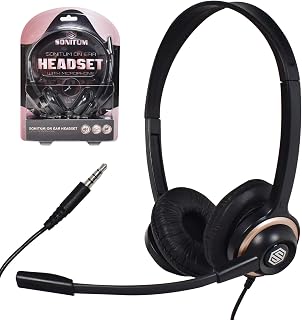
The Sonitum PC01 is a wired over-ear headset designed specifically for remote workers, call center professionals, online students, and content creators. Its compact size and universal 3.5mm jack connectivity make it an accessible option for anyone needing reliable audio communication without the premium price tag.
The standout feature is the active noise cancellation microphone, which performs admirably in real-world settings. Users report that coworkers and clients consistently hear them clearly, even in noisy environments like cars or busy offices. The rotating microphone adds practical flexibility, allowing users to position it exactly where they need it.
Regarding design and comfort, the headset strikes a reasonable balance for the price. The adjustable headband fits most head sizes, and the cushioned ear pads provide acceptable comfort during typical work sessions. However, some users note that the plastic construction feels less premium than higher-end models, and the cushioning may not sustain comfort beyond a couple of hours for those with sensitive ears.
The primary drawback is that wired connectivity restricts mobility compared to wireless alternatives. Additionally, while the build quality is functional, it doesn't inspire the same confidence as more expensive headsets. Durability concerns exist for extended daily use, though the one-year replacement guarantee mitigates this risk.
The Sonitum PC01 delivers solid performance where it matters most: clear audio and effective noise cancellation. For budget-conscious professionals and students, this headset offers genuine value and reliable communication quality that justifies its cost.
Connectivity: Wired with 3.5mm jack connector
Audio Performance: Dynamic driver with 20 Hz to 20,000 Hz frequency range and 32 ohm impedance
Microphone: Rotating design with active noise cancellation
Design: Over-ear with adjustable headband, cushioned ear pads, and lightweight construction
Compatibility: Universal compatibility with devices featuring 3.5mm jack input, including computers, laptops, smartphones, tablets, and more
Cable: Retractable design for convenient storage and portability
Weight: 0.1 kg, extremely lightweight for extended wear
Materials: Plastic and rubber construction
Warranty: Full year replacement policy and satisfaction guarantee from Sonitum
Best For: Remote workers, students attending online classes, call center employees, podcasters, content creators on a budget, and anyone who needs reliable audio communication without premium pricing.
Perfect Use Cases: Zoom meetings, Microsoft Teams calls, video conferencing, YouTube recording, podcast hosting, customer service work, online seminars, and gaming with voice chat.
Not Ideal For: Users requiring wireless connectivity, those planning more than 8 hours of continuous daily use, professional audio engineers needing studio-quality sound, or individuals with sensitive ears requiring premium cushioning.

The rose color option adds a personal touch to your desk setup while maintaining professional call quality. USB-A connectivity ensures stable audio without compression artifacts common in wireless connections. This wired stereo headset includes replaceable ear cushions and headband components, addressing comfort for users who spend four or more hours daily in virtual meetings and need equipment that lasts.
Pros
- USB plug-and-play works immediately without drivers
- Inline volume and mute controls on cable
- Rotating noise-canceling mic filters background noise
- Lightweight padded design comfortable for extended calls
Cons
- Wired connection limits mobility during meetings
- No active noise cancellation for incoming audio
Plug-and-play simplicity makes the Logitech H390 a friction-free solution for anyone whose workday revolves around virtual meetings. No software installation, no Bluetooth pairing delays, just USB connection and immediate audio. The rotating noise-canceling microphone handles its core job well, cutting background noise so your voice comes through cleanly on calls. Inline controls on the cable give you fast access to volume and mute without opening software panels or reaching for your keyboard. The 5.1-inch dynamic drivers provide balanced audio that works equally well for conference calls and the occasional music break between meetings. Comfort stays consistent through long call blocks thanks to padded leatherette ear cushions and a lightweight build that doesn't create pressure points. The 6.23-foot cable offers enough length to lean back or shift positions without feeling tethered. Build quality is straightforward plastic that prioritizes function and durability over premium aesthetics, appropriate for the price point and backed by a one-year warranty. The rose colorway adds a subtle touch of personality to standard office gear. If your meeting setup lives at one desk and you value reliable performance over wireless convenience, this handles daily video calls without fuss.
Audio Specifications: 5.1-inch dynamic drivers, 20 Hz - 20,000 Hz frequency range, 21 dB sensitivity, 20 ohm impedance. Stereo output with clear midrange and vocals optimized for voice clarity during calls.
Microphone: Rotating noise-canceling boom mic that can be tucked away when not in use. Minimizes background distractions to keep calls focused on your voice.
Connectivity: USB-A wired connection only. 6.23 ft (1.9 m) cable with inline volume and mute controls. Compatible with any PC, Mac, or Chromebook with USB-A port.
Build and Comfort: Over-ear design with adjustable headband and swivel-mounted leatherette ear cushions. Lightweight plastic construction. Includes padded headband for extended wear comfort.
Package and Warranty: Eco-friendly FSC-certified paper packaging. Includes headset, USB cable, and ear cushions. One-year limited hardware warranty from Logitech.

Pros
- Exceptional comfort for extended 8+ hour workdays with lightweight design and padded construction
- Industry-leading 20-hour battery life ensures you won't need daily charging
- Dual beamforming mics with noise cancellation capture your voice clearly even in busy offices
- Extended 30-meter Bluetooth 5.3 range provides genuine freedom to move throughout your space
- Replaceable earpads make it economical to maintain over years of use
Cons
- Some users report microphone quality issues or static developing within 6 months of regular use
- Background noise occasionally comes through on the caller's end despite noise cancellation
- Limited to passive noise isolation rather than active noise cancellation for incoming audio
The Logitech Zone 301 is a Bluetooth wireless headset designed specifically for professionals who work from home or in office environments. It's built for anyone who spends significant time on calls and needs reliable audio quality combined with freedom to move around their workspace.
The standout feature is the dual noise-canceling mic setup with beamforming technology that effectively suppresses background sound so your colleagues hear you clearly. Real-world testing shows it performs well in shared spaces, though some users note occasional background noise breakthrough. The 30-meter wireless range is genuinely useful, letting you step away from your desk without dropping connection. Battery life of up to 20 hours easily covers full workweeks, and the 5-minute quick charge adds an hour of talk time for emergencies.
Build quality feels solid with a lightweight design at 4.3 ounces that won't cause fatigue during long wear. The padded headband and enlarged earpads make it comfortable enough for 8-hour shifts without irritation. The lightweight construction does come with a tradeoff: some users have experienced durability issues with the mic or connections after 6-12 months, though others report years of reliable use.
The main drawback is inconsistent long-term reliability based on customer feedback. While many praise durability, enough users report problems within 6 months that it's worth considering. The passive noise cancellation is good but not quite active noise cancellation if you need complete isolation from incoming noise.
For remote workers and office professionals who prioritize comfort and all-day battery life, the Zone 301 delivers solid performance at its price point. The replaceable earpads add long-term value, and the eco-friendly materials appeal to sustainability-minded buyers. Just ensure you have warranty coverage handy in case of early issues.
Connectivity: Bluetooth 5.3 wireless, up to 30 meters (98.4 feet) range. Seamlessly switches between computer and phone.
Battery: 20 hours listening time, 16 hours talk time on full charge. 2-hour charging time. Quick charge adds 1 hour talk time in 5 minutes.
Audio: 30mm dynamic drivers with frequency range 100-20,000 Hz. Dual noise-canceling mics with beamforming. 38 ohm impedance. Passive noise cancellation.
Design: On-ear placement with round earpads. Weight: 4.3 ounces (122 grams). Headband design with padding. Replaceable earpads available separately.
Compatibility: Windows 11 certified. Works with any Bluetooth-enabled device. App control via LogiTune for customization.
Warranty: 1 year limited hardware warranty. Model: 981-001468.
Best For: Remote workers and office professionals who spend multiple hours daily on video calls. Ideal if you need reliable audio quality, all-day comfort, and freedom to move around your workspace without disconnecting.
Consider if: You work in shared or noisy environments and need dual noise-canceling mics. You value eco-friendly products made with recycled materials. You want to avoid daily charging with long battery life.
Skip if: You need active noise cancellation for incoming audio. You require maximum durability guarantees, as some units show issues within 6-12 months. You prefer over-ear coverage for passive sound isolation.

At just 4.9 ounces, this wired headset minimizes fatigue during long video conferences. The AI noise canceling via app integration targets background chatter and keyboard noise, while the double-sided boom mic captures voice clearly from either side. Replaceable earcups extend its lifespan, and direct Teams and Zoom compatibility means plug-and-play reliability for daily standups and client presentations.
Pros
- AI noise cancellation actively filters background distractions during calls
- Double-sided boom mic ensures clear capture from either position
- 140-gram weight prevents fatigue during all-day wear
- Replaceable earcups extend product lifespan without full replacement
Cons
- Wired USB-A connection limits mobility away from desk
- Full noise cancellation requires LADM software installation
Clear communication defines the Lenovo USB-A headset's purpose. AI-powered noise cancellation filters background distractions through the Lenovo Accessories and Device Manager software, keeping your voice intelligible even when household or office activity swirls around you. The double-sided boom microphone captures speech clearly regardless of which side you position it, and the in-line control box gives instant access to mute, volume, and call functions without hunting through software menus. Real-world testing shows crystal-clear performance in moderately noisy environments, making this genuinely useful for busy homes or shared workspaces. At 140 grams, the headset disappears during marathon meeting days. Replaceable earcups extend the product's lifespan by letting you refresh padding without discarding the entire unit. The wired USB-A connection delivers reliable audio without battery anxiety or Bluetooth dropouts, and platform compatibility with Teams and Zoom ensures smooth integration into existing workflows. Build quality feels solid for daily professional use, with materials chosen for durability rather than flash. For professionals who prioritize voice clarity and all-day comfort over mobility, this headset provides dependable performance at a practical cost.
Connectivity: USB-A wired, plug-and-play compatible with Windows and Mac computers.
Audio Performance: Stereo speakers with high-quality microphone and AI noise cancellation via LADM software.
Design: Lightweight construction at 140 grams, replaceable earcups, double-sided boom microphone, ergonomic ear cups.
Controls: In-line control box with volume adjustment, mute button, and call management functions.
Dimensions: 7.28 x 74.8 x 2.36 inches. Weight: 4.9 ounces.
Platform Compatibility: Teams, Zoom, Google Meet, Google Voice, Slack, GoTo Meeting, WeChat, Cisco Webex, and standard USB audio devices.
Model Number: 4XD1P83425. Manufacturer: Lenovo.
Ideal for remote workers, distributed teams, and office staff conducting back-to-back video calls from a fixed desk location. The lightweight build and replaceable earcups suit professionals wearing headsets for extended daily sessions. Skip this if you need wireless mobility around your workspace or if installing the LADM software for full noise cancellation represents an unacceptable setup step. The utilitarian design may disappoint users seeking sleek aesthetics.

The USB-A connection delivers plug-and-play simplicity for PC and laptop users who need immediate reliability. Backed by a 2-year limited warranty, this wired stereo option provides consistent call quality without battery anxiety. The H390's inline controls let you adjust volume and mute mid-sentence, keeping your focus on the conversation rather than fumbling with software settings during critical discussions.
Pros
- Rotating noise-canceling microphone delivers clear voice capture
- In-line controls enable quick volume and mute adjustments
- Padded leatherette cushions support all-day comfortable wear
- Plug-and-play USB setup works instantly without software
Cons
- Plastic construction may feel less premium than metal alternatives
- Non-detachable cable limits portability and replacement options
The Logitech H390 strips online meeting audio down to its essentials. The rotating noise-canceling microphone minimizes background interference, keeping your voice clear and focused during video calls. Users consistently report clean audio on both ends of conversations, with sound quality that supports professional communication without technical distractions. In-line controls provide immediate access to volume and mute functions, eliminating the need to navigate software settings mid-conversation. The 6.23-foot cable offers enough reach for typical desk setups while keeping cable clutter manageable. Comfort drives extended usability. Padded leatherette ear cushions and an adjustable headband accommodate full workdays without creating pressure points, and users report wearing these through marathon meeting schedules without discomfort. The rotating microphone boom tucks away cleanly when not needed, adding practical flexibility. Build quality exceeds expectations for the budget tier, with sturdy plastic construction that withstands daily professional use. The straightforward USB connection requires no software installation or Bluetooth pairing, making setup genuinely instant across Windows and Mac systems. For professionals seeking dependable call quality without complexity or premium cost, this headset delivers consistent performance where it matters most.
Perfect for remote workers and meeting-heavy professionals operating from a fixed desk who prioritize plug-and-play simplicity and budget-conscious value. The comfort-focused design suits users facing daily multi-hour call schedules. Skip this if you need wireless mobility, premium materials, or water resistance for outdoor use. The plastic construction and non-detachable cable limit flexibility for users seeking portability or durability beyond stationary desk environments.

Logitech H111 Stereo Headset with Noise-Cancelling
The 3.5mm audio jack makes this wired option compatible with virtually any device that has a standard headphone port. This broad connectivity suits users who switch between laptops, tablets, and phones throughout their workday. The stereo design ensures you catch every word in group calls, while the straightforward wired connection eliminates pairing hassles when joining meetings on tight schedules.
Pros
- Noise-cancelling mic filters background noise during calls
- Rotating boom adjusts for left or right side wear
- Over-ear design comfortable for extended meeting blocks
- Retractable cable reduces desk clutter
Cons
- Wired connection limits movement around workspace
- No inline volume or mute controls
Clear calls start with a good microphone, and the Logitech H111 centers its design on a noise-cancelling boom that filters room noise effectively during video meetings and conference calls. The rotating boom lets you position the mic exactly where you need it, whether you're fielding customer support calls or presenting on Zoom. Full stereo drivers handle voice with clarity, so you'll catch every word without asking people to repeat themselves. The adjustable headband and over-ear cushions work for multi-hour call blocks without discomfort, and the faux leather pads create enough isolation to help you focus. The 3.5mm jack means universal compatibility with laptops, tablets, and desk phones equipped with analog ports. You're trading wireless freedom for zero latency and no battery anxiety. The retractable cable keeps your desk tidy between meetings. Build quality feels solid for daily office use, and the two-year warranty backs that up. If your meeting workflow centers on a single workstation and you value microphone performance over mobility, this delivers the essentials reliably.
Audio Specifications: Frequency response 20 Hz to 20 kHz, 32-ohm impedance, dynamic drivers for balanced sound reproduction.
Design: Over-ear headphones with faux leather and plastic construction. Rotating microphone boom adjusts for left or right wear. Adjustable headband for personalized fit. Weighs less than typical over-ear models for extended comfort.
Microphone: Noise-cancelling microphone reduces background noise during calls and recordings. Rotating boom positioning accommodates individual preferences.
Connectivity: Wired 3.5mm jack with retractable cable. Compatible with Windows 10, 8, 7, Vista; Mac OS X 10.5 and later; Chrome OS; Linux Kernel 2.6 plus; iOS; and Android devices.
Warranty and Support: 2-year manufacturer warranty. Model 981-000612. Includes user manual in standard packaging.
Buy this if you take calls from a fixed desk setup, need a backup headset for office hoteling, or want a simple analog solution that works across multiple devices without drivers. Students attending online classes and remote workers on platforms like Teams or Webex will appreciate the clear mic and comfortable fit. Skip it if you move around during calls, need active noise cancellation to block open-office chatter, or prefer inline mute controls for quick privacy.

Dual connectivity with USB and 3.5mm gives you flexibility to connect to legacy systems or modern laptops without adapters. The noise cancelling microphone isolates your voice from ambient sound, crucial for maintaining professionalism when calling from shared spaces. In-line controls provide quick mute access during cough breaks or sidebar conversations, keeping you agile during rapid-fire meeting sequences.
Pros
- Unidirectional mic isolates voice and filters ambient noise
- Inline mute and volume controls with indicator light
- Dual USB and 3.5mm connectivity for broad compatibility
- Memory foam earpads with breathable material for long wear
Cons
- Wired design restricts movement during calls
- No carrying case for mobile professionals
Voice isolation defines the JIAMQISHI EH01, built specifically for professionals who spend hours in back-to-back virtual meetings. The unidirectional boom microphone cuts through typical home office chaos, filtering keyboard noise and background voices while keeping your speech crisp and intelligible. The 270-degree rotating boom positions precisely for optimal pickup, and the inline mute button with work indicator light makes it easy to toggle privacy without fumbling through software controls. Dual connectivity (USB and 3.5mm) ensures you can plug into any laptop, desktop, or tablet without adapter hunting. The built-in audio sound card stabilizes performance across Zoom, Teams, and Skype, eliminating the audio glitches that plague some budget headsets. Comfort matters when you're wearing a headset from morning standup to afternoon client calls, and the protein memory foam earpads with breathable material reduce heat buildup. The 40mm drivers deliver adequate clarity for voice, though they're tuned for communication rather than music. The 9-foot retractable cable gives you desk mobility while keeping wires organized. At 32 ohms, most modern laptops drive these without issue.
Audio: 40mm dynamic driver, 20 Hz to 20 kHz frequency range, 32 ohm impedance, active noise cancellation microphone
Connectivity: Dual USB and 3.5mm jack, 9-foot retractable wired cable, compatible with PC, Mac, Chromebook, tablets, smartphones, PS4, PS5, Xbox One
Design: On-ear, adjustable headband, round earpieces, soft protein memory foam earpads, plastic enclosure, breathable materials, not water resistant
Controls: Button-based in-line volume control, microphone mute button, speaker mute button, work indicator light
Warranty: 24 months by JIAMQISHI, includes user manual, standard packaging
Ideal for remote workers who live in video meetings, customer service reps taking continuous calls, and students attending full days of online classes. The noise-cancelling mic and inline controls suit professionals who need reliable voice clarity and quick mute access. Skip this if you need wireless freedom to walk around while talking, prioritize music quality over call performance, or work in a completely silent environment where aggressive noise cancellation isn't necessary.
How to Choose a Headset for Online Meetings
We compared these options by focusing on the details that matter once a meeting starts: outgoing voice clarity, connection reliability, wearing comfort, and practical controls. The right choice depends less on extra features and more on your workspace, devices, and how long you remain on calls.
Prioritize microphone clarity and convenient mute controls
For noisy homes and shared offices, a microphone that reduces surrounding sound deserves priority over stronger music playback. The Wireless Headset with Mic for Work uses environmental noise cancellation, a flexible boom, and a call-only one-touch mute button, making it a practical fit when household activity regularly competes with your voice.
The Upgrade ANC & ENC Wireless Headset with Mic takes a more comprehensive approach, combining listening-focused ANC with microphone ENC and a physical flip-to-mute boom. For users who move between a quiet desk and a bustling room, the Logitech Zone 301 Wireless Bluetooth Headset adds dual beamforming microphones designed to suppress common background distractions.
Decide between wired certainty and wireless mobility
A wired USB headset removes charging from your routine and usually delivers the most straightforward computer setup. Both the black Logitech H390 Wired Headset PC/Laptop Stereo and rose Logitech H390 Wired Headset PC/Laptop Stereo offer plug-and-play USB-A connections, in-line volume and mute controls, a rotating noise-canceling microphone, and a long cable for some desk-side freedom.
The Lenovo USB-A Wired Stereo Headset for PC/Laptop is another strong wired route, with a light frame, in-line call controls, and software-supported noise reduction. If you switch among devices often, the JIAMQISHI USB Headset with Microphone for PC includes USB and 3.5 mm connectivity; consult our cables and adapters guide if your laptop needs a different port solution.
Look for comfort that matches your call schedule
Even a clear microphone becomes less useful if the headband pinches or the earcups create heat after an hour. The JIAMQISHI model uses adjustable sizing, soft memory-foam earpads, and a reversible 270-degree boom, while the Sonitum Headset with Microphone keeps the design simple with cushioned over-ear pads, an adjustable band, and a rotating microphone.
Wireless choices can be especially helpful when you stand, pace, or step away briefly between calls. The Logitech Zone 301 weighs just 122 grams and has replaceable earpads, while the Angteela model pairs breathable cushions with an adjustable headband and extended talk time. Browse more work and leisure listening options in our Headphones & Audio collection if you want a headset that also handles downtime well.
Match the connector and software to your everyday devices
A 3.5 mm headset can be an easy answer for tablets, phones, older laptops, and computers with a combo audio jack. The Logitech H111 Stereo Headset with 3.5 mm Audio provides a rotating noise-reducing boom and adjustable fit, while Sonitum offers a similarly universal 3.5 mm connection for computers, mobile devices, and other compatible gear.
For a work-issued PC, USB-A models are often the more predictable option, especially when your organization limits Bluetooth pairing. Lenovo lists compatibility with major meeting services, and the wireless Soothielec and Angteela headsets include dedicated USB dongles for computers without Bluetooth. Before choosing, confirm your available ports and whether you need to connect to a phone and computer at the same time.
Final Thoughts
For a flexible remote-work setup with long battery life and dual-device pairing, the Wireless Headset with Mic for Work is a compelling choice. If you want a simple wired solution that stays ready at your desk, the Logitech H390 Wired Headset PC/Laptop Stereo offers reliable USB convenience and easy in-line controls.
Frequently Asked Questions
What is the best headset for online meetings in a noisy home?
The best headset for online meetings in a noisy home should have a boom microphone with environmental noise reduction, rather than relying only on noise control for your ears. A quick-access mute control also matters when interruptions happen unexpectedly. Models with ENC, beamforming microphones, or a physical flip-to-mute boom are particularly useful for this situation.
Is a wired or wireless headset better for video meetings?
Wired headsets are ideal if you want a consistent computer connection and do not want to manage battery life. Wireless models are better when you take calls from multiple devices or like to move around during longer conversations. Choose based on your daily routine, not simply on whether one connection type seems more advanced.
Do I need ANC for Zoom or Teams calls?
ANC reduces the noise you hear, which can help you concentrate in a loud environment. For the people on your call, microphone noise reduction such as ENC is usually the more important feature because it focuses on keeping your speech understandable. A headset that offers both can be useful when your workspace is frequently busy.
Can a meeting headset work for webinars and streaming in 2026?
Yes, a meeting headset can work well for webinars, lessons, voiceovers, and casual live sessions because the boom keeps the microphone close to your mouth. For more complex productions with separate microphones and multiple audio sources, explore our picks for the best audio interface for streaming. A headset remains the easier option when clear two-way communication is your main goal.





Write Your Review
No reviews yet. Be the first to share your experience!