

You sit down to record your first episode, hit record, and play it back only to hear room echo, keyboard clatter, and a voice that sounds like it was captured in a tin can. A quality USB microphone fixes all of that without requiring an audio interface, a mixer, or a degree in sound engineering. Whether you are launching a solo show or co-hosting with a partner across town, the right mic is the single biggest upgrade you can make to your audio.
This guide covers five of the best USB microphones for podcasting available right now, evaluated for sound quality, ease of setup, build quality, and versatility. If you are also thinking about your broader audio setup, check out our roundup of the best microphone boom arms to pair with your new mic for ergonomic, flexible positioning.
Quick answer
This guide compares 5 picks, with Logitech Blue Yeti USB Condenser Microphone ranked first.

Logitech Blue Yeti USB Condenser Microphone
Podcasters who record solo episodes or roundtable discussions will appreciate the multipattern polar pattern, which lets you switch between cardioid for single-host recording and omnidirectional or stereo modes when guests join in person. Paired with 120 db of audio sensitivity, it captures nuanced vocal detail, while the included stand and plug and play USB setup keep the workflow simple for creators without an audio engineering background.
Pros
- Four pickup patterns cover solo, interview, and group formats
- Onboard gain, mute, and pattern controls during recording
- Zero-latency headphone monitoring for real-time checks
- Sturdy metal build with adjustable desktop stand
Cons
- Blue VO!CE features require installing separate G HUB software
- USB only, no XLR path for future mixer integration
A podcast often means more than one voice in the room, and that's where the Yeti separates itself from single-pattern USB mics on this list. Its four pickup patterns cover situations a typical podcast actually runs into: cardioid for a solo host, omnidirectional for a roundtable, bidirectional for a classic two-person interview format, and stereo for music or ambient segments. That range means one mic can handle a solo episode one week and a co-hosted or guest episode the next without swapping gear. The tri-capsule condenser array captures detailed, warm vocal tone, and onboard controls for headphone volume, pattern selection, instant mute, and gain let a host adjust mid-recording without touching software. Zero-latency monitoring lets you hear exactly what's being captured through headphones in real time, useful for catching plosives or clipping before they ruin a take. The metal build and adjustable stand hold up to regular desk use, and Blue VO!CE software adds optional vocal polish for editing later, though it does require installing Logitech G HUB.
Audio Specifications
Frequency Response: 20 Hz - 20 kHz
Audio Sensitivity: 120 dB
Signal-to-Noise Ratio: 100
Microphone Form Factor: Tri-Capsule Array
Polar Pattern: Cardioid, Omnidirectional, Bidirectional, Stereo
Connectivity and Compatibility
Connector Type: USB
Compatible Devices: PC and Mac
Channels: 2
Number of Items: 1
Physical Specifications
Dimensions: 4.92 x 4.72 x 11.61 inches
Weight: 3.5 pounds
Enclosure Material: Metal
Color: Blackout
Power Source: USB Corded
Included Components
Blue Yeti USB Microphone
Desktop Stand
USB Cable
Instructions
Warranty
2-Year Manufacturer Warranty
Well suited to podcasters who record interviews, co-hosted shows, or roundtables and want pattern flexibility without buying multiple mics. Also a fit for hosts who want onboard gain and mute control during live recording. Skip it if you only ever record solo in a quiet, treated room, since a fixed cardioid mic would cover that need with less software overhead.

For podcasters just starting out or recording on a tight setup, the unidirectional polar pattern focuses on your voice while reducing room noise and background chatter, which matters most when recording without a treated space. The dual USB Type-A and Type-C cable adds flexibility across laptops and desktops, and the built-in volume control lets you monitor levels on the fly during long recording sessions.
Pros
- Plug and play USB setup with no interface needed
- Onboard volume knob for quick gain control
- Sturdy metal build for the price point
- Comes with stand and cable, ready out of the box
Cons
- Fixed unidirectional pattern limits multi-guest flexibility
- Sound quality caps out below broadcast-grade podcast mics
Podcasting demands vocal clarity without the complexity of an audio interface, and the FIFINE K669B fits that entry point well. It's a unidirectional condenser mic that plugs straight into USB Type-A or Type-C, so setup is just plug in and record, no drivers or mixers needed. For a podcaster recording solo episodes or interviews at a desk, the cardioid-style pickup focuses on your voice and cuts down on room noise, which matters more for spoken-word content than most people expect. The onboard volume knob lets you ride gain on the fly, useful when guest voices vary in loudness during a conversation. It ships with a desktop stand and a 6.5ft cable, so you're recording within minutes of unboxing. Metal build gives it a sturdier feel than typical budget mics. The tradeoff is that this is a starter tool, not a broadcast-grade capsule, so serious podcast studios chasing a polished, layered sound will eventually want something with more headroom and pattern options.
Connectivity and Compatibility: USB Type-A and Type-C connectors. Works with Windows PC, Mac, PS4, PS5, and most streaming platforms including Discord, OBS, Twitch, and Zoom.
Audio Performance: Cardioid condenser microphone with 20Hz-20kHz frequency response, 78dB audio sensitivity and signal-to-noise ratio, 16dB audible noise level. Captures clear, natural vocals with minimal background interference.
Physical Design: All-metal construction with unidirectional polar pattern. Includes desktop tripod stand, 6.5-foot USB-B to USB-A/C cable, volume control knob, and user manual. Weight is 5.6 ounces. One-year manufacturer warranty included.
Best for new or casual podcasters recording from a home desk who want a clean step up from a laptop mic without learning an audio interface. Also fits co-hosts or interview shows on a tight budget. Skip it if you need multiple mic setups, XLR flexibility, or a broadcast-caliber tone for a monetized show with high production standards, since this is built for simplicity over studio depth.

Podcasters who want broadcast-style sound will benefit from the dynamic capsule's unidirectional pickup, which rejects ambient noise better than condenser designs, a real advantage in untreated home studios. The dual USB and XLR connectivity means you can start simple and later upgrade to a mixer or audio interface, while the headphone jack with monitoring volume control lets you check your levels in real time while recording.
Pros
- USB for instant setup, XLR for future mixer or interface growth
- Cardioid pattern rejects keyboard and mouse noise well
- Physical mute button works outside any software
- Solid metal and ABS build with stable adjustable stand
Cons
- RGB and function keys disable when using XLR connection
- Needs separate XLR cable and possibly a boom arm
Podcasting is really a conversation between the mic's polar pattern and your room, and the AM8's cardioid unidirectional pickup is built for exactly that fight. It focuses on the voice in front of it while pushing back on keyboard clicks, mouse movement, and general room noise, which matters more in podcasting than almost any other use case since episodes run long and every hiss gets noticed. Starting on USB means a new podcaster can plug in and record the first episode the same day, no interface required. As the show grows and a co-host, mixer, or audio interface enters the picture, the XLR connection is already built in, so the mic scales with the podcast instead of getting replaced. A mute button that works independently of software is genuinely handy for live co-hosted recording. The metal and ABS build, adjustable stand, and windscreen round out a package that looks and feels more serious than its casual gaming branding suggests.
Good for podcasters starting on a budget who want a mic that can later join a mixer setup without buying new hardware. Also fits solo hosts recording straight to a laptop. Skip it if you need XLR and RGB simultaneously, since switching to XLR disables the RGB and function keys, or if you record in an untreated, echoey room without the ability to sit close to the mic.
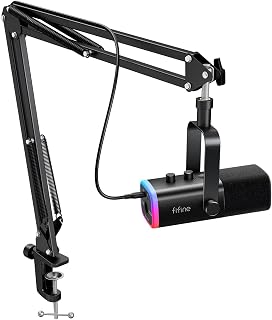
For podcasters building out a more permanent setup, the dynamic microphone kit's unidirectional pattern isolates your voice from room echo and keyboard noise, keeping episodes sounding clean. Switching between USB and XLR connectors gives you room to grow into a full audio interface setup later, and the headphone jack with volume control lets you monitor your own voice and guest audio without latency during co-hosted recordings.
Pros
- Comes as a full kit with boom arm and stand included
- Metal boom arm with springs holds position without sagging
- Cardioid pattern and 80dB SNR keep vocals clear of noise
- USB plug-and-play with no drivers on Windows or Mac
Cons
- XLR cable not included and must be bought separately
- C-clamp may not fit thicker or nonstandard desks
For a podcasting shortlist, the AM8T's biggest selling point is that it comes as a kit rather than just a microphone, which matters if you're building a setup from zero. The included boom arm uses metal construction with elastic springs so it won't droop during a long recording session, and the C-clamp fits desks up to 2 inches thick, meaning you're not sourcing a stand separately before your first episode. The 80dB signal-to-noise ratio and cardioid pattern do the core work of keeping vocals clear and pushing background chatter out of the recording, which is the baseline requirement for any podcast mic. USB plug-and-play gets a new show recording on day one with no drivers, and the XLR path is there once you add a mixer or want to bring on a co-host through a separate channel. The windscreen helps tame plosives on words with hard consonants, a small but real detail for spoken-word recording. A 1-year warranty backs the purchase, which is reassuring for gear meant to become a recurring part of your workflow.
Audio Specifications: Frequency range 50Hz-16kHz, cardioid polar pattern, 80dB signal-to-noise ratio, -50dB sensitivity. Powered via USB for both connectivity and power on PC/Mac.
Physical Design: Black ABS plastic and metal construction, approximately 1 kg weight. Boom arm stand measures 12.6 x 4.72 x 1.97 inches with adjustable positioning and C-clamp. Accommodates desks up to 2 inches thick.
Connectivity and Ports: USB-C and XLR connectors, 3.5mm headphone jack with independent volume control, mute button with LED indicator, gain knob for level adjustment. Includes 8.2ft USB-C to USB cable, windscreen, and user manual.
Best for a podcaster who needs the stand and mounting hardware included rather than sourced separately, especially a first-time host setting up a desk from scratch. Less ideal for anyone with a thick or unusual desk edge, since the clamp may not fit, or for creators who want deep software control over RGB rather than physical buttons.

Pros
- Exceptional value for the price with professional-grade features typically found in higher-end microphones
- Universal compatibility across desktop and mobile platforms with included adapters eliminates switching hassles
- Noise reduction mode genuinely improves recordings in untreated spaces without software processing
- Physical control knobs allow real-time adjustments without touching your computer or opening settings
- Solid metal construction and weighted base provide excellent stability for hands-free recording
Cons
- Noise reduction mode may feel slightly compressed compared to default mode, requiring experimentation to find the right balance for your space
- Echo control knob is analog rather than software-driven, limiting the range and precision of effects compared to DAW-based processing
- Not ideal for extremely quiet, treated studio environments where a more neutral microphone without built-in processing might be preferred
The ZealSound K66 is a versatile desktop USB microphone built for content creators who need reliable, broadcast-quality audio without professional studio setup. It's designed for podcasters, streamers, YouTubers, online educators, and anyone recording voiceovers or gaming commentary on PC or mobile devices. The microphone handles everything from quiet bedroom setups to noisier home office environments with genuine effectiveness.
The standout feature is the intelligent noise reduction mode, which targets specific real-world sounds like keyboard clicks, cooling fan hum, and air conditioner buzz. Combined with the cardioid pickup pattern and 40Hz-18kHz frequency response, the K66 captures warm, detailed vocals while naturally rejecting off-axis noise. Real-time zero-latency monitoring through the 3.5mm jack lets you hear exactly what's being recorded without delay, and the adjustable echo control adds presence or keeps things clean depending on your recording style and space.
Build quality is solid throughout. The weighted metal base prevents tipping during intense gestures or accidental bumps, while the 360-degree rotatable top-addressed design adapts to different desk arrangements and speaking angles. Physical knobs for gain, monitoring volume, and echo give you tactile control without diving into software settings, which is genuinely useful during live streams or recordings when you need quick adjustments. The included windscreen helps reduce plosive pops from aggressive voice work.
The main limitation is that this microphone favors practicality over flexibility. The built-in noise reduction is helpful but uses fixed algorithms rather than adjustable parameters, and the echo control, while convenient, won't match a DAW's processing power. In treated recording studios, you might prefer a more neutral microphone. The plug-and-play convenience also means no software driver interface to tweak sensitivity or polar pattern beyond what the hardware offers.
For the price, the K66 delivers genuine professional performance with thoughtful features that solve real recording challenges. It's an excellent match for creators who value reliability, ease of use, and consistent results across multiple platforms. The complete accessory package and one-year warranty add confidence to the purchase, making this a smart choice for anyone stepping up from built-in computer microphones or seeking a dependable second recording device.
Audio Specifications: Condenser capsule with cardioid polar pattern, 40Hz-18kHz frequency response, 46kHz sampling rate, 125dB audio sensitivity, 85dB signal-to-noise ratio, 66dB audible noise, 2.2k-ohms impedance.
Connectivity: USB connection, 3.5mm monitoring headphone jack, USB-C adapter, Lightning adapter for mobile devices. Dimensions 1.58 x 1.58 x 6.1 inches, weight 1.1 pounds.
Included Accessories: Microphone with metal stand base, 70.9-inch USB cable, foam windscreen, USB-C adapter, Lightning adapter, user manual, and technical support. Manufacturer warranty covers 365 days from purchase date.
Best For: Podcasters seeking clean, professional audio without expensive equipment; streamers on Twitch, YouTube, or Discord who need reliable mic performance; online educators and remote workers in less-than-ideal acoustic environments; content creators using TikTok, Instagram Reels, or other social platforms; musicians and singers recording demos or cover vocals; ASMR creators wanting a sensitive, stable microphone; gamers streaming or recording commentary.
Not Ideal For: Professional recording studios requiring fully neutral microphones with no built-in processing; users wanting extensive software-driven effects and parameter control; those needing XLR connectivity for mixing console integration; extremely loud or highly treated acoustic environments where the noise reduction may feel unnecessary.
Buying Guide: What to Look for in a USB Podcast Microphone
Pickup Pattern
The pickup pattern determines which directions a microphone captures sound. For solo podcasting, a cardioid pattern is the standard choice, focusing on your voice while rejecting noise from behind and to the sides. The FIFINE K669B USB Microphone, the FIFINE AmpliGame AM8 USB/XLR Dynamic Microphone, and the ZealSound Podcast Microphone for PC all use cardioid patterns for exactly this reason.
If you record interviews or roundtable conversations in the same room, look for a mic with multiple patterns. The Logitech Creators Blue Yeti USB Microphone for PC stands out here, offering four pickup patterns including stereo and bidirectional, giving you far more flexibility than a single-pattern mic.
Condenser vs. Dynamic Capsule
Condenser microphones are highly sensitive and capture a wide frequency range, making them ideal for treated rooms or quiet home offices. The Blue Yeti and the FIFINE K669B are both condenser mics, delivering rich, detailed audio with minimal effort.
Dynamic microphones are less sensitive to ambient noise, which makes them a stronger fit for untreated spaces like living rooms or shared apartments. The FIFINE AmpliGame AM8 and the FIFINE AmpliGame AM8T XLR/USB Gaming Microphone both use dynamic capsules, so they naturally reject background hum, HVAC noise, and keyboard clicks without any extra acoustic treatment.
Onboard Controls and Monitoring
Dedicated physical controls save you from diving into software menus mid-recording. A gain knob, mute button, and headphone jack for zero-latency monitoring are the three features worth prioritizing. The ZealSound Podcast Microphone for PC goes further with separate knobs for mic volume, monitoring volume, and echo adjustment, giving you hands-on control of your mix in real time.
Even budget options like the FIFINE K669B include a volume knob directly on the body, which is a practical touch that many competing mics at a similar tier skip. Real-time monitoring matters most when you want to catch distortion or background noise before it ruins a full recording session. For more ways to optimize your audio station, our guide to the best PC speakers for gaming covers playback options that pair well with a podcast workflow.
Connectivity and Upgrade Path
Pure USB mics are the simplest route: plug in and record. That works perfectly for most podcasters. But if you plan to grow into a more professional setup with an audio interface or mixer, dual USB/XLR connectivity gives you that upgrade path without buying a new microphone.
Both the FIFINE AmpliGame AM8 and the FIFINE AmpliGame AM8T XLR/USB Gaming Microphone support both connection types, so you can start simple and scale up when you are ready. The AM8T even includes a boom arm in the package, which removes one more item from your shopping list. You can also browse our full list of top boom arms if you want to upgrade the stand separately.
Final Thoughts
Every microphone on this list delivers a meaningful upgrade over a built-in laptop mic, but the right pick comes down to your recording environment and your ambitions. If you want the most versatile, broadcast-grade option with multiple pickup patterns and a polished software suite, the Logitech Creators Blue Yeti USB Microphone for PC is hard to beat. If you record in a noisy space and want a dynamic mic that handles real-world conditions with room to grow into XLR, the FIFINE AmpliGame AM8T XLR/USB Gaming Microphone offers excellent value with a complete kit included.
Frequently Asked Questions
Do I need an audio interface to use a USB podcast microphone?
No. USB microphones have a built-in analog-to-digital converter, which means they connect directly to your computer without any additional hardware. This makes them ideal for beginners and anyone who wants a streamlined, plug-and-play recording setup in 2026.
Is a condenser or dynamic microphone better for podcasting?
It depends on your recording space. Condenser mics like the Blue Yeti capture a wider frequency range and deliver richer detail, but they also pick up more room noise. Dynamic mics like the FIFINE AmpliGame AM8 are more forgiving in untreated rooms because they naturally reject off-axis sound. If your space is quiet and acoustically decent, go condenser. If you share a home or record in a live-sounding room, a dynamic mic will serve you better.
What features should a first-time podcaster prioritize?
For a first setup, focus on a cardioid pickup pattern, a built-in headphone jack for real-time monitoring, and a physical mute button. These three features cover the most common recording needs without overcomplicating your workflow. Options like the ZealSound Podcast Microphone for PC and the FIFINE K669B USB Microphone deliver all three at an accessible entry point. You can also improve your overall audio station by pairing your mic with quality desktop speakers for cleaner playback during editing.
Can I use a USB podcast microphone for video calls and streaming as well?
Absolutely. Every microphone reviewed here works with popular platforms including Zoom, Discord, OBS Studio, Streamlabs, Twitch, and YouTube. USB mics are recognized as standard audio input devices by virtually every operating system and streaming application, so switching between podcasting and live video calls requires no additional configuration in 2026.





Write Your Review
No reviews yet. Be the first to share your experience!