

You sit down to stream, record a podcast, or jump into a game with your squad, and your audio lets you down. Background noise bleeds in, your voice sounds thin, or your teammates keep asking you to speak up. A quality microphone changes all of that, and FIFINE has built a strong reputation for delivering clear, reliable audio without requiring a professional studio setup.
This guide breaks down eight of the best FIFINE microphone options available in 2026, covering everything from plug-and-play USB condensers to versatile XLR/USB dynamic mics. Whether you are a first-time streamer or a seasoned content creator looking to upgrade, there is a pick here for your exact setup. If you are also building out your stream station, check out the best Elgato Stream Deck choices for creators to round out your workflow.
Quick answer
This guide compares 8 picks, with FIFINE AmpliGame A6T USB Gaming Microphone with RGB ranked first. FIFINE T669 USB Condenser Microphone with Boom Arm holds the highest customer rating among them. FIFINE K669B USB Condenser Microphone for PC, PS4, PS5 has the most customer reviews.
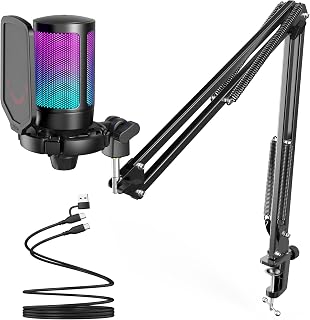
Streamers who want their setup to look as good on camera as it sounds get that from the changing RGB lighting and pop filter combo. The unidirectional pattern keeps focus on your voice over keyboard clatter, and the shock mount cuts desk vibration, both practical wins for anyone broadcasting live to viewers.
Pros
- Cardioid capsule suppresses background noise for clearer vocals
- Shock mount and pop filter reduce desk vibration and plosives
- Touch mute and volume knob accessible during long sessions
- Reversible USB-C cable and cross-platform plug and play
Cons
- RGB lighting cannot be disabled
- Boom arm is less flexible than a standalone tripod stand
Streaming and podcasting both live or die on how clean your voice sounds to other people, and the AmpliGame A6T is built around solving exactly that. The unidirectional condenser capsule focuses on your voice and pushes back on room noise, so co-hosts or chat can hear you clearly even with keyboard clatter nearby, and the included shock mount backs that up by cutting vibration noise from desk bumps. For podcasters recording long sessions, the touch mute button and volume knob mean you can handle a sneeze or a side conversation without fumbling through software. The boom arm stand gets the mic to mouth level for consistent capture across a multi-hour episode, and the pop filter keeps plosives from wrecking a take. The RGB lighting leans more toward a streaming aesthetic than a podcast one, but it does not affect audio performance. With a reversible USB-C cable and plug and play setup across desktop, laptop, and console, it is a low-friction way to get dependable, natural-sounding vocals for either format.
Audio Technology: USB Condenser Microphone, Cardioid Polar Pattern
Connectivity: USB (2.5m reversible USB-C to USB-A/C cable included)
Frequency Response: 60Hz to 18KHz
Signal-to-Noise Ratio: 70dB
Compatibility: Windows, Mac OS, PS4, PS5, Discord, Twitch, YouTube, podcasting software
Included Components: USB Condenser Microphone with Shock Mount, Boom Arm Stand with Adapter, C-clamp, Pop Filter, 8.2ft USB-C Cable, User Manual
Build Materials: Acrylonitrile Butadiene Styrene and Metal
Weight: 900g
Features: RGB Lighting with Automatic Gradient, Touch Mute Button, Volume Control Knob, Detachable Pop Filter, Shock Mount, 180-degree Boom Arm Rotation
Warranty: 1 Year Manufacturer Warranty
Good for streamers and podcasters who want one mic that handles live chat audio and recorded episodes without extra gear. The boom arm and shock mount suit anyone recording at a desk for long stretches. Skip it if you want RGB-free, minimalist styling since the lighting can't be turned off, or if you need a mic that also works well for in-person multi-guest podcast recording away from a boom stand setup.

Podcasters recording solo or with guests benefit from the unidirectional polar pattern here, which isolates a host's voice while rejecting room noise. The included boom arm stand frees up desk space during long recording sessions, and the gain knob lets you ride input levels manually, which matters when episode volume varies between speakers.
Pros
- Complete kit with boom arm, pop filter, shock mount, and windscreen
- Wide boom arm range for recording and on-camera positioning
- Metal mic body and all-steel arm construction
- 20Hz-20KHz frequency response suits vocals and light instruments
Cons
- No Xbox compatibility
- May need an adapter for USB Type-C only devices
For podcasters and streamers who want everything in one box without juggling separate purchases, the T669 makes a strong case. It's built around a complete setup rather than just a microphone, pairing a cardioid condenser capsule with a full boom arm, pop filter, shock mount, and windscreen, so you can go from unboxing to recording without sourcing extra parts. That matters for this list because podcasting and streaming setups often stall out on accessories, not just mic quality. The 20Hz-20KHz frequency response handles both spoken vocals and light instrumental work, and the boom arm's 180-degree vertical and 135-degree forward range makes it easy to swing the mic into position for recording and out of frame for video calls. Build quality holds up with a metal mic body and all-steel arm construction, with both C-clamp and desktop mount options for different desk setups. It's a straightforward, accessory-complete pick for anyone starting a podcast or stream who doesn't already own stand and filter gear.
Audio Performance: Polar pattern is unidirectional (cardioid), frequency response spans 20Hz to 20KHz with 78dB signal-to-noise ratio and 70dB audible noise floor. Condenser capsule design captures detailed, nuanced audio ideal for vocals and instruments.
Connectivity: USB Type-A and Type-C connectors enable compatibility with most modern computers and laptops. Includes 8.2-foot detachable USB-B to USB-A/C cable for flexible positioning. Requires no additional drivers on Windows and Mac systems.
Physical Design: Metal enclosure construction with adjustable boom arm stand featuring 13-inch fixed horizontal arm and 30-inch maximum reach. C-clamp and detachable desktop mount options provide secure desk mounting. Total unit weight is 1kg with package dimensions of 16.5 x 9.61 x 2.99 inches.
Included Accessories: Condenser microphone, scissor boom arm stand with C-clamp, pop filter with double layers, windscreen, shock mount, 8.2-foot USB cable, metal ring adapter, and user manual. One-year manufacturer warranty included.
Best for podcasters and streamers starting from scratch who want a mic, boom arm, pop filter, and shock mount bundled together rather than bought piece by piece. Also works for remote work and video conferencing. Skip it if you need Xbox compatibility, already own boom arm accessories, or have only USB Type-C ports without an adapter on hand, since the cable uses USB Type-B.

Pros
- Exceptional noise rejection for untreated rooms, making it ideal for home studios and portable recording
- Dual connectivity (XLR and USB) allows immediate use on PC or future expansion with audio interfaces and mixers
- Plug-and-play USB setup with no driver installation means you can start recording within seconds
- Clear, detailed vocal reproduction straight out of the box with minimal need for EQ post-processing
- Responsive tap-to-mute button and intuitive gain control on the microphone body improve workflow efficiency
Cons
- Accessories like boom arm, mic stand, and XLR cable are sold separately, adding to overall cost
- XLR functionality requires external audio interface or mixer for full feature access; some controls only work via USB
- Requires careful gain adjustment to prevent picking up excessive sound in sensitive recording environments
The FIFINE AmpliTank K688 is a dynamic microphone engineered for content creators, podcasters, streamers, and home studio enthusiasts who need professional audio quality without professional-level pricing. Its dual XLR and USB connectivity makes it genuinely versatile, functioning as an immediate plug-and-play USB mic for your computer or as a professional XLR mic for use with audio interfaces and mixers as your setup evolves.
The standout performance feature is its cardioid polar pattern and 80dB signal-to-noise ratio, which effectively isolate your voice from common home studio problems like computer fans, hard drives, and ambient room noise. Users consistently report clean, detailed vocal reproduction right out of the box, with minimal background interference even in untreated spaces. The 130dB SPL handling ensures the mic won't distort during louder vocal performances or dynamic content creation.
Build quality exceeds expectations at this price point. The all-metal construction feels durable and professional, while the included shock mount and windscreen provide practical noise management without requiring additional purchases. Controls are intuitive and physically accessible: a tap-to-mute button on top, gain adjustment dial, and 3.5mm headphone jack with dedicated volume control for real-time monitoring. These features streamline your workflow and eliminate common frustrations with software-only controls.
Realistic considerations include the need to purchase a boom arm and mic stand separately, plus an XLR cable if you plan to use the XLR output. Additionally, advanced features like gain control and headphone monitoring only function through USB connection, not XLR. The cardioid pattern, while excellent at noise rejection, requires careful gain adjustment in highly sensitive environments to avoid picking up too much ambient sound.
The K688 delivers genuine value for anyone building a budget-conscious home studio or upgrading from entry-level USB mics. Its combination of clean sound, dual connectivity, and thoughtful design makes it a reliable choice for podcasting, streaming, voiceovers, and music recording. The 1-year warranty and established brand reputation add confidence to the investment.
Connectivity and Connectors: USB-C (with USB-A adapter included) and XLR. Dual connectivity allows immediate PC use or integration with professional audio equipment.
Audio Performance: 50Hz-16KHz frequency range, 80dB signal-to-noise ratio, 130dB maximum SPL, 16-ohm impedance. Cardioid (unidirectional) polar pattern for focused vocal capture and background noise rejection.
Physical Design: Metal construction, 4.65 x 6.18 x 8.86 inches, 0.51 kg. Includes 5/8" to 3/8" stand adapter, 8.2ft USB-C to USB-A cable, dynamic microphone with integrated shock mount, windscreen, and user manual.
Control Features: Tap-to-mute button, gain knob, 3.5mm headphone jack with dedicated volume control (USB connection only). Compatible with Windows, Mac OS, mixers, audio interfaces, and sound cards.
Warranty: 1-year manufacturer warranty.
Who Should Buy: Podcasters, gaming streamers, voiceover artists, and content creators seeking professional sound quality at an accessible price. Ideal for both beginners and intermediate users building their first dedicated home studio. If you're transitioning from basic USB mics or updating an existing setup, the dual connectivity offers growth potential.
Who Might Look Elsewhere: Users requiring advanced XLR-only features without a separate audio interface. Those with treated, professional studios who may prioritize condenser microphones for different tonal characteristics. Budget shoppers unwilling to invest in a separate stand or boom arm, as these are not included.
Setup Recommendations: Start with USB connection for immediate, zero-configuration use. Position the microphone 6-12 inches from your mouth at a slight angle to maximize noise rejection. Use the included windscreen for vocal work to reduce plosives. Keep the gain knob moderate to avoid picking up excessive ambient sound. Consider upgrading to a boom arm or quality mic stand for ergonomic positioning and vibration isolation.
Upgrade Path: The K688 works excellently as a standalone USB mic but also functions as a bridge to a more advanced setup. As your needs grow, connect it via XLR to an audio interface, mixer, or sound card to unlock additional processing and routing options without replacing the microphone itself.

Hosting video calls or laying down vocal takes calls for consistent pickup, and the rated 78 db sensitivity gives this one dependable clarity for close-mic speech. The included desktop stand and volume control mean a podcaster or remote worker can set it up once and adjust levels without extra hardware.
Pros
- Cardioid design reduces background noise and room reflections
- Solid metal build rather than plastic feel
- Comes complete with cable adapters, stand, and volume knob
- Compact footprint keeps desk space free
Cons
- Best results require consistent 6-12 inch mic distance
- Needs auto-volume disabled in some apps to avoid level jumps
For streamers and podcasters working with a tight setup, the K669B covers the basics without asking you to learn new software or spend time on configuration. The cardioid condenser capsule captures voice clearly while cutting down on room reflections, which matters for podcast recordings where listeners notice echo more than they would on a live stream. Everything needed for a first proper audio setup is included: cable with both Type-A and Type-C adapters, desktop tripod stand, and a volume knob for quick in-session adjustments without alt-tabbing. The metal build feels sturdy rather than disposable, and the compact footprint keeps a desk usable for a podcast guest or a second monitor during a stream. The main thing to manage is mic placement, since the cardioid pattern wants you 6 to 12 inches away to avoid plosives, and disabling auto-volume in apps like Zoom or OBS keeps levels steady across a recording. It won't deliver broadcast-studio polish, but for someone starting a podcast or stream and needing dependable, clear audio right away, it's a solid, no-fuss entry point.
Connectivity and Compatibility: USB Type-A and Type-C connectors. Works with Windows PC, Mac, PS4, PS5, and most streaming platforms including Discord, OBS, Twitch, and Zoom.
Audio Performance: Cardioid condenser microphone with 20Hz-20kHz frequency response, 78dB audio sensitivity and signal-to-noise ratio, 16dB audible noise level. Captures clear, natural vocals with minimal background interference.
Physical Design: All-metal construction with unidirectional polar pattern. Includes desktop tripod stand, 6.5-foot USB-B to USB-A/C cable, volume control knob, and user manual. Weight is 5.6 ounces. One-year manufacturer warranty included.
Fits streamers and podcasters just starting out who want reliable audio without a learning curve or extra accessories to buy. The included stand and cable adapters make it an easy first setup. Skip it if you need broadcast-quality polish, multiple polar patterns for guest interviews, or software-based control over gain and EQ, since this is a straightforward, fixed-feature mic.

Streamers who duo-cast or want room for a second voice will notice the bidirectional polar pattern, which picks up sound from front and back instead of just one side. Tap-to-mute handles quick toggles during live broadcasts, while the gain knob keeps vocal levels steady without digging into software settings.
Pros
- 192kHz sampling rate for detailed vocal capture
- 70dB signal-to-noise ratio reduces keyboard and ambient noise
- One-tap mute also disables RGB to prevent hot-mic mistakes
- Includes shock mount, pop filter, and tripod stand
Cons
- RGB color cycling is automatic with no manual selection
- Bidirectional pattern needs careful positioning to avoid picking up room noise
The A6V aims at the overlap between streaming performance and genuine audio fidelity, which makes it a strong pick for anyone treating their 2026 setup as a step up rather than a starter kit. A 192kHz sampling rate and bidirectional polar pattern give it more flexibility for capturing detailed vocals, and the 70dB signal-to-noise ratio keeps keyboard clicks and background hum from bleeding into a stream or recorded episode. The one-tap mute doubles as a visual cue since it also kills the RGB lighting, which is a practical touch for avoiding hot-mic moments mid-broadcast. An integrated gain knob means volume gets handled at the mic instead of buried in software, useful when you're mid-stream or mid-recording and can't stop to dig through settings. The accessory bundle, including a shock mount, pop filter, and tripod stand, covers what a podcasting or streaming desk setup typically needs. The gradient RGB cycles through seven colors automatically rather than letting you choose a fixed color, which is worth knowing if you want it to match other peripherals.
Audio Performance: 192kHz sampling rate, 60Hz-18kHz frequency response, 70dB signal-to-noise ratio, cardioid polar pattern
Connectivity: USB 2.0 with 6.6ft detachable cable, compatible with PC, Mac, PS4, PS5, and major platforms including Discord, Twitch, OBS, and Streamlabs
Physical Specs: 6.93 x 7.05 x 3.78 inches, 500g weight, black finish with metal and plastic construction
Included Accessories: Shock mount with rubber bands, pop filter, adjustable metal tripod stand with rubber feet, USB-to-USB-C cable, user manual
Features: One-tap mute button with RGB indicator, intuitive gain knob, 7-color automatic gradient RGB lighting, plug-and-play installation
Warranty: 1-year manufacturer warranty

Streamers running a full audio chain through a mixer or interface get flexibility from the dual XLR/USB connection, scaling from simple plug and play to pro-level routing. The built-in headphone jack with monitoring volume control lets you check your mic feed live, a detail serious streamers care about.
Pros
- Switches between USB and XLR as your setup grows
- Unidirectional pattern isolates voice from keyboard and mouse noise
- One-touch LED mute button works without software
- Stable adjustable stand with solid metal and ABS build
Cons
- RGB and function keys disable in XLR mode
- XLR cable and boom arm sold separately
If you're building a streaming or podcasting setup and want room to grow, the AM8 earns its spot by covering both ends of the journey. Start on USB the day it arrives, no drivers, no mixer, just plug in and go live or hit record. The RGB lighting and on-mic volume control make it feel built for a streaming desk, while the unidirectional pickup keeps your voice front and center over keyboard clicks and mouse clicks, a common complaint when switching away from a headset mic. What makes it worth considering specifically for this list is the XLR path. Once your podcast or stream setup expands to a mixer or audio interface, this same mic switches over for cleaner routing and studio-style control, so you're not rebuying gear as your show grows. The metal and ABS build holds up to daily use, the stand doesn't wobble, and the mute button gives instant privacy during a live session without touching software. It's a genuinely practical two-stage mic for creators planning ahead.
Good for streamers and podcasters who want a mic that works now on USB but won't be outgrown once they add an audio interface or mixer. Also fits anyone upgrading from a gaming headset who wants noticeably cleaner vocal pickup. Skip it if you only ever plan to use XLR, since RGB and function keys turn off in that mode, or if your desk setup can't keep the mic close enough to avoid picking up room echo.
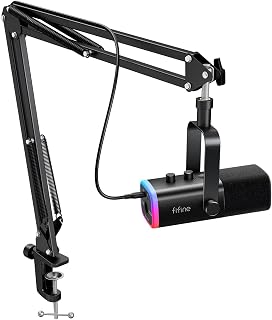
Gaming streamers building out a desk setup will appreciate that this kit pairs XLR and USB connectivity, so you can start on USB and move to an audio interface later without buying a new mic. Headphone volume control built into the body makes real-time monitoring simple during live sessions.
Pros
- USB and XLR connectivity in one mic
- Includes sturdy metal boom arm with elastic spring support
- Cardioid pattern with 80dB signal-to-noise ratio for clear vocals
- Windscreen included to reduce plosives
Cons
- XLR cable not included
- C-clamp won't fit desks thicker than 2 inches
For anyone assembling a streaming or podcasting rig in 2026, the AM8T stands out for pairing dual connectivity with a ready-to-mount accessory kit. USB gets you talking on Windows or Mac immediately, no driver hunting required, while the XLR connector is there once a mixer or interface enters the picture. That flexibility matters for streamers and podcasters who don't want to replace their mic every time their setup changes. The cardioid pickup and 80dB signal-to-noise ratio do the real work here, keeping vocals clear while background chatter and room noise fade into the back. What separates this pick from a bare mic is the included boom arm, built from metal with elastic springs so it holds position without drooping over a long stream or recording session, plus a C-clamp that fits desks up to 2 inches thick. A windscreen handles plosives during vocal-heavy content like interviews or voiceover work. The customizable RGB lighting is a nice touch for on-camera streaming setups, controlled with physical buttons rather than software.
Audio Specifications: Frequency range 50Hz-16kHz, cardioid polar pattern, 80dB signal-to-noise ratio, -50dB sensitivity. Powered via USB for both connectivity and power on PC/Mac.
Physical Design: Black ABS plastic and metal construction, approximately 1 kg weight. Boom arm stand measures 12.6 x 4.72 x 1.97 inches with adjustable positioning and C-clamp. Accommodates desks up to 2 inches thick.
Connectivity and Ports: USB-C and XLR connectors, 3.5mm headphone jack with independent volume control, mute button with LED indicator, gain knob for level adjustment. Includes 8.2ft USB-C to USB cable, windscreen, and user manual.
Suited to streamers and podcasters who want a complete starter kit, mic plus boom arm, rather than piecing one together separately. It also fits anyone planning to move from USB to XLR later without buying a new mic. Skip it if you need software-based RGB control, already own a boom arm, or have a desk too thick for the included C-clamp, since the XLR cable isn't included either way.

Streamers juggling multiple audio sources, like mic, game audio, and chat, need a mixer that keeps them separate, and the 4-channel layout with individual faders does exactly that. XLR mic input pairs naturally with dynamic mics like other AmpliGame models, while the dedicated headphone jack keeps monitoring independent from the main output.
Pros
- 48V phantom power runs condenser mics without extra gear
- Four independent channels for mic, line, headphone, and output control
- Real-time mic monitoring catches issues before they air
- Front-panel mute and vibrant RGB suit live broadcasting
Cons
- Soundboard effects are basic next to dedicated software
- XLR cable and microphone must be bought separately
If you're building out a streaming or podcasting setup and already own (or plan to buy) an XLR microphone, the SC3 is the piece that connects everything together. It bridges the gap between a basic USB mic and a full studio console, giving you 48V phantom power so condenser mics work right away, plus four channels to separately manage mic, line input, headphones, and output. For podcasting specifically, that per-channel control matters when you're mixing a guest's audio against background music or a second source. The real-time mic monitoring is a genuine streaming asset too, since it lets you catch popped levels or feedback before viewers do. Built-in voice changers and auto-tune presets give solo streamers a way to add character without juggling extra software mid-broadcast. The front-panel mute button is a small touch that pays off during live sessions when you need instant control. It won't replace a professional console, but as a step up from a plain USB mic for creators serious about audio flexibility, it earns its spot.
Good for streamers and podcasters ready to move beyond a USB mic and who want XLR support, phantom power, and independent channel control on a desk-friendly unit. Also fits anyone who wants quick mic monitoring and built-in voice effects without extra software. Skip it if you need studio-grade preamps, polished soundboard effects, or if you don't already plan to add an XLR mic and cable, since those aren't included.
Connectivity: USB Type-C, XLR mic input, 3.5mm line input, 3.5mm headphone output, 3.5mm line output
Channels: 4 independent channels (microphone, line in, headphone, line out)
Phantom Power: 48V built-in
Frequency Response: 2000 Hz
Power: USB-C powered (no external adapter needed)
Dimensions: 6.45in W x 4.44in D x 1.6in H
Weight: 0.5 kg (1.1 lbs)
Features: 6 voice changers, 12 auto-tune modes, 4 customizable sound pads, RGB lighting, mute button, real-time monitoring
Compatibility: Windows and Mac (plug-and-play)
Warranty: 1 year manufacturer
What to Look For in a FIFINE Microphone
USB vs. XLR Connectivity
The connection type is the first decision you need to make. USB microphones like the FIFINE K669B USB Microphone and the FIFINE AmpliGame A6V USB Gaming Microphone plug directly into your computer with zero additional hardware, making them ideal for beginners or anyone who values convenience.
XLR connections, available on options like the FIFINE AmpliTank K688 Dynamic Microphone and the FIFINE AmpliGame AM8 USB/XLR Dynamic Microphone, route through an audio interface or mixer for higher audio fidelity. If you plan to grow your setup over time, a dual USB/XLR mic gives you both options from day one.
Condenser vs. Dynamic Capsule
Condenser microphones are highly sensitive and capture rich, detailed sound, which makes them excellent for controlled environments like home offices or treated recording spaces. The FIFINE T669 Studio Condenser USB Microphone and the FIFINE AmpliGame A6T USB Gaming Microphone Kit both use condenser capsules that pick up natural vocal nuance with clarity.
Dynamic microphones are less sensitive to ambient noise and handle louder environments much better. If you stream from a room with fan noise, keyboard clatter, or street sounds nearby, a dynamic option like the FIFINE AmpliGame AM8T XLR/USB Gaming Microphone will naturally reject more of that background noise without heavy software processing.
Onboard Controls and Monitoring
Having physical controls on the microphone itself saves you from constantly switching to software settings mid-stream. Look for a tap-to-mute button and a gain knob as baseline features. The FIFINE AmpliGame AM8 USB/XLR Dynamic Microphone includes both, along with a 3.5mm headphone jack for real-time monitoring so you can hear exactly what your audience hears.
Real-time monitoring is especially valuable during long recording sessions where latency or clipping issues can go unnoticed. Several FIFINE models include this feature, which puts them a step ahead of basic USB microphones in the same range. For a complete streaming rig overview, the Streaming Gear category has additional recommendations worth browsing.
Accessories and Bundle Value
The accessories included with your microphone affect both your setup time and your audio quality. A boom arm, shock mount, and pop filter are the three most impactful additions. The FIFINE T669 Studio Condenser USB Microphone comes bundled with all three, giving you a complete recording kit right out of the box.
If you already own some accessories or prefer to build your own rig, a standalone microphone like the FIFINE K669B USB Microphone keeps things simple with a compact tripod stand. For creators who want a more advanced audio chain, pairing any XLR-capable FIFINE mic with the FIFINE Ampligame SC3 Gaming Audio Mixer opens up channel-level control, voice effects, and 48V phantom power for condenser mics. You can also pair your mic setup with a reliable webcam, and our guide to top Logitech webcam picks for streaming covers that side of your setup.
Final Thoughts
FIFINE offers a well-rounded lineup that covers nearly every use case, from casual gaming chat to serious podcast production. If you want a simple, high-quality starter kit with everything included, the FIFINE T669 Studio Condenser USB Microphone is hard to beat for its value and completeness. For creators who want more flexibility to grow into a professional audio chain, the FIFINE AmpliTank K688 Dynamic Microphone delivers clean, noise-rejecting audio with both USB convenience and XLR upgrade potential in a single package.
Frequently Asked Questions
Are FIFINE microphones good for streaming?
Yes, FIFINE microphones are well-regarded among streamers for delivering clear, broadcast-quality audio at an accessible entry point. Models like the FIFINE AmpliGame A6T USB Gaming Microphone Kit are designed specifically with streaming in mind, featuring cardioid pickup patterns that focus on your voice and reject off-axis noise. Many options are also plug-and-play compatible with OBS, Streamlabs, and Twitch.
What is the difference between the FIFINE USB and XLR models?
USB models connect directly to your computer without any additional hardware, making them the easiest option to get running quickly. XLR models connect to an audio interface or mixer, which allows for lower noise floors, more gain headroom, and greater control over your signal chain. Several FIFINE microphones, including the FIFINE AmpliGame AM8T XLR/USB Gaming Microphone, support both connections so you can start with USB and upgrade later.
Do FIFINE microphones work with PS4 and PS5?
Most FIFINE USB microphones are compatible with PlayStation consoles. The FIFINE AmpliGame A6V USB Gaming Microphone is explicitly confirmed for PS4 and PS5, and the FIFINE K669B USB Microphone also supports PS4 and PS5 connectivity. Always check the specific model listing for console compatibility details, as a few models are PC-only.
Do I need an audio mixer to use a FIFINE XLR microphone in 2026?
You need either an audio interface or a mixer to use the XLR output on any FIFINE microphone. The FIFINE Ampligame SC3 Gaming Audio Mixer is a natural pairing since it includes a built-in XLR input with 48V phantom power and individual channel faders. If you are building a complete streaming or headphones and audio setup, investing in a dedicated mixer gives you far more control over your final mix than software alone.
Common questions
Should I choose a USB or XLR FIFINE microphone for streaming?
USB is the better choice for most streamers. A FIFINE USB model like the K669B or AmpliGame A6V plugs straight into a computer with no extra gear, which suits beginners and simple setups. The AmpliGame AM8 offers both USB and XLR, so it works plug and play now but can connect to a mixer or audio interface later if you want more control over sound and multiple inputs down the road.
Which FIFINE microphone is the best budget podcast mic?
The FIFINE K669B is the best budget podcast mic in this lineup. It's a simple desktop condenser with a unidirectional polar pattern, play and plug USB connection, and a stand included, so there's nothing extra to buy. The T669 is a step up for podcasters who want a boom arm and gain knob, but the K669B covers the basics for anyone just starting out.
Does a FIFINE microphone need an audio interface to work?
No, most FIFINE microphones don't need an audio interface. The K669B, T669, and AmpliGame A6V are USB models that connect directly to a laptop or desktop with play and plug simplicity. Only the AmpliGame AM8 is built for XLR use with a mixer, sound card, or audio interface, and even then it still works over USB without any extra equipment.








Write Your Review
No reviews yet. Be the first to share your experience!