

Your console can look exceptional on a gaming display yet still reach OBS with a frame-rate limit, muted HDR, or enough delay to disrupt your stream. The right capture card keeps your play experience responsive while sending a dependable video feed to your recording or broadcast computer.
This guide to the best Elgato capture card options compares purpose-built choices for console players, dual-PC streamers, and camera-focused creators. If your stream includes a face camera, pairing your capture setup with one of our camera picks for YouTube creators can make a major visual difference.
Quick answer
This guide compares 8 picks, with Elgato Cam Link 4K USB Capture Card: Transform Your ranked first.
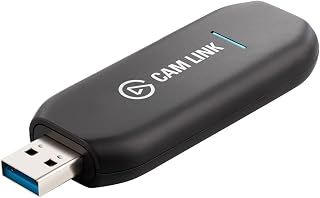
The USB 3.0 interface and plug-and-play design make this ideal for creators who want to route DSLR or action cam footage directly into streaming software without a complex setup. Ultra-low-latency technology ensures your camera feed stays in sync with gameplay or live commentary, while 1080p60 and 4K60 capture resolutions handle both high-framerate console sessions and cinematic camera work in a single compact device.
Pros
- Plug-and-play 4K60 or 1080p60 capture with zero configuration required
- Works as native webcam in OBS, Zoom, Discord, and all streaming platforms
- Ultra-low-latency performance with perfect audio sync
- Compact design with included USB extension cable for setup flexibility
Cons
- Wide USB-A connector blocks adjacent ports on crowded hubs
- Generates warmth during operation, best disconnected between sessions
The Cam Link 4K transforms your DSLR, mirrorless camera, or action cam into a studio-grade webcam for console streaming overlays, creator commentary, and broadcast-quality face-cam content. For console streamers building multi-camera setups or creators recording gaming commentary with professional image quality, this adapter bridges the gap between consumer consoles and production cameras. It captures 4K60 via HDMI input with ultra-low-latency technology, appearing instantly as a native webcam in OBS, Streamlabs, and every major streaming platform. The USB 3.0 connection delivers pristine 1080p60 or 4K60 MJPG output with perfect audio sync, no dropped frames, and zero configuration beyond plugging it in. Compatibility spans PC and Mac systems, making it platform-agnostic for mixed creator setups. The compact 8.1 x 1.2 x 3.1cm form factor includes a 30cm USB extension cable for flexible routing. One practical note: the device runs warm during operation and can block adjacent USB ports on crowded hubs or docking stations. The 2-year warranty covers hardware concerns. For console creators who already own quality cameras and want broadcast-grade face-cam footage without complex switchers or encoders, this delivers professional results immediately.
Video Capture: 4K60 (MJPEG only), 4K30, 1080p60, 1080p30, 720p60, 720p30, 576p50, 480p60
Connectivity: HDMI input (unencrypted), USB 3.x output with 30cm extension cable included
Compatibility: Windows 10 (64-bit) or later, macOS 13 or later, iPadOS 17 or later. Works with any camera or device with HDMI output, including DSLR, mirrorless, camcorder, action cam, and iPhone.
System Requirements: USB 3.x port, Intel/AMD/Apple processor. Supported platforms: OBS Studio, Zoom, Discord, TikTok Live, and virtually all streaming and conferencing software.
Physical: Dimensions 8.1 x 1.2 x 3.1cm, Weight 20g, USB 3.0 extension cable 30cm
Warranty: 2 years
Best for console streamers and gaming creators who own DSLRs, mirrorless cameras, or action cams and want studio-quality face-cam footage for Twitch, YouTube, or live commentary. Ideal for multi-camera console setups, podcasters recording gaming discussions, and remote creators needing broadcast-level image quality without traditional capture infrastructure. Skip this if you don't already own a compatible camera with HDMI output, prefer all-in-one webcam simplicity, or need a solution that doesn't generate heat during extended streaming sessions.

HDR10 capture at 1080p60 preserves the color depth and contrast of modern console titles on PS5 and Xbox Series X/S, giving your stream or recording the same visual punch viewers see on screen. The 4K60 HDR10 zero-lag passthrough means you can play at native resolution without introducing delay, while flashback recording lets you clip highlight moments after they happen.
Pros
- 1080p60 HDR10 capture with simultaneous 4K60 HDR10 zero-lag passthrough
- Instant Gameview keeps streaming preview latency imperceptible
- Flashback Recording saves previous minutes retroactively
- Compact external design with full current-gen console compatibility
Cons
- Occasional audio cutoffs reported during streams
- Mac software features slightly limited compared to Windows
The HD60 S+ handles the dual challenge console creators face: delivering broadcast-quality streams to audiences while maintaining flawless 4K HDR gameplay on their own displays. This external capture card routes console output through zero-lag 4K60 HDR10 passthrough to your monitor while simultaneously recording 1080p60 HDR10 footage for streaming or editing. Instant Gameview technology keeps preview latency imperceptible in OBS, so you can monitor your stream without disrupting competitive reaction times. Flashback Recording captures the previous minutes of gameplay retroactively, saving highlight moments without keeping your record button active all session. The compact external housing connects via included HDMI 2.0 and USB 3.0 cables, working immediately with Windows, Mac, M1 systems, and standard streaming software. Setup spans PS5, PS4, Xbox Series X/S, Xbox One, and Switch configurations without compatibility headaches. Build quality feels premium for a portable device that travels between setups or LAN events. Some Mac users report slightly fewer software features compared to Windows, and occasional audio cutoffs appear in user feedback, though third-party streaming software mitigates most issues. For console creators prioritizing HDR capture quality and passthrough performance in a portable form factor, this balances professional capability with genuine plug-and-play convenience.
Video Capture: 1080p60 HDR10, 4K30 in certain configurations
Passthrough: 4K60 HDR10 with zero-lag technology
Connectivity: HDMI 2.0 input, USB 3.0 to computer, HDMI passthrough output
Supported Platforms: Windows 10+, macOS, M1 Macs
Compatible Devices: PS5, PS4 Pro, Xbox Series X/S, Xbox One X/S, Nintendo Switch, PC, and any HDMI-capable device
System Requirements: Dual-core processor (Intel or AMD), 4GB RAM, integrated graphics or better, DirectX 11, 500MB storage
Included Accessories: USB 3.0 cable, HDMI 2.0 cable
Warranty: 2-year manufacturer coverage
Best for console streamers and gaming content creators who need HDR capture quality, 4K passthrough performance, and portable external convenience for multi-location setups or LAN events. Ideal for PS5, Xbox Series X, and current-gen console creators streaming to Twitch or YouTube who want broadcast-quality output without internal PC cards. Skip this if you primarily edit offline without streaming, prefer internal PCIe stability, or run budget systems that struggle with USB bandwidth alongside streaming software.

The 8K60 passthrough future-proofs your setup for next-generation console output and high-refresh displays, while 1080p capture keeps file sizes manageable for editing and upload. Internal HDMI connectivity reduces signal degradation over long cable runs, and Windows 10 compatibility integrates with capture software like OBS and XSplit for multi-source streaming and recording workflows.
Pros
- 4K60 HDR10 capture with imperceptible passthrough latency
- 1080p at 240fps recording for smooth slow-motion
- 8K60 passthrough and VRR support for future-proofing
- Multi-platform compatibility including PS5, Xbox Series X, Switch, Steam Deck, iPhone 15
Cons
- Dual PC setup requires significant configuration time, up to two days
- Live preview software introduces 10 to 30ms latency
The 4K Pro is built for creators and competitors who need high-fidelity capture without sacrificing gameplay responsiveness. This internal PCIe card captures 4K60 HDR10 footage while maintaining imperceptible passthrough latency, critical for competitive setups where even minor delay affects performance. It also handles 1080p at 240fps for slow-motion highlight reels and supports Variable Refresh Rate passthrough, preserving the full experience of high-end displays. The 8K60 passthrough specification future-proofs the card for next-generation console and PC upgrades. Installation requires an available PCIe slot, and while the hardware design is clean, dual PC streaming configurations demand careful setup that some users report taking one to two days to dial in properly. The utility software introduces 10 to 30ms latency in live preview, though this doesn't affect the passthrough signal to your monitor. Compatibility extends beyond consoles to Steam Deck, iPhone 15, and other capture scenarios. This card suits creators who prioritize capture quality and gameplay feel over plug-and-play simplicity, and who have the hardware and patience to optimize a premium setup.
Connectivity: HDMI 2.1 input and output, PCIe slot installation
Capture Performance: 4K60 HDR10 capture, 1080p up to 240fps recording, 8K60 passthrough
Key Features: Variable Refresh Rate passthrough, 10-bit HDR, ultra-low latency circuitry, dual PC setup compatible
System Requirements: Windows 10 operating system, available PCIe slot, full tower PC recommended
Dimensions: 2.2 x 4.76 x 0.75 inches, 110g weight
Software: Compatible with OBS, Streamlabs, Twitch Studio, Restream, Zoom, Teams, and major streaming platforms
Buy this if you're running a high-end dual PC streaming rig or competitive setup where 4K60 HDR capture and zero-lag passthrough justify the configuration effort. Skip it if you're looking for simple external connectivity or don't need resolution and frame rate capabilities beyond 1080p60.
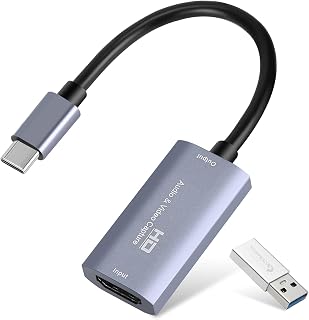
Dual USB-A and USB-C connectors let you plug into any modern PC or laptop without hunting for adapters, and the compact plug-and-play design means no driver installation before a stream. The 1080p60 capture resolution handles Nintendo Switch 2, PlayStation 5, and Xbox output at full framerate, while 4K30 input support accommodates cinematic footage from cameras or action cams in the same setup.
Pros
- 30 gram weight and compact size for travel and mobile setups
- Plug-and-play with no drivers, works across Windows, Mac, Android, gaming consoles
- Aluminum construction with heat dissipation for extended sessions
- 1080p60 capture with 4K input support via USB 3.0
Cons
- Requires separate software, not a direct display output solution
- Performance drops significantly over USB 2.0 connections
The Guermok GM-29A is a portable, plug-and-play option for creators who need basic capture functionality across multiple devices without investing heavily upfront. Weighing just 30 grams with compact dimensions, it slips into a bag for mobile streaming or recording sessions away from a primary desk setup. It captures 1080p60 and accepts 4K input, covering typical streaming resolutions for consoles and handhelds. The aluminum alloy body with integrated heat dissipation keeps temperatures manageable during extended recording, and USB-C connectivity works across Windows, Mac, Linux, Android, and gaming platforms including PS5, Xbox Series X/S, and Switch. No driver installation or external power is required. Compatibility with OBS Studio and streaming platforms makes integration straightforward. The limitation is that this is strictly a capture device, it requires separate software to function and won't output video directly to a display. USB 3.0 is essential for full 1080p60 performance; USB 2.0 connections will downgrade resolution and frame rate. Signal stability can vary depending on video format and source device. For creators prioritizing affordability and portability over professional-grade features, this card handles routine capture tasks reliably.
Video Capture: 1080P 60FPS output, 4K 30Hz input, 2K 30FPS support
Interfaces: HDMI input, USB 3.0 Type-A and Type-C outputs
Compatibility: Windows 10/11, macOS 10.15+, Linux, Android, iOS
Supported Devices: PS4, PS5, Xbox, Nintendo Switch, gaming PCs, laptops, cameras, DVRs, and more
Physical: 7.48 x 0.98 x 0.39 inches, 30 grams
Package Contents: Capture card, USB 3.0 to USB-C adapter, user manual
System Requirements: Windows 10/11 64-bit or macOS 10.15+, Intel Core i3 or AMD Ryzen 3 equivalent processor, 4GB RAM minimum, USB 3.0 port recommended

The built-in mic-in jack lets you route commentary directly into the capture stream without a separate audio interface, simplifying setups for solo creators. The 4K loop-out maintains full resolution on your display while the card captures at 1080p60, so you can play Xbox Series X/S or Nintendo Switch 2 titles at native quality while recording smooth footage for editing or live streaming.
Pros
- 4K pass-through with 1080p/60fps capture keeps your display sharp while recording
- YUY2 encoding delivers richer color and smoother gradients than MJPEG
- Built-in 3.5mm mic input simplifies commentary recording
- Compact design with USB-A and USB-C ports for broad compatibility
Cons
- Capture limited to 1080p maximum resolution
- Linux users may need manual HDMI configuration
The Acer OCB5B0 brings genuine flexibility to console and creator workflows without demanding a steep learning curve or premium budget. Its hardware encoding handles 1080p/60fps capture while simultaneously passing through 4K video to your main display, so you maintain full visual fidelity during gameplay or production work. The YUY2 color format produces noticeably cleaner gradients and more accurate color reproduction than basic MJPEG compression, which matters when you're streaming competitive gameplay or recording polished content. Hardware-level latency optimization keeps delay imperceptible, critical for fast-paced console sessions on PlayStation, Xbox, or Nintendo Switch 2. The compact form factor and dual USB connectivity (Type-A and Type-C) make it easy to move between setups or travel with your rig. A built-in 3.5mm mic input simplifies audio capture, letting you add commentary without juggling separate recording tools or software mixers. The main constraint is the 1080p capture ceiling, though that aligns with most streaming platforms. Some Linux users encounter HDMI handshake quirks that require manual resolution settings, and stability improves when connected to rear motherboard USB ports rather than front panel headers.
Video Capture: 1080p and 720p at up to 60fps, 4K pass-through to display
Video Encoding: YUY2 and MJPEG support for flexible compression and quality trade-offs
Audio Input: Built-in 3.5mm mic input with hardware-level audio embedding
Connectivity: HDMI input/output, USB 3.0 Type-A and Type-C ports
Compatibility: Windows, Mac, Linux, Nintendo Switch, Switch 2, PS5, PS4, Xbox, Xbox Series S/X, DSLR cameras, smartphones, tablets
Software: Works natively with OBS, XSplit, VLC, YouTube, Facebook, Twitter, and other streaming platforms without additional drivers
Warranty: 1-year manufacturer coverage with responsive customer support
Best suited for console streamers and content creators who need dependable 1080p capture with 4K pass-through on a modest budget. Works seamlessly with Nintendo Switch, Switch 2, PlayStation, and Xbox consoles, plus PC setups. The plug-and-play design and built-in mic input appeal to users who want to start recording quickly without deep technical configuration. Skip this if you require native 4K capture for archival or professional production work, or if your primary platform is Linux and you prefer zero-configuration hardware.

Pros
- Truly plug-and-play, no driver installation needed
- Excellent 1080P 60FPS output quality for gaming and content recording
- Low-latency HDMI pass-through allows real-time gaming without input delay
- Compact and portable, works with multiple gaming platforms out of the box
- Microphone input enables live commentary directly through the capture card
Cons
- Audio configuration requires manual setup through system and app settings initially
- Short USB cable may require extension for comfortable setup, especially with larger consoles
- Limited to 1080P output (4K pass-through available but not captured at full 4K)
The VIXLW V316B is a compact HDMI capture card designed for gamers, streamers, and content creators who want to record and broadcast gameplay from consoles, computers, and cameras without breaking the bank. Whether you're streaming Nintendo Switch gameplay to Discord, capturing retro gaming footage, or recording console tournaments, this device handles the job with minimal setup friction.
The standout feature is its true plug-and-play operation: connect it to your system via USB 3.0, plug in your HDMI source, and it works instantly as a video input device. Real-world testing confirms it delivers clean 1080P at 60FPS output with imperceptible latency through the HDMI pass-through, allowing you to play games smoothly while streaming. The low-latency performance makes it suitable for competitive gaming where input delay matters.
Build quality is solid for the price point. The device is compact and lightweight, fitting easily in a streaming setup or travel bag. It includes a basic installation guide and receiver cables, though users report the instructions could be clearer. The short USB cable may require an extension for optimal positioning, especially with larger setups.
Audio handling requires attention during initial setup. While the card captures audio and includes a microphone input for commentary, getting sound to route correctly through OBS or Discord involves tweaking system audio settings. Once configured, it works reliably, but expect 30 minutes to an hour of troubleshooting for first-time users unfamiliar with audio routing.
For under $30, this capture card delivers exceptional value for amateur streamers and content creators. It excels at 1080P 60FPS capture for console gaming and provides solid performance across Windows and Mac. Serious streamers may eventually upgrade to hardware supporting 4K capture, but as an entry-level or secondary capture device, the V316B is a genuine bargain that performs well in real-world use.
Video Capture: 1080P HD output, supports 4K30/60Hz input pass-through, 1080P 120/144Hz input, 2K30Hz maximum output
Connectivity: USB 3.0 interface, HDMI in, HDMI pass-through, 3.5mm microphone input
Compatibility: Windows 7/8/10, Mac OS, Linux. Works with PS3/PS4/PS5, Xbox One/360, Nintendo Switch, DSLR cameras, DVRs, and more
Software Support: OBS Studio, Twitch, YouTube, Facebook, VLC, Potplayer and other streaming platforms
Physical: Dimensions 3 x 2 x 1 inches, Weight 0.18 kg, Includes installation guide and cable connectors
Warranty: 60-day manufacturer warranty
Who Should Buy: This capture card is ideal for console gamers streaming to Discord or Twitch, content creators digitizing old media, and streamers building their first streaming setup on a budget. It's also excellent as a secondary capture device for multi-source streaming.
Best Use Cases: Gaming console streaming (PS4/PS5/Xbox), Nintendo Switch broadcast, recording gameplay for YouTube, converting HDMI video sources to digital files, and adding microphone commentary during live streams.
Setup Tips: Use the included installation guide carefully, ensure your USB 3.0 port is functioning properly, and expect to spend time configuring audio in your streaming software. A longer USB 3.0 cable can improve comfort during extended gaming sessions.
Performance Expectations: Expect clean, clear 1080P 60FPS output with minimal latency. Audio quality is adequate but not premium. The card won't bog down your CPU or system performance.
When to Choose Something Else: If you need true 4K capture (not just pass-through) or professional-grade audio, look at higher-end capture cards. For purely screen recording from PC without external HDMI sources, built-in Windows or Mac tools may suffice.

The PCIe x1 slot installation eliminates cable clutter and frees up USB ports for peripherals, making this a clean choice for dedicated streaming PCs. Low-latency technology and 1080p60 passthrough ensure your gameplay stays responsive on PS5, Xbox Series X/S, and earlier consoles, while the internal form factor keeps your desk surface clear for cameras and microphones.
Pros
- Internal PCIe design eliminates USB bandwidth issues and cable clutter
- Hardware H.264 encoding with true zero-delay HDMI passthrough
- Flashback Recording saves previous moments retroactively
- Secure mount without external power requirements
Cons
- Demanding encoder settings can tax mid-range CPUs at 1080p60
- Desktop-only, no laptop or portable compatibility
The HD60 Pro solves the internal capture challenge for desktop console streamers who need dedicated PCIe stability and hardware encoding without USB bandwidth constraints. This card slots directly into a PCIe x1 slot, eliminating external cables and freeing USB ports for peripherals while delivering hardware H.264 encoding and true HDMI passthrough for 1080p60 console capture. Gameplay displays on your monitor with virtually zero delay while the card simultaneously records full-quality footage to your streaming PC. Instant Gameview provides ultra-low-latency preview in OBS or streaming software, and Flashback Recording captures previous gameplay moments after they happen, turning missed highlights into saved clips. Installation requires opening your desktop case but mounts securely without external power requirements or cable management concerns. Performance stays stable across Windows and macOS systems meeting OS requirements, with the card sitting flush inside your case. The hardware encoding offloads processing from your CPU, though demanding encoder settings at 1080p60 can still tax mid-range processors during simultaneous streaming. This is strictly a desktop solution with no laptop or portable compatibility. For dedicated console streaming stations with desktop PCs and stable multi-session setups, the internal PCIe design delivers professional reliability without the clutter or bandwidth limitations of external USB alternatives.
Capture Resolution: 1080p at 60 fps
Video Encoding: Hardware H.264
Connection: PCIe x1 slot
HDMI Passthrough: Yes, lag-free
Compatibility: Windows 7 or later, macOS 10.10 or later
Recording Options: Direct to PC storage, unlimited capacity
Special Features: Instant Gameview, Flashback Recording, Master Copy simultaneous streaming and recording
Dimensions: 4.8 x 0.55 x 2.2 inches
Warranty: 1 year limited

External USB connectivity means you can move this between a desktop streaming rig and a laptop for remote events without opening a case. The 1080p60 capture handles current-gen and last-gen console output at full framerate, and ultra-low latency keeps your preview window tight enough for live commentary in OBS or direct-to-Twitch workflows without needing a second monitor.
Pros
- True passthrough with Instant Gameview ultra-low-latency monitoring
- Flashback Recording saves recent gameplay retroactively
- Compact 4.4 by 3 inch footprint with included cables
- Works across PS5, PS4, Xbox Series X/S, Xbox One in OBS and streaming platforms
Cons
- Encoding relies entirely on your PC, requires 4th-gen i5 and dedicated GPU minimum
- Capped at 1080p60, no 4K capture support
For streamers and creators building a console-focused setup, the HD60 S delivers straightforward 1080p60 capture without demanding a second PC. It connects directly between your console and gaming monitor via HDMI, passing video through to your display with no perceptible lag while simultaneously feeding footage to your streaming or recording software. The USB 3.0 connection to your PC or Mac handles the data transfer, and compatibility with OBS, Twitch, and YouTube makes integration simple. Flashback Recording is the standout utility feature here, automatically buffering recent gameplay so you can save clips after the fact when something noteworthy happens. At 12.7 ounces and roughly 4.4 by 3 inches, the unit stays out of the way on a desk. The tradeoff is that your computer handles all encoding work, so you'll need at least a 4th-gen Intel i5, 4GB RAM, and dedicated graphics to maintain smooth performance during live streams. Older systems or integrated graphics configurations will bottleneck. This card fits creators who already have a capable PC and want reliable passthrough with software encoding rather than hardware assistance.
Capture Resolution: 1080p60, 1080p30, 1080i, 720p60, 720p30, 576p, 576i, 480p
Interface: USB 3.0
Input: HDMI from PlayStation 4, Xbox One, Xbox 360, Wii U, and newer consoles
Output: HDMI passthrough for lag-free gameplay monitoring
Dimensions: 4.4 x 3 x 0.75 inches
Weight: 3.7 ounces
Compatibility: Windows 10 64-bit or Mac with USB 3.0 port
Minimum PC Requirements: 4th-gen Intel Core i5, 4GB RAM, Intel HD or NVIDIA GeForce GTX 600+ graphics
Included: HD60 S capture card, USB 3.0 cable, HDMI cable, Quick Start Guide
Warranty: 1 Year Limited
Buy this if you're streaming from PS5, PS4, or Xbox to a single capable PC or Mac and want proven 1080p60 capture with zero-lag passthrough. Skip it if your computer barely meets the system requirements or if you need 4K capture for next-gen content workflows.
How to Choose an Elgato Capture Card
A capture card should suit the signal you play, not just the resolution you hope to record. Consider your source device, monitor, computer, preferred streaming software, and whether you need a compact external unit or an internal PCIe card before narrowing the field.
Capture Resolution Versus Passthrough Resolution
Capture resolution is the quality delivered to your computer, while passthrough is the signal sent onward to the display where you play. A card can preserve a high-resolution HDR image for you while recording a more practical stream-ready format, which is often all a live platform needs.
The Elgato HD60 S is a focused 1080p60 choice, whereas the HD60 S+ supports 4K60 HDR10 passthrough alongside 1080p60 HDR10 capture. For demanding PC and console setups, the Elgato 4K Pro adds HDMI 2.1 connectivity, 4K60 capture, 8K60 passthrough, and VRR passthrough support.
External USB or Internal PCIe Installation
External USB capture cards are easier to move between laptops, desktops, cameras, and consoles. They are a sensible fit when you want a quick setup or occasionally create away from your main desk, but the computer still needs a suitable high-speed USB port and enough resources for your broadcasting software.
The HD60 Pro and 4K Pro are internal PCIe cards, so they favor a desktop streaming rig with an available expansion slot. Cam Link 4K is made for turning a camera into a high-quality video source, while the Guermok Video Capture Card, acer USB 3.0 HDMI Capture Card, and vixlw Capture Card offer compact plug-and-play alternatives with more limited capture ceilings.
Refresh Rate, HDR, and VRR Needs
Do not assume that 4K input means every card records 4K at every refresh rate. Check the capture limit, the loop-out or passthrough limit, HDR handling, and VRR support independently, especially if you play competitive games where high refresh rates and responsive gameplay matter.
For a modern high-refresh display, the 4K Pro is the strongest match in this group because its HDMI 2.1 design supports demanding passthrough scenarios. Before committing, compare your display and GPU requirements with our guide to the best 4k 240hz monitor, then verify that every HDMI cable in the chain supports your intended signal.
Software, Audio, and Complete Stream Workflow
Elgato cards work with common production tools such as OBS, giving you room to combine gameplay, webcams, overlays, and alerts. Cam Link 4K is especially useful when a DSLR, mirrorless camera, camcorder, or action camera is your primary video source rather than a console.
Audio routing deserves equal attention, since commentary, party chat, and gameplay audio can require separate configuration. The acer and vixlw options include a mic input for direct commentary, while a dedicated microphone for gaming gives you more control over voice quality; add a capable key light for streaming if you want your camera feed to look as polished as your gameplay.
Final Thoughts
For a high-end desktop or dual-PC build that needs modern passthrough, Elgato 4K Pro Internal Capture Card is the most capable option here. Creators who want a dedicated camera-to-computer solution will get more value from Elgato Cam Link 4K Capture Card for DSLR, provided their camera offers clean HDMI output.
Frequently Asked Questions
Which Elgato capture card is right for PS5 streaming in 2026?
The HD60 S+ is a strong fit when you want to play on a 4K60 HDR display while delivering a 1080p60 HDR feed to your streaming computer. Choose the 4K Pro if your desktop has PCIe capacity and you need HDMI 2.1 passthrough features. The HD60 S and HD60 Pro remain practical for streams centered on 1080p60 gameplay.
Do I need a capture card to stream from a console?
No, console-native streaming tools can broadcast directly to supported services without additional hardware. A capture card becomes useful when you want OBS scenes, a camera, overlays, alerts, local recordings, or more flexible audio control. It also makes it easier to build a branded scene around a green screen for streaming.
Can I use Elgato Cam Link 4K with a DSLR or mirrorless camera?
Yes, Cam Link 4K is designed to bring compatible DSLR, mirrorless, camcorder, action camera, and other HDMI video sources into your computer. Your camera needs a clean HDMI output for the most professional result, and continuous power prevents an unexpected shutdown during a long session. Confirm the camera’s supported output resolution and frame rate before configuring OBS or another video app.
Why does my capture card show a black screen or no audio?
Start by checking the HDMI direction, USB port speed, selected capture device, and video settings inside your software. Protected video content cannot be captured, and console owners may need to turn off HDCP for their own gameplay capture. When sound is missing, confirm the capture card is selected as the audio source and restart the broadcasting software after changing audio settings if needed.






Write Your Review
No reviews yet. Be the first to share your experience!