

Your teammates shouldn’t have to ask you to repeat yourself mid-match. A great microphone cuts through background noise, delivers clear voice communication, and gives your stream the professional sound it deserves. Whether you’re a competitive player, a full-time streamer, or just getting started, the right mic changes how people experience your content. If you’re also building out your full setup, check out our guide to the best webcam for low light to round out your streaming station.
We compared five of the most talked-about gaming microphones available right now on audio clarity, ease of use, build quality, and overall value. Here’s how they stack up.
Quick answer
This guide compares 5 picks, with FIFINE AmpliGame A6T USB Gaming Microphone with RGB ranked first. Logitech Blue Yeti USB Condenser Microphone holds the highest customer rating among them.
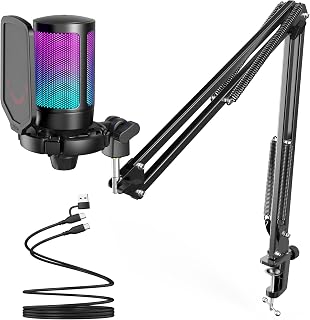
Gamers who stream from a desk setup benefit from the unidirectional polar pattern here, which isolates voice chat and commentary while rejecting keyboard clatter and fan noise from the sides. The included boom arm, shock mount, and pop filter mean you get a full broadcast rig without buying separate accessories, and the detachable USB-C cable keeps cross-platform switching between PC and console painless.
Pros
- All-in-one kit with boom arm, shock mount, and pop filter
- Works on PC, Mac, and PS4/PS5
- Touch mute button and volume knob within easy reach
- Reversible USB-C connector for easier cable routing
Cons
- RGB lighting cannot be disabled
- USB only, no XLR option for future upgrades
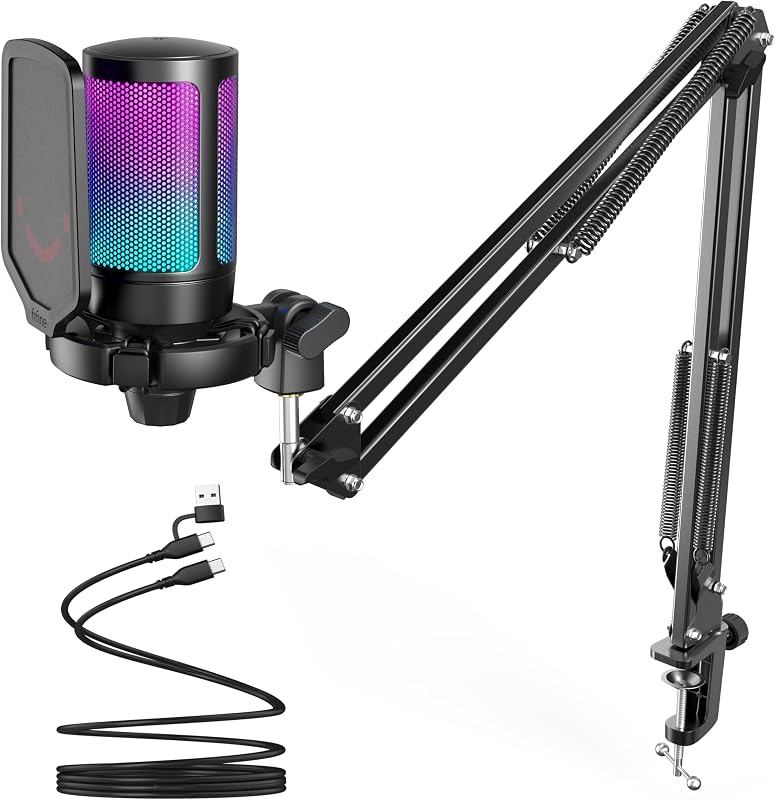
For gamers who want everything in one box without piecing together separate accessories, the A6T's kit approach stands out. It comes with a boom arm, shock mount, and pop filter already attached, which matters when you just want to start gaming with clear voice chat rather than assembling a studio setup. The cardioid condenser capsule is tuned to pick up your voice while suppressing background noise, a genuine upgrade over headset mics for squad communication in tactical or team-based games. The touch mute button and large volume knob stay within reach during fast-paced sessions, and the reversible USB-C connector is a small but real convenience for desks with awkward port access. It also works across PS4 and PS5 in addition to PC, which broadens its appeal beyond PC-only gaming setups. The shock mount cuts down on vibration noise from keyboard pounding or desk bumps, and the pop filter handles plosives without blocking your monitor view. RGB lighting adds visual flair but can't be turned off.
Audio Technology: USB Condenser Microphone, Cardioid Polar Pattern
Connectivity: USB (2.5m reversible USB-C to USB-A/C cable included)
Frequency Response: 60Hz to 18KHz
Signal-to-Noise Ratio: 70dB
Compatibility: Windows, Mac OS, PS4, PS5, Discord, Twitch, YouTube, podcasting software
Included Components: USB Condenser Microphone with Shock Mount, Boom Arm Stand with Adapter, C-clamp, Pop Filter, 8.2ft USB-C Cable, User Manual
Build Materials: Acrylonitrile Butadiene Styrene and Metal
Weight: 900g
Features: RGB Lighting with Automatic Gradient, Touch Mute Button, Volume Control Knob, Detachable Pop Filter, Shock Mount, 180-degree Boom Arm Rotation
Warranty: 1 Year Manufacturer Warranty
Best for console or PC gamers who want a complete, ready-to-use kit without buying a separate stand, mount, or filter. Particularly useful for team-based games where clear callouts matter. Skip it if you prefer a minimalist desk without RGB, since the lighting is always on, or if you need XLR flexibility for future upgrades.

Logitech Blue Yeti USB Condenser Microphone
For gamers who also record podcasts or voiceovers alongside matches, the four selectable pickup patterns let you switch between solo commentary and multi-person round table sessions without swapping hardware. A 120 dB sensitivity rating captures nuanced vocal detail, and Blue VO!CE processing gives streamers a way to shape their voice or add effects on the fly during a broadcast.
Pros
- Four pickup patterns cover solo and group gaming scenarios
- Onboard gain, mute, and monitoring controls for quick adjustments
- Zero-latency headphone monitoring during gameplay
- Durable metal build with flexible mounting options
Cons
- Requires Logitech G HUB software for Blue VO!CE effects
- Bulkier footprint than dedicated gaming mics
Gamers who stream, voice chat, or record gameplay commentary need a mic that can flex between different situations, and the Blue Yeti's four pickup patterns make that possible. Switch to cardioid for solo commentary that ignores your gaming setup's noise, flip to omnidirectional for couch co-op sessions with friends, or use stereo mode if you're capturing ambient sound alongside your voice. That kind of versatility matters more in gaming setups than in most other use cases, since one day you're recording a solo Let's Play and the next you're hosting a group podcast about last night's raid. The tri-capsule condenser array picks up detail well, and onboard controls for gain, pattern, and instant mute mean you can react mid-match without alt-tabbing into software. The zero-latency headphone monitoring lets you hear exactly what your teammates or viewers hear, which helps catch mic issues before they become a problem. The metal build holds up to a busy desk, and the included stand or boom arm compatibility gives you setup flexibility as your gaming station evolves.
Audio Specifications
Frequency Response: 20 Hz - 20 kHz
Audio Sensitivity: 120 dB
Signal-to-Noise Ratio: 100
Microphone Form Factor: Tri-Capsule Array
Polar Pattern: Cardioid, Omnidirectional, Bidirectional, Stereo
Connectivity and Compatibility
Connector Type: USB
Compatible Devices: PC and Mac
Channels: 2
Number of Items: 1
Physical Specifications
Dimensions: 4.92 x 4.72 x 11.61 inches
Weight: 3.5 pounds
Enclosure Material: Metal
Color: Blackout
Power Source: USB Corded
Included Components
Blue Yeti USB Microphone
Desktop Stand
USB Cable
Instructions
Warranty
2-Year Manufacturer Warranty
Buy this if you regularly switch between streaming, group gaming sessions, and voice-heavy content, and want one mic that adapts rather than owning several. Skip it if you only need basic voice chat clarity for matchmaking or don't plan to use multiple pickup patterns, since simpler gaming mics cover that need without the extra features. Also skip it if you'd rather avoid installing companion software for the voice effects.

Console gamers who chat with a co-op partner sitting nearby will appreciate the bidirectional polar pattern, which picks up two facing speakers instead of isolating just one. Tap-to-mute puts quick control right on the desktop mic body during heated matches, and PS4/PS5 compatibility means it plugs straight into a console setup without extra adapters or software fuss.
Pros
- PS4/PS5 compatibility alongside PC
- One-tap mute also disables RGB to prevent hot-mic moments
- Integrated gain knob for quick volume adjustments mid-game
- Includes shock mount, pop filter, and tripod stand
Cons
- RGB cycles automatically with no manual color selection
- Single cardioid pattern limits use beyond solo voice capture
For gamers who want their mic to double as part of their setup's aesthetic without sacrificing communication clarity, the FIFINE AmpliGame A6V hits that specific need. The cardioid pattern focuses on your voice while cutting down on keyboard clatter and controller noise, which matters during intense matches where every callout counts. The one-tap mute button is built for gaming pace, killing both the mic and RGB lighting instantly so you're never caught hot-mic during a rage moment. Its PS4/PS5 compatibility also makes it a rare pick for console gamers who stream or want better party chat audio, not just PC users. The gradient RGB cycles automatically, giving your desk visual flair without needing separate software running in the background while you game. The included shock mount and pop filter help keep desk-thumping and rage-quit moments from bleeding into your audio, and the detachable cable gives you routing flexibility around a crowded gaming setup.
Audio Performance: 192kHz sampling rate, 60Hz-18kHz frequency response, 70dB signal-to-noise ratio, cardioid polar pattern
Connectivity: USB 2.0 with 6.6ft detachable cable, compatible with PC, Mac, PS4, PS5, and major platforms including Discord, Twitch, OBS, and Streamlabs
Physical Specs: 6.93 x 7.05 x 3.78 inches, 500g weight, black finish with metal and plastic construction
Included Accessories: Shock mount with rubber bands, pop filter, adjustable metal tripod stand with rubber feet, USB-to-USB-C cable, user manual
Features: One-tap mute button with RGB indicator, intuitive gain knob, 7-color automatic gradient RGB lighting, plug-and-play installation
Warranty: 1-year manufacturer warranty

Competitive gamers who already run a mixer or audio interface get flexibility here thanks to dual XLR and USB connectivity, letting the mic scale from a simple plug-and-play console setup to a full streaming rig later. The unidirectional pattern keeps voice chat focused, while the built-in headphone jack with monitoring volume lets you check your own audio levels mid-match without alt-tabbing.
Pros
- Works on USB immediately, XLR later as gear grows
- Unidirectional pattern rejects keyboard and mouse noise
- Solid metal and ABS build with stable adjustable stand
- One-touch LED mute button for quick privacy
Cons
- RGB and function keys disable in XLR mode
- XLR cable and boom arm sold separately
If you're picking a gaming mic that needs to grow with your setup, the AM8 earns its spot through sheer flexibility. Start on USB for instant plug-and-play voice chat, complete with RGB flair and a mute button you can hit mid-match without alt-tabbing. When your gaming rig eventually pairs with a mixer or audio interface, switch to XLR and get studio-grade routing without buying a new mic. The unidirectional pickup pattern is the real win for gamers sharing a room with a loud PC or streaming setup, since it focuses on your voice over keyboard clatter and fan noise. Metal and ABS construction means it can handle being bumped during heated sessions, and the built-in stand threads mean no scrambling for adapters. For anyone outgrowing a headset mic but not ready to commit fully to XLR-only studio gear, this dual-connectivity approach removes the guesswork about which format to invest in.
Best for gamers who stream or record and want one mic that works now on USB and later on XLR as their setup expands. Also good if desk noise from mechanical keyboards or mouse clicks is a recurring issue in voice chat. Skip it if you only need basic USB voice chat and have no plans to ever touch an audio interface, since you'd be paying for XLR flexibility you won't use.
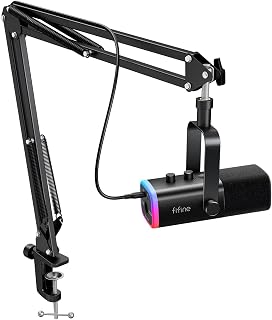
Streamers building out a dedicated gaming station will find the XLR/USB combo useful for growing into a mixer-based setup while still having simple USB plug-and-play for quick sessions. The unidirectional pickup pattern keeps focus on your voice during intense matches, and onboard headphone volume control lets you monitor game audio and mic input together without touching a separate device.
Pros
- Includes sturdy metal boom arm stand with elastic springs
- USB plug-and-play with no driver installation needed
- Cardioid pattern rejects background noise well
- C-clamp fits desks up to 2 inches thick
Cons
- XLR cable not included, must be bought separately
- RGB control is button-based, not software-managed
The AM8T targets the exact moment a gamer decides voice chat quality actually matters, whether that's for a competitive squad or a growing stream. It leans on the same dual USB/XLR setup as its sibling but ships with a proper boom arm stand, which matters for gaming desks already crowded with monitors and keyboards. The metal boom with elastic springs holds position without drifting during long sessions, and the C-clamp fits desks up to 2 inches thick, a small detail that saves a trip back to the store. On the audio side, the cardioid pattern and 80dB signal-to-noise ratio keep your voice clear while cutting down on the hum of gaming PCs and background chatter, which is the main complaint gamers have with built-in laptop mics or cheap headsets. USB gets you talking instantly on Windows or Mac, no drivers needed, while XLR is there once you're ready for a mixer. RGB lighting is controlled by physical buttons rather than software, keeping things simple for anyone who just wants to game, not tinker.
Audio Specifications: Frequency range 50Hz-16kHz, cardioid polar pattern, 80dB signal-to-noise ratio, -50dB sensitivity. Powered via USB for both connectivity and power on PC/Mac.
Physical Design: Black ABS plastic and metal construction, approximately 1 kg weight. Boom arm stand measures 12.6 x 4.72 x 1.97 inches with adjustable positioning and C-clamp. Accommodates desks up to 2 inches thick.
Connectivity and Ports: USB-C and XLR connectors, 3.5mm headphone jack with independent volume control, mute button with LED indicator, gain knob for level adjustment. Includes 8.2ft USB-C to USB cable, windscreen, and user manual.
Good fit for gamers who want a proper desk mic setup including a stand, not just the microphone itself, and who might eventually connect to a mixer or interface. Also suits anyone tired of cheap headset mics muddying voice chat. Skip it if you want deep software control over RGB effects, or if you already own a boom arm and don't need the included one.
Gaming Microphone Buying Guide
USB vs. XLR Connectivity
USB microphones are the go-to for anyone who wants to plug in and go. Options like the FIFINE AmpliGame A6T USB Gaming Microphone Kit and the FIFINE AmpliGame A6V USB Gaming Microphone are fully plug-and-play, compatible with Windows, Mac, PS4, and PS5 without any extra drivers or software.
XLR connectivity, on the other hand, is the path toward a more professional audio chain. The FIFINE AmpliGame AM8 USB/XLR Dynamic Microphone and the FIFINE AmpliGame AM8T XLR/USB Gaming Microphone give you both options, so you can start simple and upgrade to a mixer or audio interface when you’re ready.
Condenser vs. Dynamic Capsule
Condenser microphones are highly sensitive and pick up nuance and detail in your voice. They’re excellent in quieter environments where you want rich, full-bodied audio. The FIFINE AmpliGame A6V, which earned the globally recognized iF Design Award, uses a cardioid condenser capsule with a 192kHz sampling rate for naturally detailed reproduction.
Dynamic microphones are more forgiving in noisy spaces. They reject off-axis sound more aggressively, making them better suited for open rooms, apartments with ambient noise, or setups near mechanical keyboards. The AM8 and AM8T are both dynamic mics, which is a key reason they’ve earned consistent high ratings from streamers in real-world environments.
Pickup Pattern and Noise Rejection
Most gaming microphones use a cardioid polar pattern, which captures sound from directly in front of the mic while rejecting noise from the sides and rear. This is ideal for solo streaming and gaming communication. All five microphones reviewed here use cardioid patterns for focused voice pickup.
If you ever need to record two people simultaneously, a microphone with multiple pickup modes becomes valuable. The Logitech Creators Blue Yeti USB Microphone for PC stands apart here with four selectable patterns: cardioid, omni, bidirectional, and stereo. That level of flexibility is rare at this price point and makes it a strong pick for content creators doing interviews or dual commentary. Pair it with a solid stream deck and you have a capable broadcast setup.
Accessories and Desk Footprint
A boom arm is a game-changer for desk organization. The FIFINE AmpliGame A6T Kit and the FIFINE AmpliGame AM8T both include boom arms right in the box, so you can position the mic close to your mouth without it sitting in your eyeline. Shock mounts and pop filters are also bundled with several of these options, reducing mechanical vibration and plosive noise from the start.
For those with limited desk space, the FIFINE AmpliGame A6V includes a compact tripod stand with rubber feet and an adjustable thumbscrew, keeping the mic stable without requiring a clamp or arm mount. If your setup is already tight, that flexibility matters. For ideas on how other streamers organize their spaces, take a look at our roundup of the best ring lights for streaming and the best green screens for streaming.
Final Thoughts
Every microphone in this guide brings something distinct to the table, but two options stand out depending on your needs. If you want a versatile, feature-rich condenser mic with broad platform compatibility, the Logitech Creators Blue Yeti USB Microphone for PC is hard to beat with its four pickup patterns and Blue VO!CE software integration. For streamers who want a dynamic mic with room to grow into a professional XLR setup, the FIFINE AmpliGame AM8T XLR/USB Gaming Microphone delivers impressive audio clarity, a bundled boom arm, and clean RGB aesthetics in one complete package.
Frequently Asked Questions
What type of microphone is best for gaming and streaming?
For most gamers and streamers, a USB condenser or dynamic cardioid microphone is the ideal starting point. Condenser mics like the FIFINE AmpliGame A6V offer detailed, sensitive audio capture, while dynamic mics like the FIFINE AmpliGame AM8 are more forgiving in rooms with ambient noise. Your choice should come down to your recording environment and how much post-production work you want to do.
Do I need an audio interface for a gaming microphone?
No, not if you’re using a USB microphone. USB mics plug directly into your PC or console and work without any additional hardware. If you later want to use XLR for higher fidelity audio, you’ll need an audio interface or mixer. Microphones like the FIFINE AmpliGame AM8 and AM8T support both connections, so you have room to upgrade without replacing your mic entirely.
Is a condenser or dynamic mic better for a noisy room?
Dynamic microphones are generally better suited for noisy environments because they’re less sensitive to off-axis sounds and background noise. If you game in a shared space, have fans running, or use a mechanical keyboard, a dynamic mic will naturally reject more of that interference. Condenser mics shine in quieter, acoustically treated spaces where their sensitivity works in your favor.
What should I look for in a gaming microphone in 2026?
In 2026, the key factors remain audio clarity, ease of setup, and compatibility with your platform and streaming software. Look for a cardioid pickup pattern, onboard mute and gain controls, and ideally a shock mount to reduce desk vibrations. If you stream regularly, a boom arm gives you the flexibility to adjust mic positioning without rearranging your entire desk. For a complete streaming kit, pairing your mic with the right capture card for PS5 will take your production quality to the next level.
Common questions
What is the best USB microphone for gaming right now?
It depends on your budget and setup, since USB gaming mics range from simple desktop condensers to full kits. The Logitech Blue Yeti stands out for its multipattern condenser capsule array and 120 db sensitivity, giving flexibility for solo streaming or group recording. If you want RGB and a built in pop filter and shock mount, the FIFINE AmpliGame A6T kit covers that. Check each listing for the live price before buying.







Write Your Review
No reviews yet. Be the first to share your experience!