

Your Mac’s built-in FaceTime camera is fine for quick calls, but it starts to show its limits the moment you join a professional meeting, start streaming, or teach a class online. A dedicated external webcam gives you sharper video, cleaner audio, and the kind of image quality that actually makes a difference to the people on the other end. If you’re a remote worker, content creator, or student spending hours on Zoom and Google Meet, the right webcam is one of the most impactful upgrades you can make. Whether you use a MacBook, iMac, or Mac Mini, if you’re also looking for great gear for streamers, a quality webcam belongs at the top of that list.
We evaluated ten highly rated options to bring you this focused guide covering everything from budget-friendly 1080p cameras to premium 4K models with AI tracking. Whatever your setup or workflow, there’s a solid pick here for you.
Quick answer
This guide compares 10 picks, with TRAUSI 1080P Webcam with Noise-Canceling Mic, Auto ranked first. Logitech C920e HD 1080p Webcam with Dual Mics, Privacy holds the highest customer rating among them.
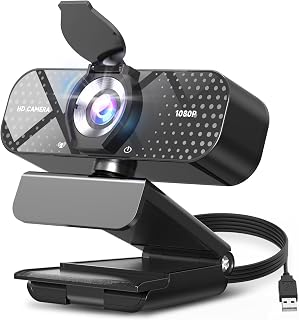
Mac users who just want reliable video calls without fuss will appreciate the wide-angle lens paired with automatic light correction, which keeps you visible in dim home offices without manual tweaking. The built-in noise-canceling microphone means you can skip a separate headset for Zoom or Teams, and the privacy shield adds peace of mind on a shared desk.
Pros
- True plug-and-play USB setup, no drivers needed on Mac
- Automatic light correction adapts to home office lighting
- Noise-canceling mic keeps voice clear over background noise
- Sliding privacy cover for quick, simple security
Cons
- Fixed focus can soften images at close range
- 30fps cap limits fluid motion for fast-paced streaming
Mac users shopping for a webcam usually just need something that plugs in and works without fuss, and the TRAUSI TW05 fits that brief. Since Macs rarely have great built-in cameras compared to their screens, a simple USB add-on with 1080P resolution and a wide-angle lens covers the basics well for FaceTime, Zoom, or Teams calls. Plug and play means no driver hunting on macOS, which is often where cheaper accessories stumble. The automatic light correction is especially useful for home offices with inconsistent lighting, adjusting the picture without you touching a settings menu. The built-in noise-canceling mic handles typical household or office noise, so your voice stays the focus of the call. A sliding privacy cover is a nice touch for anyone who keeps their Mac's camera pointed at a desk all day. For a Mac setup where you just want dependable video without extra software or configuration, this covers the essentials. It is not built for demanding streaming, but for everyday video calls and online teaching it holds up.
Video Quality: 1080P Full HD (1920x1080) at 30fps, 16:9 aspect ratio, AVI format capture
Lens: Wide-angle lens with 2.8-4mm focal length range and fixed focus design for consistent sharpness
Audio: Built-in noise-canceling microphone with AAC audio format support
Connectivity: USB 2.0, 3.0, 3.1, and OTG compatible, plug-and-play with no driver installation needed
Compatibility: Windows PC, Mac, laptops, desktops, plus Zoom, Skype, Teams, and streaming platforms
Physical: Compact minimalist design, privacy cover included, 5ft USB power cable, 90-day manufacturer warranty
Good for Mac owners who want an easy plug-and-play upgrade over a built-in camera for calls, teaching, or casual streaming, especially in rooms with variable lighting. Skip it if you want higher frame rates, manual focus, or 4K sharpness, or if you move around a lot during calls, since the fixed focus and 30fps cap can show softness or choppiness in those situations.

Mac users looking for sharp 4K footage without complexity will like that this webcam is driver-free, meaning it recognizes macOS instantly for USB-C connections without hunting for software. Auto focus keeps you sharp as you lean toward the screen, and the noise-canceling mics handle voice clarity for everyday video calls or recordings.
Pros
- Explicitly supports Mac OS X 10.6 and above
- 4K@30fps resolution for sharper detail
- Driver-free setup across multiple operating systems
- Lightweight and compact at 96.3 g
Cons
- No listed image stabilization feature
- Not water resistant, so keep it away from spills
Mac users often run into a compatibility gotcha when shopping for webcams, since not every model plays nicely with macOS. The UGREEN 4K webcam sidesteps that worry entirely, listing Mac OS X 10.6 and above right in its supported systems alongside Windows, Linux, and even iPad OS. That driver-free setup matters a lot on a Mac, where you want a camera that just mounts and works without hunting for software. At 4K and 30fps, it delivers sharper detail than the standard 1080p options common in this category, which is a real plus for anyone recording tutorials or doing polished video calls on a MacBook or iMac. The noise-canceling mics are a bonus for a laptop setup where built-in audio tends to pick up fan noise and keyboard clatter. It's also compact and light at just over 96 grams, so it won't feel like a burden clipped to a slim MacBook lid. For a Mac-focused buyer who wants higher resolution without fiddling with drivers, this is an easy recommendation.
Video Specifications: 4K 30fps and 1080p 60fps video modes, 8MP CMOS sensor, 70-degree viewing angle, 1.8 f-stop aperture, phase-detection autofocus with 0.33 to 16.4-foot range, MJPG video capture format, 16:9 aspect ratio, low-light correction with auto-exposure.
Audio Specifications: Dual built-in microphones, high-sensitivity design, 16.4-foot audio pickup range, MJPG audio format support.
Connectivity and Compatibility: USB 2.0 with Type A and USB C connectivity, driver-free plug-and-play installation. Compatible with Windows 7 and above, Mac OS X 10.6 and above, Linux, Android 5.0 and above, and iPad OS 17 and above. Works with Zoom, Skype, YouTube, FaceTime, Twitch, Facebook, Teams, Discord, OBS, and similar platforms.
Physical Specifications: 96.3 grams weight, compact minimalist grey design, built-in privacy cover, operating temperature range 32-113 degrees Fahrenheit.

Creators wanting cinema-grade clarity on their Mac setup will notice the Sony 1/2 inch sensor with PDAF, which locks focus quickly as you move during Facetime or YouTube recording. Dual noise reduction mics clean up audio without a separate mic, and the all-metal unibody design suits a permanent spot on a monitor for daily Teams calls.
Pros
- All-metal unibody build with a refined, professional look
- Genuine Sony 1/2-inch sensor for clear 4K video
- PDAF autofocus for stable footage during movement
- Magnetic privacy cover and USB-C adapter included
Cons
- Limited codec or frame rate options compared to high-end alternatives
- Built-in projector feature listed but not detailed in the write-up
The Acer 4K Webcam stands out for Mac setups where both video quality and desk aesthetics matter. Its all-metal unibody construction gives it a refined look that fits well with the design-forward feel of most Mac desk setups, and the genuine Sony 1/2-inch sensor delivers clear, true-to-life 4K video for FaceTime, Zoom, Teams, and Google Meet. The PDAF autofocus system keeps you sharp even while moving, which is useful for anyone doing presentations or demos on their Mac rather than just sitting still. Weighing only 50 grams, it's light enough to add to any Mac monitor or laptop without feeling like a bulky accessory. The magnetic privacy cover is a thoughtful inclusion for anyone conscious about camera privacy when the Mac isn't in active use. USB-C connectivity keeps setup simple, and the included USB-A to USB-C adapter means it can adapt to different Mac ports without extra purchases. For Mac users prioritizing build quality alongside video performance, this webcam covers both bases.
Sensor: Sony 1/2-inch CMOS, 4 MP effective still resolution
Video: UHD 4K resolution, 16:9 aspect ratio, MP4 capture format, Digital zoom, Auto focus with PDAF
Optics: 10-26mm focal length range, 1.8 f/1.0 aperture range, 83-degree viewing angle
Audio: Dual high-sensitivity digital microphones with noise reduction, captures from up to 2.5 meters
Connectivity: USB-C to USB-A (adapter included), compatible with Windows, Mac, and ChromeOS
Build: Aerospace-grade aluminum unibody, precision CNC machined, A-grade sandblasted matte finish, 57 grams, includes magnetic privacy cover with 12 magnets
Compatibility: Works with Teams, Zoom, Twitch, YouTube, Google Meet, FaceTime, and compatible with Nintendo Switch 2
Package Contents: 4K webcam, USB-C to USB-A cable, USB-A to USB-C adapter, webcam stand, user manual
Warranty: 1 year
Suited to Mac users who want a webcam that looks and feels premium on a desk, with reliable autofocus for calls involving movement or gestures. The magnetic privacy cover appeals to privacy-conscious users. Skip it if you need advanced codec or frame rate flexibility, since this model focuses on standard streaming and conferencing rather than high-end production features.

Mac users who want dependable 1080p video calling without 4K overhead will find the 30fps CMOS sensor with low light correction well suited to everyday Zoom or FaceTime sessions in average room lighting. Its compact pro webcam form factor clips easily onto a MacBook or external display, making it a straightforward daily driver.
Pros
- Adjustable clip mount fits varied monitor thicknesses
- Full 1080p with autofocus and light correction
- Dual microphones for natural stereo sound
- Physical privacy shutter included
Cons
- USB cable length may be limiting on larger desks
- 78-degree field of view is narrower than ultra-wide options
Mac setups vary widely, from a MacBook on a stand to a full desk with an external monitor, and the C920S is built to adapt to that variety. Its Cross-compatible USB connection and adjustable clip mount grip securely to monitors of different thicknesses and even curved displays, which covers most Mac desk configurations without needing extra hardware. For Mac users who rely on FaceTime, Zoom, or streaming apps, the 1080p sensor and glass lens give a noticeably sharper picture than a laptop's built-in camera, and the autofocus and light correction keep things looking clean without manual adjustment. The dual microphones add stereo sound that avoids the thin, tinny audio many built-in Mac mics produce. A physical privacy shutter is a nice touch for anyone who wants a hardware guarantee rather than trusting software indicators. At under 6 ounces, it won't stress a MacBook screen or an external display arm. For a Mac setup where reliable video and audio quality matter more than extra frills, this fits the everyday professional or streaming need well.
Video Performance: 1080p Full HD at 30fps, H.264 codec, 78-degree viewing angle, autofocus with low-light correction
Audio: Dual stereo microphones, supports WAV, MP3, and AAC formats
Optics: Glass lens, f/2.8 aperture, 1mm to 50mm focal length range, smooth zoom capability
Connectivity: USB 2.0 compatible, plug-and-play setup
Physical: 5.4in x 3.1in x 5.4in, 5.76 ounces, adjustable clip mount, privacy shutter included
Compatibility: Windows, Mac, Linux, and all major video platforms
Warranty: 1-year limited hardware warranty from Logitech

Logitech C920e HD 1080p Webcam with Dual Mics
For Mac users setting up a consistent home office camera, the adjustable design lets you angle the lens precisely on a monitor or laptop lid, which matters most for maintaining eye level framing during long meetings. Its certified compatibility with Zoom and Teams means fewer connection hiccups when joining calls from macOS.
Pros
- Omnidirectional mics pick up voice from up to a meter away
- 1080p HD with autofocus and automatic light correction
- Adjustable clip plus 1/4 inch tripod thread for mounting
- Physical privacy cover for at-a-glance status
Cons
- Fixed field of view limits group or wide-angle shots
- Autofocus can hesitate briefly in very low light
For Mac users whose work runs through video calls all day, whether client meetings or team standups, the C920e is built around exactly that scenario. Its dual omnidirectional microphones pick up voice clearly from up to a meter away, which suits a Mac laptop setup where you're not always sitting right up against the camera. The 1080p HD video with autofocus and automatic light correction gives a noticeably better result than a MacBook's built-in camera, especially in mixed home lighting. The adjustable clip attaches securely to a laptop lid or an external monitor, which covers most Mac configurations, and the 1/4 inch tripod thread is there if you'd rather mount it on a stand for a cleaner desk setup. The physical privacy cover lets you confirm at a glance that the lens is covered, a small but useful detail for anyone stepping away from their Mac during the workday. It's a straightforward, dependable pick for Mac users whose priority is clear video and voice pickup during meetings rather than extra bells and whistles.
Video: 1080p FHD resolution, 78-degree fixed field of view, 3MP effective still resolution, 16:9 aspect ratio, digital image stabilization, auto-focus with automatic light correction
Audio: Two integrated omnidirectional microphones, captures audio from up to 1 meter away, supports AAC and MP3 audio formats
Connectivity: USB connection, compatible with Windows 8 or later, macOS 10.10 or later, and ChromeOS including Windows 11
Physical: Compact form factor, 2.8 inches deep by 3.7 inches wide by 1.7 inches high, weighs 5.71 ounces, includes adjustable mounting clip and 1/4 inch tripod thread, physical privacy cover included
Certifications: Zoom certified, TAA compliant, works with Microsoft Teams, Google Meet, Cisco Webex, and other popular video calling platforms
Suited to remote workers and hybrid team members on Mac who spend most of their day in video meetings and want reliable audio pickup without a headset. The tripod thread appeals to anyone wanting a cleaner desk mount. Skip it if you need a wide field of view for group presentations or built-in audio output, since sound still routes through your Mac's speakers or headphones.

Streamers and hybrid workers on Mac who want their setup to do more than sit still will value the AI tracking and gesture control, which let the camera follow you around a desk or standing area during calls. Paired with a 1/2 inch sensor and HDR, it's built for creators layering DeskView or whiteboard modes into presentations.
Pros
- 4K resolution with 1/2 inch sensor for sharp, detailed video
- AI tracking with physical pan and tilt keeps you framed
- DeskView and Whiteboard modes add presentation flexibility
- Gesture control for hands-free tracking and zoom
Cons
- Requires a 9V battery for full functionality
- Not compatible with ARM-based Windows systems or Windows Hello
Mac users who want their video calls or streams to look genuinely professional will find the Insta360 Link 2 worth the upgrade over a standard USB webcam. Its 1/2 inch sensor and 4K resolution deliver image clarity far beyond typical webcams, which matters if you are presenting, recording tutorials, or streaming on a Mac setup where visual quality is part of the impression you make. The AI tracking with physical pan and tilt keeps you centered automatically, useful if you move around while presenting or teaching from your desk. The noise-canceling mic and Phase Detection Auto Focus keep both audio and video sharp without manual adjustment. The DeskView and Whiteboard modes add flexibility for presentations, and gesture control lets you manage tracking and zoom hands-free. The compact graphite black design and magnetic mount fit neatly into a modern desk setup. This is a webcam for people who treat their camera as a serious part of their workflow rather than an afterthought, and it suits Mac users who want output quality closer to dedicated broadcast gear.
Video and Image Quality: 4K resolution, 8MP still images, 1/2 inch CMOS sensor with HDR and exceptional low-light performance capture professional-grade video in any lighting condition.
AI Tracking and Framing: Physical PTZ mechanism automatically pans, tilts, and frames your movements. Gesture control and smartphone app enable intuitive remote operation for hands-free adjustments.
Audio Excellence: Advanced AI noise-canceling microphone filters unwanted background sounds, delivering broadcast-quality audio for streaming and conferencing without external equipment.
Focus and Clarity: Phase Detection Auto Focus provides instant sharp focus for every frame. Natural bokeh effect creates DSLR-like depth of field from your desk camera.
Software and Modes: Free Link Controller software unlocks advanced customization, DeskView mode for overhead angles, and Whiteboard mode for interactive presentations and teaching.
Compatibility: Works seamlessly with Zoom, Microsoft Teams, Twitch, and all major video conferencing and streaming platforms on Windows and Mac systems.
Best for Mac users who stream, present, or record regularly and want 4K clarity, auto-tracking, and studio-style features like DeskView or Whiteboard mode. Skip it if you just need casual video calls, since it is more setup than a basic webcam requires, or if you rely on Windows Hello Face Recognition or an ARM-based Windows machine elsewhere, as compatibility does not extend there.

Anyone recording tutorials or hosting video calls from a Mac desk setup will benefit from auto framing, which keeps you centered as you move without touching the camera. The 1/2 inch sensor and HDR support handle mixed lighting from windows or desk lamps, while gesture control lets you switch views hands free mid meeting.
Pros
- True 4K with HDR and strong low-light performance
- Auto-framing keeps you centered without adjustments
- Effective AI noise-canceling microphone
- Compact design with gesture control convenience
Cons
- Requires USB-C port or adapter
- No support for Windows Hello or ARM-based Windows (irrelevant for Mac but worth knowing)
Mac setups often mean juggling a laptop's mediocre built-in camera or a monitor with none at all, and the Insta360 Link 2C addresses that gap well. Its 1/2-inch sensor and true 4K capture with HDR give a noticeable step up for anyone doing Mac based video calls, and the auto-framing feature is especially useful if you move around during calls or presentations, since it keeps you centered without you touching a mouse. The AI noise-canceling mic handles the usual home office noise, typing, background chatter, so your audio stays clean on FaceTime, Zoom, or Teams. Gesture control and the companion app mean you can adjust camera behavior without leaving your seat, a nice touch for a Mac desk setup where minimal cable clutter matters. The compact form factor sits neatly on a monitor or laptop lid. Just confirm your Mac has a free USB-C port, since that's how this camera connects, and note that some Windows-specific features like Windows Hello simply won't apply to your Mac use anyway.
Video Quality: 4K resolution at 16:9 aspect ratio with HDR support and low-light performance. Phase Detection Auto Focus ensures consistently sharp focus. Natural bokeh effect replicates DSLR depth of field.
Audio: AI-powered noise-canceling microphone with support for AAC, MP3, and PCM formats. Advanced algorithms filter unwanted background noise for professional-grade communication.
Control & Compatibility: Compatible with Zoom, Microsoft Teams, Twitch, and major video platforms. Gesture control, smartphone app, and remote adjustment via Link Controller software. USB connectivity with included USB-C cable and A adapter.
Hardware: 1/2-inch CMOS sensor. 108cm maximum focal length with 1.8mm maximum aperture. Includes magnetic mount, recognition markers, and 1-year warranty. Compact form factor designed for desktop and monitor placement.
Good for Mac users who want automated framing and strong low-light 4K quality for calls, streaming, or content creation without manual adjustments. Skip it if you're on an older Mac without USB-C availability or an adapter on hand, or if you only need basic webcam function for occasional calls. Streamers and remote professionals on Mac who value hands-free adjustments and clean audio will get the most out of it.

Professionals who livestream or run back to back meetings on a Mac will appreciate dynamic image stabilization, which keeps footage steady even if your desk shifts slightly during a call. Its lightweight build and low light handling make it easy to mount on a monitor and forget about, ideal for daily standups or streaming sessions.
Pros
- Dual USB-A and USB-C connectivity for broad Mac compatibility
- Lightweight and compact at just 2.22 ounces
- Dynamic image stabilization for steadier footage
- Strong low-light performance for inconsistent home lighting
Cons
- Compact size may limit mounting options on very large displays
- No confirmation of extended field-of-view presets for this version
For Mac users assembling a serious video setup, the Logitech Brio Ultra brings 4K resolution with the flexibility of both USB-A and USB-C connectivity, so it adapts easily to whichever Mac you're running, older or newer. Its lightweight, compact design keeps a clean look on a Mac display without adding bulk, and the dynamic image stabilization helps keep footage steady if your desk setup isn't perfectly still. The low-light special feature is a real advantage for home offices with inconsistent lighting, a common issue for Mac users working from varied spaces throughout the day. At just over two ounces, it's an easy webcam to mount, unmount, or travel with if you switch between a Mac desktop and a MacBook. The compact dimensions mean it won't dominate your monitor bezel or webcam shelf. For anyone who wants dependable 4K video quality on macOS without worrying about connector compatibility, this webcam removes a common pain point right out of the box.
Ideal for Mac users who want flexible connectivity between USB-A and USB-C without needing extra adapters, plus solid low-light handling for home offices. Best for people who value a lightweight, portable camera they can move between Mac devices easily. Skip it if you need advanced field-of-view presets or multiple mic pickup options, since those aren't confirmed here for this listing.
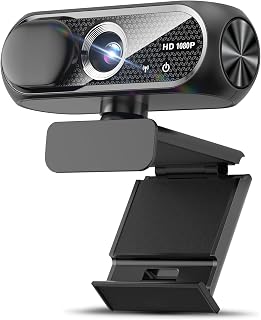
For Mac owners prioritizing simple video calls over bells and whistles, the CMOS sensor combined with low light special features handles typical indoor lighting without extra accessories. The included privacy cover suits anyone working from a shared space, and plug and play USB connectivity means no driver hunting on macOS before your first Skype call.
Pros
- Compact design sits neatly on any monitor
- Automatic light correction handles varied lighting well
- Noise-canceling mic keeps voice clear in shared spaces
- Simple plug-and-play setup with no technical skill needed
Cons
- Fixed focus limits control at variable distances
- Can be tricky to mount securely on curved laptop screens
For Mac users looking to replace a middling built-in camera without spending much, this webcam offers a straightforward path. It is a compact, plug-and-play USB device, which matters on macOS where driver compatibility can be a headache with lesser-known brands. The 1080p CMOS sensor and wide-angle lens produce sharp video with a natural field of view for calls, and the automatic light correction adjusts smoothly whether your workspace is dim or sunlit, a common issue for home setups. The noise-canceling microphone keeps your voice intelligible even with some household activity in the background. It sits neatly atop a monitor thanks to its compact form factor, and the privacy cover adds a layer of reassurance when the camera is not in use. This is a webcam built around reliability rather than extra features, which suits anyone who just wants their Mac video calls to look and sound clean. It is not aimed at gamers or fast-action streamers, but for everyday professional or classroom use on a Mac, it does the job without complication.
Video Capture: 1080p Full HD at 30fps, 1920x1080 resolution, 16:9 aspect ratio, AVI format
Lens and Focus: Wide-angle lens with fixed focus, 1-2 meter focal length range
Sensor: CMOS photo sensor for reliable low-light performance
Audio: Built-in noise-canceling microphone, supports AAC and MP3 formats
Connectivity: USB 2.0, 3.0, and 3.1 compatible, plus OTG support. Includes 5-foot USB power cable. No additional drivers required.
Compatibility: Windows PC, Mac, Linux, tablets, and smartphones. Works with Zoom, Skype, and all major video conferencing platforms
Design: Compact form factor, black color, includes privacy cover slide
Warranty: 90-day manufacturer warranty

Pros
- Excellent value for the price with professional features typically found in more expensive models
- Noise-canceling microphone significantly improves audio clarity in busy environments
- Auto light correction ensures consistent video quality across different lighting situations
- Wide-angle lens captures more of your workspace, ideal for group calls and streaming
- Includes accessories like privacy cover and tripod mount for versatile setup options
Cons
- Fixed focus may struggle with very close-up or extreme distance shots compared to autofocus models
- 30fps frame rate is adequate for video calls but may feel less smooth for fast-action gaming
- No 4K option limits future-proofing if higher resolution becomes important later
The Gohero TW-07 is a compact 1080P webcam designed for remote workers, online educators, content creators, and anyone needing reliable video communication on a budget. With its sub-$20 price tag and feature-rich specifications, it punches well above its weight in the entry-level webcam market.
The standout features are its noise-canceling microphone and automatic light correction technology. The microphone actively filters background noise, making your voice clear during webinars and video calls even in less-than-ideal environments. The auto light correction dynamically adjusts brightness and color balance, ensuring you look presentable whether you're in a dimly lit room or bright sunlight. The 1080P resolution with wide-angle lens captures sharp, vibrant video at 30 frames per second, suitable for Zoom calls, Skype meetings, and casual streaming.
Build quality is solid for the price. The webcam has a compact form factor with a privacy cover slider included, addressing growing concerns about webcam security. The plug-and-play setup requires no driver installation and works immediately with Windows, Mac, and various USB standards. The 5-foot cable provides adequate reach for most desk setups.
The main limitation is the fixed focus design, which works well for typical video call distances but may not satisfy users wanting macro or extreme zoom capabilities. Additionally, the 30fps frame rate is smooth enough for communication but noticeably less fluid than 60fps models for fast-action scenarios.
Overall, the Gohero TW-07 is a smart choice for budget-conscious users prioritizing audio and lighting quality. It delivers practical performance for remote work and learning without unnecessary complexity, backed by a solid warranty and a strong user rating.
Video Performance: 1080P Full HD resolution, 30fps frame rate, 16:9 aspect ratio, MP4 format
Optics: Wide-angle lens, fixed focus, 35-105mm focal length, 5.6mm maximum aperture
Audio: Noise-canceling built-in microphone, AAC audio format
Connectivity: USB 2.0, 3.0, 3.1, and OTG compatible, includes 5ft USB cable
Sensor: CMOS photo sensor technology
Compatibility: Windows PC, Mac, Linux, and platforms like Zoom, Skype, Teams
Included Accessories: Privacy cover, tripod mount, USB cable, user manual
Warranty: 1 Year manufacturer warranty
Remote Workers: If you're frequently on video calls and need reliable audio and video without fuss, this webcam checks all the boxes at an unbeatable price.
Online Educators and Trainers: The wide-angle lens and noise-canceling mic make this ideal for teaching, with auto light correction helping you look professional regardless of classroom lighting.
Content Creators on a Budget: Aspiring YouTubers, Twitch streamers, and podcasters can use this as an affordable starting point before investing in premium equipment.
Budget-Conscious Home Office Setups: If your built-in laptop webcam isn't cutting it but you don't want to spend $100+, this delivers solid performance at a fraction of the cost.
Who Might Want to Look Elsewhere: Gaming enthusiasts seeking 60fps performance or professionals requiring 4K resolution should consider higher-end models, though this remains excellent for casual gaming.
What to Look for When Buying a Webcam for Mac
Resolution and Frame Rate
Resolution is the most visible difference between webcams. At the 1080p end, models like the TRAUSI 1080P FHD Webcam with Noise-Canceling Mic and the Logitech C920S HD Pro Webcam Full 1080p/30fps deliver crisp, clear video that is a genuine step up from any MacBook’s built-in camera. For content creators, streamers, or anyone whose audience sees them on a large screen, stepping up to 4K is worth it.
The UGREEN 4K@30fps Webcam for PC Ultra HD Web Camera and the Acer 4K Webcam for PC/Mac with All-Metal Unibody both use large sensors that capture significantly more detail. Keep in mind that 4K playback also demands that your Mac and conferencing software support it, otherwise the camera will intelligently drop to 1080p.
Autofocus and Low-Light Performance
Phase Detection Autofocus (PDAF) is the technology to look for if you move around during calls or if your background is cluttered. The Insta360 Link 2 – PTZ 4K Webcam for PC/Mac combines PDAF with physical pan-and-tilt movement and AI tracking, so it physically follows you around the room. That level of responsiveness is unmatched in this category.
Low-light correction is equally important if you work in a home office without great natural light. The Logitech C920e HD 1080p Mic Enabled Webcam uses automatic light correction, while the Acer model’s Sony 1/2″ sensor handles dim environments with impressive clarity. Even the budget-friendly 1080P HD Webcam with Microphone includes automatic light correction technology, making it surprisingly capable for its category. If you’re building a home office that handles everything, it pairs well with the kinds of accessories covered in our guide to gifts for tech lovers.
Built-in Microphone Quality
Most Mac users on video calls rely on the webcam’s microphone rather than a separate audio setup. The difference between a basic mic and a noise-canceling one is immediately noticeable to everyone in a meeting. The Insta360 Link 2C – 4K Webcam for PC/Mac uses AI-powered noise-canceling algorithms that filter out keyboard clicks, fans, and ambient room noise in real time.
For a more affordable option with solid audio, the Gohero Full HD 1080P Video Webcam includes a noise-canceling microphone that keeps your voice front and center during calls. The Logitech Brio Ultra 4K HD Webcam for Streaming goes further with dual omnidirectional mics that capture clear audio from over a meter away. If you’re investing in a streaming-focused setup, this kind of audio quality matters just as much as the video. Check out our roundup of streaming gear recommendations for more ideas.
Privacy Features and macOS Compatibility
Privacy covers have become a standard feature, and for good reason. Options like the Acer 4K Webcam for PC/Mac with All-Metal Unibody use a magnetic cover with a strong snap-close design, while the UGREEN model includes a built-in sliding privacy shutter. These small features add meaningful peace of mind when your camera sits on your desk all day.
Every webcam in this guide is confirmed to work with macOS via plug-and-play USB connectivity, with no drivers required. That matters for Mac users because driver-dependent cameras often cause compatibility headaches after macOS updates. If you’re pairing your new webcam with a keyboard and mouse upgrade, our keyboard and mouse deals guide is a natural next stop. For those building out a full Mac-friendly home office on a tighter budget, our list of affordable tech gifts under a budget is worth a look too.
Final Thoughts
There’s a strong webcam here for every kind of Mac user. For a no-fuss upgrade that delivers sharp 1080p video and clean audio right out of the box, the Logitech C920S HD Pro Webcam Full 1080p/30fps remains one of the most reliable and widely validated choices available. If you want the full premium experience with AI tracking, physical pan-and-tilt, and stunning 4K clarity, the Insta360 Link 2 – PTZ 4K Webcam for PC/Mac is in a class of its own and well worth the investment for streamers and creators who spend serious time on camera.
Frequently Asked Questions
Do external webcams work with macOS without installing drivers?
Yes, all the webcams in this guide connect via USB and are recognized by macOS instantly as plug-and-play devices. You don’t need to install any drivers or third-party software to start a video call. This is especially important for Mac users since macOS updates can sometimes break driver-dependent hardware.
Is a 4K webcam worth it for Mac video calls in 2026?
It depends on how you use it. For standard Zoom or Teams calls, a 1080p webcam like the Logitech C920e delivers excellent results and most platforms cap stream quality well below 4K anyway. Where 4K genuinely shines is in recording, streaming to an audience, or when you need to crop and zoom in post without losing detail. If those use cases apply to you, the UGREEN or Acer 4K models offer outstanding value.
What is the best budget webcam for Mac?
For budget-conscious buyers, the TRAUSI 1080P FHD Webcam with Noise-Canceling Mic and the 1080P HD Webcam with Microphone both offer 1080p resolution, noise-canceling microphones, privacy covers, and automatic light correction at a very accessible price. Both are plug-and-play and work seamlessly with macOS, Zoom, and Teams. They’re solid starter webcams that genuinely outperform any Mac’s built-in camera.
Can I use a webcam with FaceTime on Mac?
Absolutely. Any USB webcam that macOS recognizes will work with FaceTime, as well as Zoom, Google Meet, Microsoft Teams, Skype, and streaming platforms like Twitch. You simply select the external camera as your video source in the app’s settings. The process takes about ten seconds and works reliably across all the models reviewed here. If you’re setting up a full communication or gaming station, our guide to top gifts for gamers covers other peripherals worth considering alongside a new webcam.






Write Your Review
No reviews yet. Be the first to share your experience!