

You’ve got the gameplay, the commentary, and the audience waiting. The only thing standing between you and a polished stream is a reliable capture card that works seamlessly with your Xbox. Whether you’re on an Xbox Series X/S or an older Xbox One, the right device will pull your footage cleanly into OBS, Streamlabs, or any other broadcasting software without lag or signal loss.
This guide covers seven of the top-rated options available right now, ranging from premium Elgato hardware to budget-friendly plug-and-play alternatives. If you’re also building out the rest of your streaming setup, check out our roundup of the best Stream Deck controllers to take your broadcast workflow even further.
Quick answer
This guide compares 7 picks, with Elgato HD60 S+ 4K60 HDR10 External Capture Card ranked first.

Elgato HD60 S+ 4K60 HDR10 External Capture Card
For Xbox Series X/S owners chasing HDR gameplay footage, the 4K60 HDR10 zero-lag passthrough matters most since it lets you monitor the exact image your console outputs while capturing, with instant gameview eliminating the delay that throws off reaction-based play. Flashback recording also means missed clips from a great match aren't gone for good.
Pros
- 4K60 HDR10 zero-lag passthrough for console viewing
- 1080p60 HDR10 capture and streaming
- Works across the full Xbox Series and Xbox One lineup
- Instant Gameview and flashback recording included
Cons
- 4K is passthrough only, not full 4K capture resolution
- Requires a dedicated HDMI connection, no USB-only setup
If your Xbox Series X or S is the centerpiece of your setup, the HD60 S+ is built to match its output. It handles 4K60 HDR10 zero-lag passthrough, so you can view your Xbox on a big screen in full quality while capturing separately, plus 1080p60 HDR10 recording and streaming for the actual footage you push to OBS, Twitch, or YouTube. Instant Gameview cuts down on the delay between hitting record and seeing your gameplay, which matters when you are trying to catch a clip before a match ends. It connects over HDMI and works across the whole Xbox lineup, from Series X/S down to Xbox One X/S, so it holds up even if you upgrade consoles later. Unlimited capture and flashback recording round it out for anyone who wants a card that keeps working quietly in the background without you babysitting settings. For Xbox owners who care about HDR and want console-shelf simplicity, this is one of the more complete options on the list.
Video Capture: 1080p60 HDR10, 4K30 in certain configurations
Passthrough: 4K60 HDR10 with zero-lag technology
Connectivity: HDMI 2.0 input, USB 3.0 to computer, HDMI passthrough output
Supported Platforms: Windows 10+, macOS, M1 Macs
Compatible Devices: PS5, PS4 Pro, Xbox Series X/S, Xbox One X/S, Nintendo Switch, PC, and any HDMI-capable device
System Requirements: Dual-core processor (Intel or AMD), 4GB RAM, integrated graphics or better, DirectX 11, 500MB storage
Included Accessories: USB 3.0 cable, HDMI 2.0 cable
Warranty: 2-year manufacturer coverage
Best for Xbox streamers who want HDR10 capture and 4K passthrough without juggling extra boxes. Good fit if you already use OBS or similar software and want low-latency monitoring while recording. Skip it if you only need basic 1080p capture on a tight setup, or if your PC lacks the minimum dual-core processor and 4 GB RAM, since you would be paying for features you will not use.

Xbox players who split time across a Switch 2 or mobile devices benefit from the USB Type C and USB 3.0 dual connectivity here, since the 5 Gbps transfer speed keeps 1080p60 footage smooth without dropped frames. The ultra low latency spec also helps when you're monitoring live Xbox gameplay through a laptop instead of a dedicated PC rig.
Pros
- Works with Xbox, PS4/PS5, Switch, and more
- USB 3.0 and USB-C output at up to 5 Gbps
- Runs on Windows, macOS, and Linux
- Compact and lightweight at 50 grams
Cons
- Capped at 1080p60 or 2K30, no true 4K capture
- No HDR support mentioned in specs
For Xbox owners who want an affordable, no-frills way to get their gameplay onto a laptop or PC, the UGREEN capture card handles the basics without much fuss. It takes HDMI input, which covers Xbox Series X and other Xbox consoles, and outputs over USB 3.0 or USB Type C at up to 5 Gbps, so footage transfers with minimal lag. Capture resolution tops out at 1080p 60fps or 2K at 30Hz, which is enough for casual streaming, Discord calls, or saving clips rather than professional broadcast work. It is also genuinely cross-platform, running on Windows, macOS, and Linux, and it extends beyond Xbox to PS4, PS5, Switch, and even Meta Quest, so it is useful if your household has more than one console. At 50 grams it is light enough to toss in a bag between gaming sessions. If your Xbox capture needs are casual rather than competitive, this fits without asking much of your system.
Gaming Consoles: Fully compatible with Nintendo Switch, Switch 2, PlayStation 4, PS4 Pro, PS5, Xbox Series X, and Meta Quest 3 and Quest 2. Note: PS5 and PS4 require HDCP to be disabled in settings. Switch and Xbox work seamlessly without additional configuration.
Computers and Devices: Works on Windows 11, 10, 8.1, and 7, macOS (including Apple Silicon M-series chips), Linux, Android phones and tablets, and iPads running iOS 17 or later. Both USB-A and USB-C connections supported for maximum flexibility.
Cameras and Professional Equipment: Compatible with Canon, DJI drones (including DJI RC 2), GoPro, and other HDMI-output devices. Ideal for converting HDMI camera output to USB for streaming and recording on computers and tablets.
Software Support: OBS Studio, XSplit, Potplayer, QuickTime Player, VLC, and all standard video capture software recognize the device immediately. No driver installation needed on any supported operating system.
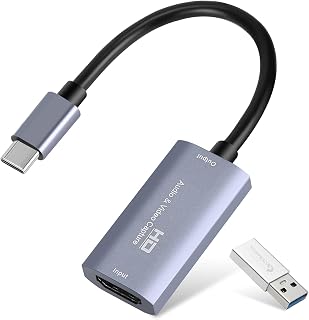
This one stands out for Xbox users who also stream from PlayStation, Switch, or Steam Deck, since its platform list covers nearly every console alongside Xbox. The 4K30 HDMI input paired with 1080p60 video capture and a compact plug-and-play design makes it easy to move between systems without reconfiguring anything.
Pros
- Plug-and-play setup with no complicated software
- USB 3.0 Type-A and Type-C options for flexible connections
- Works across Xbox, PS4, PS5, Switch, and more
- Supports both Windows and Mac
Cons
- Capture tops out at 1080p60, not true 4K capture
- Needs USB 3.0 for stable performance
If you're building an Xbox streaming setup and don't want to fuss with drivers or menus, this one earns its spot through sheer simplicity. It takes a 4K30 HDMI signal from your console and passes it through as 1080p60 capture over USB 3.0, which lines up well with what most Xbox streamers actually need for smooth Twitch or YouTube output. The USB 3.0 Type-C and Type-A options mean it plays nice with a wider range of laptops and desktops than most budget cards, and since it's plug-and-play, you're not hunting for extra software just to get a picture on screen. It also stretches beyond Xbox duty, working with Switch, PS4, PS5, and even mobile devices, so if your capture needs change down the road, the card comes along for the ride. For anyone prioritizing an easy setup over deep customization, it's a solid fit.
Video Capture: 1080P 60FPS output, 4K 30Hz input, 2K 30FPS support
Interfaces: HDMI input, USB 3.0 Type-A and Type-C outputs
Compatibility: Windows 10/11, macOS 10.15+, Linux, Android, iOS
Supported Devices: PS4, PS5, Xbox, Nintendo Switch, gaming PCs, laptops, cameras, DVRs, and more
Physical: 7.48 x 0.98 x 0.39 inches, 30 grams
Package Contents: Capture card, USB 3.0 to USB-C adapter, user manual
System Requirements: Windows 10/11 64-bit or macOS 10.15+, Intel Core i3 or AMD Ryzen 3 equivalent processor, 4GB RAM minimum, USB 3.0 port recommended

The 4K HDMI loop-out on this card lets Xbox streamers send a clean 4K signal to a monitor while capturing a 1080p60 stream separately, which is handy for checking gameplay clarity in real time. A built-in 3.5mm microphone input also simplifies adding commentary without a separate audio interface.
Pros
- 4K HDMI loop-out for simultaneous monitor viewing
- Dedicated 3.5mm microphone input
- Supports Windows, Mac, and Linux
- Compact design works with cameras and consoles alike
Cons
- Xbox isn't explicitly listed under supported platforms
- Capture resolution limited to 1080p
This capture card stands out for Xbox streamers who also want to bring an external camera into the mix. Alongside standard 4K HDMI input and 1080p60 USB 3.0 capture, it includes a 3.5mm microphone input for direct audio and a 4K HDMI loop-out so you can send the signal to a monitor or TV while still capturing it for your stream. That loop-out is genuinely useful if you're streaming Xbox gameplay and want to watch on a bigger screen without a separate splitter. It's built for USB 3.0 systems running Windows, Mac, or Linux, which gives it a bit more OS flexibility than most competitors. It's not the card for squeezing out every extra feature, but for Xbox streamers who want clean HDMI passthrough, dedicated mic input, and simultaneous monitor viewing, it covers the essentials without complication.
Hardware Interface: USB 3.0
Video Capture Resolution: 1080P at 60FPS
Video Input: 4K HDMI support with 1080P output
Audio Input: 3.5mm microphone jack (TRS standard)
Compatible Operating Systems: Windows, Mac OS, Linux
Compatible Platforms: Nintendo Switch, PS4, PS5, Xbox One, Xbox 360, DSLR cameras, streaming devices
Special Features: HDMI loop-out, plug-and-play design, automatic input detection
Physical Weight: 0.3 kg
System Requirements: Computer with USB 3.0 port and compatible Windows, Mac OS, or Linux operating system
A good match for Xbox streamers who want HDMI loop-out for a second display and a dedicated mic input for cleaner commentary audio. Linux users also get rare native support here. Skip it if you don't need loop-out functionality or a physical mic port, since simpler cards may suit you just as well, and note it doesn't list explicit Xbox platform support the way some competitors do.
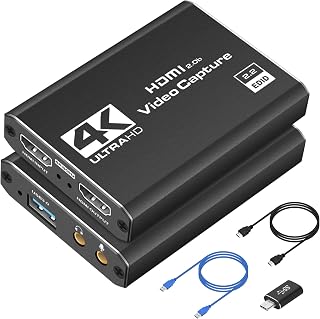
Xbox streamers who want real-time visual feedback while recording will find the 4K HDMI real-time preview useful for checking framing and HDR color before going live. Combined with 1080p60fps capture and built-in audio and video recording, it covers the basics of a straightforward Xbox streaming setup without extra complexity.
Pros
- 4K HDMI real-time preview while recording
- Combined audio and video capture in one device
- Plug and play on Windows and Mac
- Works with PS5, PS4, Switch, and Xbox
Cons
- Recording resolution caps at 1080p60, not full 4K
- Requires a USB 3.0 port for proper function
For Xbox owners who want a no-drama way to record gameplay or stream sessions, this card focuses on doing one job cleanly: pulling in 4K HDMI and outputting steady 1080p60 footage over USB 3.0. The 4K HDMI real-time preview is a nice touch if you like monitoring your feed while you play, and combined audio and video recording means you're not juggling separate capture paths for sound. It's built to be plug and play, so setup on either Windows or Mac shouldn't require much troubleshooting. While it lists compatibility with PS5, PS4, Switch, and PC too, Xbox streamers get the same reliable core experience: consistent 1080p60 output without the card trying to do more than it can handle. If your goal is dependable capture rather than a feature-packed device, this fits that brief well.
Video Capture: 1080P at 60FPS, 4K HDMI input with real-time preview
Connectivity: USB 3.0 interface, HDMI input/output, YUY2 video format support
Compatibility: Windows, macOS, PlayStation 4/5, Xbox, Nintendo Switch, DSLR cameras, and other HDMI-enabled devices
Software Support: OBS Studio, Streamlabs, XSplit, and compatible streaming platforms
System Requirements: USB 3.0 port required; works with Windows and Mac systems
Physical: Weighs 0.21 kg, dimensions 1 x 1 x 2.7 inches, includes HDMI cable, USB extension, and USB-to-Type-C adapter
Warranty: 1-year manufacturer warranty included
Suited to Xbox players who want simple, dependable 1080p60 capture with real-time preview and don't need bells and whistles. It's a reasonable pick for laptop or MacBook setups given its listed compatibility. Skip it if you're after true 4K recording output, since this device captures at 1080p60 despite accepting a 4K HDMI input, or if you need something ultra lightweight to travel with.

For Xbox Series X/S setups where cable management matters, the dual USB 3.0 Type A and Type C connectors offer flexibility depending on your PC or laptop ports. The 4K loop-out keeps your display feed sharp while capturing at 1080p60, and the dedicated mic-in makes adding live commentary straightforward.
Pros
- 4K HDMI loop-out keeps your monitor feed sharp while capturing
- USB 3.0 Type A and Type C options for flexible connections
- Mic-in jack for adding commentary to Xbox recordings
- Plug and play setup with Windows and Linux support
Cons
- Capture resolution caps at 1080p, not native 4K
- No listed audio pass-through details beyond mic-in
If you're hooking an Xbox Series X or Series S up for recording or streaming, this Acer capture card handles the job without fuss. It takes in HDMI from your console and passes 4K through via loop-out, so you can keep a clean, low-latency picture on your monitor while it captures at 1080p or 720p for actual recording. USB 3.0 connectivity (both Type A and Type C) keeps data moving fast enough for smooth capture, and it's plug and play, so there's no driver hunting before your first session. A mic-in jack means you can lay commentary over your Xbox footage directly, which matters if you're building highlight reels or streaming gameplay live. It works across Windows and Linux, and beyond Xbox it also supports Switch, PlayStation, and PC sources, so it's not a one-console tool if your setup changes down the line.
Video Capture: 1080p and 720p at up to 60fps, 4K pass-through to display
Video Encoding: YUY2 and MJPEG support for flexible compression and quality trade-offs
Audio Input: Built-in 3.5mm mic input with hardware-level audio embedding
Connectivity: HDMI input/output, USB 3.0 Type-A and Type-C ports
Compatibility: Windows, Mac, Linux, Nintendo Switch, Switch 2, PS5, PS4, Xbox, Xbox Series S/X, DSLR cameras, smartphones, tablets
Software: Works natively with OBS, XSplit, VLC, YouTube, Facebook, Twitter, and other streaming platforms without additional drivers
Warranty: 1-year manufacturer coverage with responsive customer support
Good fit for Xbox Series X or Series S owners who want straightforward 1080p capture with 4K pass-through for their display, plus the option to add mic commentary without extra gear. Streamers and casual recorders who value plug and play setup will appreciate the low friction. Skip it if you specifically need native 4K recording rather than pass-through, since capture tops out at 1080p here.

If you're setting up a straightforward Xbox recording rig without needing 4K, the 1080p60 ultra-low latency capture keeps things simple and responsive over a basic USB connection. It integrates directly with OBS, Twitch, and YouTube, which suits a console streamer who just wants dependable footage without fussing over HDR or higher resolutions.
Pros
- Ultra-low latency 1080p60 capture and streaming
- Works with Xbox Series X/S and Xbox One X/S
- Direct integration with OBS, Twitch, and YouTube
- Compatible with both Mac and Windows 10
Cons
- Limited to 1080p, no 4K or HDR support
- Heavier than newer models at 12.7 ounces
For Xbox players who just want reliable 1080p60 capture without paying for 4K or HDR they may not use, the HD60 S is a straightforward fit. It connects over USB and supports the full range of Xbox consoles, from Series X/S back to Xbox One X/S, plus PS5 and PS4/Pro if you ever switch platforms. It integrates directly with OBS, Twitch, and YouTube, so setup for streaming or uploading highlights is simple. The ultra-low latency spec matters most here, since Xbox capture cards live or die on how much delay they add between your controller input and what shows up on screen. It works on both Mac and Windows 10, though it does ask for a fairly capable system: a 4th-gen quad-core Intel i5 or comparable, decent graphics, and 4 GB RAM. If your Xbox setup is centered on 1080p content and you want a known, widely supported brand without extra frills, this covers the basics well.
Capture Resolution: 1080p60, 1080p30, 1080i, 720p60, 720p30, 576p, 576i, 480p
Interface: USB 3.0
Input: HDMI from PlayStation 4, Xbox One, Xbox 360, Wii U, and newer consoles
Output: HDMI passthrough for lag-free gameplay monitoring
Dimensions: 4.4 x 3 x 0.75 inches
Weight: 3.7 ounces
Compatibility: Windows 10 64-bit or Mac with USB 3.0 port
Minimum PC Requirements: 4th-gen Intel Core i5, 4GB RAM, Intel HD or NVIDIA GeForce GTX 600+ graphics
Included: HD60 S capture card, USB 3.0 cable, HDMI cable, Quick Start Guide
Warranty: 1 Year Limited
Good for Xbox owners who stream or record at 1080p and do not need 4K or HDR capture. Also fits anyone who wants a card confirmed to work with OBS, Twitch, and YouTube out of the box. Skip it if you want 4K or HDR10 footage, or if your PC does not meet the quad-core i5-class requirement, since performance may suffer.
What to Look for in an Xbox Capture Card
Resolution and Frame Rate
The Xbox Series X outputs up to 4K, so you want a capture card that can at least accept a 4K signal via HDMI passthrough, even if it encodes at 1080p. Cards like the Elgato HD60 S+, External Capture Card deliver genuine 4K60 HDR10 passthrough so you see the full quality on your TV while your stream gets clean 1080p60 HDR10 footage.
For most streamers, 1080p at 60fps is the sweet spot. It keeps file sizes and upload bandwidth manageable without any visible drop in quality for viewers on Twitch or YouTube.
Latency and Passthrough
Latency is the silent killer of streaming setups. If your capture card introduces delay between what you play and what you see on screen, your gameplay suffers. Look for cards that offer a dedicated HDMI passthrough output so your TV receives the raw console signal while the card handles encoding separately.
The Elgato HD60 S, External Capture Card uses Instant Gameview technology to minimize preview latency in your streaming software, which is especially useful when you’re monitoring your broadcast feed in real time.
Connection Type and Compatibility
USB 3.0 is the standard you should look for. It provides the bandwidth needed for 1080p60 capture without bottlenecking your signal. Most cards reviewed here use USB 3.0 and are also backward compatible with USB 2.0 ports, though performance may vary.
Driver-free, plug-and-play devices like the UGREEN 2K@30Hz 1080P 60FPS Video Capture Card 4K and the Guermok Video Capture Card are ideal if you want a simple setup without wrestling with software installs. They work across Windows, macOS, and Linux right out of the box. If you’re also looking to upgrade other parts of your rig, our streaming gear category has plenty of additional recommendations.
Software Ecosystem and Streaming Platform Support
Every card on this list supports OBS Studio, which is the industry standard for free streaming software. Some, like the Elgato models, also integrate with 4K Capture Utility and offer deeper customization for advanced users.
If you stream directly to Twitch, YouTube, or Facebook, confirm your card works with your preferred platform’s encoder settings. Cards like the Capture Card 4K HDMI Video Streaming to USB 3.0 and the acer USB 3.0 HDMI Capture Card, 4K HDMI Loop-Out are confirmed compatible with all major platforms and include mic input for live commentary. For a complete streaming setup, pairing your capture card with a quality low-light webcam can elevate your on-camera presence significantly.
Final Thoughts
For streamers who want a reliable, future-proof solution, the Elgato HD60 S+, External Capture Card stands out as the premium choice with its 4K60 HDR10 passthrough and deep software integration. If you’re just getting started or want a no-fuss option that still delivers solid 1080p60 quality, the UGREEN 2K@30Hz 1080P 60FPS Video Capture Card 4K is a compact, driver-free pick that gets the job done without any complicated setup.
Frequently Asked Questions
Do I need a capture card to stream from my Xbox?
Xbox consoles have a built-in streaming feature, but a dedicated capture card gives you far more control over your broadcast. It lets you use professional software like OBS, add overlays, mix audio, and record locally at the same time. For anyone serious about content creation in 2026, a capture card is worth it.
Does the Xbox Series X support 4K capture?
The Xbox Series X outputs a 4K signal, but most capture cards encode footage at 1080p while passing through the 4K signal to your TV. Cards like the Elgato HD60 S+ support true 4K60 HDR10 passthrough, so your gaming experience stays pristine while your capture stays high quality. Recording at native 4K requires a card specifically rated for 4K capture output.
What is HDCP and why does it matter for capture cards?
HDCP, or High-bandwidth Digital Content Protection, is a copy-protection protocol that can block capture cards from recording your screen. Xbox consoles and PS5 both have HDCP enabled by default, which will prevent most capture cards from working. You need to disable HDCP in your console’s display settings before your card can capture gameplay footage.
Can I use a capture card for Xbox and PS5 with the same device?
Yes, every card on this list works across both Xbox and PlayStation consoles since they all use standard HDMI connections. This makes them versatile tools if you own multiple consoles or plan to switch platforms. For a broader look at PS5-specific recommendations, our guide on the best capture cards for PS5 covers dedicated options for that console in 2026.







Write Your Review
No reviews yet. Be the first to share your experience!