

Whether you’re joining early morning meetings before sunrise, streaming from a basement setup, or video calling from a room with limited windows, poor lighting shouldn’t compromise your image quality. Standard webcams struggle in dim environments, leaving you looking washed out or obscured by shadows.
This guide evaluates five webcams specifically engineered to excel in low-light conditions, comparing their sensor technology, automatic brightness adjustment, and real-world performance. If you’re also optimizing your streaming setup, check out our recommendations for RGB gaming mouse pads that complement professional broadcasts.
Quick answer
This guide compares 5 picks, with 1080P HD Webcam with Noise Cancellation, Auto Light ranked first. Logitech C920x HD Pro Webcam 1080p/30fps with Dual Mics holds the highest customer rating among them.
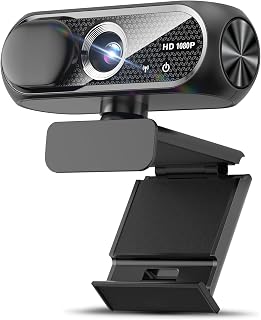
This compact option includes auto light correction, which actively adjusts exposure and brightness when ambient lighting drops. That feature directly addresses the challenge of dimly lit rooms, ensuring your face remains visible during video calls without needing external lamps. The wide-angle lens captures more of your surroundings even when positioned close to a monitor, while noise cancellation keeps audio clear.
Pros
- Automatic light correction adapts to dim environments
- Compact build with included privacy cover
- Plug-and-play setup with no software required
- Wide-angle lens captures good field of view
Cons
- Fixed focus limits depth control
- 30fps may not suit fast-paced streaming
The Shcngqio TWC29 tackles low-light video calls with automatic light correction technology that adapts to dim rooms without the grainy wash common in budget webcams. The system adjusts exposure dynamically, brightening dark home offices and evening calls while keeping colors natural. The 1080p CMOS sensor delivers sharp video at 30fps, and the wide-angle lens ensures good coverage even in tighter spaces. The built-in noise-canceling microphone handles typical home environments well, keeping your voice clear during calls. Build quality is solid and compact, sitting securely on flat monitors without adding bulk. The included privacy cover addresses security concerns, and the 5-foot USB cable offers reasonable flexibility for desk setups. Plug-and-play functionality means no driver hunting or software installation. The fixed focus system works reliably at standard desk distances, prioritizing consistency over manual control. For the price, this webcam delivers dependable low-light performance without complicated setup or advanced features you may not need.
Video Capture: 1080p Full HD at 30fps, 1920x1080 resolution, 16:9 aspect ratio, AVI format
Lens and Focus: Wide-angle lens with fixed focus, 1-2 meter focal length range
Sensor: CMOS photo sensor for reliable low-light performance
Audio: Built-in noise-canceling microphone, supports AAC and MP3 formats
Connectivity: USB 2.0, 3.0, and 3.1 compatible, plus OTG support. Includes 5-foot USB power cable. No additional drivers required.
Compatibility: Windows PC, Mac, Linux, tablets, and smartphones. Works with Zoom, Skype, and all major video conferencing platforms
Design: Compact form factor, black color, includes privacy cover slide
Warranty: 90-day manufacturer warranty
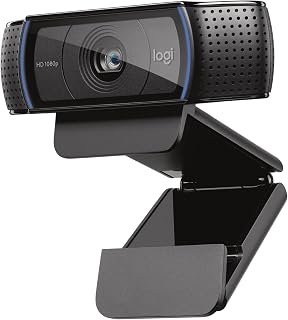
Logitech C920x HD Pro Webcam 1080p/30fps with Dual
The 1/2.9 inch sensor captures more light per pixel than smaller sensors, delivering clearer video in darker environments. This makes it a reliable choice for home offices or bedrooms with limited natural light. Full 1080p resolution at 30fps ensures smooth, detailed streaming, and XSplit VCam compatibility adds virtual background options for professionals working in less-than-ideal lighting conditions.
Pros
- Automatic light correction handles dim rooms effectively
- Five-element glass lens delivers crisp detail
- Dual stereo mics outperform single-mic designs
- 78-degree viewing angle accommodates groups
Cons
- No physical privacy shutter included
- 30fps limits fast-action streaming
When lighting conditions drop, the Logitech C920x responds with automatic light correction that brightens and sharpens your image without introducing the grain that plagues cheaper models. The five-element glass lens and 1/2.9-inch CMOS sensor work together to pull detail from shadowy rooms, making evening calls and dimly lit home offices look far better than you'd expect from a 1080p webcam. Intelligent autofocus continuously adapts, keeping you sharp even as you shift position or lean into frame. The 78-degree viewing angle accommodates solo calls and group presentations alike. Dual stereo microphones positioned on either side of the lens capture natural audio and reduce background noise, delivering a professional presence that single-mic webcams can't match. The compact black design integrates cleanly into any desk setup. The included 3-month XSplit VCam license adds background control without requiring a green screen. At 30fps, video feels smooth for standard conferencing and content creation, though fast-motion streaming may expose frame rate limits. The absence of a physical privacy shutter is the main oversight in an otherwise well-rounded package.
Video Performance: Full HD 1080p at 30fps, 720p at 30fps, 78-degree viewing angle, autofocus with light correction
Audio: Dual stereo microphones for natural sound capture
Lens: Five-element glass lens, 1.8 f-stop maximum aperture, auto focus
Sensor: CMOS 1/2.9 inch, FHD maximum display resolution
Connectivity: USB, plug-and-play compatibility with Windows 11 and multiple operating systems
Physical: 3.7 inches wide, 2.7 inches tall, 1.7 inches deep, weighs 5.7 ounces
Included: C920x Webcam, USB cable, user documentation, 3-month XSplit VCam license
Warranty: 1 Year Limited Hardware Warranty
Remote professionals, YouTube creators, and streamers working in low-light environments will appreciate the automatic light correction and glass lens that maintain clarity when natural light fades. This suits users who need reliable video quality for business calls, tutorial videos, or evening broadcasts. Skip this if you require 60fps for gaming streams, prefer a built-in privacy shutter for quick coverage, or need ultra-compact portability for frequent travel.
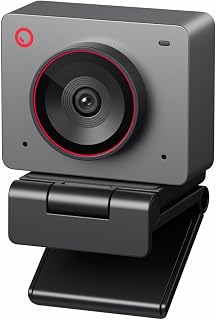
The 1/2-inch sensor is significantly larger than typical webcam sensors, gathering substantially more light to produce brighter, less noisy images in dim settings. Combined with 4K resolution, this delivers exceptional clarity even when your workspace lacks strong illumination. AI framing keeps you centered automatically, so you can focus on your work rather than adjusting position to stay in the light.
Pros
- 1/2-inch sensor with f/1.8 aperture excels in dim light
- AI auto-framing and gesture control offer hands-free operation
- Ultra-compact and lightweight for portability
- 4K at 30fps or 1080p at 60fps flexibility
Cons
- Included stand lacks stability
- Short USB-C cable requires extension for desk use
Low-light performance separates the OBSBOT Meet 2 from standard webcams. The 1/2-inch CMOS sensor with f/1.8 aperture captures four times more light than typical models, turning dimly lit rooms and evening broadcasts into clear, professional-looking video. That larger sensor and wide aperture mean less noise, better color accuracy, and detail that holds up when ambient light drops. The AI autofocus continuously adjusts to keep you sharp, while auto-framing tracks your movement and recomposes dynamically, keeping you centered without manual adjustments. Gesture control adds hands-free zoom and framing toggles, useful when you're mid-presentation or streaming and can't reach your keyboard. Video output options include 4K at 30fps or 1080p at 60fps, giving flexibility based on bandwidth and platform requirements. The ultra-compact form factor and 40.5-gram weight make this genuinely portable. Dual omni-directional mics filter mechanical noise effectively, though serious content creators typically pair this with external audio. The magnetic lens cover feels premium and protects the glass when traveling. The main compromises are the unstable included stand and short USB-C cable, which often require workarounds for optimal positioning.
Video Performance: 4K UHD at 30fps or 1080p at 60fps, 48MP still resolution, 4x digital zoom
Imaging Tech: 1/2 inch CMOS sensor, f/1.8 aperture, 10-26mm focal length range, auto-focus with gesture and AI controls
Audio: Dual omni-directional noise-canceling microphones with adaptive noise reduction
Connectivity: USB-C, plug-and-play compatible with PC/Mac, optional OBSBOT Center software
Physical: 40.5g weight, compact design (0.43 x 0.2 x 0.41 inches), includes magnetic lens cover and USB cable, 1-year warranty
Content creators, streamers, and remote professionals broadcasting in low-light conditions gain the most from the larger sensor and wide aperture. This suits users who need 4K clarity, AI-powered framing, and portability for multi-location setups. Skip this if you work in controlled lighting where the sensor advantage disappears, need a stable out-of-box mounting solution, or operate in corporate environments with restricted software installs for accessing advanced controls.
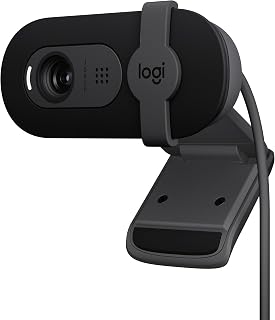
With a dedicated low light feature, this model optimizes image processing specifically for darker environments, reducing grain and maintaining natural color balance when overhead lights are off or windows face away from the sun. Full HD 1080p ensures sharp detail, while the USB-A connection provides plug-and-play simplicity for quick setup on any desktop or laptop without driver downloads.
Pros
- RightLight boosts brightness up to 50% in dim conditions
- Full HD resolution maintains clarity with automatic enhancement
- Plug-and-play compatibility with major video platforms
- Physical privacy shutter provides quick lens coverage
Cons
- Fixed focus offers no manual adjustment
- 60-degree viewing angle limits framing flexibility
Low light ruins most webcam footage, turning faces into grainy shadows. The Logitech Brio 101 tackles this head-on with RightLight technology that automatically increases brightness by up to 50%, pulling detail out of dim environments and reducing harsh shadows. Whether you're working from a basement office or streaming after sunset, this Full HD camera ensures you stay visible and professional looking. The sensor handles challenging lighting conditions that typically defeat budget webcams, maintaining clarity where cheaper models would fail. Setup requires nothing more than plugging in the USB-A cable and launching your video platform of choice, with native compatibility across Zoom, Teams, and Google Meet. The integrated privacy shutter slides over the lens when you need guaranteed camera-off security. At 4.96 ounces, it's light enough to move between rooms without hassle. The built-in microphone captures your voice clearly during calls. For anyone stuck with poor natural light or inconsistent room lighting, the Brio 101 delivers practical image enhancement without requiring ring lights or external fixtures.
Video: 1080p Full HD resolution, H.264 video capture, 60-degree viewing angle, fixed focus with 4mm maximum focal length
Audio: Built-in microphone with mono audio support for clear communication during calls
Connectivity: USB-A connection with integrated cable, works with Windows 7+, macOS 10.10+, and Chrome OS
Physical: Compact rectangular design measuring 2.87in W x 2.62in H x 1.26in D, weighs 4.96 ounces, available in black
Features: RightLight auto-brightness, integrated privacy shutter, customizable settings via Logi Options+ app, 1-year limited hardware warranty
Ideal for remote workers in dimly lit home offices, students attending evening classes, or streamers creating content after dark. Anyone dealing with poor natural lighting or limited control over their recording environment will benefit from the automatic brightness adjustment. Skip this if you need wide-angle framing for multiple people, require manual focus control for specific creative effects, or already have excellent lighting and want features beyond low-light correction. The fixed 60-degree viewing angle limits versatility for group shots.

Pros
- Exceptional low-light performance eliminates the need for ring lights or external lighting
- Dual microphones with AI noise cancellation deliver professional audio quality
- Flexible viewing angles let you customize framing without moving your computer
- Privacy cover provides physical security between video calls
- Broad OS compatibility works with older systems back to Windows 7
Cons
- No built-in autofocus adjustment options visible in specs, limited manual control
- 2MP still resolution is modest compared to some competitors in this price range
The Anker PowerConf C200 is a 2K webcam designed for professionals who spend significant time on video calls or streaming. It's ideal for remote workers, educators, and content creators who value video quality and audio clarity without breaking the bank.
The standout feature is its superior low-light correction, which captures sharp, usable video even in dim environments. Combined with dual-mic AI noise cancellation, this webcam delivers professional-grade performance in real-world conditions. The 2K resolution ensures crisp detail during important presentations and video conferences.
The compact design includes thoughtful features like a physical privacy slider and adjustable viewing angles (65°, 78°, 95°) that you can customize through software. This flexibility means you can frame your shot perfectly without repositioning your setup. The build feels solid and the form factor works well on any monitor or laptop.
One limitation is that the specs show limited manual control options beyond angle adjustment. Additionally, the 2MP still resolution is somewhat basic for a webcam at this price point, though video performance is the primary strength here.
Overall, the PowerConf C200 delivers excellent value for remote workers and streamers who need reliable 2K video and clear audio in any lighting condition. The 18-month warranty and broad OS compatibility add confidence to the purchase.
Video Specs: 2K resolution, MP4 format, 2MP still capture, auto focus with 1-2.8 f-stop range, 15-30mm focal length
Audio: Dual microphones with AI noise cancellation, MP3 format support
Viewing Angles: Adjustable via software between 65°, 78°, and 95°
Connectivity: USB connection, included USB-C cable
Compatibility: Windows 7 or later, macOS 10.11 or later
Physical: Compact form factor (1.97in D x 1.57in W x 2.17in H), 7.04 ounces, black color, privacy cover included
Warranty: 18 months
Buying Guide: What Makes a Webcam Excel in Low Light
Sensor Size and Light Capture
The physical sensor inside your webcam determines how much light it can gather and convert into a clear image. Larger sensors like the 1/2-inch CMOS found in the OBSBOT Meet 2-4K Webcam for PC with 1/2″ Sensor capture significantly more photons than smaller sensors, resulting in brighter footage with less digital noise.
When shopping, look for specifications that mention sensor dimensions or low-light performance explicitly. Budget models often use smaller 1/4-inch or 1/5-inch sensors that perform adequately in bright rooms but struggle once ambient light drops below typical office levels.
Automatic Light Correction Technology
Modern webcams employ algorithms that analyze each frame and dynamically adjust exposure, brightness, and color balance. The 1080P HD Webcam with Microphone features automatic light correction that adapts in real time as lighting conditions shift during your call.
This feature proves invaluable during transitional hours when natural window light fades gradually. Advanced implementations like Logitech’s RightLight technology boost brightness by up to 50% while reducing harsh shadows, ensuring you remain clearly visible without manual adjustments. Gamers streaming late-night sessions will appreciate specialized mouse pads for FPS gaming that maintain precision alongside upgraded video quality.
Resolution and Frame Rate Balance
Higher resolution demands more light to maintain clarity. A 4K webcam in a dimly lit room may produce darker, noisier footage than a 1080p model because it requires more illumination to fill four times as many pixels with clean data.
The Anker PowerConf C200 2K Webcam for PC/Laptop/Mac strikes a practical middle ground with 2K resolution that delivers sharp detail without the extreme light requirements of 4K. Most video conferencing platforms compress streams to 1080p anyway, making ultra-high resolutions less critical than strong low-light capability for everyday use.
Field of View and Framing Flexibility
A narrower field of view concentrates available light on a smaller area, which can improve brightness when working in dim spaces. Conversely, ultra-wide lenses spread thin lighting across more background, potentially darkening your face.
Look for webcams offering adjustable viewing angles through software, like the Anker model with selectable 65°, 78°, or 95° fields. This flexibility lets you tighten the frame in low light to maximize brightness on your subject, then widen it for group calls when conditions improve. Streamers building complete setups often pair these cameras with coordinated keyboard and mouse combos for a cohesive aesthetic.
Final Thoughts
Choosing the right webcam for low-light environments depends on your specific workspace challenges and budget. For professionals needing exceptional clarity in consistently dim settings, the OBSBOT Meet 2 delivers premium sensor technology and AI-driven adjustments that maintain broadcast quality even in challenging lighting. If you’re working with tighter constraints but still want reliable automatic correction, the Shcngqio 1080P HD Webcam provides solid low-light performance and essential features at an accessible entry point.
Frequently Asked Questions
Do I need extra lighting if I buy a low-light webcam?
A quality low-light webcam significantly reduces your need for supplemental lighting, but won’t eliminate it entirely in pitch-black conditions. Models with automatic light correction and larger sensors handle typical home office dimness, basement setups, and evening calls without additional equipment. However, even a small desk lamp positioned at eye level will yield noticeably better results than relying solely on camera technology.
What’s the difference between auto light correction and HDR?
Auto light correction analyzes overall brightness and adjusts exposure settings in real time to compensate for dim environments. HDR (high dynamic range) captures multiple exposures simultaneously and combines them to preserve detail in both bright and dark areas of the same frame. For video calls in consistently low light, auto correction proves more valuable, while HDR helps when you’re backlit by a window with shadows on your face.
Will a 4K webcam perform better in low light than 1080p?
Not necessarily. Higher resolution requires more light to maintain clean image quality across additional pixels. A 1080p webcam with a larger sensor and dedicated low-light optimization often outperforms a 4K model with a smaller sensor in dim conditions. Unless you’re recording content that genuinely benefits from 4K detail and you can provide adequate lighting, prioritize sensor size and light correction features over raw resolution specs.
Can webcam software improve low-light performance after purchase?
Companion apps like Logitech’s Logi Options+ and OBSBOT Center allow you to fine-tune exposure, brightness, and contrast beyond automatic settings. These adjustments can squeeze better performance from your webcam’s hardware in challenging lighting. Third-party tools and streaming software like OBS also offer filters and color correction that enhance dim footage, though they can’t overcome fundamental sensor limitations. For content creators managing multiple peripherals, explore wireless keyboard and mouse options that reduce desk clutter around your recording space.







Write Your Review
No reviews yet. Be the first to share your experience!