

You hop on a video call and your colleague’s face looks sharp and well-lit while yours appears grainy and washed out. It’s a familiar frustration, and it usually comes down to one thing: your webcam. Whether you’re presenting to clients, teaching online, or streaming to an audience, the resolution and quality of your camera shapes how others perceive you.
This guide answers the question directly: do you need a 4K webcam for video calls? We’ve evaluated eight of the top webcams on the market, covering 4K options and strong 2K alternatives, so you can make the right call for your setup. If you’re also comparing options across brands, our roundup of best Logitech webcam picks for calls, streaming, and 4K is a great companion read.
Quick answer
This guide compares 8 picks, with UGREEN 4K 30fps Webcam with Auto-Focus, Dual Mics & ranked first. Logitech BRIO 4K Ultra HD Webcam - Professional Video holds the highest customer rating among them.

Dual USB-A and USB-C connectivity means it plugs straight into whatever port your laptop or dock actually has, avoiding adapter hassles before a call starts. Noise-canceling mics cut down on keyboard clatter or background hum, and the compact form factor keeps it unobtrusive on a monitor bezel for anyone who values a tidy, simple setup.
Pros
- 16.4-foot mic pickup range for flexible seating
- Autofocus tracks movement from close-up to far away
- Built-in privacy cover included
- USB-C and USB-A compatibility for modern and older setups
Cons
- 4K 30fps requires compatible hardware or it drops to 1080p
- 70-degree view not ideal for group calls
For video calls specifically, two things matter most: being seen clearly and being heard clearly, and this webcam addresses both without the premium price tag of flagship options. The dual microphone system has a 16.4-foot pickup range, so it keeps up even if you move around or step away from your desk mid-call. Phase-detection autofocus tracks you smoothly from under a foot to over 16 feet away, which matters if you shift positions during a long meeting. Intelligent auto-exposure adjusts for low light, a common issue on calls taken in home offices with inconsistent lighting. It's genuinely compact and lightweight, mounts easily on a monitor or laptop, and includes a built-in privacy cover so you're not relying on tape between calls. USB-C and USB-A support covers most current setups. One thing to know: true 4K at 30fps needs compatible hardware, otherwise it steps down to 1080p at 60fps, which is still fine for most calls. The 70-degree view is suited to solo callers rather than group shots.
Video Specifications: 4K 30fps and 1080p 60fps video modes, 8MP CMOS sensor, 70-degree viewing angle, 1.8 f-stop aperture, phase-detection autofocus with 0.33 to 16.4-foot range, MJPG video capture format, 16:9 aspect ratio, low-light correction with auto-exposure.
Audio Specifications: Dual built-in microphones, high-sensitivity design, 16.4-foot audio pickup range, MJPG audio format support.
Connectivity and Compatibility: USB 2.0 with Type A and USB C connectivity, driver-free plug-and-play installation. Compatible with Windows 7 and above, Mac OS X 10.6 and above, Linux, Android 5.0 and above, and iPad OS 17 and above. Works with Zoom, Skype, YouTube, FaceTime, Twitch, Facebook, Teams, Discord, OBS, and similar platforms.
Physical Specifications: 96.3 grams weight, compact minimalist grey design, built-in privacy cover, operating temperature range 32-113 degrees Fahrenheit.
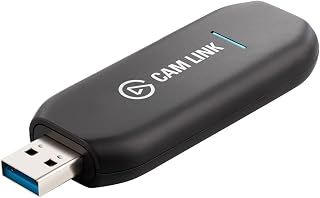
This isn't a webcam itself but a capture card that turns a DSLR or camcorder into a video call source, letting serious creators use glass and sensors far beyond what any webcam offers. With 4K60 capture and ultra-low-latency USB 3.0 transfer, it suits anyone who already owns a capable camera and wants that image quality on calls.
Pros
- True 4K60 and 1080p60 capture from your existing camera
- Plug-and-play recognition as a webcam in major call apps
- Ultra-low-latency with no audio sync issues
- Solid, well-built construction backed by a 2-year warranty
Cons
- Requires owning a separate compatible camera to be useful
- Wide USB-A connector can block adjacent ports on crowded setups
If you're asking whether you need a 4K webcam for video calls, the Cam Link 4K offers a different answer: skip the webcam entirely and use the DSLR, mirrorless camera, or action cam you already own. This capture card turns that camera into your video call source, outputting true 4K60 or 1080p60 through a simple HDMI into USB 3.0 connection. Once plugged in, your camera shows up as a native webcam in Zoom, Discord, and other call platforms, with no lag and audio that stays in sync. For anyone who wants call quality beyond what dedicated webcams offer, this is the route that gets you there using glass and sensors a webcam can't match. It runs warm during use, so unplugging between calls is worth doing for long-term reliability. The connector is also wider than a typical USB-A plug, which can crowd out neighboring ports. Still, for video call quality that genuinely rivals broadcast setups, this is a legitimate alternative to buying a 4K webcam outright.
Video Capture: 4K60 (MJPEG only), 4K30, 1080p60, 1080p30, 720p60, 720p30, 576p50, 480p60
Connectivity: HDMI input (unencrypted), USB 3.x output with 30cm extension cable included
Compatibility: Windows 10 (64-bit) or later, macOS 13 or later, iPadOS 17 or later. Works with any camera or device with HDMI output, including DSLR, mirrorless, camcorder, action cam, and iPhone.
System Requirements: USB 3.x port, Intel/AMD/Apple processor. Supported platforms: OBS Studio, Zoom, Discord, TikTok Live, and virtually all streaming and conferencing software.
Physical: Dimensions 8.1 x 1.2 x 3.1cm, Weight 20g, USB 3.0 extension cable 30cm
Warranty: 2 years
Buy this if you already own a DSLR, mirrorless, or action camera and want it to double as your video call source instead of purchasing a dedicated 4K webcam. It suits remote professionals and creators who care about image quality above convenience. Skip it if you don't own a compatible camera, since you'd be buying two devices instead of one, or if you just want something simple to plug in and forget.

Infrared capability enables Windows Hello face login alongside video calling, giving this camera a dual role for people who want one device handling both security and calls. Digital image stabilization also smooths out minor desk vibrations or bumps, useful for anyone on a laptop stand or in a space where the camera isn't mounted perfectly rigid.
Pros
- RightLight 3 HDR handles tough call lighting automatically
- Three FOV presets for flexible framing
- Dual mics with noise cancellation for clear call audio
- Universal mount fits laptops, monitors, and displays
Cons
- USB-only, no wireless option
- This version is discontinued, affecting long-term support
If you're specifically shopping for a 4K webcam for video calls, this is the model the category gets measured against. It shoots 4K at up to 90fps, but the real reason it belongs on this list is RightLight 3 HDR, which keeps your face properly exposed on calls even when you're sitting in front of a window or in a dim room, a scenario that trips up most webcams. Three selectable fields of view (90, 78, 65 degrees) let you frame tightly for one-on-one calls or wider for a shared desk. Dual omni-directional mics with noise cancellation mean the audio side of your calls holds up too, not just the video. It mounts universally on laptops, monitors, or displays, and a physical privacy shade covers the lens between meetings. Windows Hello support and cross-platform compatibility round it out. The catch for this specific use case: it's USB-only, so no wireless flexibility, and the 2017 version has been discontinued, which matters if you're thinking long-term about replacements or support.
Video Performance: 4K Ultra HD resolution, 90fps maximum frame rate, 5x digital zoom, three FOV presets (90, 78, 65 degrees), RightLight 3 HDR with auto light adjustment.
Audio: Dual omni-directional microphones, noise-canceling technology, MP3 and PCM audio format support.
Physical Design: 1x1x4 inches, 0.16kg weight, black finish, universal mounting clip, privacy shade, digital image stabilization.
Connectivity: USB connection, Windows Hello integration, compatible with Windows, Mac, and ChromeOS platforms.
Additional Features: Auto focus, 86.6-degree viewing angle, infrared support, 1-year limited hardware warranty, model number 960-001105.
Best for remote workers and professionals who are on video calls daily and want the lighting and framing to just work without fiddling. Also a fit for anyone recording video content who wants call-quality output. Skip it if you want a wireless setup, need guaranteed long-term availability of a current model, or only hop on the occasional casual video call where simpler hardware would do.

For callers who don't need full 4K and want something that just works, the 95 degree field of view fits more of a room or a second person into frame, useful for interviews or small shared spaces. Being driver-free means it's ready the moment it's plugged in, a practical fit for quick, no-fuss video calls.
Pros
- Wide 95-degree field of view for group or tight spaces
- Dual mics with background noise suppression
- Driver-free setup across major operating systems
- Includes privacy cover and 360-degree rotation
Cons
- Fixed-focus lens, not suited for close-up distances
- Full 2K resolution depends on compatible hardware
Not everyone needs true 4K for video calls, and if your priority is dependable call quality at a lower cost, this 2K webcam is worth considering within that search. Its 4MP CMOS sensor delivers 2K video at 30fps, sharp enough for professional calls without demanding top-tier resolution. The 95-degree field of view is notably wide for this tier, which helps if you're on calls from a shared space or want more of the room visible. Dual integrated mics with background noise suppression keep your voice clear, and automatic light adjustment helps in average home lighting. It's plug-and-play across Windows, Mac, Linux, Android, and iPad with no driver installation, which matters if you're joining calls from different devices. A privacy cover is included, and 360-degree rotation plus universal mounting make it workable on a monitor, laptop, or tripod. The fixed-focus lens is the main tradeoff: it performs best beyond 50cm, so it's built for typical call distances, not close-up work, and reaching full 2K depends on your system's hardware and software support.
Suited to anyone who wants reliable video calls on a budget, including students, remote workers, and casual users who don't need 4K resolution. The wide field of view also helps for calls from a shared or cramped space. Skip it if you need true 4K, plan to use it for close-up or macro shots, or want an autofocus lens that adjusts as you move.
Video Performance: 2K and 1080P resolution, 30fps, 4MP CMOS sensor, 16:9 aspect ratio, MP4 format, 95-degree field of view
Audio: Dual integrated microphones, AAC and MP3 audio format support, background noise suppression
Design: Compact form factor, 3.52 ounces, privacy cover included, 360-degree rotation, universal mount compatibility
Compatibility: Windows 7/8/10/11, Mac OS X 10.6+, Linux, Android 5.0+, iPad OS 17+. Works with Zoom, Skype, YouTube, FaceTime, Twitch, Facebook, and other platforms. Driver-free, plug-and-play installation.
Technical Specs: Fixed-focus lens, 2.2 f-stop aperture, 1x optical zoom, digital zoom not supported, USB connectivity, indoor antenna

A 73 degree field of view suits small offices or shared desks where multiple people need to fit in frame during a call, something narrower lenses struggle with. Combined with PDAF autofocus for consistent sharpness and dual omnidirectional mics for pickup across the room, it covers the core demands of group video calls without needing extra accessories.
Pros
- Genuine 4K resolution with PDAF autofocus for staying sharp while moving
- Dual omnidirectional mics with audio quality rivaling external mics
- Plug and play setup with no drivers or cloud account required
- 73-degree field of view keeps calls focused on you
Cons
- 4K requires manual activation through third-party software
- Video quality is noticeably lighting-dependent
For anyone weighing whether a 4K webcam is necessary for video calls versus sticking with a built-in camera, the C960 makes a practical case. It delivers genuine 4K resolution alongside PDAF autofocus that keeps you in focus as you shift position during a call, which matters more on video than people realize until their face drifts soft mid-sentence. The dual omnidirectional mics are a real highlight here, with audio quality that reviewers often rank alongside dedicated external microphones, useful if your calls rely on built-in audio rather than a separate headset. Auto light correction helps it adapt across different room lighting, though like most webcams it performs best when you're not backlit. Setup is plug and play with no driver installs or cloud account needed, which simplifies things if you're setting this up for work-issued hardware. The 73-degree field of view keeps the frame tight on you rather than your whole room, a plus for professional-looking calls. The one real step is that 4K isn't active by default, you'll need software like OBS to turn it on.
Video Performance: True 4K resolution at 30fps (defaults to 1080P), CMOS sensor, 73-degree field of view, maximum 3-meter focal range, 8.3 MP still resolution.
Autofocus and Imaging: PDAF autofocus technology, auto light correction for low-light and bright environments, digital zoom, wide-angle lens with 2mm minimum aperture.
Audio: Dual omnidirectional microphones for clear, natural sound capture with minimal background noise.
Connectivity and Compatibility: USB plug-and-play, works with Windows 7/10/11, macOS 10.14 and above, Android TV 7.0 and above, and Linux. Compatible with Zoom, Teams, Skype, and other major communication platforms. EMEETLINK software for custom video settings.
Physical Design: Compact form factor (3.9" x 2.3" x 2.2"), weighs 4.8 ounces, includes privacy cover and adjustable mount with 360-degree horizontal and 15-degree vertical adjustment. 1/4-inch tripod thread for alternative mounting options.

Video calls hinge on staying sharp while you move your head or reach for notes, and PDAF autofocus tracks focus continuously instead of hunting and blurring like contrast-based systems. Paired with dual omnidirectional mics, it picks up voices clearly in a conference room without a separate microphone, making it a solid 4K pick for anyone who wants reliable clarity without fiddling with settings mid-call.
Pros
- True 4K at 30fps with PDAF autofocus across a wide distance range
- Dual omnidirectional mics clear up to 8 feet
- 360-degree swivel plus tripod mount for flexible call setups
- Privacy cover included for shared or public workspaces
Cons
- Defaults to 1080p, 4K must be switched on manually
- Fixed 73-degree field of view with no facial tracking
If your main question is whether a 4K webcam is actually worth it for video calls, the NOVA 4K is a good test case for what that upgrade buys you. The PDAF autofocus keeps you sharp from 7.9 to 118 inches, so it holds focus whether you're leaning into your desk for a one on one call or stepping back to show something on a whiteboard. Dual omnidirectional mics pick up your voice clearly up to 8 feet out, which matters more than people expect once you're relying on laptop placement rather than a headset. Note that it boots in 1080p by default, so you'll need to switch to 4K manually through EMEETLINK, where you can also tweak brightness, contrast, and saturation to suit your room. The 360-degree swivel and tripod mount give you real flexibility in positioning, and the privacy cover is a nice baseline for anyone on calls from a shared space. The fixed 73-degree field of view keeps backgrounds from sprawling into frame, which many video-call users actually prefer over ultra-wide lenses.
Video: 4K UHD at 30fps, 1080p default, YUY2/MJPEG capture format, 73-degree fixed viewing angle, PDAF autofocus (7.9 to 118 inches), CMOS sensor with f/3.3 aperture.
Audio: Dual omnidirectional microphones, 100-10kHz frequency range, effective pickup up to 8 feet with optimal positioning.
Connectivity: USB 2.0, plug-and-play (no drivers required), compatible with Windows 10/11, macOS 10.14+, Android TV 7.0+. Works with Zoom, Teams, Google Meet, and major platforms.
Physical: Compact form factor (2.16 x 3.94 x 2.32 inches), 4.64 ounces, universal joint with 360-degree horizontal rotation, 15-degree vertical tilt, 180-degree adjustable stand, tripod mount support.
Warranty: 2-year manufacturer warranty. Package includes privacy cover, USB cable, and user manual.

For anyone whose home office has uneven or dim lighting, the low light correction feature brightens your face automatically without washing out the background, a common pain point on calls held early morning or in the evening. The compact form factor also makes it easy to clip onto a laptop or monitor without adding desk clutter.
Pros
- Low-light correction keeps calls clear in dim rooms
- Dual-mic AI noise cancellation improves audio quality
- Three adjustable viewing angles with software control
- Physical privacy slider and compact, flexible form factor
Cons
- Caps out at 2K, not 4K, resolution
- Limited manual control options and basic 2MP still resolution
For most people weighing a 4K webcam against something more practical, the PowerConf C200 makes the case for 2K being the smarter buy for everyday video calls. It won't match 4K sharpness, but its low-light correction and dual-mic AI noise cancellation solve the two problems that actually hurt call quality: dim home offices and noisy backgrounds. The 2K resolution still delivers clean, detailed video for presentations and meetings without the bandwidth and processing demands that true 4K streaming can bring to a video call. A physical privacy slider and three adjustable viewing angles let you frame your shot without moving your whole setup, and the compact design sits easily on a monitor or laptop. The tradeoff is limited manual control and a modest 2MP still photo resolution, but neither affects live call performance. If your priority is reliable, professional-looking video on everyday calls rather than maximum resolution on paper, this covers the fundamentals well and comes backed by an 18-month warranty.
Video Specs: 2K resolution, MP4 format, 2MP still capture, auto focus with 1-2.8 f-stop range, 15-30mm focal length
Audio: Dual microphones with AI noise cancellation, MP3 format support
Viewing Angles: Adjustable via software between 65°, 78°, and 95°
Connectivity: USB connection, included USB-C cable
Compatibility: Windows 7 or later, macOS 10.11 or later
Physical: Compact form factor (1.97in D x 1.57in W x 2.17in H), 7.04 ounces, black color, privacy cover included
Warranty: 18 months
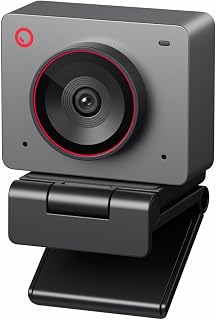
A 1/2 inch sensor is notably larger than what most webcams use, gathering more light for cleaner detail in typical home office lighting. AI framing keeps you centered automatically as you shift in your chair, which matters for anyone who wants a polished, hands-free presence on calls without manually readjusting the camera position every few minutes.
Pros
- 1/2 inch sensor with f/1.8 aperture for strong low-light calls
- AI auto-framing keeps you centered without manual adjustment
- Ultra compact and lightweight at 40.5 grams for portability
- Choice of 4K at 30fps or 1080p at 60fps
Cons
- Included stand lacks stability for desk use
- Short USB-C cable may require an extension
If you're asking whether 4K is worth it for video calls, the Meet 2 answers with more than just resolution. Its 1/2 inch CMOS sensor with f/1.8 aperture pulls in four times more light than standard webcams, which means calls held in dim home offices or late in the evening still look clean, something plain 4K sensors alone don't guarantee. The AI auto-framing feature continuously recenters you in the shot, useful for calls where you shift position or lean toward your screen, and the gesture controls let you adjust zoom or framing without breaking from typing or presenting. At 40.5 grams and genuinely pocket sized, it travels easily for hybrid workers jumping between office and home calls. You get a choice of 4K at 30fps or 1080p at 60fps, so you can prioritize detail or smoothness depending on your connection. The magnetic lens cover is a tidy privacy solution for screen-side use. The included stand is the weak point, often needing a replacement mount for stable desk positioning, and the short USB-C cable may need an extension depending on your setup.
Video Performance: 4K UHD at 30fps or 1080p at 60fps, 48MP still resolution, 4x digital zoom
Imaging Tech: 1/2 inch CMOS sensor, f/1.8 aperture, 10-26mm focal length range, auto-focus with gesture and AI controls
Audio: Dual omni-directional noise-canceling microphones with adaptive noise reduction
Connectivity: USB-C, plug-and-play compatible with PC/Mac, optional OBSBOT Center software
Physical: 40.5g weight, compact design (0.43 x 0.2 x 0.41 inches), includes magnetic lens cover and USB cable, 1-year warranty
A strong pick if you want 4K video calls with smart framing and low-light performance, especially if you're hybrid or mobile and value a compact camera you can pack easily. Skip it if you need a sturdy out-of-box stand without buying an alternative mount, or if your workplace restricts installing the OBSBOT Center software needed for advanced controls.
Webcam Buying Guide: What Actually Matters
Resolution: 4K vs 2K vs 1080p
For standard video calls on Zoom, Teams, or Google Meet, most platforms cap their stream quality well below 4K. That said, a 4K sensor still benefits you: it gives software more data to work with, which improves cropping, digital zoom, and overall sharpness even at lower output resolutions.
If you stream to audiences, record tutorials, or share detailed visuals like whiteboards or product demos, a true 4K webcam like the options explored in our Razer webcam alternatives guide can make a real difference. For pure video calling, a sharp 2K model often hits the sweet spot.
Autofocus and Low-Light Performance
Resolution is only part of the picture. Phase Detection Autofocus (PDAF), found on the UGREEN 4K@30fps Webcam for PC Ultra HD Web Camera and the EMEET NOVA 4K Webcam for PC, Ultra 4K HD, locks focus quickly and holds it steady even when you move. That keeps your face sharp during active presentations.
Low-light correction matters just as much as resolution in dim home offices. The Anker PowerConf C200 2K Webcam for PC/Laptop/Mac handles this particularly well, using AI-enhanced exposure to brighten faces without adding noise. Always check how a webcam performs in your actual lighting conditions before assuming more megapixels means better video.
Sensor Size and Capture Cards
Sensor size directly affects how much light a camera captures, which is why the OBSBOT Meet 2-4K Webcam for PC with 1/2″ Sensor stands out. Its larger 1/2-inch sensor produces noticeably brighter, cleaner images compared to webcams with smaller sensors at the same resolution.
If you already own a DSLR or mirrorless camera, you don’t need to buy a dedicated webcam at all. The Elgato Cam Link 4K Capture Card for DSLR connects your existing camera to your PC via USB and streams at up to 4K 60fps with zero perceptible lag. It’s one of the most effective ways to get professional-level video quality without replacing your gear. For more streaming hardware ideas, browse our full streaming gear category.
Built-In Microphone Quality
Your audio quality affects how professional you sound far more than your video resolution does. Several webcams on this list include dual omni-directional microphones with noise cancellation, including the EMEET C960 4K Webcam for PC, PDAF Auto Focus and the Logitech 4k Webcam, which suppresses background noise to keep your voice front and center.
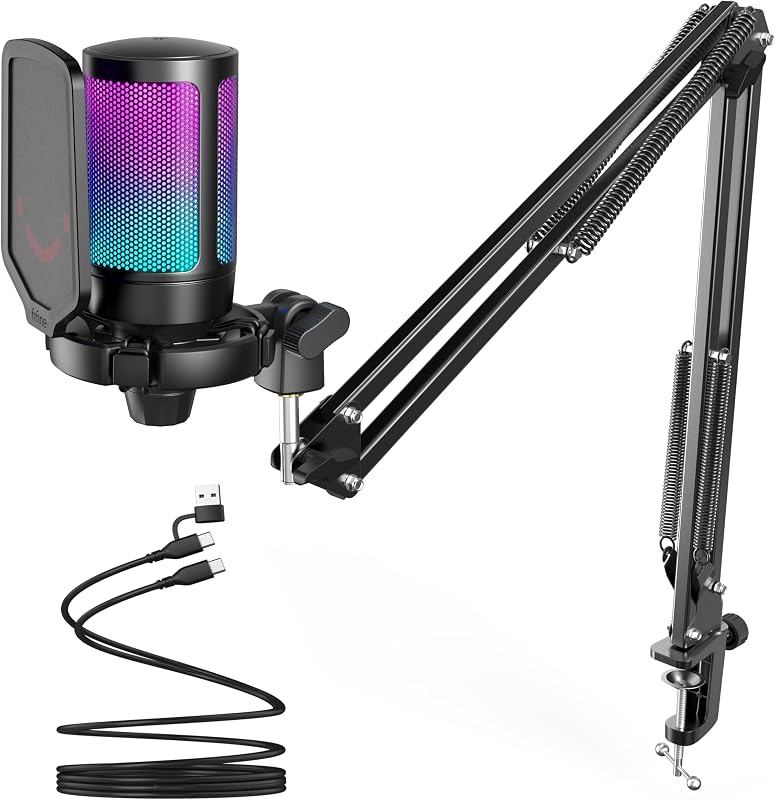
If you want to go further with your audio setup, pairing a quality webcam with a dedicated mic is the move. Our guides to the best FIFINE microphone picks for streaming and podcasting cover solid options at every level. A good webcam with a dedicated microphone is almost always a better combination than a webcam with mediocre audio on its own.
Privacy, Portability, and Compatibility
A physical privacy cover is a small feature with real value. The UGREEN 2K Webcam for PC Ultra HD 1080P Computer and several others on this list include a built-in lens cover that lets you block the camera instantly without disconnecting anything. That peace of mind adds up when you’re on calls all day.
Plug-and-play compatibility is worth confirming before you buy. Every webcam on this list works across Windows, macOS, and most major video platforms without requiring driver installation. The OBSBOT Meet 2-4K Webcam for PC with 1/2″ Sensor is also impressively compact, weighing just 40.5 grams, making it a strong choice if you work from multiple locations. For a broader look at streaming setups, don’t miss our coverage of the best Elgato Stream Deck choices for creators.
Final Thoughts
Whether you go full 4K or stick with a sharp 2K option depends on how you use your webcam. For most video call setups, the EMEET NOVA 4K Webcam for PC, Ultra 4K HD delivers excellent clarity, reliable PDAF autofocus, and solid built-in audio at a mid-range position in the lineup. If you’re a content creator or streamer who already owns a quality camera, the Elgato Cam Link 4K Capture Card for DSLR is the smarter route, unlocking professional-grade video without buying a new webcam at all.
Frequently Asked Questions
Do you actually need a 4K webcam for video calls in 2026?
For everyday video calls on platforms like Zoom or Microsoft Teams, 4K is not strictly necessary since most platforms compress video well below that resolution. However, a 4K sensor does improve overall image quality by giving the camera more data to work with, resulting in sharper detail and better digital zoom even at lower output settings. If you present frequently or want your image to look polished on any display, the upgrade is worth considering.
What is the difference between 2K and 4K for streaming?
For streaming platforms like Twitch or YouTube, 4K provides noticeably sharper video when your audience watches on large screens or zooms into your feed. A 2K webcam like the Anker PowerConf C200 2K Webcam for PC/Laptop/Mac is still excellent for 1080p streams, which remain the standard for most creators. If your channel or audience is growing and you want to future-proof your setup, stepping up to 4K makes more sense in 2026 than it did a few years ago.
Is it better to use a DSLR as a webcam instead of buying a new one?
If you own a DSLR or mirrorless camera with clean HDMI output, using it as a webcam with a capture card often produces superior results compared to any standalone webcam at a similar investment. The Elgato Cam Link 4K Capture Card for DSLR makes this setup straightforward and supports up to 4K 60fps with ultra-low latency. It’s a smart route for anyone who already has quality camera gear collecting dust.
Does a 4K webcam work on older computers?
It depends on your system’s USB bandwidth and processing power. Most 4K webcams, including the UGREEN 4K@30fps Webcam for PC Ultra HD Web Camera, will automatically fall back to 1080p 60fps if your hardware or software cannot support 4K output. This makes them a safe purchase even on older machines, as you still get a quality image. For a deeper dive into hardware compatibility topics, the refresh rate and FPS guide covers how your broader system setup affects video performance.
Common questions
Why do meeting apps cap the stream resolution anyway?
Most video call platforms compress and downscale your feed regardless of camera quality, often to 1080p or lower, to save bandwidth across all participants. That means a 4K sensor rarely sends true 4K during a Zoom or Teams call. The Logitech 4K Webcam still helps because its sensor captures more detail before compression, giving the app better source material to work with even after downscaling.
Does low light beat resolution for video call quality?
Yes, low light performance matters more than raw resolution for how you actually look on camera. A sharp 4K image in a dim room still looks grainy and washed out once compressed. The Anker PowerConf C200 prioritizes low light correction over megapixel count, which produces a clearer, more natural picture in typical home or office lighting than a higher resolution sensor without that feature.
Can your upload speed limit you before camera resolution does?
Yes, your internet upload speed is usually the real bottleneck before camera resolution ever matters. Video call apps throttle quality to match available bandwidth, so a slow upload connection will flatten a 4K feed the same way it flattens 1080p. Pairing a capable camera like the Logitech 4K Webcam with a stable, fast upload connection matters more than chasing extra resolution alone.







Write Your Review
No reviews yet. Be the first to share your experience!