

Streaming or recording your PS5 gameplay requires more than just hitting the share button. The PS5’s built-in capture has limitations that serious content creators quickly outgrow: no 4K60 recording, restricted editing options, and no way to add live commentary or overlays. A dedicated capture card bridges that gap, letting you produce polished content with full control over resolution, frame rates, and production workflow.
This guide covers 10 capture cards evaluated for PS5 compatibility, from budget-friendly USB dongles to professional-grade internal cards. Whether you’re building a single-PC streaming setup or upgrading to dual-PC production, you’ll find options matched to your technical requirements and content goals. For creators expanding their entire studio setup, our best laptops for freelancers guide covers portable powerhouses that pair well with external capture solutions.
Quick answer
This guide compares 10 picks, with Elgato HD60 S+ 4K60 HDR10 External Capture Card ranked first.

Elgato HD60 S+ 4K60 HDR10 External Capture Card
PS5 streamers who want the smoothest possible live output will appreciate the 4K60 HDR10 zero-lag passthrough here, which means your TV gets the full next-gen signal while the card captures a clean 1080p60 HDR10 feed for your audience. Flashback Recording also lets you save a clip retroactively, so you never lose an unexpected highlight mid-session on OBS or 4K Capture Utility.
Pros
- 1080p60 HDR10 capture preserves color depth
- 4K60 HDR10 passthrough with zero added latency
- Instant Gameview reduces streaming preview delay
- External USB design works on Windows and macOS
Cons
- Captures at 1080p60 maximum, not 4K60
- Requires available USB 3.0 port and cable management
When you need reliable 1080p60 HDR10 streaming from your PS5 without sacrificing visual quality on your display, this external capture card delivers a focused solution. The zero-lag 4K60 HDR10 passthrough ensures your gameplay remains responsive on screen while the card captures a clean 1080p60 HDR10 feed for your stream. Instant Gameview technology minimizes the preview delay in your streaming software, making it easier to monitor your broadcast in real time. The compact external design works across Windows and macOS without requiring you to open your PC, and the card handles unlimited recording sessions plus flashback recording to save recent gameplay retroactively. For PS5 streamers who want HDR capture at 1080p60 with dependable passthrough and cross-platform flexibility, this card handles the essentials efficiently.
Video Capture: 1080p60 HDR10, 4K30 in certain configurations
Passthrough: 4K60 HDR10 with zero-lag technology
Connectivity: HDMI 2.0 input, USB 3.0 to computer, HDMI passthrough output
Supported Platforms: Windows 10+, macOS, M1 Macs
Compatible Devices: PS5, PS4 Pro, Xbox Series X/S, Xbox One X/S, Nintendo Switch, PC, and any HDMI-capable device
System Requirements: Dual-core processor (Intel or AMD), 4GB RAM, integrated graphics or better, DirectX 11, 500MB storage
Included Accessories: USB 3.0 cable, HDMI 2.0 cable
Warranty: 2-year manufacturer coverage
PS5 streamers who prioritize 1080p60 HDR10 capture with reliable 4K passthrough will appreciate the external convenience and low-latency preview. Content creators working on both Windows and Mac systems benefit from the broad compatibility. Skip this if you need native 4K capture at 60fps for archival or post-production work, or if you prefer internal PCIe cards to reduce desk clutter and USB port usage.

Built around a USB 3.0 Type-C connection, this card slots into a modern streaming setup without needing an available PCIe slot, making it a practical pick for PS5 owners who stream from a laptop or compact desktop. The HDMI AV output keeps your display feed intact, and native Windows 11 and macOS Ventura support means the software side is ready to go right out of the box.
Pros
- USB-C connection works across Windows, macOS, and iPadOS
- Compact 90-gram design suits portable streaming setups
- No internal installation required
- Supports modern CPUs including Apple M1 and later
Cons
- 1080p capture only, no 4K recording option
- Occupies a USB 3.0 Type-C port during use
Streaming PS5 gameplay at 1080p60 becomes straightforward with this compact USB-C capture card that emphasizes portability and setup speed. The device connects via USB 3.0 Type-C and captures 1080p footage while passing through your signal via HDMI, suitable for single-PC streaming setups or content creators who work across multiple machines. Compatibility extends to Windows 11, macOS Ventura 13 or later, and even iPadOS devices with USB-C, giving you flexibility to capture on a laptop, desktop, or tablet. The lightweight design at 90 grams and small footprint make it easy to pack for events or travel. System requirements remain accessible with 8th gen Intel i5 or AMD Ryzen processors supported alongside Apple M1 chips. For PS5 streamers who value portability and plug-and-play simplicity across different operating systems, this card handles standard streaming workflows without internal installation.
Video Input/Output - HDMI 2.0 unencrypted input with lag-free HDMI 2.0 passthrough output. Supports up to 2160p60, 1440p120, or 1080p240 passthrough resolution with Variable Refresh Rate (VRR) support for smooth competitive gameplay.
Capture Capabilities - Records in 2160p60, 1440p60, 1080p120, 1080p60, 720p60, 567p, or 480p. HDR10 capture available up to 1080p60 on Windows systems only. Analog 3.5mm audio input allows simultaneous capture of in-game audio and microphone commentary.
Physical Specs - Dimensions 112x72x18mm (4.4x2.8x0.7 inches), weighing just 90 grams. Connection via USB 3.0 Type-C. Package includes 150cm USB-C to USB-C cable and 150cm HDMI 2.0 cable.
System Requirements - Windows 11 64-bit, macOS 13 or later, or iPadOS with USB-C. Minimum CPU: Intel Core i5 8th gen or later, AMD Ryzen equivalent, or Apple M1. Minimum GPU: NVIDIA GeForce RTX 10xx or equivalent. 2-year manufacturer warranty included.
PS5 streamers who move between locations or devices will value the compact size and multi-platform support including iPadOS. Content creators using modern laptops with USB-C benefit from the straightforward connection. Avoid this if you need 4K60 capture capability, require HDR10 recording for your PS5 content, or want an internal card solution to preserve external port availability on your desktop system.

For PS5 streamers running a dedicated Windows 10 desktop rig, the internal PCIe design keeps the capture pipeline off USB entirely, reducing bottlenecks during long broadcast sessions. The 8K60 passthrough spec means the card handles the PS5 signal without downscaling what hits your monitor, while the AVCHD output pipeline suits creators who also archive locally alongside their live stream.
Pros
- 8K60 passthrough prepares your setup for future displays
- Internal PCIe installation eliminates desk cable clutter
- Frees USB ports for other streaming peripherals
- Stable permanent connection once installed
Cons
- Requires opening your PC and available PCIe slot
- Windows 10 only, no macOS support
For PS5 streamers building dedicated capture PCs, this internal PCIe card brings high-end passthrough to your streaming rig. The 8K60 passthrough capability future-proofs your setup as display technology advances, while the card captures 1080p footage for streaming. Installing directly into a PCIe slot eliminates external cables on your desk and frees up USB ports for other peripherals. The internal mounting provides a permanent, stable connection that won't accidentally disconnect mid-stream. Windows 10 compatibility integrates with standard streaming software, and the 110-gram card installs into a single slot without requiring additional power connectors. This approach works best when you have a second PC dedicated to encoding and streaming, letting your gaming PC handle PS5 passthrough at maximum fidelity while the capture card feeds footage to your streaming machine. Streamers with two-PC setups who want clean cable management and premium passthrough will find this card addresses those specific needs.
Connectivity: HDMI 2.1 input and output, PCIe slot installation
Capture Performance: 4K60 HDR10 capture, 1080p up to 240fps recording, 8K60 passthrough
Key Features: Variable Refresh Rate passthrough, 10-bit HDR, ultra-low latency circuitry, dual PC setup compatible
System Requirements: Windows 10 operating system, available PCIe slot, full tower PC recommended
Dimensions: 2.2 x 4.76 x 0.75 inches, 110g weight
Software: Compatible with OBS, Streamlabs, Twitch Studio, Restream, Zoom, Teams, and major streaming platforms
PS5 streamers running dedicated two-PC setups gain clean internal installation and exceptional passthrough specs. Desktop builders with available PCIe slots and Windows 10 systems benefit from the permanent mounting and cable reduction. Skip this if you stream from a single PC without room for internal cards, need macOS compatibility, or want 4K capture recording rather than just passthrough capability.
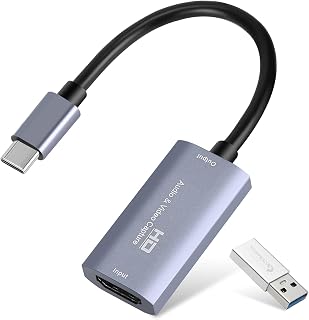
The plug-and-play design requires no driver installation, which removes a common setup hurdle for new PS5 streamers working across Windows or macOS. The 4K30 HDMI input accepts the full PS5 output signal, downscales it to a 1080p60 capture for smooth streaming, and the card's broad platform list, including PlayStation 5 explicitly, confirms it is tested against the exact console this audience is using.
Pros
- Plug-and-play operation with no driver hassle
- 1080p60 output matches most streaming platforms
- USB-C and USB 3.0 compatibility for flexible connections
- Compact size for portable streaming kits
Cons
- 4K input limited to 30fps passthrough
- Basic feature set lacks advanced mixing controls
PS5 streaming requires a capture solution that handles HDMI passthrough cleanly and delivers smooth frame rates without bogging down your broadcast. This compact USB capture device accepts 4K30 input from your PlayStation 5 and outputs clean 1080p60 or 2K30 footage through a USB 3.0 or USB-C connection. The plug-and-play design skips complex driver installations, letting you route your PS5 signal into OBS, Streamlabs, or other broadcasting software immediately. The hardware supports Windows 10/11 and macOS 10.15 or later with modest system requirements: an Intel Core i3 or AMD Ryzen 3 processor and 4GB RAM suffice for baseline operation, though more capable hardware improves encoding performance. MPEG-4 and MOV output formats cover most streaming platforms. The ATSC tuner and multiple USB interface options give you flexibility when connecting laptops, desktops, or even mobile devices for on-the-go capture. If your primary goal is getting PS5 gameplay onto Twitch or YouTube without a complicated setup, this card delivers the essentials in a portable form factor.
Video Capture: 1080P 60FPS output, 4K 30Hz input, 2K 30FPS support
Interfaces: HDMI input, USB 3.0 Type-A and Type-C outputs
Compatibility: Windows 10/11, macOS 10.15+, Linux, Android, iOS
Supported Devices: PS4, PS5, Xbox, Nintendo Switch, gaming PCs, laptops, cameras, DVRs, and more
Physical: 7.48 x 0.98 x 0.39 inches, 30 grams
Package Contents: Capture card, USB 3.0 to USB-C adapter, user manual
System Requirements: Windows 10/11 64-bit or macOS 10.15+, Intel Core i3 or AMD Ryzen 3 equivalent processor, 4GB RAM minimum, USB 3.0 port recommended
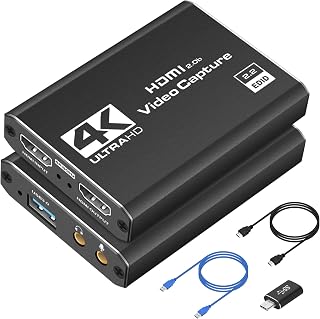
Pros
- Immediate plug-and-play operation requires no driver downloads or software configuration
- Captures crisp 1080P 60FPS video suitable for professional streaming and content creation
- Compact and lightweight design makes it travel-friendly for creators on the go
- Low-latency performance keeps gameplay smooth during competitive streaming sessions
- Affordable price point for beginners and hobbyist streamers
Cons
- Maximum capture resolution tops out at 1080P 60FPS despite 4K HDMI input support, limiting future-proofing
- Limited documentation and minimal brand presence may complicate troubleshooting for advanced users
- No mention of customer support responsiveness or warranty enforcement clarity
The Dcyfol capture card is a compact USB 3.0 streaming solution designed for gamers, content creators, and streamers who want high-quality capture without complexity. Whether you're streaming competitive gaming sessions, recording Nintendo Switch gameplay, or broadcasting from a DSLR camera, this device handles 1080P 60FPS capture with minimal setup friction.
The standout feature is its truly plug-and-play nature: no drivers, no firmware updates, no configuration headaches. Connect it to your Windows PC or Mac via USB 3.0, launch OBS Studio or your streaming software of choice, and you're capturing within seconds. The low-latency passthrough means you can play your game or record your subject without experiencing input lag, while your audience gets a clean, real-time feed. This is critical for competitive gaming where even milliseconds matter.
Design-wise, the device is refreshingly minimal. At just 0.21 kg and measuring 1 x 1 x 2.7 inches, it slides into a bag or backpack effortlessly, making it ideal for content creators who stream from multiple locations, attend LAN parties, or host events. The included accessories (HDMI extension cable, USB-to-Type-C adapter, and USB extension cable) add genuine value for cable management flexibility.
The main limitation is that despite accepting 4K HDMI input, the capture output maxes out at 1080P 60FPS. If you're chasing 4K streaming or ultra-high frame rates, this won't deliver. Additionally, as a lesser-known brand, Dcyfol offers limited online documentation or responsive support channels compared to established competitors, which could be challenging if you encounter compatibility issues.
For budget-conscious streamers, casual content creators, and console gamers seeking affordable, reliable capture hardware, the Dcyfol delivers solid value. It excels at its core job: capturing game footage and streaming it live with minimal setup and maximum portability. Recommended for anyone prioritizing simplicity and affordability over cutting-edge specs.
Video Capture: 1080P at 60FPS, 4K HDMI input with real-time preview
Connectivity: USB 3.0 interface, HDMI input/output, YUY2 video format support
Compatibility: Windows, macOS, PlayStation 4/5, Xbox, Nintendo Switch, DSLR cameras, and other HDMI-enabled devices
Software Support: OBS Studio, Streamlabs, XSplit, and compatible streaming platforms
System Requirements: USB 3.0 port required; works with Windows and Mac systems
Physical: Weighs 0.21 kg, dimensions 1 x 1 x 2.7 inches, includes HDMI cable, USB extension, and USB-to-Type-C adapter
Warranty: 1-year manufacturer warranty included
Is this for you? Choose this capture card if you stream on Twitch or YouTube, record gaming content, or create video from external sources like cameras and consoles. It's ideal if you value simplicity, portability, and affordability over premium specs.
System Setup: Ensure your computer has a free USB 3.0 port and runs Windows or macOS. Download OBS Studio or Streamlabs (both free). Connect the capture card, select it as a video source in your streaming software, and you're ready to go.
Console Compatibility: Works seamlessly with PlayStation 5/4 and Xbox Series X without additional configuration. Nintendo Switch users benefit from the portable design for on-the-go streaming.
When to skip it: If you need 4K capture output, ultra-low latency for professional esports, or tier-one brand support, consider premium alternatives. If you stream primarily from your PC, a dedicated graphics card encoder may be more cost-effective.
Pro tip: Use the included HDMI and USB extension cables to position the device away from your main setup, reducing cable clutter and improving desk ergonomics during long streaming sessions.

Pros
- True plug-and-play functionality works immediately on Windows and Mac without driver installation
- Delivers sharp 1080P 60FPS video with minimal latency, perfect for competitive gaming streams
- Compact and lightweight design portable enough for mobile streaming setups
- Supports multiple input sources including cameras, gaming consoles, and streaming devices
- Excellent value for money with professional-grade performance at an accessible price point
Cons
- Audio configuration can be tricky on Mac systems and requires manual Sound settings adjustment
- Some users reported that the included USB-C adapter produced choppy audio, though third-party adapters resolved the issue
- Limited to 1080P output despite 4K HDMI input support, which may disappoint 4K streaming enthusiasts
The VIXLW 4K HDMI Capture Card is a straightforward solution for anyone who wants to record or stream video from gaming consoles, cameras, or other HDMI devices without complicated setup. Whether you're a Twitch streamer, content creator, or gamer wanting to preserve your best moments, this device bridges your source device to your computer effortlessly.
Performance is where this capture card truly shines. Owners consistently report that 1080P at 60FPS output looks clean and vibrant with virtually no perceptible lag, even during fast-paced action sequences. The HDMI loop-out feature keeps your display responsive while you stream, and compatibility with OBS, Twitch, YouTube, and other platforms means you can start broadcasting within minutes of plugging it in.
Build quality is solid for the price point. The device is small and lightweight, making it perfect for portable setups like LAN parties or traveling content creators. It requires only a USB 3.0 port and handles everything else automatically, detecting your input and adjusting output without consuming excessive CPU resources.
One genuine drawback surfaces with audio setup, particularly on Mac systems. While the capture card includes a USB audio input option, Mac users need to manually configure Sound settings to route audio correctly into OBS. Additionally, some early users experienced choppy audio with the included USB-C adapter, though switching to a standard adapter resolved the issue.
The VIXLW capture card delivers professional-grade streaming performance at a price that won't break your budget. If you can handle basic audio configuration and don't need 4K output, this is a reliable choice for serious and casual streamers alike.
Hardware Interface: USB 3.0
Video Capture Resolution: 1080P at 60FPS
Video Input: 4K HDMI support with 1080P output
Audio Input: 3.5mm microphone jack (TRS standard)
Compatible Operating Systems: Windows, Mac OS, Linux
Compatible Platforms: Nintendo Switch, PS4, PS5, Xbox One, Xbox 360, DSLR cameras, streaming devices
Special Features: HDMI loop-out, plug-and-play design, automatic input detection
Physical Weight: 0.3 kg
System Requirements: Computer with USB 3.0 port and compatible Windows, Mac OS, or Linux operating system
Who Should Buy This? Streamers and content creators on Windows or Mac looking for affordable, reliable 1080P capture. Gamers wanting to record Switch, PlayStation, or Xbox gameplay. Anyone needing a plug-and-play solution without driver hassles or external power requirements.
Who Might Want to Look Elsewhere? If you specifically need 4K output capture, this card only delivers 1080P despite accepting 4K input. Users who demand zero learning curve for audio setup may find Mac configuration frustrating. Professional broadcasters with multiple simultaneous streams may want more advanced hardware.
Setup Tips: For best results, use a quality USB 3.0 cable and port. Mac users should pre-configure audio input in System Settings before launching OBS. Test with a short recording before going live to ensure your audio route works correctly.
Best For: Budget-conscious streamers, casual gaming recorders, educators creating instructional videos, and anyone wanting to repurpose existing HDMI devices as streaming sources without technical complexity.

Pros
- Exceptional value for the price with professional-grade performance that rivals much more expensive cards
- Zero setup friction: plug in and start recording immediately without driver downloads or configuration
- Hardware-level mic input eliminates software complexity and ensures perfectly synced audio
- Impressive color quality with YUY2 encoding that outperforms standard MJPEG alternatives
- Versatile compatibility across gaming consoles, computers, and mobile devices with no adapters needed
Cons
- Limited to 1080p/60fps capture output despite 4K pass-through capability, which may disappoint users wanting higher-resolution recordings
- HDMI handshake issues can occur on Linux systems requiring manual display settings configuration to resolve
- Some USB port placement sensitivity noted where rear motherboard ports perform more reliably than front panel connections
The Acer OCB5B0 is a compact USB 3.0 capture card engineered for streamers, content creators, and gamers who need reliable video recording without technical complexity. It sits in the budget-friendly segment but punches above its weight with features typically found in much pricier alternatives, making it an ideal choice for newcomers and experienced users alike.
The standout feature is its 4K pass-through capability paired with 1080p/60fps recording. This means your primary display stays sharp and responsive while the card simultaneously captures broadcast-quality video. The YUY2 color encoding delivers noticeably richer colors and smoother gradients compared to standard MJPEG compression, resulting in videos that look more professional and lifelike. Combined with hardware-level latency optimization, you get imperceptible delay between what you're playing or recording and what appears on screen.
Build quality reflects its practical design philosophy. The device is small enough to fit in a pocket or laptop bag, yet the HDMI and USB connections feel solid. It ships with both USB-A and USB-C ports, making it compatible with virtually any modern computer. The integrated 3.5mm mic input is a genuine convenience factor, letting you embed audio directly without software routing or additional hardware.
The main limitation is the capture resolution ceiling at 1080p, though this matches professional streaming standards. Some users on Linux reported HDMI negotiation issues requiring manual display configuration, though this is relatively rare and easily resolved. The device performs better on rear motherboard USB ports than front panel connections due to power delivery stability.
For the price point, the Acer OCB5B0 delivers exceptional performance and eliminates common capture card frustrations. Its plug-and-play simplicity, broad device compatibility, and reliable color reproduction make it a smart investment for anyone serious about streaming, recording, or content creation without wanting complexity or high costs.
Video Capture: 1080p and 720p at up to 60fps, 4K pass-through to display
Video Encoding: YUY2 and MJPEG support for flexible compression and quality trade-offs
Audio Input: Built-in 3.5mm mic input with hardware-level audio embedding
Connectivity: HDMI input/output, USB 3.0 Type-A and Type-C ports
Compatibility: Windows, Mac, Linux, Nintendo Switch, Switch 2, PS5, PS4, Xbox, Xbox Series S/X, DSLR cameras, smartphones, tablets
Software: Works natively with OBS, XSplit, VLC, YouTube, Facebook, Twitter, and other streaming platforms without additional drivers
Warranty: 1-year manufacturer coverage with responsive customer support
Perfect For: Twitch and YouTube streamers on a budget, gamers capturing Switch and PlayStation gameplay, online educators and trainers, content creators and vloggers, esports enthusiasts, and anyone recording video conference calls or tutorials.
Best Use Cases: Gaming streams and highlights, educational video recording, conference documentation, virtual meeting enhancement, podcast video components, live event coverage, and portable on-location recording.
May Not Be Ideal For: Users requiring 4K capture output (the card is limited to 1080p recording), professionals demanding broadcast-grade equipment with advanced color grading, or anyone unable to troubleshoot basic USB connection optimization.

Pros
- Versatile multi-resolution support handles 4K streams, 1440P competitive play, and 1080P high-refresh recording from a single device
- Zero-latency passthrough ensures your display shows the same quality as your stream, eliminating syncing issues
- Driver-free setup with USB 3.0 compatibility means it works immediately without software installation or external power requirements
- Professional audio mixing via 3.5mm jack gives full control over commentary, game audio, and chat levels
- Strong build quality and reasonable price point make it competitive against higher-end capture cards
Cons
- Limited to USB 3.0 speeds, which may be a constraint for future 8K capture or extremely high bitrate setups
- No built-in software suite, so users must configure OBS or compatible streaming software independently
- Small sample size of reviews (19 total) means limited real-world data on long-term durability and edge-case performance
The BlueAVS 4K capture card is a versatile streaming and recording solution designed for gamers, esports enthusiasts, and content creators who demand high-refresh, high-resolution capture without compromise. Whether you are streaming PlayStation 5 gameplay, recording competitive 1440P matches, or capturing ultra-smooth 1080P esports footage, this card adapts to your needs while keeping your live output pristine.
The standout feature is its zero-latency passthrough combined with multi-resolution support. You get identical video quality on both your display and stream, with full frame rate preservation at 4K60, 1440P144, or 1080P240Hz. HDR, VRR, and ALLM support mean your visuals stay tear-free and responsive even during intense gaming sessions. The 3.5mm audio mixing port adds professional-grade control over separate commentary and game audio, a feature many competitors charge extra for.
Build quality is solid for the price. At just 126 grams, the card is portable enough for LAN events or console swaps between rooms. The included USB-C to USB-A cable and HDMI cable handle setup immediately, and the true plug-and-play design works on Windows, Mac, and Linux without driver installation. No external power needed keeps your desk clean and your setup flexible.
The main limitations are USB 3.0 bandwidth constraints for future-proofing and the lack of bundled software, meaning you must configure OBS or another UVC-compliant app yourself. The small review count limits visibility into long-term reliability, though the 1-year warranty provides reasonable protection.
This is a smart choice for serious streamers and creators who want reliable multi-resolution capture at a fair price. It delivers the core functionality and quality that professionals expect without unnecessary complexity or premium pricing.
Video Capture Resolutions: 4K at 60Hz, 1440P at 144Hz, 1080P at 240Hz
Passthrough Performance: Identical resolutions and refresh rates as capture output
Connections: HDMI input, HDMI output, USB 3.2 Gen 1 (5Gbps), 3.5mm audio jack
Compatibility: Windows 10/11, macOS, Linux, PlayStation 5, Xbox Series X/S, Nintendo Switch, gaming PCs
Audio Features: Line-in audio and headset audio mixing via 3.5mm port
Video Features: HDR, VRR, ALLM support for tear-free visuals
Physical: 4.33 x 2.36 x 0.9 inches, 126g weight
Package Contents: Capture card, HDMI cable, USB-C to USB-A cable, installation guide
Warranty: 1-year limited manufacturer support
Who Should Buy This: Streamers and creators who game on PS5, Xbox Series X/S, or high-refresh PCs and want reliable multi-resolution capture without driver hassles or expensive setups. Esports teams and LAN event organizers benefit from its portability and plug-and-play design.
Who Might Want to Wait: Anyone requiring 8K capture, higher USB bandwidth for future upgrades, or integrated streaming software. Users on USB 2.0 systems cannot use this card.
Setup Requirements: A USB 3.0+ port (USB 3.2 Gen 1 minimum), a streaming or recording software that supports UVC capture (OBS, Streamlabs, etc.), and an HDMI source like a gaming console or PC. No external power adapter needed.
Best Use Cases: Game streaming on Twitch or YouTube, esports match recording, console gameplay capture, and portable streaming for events or LAN tournaments.

Pros
- Professional-grade 4K capture at 60Hz with minimal latency is rare at this price point
- High passthrough refresh rates (1080p@240Hz, 2K@120Hz) eliminate input lag during gameplay
- Universal compatibility across Windows, macOS, and Linux with zero-driver setup required
- HDR and VRR support ensure vibrant, smooth visuals with no image quality degradation
- Compact USB 3.0 design integrates easily into any streaming or recording setup
Cons
- Limited real-world user reviews (35 reviews) provide less community feedback compared to established competitors
- Utility software is only available for Windows and macOS, limiting customization options for Linux users
- Smart display ring light control requires learning the 2-3 second press-and-hold gesture
The PORTTA DX20R is a premium capture card engineered for streamers, content creators, and esports enthusiasts who demand broadcast-quality 4K recording without compromising gameplay performance. It bridges professional production needs with consumer accessibility, offering features traditionally found in five-figure setups.
The standout feature is its dual-mode video handling: capture 4K@60Hz directly to your PC while simultaneously passing through video at up to 1080p@240Hz or 2K@120Hz to your monitor. This eliminates the input lag that plagues many capture solutions, making it ideal for competitive gaming. HDR and VRR support ensure captured footage maintains cinematic quality and smooth motion, whether you are recording esports tournaments or narrative-driven AAA titles.
Build quality appears solid with the compact USB 3.0 Type-C design fitting easily into any streaming desk. The real-time display showing operational parameters and the smart ring light control add polish, though the gesture-based interface requires a brief learning curve. Setup is genuinely plug-and-play across Windows, macOS, and Linux without drivers.
The main limitation is the relatively small user review base, which means less community troubleshooting data available online. Additionally, advanced features through PORTTA CapHub are restricted to Windows and macOS, potentially frustrating Linux users wanting full customization of EDID and VRR modes.
For creators and competitive players seeking 4K capture with passthrough performance, the DX20R delivers professional functionality at a mid-range price. Its combination of high refresh rates, zero-lag passthrough, and universal compatibility makes it a strong choice for anyone serious about streaming or content production.
Video Capture: 4K@60Hz, 2K@144Hz, 1080p@240Hz with support for YUY2, NV12, and RGB24 color formats
Video Passthrough: 1080p@240Hz, 2K@120Hz for zero-lag gameplay monitoring
Advanced Features: Variable Refresh Rate (VRR), High Dynamic Range (HDR), real-time parameter display
Connectivity: HDMI input, USB 3.0 Type-C output to PC
Operating Systems: Windows, macOS, Linux (native support without drivers)
Software: PORTTA CapHub utility available for Windows and macOS, featuring video customization, audio mixing, firmware updates, and EDID/VRR mode management
Best For: Professional streamers, esports competitors, content creators, and anyone recording 4K gaming or video content who needs zero-lag passthrough for gameplay.
Consider if You: Stream on Twitch, YouTube, or Facebook in 4K, compete in fast-paced games where input lag matters, use OBS or similar streaming software, or need compatibility across multiple operating systems.
May Not Be Right If: You only stream 1080p, already own a capture card that meets your needs, primarily use Linux and need full software feature access, or want a budget solution under $100.
Compatibility Note: Works with PS5, Xbox Series X/S, and PC gaming setups. Verify your HDMI cables support the resolution and refresh rates you need for optimal performance.

Pros
- Exceptional ease of use, recognized by OBS and streaming software without configuration
- Supports multiple resolutions and refresh rates, matching any gaming setup from competitive esports to 4K cinema
- Multi-platform compatibility covers virtually every current gaming device and streaming OS
- High-quality capture at 1080P even without a 4K monitor or console
- Clean industrial design with status indicators, includes all necessary cables
Cons
- Peak 4K60 capture may require adequate PC bandwidth and storage speed for uninterrupted recording
- Limited to HDMI input only, not compatible with older analog video sources or DisplayPort
- Best performance depends on USB 3.2 Gen 1 availability on your computer
The BlueAVS 4K60 HDMI Video Capture Card is a USB-C external capture device designed for console and PC streamers who need reliable, zero-hassle video capture without complex driver management or separate power supplies. Whether you stream PS5 gameplay to Twitch, record competitive esports footage on Xbox Series X, or capture Switch gameplay, this card handles it all through a single USB connection.
The standout feature is genuine plug-and-play functionality. Windows and macOS recognize it immediately, OBS picks it up as a capture source within seconds, and there is no software installation required. Reviewers consistently praise the 30-second setup time compared to other capture cards that demand driver downloads and system restarts. The multi-resolution capture engine supports 4K60, 1440P144, and 1080P240, each with full passthrough to your display for zero input lag during gameplay. The lossless passthrough means your stream viewer sees exactly what you see on screen without cropping or compression.
Build quality is solid and professional. The compact aluminum chassis includes an orange power indicator, all necessary HDMI and USB-C cables, and weighs just over 12 ounces for portability. The card also reduces streaming PC load by preprocessing video and audio signals, resulting in cooler temperatures and smoother gameplay during streams. This offloading benefit alone justifies the investment for streamers running older systems or multi-window streaming setups.
The primary limitation is reliance on HDMI input only, making it incompatible with older analog sources or DisplayPort equipment. Additionally, sustained 4K60 recording requires adequate USB 3.2 bandwidth and fast local storage, though most modern PCs meet these requirements. Casual streamers at 1080P or 1440P will encounter no bottlenecks.
The BlueAVS 4K60 is the clear choice for streamers prioritizing simplicity, multi-resolution flexibility, and reliability. At its price point, it delivers professional-grade capture without the frustration of configuration. Recommended for Twitch streamers, content creators, and esports enthusiasts across all platforms.
Video Input: HDMI
Video Output: HDMI passthrough
Audio Input: 3.5mm jack
Audio Output: Headphone jack (3.5mm)
Computer Connection: USB 3.2 Gen 1 Type-C
Capture Resolutions: 4K60, 1440P144, 1080P240
Passthrough Resolutions: Up to 4K60 with lossless quality
Operating Systems: Windows, macOS Sonoma 14 and later
Software Compatibility: OBS Studio, Streamlabs OBS, XSplit, and standard video capture applications
Platform Support: PlayStation 5, PlayStation 4, Xbox Series X, Xbox Series S, Xbox One, Nintendo Switch, Nintendo Switch 2, Steam Deck, ROG Ally, Meta Quest 2, GameCube
Dimensions: Compact external device
Weight: 12.32 ounces
Model Number: BA-12
Included Accessories: HDMI cables, USB-C cable, 3.5mm audio cable
What to Look for in a PS5 Capture Card
Resolution and Frame Rate Support
The PS5 outputs up to 4K at 120Hz, but not every capture card can handle that bandwidth. Most mid-range cards like the Elgato HD60 S+, External Capture Card capture at 1080p60 while passing through 4K60 to your display. High-end models such as the Elgato 4K S Capture Card for PS5, Xbox Series X/S record in true 4K60 with support for 1440p120 and 1080p240 passthrough.
Consider your content format when choosing resolution capabilities. Streaming platforms compress 4K footage heavily, so 1080p60 capture often delivers better visual results at typical bitrates. Competitive shooters benefit more from high refresh rate passthrough that keeps your display running at 120Hz or 240Hz while recording at lower resolutions. If you’re producing edited YouTube content rather than live streams, prioritize capture quality over passthrough specs.
Latency and Passthrough Quality
Capture cards introduce encoding delay between your console and recording software, but passthrough latency affects your actual gameplay. Zero-lag passthrough means the signal going to your monitor bypasses encoding entirely, keeping your display responsive. The Elgato 4K Pro Internal Capture Card uses HDMI 2.1 for 8K60 passthrough with Variable Refresh Rate support, eliminating screen tearing without compromising input response.
Budget cards often sacrifice passthrough quality, downscaling 4K input to 1080p on both capture and display outputs. This matters less if you’re using a 1080p monitor, but PS5 owners with 4K displays should verify the card supports independent passthrough at your screen’s native resolution. HDR passthrough adds another compatibility layer since not all cards preserve HDR metadata correctly through the signal chain.
Connection Type and Power Requirements
External USB 3.0 cards like the Guermok Video Capture Card offer plug-and-play convenience without opening your PC case. They draw power through the USB connection and work with laptops for portable streaming setups. Internal PCIe cards provide higher bandwidth and lower system overhead but require a desktop PC with available slots and power connectors.
USB 3.0 provides 5Gbps theoretical bandwidth, sufficient for 1080p60 capture but constrained at 4K60. USB-C variants offer the same speed with reversible connectors. PCIe cards access dedicated lanes directly to your motherboard, supporting higher resolutions without competing for USB controller bandwidth. If you’re running multiple USB peripherals like webcams, microphones, and lighting controls, internal cards prevent bottlenecks in your streaming rig. Content creators who also need powerful mobile workstations should review our best laptops for working from home recommendations.
Software Compatibility and Audio Features
Most capture cards function as UVC (USB Video Class) devices, appearing as webcams in OBS Studio, Streamlabs, and XSplit without custom drivers. The acer USB 3.0 HDMI Capture Card, 4K HDMI Loop-Out includes a 3.5mm mic input for commentary, letting you mix game audio and voice without a separate mixer. Cards without audio inputs require virtual audio routing through software like VoiceMeeter.
Check whether the card captures embedded HDMI audio separately from microphone input. Some models merge both into a single stereo stream, limiting post-production flexibility. Advanced cards like the PORTTA DX20R HDMI Video Capture Card include companion software for firmware updates, EDID management, and audio mixing controls. This matters when troubleshooting HDCP handshake issues or adjusting capture parameters beyond what streaming software exposes.
Final Thoughts
Your ideal capture card depends on whether you prioritize maximum quality or flexible portability. For creators streaming competitive gameplay at high refresh rates, the BlueAVS 4K60 HDMI Video Capture Card for PS5 Game handles 1440p144 and 1080p240 with VRR passthrough while maintaining 4K60 capture. Budget-conscious streamers who primarily produce 1080p content get excellent value from the Guermok Video Capture Card, which delivers clean 1080p60 recording without requiring internal PC installation.
Frequently Asked Questions
Do I need a capture card if I only stream to Twitch?
Yes, if you want production features beyond the PS5’s native sharing. The console can stream directly to Twitch, but you cannot add overlays, alerts, multiple camera angles, or custom layouts without capture card integration with streaming software. Capture cards also let you archive full-quality recordings separately from compressed live streams.
Can capture cards record PS5 party chat audio?
No, HDMI carries only game audio and system sounds. Party chat routes through the PS5’s internal audio system and exits through your controller or USB headset. To capture party chat, you need a separate audio interface that connects between your headset and PC, or use Discord on your computer instead of PlayStation Party.
Will capture cards work with PS5 games that have HDCP protection?
The PS5 disables HDCP during gameplay by default, allowing capture cards to record game content freely. HDCP activates when viewing streaming apps like Netflix or Disney+, which blocks capture during those sessions. If you encounter HDCP errors during gaming, verify the setting is disabled in System Settings under HDMI output options.
What PC specs do I need to run a 4K capture card in 2026?
For 4K60 capture with streaming, you need at least a 6-core CPU, 16GB RAM, and a dedicated GPU that supports hardware encoding like NVIDIA’s NVENC or AMD’s VCE. Recording 4K without streaming requires less CPU power since you’re not encoding in real time. Storage speed matters too since 4K60 footage generates large files quickly. Students and professionals building powerful editing workstations should also explore our guide to best laptops for computer science students for portable processing power.
Common questions
What is the best capture card for Nintendo Switch and Switch 2?
The Guermok Video Capture Card is an excellent choice for both Switch models, capturing 1080p60 and 2K30 with USB-C and USB 3.0 connectivity. It explicitly supports both the original Switch and the Switch 2, which launched in June 2025, making it a future-proof option. The plug-and-play design works seamlessly across platforms, and the compact form factor is ideal for portable setups. Most budget 4K capture cards in the product lineup will handle Switch content well, but verified compatibility with Switch 2 gives the Guermok an edge.







Write Your Review
No reviews yet. Be the first to share your experience!