

If you’re juggling multiple applications during a live stream, editing session, or video call, reaching for keyboard shortcuts slows you down. A dedicated stream deck replaces complex hotkey combinations with single-button commands, giving you instant control over scene switches, audio levels, lighting, and more.
This guide reviews 10 controllers across different price points and feature sets. Whether you need a compact 6-key pad for basic streaming or a 36-key console with dials and touchscreens for professional production work, you’ll find detailed insights to match your workflow.
Quick answer
This guide compares 10 picks, with TreasLin VSD XL 32-Key Programmable Stream Deck ranked first. Streonor S10 Stream Controller: 10 LCD Keys holds the highest customer rating among them. Elgato Stream Deck MK.2 - 15 LCD Macro Keys for Live has the most customer reviews.

Pros
- Exceptional value compared to premium streaming decks like Elgato Stream Deck Pro, delivering comparable functionality at nearly half the cost
- Intuitive visual feedback with LCD key displays eliminates memorization and reduces workflow errors through instant visual confirmation
- Application-specific profile system lets you instantly switch between completely different button configurations for OBS, Photoshop, Excel, or gaming without manual reconfiguration
- Dual scroll wheels provide smooth analog control for scene transitions and parameter adjustments that would otherwise consume multiple dedicated keys
- Active community support and extensive compatibility ensure plugins and macros for virtually any professional software or workflow automation scenario
Cons
- Initial setup requires time investment to map out your workflow and configure profiles properly, though the process itself is straightforward
- Companion software is required for configuration, so air-gapped or restricted systems may have limited functionality
- Battery-free USB-only operation means the deck must remain tethered to your computer during use, limiting mobility
The TreasLin VSD XL is a programmable macro pad designed for content creators, video editors, musicians, gamers, and office professionals who spend hours navigating software menus and repetitive keyboard shortcuts. With 32 customizable LCD keys and dual scroll wheels, it functions as a control center that brings your most-used commands within arm's reach, whether you're streaming on Twitch, editing in Premiere Pro, managing spreadsheets, or coordinating teams on Zoom.
What sets the VSD XL apart from basic macro keyboards is its visual intelligence. Each key displays custom images, animated icons, or dynamic badges, so you never forget what button does what. The drag-and-drop software requires no coding knowledge and lets you create unlimited profiles for different applications. Reviews consistently praise how responsive the keys feel and how much time the device saves through streamlined workflows, with one reviewer calling it a huge time saver for streaming, editing, and productivity tasks.
Build quality is solid, with an aluminum enclosure, responsive tactile switches, and a included magnetic stand for flexible positioning. The wraparound RGB lighting ring adds both functional illumination for dark-room sessions and atmospheric appeal. Dual scroll wheels on both sides let you toggle between OBS scenes, adjust Spotify volume, or scroll through Excel sheets without sacrificing any of your 32 programmable keys.
The main limitation is the setup time investment. You'll need to sit down and map out your actual workflow before the device truly pays dividends, and the USB tether keeps it stationary. Additionally, the software-dependent configuration means air-gapped systems won't work. However, for the price point, the VSD XL delivers exceptional value against premium competitors, with genuine 5-star user feedback highlighting its reliability and versatility.
Verdict: The TreasLin VSD XL is a smart investment for anyone whose daily work involves switching between applications or executing repetitive command chains. It bridges the gap between budget macro pads and expensive professional stream decks, delivering professional-grade customization, compatibility, and build quality without the premium price tag. Highly recommended for content creators, professionals, and serious gamers.
Content Creators and Streamers: If you broadcast on Twitch or YouTube, the VSD XL gives you one-touch scene switching, audio mixing, camera control, and chat monitoring without breaking focus on your stream. The visual LCD keys let your audience or team instantly understand what controls you're managing.
Video and Audio Professionals: Video editors working in Premiere Pro, Final Cut Pro, or DaVinci Resolve can map timeline scrubbing, playback control, and effect adjustments to dedicated keys. Music producers in Ableton, Logic Pro, and FL Studio gain instant access to track arming, mixing, and effect parameters without menu diving.
Graphic Designers and Photographers: Photoshop and Illustrator workflows accelerate dramatically when tool selection, brush size adjustment, and layer management are keystroke-away. The scroll wheels provide analog control for fine-tuning parameters.
Office Professionals: Excel power users, project managers using Microsoft Teams, and anyone juggling multiple applications benefit from instant access to frequently-used functions, reducing context-switching fatigue and improving productivity.
Competitive Gamers: While positioned as a streaming tool, the macro capabilities support complex ability combinations, loadout switching, and in-game command chains in competitive titles, functioning as an advanced gaming keypad for strategic depth.
Physical: 32 programmable LCD keys, dual scroll wheels, aluminum enclosure, ambidextrous design, weight 410g, includes magnetic stand and USB-C to USB-A cable
Display: Full-screen LCD backgrounds per key, semi-transparent animated icons, custom image and GIF support, dynamic badge overlays, ambient RGB wraparound lighting with auto color cycling
Compatibility: Windows 11 and later, macOS 14.0 Sonoma and later, USB connectivity, works with OBS Studio, Streamlabs, Twitch, YouTube, Discord, Spotify, Adobe Suite, Microsoft Office, Zoom, and 1000+ applications via open API
Software: Drag-and-drop configuration interface requiring zero coding knowledge, unlimited profile creation, built-in multi-action executor for complex macro chains, application-specific profile switching
Warranty: 2-year manufacturer warranty, includes quick start guide and technical support

Pros
- Highly responsive LCD keys and touchscreen provide intuitive, visual feedback during creative work
- Extensive plugin ecosystem with 100+ integrations reduces need for third-party solutions
- Multi-action macro capability dramatically reduces repetitive steps in complex projects
- Excellent build quality and ergonomic layout keep essential controls within fingertip reach
- Strong customer satisfaction with 4.8-star rating reflecting real-world reliability
Cons
- Linux compatibility is not supported, limiting options for some creative professionals
- Requires uninstalling conflicting controller software before setup, adding initial configuration time
- Some third-party service integrations require active accounts or subscriptions for full functionality
The Streonor S10 Stream Controller is a professional-grade macro pad designed for content creators, livestreamers, video editors, and multitasking professionals who demand precise control over complex workflows. It combines 10 customizable LCD keys, an integrated touchscreen, and 4 programmable rotary knobs into a single desktop controller that puts your most-used commands literally at your fingertips.
The standout feature is the multi-action macro programming capability, which lets you chain multiple commands together and execute them with a single keypress. This means launching apps, switching OBS scenes, adjusting audio levels, and opening project folders can all happen in sequence, dramatically reducing repetitive steps during demanding creative sessions. The 4 rotary knobs add another layer of control for real-time adjustments like volume, microphone gain, scrolling, and timeline scrubbing without breaking your focus.
Build quality is solid and professional, with a compact desktop footprint that fits naturally into any streamer or editor setup. The LCD keys display custom icons and GIF animations through the STREONOR software, making it visually intuitive to navigate complex workflows. Support for 100+ plugins and icon packs means it integrates seamlessly with OBS Studio, Twitch, YouTube, editing suites, and music production software through customizable profiles.
The main limitation is Linux support is not included, which restricts options for some creative professionals. Additionally, the initial setup requires uninstalling conflicting controller software and configuring integrations, which adds a small one-time overhead. Some third-party services may require active subscriptions or accounts for full functionality.
Overall, the Streonor S10 delivers exceptional value for professionals who need centralized, programmable control over multiple applications. The 4.8-star customer rating reflects strong real-world reliability and satisfaction among streamers, editors, and gaming content creators who rely on rapid, repeatable commands during live and recorded sessions.
The Streonor S10 is ideal for livestreamers managing OBS scenes, audio levels, and alerts simultaneously. Video editors benefit from timeline control and app-switching macros that keep editing tools accessible without constant window switching.
Content creators on Twitch, YouTube, and similar platforms will find the macro capability transforms complex multi-step workflows into single-keypress actions. Music producers and podcast editors gain precise control over audio mixing without reaching for the mouse or keyboard. Gaming enthusiasts and esports players who stream will appreciate the dedicated profiles and responsive controls that let them manage stream production while staying focused on gameplay.
This controller is less essential for casual users with simple workflows. It requires some initial setup and configuration knowledge to unlock its full potential, so it's better suited for professionals who already manage complex software stacks.
The Streonor S10 connects via USB-C and works with Windows 10 64-bit or higher and macOS Big Sur 11.0 or higher. Installation requires downloading the STREONOR software and configuring macros through their intuitive control panel. The software store provides 100+ plugins for popular applications like OBS, Streamlabs, and major editing software.
Key setup considerations include uninstalling conflicting controller software before installation to avoid compatibility issues. Creating dedicated profiles for different workflows (streaming, editing, music production) lets you switch contexts instantly. The icon packs and GIF support make your macro pad visually organized and easy to navigate during live sessions.
Overall setup time is typically 30-60 minutes depending on how extensively you configure your macros and profiles. The learning curve is gentle for users familiar with streaming or editing software, though newcomers may want to reference tutorial resources from the STREONOR community forum.

Pros
- 32 individual LCD keys provide massive control surface compared to standard Stream Deck
- Powerful customization options through official app and third-party integrations
- Professional build quality with responsive tactile feedback
- Works reliably across Windows 10 and macOS without compatibility issues
- Magnetic stand keeps the device stable during intense streaming sessions
Cons
- Premium price point may be steep for casual or part-time streamers
- Steep learning curve for users unfamiliar with Stream Deck software and customization
- Limited value for users who only stream occasionally or work with simple setups
The Elgato Stream Deck XL is a professional control interface built specifically for live streamers, content creators, and studio professionals who demand advanced production control. With 32 individual LCD keys, this device is designed for users who need comprehensive command access without constant menu navigation. If you run multi-camera setups, manage complex lighting rigs, or coordinate between multiple platforms, this is the tool that scales with your ambitions.
The standout feature is the sheer density of customizable controls combined with intelligent integrations. Each LCD key displays custom icons and labels, giving you visual confirmation of what each button does at a glance. Real-world performance is snappy, with commands executing instantly across OBS Studio, Twitch, YouTube, Discord, Spotify, and dozens of other platforms. The ability to develop custom integrations through the Stream Deck SDK means your control surface grows alongside your setup.
Build quality is solid throughout. The plastic enclosure feels premium without excessive weight, and the responsive key action provides satisfying tactile feedback during extended use. The included magnetic stand positions the device at an ergonomic angle and keeps it secure on any studio desk. USB 3.0 connectivity is plug-and-play with no driver headaches on either Windows 10 or macOS.
The main drawback is the learning curve. Setting up complex button configurations, profile management, and conditional logic takes time and experimentation. Additionally, the cost is substantial, making it more suited for professional streamers and content creators than hobbyists who stream occasionally.
Verdict: The Stream Deck XL is a game-changing investment for serious streamers and studio professionals who need comprehensive production control. If your workflow demands rapid switching between multiple apps and tools, this device pays for itself through time savings and professional execution. For casual streamers or simple setups, the standard Stream Deck may suffice, but for anything beyond basic use, the XL's extra real estate and processing power make it the smarter choice.
Physical: Dimensions 182 x 112 x 34 mm (7.17 x 4.41 x 1.34 inches), Weight 410g without stand, Plastic enclosure with magnetic stand included.
Controls: 32 customizable LCD keys with visual feedback, individually programmable for unlimited actions and macros.
Connectivity: USB 3.0 interface, USB-C to USB-C cable included, USB powered (no external adapter needed).
Compatibility: Windows 10 (64-bit) or newer, macOS 10.13 or newer. Integrates with OBS Studio, XSplit, Streamlabs, Twitch, YouTube, Twitter, Discord, Spotify, Philips Hue, vMix, VoiceMod, and more via the Stream Deck SDK.
Warranty: 2-year manufacturer warranty. Includes USB-C to USB-C cable, magnetic stand, and quick start guide.
Who Should Buy: Professional streamers managing multi-platform broadcasts, content creators working with complex production setups, esports competitors needing rapid scene switching, and studio professionals automating lighting and audio workflows.
Who Might Skip: Casual streamers using simple single-camera setups, users on tight budgets, beginners unfamiliar with streaming software, or anyone primarily using mobile-only platforms.
Alternatives to Consider: The standard Elgato Stream Deck (15 keys) costs less and suits basic needs. For extreme customization, some users combine the XL with a second device. The Loupedeck+ offers similar functionality with a different key layout and additional knobs.
Setup Tip: Download the Stream Deck app before purchasing and explore community profiles on the official website. Many users share pre-built configurations that can jumpstart your setup and reduce the initial learning curve.
Pros
- Exceptional build quality and durability reported across all customer reviews
- Massive control capacity with 36 keys plus 6 dials eliminates need for multiple devices
- Intuitive customization through free Stream Deck app makes setup and reconfiguration simple
- Hundreds of integrations and optional Network Dock accessory expand functionality
- Real-time touch strip display provides quick glance access to critical information
Cons
- Substantial size and fixed form factor may present workspace limitations for portable use
- Requires dedicated USB-C port on computer, which some users may lack
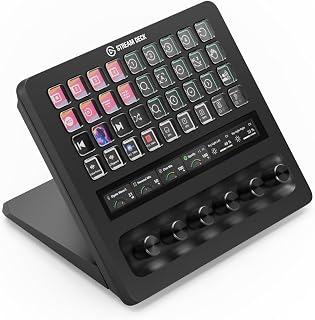
The Elgato Stream Deck + XL is a professional control platform designed for content creators, live streamers, audio engineers, and production professionals who need to manage complex workflows from a single interface. Unlike standard keyboards, this device lets you trigger entire automation sequences, control multiple applications, and monitor real-time data with one touch. It's built for users who spend hours in production environments and need reliable, precision control.
The standout features deliver real-world performance benefits. The 36 customizable macro keys provide more control points than competing devices, while the six multifunction dials add a layer of precision adjustment that feels natural for audio mixing, video editing, and system parameter control. The touch strip display eliminates the need to look away from your main work to access critical information. Customer reviews consistently highlight how these elements combine to streamline professional workflows, with one user noting they can now control Discord user audio levels without navigating menus.
Build quality justifies the investment. The device feels solid and durable in hand, with responsive buttons and a responsive touch interface. Multiple reviewers with Stream Deck XL experience confirmed that the + XL model maintains the same exceptional build standards while adding more control capacity. The 2-year manufacturer warranty provides additional confidence in the product longevity.
The primary drawback is the substantial footprint and premium price point. At $349.99, this is a significant investment that assumes dedicated desk space and a commitment to customization. The device also requires a free USB-C port, which can be limiting on some laptops. Some users expressed interest in a foldable design for portability, which the current model lacks.
The Elgato Stream Deck + XL is a worthwhile investment for professionals who will use all available controls regularly. The extensive integration ecosystem, customization depth, and build quality justify the cost for production environments. However, casual users or those with limited desk space should consider whether the XL size provides genuine value over smaller alternatives.
This product is ideal for live streamers using OBS, Streamlabs, or Streamer.bot who need single-click access to scene switching, audio management, and overlay controls. Professional audio engineers benefit from using the dials to control mixer levels, plugin parameters, and monitor volumes without leaving their DAW. Video editors and production assistants can map the keys to timeline navigation, effect shortcuts, and export functions.
Content creators working with multiple applications simultaneously gain the most value, as the unlimited profile system lets you create context-specific layouts for different projects or team members. If your workflow involves frequent application switching or repetitive multi-step processes, the multi-action capability pays dividends. Professionals with dedicated workspace setups benefit more than those requiring portable equipment.
Physical: 8.07 inches length by 5.79 inches width by 6.89 inches height. Weighs 2.4 pounds. Black color finish. Includes USB-C cable and Stream Deck + XL unit.
Connectivity: USB-C connection to PC or Mac. Supports hundreds of integrations including OBS, DAWs, video switchers, streaming platforms, and creative applications. Compatible with optional Network Dock for expanded connectivity.
Controls: 36 customizable macro keys with LCD displays. Six multifunction dials. Touch strip with swipeable interface. All controls support Multi Actions for sequence automation and unlimited custom profile creation.
Performance: 1080p display resolution on keys. 1920 x 1080 pixel video output. H.264, H.265/HEVC, VP9, and AV1 codec support. Free Stream Deck app for PC and Mac handles all customization.
Support: 2-year manufacturer warranty from Corsair. Model number 20GBX9901.

Pros
- Perfect balance of functionality and desk space, ideal for those who find larger decks overkill
- Exceptional build quality and recognition from Elgato software, with familiar programming interface
- Highly versatile for both streaming and non-streaming use cases like content creation, gaming, and remote work
- LCD keys eliminate guesswork and reduce workflow interruptions
- Reliable 12-month warranty backs the investment
Cons
- Non-detachable USB cable limits desk placement flexibility and may degrade over time with repeated movement
- Limited to 6 buttons means frequent page-switching for complex workflows, though folder logic partially mitigates this
The Elgato Stream Deck Mini is a compact programmable controller designed for content creators, streamers, remote workers, and anyone who spends significant time in productivity software. Unlike traditional macro pads, each of its six keys features a built-in LCD display that shows custom icons, making it instantly recognizable without memorization. This 3.3-inch device packs real utility into minimal desk real estate.
The standout feature is its exceptional software integration. Users report seamless compatibility with Zoom (mute, camera toggle, hand raise), Adobe Creative Suite, Microsoft Office, OBS Studio, Streamlabs, and over 100 other applications. The drag-and-drop interface is genuinely beginner-friendly, and advanced users appreciate multi-action sequencing with precise timing control. Key Logic functionality allows single-tap, double-tap, and hold actions on one button, effectively tripling available controls. Performance is snappy and reliable, with no lag reported across reviews.
Build quality is solid. The compact form factor doesn't feel cheap, and the integrated USB cable, while fixed, is sufficiently long at 59 inches. The matte black finish resists fingerprints. However, some users note the cable shielding could be better, as proximity to microphones occasionally introduced audio noise. The non-detachable cable is the primary design trade-off, limiting flexibility for desk organization.
The six-key limitation is real but manageable. Users switching from the 32-button Stream Deck XL report satisfaction with the Mini, though those running complex multi-application setups may need to navigate folders frequently. For focused workflows, this is rarely an issue. The price sits at a premium compared to generic programmable macro pads, but the Elgato ecosystem integration and polished software justify the investment.
Verdict: The Stream Deck Mini delivers excellent value for professionals and enthusiasts seeking a compact, reliable macro solution. It excels at reducing workflow friction in content creation, remote meetings, and creative work. Recommended for anyone frustrated with keyboard shortcuts who values build quality and software reliability over raw button count.
Physical Dimensions: 3.3 x 2.4 x 2.3 inches (84 x 60 x 58 mm), Weight: 6.17 ounces (160g). Form factor is compact and ideal for desk placement.
Control Interface: 6 customizable LCD macro keys with integrated USB 2.0 cable (150 cm / 59.1 inches). Connector type is Micro USB with fixed cable.
Compatibility: Windows 10 (64-bit) or newer, macOS 10.15 or newer. Works with OBS Studio, XSplit, Streamlabs, Twitch, YouTube, Zoom, Teams, Microsoft Office, Adobe Creative Suite, Google Suite, Spotify, and 100+ additional applications via Stream Deck SDK.
Software: User-friendly drag-and-drop interface for action assignment and customization. Supports multi-action sequencing, Key Logic programming (single-tap, double-tap, hold), and folder organization for extended functionality.
Warranty: 12-month manufacturer warranty. Model number: 10GAI9901, UPC: 00813180020658.
Best For: Content creators and streamers using OBS or Streamlabs, remote workers joining frequent video calls, graphic designers and photographers managing Adobe applications, gamers needing quick macro access, and professionals in live production environments.
Consider the Full Deck XL If: You regularly manage complex workflows requiring more than six simultaneous macros, or you need extensive third-party integration beyond standard applications. The XL's 32 keys may be worth the desk space if your workflows demand it.
Setup Expectations: Installation is straightforward: plug in via USB, download Elgato's free Stream Deck software, and start assigning actions via drag-and-drop. Most users complete initial setup within 10-15 minutes. Advanced features like Key Logic and multi-action sequences take additional learning but are well-documented.
Real-World Performance: Users consistently report zero lag and reliable performance across Windows and Mac. The fixed USB cable is adequate for most desk setups but limits flexibility. Audio shielding is acceptable for most environments, though users with sensitive microphone placement may notice minor interference.
Investment Consideration: At $59, the Stream Deck Mini represents a premium compared to generic macro pads, but the software ecosystem, build quality, and broad application support deliver measurable productivity gains for professionals. Plan on long-term use to justify the initial cost.

Pros
- Intuitive LCD keys provide immediate visual confirmation that commands executed correctly
- Extensive plugin library covers virtually every streaming, design, and production platform
- Compact form factor and lightweight design make it ideal for portable studio setups
- USB-C connectivity and cross-platform support work with modern Mac and Windows systems
- One-touch operation eliminates repetitive keyboard shortcuts and mouse clicks during live streaming
Cons
- No wireless connectivity option, requires USB-C cable connection to function
- Learning curve for advanced customization and plugin configuration beyond basic setup
- Limited tactile feedback compared to mechanical keyboards, which some users may prefer
The Elgato Stream Deck MK.2 is a professional-grade macro controller designed for streamers, content creators, and production professionals who need rapid access to complex commands. It shines as a productivity tool that consolidates control of multiple applications, hardware, and smart devices into a single compact device.
The standout feature is its 15 customizable LCD keys, each capable of triggering single or multiple actions with visual feedback. Whether you're switching OBS scenes, launching Twitch alerts, adjusting Philips Hue lighting, or triggering Spotify playlists, the Stream Deck handles it all through its extensive plugin ecosystem. Real-world performance is smooth and responsive, with no noticeable lag between key press and command execution.
Build quality is solid despite the plastic enclosure. The device feels premium with its matte finish and weighted base stand. The compact 4.6 x 3.3 inch footprint means it won't clutter your desk, while the included USB-C cable and desktop stand ensure you're ready to use it right out of the box.
The main drawback is the lack of wireless connectivity, which limits placement flexibility if your setup requires distance from your computer. Additionally, unlocking the full potential of the device requires time spent configuring plugins and custom actions, though the learning curve is manageable for most users.
For anyone serious about streaming or content production, the Stream Deck MK.2 is a worthwhile investment that saves time and reduces on-air mistakes. It transforms chaotic multi-application workflows into streamlined, one-touch operations.
Dimensions and Weight: 4.6 x 3.3 x 1.0 inches without stand, 145g without stand, 270g with stand included.
Connectivity: USB-C 2.0 interface, USB-powered with no battery required.
Compatibility: macOS 10.15 Catalina or newer, Windows 10 64-bit or newer. Works with laptops, desktops, and PCs.
Keys: 15 fully programmable LCD keys with customizable icons and visual feedback.
Included Accessories: Desktop stand, USB-C cable, quick-start guide, and access to thousands of plugins and royalty-free media assets.
Warranty: 2-year manufacturer warranty included.
Twitch and YouTube Streamers: Direct integration with streaming platforms enables scene switching, chat alerts, and overlay control from a single device.
Video and Audio Producers: Hotkey support accelerates film editing, music production, and audio mixing workflows within professional software like Adobe Premiere, DaVinci Resolve, and Ableton Live.
Content Creators: Manage social media posting, lighting, audio levels, and effects simultaneously without interrupting your creative workflow.
Professional Live Production: Multi-application control reduces on-air errors and enables faster transitions between scenes, graphics, and media playback during live broadcasts.

Pros
- Intuitive drag-and-drop interface makes setup accessible to non-technical users
- LCD key displays with GIF animation significantly improve ergonomic recognition during fast workflows
- Extensive software integration library covers streaming, productivity, gaming, and creative tools
- Three dedicated dials provide tactile, real-time control for volume and media operations
- Excellent build value at competitive price point for professional-grade macro functionality
Cons
- No reviews available yet, so real-world durability and long-term reliability cannot be verified
- Limited to six keys may feel restrictive for power users with complex macro libraries
- USB-only connectivity means it requires a desktop setup and cannot be used with mobile devices
The ActionRing N3 V3 is a programmable stream controller and macro keyboard built for content creators, gamers, and productivity-focused professionals. It combines six customizable LCD keys with three control dials, offering hands-on workflow acceleration without requiring coding knowledge or steep learning curves.
The standout feature is its LCD key system with GIF animation support, which transforms abstract buttons into visual shortcuts. Pairing this with the Action Flow function allows you to chain multiple commands into a single keystroke, making complex OBS scene transitions, application launches, and text macros genuinely one-click operations. Compatibility spans OBS, Twitch, YouTube, Photoshop, Premiere Pro, Excel, and over 100 plugins, making it useful across streaming, design, office, and gaming workflows alike.
Build quality appears solid with USB connectivity and standard desktop form factor. The three analog dials feel like a practical addition for real-time volume and playback control, breaking away from the button-only limitations of competing macro pads. Windows and macOS support ensures broad compatibility, and the included 24-month warranty reflects manufacturer confidence.
The main limitation is the absence of verified user reviews, so real-world reliability over extended use remains untested. Additionally, six keys may not satisfy users managing extensive macro libraries, though the plugin ecosystem partly compensates through customizable screen widgets like timers and calendars.
The N3 V3 delivers genuine value for streamers, video editors, and anyone seeking to eliminate repetitive manual tasks. Its accessible customization interface combined with pro-level functionality makes it a smart choice for both beginners entering content creation and experienced users optimizing their setup.
Connectivity: USB (wired, powered via USB port)
Keys: 6 programmable LCD buttons with GIF animation support, 3 multi-function control dials
Compatibility: Windows 10 and later, macOS 10.12 and later
Software Support: OBS, Twitch, YouTube, Discord, PowerPoint, Adobe Creative Suite, Excel, and 100+ applications via plugin library
Dimensions: 6.69 x 5.04 x 2.64 inches
Warranty: 24 months manufacturer coverage from date of purchase
Model: ActionRing N3 V3 (Color: Black)
Best For: Content creators using OBS or Twitch, video editors in Adobe Suite, streamers managing multiple software windows, gamers seeking macro functionality, and office professionals automating repetitive tasks in Excel, PowerPoint, or other productivity software.
Consider Alternatives If: You need wireless connectivity, require more than six programmable keys, or work exclusively on mobile devices. This product is desktop-focused and keyboard-dependent.
Setup Time: Most users report functional setup within 10-15 minutes using the drag-and-drop interface. Advanced Action Flow macros may require 30-45 minutes to master.

Pros
- Intuitive drag-and-drop interface makes setup accessible to beginners and experts alike
- Broad app compatibility covers creative, communication, and productivity tools used daily
- Compact footprint maximizes desk space without sacrificing functionality
- Smart home integration adds value beyond traditional streaming and content creation
- Solid 4.6 out of 5 rating demonstrates reliable real-world performance and user satisfaction
Cons
- Limited to 8 keys, which may feel restrictive for users managing highly complex workflows requiring 15+ shortcuts
- Micro USB connection may require a separate cable if not readily available at your desk
- Software-dependent operation means any Stream Deck app bugs or updates could impact functionality
The Elgato Stream Deck Neo is an 8-key programmable macro controller designed for professionals, content creators, and streamers who need to automate repetitive tasks. It's particularly valuable for anyone juggling multiple apps throughout the day, from video conferencing platforms to creative software suites. The device bridges the gap between basic keyboard shortcuts and full-featured control surfaces, offering meaningful productivity gains at an accessible price point.
The standout feature is its drag-and-drop setup via the free Stream Deck app, which eliminates the complexity many users fear with macro controllers. Integration with over 100 apps including Zoom, Teams, Photoshop, and the entire Microsoft Office suite means most users will find immediate workflow applications. The two touch-sensitive areas add versatility for volume control, media playback, or custom actions, and smart home integration lets you control lighting and audio ecosystems directly from your desk.
The Neo's compact design measures just 1.02 by 4.21 by 3.07 inches, making it small enough to integrate seamlessly into any workspace without consuming valuable real estate. The plastic construction feels solid despite its lightweight profile, and the rubberized key surface provides tactile feedback during use. Micro USB connectivity offers cross-platform compatibility with both PC and Mac systems, though users should verify cable availability before setup.
The main limitation is the 8-key configuration, which may feel constraining for power users managing extremely complex workflows or multiple applications simultaneously. Additionally, since the device relies entirely on the Stream Deck software, any app performance issues or update conflicts could temporarily impact functionality. These considerations are minor for typical use cases but worth acknowledging for advanced users.
The Elgato Stream Deck Neo delivers genuine productivity value through smart automation and intuitive setup. It's an excellent choice for professionals seeking tangible efficiency gains, streamers looking for live production control, and anyone tired of memorizing complex keyboard shortcuts. The strong user rating and broad app compatibility make it a reliable investment in workflow optimization.
Content creators and streamers will benefit most from the Stream Deck Neo's live production control capabilities and broad software integration. Remote workers using Zoom, Teams, and other communication platforms can dramatically reduce repetitive actions and improve meeting management.
Photographers and video editors working with Adobe Creative Suite will appreciate quick access to frequently used tools and filters. Music producers can map transport controls and effect toggles to physical keys for improved workflow. General office professionals can automate email, document, and spreadsheet tasks across Microsoft Office applications.
Anyone seeking their first programmable macro controller will find the Neo's simplicity and affordability more approachable than advanced alternatives. However, professionals managing 15+ simultaneous applications may need models with more programmable keys.
Key Specs:
Model: Elgato Stream Deck Neo
Programmable Keys: 8 customizable keys
Touch Points: 2 dedicated touch-sensitive areas
Connectivity: Micro USB
Compatible Devices: PC, Laptop, Mac
Dimensions: 1.02 inches L x 4.21 inches W x 3.07 inches H
Material: Plastic with rubberized key surface
Color: White
Software: Free Stream Deck app (Windows and macOS)
Keyboard Type: Gaming-grade mechanical switches
Special Features: Programmable keys, smart home control support

Pros
- Dramatically speeds up workflow by consolidating multiple actions into single taps
- Exceptional build quality with tactile LCD buttons and responsive performance
- Extensive customization options with regular updates adding new capabilities
- Ideal for multi-app streaming setups combining OBS, Discord, Twitch, and monitoring tools
- Collector's edition design brings authentic Fallout aesthetic to professional setups
Cons
- Requires software installation and learning curve to maximize customization potential
- 15-key layout may feel limiting for power users managing extremely complex workflows
The Elgato Stream Deck Nuka-Cola Fallout Edition is a specialized control device that transforms how streamers, content creators, and video editors manage their workflows. This isn't a keyboard replacement, but rather a command center that consolidates dozens of common actions into 15 customizable buttons, making it essential gear for anyone juggling multiple applications during live broadcasts or editing sessions.
What sets this device apart is the combination of real-time data integration and instant app control. Each LCD key can trigger scene changes in OBS, launch Discord overlays, toggle audio inputs, or display live system metrics like CPU usage and stream FPS. The LED illumination ensures you can see every button clearly even during intense gaming sessions, eliminating the need to glance down and lose focus on your screen.
Build quality is solid with responsive mechanical buttons and a compact footprint that doesn't dominate desk space. The USB-C connection is modern and reliable, while the included software provides extensive customization options through an intuitive interface. Regular firmware updates ensure the device stays current with new streaming platforms and tools.
The primary drawback is the learning curve required to set up optimal key configurations, plus the investment is substantial for casual streamers. Some power users managing extremely complex production setups might wish for more than 15 keys, though the modular plugin system helps offset this limitation.
For professional streamers, content creators, and Fallout enthusiasts seeking a reliable productivity tool with distinctive collector's appeal, the Nuka-Cola Stream Deck delivers exceptional performance and unique aesthetic value that justifies the premium price tag.
This Stream Deck excels for live streamers managing complex setups with OBS, Discord, Twitch chat, and audio systems. Professional video editors benefit from programmable shortcuts for timeline scrubbing and effect triggers in premiere or Final Cut Pro. Content creators producing multiple shows or segments gain workflow efficiency by switching between pre-configured scenes instantly.
The Fallout Special Edition particularly appeals to gaming streamers and franchise enthusiasts who want their gear to reflect their community passion. It's also ideal for esports athletes requiring split-second scene and audio adjustments during competitive broadcasts, and podcasters who need quick transitions between intros, ads, and segments.
The Stream Deck connects via USB-C to Windows and Mac laptops and desktops, with full driver support and regular software updates. Setup involves installing the Elgato Stream Deck software, creating profiles for different streaming applications, and customizing each key with icons and actions. The included user manual walks through basic configuration, while the community plugin ecosystem extends functionality far beyond the factory settings.
Compatibility extends across major platforms including OBS Studio, Streamlabs OBS, Adobe Creative Suite, and most streaming platforms. The device remembers multiple profile configurations, allowing instant switching between gaming streams, creative work, and everyday productivity tasks with a single software command.

Pros
- Exceptional tactile control with visual LCD feedback eliminates guesswork
- Wave Link software delivers professional audio mixing capabilities out of the box
- Extensive plugin ecosystem and regular updates keep functionality fresh
- Multi-action support and smart profiles save time on repetitive tasks
- Compact form factor doesn't consume much desk space
Cons
- Requires USB power connection, limiting placement flexibility
- Steep learning curve for first-time users unfamiliar with customization
The Elgato Stream Deck + is a professional-grade hardware controller designed for content creators, audio engineers, and live streamers who demand tactile control over their production environment. Whether you're managing audio levels during a stream, triggering lighting effects, switching scenes in OBS, or controlling music playback, this device puts essential functions within arm's reach.
What truly sets the Stream Deck + apart is its hybrid control interface. The 8 customizable LCD keys provide visual feedback so you always know the current state of your commands. The 4 rotary encoders let you smoothly adjust parameters like microphone gain or stream bitrate, while the capacitive touch strip handles volume adjustments and fader control. This multi-modal approach feels responsive and professional.
Build quality is excellent. The 465-gram device sits solidly on your desk with a non-slip base, and the LCD keys are crisp and bright. The included USB-C cable is well-made, though you'll be tethered to a power source during use. The compact 5.5 x 5.4 x 4.3 inch footprint fits seamlessly into tight studio spaces without feeling cramped.
The main limitation is the learning curve. New users will need time to master the Stream Deck App's customization interface and explore available plugins. Additionally, at $179.99, this is a significant investment for hobbyists. The USB power requirement also means less flexibility in where you can position the device.
For serious creators, streamers, and producers, the Stream Deck + delivers industry-standard control and justifies its premium price through reliability, extensibility, and the included Wave Link mixing software. It's a workhorse for anyone looking to streamline their production workflow.
Physical Dimensions: 5.51 inches deep x 5.43 inches wide x 4.33 inches high, weighing 470 grams (1 lb).
Control Interface: 8 customizable LCD keys, 4 rotary 360-degree encoders with push function, 1 capacitive touch strip (4.2 x 0.5 inches).
Connectivity: USB 2.0 via USB-C connector. Corded electric power required. Frequency response: 20 kHz. Audio input via USB.
System Requirements: Windows 10 64-bit or macOS 10.13 and newer. Warranty: 2 years manufacturer coverage. Model: 20GBD9901 by Corsair.
Ideal for: Live streamers on Twitch or YouTube, podcast producers, audio engineers, video editors, and music producers who benefit from dedicated hardware control. Content creators managing multiple software applications will find the smart profiles feature invaluable.
Less ideal for: Casual users or hobbyists with minimal production needs. Those with limited desk space or a preference for wireless peripherals may find the tethered USB connection restrictive.
Buying Guide: Choosing the Right Stream Deck
Number of Keys and Physical Controls
The number of programmable keys directly impacts how many functions you can access without switching pages. Entry-level models like the Elgato Stream Deck Mini offer 6 keys, which works well for basic streaming tasks like scene switching and muting. Mid-range options provide 8 to 15 keys, suitable for most content creators who run OBS alongside chat and media controls.
Professional workflows benefit from 32 to 36 keys, especially when managing multiple camera angles, lighting systems, and audio sources simultaneously. Controllers with rotary dials and touchscreens add another dimension, letting you adjust volume, scroll timelines, or navigate pages without dedicating LCD keys to those functions.
Software Compatibility and Plugin Ecosystem
Check which operating systems and applications the controller supports before purchasing. Most stream decks work with Windows and macOS, but verify compatibility with your specific software stack. Popular streaming platforms like OBS Studio, Streamlabs, and XSplit typically have native integrations, while productivity apps such as Photoshop, Premiere Pro, Excel, and Zoom may require plugin installation.
The plugin library determines how quickly you can expand functionality. Elgato maintains the largest official ecosystem, but third-party controllers increasingly offer robust app stores with hundreds of ready-made actions. If you work with niche software or custom workflows, confirm whether the device supports custom commands or API integrations. Remote workers often need quick access to video conferencing controls, document templates, and communication tools.
Customization Options and Visual Feedback
LCD keys that display custom icons and animations make it easier to identify functions at a glance. Some controllers allow full-screen backgrounds behind semi-transparent icons, while others limit you to small centered images. GIF support adds dynamic visual cues that can indicate active states, like showing a pulsing icon when your microphone is live.
Profile switching capability lets you create dedicated layouts for different applications or projects. Advanced models automatically switch profiles when you open specific software, eliminating manual page navigation. RGB lighting around the device or beneath keys provides ambient feedback but remains a secondary consideration compared to functional LED indicators that confirm command execution.
Build Quality and Desk Footprint
Compact 6 to 8-key models fit easily beside a keyboard without dominating your workspace, making them ideal for streamers with limited desk real estate. Larger 32-key units require dedicated placement but reduce the need for multiple peripherals. Weighted bases prevent the device from sliding during use, while adjustable stands improve visibility and ergonomics during long sessions.
Key feel matters if you’ll be triggering dozens of commands per stream or editing session. Tactile buttons with clear actuation points reduce mis-presses compared to mushy or overly sensitive switches. Detachable USB cables simplify cable management and replacement if the connection fails. For professionals managing multiple workstations, look for models that store profiles locally rather than requiring cloud synchronization.
Final Thoughts
The right stream deck depends on your specific workflow and budget. For streamers and content creators needing professional-grade control with maximum flexibility, the Elgato Stream Deck + XL Control Platform, Dials delivers 36 keys, multifunction dials, and a touch strip for comprehensive production management. If you want powerful customization and excellent value, the TreasLin/VSDinside XL Streaming Deck & Macro offers 32 programmable LCD keys with scroll wheels and RGB lighting at a competitive price point.
Frequently Asked Questions
Do stream decks work with consoles like PlayStation or Xbox?
Stream decks connect via USB and require desktop software to configure, so they do not work directly with gaming consoles. However, you can use a stream deck on your PC to control capture card software while streaming console gameplay. The controller manages your broadcast software, not the console itself.
Can I use a stream deck for work tasks besides streaming?
Absolutely. Stream decks excel at automating repetitive tasks across productivity software. Video editors assign timeline shortcuts, designers create Photoshop macro sequences, and office professionals automate Excel formulas and email templates. Any workflow that relies on keyboard shortcuts or multi-step processes benefits from single-button execution.
How difficult is it to set up a stream deck in 2026?
Setup typically takes 10 to 20 minutes. Download the companion software, drag actions onto keys, and upload custom icons if desired. Most controllers offer plugin stores with pre-configured actions for popular apps, eliminating manual command entry. Basic functions like launching applications or entering text require no coding knowledge, while advanced multi-action sequences involve simple drag-and-drop logic.
What happens if I need more keys than my stream deck provides?
All stream decks support multiple pages of actions that you can switch between with a dedicated key or gesture. This effectively multiplies your available commands, though it adds a navigation step. Some users run two stream decks simultaneously for instant access to dozens of functions without page switching, especially in complex production environments with multiple camera operators and technical directors.
Common questions
What is the best stream controller for beginners and pros?
The Elgato Stream Deck Mini is best for beginners who want an affordable entry point with 6 customizable LCD keys, while the Elgato Stream Deck + XL is ideal for pros who need advanced control with dials, a touch strip, and extensive customization. The Streonor S10 offers excellent middle ground with 10 LCD keys, 4 rotary knobs, and integrated audio mixing at a competitive price point. Your choice depends on whether you prioritize simplicity, advanced features, or budget flexibility.







Write Your Review
No reviews yet. Be the first to share your experience!