

You’re mid-match, peeking a corner in Valorant, and your keyboard misses the input by a fraction of a second. That’s the problem magnetic switch keyboards are built to solve. Unlike traditional mechanical switches that rely on physical contact, hall effect technology uses magnetic sensors to detect keypresses, which means faster actuation, adjustable sensitivity, and a switch that won’t wear out over years of heavy use.
This guide covers the eight best magnetic switch keyboards available right now, from sub-forty-dollar compact 60% boards to premium wireless TKL and full-size options. Whether you’re a competitive FPS player or a daily typist who wants a more precise feel, there’s a solid option here for you. If you’re still deciding on a layout, our roundup of the best 60 percent keyboard is worth a read before committing.
Quick answer
This guide compares 8 picks, with ATTACK SHARK X68 HE 60% Mechanical Gaming Keyboard ranked first. AULA WIN60 HE 60% Hall Effect Gaming Keyboard, 8000Hz has the most customer reviews.

For players chasing competitive precision in a compact frame, the 0.01mm RT accuracy paired with rapid trigger and adjustable actuation lets you fine tune sensitivity per game. Layer in an 8K Hz polling rate and a top mounted structure for consistent keyfeel, and this 60% layout becomes a serious contender for anyone building a magnetic switch setup around raw responsiveness.
Pros
- Hall effect switches with adjustable rapid trigger
- 0.01mm actuation accuracy
- 8K Hz polling rate for low latency
- Sturdy top-mounted plate with PORON stabilizers
Cons
- Wired only, no wireless option
- 60% layout requires learning key combinations
If you're hunting for a magnetic switch keyboard without spending big, the ATTACK SHARK X68 HE deserves a spot on this list as the value pick. It packs hall effect switches with rapid trigger and 0.01mm actuation accuracy into a 60% frame, which is exactly the kind of spec sheet usually reserved for pricier boards. Actuation is adjustable from 0.1mm to 3.4mm, so you can tune sensitivity per key through the programmable web driver, and each key supports up to 4 bound functions based on press depth. An 8K Hz polling rate keeps input lag low, which matters when you're comparing magnetic switch options for competitive play. The top-mounted aluminum plate and double layer PORON stabilizers give it a sturdier feel than the price suggests, and pre-lubed stabilizers cut down on rattle. PBT keycaps add durability. For readers comparing magnetic switch keyboards on a budget, this is the model that proves you don't need to spend a lot to get real hall effect performance.
Physical Specs: 66 keys, 60% compact layout with dedicated arrow keys, top-mount aluminum construction, curved wrist rest included, non-slip base mat. Dimensions optimized for minimal desk footprint.
Switch Technology: Hall effect magnetic switches with adjustable actuation from 0.1mm to 3.4mm, rapid trigger function, customizable keystroke points, NKRO anti-ghosting, FN key combinations supported.
Performance: 8KHz polling rate, 0.125ms latency, 0.01mm rapid trigger accuracy. Programmable web driver (qmk.top) enables key remapping, macros, hotkeys, and RGB effects. No software installation required, works on PC and Mac.
Connectivity: USB-C wired connection, compatible with Windows 10+, Mac OS 10.12 Sierra+, supports dual system switching between Win and Mac via single button.
Lighting: Built-in RGB LED backlighting with 16.8 million colors, multiple backlit modes, south-facing LEDs for superior shine-through, customizable via web driver.
Keycaps: PBT Cherry profile double-shot keycaps, durable with clear lettering that resists fading. Color: Black with rainbow RGB theme.
Good for budget-conscious gamers who want genuine hall effect switches and rapid trigger without paying flagship prices, especially FPS or rhythm game players who can adapt to a 60% layout. Skip it if you need dedicated function rows, arrow keys, or wireless freedom, or if you're not willing to learn key combos for missing keys. Also worth passing on for anyone wanting a widely supported software ecosystem.

Readers wanting a premium magnetic setup for both desk and travel will like the 65% TKL layout with dual USB-C ports and a protective cover for portability. Speed Tap and rapid trigger sharpen in game response, while PBT keycaps hold up under long sessions, making this a well rounded pick for serious enthusiasts.
Pros
- Compact 65% TKL layout for portability
- Dual USB-C ports for flexible device switching
- On-keyboard touch panel for software-free adjustments
- Includes protective case and keycap puller
Cons
- Wired only, no wireless mode
- AZERTY layout, not standard QWERTY
For anyone comparing top-tier magnetic switch keyboards for this list, the ASUS ROG Falchion Ace HFX earns its place as the portable powerhouse. Its 65% TKL layout is compact enough for tournament bags and hot-desk setups while still keeping more keys than a 60% board. Hall effect magnetic switches offer adjustable actuation and rapid trigger mode, and dual USB-C ports on the rear edges let you switch quickly between two devices. Five-layer dampening with silicone gasket mounting gives typing a cushioned, quiet feel, and pre-lubed switches add to the premium impression. A built-in touch panel lets you adjust settings directly on the keyboard without relying on software. It ships with a protective case and keycap puller, which is a thoughtful touch for players who travel with their gear. For readers weighing portability against performance in a magnetic switch keyboard, this model covers both without compromise, provided you're fine with a wired-only connection.
Best for: Competitive FPS gamers, esports players, and enthusiasts who value response time and customizable actuation settings. The rapid trigger mode and 8000Hz polling directly improve performance in games like Valorant, CS2, and Apex Legends.
Good for: Hybrid work and gaming setups where a compact keyboard maximizes desk space. The dual USB-C ports are useful for switching between a gaming PC and work laptop. Touch panel media controls and RGB lighting add quality-of-life features.
Consider alternatives if: You require wireless connectivity for cable-free gaming or portability. The wired-only design is a deliberate choice for maximum reliability and zero input lag, but it may not suit all use cases.
Not ideal for: Budget-conscious gamers or users who primarily need a keyboard for typing. The premium pricing reflects esports-grade specifications that gaming-focused buyers will appreciate, but casual users may find better value in mid-range alternatives.
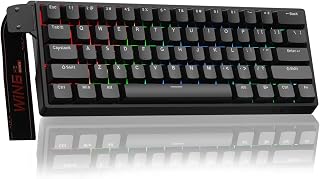
Anyone wanting to try Hall effect switches without overcommitting will appreciate the hot swappable sockets here, letting you experiment with different modules over time. The adjustable actuation and rapid trigger mode deliver genuine competitive feel in a 60 percent compact frame, while USB-C wired connectivity keeps input lag out of the equation entirely.
Pros
- 8000Hz polling rate for fast response
- 0.02mm rapid trigger distance
- Hot-swappable Hall Effect switches
- Compact 60% layout saves desk space
Cons
- Stock keycaps feel cheap
- No PS5/PS4 or OBOX compatibility
For anyone shopping this list specifically for competitive play, the WIN60 HE earns its spot through raw response speed rather than extras. Its Hall Effect magnetic switches pair with an 8000Hz polling rate and 0.02mm rapid trigger distance, a combination aimed squarely at FPS titles like Valorant and CS2 where fractions of a second matter. The 60% layout strips the board down to essentials, freeing desk space for mouse movement without sacrificing the programmable keys and customization that magnetic switches enable. It's wired only, which suits players who prioritize consistent latency over cable-free convenience. Build quality holds up well for the category, with a solid frame and a quieter sound profile than typical clicky gaming boards. The main tradeoff is the stock keycaps, which feel cheaper than the switches underneath, so budget-minded buyers should plan on an eventual keycap swap if typing feel matters as much as gaming performance.
Switch Technology: Hall Effect Magnetic Switches (Graywood V3), Linear actuation, 0.02mm rapid trigger distance
Performance: 8000Hz polling rate, adjustable actuation, rapid trigger mode support
Layout: 60% compact, 61 keys, QWERTY
Connectivity: USB-C wired connection
Lighting: RGB backlit, 16.8 million color options, illuminates PBT keycaps
Customization: Hot-swappable switches, programmable keys, web-based driver for macros and settings
Dimensions: 11 inches L x 5 inches W x 1.1 inches H
Build: Plastic enclosure, sturdy frame
Included Items: Keyboard, USB-C cable, keycap puller
Compatibility: Windows PC and laptops (not compatible with PlayStation or Mac)
Warranty: 6 months
Power: USB powered, no batteries required
Buy this if you play fast-paced FPS games and want magnetic switch precision in a compact, wired, desk-space-saving form. It fits players who don't mind a web-based configurator once settings are dialed in. Skip it if you need PS5/PS4 compatibility, want wireless freedom, or expect premium keycaps out of the box.
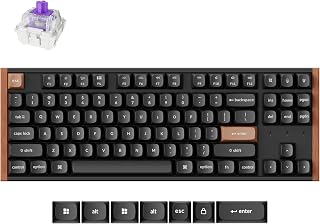
For someone who wants magnetic switch performance without giving up wireless freedom, the tri connectivity of 2.4GHz, Bluetooth 5.2, and wired covers every scenario from console to desktop. Hot swappable Hall effect switches with rapid trigger add tuning flexibility, and the aluminum and wood frame gives this TKL board a distinct desk presence.
Pros
- Tri-mode connectivity: 2.4GHz, Bluetooth 5.2, USB-C
- Hot-swappable magnetic switches
- Dynamic Rapid Trigger with adjustable actuation
- TKL layout retains navigation keys
Cons
- Steeper learning curve for rapid trigger and DKS features
- Battery powered, so wireless modes need charging
For readers who don't want to give up wireless freedom just to get a magnetic switch keyboard, the Keychron K8 HE stands out on this list as the tri-mode option. It offers 2.4GHz, Bluetooth 5.2, and wired USB-C connectivity alongside hall effect switches, so you're not locked to a cable the way most magnetic switch boards demand. Its Dynamic Rapid Trigger system tracks real-time key travel rather than a fixed point, with actuation adjustable from 0.2mm to 3.8mm, and Dynamic Keystrokes let a single key trigger up to four different actions depending on how far it's pressed. The TKL layout keeps a fuller key set than compact competitors, useful if you still want arrow keys and navigation clusters. Build quality leans premium, with an aluminum frame and wood siding plus OSA-profile PBT keycaps that resist shine. The web-based Keychron Launcher makes remapping straightforward without installing anything. For this article's audience, it's the pick for anyone who wants magnetic switch performance but refuses to be tethered to a desk.
Connectivity: 2.4GHz wireless (1000 Hz polling rate), Bluetooth 5.2, USB-C wired connection. Supports up to three paired devices.
Keyboard Layout: TKL (80%, 87 keys), QWERTY, ambidextrous design. Compatible with PC, Mac, Linux, and gaming consoles.
Switch Technology: Hall Effect magnetic switches with 0.1mm sensitivity. Actuation adjustable from 0.2mm to 3.8mm. Hot-swappable design requires no soldering for switch replacement.
Build Quality: Aluminum frame with natural wood sidings. OSA-profile double-shot PBT keycaps with non-shine-through finish. Aluminum keyboard plate.
Power & Weight: Battery powered. Total weight: 700g. Includes 2.4GHz receiver with USB Type-A extension adapter.
Customization: Web-based Keychron Launcher app. Supports key remapping, macro creation, rapid trigger activation, snap action, and Dynamic Keystrokes (DKS). No software downloads required.
Backlighting: Per-key RGB backlighting with customizable effects.
Warranty & Support: 1-year manufacturer warranty. Includes keycap puller, hex key, screwdriver, and 2.4GHz receiver in the box.
Best for gamers and typists who want hall effect switches with the option to go fully wireless, and who value a TKL layout over a compact one. Also suits anyone wanting hot-swappable switches for future customization. Skip it if you want the smallest possible footprint or you're not interested in learning rapid trigger and Dynamic Keystrokes customization.

Budget conscious gamers exploring magnetic switches will find the fast trigger mode and adjustable actuation deliver real rapid trigger benefits in a familiar 60% layout. Hot swappable sockets mean you're not locked into stock switches, and broad compatibility across console, laptop, and PC makes this an easy entry point into Hall effect gaming.
Pros
- Hall Effect linear switches with adjustable actuation
- 8000Hz polling rate for fast input response
- Hot-swappable switches for future flexibility
- Compact 60% layout, portable and desk-friendly
Cons
- 60% layout omits numpad and dedicated function keys
- Wired only, no wireless option
For a roundup on magnetic switch keyboards, the AULA WIN68 HE earns its spot as the compact pick. Its 60% layout strips the board down to essentials, making it a strong choice for anyone who wants Hall Effect switching without the desk footprint of a full-size or even a 75% board. The linear switches support fast trigger mode with adjustable actuation, so you can dial in sensitivity for gaming without hunting for a different keyboard. An 8000Hz polling rate keeps input readings quick, which matters more on a magnetic switch keyboard than a standard mechanical one since the whole appeal is faster, more precise registration. Hot-swappable sockets mean you are not locked into the stock switches if preferences change later, and RGB backlighting covers the visual side. Wired USB-C connectivity keeps things simple and avoids latency concerns. For readers specifically comparing magnetic switch options in 2026, this one stands out for squeezing the technology into a small, portable, budget-friendly frame rather than a premium full-featured board.
Technical Specs: 68-key 60% layout, Hall Effect magnetic switches with 0.02mm-3.44mm adjustable actuation, 8000Hz polling rate, 0.3ms response latency, USB-C wired connection.
Lighting: 16.8 million RGB colors, 14 preset effects, south-facing LEDs, adjustable brightness via driver or FN combinations.
Physical: Dimensions 14"L x 6"W x 1.7"H, weight 686g, plastic enclosure, contemporary black styling.
Compatibility: Windows PC and laptops, USB-C connectivity, includes 2 extra magnetic switches, keycap puller, portable ribbon cable, and standard USB cable.
Support: 6-month manufacturer warranty, web-based driver customization (Windows only, no macOS support).
Good for gamers who want Hall Effect switching in the smallest possible footprint, especially those short on desk space or who travel with their keyboard. Also fits anyone wanting to try magnetic switches without committing to a pricier board. Skip it if you need a numpad, function row, or wireless connectivity, or if you specifically want per-key programmable macros beyond basic hot-swap flexibility.
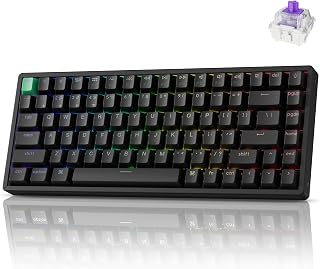
Players who don't want to sacrifice tuning depth for portability will appreciate the adjustable actuation point combined with 2.4GHz and Bluetooth 5.2 connectivity, so precision travels with you. A full metal frame and PBT keycaps add durability, while QMK support gives enthusiasts the deep customization that magnetic switch fans tend to seek out.
Pros
- Adjustable actuation from 0.2mm to 3.8mm
- Triple connectivity: 2.4GHz wireless, Bluetooth 5.2, USB-C
- Full aluminum frame with PBT keycaps
- QMK and web-based configurator for customization
Cons
- Proprietary Gateron switches limit third-party swaps
- Initial configuration requires a wired USB connection
In a lineup built around magnetic switch performance, the Keychron K2 HE stands out as the pick for anyone who also wants flexibility in how they connect. It is one of the few boards here offering 2.4GHz wireless and Bluetooth 5.2 alongside wired USB-C, so it fits gaming rigs and everyday laptop or tablet use without switching hardware. The Gateron double-rail Hall Effect switches bring the actuation range down to 0.2mm to 3.8mm, giving fine control over how light or deep a keypress needs to be, which is the core reason magnetic switches earn a spot on a best-of list like this. Snap Action tech prioritizes the most recent keypress, a detail that matters in fast input scenarios. Build quality leans premium with a full aluminum frame and PBT keycaps in a cherry profile, and the 75% layout keeps a numpad-adjacent key set without going full-size. QMK support and a web-based configurator round out the customization story for readers who want to tune actuation per key rather than accept one blanket setting.
Layout and Switches: 75% layout, 84 keys, Hall Effect Gateron double-rail magnetic switches (pre-lubed), linear switch type with snap action and adjustable actuation 0.2-3.8mm
Connectivity: 2.4GHz wireless (1000Hz polling rate), Bluetooth 5.2 (connect up to 3 devices), USB-C wired mode. Type-A 2.4GHz receiver included
Customization: Web-based Launcher configurator for key remapping, macro creation, actuation adjustment, RGB control, and rapid triggering setup. QMK compatible
Design and Build: Aluminum keyboard plate, full metal frame, ABS plastic bottom case, dimensions 12.46in L x 4.99in W x 1.6in H, weight 2.2 lbs. 22+ RGB backlight effects with shine-through PBT cherry profile keycaps
Compatibility: Windows, macOS, Linux. Works with laptops, PCs, smartphones, and tablets. Includes Type-A to Type-C cable, keycap puller, screwdriver, hex key, and extension receiver adapter
Best for people who want magnetic switch performance but also need wireless freedom across multiple devices, including laptops, tablets, and phones. Enthusiasts who want per-key actuation tuning will get the most from it. Skip it if you want to swap in third-party switches later, since the double-rail magnetic switches are proprietary, or if you prefer a fully wired setup for zero setup friction.
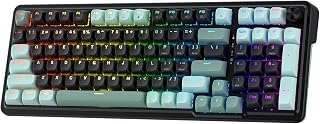
Those wanting near silent competitive typing will notice the Next-Gen UltraMag HE switches paired with a gasket design that softens keystrokes without dulling rapid trigger response. The 98 key layout keeps a numpad on hand for productivity, and PBT round keycaps round out a build focused on comfort during extended magnetic switch gaming.
Pros
- Adjustable actuation from 0.1mm to 3.4mm
- 8000Hz polling rate for competitive gaming
- Gasket design with noise dampening for smoother feel
- Multiple saved actuation profiles via software
Cons
- Wired USB-C only, no wireless option
- 98-key layout omits a dedicated numpad
The Redragon K686 HE fits naturally into a magnetic switch roundup as the value-focused entry, proving the technology does not require a high budget to deliver. Its UltraMag Hall Effect switches support adjustable actuation from 0.1mm to 3.4mm, which is one of the wider ranges among magnetic boards, giving readers real flexibility between hair-trigger response and deeper, deliberate presses. Paired with 8000Hz polling, it targets the exact use case this article is built around: fast, precise input for competitive play. The 98-key layout keeps a near-full key set while trimming bulk, and the dual-module gasket design combined with noise dampening gives a controlled, quieter keystroke than typical budget mechanical boards. Software support for saving multiple actuation profiles means settings can shift between games without manual reconfiguration each time. A built-in media control wheel adds a practical touch for volume and backlight adjustments. For an article focused on picking the right magnetic switch keyboard, this one earns its place by showing the category is accessible at a lower price point.
Connection Type: Wired USB-C
Layout: 98 Keys, QWERTY, Gasket Design
Switch Type: Custom Hall-Effect Magnetic (UltraMag POM)
Polling Rate: 8,000Hz
Actuation Range: 0.1mm to 3.4mm adjustable
Backlighting: RGB with brightness control
Material: ABS plastic and PBT keycaps
Compatibility: Windows 10 and later, USB-powered
Weight: 800 grams
Warranty: 1 year manufacturer coverage
Included Accessories: Spare switches, switch puller, USB cable
A strong fit for competitive FPS players who want rapid-trigger magnetic switches without paying premium prices, and for anyone assembling a gaming setup on a budget. Less ideal for people who want a dedicated numpad or wireless connectivity, since this is wired-only with a 98-key layout. Also worth skipping if your system does not reliably support the profile software.

Keychron K10 HE Full-Size Wireless Gaming Keyboard
Anyone wanting full size comfort without giving up magnetic switch tech will value the ergonomic layout paired with tri-mode wireless, so cables never dictate your desk setup. Rapid trigger keeps competitive response sharp even in a full 104 key board, and broad device compatibility makes it flexible across console, PC, and mobile use.
Pros
- Adjustable actuation from 0.2mm to 3.8mm
- Tri-mode wireless: Bluetooth, 2.4GHz, USB-C
- Hot-swappable switches, no soldering needed
- Premium aluminum and wood build
Cons
- Requires clearing browser data before first setup
- Gamepad emulation has limitations
If you want one magnetic switch keyboard that handles gaming, work, and everything between, the K10 HE makes a strong case for the top of this list. Its Hall Effect switches let you dial actuation from 0.2mm to 3.8mm, so you can set a hair-trigger response for ranked matches, then back it off for cleaner typing during the day. Tri-mode connectivity means it moves freely between a gaming PC, a laptop, or a tablet without cables tying you down, and the full-size layout keeps the number pad and function row intact for anyone who needs them. Beyond switch tech, this is a keyboard built to last on a desk: aluminum plate, wood siding, and hot-swappable sockets mean you can rework the feel over time instead of replacing the whole board. For a list focused on magnetic switches specifically, the K10 HE stands out for combining that switch technology with genuine everyday versatility rather than a single-purpose gaming design.
Layout and Switches: 100% full-size layout (104 keys) with Gateron Double-Rail Nebula Hall Effect magnetic switches. Hot-swappable design allows easy switch replacement.
Connectivity: Bluetooth 5.2 (supports up to 3 paired devices), 2.4GHz wireless via USB-A receiver, and wired USB-C connection. Seamless tri-mode switching.
Actuation Range: Adjustable from 0.2mm to 3.8mm with 0.1mm sensitivity. Customizable through Launcher web configurator for gaming and typing preferences.
Build: Aluminum plate and frame with natural wood sidings. Double-shot PBT keycaps in OSA profile resist shine and wear. Includes dedicated media keys and extra keycaps.
Lighting: RGB backlighting with customizable effects and brightness control through software.
Compatibility: macOS, Windows, and Linux with remapping support. Works with gaming consoles, laptops, PCs, smartphones, and tablets.
Power: Battery-powered with included Type-C charging cable. Weight: 1000g.
Buy this if you split time between gaming, coding, or office work and want a full-size magnetic switch keyboard that looks good doing all three. It suits anyone who values wireless flexibility and hot-swap tinkering. Skip it if you only want a compact gaming board, need PS5/PS4 support, or don't want to deal with clearing browser data to access the Web Launcher configurator.
What to Look for in a Magnetic Switch Keyboard
Actuation Range and Rapid Trigger Support
The core advantage of a hall effect keyboard is adjustable actuation. Most of the boards here let you set the trigger point anywhere from 0.1mm to around 3.8mm, so you can dial in ultra-shallow actuation for rapid keypresses or a deeper feel for deliberate typing. Rapid trigger takes this further by resetting the key the instant it starts moving back up, rather than waiting for a fixed reset point.
For FPS gaming, rapid trigger is essentially a must-have feature. The best 65 percent keyboards with hall effect switches often lead in this area, but as you’ll see below, even budget-tier boards now include it. Look for an RT step distance of 0.1mm or lower for the most responsive experience.
Polling Rate
Polling rate determines how often your keyboard reports its state to your PC. Standard keyboards poll at 1000Hz, meaning once per millisecond. Several boards in this list, including the ASUS ROG Falchion Ace HFX Hall Effect and the ATTACK SHARK X68 HE RT Mechanical Gaming Keyboard, push that to 8000Hz, cutting input delay to as low as 0.125ms in theory. For competitive play, the difference is measurable.
Wireless options like the Keychron K8 HE and Keychron K2 HE offer 1000Hz in 2.4GHz and wired modes, which is competitive for most use cases. If you’re a tournament-level player, wired 8000Hz is the safer choice. For everyone else, 1000Hz wireless is more than sufficient.
Layout and Form Factor
Magnetic switch keyboards now span every major layout. The ATTACK SHARK X68 HE RT, Aula WIN60 HE, and AULA WIN68 HE are all compact 60% boards that free up desk space for a wider mouse range. The ASUS ROG Falchion Ace HFX Hall Effect and Keychron K2 HE sit in the 65% and 75% range, retaining arrow keys and navigation clusters. If you need a full numpad, the Keychron K10 HE covers the complete 100% layout.
Think about how you use your desk before choosing. A 60% board is portable and mouse-friendly, but you’ll rely on function layer combinations for keys like Delete and Page Up. A TKL or full-size layout keeps everything accessible at the cost of some desk real estate. Our overview of keyboards and mice breaks down the tradeoffs in more detail.
Connectivity and Build Quality
Wired boards like the Redragon K686 HE Wired Hall-Effect Rapid Trigger and the ATTACK SHARK X68 HE RT keep things simple with a USB-C connection and consistent polling. Wireless options such as the Keychron K8 HE TKL Hall Effect Wireless Keyboard and Keychron K10 HE Full-Size Hall Effect Keyboard offer tri-mode connectivity including Bluetooth 5.2, 2.4GHz, and wired, making them flexible for multi-device setups.
Build quality varies meaningfully across price points. The Keychron lineup uses aluminum frames with natural wood side panels, while ASUS brings a silicone gasket mount and five-layer dampening foam. Budget boards from CORBOBO and AULA prioritize function over acoustics, but still offer solid construction for the price. Hot-swap support, present on most boards here, is worth prioritizing if you ever want to swap switches down the line. Pairing your keyboard with one of the best mouse pads for gaming rounds out the setup nicely.
Final Thoughts
If you want the best value in a magnetic switch keyboard for competitive gaming, the Aula WIN60 HE – 60% Mechanical Gaming Keyboard delivers rapid trigger, 8000Hz polling, and a compact layout at a price that’s hard to argue with. For those who want a premium wireless experience with a refined build and full-size layout, the Keychron K10 HE Full-Size Hall Effect Keyboard covers every base, from tri-mode connectivity to hot-swappable switches and macOS plus Windows compatibility.
Frequently Asked Questions
What is a magnetic switch keyboard?
A magnetic switch keyboard uses hall effect sensors to detect keypresses through changes in a magnetic field rather than physical contact between components. This eliminates the metal fatigue and wear that eventually degrades traditional mechanical switches. The result is a switch rated for a much longer lifespan with consistent actuation throughout.
Is a hall effect keyboard worth it for gaming in 2026?
Yes, especially if you play fast-paced FPS or rhythm games. The combination of adjustable actuation and rapid trigger gives you a meaningful edge in games like Valorant and CS2, where counter-strafing speed and peek timing matter. Even mid-range options in 2026 now include 8000Hz polling and 0.1mm RT precision, features that were exclusive to high-end boards just a couple of years ago. For a deeper look at what pairs well with these keyboards, check out our picks for the best mouse for FPS gaming.
Do magnetic switch keyboards work on Mac?
Most do, with some limitations. The Keychron K2 HE, K8 HE, and K10 HE all include dedicated macOS keycaps and one-button system switching. The AULA WIN68 HE’s web driver, however, is Windows-only, so Mac users won’t have access to full customization on that model. Always check the software compatibility before buying if you’re on macOS.
What is rapid trigger and why does it matter?
Rapid trigger resets a key the moment it begins traveling back up, rather than waiting for it to physically cross a fixed reset threshold. In practice, this means you can perform consecutive keypresses much faster, which is critical for counter-strafing and bunny-hopping in competitive shooters. All eight keyboards in this guide support rapid trigger, though the minimum step distance varies from 0.01mm on the Aula WIN60 HE to 0.1mm on the Keychron lineup.



Write Your Review
No reviews yet. Be the first to share your experience!