

Whether you’re upgrading a budget build or assembling a high-end gaming rig capable of 4K at maximum settings, picking the right graphics card is one of the most important decisions you’ll make. MSI has built a reputation for reliable cooling solutions, solid overclocks out of the box, and a lineup that spans every price tier. From the entry-level GT 1030 all the way up to the flagship RTX 5080 SUPRIM SOC, there’s an MSI GPU for nearly every use case. If you’re also planning a full system build, pairing a capable GPU with a quality PSU for a high-end gaming PC is essential to get the most out of your hardware.
This guide reviews ten of the top MSI graphics cards available right now in 2026, covering everything from everyday desktop use to competitive esports and professional-grade rendering. We evaluated each card based on architecture, memory configuration, thermal design, and real-world suitability for different types of gamers and builders.
Quick Comparison
Ratings reflect the most recent data pull. Check each listing for current price and availability.
Quick answer
This guide compares 10 picks, with MSI RTX 5080 SUPRIM SOC 16GB GDDR7 Gaming Graphics ranked first. MSI RTX 3060 12GB Gaming Graphics Card - 1440p High has the most customer reviews.
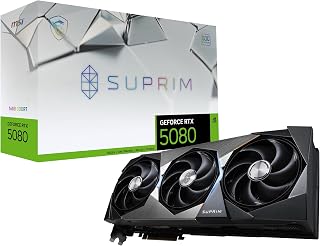
For enthusiasts building a flagship 4K gaming rig, the SUPRIM SOC pushes a 2760 MHz clock alongside 16GB of GDDR7 across a 256-bit bus, giving it the bandwidth to drive demanding titles at max settings. This is the pick for readers who want top-tier Blackwell performance without stepping up to liquid cooling.
Pros
- 16GB GDDR7 on a 256-bit bus for high throughput
- 2760 MHz clock handles AAA titles at max settings
- Cooling borrowed from the RTX 5090 flagship
- DisplayPort 2.1a and HDMI 2.1b future-proof outputs
Cons
- Requires a minimum 1000W power supply
- Large footprint demands a spacious case
For a 2026 top-10 list, the RTX 5080 SUPRIM SOC represents the step up from great to flagship. Built on NVIDIA's Blackwell architecture, it pairs 16GB of GDDR7 with a 256-bit interface for strong throughput in both gaming and compute-heavy work. The 2760 MHz boost clock gives it real muscle against modern AAA titles at max settings, and MSI carried over cooling engineering from the RTX 5090 flagship, so the dual-fan setup and oversized heatsink keep temperatures low even under sustained load. DisplayPort 2.1a x3 and HDMI 2.1b mean it's ready for next-gen monitors without adapters. This is the card for readers who've outgrown mid-range options and want a single upgrade that handles 4K gaming, content creation, and AI workloads without a second thought. It does ask for serious system support: a 1000W PSU and a case with room to spare. For this article's audience of buyers hunting the best of the best, it's a strong flagship contender that balances raw power with genuinely quiet operation.
GPU and Memory: NVIDIA GeForce RTX 5080, 16GB GDDR7, 256-bit memory interface, 30 GHz memory clock speed
Performance: 2760 MHz GPU clock speed, NVIDIA Blackwell architecture, PCI-Express x16 interface
Display Outputs: 3x DisplayPort 2.1a, 1x HDMI 2.1b, maximum resolution 7680x4320 (8K)
Physical and Warranty: 6.8 lbs weight, 3-year manufacturer warranty, includes quick setup guide, UPC 824142395752
Good fit for enthusiasts building a no-compromise 4K or workstation rig who already plan around a 1000W+ PSU and a full-size case. Also worth considering for creators mixing gaming with AI or rendering work. Skip it if your case is compact, your PSU is under 1000W, or you mainly play at 1440p, where this level of headroom goes unused.

This standard desktop RTX 3050 hits a 1507 MHz boost clock with 6GB of GDDR6, making it a sensible entry point for readers upgrading from integrated graphics who want dependable 1080p gaming. Its straightforward HDMI and DisplayPort outputs cover typical single-monitor setups without added complexity.
Pros
- No dedicated power supply connection needed, simplifying installation
- Runs cool and quiet with efficient thermal performance
- Perfect for upgrading 10+ year old systems like the GTX 970
- Supports dual 4K displays simultaneously with DisplayPort 1.4a and HDMI 2.1a
- Compact form factor fits standard desktop slots without modification
Cons
- Performance drops significantly with ray tracing enabled in demanding games
- Not suitable for high-refresh 1440p or 4K gaming at maximum settings
- Outperformed by older 1660 Ti in some gaming scenarios
The MSI GeForce RTX 3050 is a budget graphics card designed for users upgrading older systems or building entry-level gaming rigs. Built on NVIDIA's Ampere architecture, it offers a practical middle ground between aging GPUs and cutting-edge hardware, making it ideal for simulation games, media servers, video transcoding, and general productivity tasks.
Performance is respectable for its class. Users report smooth operation at 1080p with most games, solid frame rates on esports titles, and excellent performance handling dual 4K monitor displays. The 6GB GDDR6 memory provides adequate headroom for current games, while ray tracing support exists but isn't practical for high-quality settings on demanding titles.
Build quality reflects MSI's reputation for reliability. The dual-fan cooling system keeps temperatures low even during sustained use, and the card's compact 8.1-inch length makes it compatible with smaller cases and older systems. A major advantage is its bus-powered design, requiring no external power connections and making installation straightforward on systems with limited PSU capacity.
The main limitation is gaming performance at higher resolutions or settings. Owners report that ray tracing can reduce performance below 30 fps in demanding games, and it underperforms the GTX 1660 Ti in direct comparisons. This card succeeds as an upgrade for systems running 10+ year old graphics processors, but isn't a choice for cutting-edge gaming.
The RTX 3050 delivers solid value for specific use cases: upgrading legacy systems, powering media servers, or gaming at 1080p with moderate settings. It's an honest, capable card for budget-conscious users who understand its performance ceiling and need a low-power solution.
Ideal Buyers: Users upgrading systems over 10 years old, especially those running GTX 970 or similar legacy cards. Owners of media servers and Plex instances looking for efficient transcoding. Budget gamers targeting 1080p resolution at 60+ fps with moderate visual settings.
Not Recommended For: Competitive esports players requiring high frame rates at 1440p or higher. Users planning to play demanding AAA titles at high settings or with ray tracing enabled. Anyone building a new system with a tight gaming focus, as slightly higher budgets open better options.
GPU: NVIDIA GeForce RTX 3050 (Ampere Architecture)
Memory: 6GB GDDR6 at 14 Gbps
Memory Interface: 96-bit
Boost Clock: 1507 MHz
Output Connectors: 1x DisplayPort 1.4a, 2x HDMI 2.1a
Maximum Resolution: 7680x4320
Cooling: Dual fans
Power Draw: Bus powered, no external PSU connection
Dimensions: 8.1 inches length x 4.3 inches width
Weight: 1.5 pounds
Interface: PCI-Express x16
Warranty: 3 years

Mainstream 1440p gamers will find the 12GB frame buffer here particularly useful, since it holds up better in memory-hungry modern titles than 8GB competitors. Paired with a 1837 MHz clock and dual Torx fans, this card fits readers wanting solid Ampere-era performance without moving up to a higher tier.
Pros
- 12GB GDDR6, more than the 3060 Ti or 3070
- Smooth 1080p and 1440p performance
- Twin Fan design keeps noise and heat low
- Three DisplayPort outputs plus HDMI 2.1
Cons
- Based on older 2020 Ampere architecture
- Weaker ray tracing and efficiency versus newer RTX cards
For a 2026 roundup of MSI graphics cards, the RTX 3060 12GB Ventus 2X earns a place as the value pick for shoppers who don't need the latest architecture to get real performance. Built on NVIDIA's Ampere platform, this card's biggest advantage in this list is its 12GB of GDDR6 memory, which actually beats newer cards like the RTX 3060 Ti and 3070 that ship with only 8GB. That extra memory headroom means you can push texture settings higher in modern titles without hitting a wall. It handles 1080p and 1440p gaming smoothly, and esports titles like CS2 and Valorant run at very high frame rates. It also holds up well for CUDA-based compute tasks, making it a reasonable pick for machine learning experimentation alongside gaming. MSI's Twin Fan cooling keeps noise and temperatures under control during long sessions, and the card includes three DisplayPort 1.4a outputs plus one HDMI 2.1 connector, supporting resolutions up to 7680x4320. For anyone assembling a 2026 buying guide, this card represents the budget-conscious entry point into MSI's current lineup, proving older architecture can still deliver where it counts.
GPU: NVIDIA GeForce RTX 3060 Ampere Architecture
Memory: 12GB GDDR6
GPU Clock Speed: 1837 MHz
Memory Clock Speed: 1807 MHz
Memory Interface: 192-Bit
Max Power Draw: 170W
Interface: PCI-Express 4.0 x16
Video Outputs: 3x DisplayPort 1.4a, 1x HDMI 2.1
Max Resolution: 7680x4320
Cooling: Twin-Fan Design
Dimensions: 9.25 inches L x 4.88 inches W
Weight: 340g
Warranty: 3 Years
Model: RTX 3060 Ventus 2X 12G OC
Manufacturer: MSI

Gamers chasing high refresh rate 1440p or entry-level 4K in 2026 will appreciate the 2580 MHz extreme clock and 16GB of GDDR7 on this MLG Edition card. That memory pool keeps textures loaded smoothly in newer titles, while triple DisplayPort 2.1a outputs support multi-monitor setups for competitive players wanting both speed and clarity.
Pros
- 16GB GDDR7 avoids VRAM bottlenecks at 4K
- 2580 MHz clock with DLSS 4 support
- TRI FROZR 4 cooling stays quiet under load
- Roughly 50W more efficient than rival cards
Cons
- Large physical size needs adequate case clearance
- Overkill for anything below 4K gaming
If your 2026 shortlist starts and ends with '4K without excuses,' the RTX 5070 Ti 16G MLG Edition OC earns its spot. The Blackwell architecture and DLSS 4 support push it past 100 FPS at native 4K in demanding titles, with Cyberpunk 2077 RT Overdrive landing in the 120-140 FPS range and Black Myth: Wukong holding steady at 90-110 FPS on ultra settings. 16GB of GDDR7 across a 256-bit bus keeps VRAM from becoming a bottleneck, which matters more each generation as textures grow heavier. The TRI FROZR 4 cooler with seven-blade STORMFORCE fans runs cool and quiet, and it reportedly draws around 50W less than comparable AMD cards, a nice bonus for anyone watching total system heat and noise. DisplayPort 2.1a x3 and HDMI 2.1b cover current and near-future high refresh displays. For a best-of list built around top-tier gaming picks, this card checks the performance, efficiency, and thermal boxes without needing an enthusiast budget beyond the 50-series entry point.
Real-world gaming performance demonstrates why this GPU commands premium pricing. At 4K resolution with max settings and DLSS 4 enabled, users achieve 100+ FPS in modern AAA titles, representing a significant leap over previous generation cards.
Cyberpunk 2077 with ray tracing overdrive and path tracing reaches 120-140 FPS. Black Myth: Wukong at native 4K ultra maintains 90-110 FPS. The 16GB GDDR7 memory proves essential, eliminating stuttering in memory-intensive games like Alan Wake 2 and Star Citizen at maximum settings. Compared to flagship AMD alternatives, this card runs 50W cooler on average.
Buy this if you game at 4K, want DLSS 4 headroom, and care about thermals and noise as much as raw speed. It also suits creators who need extra VRAM for demanding projects. Skip it if you're on 1080p or 1440p, since you'd be paying for capability you won't use, or if your case and PSU can't accommodate a larger, power-hungry card.
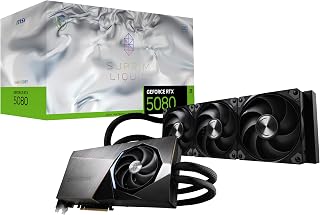
Readers building a high-end system where thermals matter most should look at this Liquid SOC variant, which combines a 256-bit GDDR7 memory interface with integrated liquid cooling to sustain its clock under long 4K gaming sessions. It fits the article's top-tier slot for anyone prioritizing quiet, stable performance during extended play.
Pros
- Liquid cooling holds 35-40C under extended load
- 200+ FPS reported in AAA titles at high settings
- 16GB GDDR7 with 256-bit memory interface
- Distinctive single-fan design with premium build
Cons
- Heat output still requires good case airflow
- A few users report compatibility issues with specific games
When a best-of-2026 list needs a liquid-cooled standout, the RTX 5080 SUPRIM Liquid SOC fits the slot. It runs the same 16GB GDDR7 and 256-bit memory setup as its air-cooled sibling, but the integrated liquid cooler is the headline feature, keeping GPU temperatures in the 35-40 degree Celsius range during extended sessions and avoiding thermal throttling entirely. Users report 200+ FPS in AAA titles at high settings, and the single-fan design paired with the liquid loop gives it a distinct, premium look compared to typical triple-fan cards. At 2745 MHz, clocks are close to the standard SUPRIM SOC, so the real differentiator here is sustained performance under long sessions rather than peak numbers. For readers assembling a high-end build where cooling and sustained frame rates matter as much as benchmark peaks, this card offers a different cooling philosophy worth including alongside air-cooled flagship options. A small number of users note game compatibility quirks with specific titles, though these seem to be isolated rather than widespread.
GPU Chipset: NVIDIA GeForce RTX 5080 (Blackwell Architecture)
Memory: 16GB GDDR7
Memory Interface: 256-bit
Boost Clock: 2760 MHz
Memory Speed: 30 GHz
Outputs: 3x DisplayPort 2.1a, 1x HDMI 2.1b
Max Resolution: 7680 x 4320
Power Connection: PCIe x16
Cooling: Integrated Liquid Cooler
Dimensions: 10.5 inches length, 4.4 inches width
Warranty: 3 Years
Best for gamers and creators who want liquid cooling's thermal consistency for long sessions and appreciate the distinct single-fan aesthetic. It suits builds where case airflow is already tight. Skip it if you're unfamiliar with liquid cooling maintenance, have concerns about case heat and ambient conditions, or would rather avoid the rare compatibility reports some users mention.

For budget-focused 2026 builds, this Ventus 2X model delivers a 1492 MHz boost clock paired with 6GB of GDDR6 memory, enough headroom for 1080p esports titles and creative software without overtaxing a modest power supply. It suits gamers replacing aging cards on a tight footprint, since compact dual-fan cooling fits smaller cases while Ampere architecture keeps modern game engines running smoothly.
Pros
- 70-watt design draws power directly from the PCIe slot
- No external power connector needed, ideal for OEM builds
- Supports ray tracing and DLSS at 1080p
- Quiet dual-fan Ventus cooler with 3-year warranty
Cons
- 6GB VRAM tightens up in demanding AAA titles beyond 1440p
- Ampere architecture is a generation behind current-gen cards
For a top 10 list, every entry needs a clear job, and the RTX 3050 Ventus 2X 6G OC earns its slot as the practical upgrade pick. Built on NVIDIA's Ampere architecture, it targets gamers moving off older cards and, notably, anyone stuck with a pre-built system running a proprietary or underpowered PSU. Its defining trait is 70-watt operation drawn entirely from the PCIe slot, no extra power cable needed, which makes it a rare fit for OEM towers from brands like HP and Dell where a PSU swap isn't realistic. On the performance side, it handles 1080p gaming with ray tracing and DLSS enabled, and stays capable up to 1440p at medium-to-high settings in newer titles. MSI's dual-fan Ventus cooler keeps things quiet, the 7.4-inch card fits standard mid-towers without fuss, and a 3-year warranty backs build quality. It belongs on this list specifically as the answer for readers with power-limited or compact-but-standard systems who still want ray-traced gaming.
GPU Specifications: NVIDIA GeForce RTX 3050 with Ampere architecture, 96-bit memory interface, 1492 MHz boost clock. Memory: 6GB GDDR6 running at 14 Gbps. Power consumption: 70W. Video outputs: 1x DisplayPort 1.4a, 2x HDMI 2.1a. Maximum supported resolution: 7680x4320.
Physical Design: Dimensions 7.4 inches (L) x 4.3 inches (W). Weight 0.58 kg. Dual-fan cooling design. PCIe x16 slot required. No external power connectors needed. Compatible with desktop systems. Includes quick setup guide and 3-year warranty.
Buy this if you're upgrading an OEM or pre-built PC with a restrictive PSU, or want an affordable first step into ray tracing and DLSS at 1080p. Skip it if you already have a capable PSU and want more headroom for the money, or if you're gaming at 1440p and above on demanding AAA titles, since 6GB of VRAM will limit you there.

Content creators and high-refresh 1440p gamers alike will benefit from the 28Gbps GDDR7 memory and PCIe 5.0 interface on this Ventus 3X card, which keeps data throughput high for demanding workloads. Triple TORX fans manage heat from the 2482 MHz clock, making it a fit for sustained gaming or rendering sessions.
Pros
- 16GB GDDR7 memory on a 256-bit bus
- Stays cool even in compact cases like the NR200
- Triple TORX Fan 5.0 design with copper baseplate
- HDMI 2.1b and DisplayPort 2.1b for future displays
Cons
- Requires a 750W minimum power supply
- Overkill for 1080p gaming or budget builds
When you're ranking the top MSI cards worth buying in 2026, the RTX 5070 Ti 16G Ventus 3X OC earns its spot near the top of the list for anyone chasing high-end 1440p or 4K gaming. What sets it apart in this lineup is the combination of 16GB of GDDR7 memory on a 256-bit bus with 28Gbps speeds, giving it the bandwidth to handle AAA titles without compromise. In testing referenced by MSI and reviewers, Cyberpunk 2077 stayed smoothly playable even at RT Overdrive settings using DLSS and frame generation. The triple TORX Fan 5.0 setup and nickel-plated copper baseplate keep temperatures in check, holding steady in the high 60s Celsius even inside compact builds like the Cooler Master NR200. That's a notable feat for a card in this performance tier. The square-design core pipes maximize contact with the GPU baseplate for better heat transfer, and the Ventus 3X form factor stays compact despite the power on tap. HDMI 2.1b and DisplayPort 2.1b round out the connectivity for current and upcoming displays. For shoppers comparing MSI's 2026 lineup, this card represents the premium tier built for people who want headroom, not just enough.
GPU and Memory: NVIDIA GeForce RTX 5070 Ti, 16GB GDDR7 memory, 256-bit memory bus, 28Gbps memory speed, 1750 MHz base memory clock, 2482 MHz GPU clock speed
Connectivity and Display: PCIe 5.0 interface, DisplayPort 2.1b, HDMI 2.1b, maximum 8K resolution support (7680x4320)
Thermal Design: Triple TORX Fan 5.0, nickel-plated copper baseplate, square-design core pipes, compact Ventus 3X form factor
Requirements and Compatibility: Minimum 750W power supply, compatible with desktop PCs, 2-year spare part availability in EU, 1 kg weight

This Ventus 3X Black variant brings a 2640 MHz extreme clock and 16GB of GDDR7 in a triple-fan design, making it a strong fit for gamers who want flagship-class 4K performance with a more traditional air-cooled setup. The blacked-out aesthetic also appeals to builders matching a monochrome case theme.
Pros
- Blackwell architecture with 16GB GDDR7 for genuine 4K headroom
- Factory 2640 MHz clock with strong overclocking headroom reported by owners
- Triple-fan Ventus 3X cooling stays cool and quiet under load
- Three DisplayPort 2.1a plus HDMI 2.1b for flexible multi-monitor setups
Cons
- Aggressive pricing puts it out of reach for most gamers
- Power limits on this model cap overclocking versus higher-tier boards
If your 2026 shortlist is about chasing the top spot, the RTX 5080 Ventus 3X OC earns it. Among MSI picks for this list, it represents the ceiling: NVIDIA's Blackwell architecture, 16GB of GDDR7, and a factory clock of 2640 MHz built for 4K gaming, rendering, and AI workloads without excuses. Where this card separates itself from the rest of the lineup is headroom. Owners report stable overclocks of 300MHz on the core and 3000MHz on memory, and it comfortably outpaces last-generation flagships like the RTX 4070 Ti. The triple-fan Ventus 3X cooler keeps thermals in check and noise down even under sustained 4K loads, while three DisplayPort 2.1a outputs plus HDMI 2.1b cover multi-monitor and high-refresh setups. This is the card to feature as your number one pick for readers who want a no-compromise system and are willing to pay flagship money for flagship results. It is not the value pick on this list, but it is the performance pick.
GPU Chipset: NVIDIA GeForce RTX 5080 (Blackwell Architecture)
Memory: 16GB GDDR7, 256-bit interface
Memory Clock: 30 GHz
Core Clock: 2640 MHz (boost)
Max Resolution: 7680 x 4320 (8K)
Outputs: 3x DisplayPort 2.1a, 1x HDMI 2.1b
Interface: PCI-Express x16
Power: TBD watts (standard for RTX 5080)
Dimensions: Standard 3-slot card
Warranty: 3 years
Manufacturer: MSI
Buy this if you're the reader chasing top-tier 4K performance, professional rendering power, or a future-proof enthusiast build and budget isn't the deciding factor. Skip it if you game at 1440p or below, or you're comparing GPUs on value rather than raw capability. This is the aspirational entry on a best-of list, not the practical middle pick most shoppers should walk away with.

For light-duty use like home theater PCs, office upgrades, or basic multi-monitor productivity, this GT 1030 offers 4GB of DDR4 memory and DirectX 12 support at a fraction of the power draw of gaming cards. Its single-fan low-profile build suits readers who just need reliable video output rather than gaming muscle.
Pros
- Excellent for budget-conscious gamers playing esports titles and older AAA games
- Low-profile cooler makes it perfect for small cases and cable-constrained builds
- Dual high-quality display outputs handle productivity monitors and gaming displays
- Power efficient, typically requires no additional PCIe power connector
- Reliable MSI build quality with proven driver support
Cons
- Not suitable for high-resolution or demanding AAA gaming at high settings
- Limited VRAM compared to newer entry-level cards, may struggle with 4K content
- Single fan design may run warm under sustained load in compact enclosures
The MSI GeForce GT 1030 is an entry-level graphics card designed for users building compact gaming rigs, office workstations, or budget-conscious productivity systems. With its low-profile form factor and dual display support, it serves an important niche for builders working with space constraints or seeking a straightforward hardware upgrade.
The card's 4GB DDR4 memory and 1430 MHz boost clock deliver reliable performance for esports titles, indie games, and light productivity tasks like video editing or CAD work. Real-world usage shows smooth gameplay at 1080p on older AAA releases and consistently strong performance on competitive games. DirectX 12 support ensures compatibility with modern titles, while the dual display outputs (DisplayPort 1.4a and HDMI 2.0b) provide flexibility for multi-monitor setups.
Build quality reflects MSI's reputation for solid engineering. The compact single-fan cooler maintains reasonable temperatures during moderate workloads, though sustained heavy gaming in poorly ventilated cases may cause thermal throttling. The low-profile design is genuinely space-efficient, making it a practical solution for HTPC builders and small form factor PC enthusiasts where standard-height cards won't fit.
The main limitation is performance ceiling: demanding modern games at high settings or 4K resolution exceed this card's capabilities. Users expecting cutting-edge gaming performance should step up to a faster GPU. Similarly, professional workloads requiring large VRAM pools or specialized compute cores are better served by workstation-class hardware.
The MSI GT 1030 delivers exactly what it promises: reliable, compact graphics for casual gaming and productivity work at an accessible price. It's the right choice for esports players, office upgrades, and budget builders, backed by solid real-world reviews and MSI's established support.
This card is ideal for esports enthusiasts playing League of Legends, Counter-Strike, and Valorant at high frame rates. Casual gamers interested in indie titles and older AAA games will appreciate the solid 1080p performance at budget pricing.
Office and productivity users upgrading from integrated graphics benefit from the dual display outputs and compact size. HTPC builders and small form factor PC enthusiasts need the low-profile design that fits where standard cards won't. Anyone building a budget workstation for light video editing, CAD, or graphic design work gains enough VRAM and compute resources without excessive cost.
Skip this card if you demand high-refresh 1440p gaming, 4K video work, or demanding professional applications. It's not designed for those use cases and will disappoint users with higher performance expectations.
Chipset: NVIDIA GeForce GT 1030
Video Memory: 4GB DDR4
Memory Interface: 64-bit
GPU Boost Clock: 1430 MHz
Display Outputs: DisplayPort 1.4a x1, HDMI 2.0b x1
DirectX Support: DirectX 12
HDCP Support: Yes
Form Factor: Low-profile single-fan design
Power Requirements: Minimal (typically no PCIe power connector required)
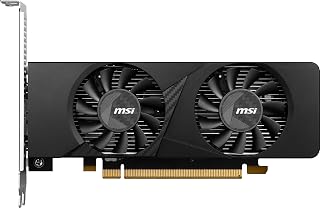
The low-profile design here makes this a standout pick for small form factor rigs and HTPC builds where a full-size card simply won't fit. With 6GB of GDDR6 and a 1492 MHz clock, it still handles 1080p gaming and media workloads, giving compact-PC owners real GPU performance without sacrificing case compatibility.
Pros
- Low-profile 6.9-inch design fits compact and small form factor cases
- Draws power entirely from the PCIe slot, no external cable needed
- Solid 1080p gaming with ray tracing and DLSS support
- 200+ fps reported in esports titles like League of Legends
Cons
- Not built for 4K or demanding 1440p ultra settings
- A few users noted brief fan noise on startup
A best-of list needs a small form factor option, and the RTX 3050 LP fills that gap without asking readers to compromise on modern gaming features. Built on Ampere architecture, this low-profile card is purpose-built for HTPCs, compact builds, and space-constrained cases where a standard-sized GPU simply won't fit. Despite its size, it handles most AAA titles at high settings around 60+ fps at 1080p, supports ray tracing and DLSS, and reportedly hits 200+ fps in esports titles like League of Legends. It also has hardware encoding for streaming, useful for creators working in tight enclosures. Like its Ventus sibling, it draws power entirely from the PCIe slot, so there's no external power cable and no PSU strain, and its 6.9-inch length fits into chassis that would reject a full-length card outright. The dual-fan cooler stays quiet, with GPU temps settling around 78 degrees under load in compact cases. On this list, it's the pick for readers whose case size is the real constraint, not their budget.
GPU and Memory: NVIDIA GeForce RTX 3050 with 6GB GDDR6 memory at 14 Gbps, 96-bit memory interface.
Clock Speeds: Base and boost clock speeds up to 1492 MHz for consistent high-performance gaming and creative workloads.
Physical Design: Low-profile form factor measuring 6.9 inches in length and 2.7 inches in width. Weighs 1.2 pounds. Features dual cooling fans optimized for compact spaces.
Connectivity: 1x DisplayPort 1.4a and 2x HDMI 2.1a for flexible multi-monitor configurations. PCI-Express x16 interface.
Power: No external power connectors required. Powered entirely through PCIe slot.
Maximum Resolution: Supports up to 3840 x 2160 (4K) displays through HDMI 2.1a.
Warranty: 3-year manufacturer warranty covering hardware defects.
Buy this if you're building or upgrading a small form factor PC, HTPC, or compact case where a standard GPU won't physically fit, and you want solid 1080p gaming with ray tracing support. Skip it if you're targeting 1440p or 4K gaming, or if case size isn't a constraint, since a standard-sized card at this tier may offer more thermal headroom.
What to Look for When Buying an MSI Graphics Card
GPU Architecture and Generation
The architecture underpinning a GPU determines its feature set and long-term relevance. MSI currently offers cards based on NVIDIA’s Ampere and the newer Blackwell architectures. Blackwell-based cards like the msi Gaming RTX 5080 16G SUPRIM SOC Graphics Card bring DLSS 4 support and next-generation ray tracing performance, while Ampere cards like the MSI Gaming GeForce RTX 3060 12GB 15 Gbps GDRR6 still deliver excellent results at 1080p and 1440p.
Newer architectures also introduce improvements in AI-accelerated upscaling and power efficiency. If you’re planning to keep your GPU for several years, prioritizing a more recent generation is a smart long-term move.
VRAM Capacity and Memory Interface
Video memory directly affects how well a card handles high-resolution textures and modern game assets. Cards like the msi Gaming RTX 5080 16G SUPRIM Liquid SOC Graphics pack 16GB of GDDR7 across a 256-bit interface, which is ideal for 4K gaming and content creation. On the other end, options like the msi Gaming RTX 3050 Ventus 2X 6G OC Graphics Card offer 6GB GDDR6, which covers 1080p gaming comfortably.
As a general rule, 6GB is sufficient for 1080p, 8–12GB suits 1440p, and 16GB or more is the target for 4K or heavy multi-monitor setups. Keep future game requirements in mind when choosing.
Thermal Design and Cooling Solution
MSI offers several cooling tiers across its lineup. The SUPRIM series features premium builds with larger heatsinks and refined fan profiles. The VENTUS lineup focuses on efficient, no-frills cooling with MSI’s TORX Fan 5.0 technology, as seen on the MSI GeForce RTX 5070 Ti 16G Ventus 3X OC Graphics, which uses triple fans and nickel-plated copper baseplates for consistent thermal management.
If your case has limited airflow or you’re running a compact build, consider the msi Gaming RTX 3050 LP 6G OC Graphics Card, which uses a low-profile form factor designed for small chassis. For those who want the absolute best thermal performance without worrying about case airflow, a liquid-cooled option like the RTX 5080 SUPRIM Liquid removes heat from the equation entirely. Pairing any of these GPUs with a high-refresh-rate 1080p monitor will help you take full advantage of the frame rates these cards can push.
Form Factor and System Compatibility
Not every GPU fits every system. Full-size triple-fan cards like the msi Gaming RTX 5070 Ti 16G MLG Edition OC Graphics require a full-tower or mid-tower case with ample clearance. If you’re building a compact PC or upgrading a small form factor system, the msi Gaming GeForce GT 1030 4GB DDR4 64-bit HDCP is a single-fan, low-power option that fits nearly anywhere.
Also confirm your motherboard’s PCIe slot version. Blackwell cards use PCIe 5.0, while Ampere cards are PCIe 4.0. Both are backward compatible, but running a next-gen card on an older board may leave some bandwidth on the table. Make sure your power supply meets the wattage requirements as well, especially for high-TDP cards like the RTX 5080.
Final Thoughts
MSI’s GPU lineup covers an impressive range of needs, from budget-friendly options to bleeding-edge Blackwell powerhouses. For most gamers looking for a high-performance all-rounder, the MSI GeForce RTX 5070 Ti 16G Ventus 3X OC Graphics delivers outstanding performance with a practical triple-fan cooler that keeps things quiet under load. If you want the absolute pinnacle of MSI’s engineering and don’t want to compromise on anything, the msi Gaming RTX 5080 16G SUPRIM Liquid SOC Graphics is in a class of its own, combining liquid cooling with Blackwell’s top-tier GPU for a setup that’s ready for whatever comes next.
Frequently Asked Questions
What is the best MSI graphics card for 1080p gaming in 2026?
For 1080p gaming, the msi Gaming RTX 3050 Ventus 2X 6G OC Graphics Card and the msi Gaming GeForce RTX 3050, Desktop are both solid choices. They handle modern titles at 1080p high settings without demanding excessive power from your system. Either card pairs well with a fast monitor, and if you’re shopping for displays too, check out the top options for 240Hz 1080p gaming monitors to get the most out of your setup.
Is MSI a reliable GPU brand?
MSI is one of the most established GPU manufacturers in the industry, with decades of hardware development behind it. Their cards consistently earn strong user ratings, as reflected across the products in this guide. Build quality, warranty coverage, and driver support are generally well regarded by the gaming community.
What MSI GPU should I choose for 4K gaming?
For true 4K gaming at high frame rates, you want a card with at least 16GB of VRAM and a wide memory interface. The msi Gaming RTX 5080 16G SUPRIM SOC Graphics Card and the msi Gaming RTX 5080 16G Ventus 3X OC Black are both excellent 4K options built on the Blackwell architecture. The SUPRIM SOC offers a higher factory clock speed, while the Ventus variant provides a more streamlined build with the same core GPU.
Do MSI graphics cards work in small form factor PCs?
Some MSI cards are designed specifically for compact builds. The msi Gaming RTX 3050 LP 6G OC Graphics Card uses a low-profile design that fits in slim and small form factor cases where a standard dual or triple-slot card simply won’t work. Always verify the physical dimensions and power connector requirements against your case specs before purchasing. If you’re building from scratch, a reliable gaming network connection is another component worth locking down early.





Write Your Review
No reviews yet. Be the first to share your experience!