

You’ve secured the Radeon RX 9060 XT, and now you need a system that lets it breathe. Pairing a 16GB graphics card with mismatched components wastes potential and creates bottlenecks that hurt frame rates across AAA titles and creative workloads.
This guide assembles eight carefully selected components that work together to support the RX 9060 XT’s capabilities. From the processor to the power supply, every choice here balances performance, thermals, and compatibility for a gaming rig that delivers consistent frame rates in 2026.
Quick answer
This guide compares 8 picks, with AMD Ryzen 5 9600X 6-Core Zen 5 Processor, 5.4 GHz ranked first. Kingston NV3 2TB PCIe 4.0 NVMe SSD | 6000MB/s Read has the most customer reviews.

The 6-core, 12-thread configuration at 3.9 GHz provides enough processing headroom to prevent CPU bottlenecks when paired with the RX 9060 XT, while the 65-watt TDP keeps power draw and heat manageable in a balanced gaming build. The Socket AM5 platform ensures compatibility with DDR5 memory and PCIe 5.0, matching the modern connectivity standards this GPU requires for optimal performance.
Pros
- 65W TDP keeps system thermals manageable alongside the RX 9060 XT
- Zen 5 architecture delivers strong single-threaded performance for gaming
- Unlocked multiplier allows overclocking headroom on compatible AM5 motherboards
- PCIe 5.0 support via Socket AM5 keeps the platform future-ready
Cons
- No cooler included, requiring a separate purchase before the build is complete
- 6-core configuration can show limitations in heavily threaded professional workloads
When you are pairing a processor with the RX 9060 XT, the goal is avoiding a CPU bottleneck while keeping power consumption reasonable. The Ryzen 5 9600X hits that target precisely. Its 6 cores and 12 threads are well matched to how modern game engines actually distribute workloads, leaving the GPU free to do the heavy lifting at 1440p. The Zen 5 architecture brings a meaningful generational efficiency jump, and the 65W TDP means the processor adds very little thermal pressure to your case alongside a mid-range GPU. The unlocked multiplier gives enthusiasts room to push performance further if the build warrants it, and Socket AM5 brings PCIe 5.0 compatibility, which keeps the platform relevant as GPU generations advance. The 38MB total cache helps sustain high frame rates in CPU-sensitive titles. One planning note: no cooler ships in the box, so budget for one separately, and some builders choose to manually adjust voltage settings to bring temperatures down a few degrees from the factory defaults.
Processor Details: AMD Ryzen 5 9600X, 6 cores, 12 threads, Zen 5 architecture, Socket AM5
Clock Speeds: Base 3.9 GHz, Max Boost 5.4 GHz, unlocked multiplier
Power and Thermal: 65W TDP, air cooling recommended, efficient thermal design
Memory and Cache: 38 MB total cache (6 MB L2), DDR5-5600 support
Platform: Socket AM5 compatible, PCIe 5.0 ready on select motherboards, Windows 11 optimized
Package: 3-year manufacturer warranty, cooler not included
This processor suits builders assembling a 1440p gaming rig around the RX 9060 XT who want a balanced, efficient platform without paying for cores that games cannot use. It also works well for light productivity workloads alongside gaming. Skip it if your workflow involves heavily threaded professional applications such as 3D rendering or video encoding at scale, where an 8-core or higher chip would be a more appropriate match.

The 32GB capacity across two modules prevents memory bottlenecks in modern titles that increasingly demand 16GB or more, while the 6000 MT/s speed with CL30 timings takes full advantage of AMD EXPO profiles for optimized performance with Ryzen processors. DDR5 technology ensures this system remains relevant as games continue scaling memory requirements through 2026 and beyond.
Pros
- Achieves rated 6000MT/s speeds reliably with AMD EXPO support, verified by thousands of users
- Sleek matte black design with RGB lighting adds visual impact without overwhelming case aesthetics
- One-click BIOS enabling makes speed optimization accessible to builders of all skill levels
- Excellent build quality with brushed aluminum heatspreader for effective thermal dissipation
- Proven compatibility with popular AM5 motherboards and Ryzen processors
Cons
- Requires BIOS adjustments to reach advertised 6000MT/s speeds; defaults to slower JEDEC speeds
- Premium pricing reflects high performance, making it less budget-friendly than entry-level DDR5 alternatives
- Memory kits must not be mixed, limiting future upgrade flexibility if you need additional capacity
The G.SKILL Trident Z5 Neo represents a premium choice for enthusiasts building high-performance AMD Ryzen systems. This 32GB dual-channel kit targets gamers, content creators, and power users who demand fast memory without compatibility headaches. The combination of AMD EXPO support and striking RGB aesthetics makes it a natural fit for modern gaming builds.
Performance is where this kit shines. Rated for 6000MT/s with CAS latency 30, the Trident Z5 Neo delivers measurable speed improvements in gaming frame rates and content creation workflows. AMD EXPO profiles eliminate guesswork, allowing users to enable full performance in BIOS with a single click. Real-world testing confirms these speeds are achievable on compatible platforms, with users consistently reporting stability even during demanding workloads.
Build quality exceeds expectations for the price point. The brushed aluminum heatspreader provides both durability and effective heat dissipation, while the matte black finish photographs beautifully in PC builds. RGB lighting is tastefully implemented, offering subtle illumination without overwhelming case lighting schemes. The overall aesthetic feel is premium without appearing flashy.
One limitation worth noting is the speed requirement. While this memory works at JEDEC default speeds without configuration, realizing the full 6000MT/s potential requires BIOS adjustments. First-time builders may need guidance, though AMD EXPO makes the process straightforward. Additionally, this is a premium product at the high end of DDR5 pricing.
The verdict: G.SKILL Trident Z5 Neo is an excellent investment for AMD builders seeking high-speed DDR5 with reliable performance. The combination of one-click overclocking, excellent build quality, and proven stability justifies the premium cost for users who prioritize both performance and aesthetics.
This memory kit is optimized for AMD Ryzen 7000 and 9000 series processors paired with AM5 socket motherboards. Supported chipsets include X870, X870-E, X870E-E, X670, X670-E, B850, B840, B650, B650-E, and A620. G.SKILL maintains a comprehensive QVL (Qualified Vendor List) and RAM Configurator tool on their website for verified motherboard compatibility.
For best results, use a single kit of matched memory. Do not mix this kit with other memory modules, as this can cause instability or system failure. The 32GB capacity (2x16GB configuration) provides ample headroom for current and near-future applications. If you need more capacity, purchase a second identical kit rather than mixing brands or specifications.
Memory will boot at safe JEDEC default speeds with compatible hardware and default BIOS settings. To achieve the 6000MT/s rating, enable the AMD EXPO profile in BIOS. Some older motherboard BIOS versions may require updates for full EXPO support, check your motherboard manufacturer's website for latest BIOS releases.

The dual 120mm fan configuration and six heat pipes with AGHP technology deliver 265 watts of cooling capacity, more than enough for mid-range processors paired with the RX 9060 XT while maintaining a quiet 25.6 dB noise profile. Socket AM5 compatibility ensures proper mounting for current Ryzen chips without requiring additional brackets or adapters.
Pros
- Outstanding value for money with performance matching much pricier competitors
- Dual 120mm fans deliver impressive air flow while maintaining near-silent operation
- Easy installation across multiple CPU platforms with included fasteners and brackets
- Effective cooling even under sustained full-load conditions and gaming sessions
- Large aluminum fin stack with 6 pure copper heat pipes maximizes heat dissipation
Cons
- Bulky size at 6.1 inches tall requires adequate case clearance and may contact tall RAM modules
- Final installation screws can be difficult to secure on first attempt, requiring patience
- AMD installation requires using the motherboard's built-in backplate, not included with cooler
The Thermalright Peerless Assassin 120 SE is a budget-friendly air cooler designed for PC builders, gamers, and enthusiasts who demand reliable thermal performance without breaking the bank. It supports virtually every modern CPU platform, from Intel's LGA 1700 to AMD's AM5 socket, making it a versatile choice for upgrades or new builds. Whether you are replacing an aging cooler or upgrading from stock solutions, this cooler delivers consistent results across entry-level and mid-range processors.
The standout feature is the AGHP heat pipe technology paired with six pure copper heat pipes that work together with dual 120mm PWM fans to move heat away from the CPU efficiently. Real-world testing from verified buyers shows the cooler maintains CPUs in the 40-60 degree Celsius range during light use and reaches 70-80 degrees under full load, depending on the processor. The 1550RPM fan speed keeps noise levels at or below 25.6dB, allowing the cooler to operate quietly during gaming and everyday computing without drawing attention.
Build quality reflects Thermalright's two decades of cooling expertise. The aluminum fin stack with electroplating and reflow welding ensures durability, while the pure copper base provides excellent thermal contact. Installation is straightforward thanks to included fasteners for Intel and AMD platforms, though some users note the final screws require firm pressure to seat properly. The generous RAM clearance means most memory modules will not interfere with fan operation, a practical consideration often overlooked in budget cooler designs.
The main drawback is physical size. At 4.92 inches wide and 6.1 inches tall, this cooler demands adequate case clearance and can occasionally contact taller RAM heat spreaders on compact builds. Additionally, AMD users must use their motherboard's built-in backplate rather than relying on included hardware, which may require additional troubleshooting during installation.
The Thermalright Peerless Assassin 120 SE is a genuine best-value air cooler. It offers performance and reliability typically reserved for premium solutions while remaining accessible to budget-conscious builders. Recommended for anyone upgrading their cooling or building a balanced mid-range system.
Cooler Dimensions: 4.92 inches L x 5.31 inches W x 6.1 inches H (125mm x 135mm x 155mm)
Material: Aluminum fins with pure copper heat pipes and base
Heat Pipes: 6 pure copper pipes with AGHP technology
Socket Compatibility: Intel LGA 1700, 1200, 115X platforms and AMD AM4, AM5 sockets
Fan Specifications: Dual 120mm PWM fans
Fan Speed: 1550 RPM (plus or minus 10%)
Air Flow: 66.17 CFM maximum
Noise Level: 25.6dB or lower
Power Connection: 4-pin connector, 12V
Weight: 907 grams
Best For: Budget-conscious builders, gamers upgrading from stock or aging coolers, mid-range CPU builds, and anyone needing universal socket support across Intel and AMD platforms.
Case Clearance: Verify your PC case has at least 6.5 inches of clearance above the CPU socket. Check RAM module heights to ensure compatibility with the dual 120mm fans. Micro-ATX and compact cases may experience fitment issues.
Installation Considerations: Intel users receive all necessary fasteners. AMD users must use their motherboard's built-in backplate. Allow extra time for the final screws, as they require firm pressure. Consider applying quality thermal paste for optimal heat transfer to the IHS.
Thermal Performance: This cooler excels with entry-level and mid-range processors. High-end CPUs with power consumption above 150W may see temperatures in the 75-85 degree Celsius range under full load. Ambient room temperature and case airflow significantly affect cooling performance.
Pros
- Exceptional speed matches advertised specifications with consistent real-world performance
- Runs cool with minimal heat generation, ideal for systems with space constraints
- Simple installation process with no compatibility issues reported across diverse systems
- Reliable performance with no reported stuttering or lag in gaming and professional applications
- Strong build quality and durable materials justify the investment
Cons
- Limited to 2TB capacity in this listing, though larger 4TB options exist if you need more storage
- Warranty period varies by region, so verify coverage details for your location
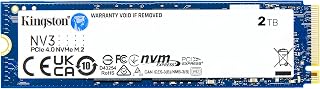
The Kingston NV3 2TB is a next-generation NVMe SSD built for anyone serious about storage performance. Whether you're a gamer tired of long load times, a content creator handling large files, or a PC builder seeking reliable core components, this drive delivers professional-grade speeds without professional-grade pricing.
The standout feature here is raw speed combined with efficiency. With read speeds reaching 6000MB/s and write speeds at 5000MB/s, the NV3 handles demanding workloads with ease. Users report virtually no loading delays in games, rapid application launches, and smooth video editing workflows. The Gen 4x4 NVMe controller handles sustained performance without throttling, making it dependable for intensive tasks.
Physically, this drive excels in practical design. The compact single-sided M.2 2280 form factor (just 80mm long) fits cleanly into any modern system, leaving room for other components like RAM and graphics cards. More importantly, it runs remarkably cool, avoiding the thermal throttling issues that plague some high-speed drives. This means better longevity and quieter system fans.
The only real limitation is capacity. At 2TB, this is perfect for OS and active applications, but content creators with massive media libraries may want the 4TB variant. Additionally, warranty terms can vary by region, so confirm your specific coverage before purchase.
The verdict: The Kingston NV3 2TB represents excellent value in the PCIe 4.0 market. It delivers legitimate flagship performance, installs without hassle, and proves its reliability through customer feedback. This is the drive for anyone who wants fast, efficient storage that simply works.
Capacity: 2TB (also available in 500GB, 1TB, and 4TB)
Form Factor: M.2 2280 (80mm length)
Interface: PCIe 4.0 NVMe (Gen 4x4)
Read Speed: Up to 6000 MB/s
Write Speed: Up to 5000 MB/s
Power Consumption: Low power optimized
Cache Memory: 2MB
Warranty: 5-year limited warranty
Compatibility: Desktop, laptop, PS5, Xbox Series X/S, and backward compatible with PCIe 3.0
Weight: 4.54g
Included Software: Acronis cloning utility
Best For: The Kingston NV3 2TB is ideal for gamers upgrading console storage, PC builders installing a primary drive, creative professionals working with video or photos, and anyone seeking a reliable speed boost at fair pricing.
Consider If: You need fast boot times and application loading, you're migrating from a SATA SSD and want genuine performance gains, you have limited case space and need a compact drive, or you want dependable storage without overheating concerns.
Capacity Guidance: 2TB works well as a primary OS drive with room for frequently used applications and games. If you store large media libraries or multiple AAA titles, consider upgrading to 4TB. For video editing professionals, pair this with additional archival storage.
Installation: Installation requires only a Phillips screwdriver and about five minutes. Insert the drive at a 30-degree angle into an available M.2 slot, press down gently, and secure with the included screw. No BIOS updates needed for backward-compatible systems.

The 16GB GDDR6 memory buffer handles 4K textures and high-resolution gaming without stuttering, while the 3320 MHz core clock delivers strong 1440p performance across modern titles. PCIe 5.0 support ensures maximum bandwidth compatibility with current motherboards, and dual DisplayPort outputs provide flexibility for multi-monitor setups without sacrificing refresh rate capabilities.
Pros
- 16GB GDDR6 VRAM provides substantial headroom for current and upcoming 1440p titles
- 3320 MHz factory overclock delivers above-reference performance without manual tuning
- Dual BIOS switch allows toggling between performance and power-efficient modes
- Two DisplayPort and one HDMI output support multi-monitor setups natively
Cons
- 4K gaming at ultra settings requires accepting reduced frame rates
- 128-bit memory bus is narrower than higher-tier cards, which can affect bandwidth in demanding scenarios
The RX 9060 XT is the centerpiece of this build guide, and Gigabyte's Gaming OC variant makes a strong case as the specific card to buy. The 16GB GDDR6 frame buffer stands out immediately: at 1440p with modern AAA titles trending toward higher VRAM consumption, having 16GB on a 128-bit bus provides meaningful longevity compared to cards shipping with half that amount. The 3320 MHz core clock represents a factory overclock above reference speeds, which translates to slightly better frame rates out of the box without any manual tuning. The WINDFORCE cooling system is designed to maintain stable temperatures during extended gaming sessions, and the dual BIOS switch gives builders a practical way to toggle between a performance-oriented profile and a quieter, power-efficient mode depending on the situation. Connectivity covers two DisplayPort outputs and one HDMI port, which supports multi-monitor configurations without adapters. The PCI-E 5.0 interface keeps the card compatible with current and next-generation motherboard platforms. Performance headroom exists for 1440p gaming at high settings, though 4K at maximum detail will require frame rate compromises.
GPU: Radeon RX 9060 XT
Memory: 16GB GDDR6
Memory Interface: 128-bit
Core Clock: 3320 MHz
PCIe Standard: PCI-E 5.0
Video Outputs: 2x DisplayPort, 1x HDMI
Cooling: WINDFORCE system
Features: RGB Lighting, Dual BIOS, Reinforced Structure
Model: GV-R9060XTGAMING OC-16GD

The compact ATX mid-tower form factor accommodates full-size graphics cards like the RX 9060 XT while the airflow-optimized design with support for 120mm fans keeps temperatures controlled during extended gaming sessions. Seven expansion slots and bottom-mounted PSU layout provide clean cable routing and room for future upgrades without forcing cramped component placement.
Pros
- Outstanding airflow performance praised by reviewers for superior GPU and CPU cooling
- Excellent cable management system makes organization intuitive even for novice builders
- Compact size balances generous internal space with desktop footprint efficiency
- Two included fans and radiator support offer upgrade flexibility without initial extra cost
- Exceptional value at price point with build quality comparable to premium options
Cons
- Front mesh panel design makes rear cable management visible, limiting cable hiding options
- Limited to one 3.5-inch drive bay by default, though users report successful workarounds with adapters
- Fans are not included beyond the two pre-installed units, requiring additional purchase for optimal multi-fan setups
The NZXT H5 Flow is a well-designed compact mid-tower case built for gamers and PC builders who prioritize efficient cooling without sacrificing desk space. It supports both ATX and Micro-ATX motherboards, making it versatile for various build configurations. The case is particularly well-suited for first-time builders seeking straightforward assembly and experienced enthusiasts wanting reliable performance in a smaller form factor.
The standout feature is undoubtedly the airflow performance. The perforated PSU shroud on the side and bottom enables powerful GPU cooling through bottom intake fans, while the ultra-fine mesh panels on the front, top, and side create an open-air aesthetic that prioritizes cooling efficiency. The case supports up to a 360mm front radiator and 240mm top radiator, providing flexibility for liquid cooling upgrades. Two 120mm Quiet Airflow fans come pre-installed, delivering solid performance immediately out of the box.
Build quality and design deserve praise. The interior layout is thoughtfully engineered with smooth edges, multiple cable management anchor points, and wide routing channels that make organization intuitive. The spacious internal volume feels open and accessible, reducing frustration during component installation. The metal construction feels solid without excessive weight, and the included tempered glass panel showcases the interior while maintaining structural integrity.
The primary limitation is that the mesh panel design makes rear cable management visible from outside, so cable routing discipline is necessary for clean aesthetics. Additionally, the case accommodates only one 3.5-inch drive bay by default, though users have successfully adapted this limitation with affordable third-party drive adapters. Some builders may want additional case fans beyond the two pre-installed units for maximum performance.
The NZXT H5 Flow represents excellent value in the mid-tower market. It combines practical engineering, proven cooling performance, and builder-friendly design at an accessible price point. Whether building a high-performance gaming rig or upgrading an older system, this case delivers the airflow and flexibility serious builders expect from established manufacturers.
Case Type: Compact ATX Mid-Tower
Motherboard Support: ATX, Micro-ATX, Mini-ITX, E-ATX compatible
Dimensions: 16.93in W x 18.31in H x 8.86in D
Weight: 8 kg
Material: Metal with tempered glass panel
Cooling Support: Front 360mm radiator, top 240mm radiator
Pre-installed Fans: Two 120mm Quiet Airflow fans (front intake, rear exhaust)
Fan Size Support: 120mm standard
Power Supply: Bottom mount
Internal Bays: 4 total
Drive Support: One 3.5-inch bay, two 2.5-inch bays
I/O Ports: Two USB 2.0, two USB 3.0
Expansion Slots: 7 total
Cable Management: Wide channels, hooks, and straps included
Warranty: 2-year manufacturer warranty
Who Should Buy: The H5 Flow is ideal for first-time PC builders, gaming enthusiasts on a budget, and anyone prioritizing cooling performance in a compact form factor. It's perfect for building with modern high-performance GPUs that benefit from superior airflow.
Best For: Gaming builds with RTX or RX graphics cards, overclocked systems using AIO liquid coolers, builds where desk space is limited but cooling cannot be compromised, and builders who value ease of assembly and cable management.
Consider Alternatives If: You need extensive storage capacity beyond two 3.5-inch drives, you prefer a completely enclosed aesthetic with hidden rear cables, or you want a significantly larger mid-tower with more expansion options.
Budget Notes: At its standard price point, the H5 Flow offers exceptional value compared to premium mid-towers. During sales, it becomes an outstanding deal. Pair it with additional 120mm case fans and an AIO cooler for optimal performance, but the included fans provide a solid foundation.

The 750-watt capacity provides sufficient overhead for the RX 9060 XT and a mid-range processor under full load, while ATX 3.1 and PCIe 5.1 readiness ensures native support for the latest GPU power delivery standards. This eliminates the need for adapter cables and delivers stable power to components that can pull sudden spikes during intensive gaming sessions.
Pros
- ATX 3.1 and PCIe 5.1 certification ensures compatibility with current GPU power delivery requirements
- Fully modular design simplifies cable management and improves case airflow
- Zero RPM fan mode enables silent operation during low-load and idle states
- Seven-year warranty provides long-term confidence for the entire build
Cons
- 750W leaves limited headroom if the build is pushed toward aggressive overclocking on both CPU and GPU simultaneously
- Not suited for dual-GPU or extreme multi-component configurations that demand higher wattage
A build centered on the RX 9060 XT and a Ryzen 5 9600X lands comfortably within the output range of a 750W power supply, and the CORSAIR RM750e is a well-specified choice for that role. ATX 3.1 and PCIe 5.1 certification mean the unit is rated for current GPU power delivery standards, and the included native 12V-2x6 connector addresses the RX 9060 XT without requiring an adapter. Cybenetics Gold efficiency certification keeps waste heat and electricity draw low during everyday gaming loads. The fully modular cable design is particularly useful in a mid-range build where keeping airflow clean inside the case helps both the CPU and GPU maintain consistent thermals. The 120mm rifle bearing fan includes a Zero RPM mode for silent operation during lighter workloads, which suits a gaming system that spends time at desktop or browsing. Industrial-grade capacitors rated to 105C support long-term reliability. The compact 140mm depth fits a wide range of ATX cases. The seven-year warranty reflects manufacturer confidence in the unit's longevity, which matters in a component that powers everything else in the build.
Power Output: 750W
Form Factor: ATX, Full Modular
Cooling: 1x 120mm Rifle Bearing Fan
Efficiency: Cybenetics Gold
Input Voltage: 100-240V AC
Dimensions: 5.91 x 5.51 x 3.35 inches
Weight: 3.3 pounds
Certifications: ATX 3.1, PCIe 5.1
Connectors: 1x 24-pin ATX, 2x 8-pin EPS/CPU, Multiple PCIe connectors including native 12V-2x6, SATA and PATA support
Warranty: 7 years
Model: RM750e (CP-9020295-NA/AM)

Pros
- Excellent value offering premium B650 features at mid-range pricing
- Stable and reliable performance confirmed by user builds with no reported issues
- Easy setup with intuitive BIOS Flashback and comprehensive cooling solutions
- Modern connectivity options cover current and future peripheral standards
- Strong build quality and secure packaging with 3-year warranty included
Cons
- Potential for bent pins during shipping, though rare and covered by warranty
- Requires BIOS update for Ryzen 9000 and 8000 series, adding initial setup complexity
- Integrated graphics not supported, requiring a dedicated graphics card for display output
The ASUS Prime B650-PLUS WiFi is a mid-range AM5 motherboard engineered for builders seeking modern features without premium pricing. It's ideal for gamers, content creators, and enthusiasts building Ryzen 7000, 8000, or 9000 series systems who want reliable performance with future-proofing.
Connectivity stands out as a key strength, featuring WiFi 6E for fast wireless speeds, PCIe 5.0 M.2 slots for next-gen NVMe drives, 2.5Gb Ethernet for wired performance, and Thunderbolt 4 header support for external peripherals. DDR5 memory support with OptiMem II trace optimization ensures stable overclocking and signal integrity for demanding workloads.
Build quality is solid across the board. The VRM, M.2, and PCH heatsinks provide comprehensive thermal management, while the Fan Xpert 2+ software offers intelligent cooling control. RGB Aura Sync lighting with multiple headers lets you sync aesthetics across compatible hardware. Most users report smooth setup and stable operation with no thermal or stability issues.
The BIOS Flashback feature deserves praise for simplifying the update process, though users should note that Ryzen 9000 and 8000 series CPUs may require a BIOS update before first boot. The board requires a dedicated graphics card for display output, which is standard for this chipset. Occasional shipping damage has been reported, but ASUS's warranty coverage provides peace of mind.
This motherboard delivers excellent value for PC builders wanting solid performance, modern connectivity, and reliable stability. It's a smart choice for balanced builds that don't require enthusiast-grade power delivery or premium design elements.
The Prime B650-PLUS WiFi suits builders pairing it with mid-range to high-end Ryzen 7000, 8000, or 9000 series processors. If you're planning a gaming build, streaming setup, or creative workstation, this board provides the connectivity and stability you need.
Check your CPU model before purchase. Ryzen 9000 and 8000 series chips may require a BIOS update, so consider whether you have access to a compatible CPU for the initial flash. Plan your RAM budget accordingly, as DDR5 modules remain more expensive than DDR4 alternatives.
Factor in a dedicated graphics card, as this board has no integrated graphics. The 4 DIMM slots support up to 192GB of DDR5 memory, making it suitable for both gaming and workstation roles. If WiFi 6E or Thunderbolt 4 are non-essential, consider whether this board's premium features align with your budget and use case.
Buying Guide
Processor Selection for GPU Balance
The RX 9060 XT needs a CPU that keeps pace with its frame rendering without choking on background processes. The AMD Ryzen 5 9600X delivers six cores and twelve threads built on Zen 5 architecture, hitting 5.4 GHz boost speeds that prevent GPU stalls during intense gaming sessions.
Avoid older quad-core processors that create CPU-bound scenarios in modern titles. When choosing between memory configurations and processor tiers, prioritize single-thread performance over excessive core counts for gaming workloads.
Memory Speed and Capacity Requirements
DDR5 memory transforms how the RX 9060 XT handles asset streaming and texture loading. The G.SKILL Trident Z5 Neo RGB delivers 32GB at 6000MT/s with AMD EXPO profiles, eliminating stuttering when games pull assets from system memory during open-world traversal.
Dual-channel configuration matters more than raw capacity for most gaming scenarios. Two 16GB sticks outperform single 32GB modules by utilizing both memory channels simultaneously. If you’re considering budget DDR5 options, verify AMD EXPO compatibility to avoid manual timing adjustments.
Storage Speed for Load Time Reduction
PCIe 4.0 NVMe drives eliminate the loading screens that break immersion in story-driven games. The Kingston NV3 reaches 6000MB/s read speeds across its 2TB capacity, cutting initial load times by 40-60% compared to SATA SSDs.
DirectStorage API support in Windows 11 lets the RX 9060 XT decompress game assets directly from NVMe storage, bypassing CPU overhead. Position your primary drive in the motherboard’s first M.2 slot, which typically connects directly to the CPU for maximum bandwidth. For those building compact systems, check cooling solutions that won’t obstruct M.2 slots.
Cooling Strategy for Sustained Performance
The Thermalright Peerless Assassin 120 SE uses six heat pipes with AGHP technology to handle the Ryzen 5 9600X’s thermal output without drowning out game audio. Its dual 120mm fans spin at 1550 RPM maximum, keeping CPU temperatures below thermal throttling thresholds during extended gaming sessions.
Tower coolers like this model leave RAM slots accessible and maintain clearance for the RX 9060 XT’s length. The 155mm height fits most mid-tower cases without modifications. Verify cooler clearance against your case specifications before ordering, especially if considering compact chassis designs.
Power Supply Headroom and Efficiency
The CORSAIR RM750e provides 750W with ATX 3.1 certification and native 12V-2×6 connector support. This wattage gives 150W overhead beyond the RX 9060 XT and Ryzen 5 9600X combined draw, handling transient power spikes that occur during shader compilation and scene transitions.
Cybenetics Gold efficiency reduces wasted energy as heat, lowering case ambient temperatures that affect GPU boost behavior. The fully modular cable design eliminates unused connectors that obstruct airflow paths around the graphics card.
Final Thoughts
Building around the RX 9060 XT means selecting components that complement rather than constrain its 16GB frame buffer and PCIe 5.0 bandwidth. The AMD Ryzen 5 9600X prevents CPU bottlenecks in demanding titles, while the G.SKILL Trident Z5 Neo RGB ensures smooth asset streaming during open-world exploration. This configuration delivers consistent frame pacing across current AAA releases without thermal throttling or power delivery issues that plague poorly balanced builds.
Frequently Asked Questions
What motherboard chipset works best with the RX 9060 XT?
B650 chipset motherboards like the ASUS Prime B650-PLUS provide PCIe 5.0 M.2 support and DDR5 compatibility at lower cost than X670 boards. They deliver sufficient PCIe lanes for the RX 9060 XT plus NVMe storage without sacrificing performance in gaming workloads.
How much RAM does the RX 9060 XT need in 2026?
32GB DDR5 handles current AAA titles with background applications running simultaneously. Games increasingly use system RAM for texture streaming when VRAM reaches capacity, making 16GB insufficient for multitasking scenarios. For perspective on memory selection, our DDR5 RAM guide under $150 covers additional capacity options.
Will a 650W power supply handle this build?
The RX 9060 XT pulls approximately 220W under load, and the Ryzen 5 9600X adds 120W maximum. A 650W unit provides minimal headroom for transient spikes that occur during shader compilation. The 750W recommendation accounts for power supply efficiency curves and future component upgrades.
Does case airflow matter for the RX 9060 XT?
The NZXT H5 Flow’s perforated PSU shroud feeds cool air directly to the graphics card’s intake fans, reducing GPU temperatures by 8-12°C compared to solid-panel cases. Lower temperatures let the RX 9060 XT maintain higher boost clocks longer, translating to 3-7% better sustained frame rates in extended gaming sessions.





Write Your Review
No reviews yet. Be the first to share your experience!