

AMD’s RX 9070 XT delivers serious gaming horsepower, but pairing it with the wrong components creates bottlenecks that waste its potential. You need a CPU that keeps pace with high frame rates, fast RAM for data throughput, storage that doesn’t stutter during asset streaming, and cooling that handles modern power draws.
This guide walks through the core components for a balanced RX 9070 XT build, from the motherboard foundation to the power supply that fuels it all. Whether you’re targeting 1440p ultra settings or 4K gaming, these picks deliver performance without compatibility headaches.
Quick answer
This guide compares 8 picks, with CORSAIR iCUE LINK 3500X RGB Mid-Tower Case ranked first. Samsung 980 PRO 2TB PCIe 4.0 NVMe SSD - 7000 MB/s holds the highest customer rating among them.

Pros
- Outstanding cable management with iCUE LINK ecosystem and reverse motherboard support keeps your view clean
- Exceptional airflow with dust filters on bottom, top, and side panels plus multiple fan mounting positions
- Generous interior space accommodates high-end components including large GPUs and radiator systems
- Pre-installed RGB fans and hub get you started immediately without additional purchases
- Removable tempered glass panels and intelligent layout make building and upgrades straightforward
Cons
- Front glass panel requires careful handling during removal to avoid breakage
- Cable management can be tight for front-connected motherboards compared to reverse-connection boards
- PSU cable routing at bottom can be cramped depending on power supply design and cable orientation
The CORSAIR iCUE LINK 3500X is a premium mid-tower case designed for builders who want stunning visuals combined with serious cooling capability. It appeals to gamers, enthusiasts, and anyone building a high-performance PC who values both form and function. The case shines particularly for users with reverse-connection motherboards like ASUS BTF and MSI Project Zero.
The standout feature is the revolutionary iCUE LINK ecosystem. Three pre-installed RX120 RGB fans connect with a single cable to the included system hub, dramatically reducing cable clutter compared to traditional setups. This simplified connection system, paired with the panoramic tempered glass panels, creates an impressively clean aesthetic. Reviewers consistently praise the phenomenal airflow and quiet fan operation, with support for up to 10 fans total plus liquid cooling radiators for extreme builds.
Build quality is excellent throughout. The removable front and side glass panels use intuitive push-pin fasteners and magnetic guides, making assembly and maintenance easy. The spacious interior provides ample room for large graphics cards, tall tower coolers, and cable management. The case includes dust filters on multiple surfaces that are removable if you prefer maximum airflow, and there's dedicated space for 2.5-inch SSDs on the motherboard mounting area.
The main drawback involves cable management variations. While reverse-connection motherboards get a completely hidden cable design, front-connected boards require more careful routing behind the motherboard tray. Additionally, the front glass panel is delicate and requires careful handling during removal. Some users note that PSU cable routing can be tight depending on your power supply's connector configuration.
Verdict: The CORSAIR iCUE LINK 3500X is an excellent choice for builders prioritizing both aesthetics and cooling performance. The iCUE LINK ecosystem simplifies your build, the airflow is genuinely exceptional, and the glass-focused design lets your components shine. Highest recommendation for new builds and upgrades, especially with modern reverse-connection motherboards.
Physical Dimensions: 19.92" deep x 9.45" wide x 18.11" high, weighing 20.4 pounds
Motherboard Support: ATX, Micro-ATX, Mini-ITX, EATX compatible. Reverse connection validated for ASUS BTF and MSI Project Zero
Cooling and Fans: Supports up to 10 total 120mm fans, multiple radiators up to 360mm. Includes 3 pre-installed CORSAIR iCUE Link RX120 RGB fans
Drive Bays: 7 internal bays, supports 3.5-inch HDDs and 2.5-inch SSDs
Expansion Slots: 7 total PCIe expansion slots
Ports and Connectivity: 2 USB 2.0 ports, iCUE LINK System Hub included
Materials: Tempered glass front and side panels, includes dust filters on bottom, top, and side
Warranty: 2-year manufacturer warranty

The 8-core, 16-thread configuration handles modern games and streaming workloads without bottlenecking GPU performance. Its 96MB of 3D V-Cache significantly improves frame rates in cache-sensitive titles, making it particularly effective for gaming-focused builds. Socket AM5 compatibility ensures longevity through future Ryzen upgrades, and the 4.2 GHz base clock provides strong single-threaded performance for competitive titles and productivity tasks alike.
Pros
- 8 cores and 96MB cache prevent CPU bottlenecks with RX 9070 XT
- 89°C max temperature keeps cooling requirements manageable
- 5nm architecture balances performance with efficiency
- Socket AM5 supports future platform upgrades
Cons
- Requires Socket AM5 motherboard purchase
- Needs adequate cooling to maintain optimal performance
Pairing a CPU with the RX 9070 XT requires balancing performance to avoid bottlenecks while staying within reasonable power and thermal budgets. The Ryzen 7 7800X3D hits that target perfectly for this build. Its 8 cores and 16 threads provide ample processing power for modern games while the 96MB L3 cache reduces latency, keeping frame rates high when paired with the RX 9070 XT at 1440p and 4K resolutions. The 4.2 GHz clock speed on 5nm architecture delivers strong single-threaded performance for gaming without generating excessive heat. Maximum operating temperature of 89 degrees Celsius means cooling requirements remain manageable, reducing both system noise and component stress during long gaming sessions. Socket AM5 compatibility ensures this build stays current with future AMD platform updates and DDR5 memory support. While integrated AMD Radeon Graphics provides basic display output during troubleshooting, the RX 9070 XT handles all actual graphics workloads. For an RX 9070 XT focused build, this processor delivers the performance needed without overspending on unnecessary cores or clock speeds that gaming workloads rarely utilize.
Processor Specifications: The Ryzen 7 7800X3D features 8 CPU cores with 16 threads for efficient parallel processing. Clock speed reaches 4.2 GHz, with a maximum operating temperature of 89 degrees Celsius. The processor uses Socket AM5 for motherboard compatibility and employs a 5nm manufacturing process for superior efficiency.
Cache and Memory: This processor includes 8 MB of L2 cache and an impressive 96 MB of L3 cache, totaling 104 MB of high-speed memory. This substantial cache configuration significantly reduces memory latency and improves data throughput for demanding applications.
Graphics: Integrated AMD Radeon Graphics with a graphics frequency of 2200 MHz provides baseline graphics capability for general computing and light multimedia tasks without requiring a dedicated graphics card.
This CPU is ideal for gamers building around the RX 9070 XT who want strong 1440p and 4K performance without overspending on excessive core counts. Content creators who mix gaming with video editing and 3D rendering also benefit from the 16 threads. Skip this if you need the absolute maximum gaming performance regardless of cost, as higher-end chips exist. Also not suitable if you already own an older AMD platform and want to avoid motherboard replacement, since Socket AM5 is required.

Pros
- Exceptional speed transforms system responsiveness, boot times, and application loading
- Superior thermal management keeps drive cool even during extended gaming or rendering sessions
- Highly reliable with extensive real-world testing showing excellent long-term durability
- Compatible with PS5, desktops, and laptops for flexible performance upgrades
- Backward compatible with PCIe 3.0 systems, protecting your investment
Cons
- Premium price point makes it a significant investment compared to PCIe 3.0 alternatives
- Requires PCIe 4.0 motherboard support to achieve full performance potential
- Installation may require GPU removal on some motherboards to access M.2 slot
The Samsung 980 PRO is a top-tier NVMe SSD designed for users who demand the absolute best in storage performance. This drive targets gamers, content creators, video editors, and professionals running data-intensive applications who need both speed and reliability. If you prioritize boot times, load speeds, and application responsiveness, this SSD will deliver a noticeable upgrade.
Performance is where the 980 PRO truly shines. With sequential read speeds reaching 7000 MB/s and writes up to 5100 MB/s, this drive is 2x faster than PCIe 3.0 competitors and 12x faster than SATA SSDs. Real users report that games load in seconds, applications launch instantly, and massive file transfers complete in a fraction of the time. The proprietary Elpsis controller and Samsung V-NAND technology work together to deliver consistent, sustained performance even under heavy loads.
The drive uses intelligent thermal engineering to stay cool during intensive sessions. A nickel-coated controller and integrated heat spreader manage temperatures effectively, preventing thermal throttling even during extended gaming marathons or professional workloads like video rendering. The compact M.2 2280 form factor fits most modern systems, though you may need to remove your GPU temporarily to access the M.2 slot on some motherboards.
The main drawback is the premium price, which reflects the high-performance positioning. Additionally, you'll only unlock full PCIe 4.0 performance on compatible motherboards. Older systems can still use the drive in PCIe 3.0 mode, but you won't experience the full speed advantage. Long-term reliability appears excellent based on user reports of drives handling 75+ TB of writes with zero failures.
The Samsung 980 PRO is the drive to choose if you want maximum performance and don't mind paying for it. With a 5-year warranty, proven durability, and speeds that transform your computing experience, it's worth the investment for gaming, content creation, or any workload where speed directly impacts productivity.
Performance Sequential Reads: 7000 MB/s, Sequential Writes: 5100 MB/s. Interface PCIe 4.0 NVMe, M.2 2280 form factor. Capacity 2TB. Security AES 256-bit encryption. Flash Technology Samsung V-NAND. Thermal Management Nickel coating and integrated heat spreader. Warranty 5 years manufacturer coverage. Physical 3.15"L x 0.94"W x 0.87" thickness, weighs 1.92 ounces. Compatibility PCIe 4.0 motherboards, with backward compatibility for PCIe 3.0 systems. Compatible with PlayStation 5.
Who Should Buy Gamers with PS5 or high-end PCs, content creators editing 4K video, professionals running large data analytics, and anyone upgrading from older SATA SSDs who values speed above all else.
Who Should Wait Users with PCIe 3.0 only motherboards won't experience the full benefit. Budget-conscious buyers should consider PCIe 3.0 alternatives that offer excellent value at lower prices. Those with typical workloads (web browsing, office work, casual gaming) won't notice a meaningful difference.
Installation Tips Use a magnetic screwdriver when installing to avoid losing the tiny mounting screw. Check your motherboard manual before purchase as some systems require removing the GPU to access M.2 slots. Consider adding a compatible heatsink for additional thermal headroom in small form factor cases. Ensure your system BIOS is updated to fully support PCIe 4.0.

This 32GB kit (2x16GB) delivers sufficient capacity for gaming alongside background applications like streaming software and browser tabs. The 6000 MT/s speed with CL30 latency hits the sweet spot for Ryzen 7000 series processors, maximizing Infinity Fabric performance. AMD EXPO support provides one-click overclocking for plug-and-play stability, and the dual-channel configuration ensures optimal memory bandwidth for both gaming and content creation scenarios.
Pros
- 6000MT/s speeds complement RX 9070 XT system performance
- AMD EXPO enables full speed with single BIOS setting
- Brushed aluminum heatspreader maintains thermal stability
- Matte black aesthetic suits modern GPU-focused builds
Cons
- Requires BIOS configuration to reach rated speeds
- Premium positioning at upper DDR5 tier
Building around the RX 9070 XT requires balanced component selection, and the G.SKILL Trident Z5 Neo RGB delivers DDR5 performance that won't bottleneck your GPU investment. This 32GB kit runs at 6000MT/s with CL30 timings, speeds that align perfectly with AMD Ryzen platforms commonly paired with high-end graphics cards. AMD EXPO profiles handle configuration through a single BIOS toggle, removing the trial and error that plagued earlier DDR5 adoption. The brushed aluminum heatspreader maintains thermal stability during extended gaming sessions, while the matte black finish integrates seamlessly with modern case aesthetics. RGB lighting adds visual appeal without excessive brightness that might clash with GPU illumination. Real-world stability reports confirm this kit maintains advertised speeds under sustained workloads, critical when your RX 9070 XT pushes frame rates in demanding titles. The dual-channel configuration provides sufficient capacity for gaming alongside streaming or content creation tasks. For builders investing in flagship graphics, pairing it with premium memory that eliminates compatibility concerns makes practical sense.
This memory kit is optimized for AMD Ryzen 7000 and 9000 series processors paired with AM5 socket motherboards. Supported chipsets include X870, X870-E, X870E-E, X670, X670-E, B850, B840, B650, B650-E, and A620. G.SKILL maintains a comprehensive QVL (Qualified Vendor List) and RAM Configurator tool on their website for verified motherboard compatibility.
For best results, use a single kit of matched memory. Do not mix this kit with other memory modules, as this can cause instability or system failure. The 32GB capacity (2x16GB configuration) provides ample headroom for current and near-future applications. If you need more capacity, purchase a second identical kit rather than mixing brands or specifications.
Memory will boot at safe JEDEC default speeds with compatible hardware and default BIOS settings. To achieve the 6000MT/s rating, enable the AMD EXPO profile in BIOS. Some older motherboard BIOS versions may require updates for full EXPO support, check your motherboard manufacturer's website for latest BIOS releases.
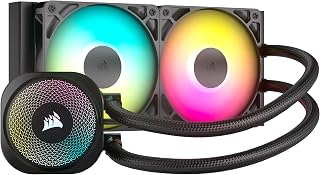
The 240mm radiator size balances effective cooling with case compatibility, keeping the 7800X3D's thermals in check during extended gaming sessions. Direct motherboard connection simplifies installation without additional cables cluttering the build. Support for both Intel LGA 1700 and AMD AM5 sockets provides mounting flexibility, and the included RS120 ARGB fans operate at 36 dB, maintaining reasonable acoustics while moving sufficient air through the radiator.
Pros
- 240mm radiator suits CPU thermal needs in GPU-focused builds
- Direct motherboard connection reduces cable complexity
- 20 dBA pump operation stays quiet beneath GPU fans
- Broad socket compatibility covers common RX 9070 XT platforms
Cons
- Advanced RGB customization requires separate controller purchase
- Aggressive CPU overclockers need larger radiator sizes
The RX 9070 XT generates substantial heat that demands adequate CPU cooling to prevent thermal throttling during GPU-intensive workloads. CORSAIR's Nautilus 240 RS addresses this with a 240mm radiator configuration sized appropriately for systems where graphics performance takes priority over extreme CPU overclocking. Direct motherboard connection streamlines installation in builds already dense with GPU power cables and RGB headers. The RS120 ARGB fans maintain 2100 RPM maximum speed with magnetic dome bearings that ensure longevity, important when your cooling solution sits near a flagship graphics card exhausting warm air. Pre-applied thermal paste and the convex cold plate design reduce installation variables that might compromise thermal transfer. The pump operates at 20 dBA, staying inaudible beneath GPU fan noise during gaming loads. Compatibility spans Intel LGA 1851, 1700, and AMD AM5 and AM4 sockets, covering the platforms typically chosen for RX 9070 XT builds. Eight RGB LEDs per component provide lighting without requiring standalone controllers, keeping your motherboard headers available for case fans or RGB strips.
Cooling Performance: 240mm all-in-one liquid cooler with efficient pump circulation and optimized cold plate design.
Power Requirements: 12V DC, 15W, 4-pin PWM connector for easy motherboard integration.
Noise Levels: Pump operates at 20 dBA, overall system noise rated at 36 dB for whisper-quiet operation.
Included Fans: Two RS120 ARGB fans with magnetic dome bearings, maximum 2,100 RPM, eight RGB LEDs per fan.
Socket Compatibility: Intel LGA 1851, LGA 1700, AMD AM5, AM4 for broad platform support.
Physical Dimensions: 10.87 inches (L) x 4.72 inches (W) x 1.06 inches (H), weighing 2.9 pounds.
Warranty: 5-year manufacturer protection against defects.
This cooler fits builders pairing the RX 9070 XT with mainstream CPUs who prioritize straightforward installation and quiet operation over extreme overclocking headroom. The direct motherboard connection appeals to those avoiding controller clutter in GPU-focused systems. Skip this if you plan aggressive CPU overclocking alongside your graphics card, where 280mm or 360mm radiators better handle sustained thermal loads. Builders wanting advanced RGB control beyond motherboard sync will need additional hardware.

The 850W capacity handles the RX 9070 XT's power demands with overhead for a high-end CPU and peripherals, preventing stability issues during gaming loads. ATX 3.1 compliance ensures compatibility with next-generation GPU connectors and transient power spikes. Fully modular cabling simplifies cable management in modern cases, and the Gold efficiency rating reduces heat output while keeping electricity costs reasonable during extended sessions.
Pros
- 850W capacity handles RX 9070 XT plus high-end CPU with headroom
- 12V-2x6 connector delivers up to 600W to modern graphics cards
- Zero Fan Mode runs silent under typical gaming loads
- Japanese capacitors minimize ripple for stable voltage delivery
Cons
- NZXT newer to PSU market than established competitors
- ATX form factor may not fit ultra-compact cases
Building around the RX 9070 XT demands a power supply that can handle both the GPU's requirements and provide headroom for a complete high-end system. The NZXT C850 Gold delivers exactly that with its 850W capacity and ATX 3.1 compliance. The 12V-2x6 connector supports up to 600W delivery to modern graphics cards, ensuring the RX 9070 XT receives stable power even during intensive gaming sessions. What makes this unit particularly suitable for an RX 9070 XT build is its combination of efficiency and silence. The 135mm fan with Zero Fan Mode runs completely silent under typical gaming loads, while 80 PLUS Gold and Cybenetics Gold certifications confirm excellent efficiency. Japanese capacitors minimize ripple noise and improve hold-up time, critical for maintaining stable voltage delivery to sensitive components. The fully modular cable design simplifies building and supports clean cable management in modern cases. With a 10-year warranty backing the unit, this PSU represents a long-term investment that pairs perfectly with the RX 9070 XT's performance tier without overspending on unnecessary wattage capacity.
Power Output: 850 watts
Form Factor: ATX full-size
Modular Design: Fully modular cables
Cooling: 135mm fluid dynamic bearing fan with Zero Fan Mode
Efficiency Rating: 80 PLUS Gold, Cybenetics Gold
Connectors: ATX 3.1 compliant with 12V-2x6 connector (600W max to GPU)
Input Voltage: 100-120V AC
Capacitors: 100% Japanese premium capacitors
Warranty: 10 years manufacturer coverage
Dimensions: 6.3 x 5.91 x 3.39 inches
Weight: 7.8 pounds
This power supply suits builders pairing the RX 9070 XT with high-end CPUs and planning to maintain their system for years. The 850W capacity provides comfortable headroom for overclocking and future upgrades. Skip this if you're building a budget system where a 750W unit would suffice, or if you need ultra-premium brand recognition. Also not ideal for ultra-compact cases where ATX form factor poses space constraints. The fully modular design benefits those who care about aesthetics and cable management.

This card's 16GB GDDR6 memory provides headroom for high-resolution gaming and creative workloads that benefit from larger frame buffers. The 3060 MHz GPU clock speed delivers strong performance out of the box, while the Gaming OC variant includes factory overclocking for added frames without manual tuning. PCIe 5.0 support ensures forward compatibility with modern motherboards, and the DisplayPort output handles high refresh rate monitors that pair well with this performance tier.
Pros
- 16GB GDDR6 eliminates VRAM constraints in modern games
- 160 to 220fps at 1440p high settings on AAA titles
- WINDFORCE cooling runs quiet under gaming loads
- PCIe 5.0 ensures compatibility with current platforms
Cons
- Requires 750W power supply minimum
- 11.34-inch length demands case compatibility verification
The GIGABYTE Radeon RX 9070 XT Gaming OC is the foundation of this entire build guide, delivering exactly what gamers need for high-refresh 1440p and capable 4K gaming without flagship pricing. This card's 16GB GDDR6 memory eliminates VRAM bottlenecks that plague 8GB and 12GB cards in modern titles, while the 3060 MHz GPU clock and PCIe 5.0 interface ensure compatibility with current motherboards. Real-world performance delivers 160 to 220fps on AAA titles at 1440p high settings, making it ideal for 144Hz and 165Hz monitor users. The WINDFORCE cooling system with Hawk fans and server-grade thermal conductive gel maintains temperatures during extended sessions while operating quietly. At 11.34 inches length, it fits most modern cases without compatibility headaches. The silver and black aesthetic matches contemporary builds without RGB overload. DisplayPort outputs support 7680 x 4320 maximum resolution, providing flexibility for multi-monitor setups or future display upgrades. For builders seeking strong 1440p performance and workable 4K gaming, this card represents the performance tier that justifies building an entire system around it.
Core Specifications
GPU: AMD Radeon RX 9070 XT
Memory: 16GB GDDR6
Memory Clock: 2600 GHz
GPU Clock: 3060 MHz
Interface: PCIe 5.0 x16
Max Resolution: 7680 x 4320 (8K)
Physical and Connectivity
Dimensions: 11.34 inches (L) x 5.2 inches (W)
Weight: 1.78 kg
Output: DisplayPort
Power Connectors: Dual 8-pin (750W+ PSU recommended)
Cooling: WINDFORCE system with Hawk fans and thermal gel
Warranty and Support
Manufacturer: GIGABYTE
Warranty: 3 years
Model: GV-R9070XTGAMING OC-16GD
Gaming Performance at Common Resolutions
1440p Gaming: 160-220fps on most modern AAA titles at high settings. Excellent for competitive gaming and high-refresh monitors.
4K Gaming: Playable at high settings on most titles, medium settings on demanding new releases. Solid for content creators monitoring in 4K.
Esports Titles: 300+ fps possible on optimized competitive games for ultra-high refresh gameplay.
Real-World Use Cases
Best suited for 1440p gaming at 144+ fps, 4K content creation workflows, professional 3D rendering, and VR gaming. Handles flight simulators like DCS at high settings with 4K head tracking. Eliminates VRAM constraints for media professionals working with large files.
Driver Recommendations
Run DDU (Display Driver Uninstaller) before installation if upgrading from another card. Install latest AMD drivers for maximum stability and performance. Update BIOS if required by your system for PCIe 5.0 compatibility.

The Socket AM5 interface directly supports the Ryzen 7800X3D while maintaining upgrade paths to future Ryzen 9000 processors. Three M.2 slots accommodate fast NVMe storage for game libraries and project files, while DDR5 support up to 6400 MHz ensures compatibility with high-performance memory kits. The 12+2 power stages deliver stable voltage regulation for sustained gaming loads, and PCIe 4.0 connectivity provides ample bandwidth for the RX 9070 XT.
Pros
- Exceptional value for a full-featured B650 gaming motherboard
- Excellent power delivery stability supports CPU overclocking and heavy workloads
- Abundant storage connectivity with PCIe 5.0 and multiple M.2 slots
- WiFi 6E provides fastest wireless speeds available for gaming and streaming
- Straightforward installation with clearly labeled headers and connectors
Cons
- BIOS update required for Ryzen 9000 and 8000 series compatibility, adding setup time
- Some users report LAN driver issues requiring manual updates and troubleshooting
- Slightly higher price point compared to budget B650 alternatives
The ASUS ROG Strix B650-A Gaming WiFi is a mid-range gaming motherboard built for Ryzen builders who refuse to compromise on features. It targets gamers and content creators running Ryzen 7000, 8000, or 9000 series processors who need reliable performance, modern connectivity, and room to expand without spending on high-end X870E boards.
This board stands out with its PCIe 5.0 M.2 slot for cutting-edge NVMe drives, paired with two PCIe 4.0 slots for ample storage options. The 12+2 power delivery is robust enough for sustained multi-core workloads, while the strategically designed VRM heatsinks keep temperatures in check. WiFi 6E networking puts you ahead of competitors in online gaming, and the abundance of USB ports plus 4 SATA connections gives you flexibility for keyboards, mice, drives, and legacy devices.
Build quality is impressive for the price tier. Users consistently praise the solid construction, quality components, and clear header labeling that makes cable management straightforward. The ROG aesthetic looks sharp in any case, and the Aura Sync RGB integration plays well with other ASUS components for unified lighting.
Setup does have friction points. The board requires a BIOS flash before booting with newer Ryzen CPUs, and some users have experienced LAN controller issues requiring driver updates outside of Windows. Budget an extra 6 hours for initial configuration if you're not familiar with BIOS flashing or troubleshooting network drivers.
The ASUS ROG Strix B650-A Gaming WiFi is a smart buy for builders seeking premium features and build quality at a reasonable price. It excels as the foundation for high-performance mid-range gaming PCs and creative workstations, though patience during setup is required.
Socket and Compatibility: AM5 socket supports AMD Ryzen 9000, 8000, and 7000 series processors with BIOS update for newer generations. Supports up to 128GB DDR5 memory at speeds up to 6400 MHz across 4 DIMM slots.
Storage and Expansion: One PCIe 5.0 M.2 slot, two PCIe 4.0 M.2 slots, all with heatsinks. Includes 4 SATA 6Gb/s ports for traditional drives. Four PCIe slots total provide GPU and expansion card compatibility.
Power Delivery: 12+2 power stages with 8+4 pin ProCool connectors. Premium alloy chokes and durable capacitors ensure stable multi-core performance and overclocking headroom.
Connectivity: WiFi 6E, 2.5G LAN, 9 USB ports including USB 3.2 Gen 2x2 Type-C, 1 HDMI output, and optical S/PDIF. Comprehensive I/O covers gaming, streaming, and content creation needs.
Form Factor and Design: ATX motherboard with dimensions 10.8in L x 13.4in H. Massive VRM heatsinks with airflow channels and thermal pads maintain cool operating temperatures. Includes 3-year warranty from ASUS.
Who Should Buy: This motherboard is perfect for mid-range gaming PC builders and content creators using Ryzen 7000 series and newer processors. It's ideal if you want future-proof PCIe 5.0 storage, WiFi 6E networking, and abundant ports without paying for unnecessary X870E premium features.
Who Should Skip: Budget builders on a tight constraint should consider more basic B650 options. High-end enthusiasts planning extreme overclocking or building show systems may prefer premium X870E boards with additional features.
Setup Expectations: Plan 4 to 6 hours for complete setup if you need to BIOS flash for your CPU. Have a USB drive ready. Verify LAN drivers post-installation and keep ASUS support contact information handy for troubleshooting. Experienced builders will have smoother installation than first-timers.
Compatibility Check: Verify your CPU generation before purchase. Ryzen 9000 and 8000 series require BIOS update before POST. Check case dimensions to ensure ATX form factor fits your chassis. Confirm DDR5 RAM compatibility and GPU clearance with your cooler and case layout.
Value Proposition: At this price point, the ASUS ROG Strix B650-A delivers more features and better build quality than budget alternatives while costing significantly less than premium X870E options. It represents strong value for gamers seeking performance and expandability without overpaying.
Buying Guide: Matching Components to the RX 9070 XT
CPU Selection and Bottleneck Avoidance
The RX 9070 XT pushes high frame rates at 1440p and 4K, so your processor needs enough single-thread performance to feed the GPU without creating CPU-bound scenarios. Eight cores with strong IPC handle modern game engines effectively.
The AMD Ryzen 7 7800X3D 8-Core brings 3D V-Cache technology that dramatically improves gaming performance by reducing memory latency. Its 96MB L3 cache keeps frame times consistent, and the 5nm architecture delivers efficient performance without excessive heat generation. This processor handles CPU-intensive titles while leaving thermal headroom for overclocking your GPU.
Memory Speed and Capacity Requirements
Modern games increasingly rely on fast memory for texture streaming and asset loading. DDR5 provides the bandwidth advantage over DDR4, particularly when paired with AMD’s EXPO profiles that optimize timings for Ryzen platforms.
The G.SKILL Trident Z5 Neo RGB Series DDR5 RAM at 6000MT/s with CL30 timings offers excellent performance for gaming workloads. The 32GB capacity (2x16GB) handles multitasking and background applications without forcing the system to page to disk. AMD EXPO support means you can enable the performance profile in BIOS without manual timing adjustments, and the tight CL30-38-38-96 timings reduce latency compared to looser kits. If you need a more budget-conscious option while maintaining solid performance, check out DDR5 RAM under $150 for alternatives.
Storage Performance for Gaming Workloads
PCIe 4.0 NVMe drives eliminate storage bottlenecks during game loads and texture streaming. Sequential read speeds above 6000 MB/s keep load times short, while high random read performance prevents stuttering when games pull scattered data.
The Samsung 980 PRO SSD 2TB PCIe NVMe Gen 4 Gaming M.2 delivers 7000 MB/s reads with Samsung’s Elpsis controller harmonizing flash memory and interface performance. The 2TB capacity accommodates multiple AAA titles with room for recording software and system overhead. Nickel coating and a heat spreader label manage thermal throttling during extended gaming sessions, maintaining consistent speeds when you need them most.
Cooling Solutions for High-Performance Builds
The Ryzen 7 7800X3D runs efficient but still generates heat under sustained loads. A 240mm AIO provides sufficient cooling capacity while maintaining low noise levels, and the compact size fits most cases without clearance issues.
The CORSAIR Nautilus 240 RS ARGB Liquid CPU Cooler uses a convex cold plate with pre-applied thermal paste for maximum IHS contact. The RS120 fans with AirGuide technology focus airflow through the radiator fins while magnetic dome bearings reduce noise to 20 dBA at the pump. Direct motherboard connection eliminates the need for a separate controller, and daisy-chain fan connections reduce cable clutter inside your case. For builders working in compact enclosures, explore CPU coolers for small form factor PCs designed for tighter spaces.
Power Supply Sizing and Efficiency
The RX 9070 XT can pull transient power spikes during demanding scenes. An 850W PSU provides overhead for these spikes plus system components, with headroom for future upgrades. ATX 3.1 compliance ensures proper handling of PCIe 5.0 power delivery requirements.
The NZXT C850 Gold ATX 3.1-850W Fully Modular Power features a 12V-2×6 connector rated for 600W delivery to the GPU, handling the RX 9070 XT’s power demands with stability. The 80 PLUS Gold certification delivers efficient power conversion, reducing waste heat in your case. Japanese capacitors improve hold-up time and minimize ripple noise, while the 135mm FDB fan with Zero Fan Mode stays completely silent under 50% load, keeping your system quiet during lighter workloads.
Motherboard Platform and Expansion
AMD’s AM5 platform supports current Ryzen 7000 series processors and provides an upgrade path to future generations. B650 chipset boards offer PCIe 5.0 M.2 support and DDR5 compatibility at a reasonable price point compared to X670 models.
The ASUS ROG Strix B650-A Gaming WiFi AMD B650 AM5 delivers 12+2 power stages with thick VRM heatsinks and airflow channels for stable CPU power delivery. One PCIe 5.0 M.2 slot and two PCIe 4.0 slots provide storage expansion, while WiFi 6E eliminates the need for ethernet in wireless setups. ProCool 8+4 pin connectors ensure clean power to the CPU, and the robust thermal design handles the Ryzen 7 7800X3D’s demands without VRM throttling. For more AM5 platform options, review motherboard comparisons covering different chipsets.
Case Selection and Airflow Design
Modern GPUs exhaust significant heat into the case. A chassis with front-to-back airflow and space for multiple intake fans prevents hot air recirculation that degrades component temperatures.
The CORSAIR iCUE Link 3500X RGB Mid-Tower ATX PC Case accommodates up to 10x 120mm fans across side, roof, and PSU mounting points, ensuring the RX 9070 XT receives fresh air intake. Three pre-installed RX120 RGB fans provide baseline cooling, and the tempered glass panels showcase your build while remaining easily removable for maintenance. Support for EATX motherboards and reverse connection board designs offers flexibility for different hardware configurations, and the wraparound glass aesthetic displays your components without compromising airflow capacity. Compare additional PC case designs for different form factors and cooling philosophies.
Final Thoughts
Building around the RX 9070 XT means selecting components that work together without creating performance bottlenecks. The AMD Ryzen 7 7800X3D prevents CPU limitations while the G.SKILL Trident Z5 Neo RGB DDR5 provides the memory bandwidth modern games demand. Pair these with fast storage, adequate cooling, and a quality power supply for a system that handles current titles and future releases without compromise.
Frequently Asked Questions
What CPU works best with the RX 9070 XT for gaming?
The AMD Ryzen 7 7800X3D offers the strongest gaming performance due to its 3D V-Cache technology, which reduces memory latency and keeps frame times consistent. Eight cores with high single-thread performance prevent CPU bottlenecks at 1440p and 4K resolutions. Intel’s Core i7-14700K provides an alternative with more cores for productivity workloads, but the 7800X3D typically edges ahead in pure gaming scenarios.
How much RAM do I need for an RX 9070 XT build in 2026?
32GB of DDR5 memory covers modern gaming requirements with headroom for background applications and browser tabs. Games increasingly use 12-16GB at maximum settings, so 32GB prevents paging to disk during multitasking. Speed matters more than raw capacity once you exceed 32GB, so prioritize DDR5-6000 with tight timings over jumping to 64GB with slower speeds unless you run memory-intensive creative software alongside gaming.
Is 850W enough power for the RX 9070 XT?
An 850W power supply provides adequate capacity for the RX 9070 XT plus a high-performance CPU with room for transient power spikes. The GPU can briefly exceed its rated TDP during demanding scenes, and an 850W unit with ATX 3.1 compliance handles these spikes without triggering overcurrent protection. This wattage also leaves headroom if you add more storage drives or upgrade to a higher-tier GPU later. For audiophiles building gaming rigs, consider closed back headphones for gaming that isolate fan noise during intense sessions.
Do I need PCIe 5.0 storage for gaming with the RX 9070 XT?
PCIe 4.0 NVMe drives deliver sufficient performance for gaming workloads in 2026, with sequential reads above 7000 MB/s eliminating storage bottlenecks during texture streaming and level loads. PCIe 5.0 drives offer higher sequential bandwidth but current games do not saturate PCIe 4.0 speeds, making the cost premium unnecessary for most builders. Invest the savings into faster RAM or a better CPU cooler for more tangible gaming improvements.





Write Your Review
No reviews yet. Be the first to share your experience!