

You sit down for a late-night session and your keyboard is either too loud, too mushy, or just plain boring to look at. Finding the right RGB mechanical keyboard means balancing switch feel, build quality, lighting customization, and layout in one package. Whether you are a competitive gamer, a daily typist, or someone who just wants a great-looking desk setup, there is a board on this list built for your workflow. If you are also exploring compact options, check out our roundup of the best 65 percent keyboards for a more space-saving take.
We evaluated eight keyboards across a range of layouts, switch options, and price tiers so you can cut through the noise and buy with confidence. From budget-friendly wired boards to wireless flagships with Hall Effect technology, every pick here has been carefully reviewed for real-world performance.
Quick answer
This guide compares 8 picks, with AULA F75 Pro 75% Hot Swappable Wireless Mechanical ranked first. Redragon K671 Mechanical Gaming Keyboard, Hot-Swappable has the most customer reviews.

A 75% layout with a dedicated knob gives you compact desk space without losing volume control, and hot-swappable sockets paired with pre-lubed Reaper switches mean you can tune sound and feel without soldering. Triple connectivity (2.4GHz, BT5.0, USB-C) makes it flexible across setups, while the RGB backlighting under PBT keycaps stays vibrant and resists shine over time.
Pros
- 75% layout keeps arrow keys while saving desk space
- Hot-swappable sockets for switch experimentation
- Multi-function knob handles RGB brightness or volume
- Works across PC, console, tablet, and smartphone
Cons
- Advanced macros and lighting need driver software
- Water-repellent only, not fully spill-proof
If you want RGB flair without the desk-hogging footprint of a full board, the AULA F75 Pro earns its spot on this list through sheer flexibility. It's a 75% layout, so you keep arrow keys and function row while trimming the numpad, and it runs across 2.4GHz wireless, Bluetooth 5.0, or USB-C depending on what your setup needs. The pre-lubed Reaper linear switches feel smooth out of the box, and since the board is hot-swappable, you can swap switches later without picking up a soldering iron. Side-printed PBT keycaps hold up better against shine and sweat than standard ABS. RGB lighting is fully backlit and controllable through the multi-function knob, which also doubles as a volume roller in office mode. It works across PC, consoles, tablets, and smartphones, so it earns a place whether you're chasing gaming performance or just want a colorful board that travels between devices.
The hot-swappable design is a major strength for users wanting to personalize their typing experience. The keyboard supports both 3-pin and 5-pin switches, accommodating most mechanical switch types on the market. The included LEOBOG Reaper switches are pre-lubricated and tuned for a linear, creamy response that appeals to both typists and gamers. Two spare Reaper switches come in the box, letting you experiment or prepare for future replacements.
The programmable key functionality and macro support open creative possibilities for gamers and professionals alike. Through the driver software, you can remap keys, create key combinations, and set up context-specific macros. The N-key rollover ensures simultaneous key presses register accurately, critical for competitive gaming. Windows lock prevents accidental touches during intense gaming sessions, protecting your in-game focus.
Tri-mode connectivity is exceptionally practical in today's multi-device world. Pair the F75 Pro with your PC, laptop, tablet, and smartphone simultaneously, then switch between them using convenient shortcut keys or the side button. The 2.4GHz wireless mode delivers millisecond responsiveness suitable for gaming, while Bluetooth 5.0 handles everyday mobile needs with lower power consumption. USB-C wired connection provides a reliable fallback with zero latency.
The 4000mAh rechargeable battery balances capacity and charging speed for real-world use. Battery life depends on usage patterns and lighting settings, but the large capacity supports several days of typical use between charges. The included USB-C cable handles both charging and wired connectivity, eliminating cable clutter.

Full-size layout keeps your numpad intact for spreadsheet work between gaming sessions, and hot-swappable NX Snow V2 linear switches let you customize actuation feel to match competitive play. The three tilt angles and included wrist rest address ergonomics during long sessions, while per-key RGB over PBT keycaps delivers the bright, durable lighting this roundup demands.
Pros
- Hot-swappable with pre-lubed linear switches installed
- Sound-dampening foam reduces hollow keystroke noise
- PBT doubleshot keycaps resist shine over time
- Detachable wrist rest with three tilt angles
Cons
- Wired only, no wireless connectivity option
- Requires Windows 10 or later for full support
For an RGB mechanical keyboard that leans hard into gaming performance while still handling everyday typing, the ROG Strix Scope II X makes a strong case. It's a full-size 100% layout, so the number pad stays intact, and the hot-swappable sockets come pre-fitted with linear ROG NX Snow V2 switches that offer a smooth, wobble-free keystroke thanks to improved stabilization. The dust-proof stem design and integrated LED lens are built specifically to keep the RGB lighting clean and consistent over time. Sound-dampening foam under the plate cuts down on the hollow ping that cheaper boards suffer from, so it stays satisfying to type on even outside of gaming sessions. PBT doubleshot keycaps resist shine, and the aluminum top plate adds rigidity. A detachable wrist rest and three tilt angles round out the ergonomics. It's a wired-only board, but that trade-off buys the kind of consistent low-latency response competitive players want from an RGB gaming keyboard.
Physical Dimensions: 17.2 inches length, 5.1 inches width, 1.5 inches height. Weight: 2.1 pounds.
Key Features: 104-key full-size layout, QWERTY configuration, hot-swappable mechanical switches, three adjustable tilt angles, detachable wrist rest, RGB backlit with per-key customization, USB 2.0 TypeC-to-TypeA connection.
Switch Specifications: ROG NX Snow V2 linear switches (pre-lubed), dust-proof wall-stem design, integrated LED lens, smooth keystrokes with reduced wobble. Optional ROG NX Storm clicky switches for tactile feedback.
Keycaps: PBT doubleshot material, resistant to shine and wear, includes specialty ROG-themed spacebar keycap.
Compatibility: Windows 10 and above, PC and laptop. Includes detachable wrist rest, 2-in-1 ROG keycap and switch puller, USB cable, and ROG sticker.

Tri-mode connectivity gives console and PC players flexibility to switch between wired reliability and wireless freedom, while hot-swappable NX Snow linear switches let you experiment with feel without extra tools. The 96% layout trims bulk but keeps essential keys, and PBT keycaps over RGB backlighting hold color and texture through heavy console gaming sessions.
Pros
- Tri-mode connectivity: wired, 2.4GHz wireless, Bluetooth
- Hot-swappable pre-lubed linear switches
- Metal top housing with sound-dampened acoustics
- 96% layout keeps numpad in a smaller footprint
Cons
- Armoury Crate software has a steep learning curve
- Not water resistant
This board targets a specific frustration RGB keyboard shoppers run into: wanting full lighting and switch customization without committing to a bulky full-size layout. The ROG Strix Scope II 96 splits the difference with a 96% layout that keeps the number pad while trimming excess bezel space. It supports tri-mode connectivity, so you can run it wired, over 2.4GHz wireless, or via Bluetooth depending on the situation. The pre-lubed ROG NX Snow linear switches are hot-swappable, meaning the RGB-lit switches you start with don't have to be the ones you finish with. Factory sound dampening keeps keystrokes from pinging or echoing, which matters once RGB lighting draws attention to a board that also needs to sound good. A metal top housing and PBT keycaps keep the build feeling solid rather than hollow. Included wrist rest and tilt adjustments add comfort for longer sessions, rounding out a board built for players who want RGB, hot-swap flexibility, and wireless freedom in one package.
Layout: 96% (TKL size with full-size functionality and number pad)
Switches: Hot-swappable ROG NX Snow linear switches (pre-lubed), alternative ROG NX Storm clicky switches available
Connectivity: 2.4GHz wireless (SpeedNova technology), Bluetooth (up to 3 devices), USB wired
Battery Life: Up to 1,500 hours in 2.4GHz wireless mode
Lighting: Per-key RGB with customizable effects
Keycaps: PBT material
Dimensions: 14.84 inches L x 5.16 inches W x 1.57 inches H
Weight: 2.8 pounds
Compatibility: Windows PC and Mac
Included Accessories: Detachable wrist rest, ROG keycap and switch puller, wireless receiver, USB extender, specialty spacebar keycap, USB cable, ROG sticker
Warranty: 1 year
Suited to gamers who want a near-full-size RGB board with wireless flexibility and hot-swappable switches for future tuning. Anyone who values a numpad but doesn't want a bulky 100% board fits this well. Skip it if you're not willing to deal with Armoury Crate software for RGB and macro setup, or if you need spill protection, since this board isn't water resistant.

Eleven programmable backlit modes give you granular control over the RGB show without third-party software, appealing to anyone who wants lighting customization out of the box. Hot-swappable red linear switches let you upgrade feel later, anti-ghosting ensures every keystroke registers during intense sessions, and double-shot PBT keycaps resist the fading that plagues cheaper backlit boards.
Pros
- Hot-swappable switches for future changes
- 11 backlit RGB modes with brightness control
- Full anti-ghosting on 104 keys
- Durable double-shot PBT keycaps
Cons
- Wired only, no wireless option
- RGB limited to 11 presets, no per-key color
For an RGB board that lets you tinker with the lighting rig itself, the Redragon K671 stands out because of its hot-swappable red switches, meaning you can experiment with different switch feel while keeping the same RGB frame and keycaps. The 11 backlit modes with adjustable speed and 5 brightness levels give you real control over the light show, and the full 104-key layout with anti-ghosting means every keypress registers even when your lighting effects are cranked up during intense gaming. Double-shot PBT keycaps resist fading, so the RGB glow stays vivid and even through the legends over time rather than washing out unevenly. Build quality holds up well, with a solid ABS enclosure that doesn't flex, and the muted clack of the linear switches sounds satisfying without being harsh. It comes with spare switches and keycaps, which is a nice touch if you want to try swapping components down the line as part of your RGB setup.
Good for gamers and typists who want a full-size RGB mechanical keyboard with hot-swap flexibility and don't mind sticking to 11 preset lighting modes rather than per-key custom colors. Skip it if you need wireless connectivity, since this is wired only, or if you want granular per-key RGB customization instead of preset effects. Also skip it if quiet operation matters, since mechanical switches produce audible feedback.
Model: Redragon K671
Switch Type: Cherry MX Red Linear
Key Count: 104 Keys (Full Size QWERTY)
Backlighting: 11 RGB Modes, 5 Brightness Levels
Connectivity: Wired USB
Special Features: Hot-Swappable, Anti-Ghosting, Macro Editing, Programmable Keys
Keycaps: Double-Shot PBT (Durable, Clear Backlight)
Dimensions: 17.13 inches L x 4.88 inches W x 1.42 inches H
Material: ABS Enclosure
Water Resistance: Water Resistant
Included Accessories: 4 Spare Switches, 2 Red Replacement Keycaps, Switch Removal Tool
Warranty: 24 Months
Compatibility: Windows PC, Mac, Most USB-Compatible Devices
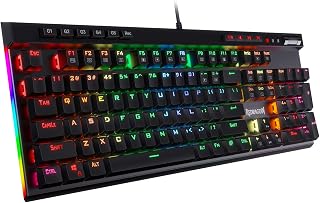
A dedicated media wheel and macro keys put volume and shortcut control right at your fingertips, useful for streamers juggling audio on the fly. Hot-swappable switches mean you're not locked into the stock feel, USB-C connectivity offers a sturdier, reversible connection than older ports, and the ergonomic case design keeps RGB lighting visible from a comfortable typing angle.
Pros
- Hot-swappable socket accepts nearly any mechanical switch for endless customization
- Five programmable macro keys deliver real value for MMO and MOBA gamers
- Solid build quality with aluminum plate and durable double-shot keycaps
- Full anti-ghosting technology ensures zero missed inputs in competitive gaming
- Works out of the box with no mandatory software installation required
Cons
- Outemu Blue switches may be loud for shared spaces or office environments
- USB-C connection is less common than USB-A, though adapters are readily available
- No wireless option limits placement flexibility on the desk
The Redragon K580 is a 104-key wired mechanical gaming keyboard designed for competitive gamers and enthusiasts who want serious performance without the premium price tag. It's an ideal fit for anyone playing MMOs, MOBAs, or fast-paced shooters where macro keys and reliable input response matter.
The standout feature here is the hot-swappable socket combined with five dedicated macro keys that program directly on the keyboard. You can record complex combos or gaming shortcuts without touching software, and swap out the stock blue switches whenever you want to experiment. The full anti-ghosting ensures every keystroke registers accurately, even during frantic multi-key inputs.
Build quality holds up well for the price point. The aluminum plate, double-shot keycaps rated for 50 million keystrokes, and reinforced construction suggest this keyboard will survive years of heavy use. The blue mechanical switches deliver the tactile bump and audible click that many gamers love, though this can be loud in quiet environments.
The main trade-off is connectivity and noise. USB-C is less universal than USB-A, and the clicky switches aren't ideal for shared workspaces. There's also no wireless option, so you're tethered to your setup. That said, these limitations are minor for dedicated gamers.
The Redragon K580 offers excellent value for mechanical keyboard enthusiasts and competitive gamers. Strong build quality, customizable macro keys, and hot-swap capability make it a smart choice if you want performance and flexibility without excessive cost.
Design and Layout: Full-size 104-key QWERTY layout with ergonomic design and ambidextrous hand orientation. Dimensions are 15.75 inches by 5.91 inches by 0.98 inches.
Switches and Feel: Outemu blue mechanical switches with tactile bump and audible click. Rated for 50 million keystrokes. Double-shot keycaps resist fading over time.
Customization: Hot-swappable socket accepts nearly any mechanical switch. Five dedicated programmable macro keys (G1-G5) with on-board memory, no software required.
Connectivity: Wired USB-C connection. Compatible with Windows, MacOS, and Linux. Optional companion software available for advanced RGB effects and macro profiles.
Additional Features: Full anti-ghosting on all 104 keys, media wheel for volume control, dedicated media keys for play/pause/skip, built-in keycap puller. Water-resistant construction. Includes 1-year manufacturer warranty.

An aluminum alloy board underneath the 104-key layout adds a sturdier, less hollow typing feel than typical plastic gaming keyboards, while noise-absorbing foams cut down on the hollow clack many RGB boards suffer from. Hot-swappable sockets let you customize switches over time, and full-size layout ensures nothing is sacrificed for the vibrant per-key RGB lighting.
Pros
- Premium aluminum build feels substantial and eliminates wobble compared to plastic keyboards
- Hot-swap socket accepts standard 3-pin and 5-pin switches for easy customization
- Brown switches strike excellent balance between tactile feedback and quiet operation
- Exceptional value compared to competing mechanical gaming keyboards at this price point
- Includes spare switches and keycap puller for immediate customization
Cons
- Software quality is mediocre and occasionally unstable according to user feedback
- Stock brown switches may feel less responsive than clicky switch alternatives for some gamers
- Minimal packing materials create initial concern about damage risk, though units arrive in good condition
The Redragon K556 is a 104-key mechanical gaming keyboard designed for players and professionals who demand reliable performance without premium pricing. This full-size keyboard caters to both casual gamers looking to enter the mechanical keyboard space and office workers seeking tactile, responsive typing without excessive noise.
The standout feature is the hot-swappable socket system, which eliminates the need for soldering when changing switches. The stock brown switches deliver a satisfying tactile bump with minimal audible noise, making them versatile for both gaming marathons and quiet office environments. Users consistently praise the key spacing, travel distance, and overall typing smoothness, with many reporting the transition from membrane keyboards felt natural within hours.
Build quality justifies the price point. The brushed aluminum frame creates a tank-like keyboard that refuses to flex or wobble during intense gaming sessions, a stark contrast to plastic-frame competitors. The 20 RGB lighting modes with adjustable brightness and speed deliver aesthetic appeal, and the included keycap puller plus spare switches signal that Redragon supports user customization from day one.
The primary drawback is companion software quality. While functional for macro programming and custom RGB effects, users report occasional instability. The keyboard functions perfectly without software through onboard presets, making this a minor rather than critical issue. Some gamers may also prefer the more pronounced click of switch alternatives, though brown switches remain popular for their all-purpose design.
The Redragon K556 delivers exceptional value for mechanical keyboard newcomers, competitive gamers on budget, and anyone prioritizing reliability and customization over brand prestige. Its aluminum construction, hot-swap capability, and proven durability make it a smart investment that outperforms more expensive keyboards that fail after 1-2 years.
Physical Dimensions: 17.13 inches length x 4.88 inches width x 1.59 inches height, weighing 1000g (2.2 lbs)
Switch Type: Redragon Brown mechanical switches with hot-swappable 3-pin and 5-pin socket compatibility
Backlighting: RGB LED with 20 preset modes, adjustable brightness and flow speed
Layout: Full 104-key QWERTY with 6 sections, ambidextrous design
Connectivity: Wired USB connection, plug-and-play compatibility
Build Materials: Brushed aluminum alloy board and plate, noise-absorbing foam layers
Compatibility: Windows, macOS, Linux, and gaming consoles
Software: Optional companion software for RGB customization and macro programming
Accessories Included: Spare Redragon brown switches, keycap/switch puller
Warranty: 1-year manufacturer coverage
Model Number: K556, 1st Generation
Perfect For: First-time mechanical keyboard buyers, budget-conscious gamers, office workers seeking tactile typing, competitive players on limited budgets, anyone wanting a customizable keyboard platform without brand markup.
Consider Alternatives If: You require ultra-quiet switches for noise-sensitive environments, you need wireless connectivity, you demand cutting-edge software features, or you prefer numpad-less compact layouts.
Why Redragon K556 Wins: The combination of hot-swap capability, aluminum build quality, and brown switch versatility creates an entry point to mechanical keyboards that doesn't sacrifice durability or performance. Compared to spending twice as much on premium brands that may fail after a year or two, the K556 delivers sustained value and community-proven reliability.

Per-key RGB illumination paired with an OLED smart display sets this apart for players who want lighting and system info visible without alt-tabbing. The aircraft-grade aluminum alloy frame adds rigidity that plastic boards lack, tactile hybrid switches offer a middle ground between clicky and linear feel, and the included wrist rest supports longer gaming stretches.
Pros
- Per-key RGB illumination
- OLED smart display included
- Aircraft grade aluminum alloy frame
- Water resistant build
Cons
- Compact 64-key layout limits keys
- AZERTY layout may not suit all users
If per-key RGB is the whole point of your search, the Apex 5 Hybrid earns its spot with full per-key illumination on an aircraft grade aluminum alloy frame that can handle color mapping across every key without a duller uniform glow. The OLED smart display adds a practical touch, letting you keep an eye on media, macros, or game info while your lighting profile runs in the background. Hybrid tactile switches strike a middle ground between mechanical feedback and softer membrane travel, so typing feels responsive without being fatiguing during long RGB-lit sessions. It includes a wrist rest for comfort during marathon gaming, and the water resistant build adds peace of mind for anyone gaming with a drink nearby. The ambidextrous 64-key layout keeps things compact, which suits players who want a tighter RGB light show on a smaller footprint rather than a sprawling full-size board.
Connectivity: USB with thick, durable cable and branded connector
Switches: SteelSeries Hybrid Blue (tactile and clicky, 20 million keypress durability)
Illumination: Per-key dynamic RGB with reactive effects
Display: OLED smart display with customizable content
Layout: AZERTY, 104 keys across 3 sections
Frame Material: Aircraft-grade aluminum alloy
Plate Material: Aluminum
Wrist Rest: Premium magnetic design with full palm support
Dimensions: 35.43 inches L x 11.81 inches W x 0.16 inches H
Weight: 2 pounds
Water Resistance: IP32 rated
Compatibility: Windows 10+, macOS 10.12 Sierra+
Color: Black
Warranty: 1 year limited warranty
Good for gamers who want standout per-key RGB plus a display screen in a compact, console-compatible board, and who don't mind an AZERTY layout or a smaller 64-key count. Skip it if you need a full-size layout with dedicated function rows and numpad, or if you specifically want QWERTY without remapping. Also skip it if you're chasing linear switches, since this uses hybrid tactile Omnipoint switches instead.

Keychron K10 HE Full-Size Wireless Gaming Keyboard
Rapid trigger and magnetic Hall effect switches give competitive players near-instant actuation reset, a real edge in fast-paced titles where standard mechanical switches lag behind. Tri-mode wireless connectivity means you're not tethered to one device, and the ergonomic full-size layout with programmable keys rounds out a board built for accuracy as much as RGB flair.
Pros
- Highly customizable, bright RGB lighting
- Hall Effect switches reduce wear over time
- Tri-mode wireless plus wired USB-C
- Adjustable actuation and rapid trigger mode
Cons
- Setup requires clearing browser data first
- Gamepad emulation has some limitations
If you want RGB on a keyboard that also pushes switch technology forward, the Keychron K10 HE pairs bright, highly customizable RGB lighting with Hall Effect magnetic switches that use magnetic sensors instead of physical contact for keypresses. That means the smooth, quiet feel holds up over time with less wear than standard mechanical switches, while adjustable actuation from 0.2mm to 3.8mm and rapid trigger mode give competitive gamers precise control alongside the lighting. Tri-mode connectivity covers Bluetooth, 2.4GHz wireless, and wired USB-C, so the RGB effects and macros stay available no matter how you connect. The aluminum plate and natural wood siding give the RGB glow a distinctive setup rather than an all-plastic look, and double-shot PBT keycaps keep the legends from shining through with wear. The Web Launcher configurator lets you fine-tune both lighting and actuation, making this a keyboard where the RGB is just one part of a deeper customization package.
Layout and Switches: 100% full-size layout (104 keys) with Gateron Double-Rail Nebula Hall Effect magnetic switches. Hot-swappable design allows easy switch replacement.
Connectivity: Bluetooth 5.2 (supports up to 3 paired devices), 2.4GHz wireless via USB-A receiver, and wired USB-C connection. Seamless tri-mode switching.
Actuation Range: Adjustable from 0.2mm to 3.8mm with 0.1mm sensitivity. Customizable through Launcher web configurator for gaming and typing preferences.
Build: Aluminum plate and frame with natural wood sidings. Double-shot PBT keycaps in OSA profile resist shine and wear. Includes dedicated media keys and extra keycaps.
Lighting: RGB backlighting with customizable effects and brightness control through software.
Compatibility: macOS, Windows, and Linux with remapping support. Works with gaming consoles, laptops, PCs, smartphones, and tablets.
Power: Battery-powered with included Type-C charging cable. Weight: 1000g.
Good for gamers and professionals who want RGB lighting combined with adjustable magnetic switch performance and wireless flexibility across multiple devices. Skip it if you want plug-and-play simplicity, since the Web Launcher setup requires clearing browser data first. Also skip it if you're on a tight budget or don't need Hall Effect precision, since simpler mechanical RGB boards can cover basic lighting needs.
Buying Guide: What to Look for in an RGB Mechanical Keyboard
Switch Type and Feel
The switch is the soul of any mechanical keyboard. Linear switches like the ROG NX Snow found in the ASUS ROG Strix Scope II 96 Wireless Mechanical glide smoothly with no bump, making them ideal for fast-paced gaming. Tactile switches like the Brown switches in the Redragon K556 offer a soft bump that helps with typing accuracy without the noise of a clicky switch.
Clicky switches, such as the Blue switches in the Redragon K580, deliver an audible click and a distinct tactile response that many typists love. If you share a space, tactile or linear options are the more considerate choice.
Hot-Swap Support
Hot-swap sockets let you pull out and replace switches without soldering, which is a game-changer for customization. Most boards on this list, including the AULA F75 Pro Wireless Mechanical Keyboard, 75% Hot and the Keychron K10 HE, support both 3-pin and 5-pin switches, giving you a huge range of aftermarket options. If you plan to experiment with different switch feels over time, hot-swap is a feature worth prioritizing.
Boards without hot-swap are not necessarily a bad deal, especially at lower price points, but you are committing to the factory switch choice. For beginners, the stock switches on most of these picks are already well-chosen for their intended use case.
Connectivity and Layout
Wired keyboards offer zero-latency input that is hard to beat for competitive gaming. But tri-mode boards like the ASUS ROG Strix Scope II 96, which supports Bluetooth, 2.4GHz wireless, and USB-C, give you flexibility across multiple devices and setups. If you switch between a gaming PC and a laptop throughout the day, wireless connectivity is a serious quality-of-life upgrade.
Layout is equally important. Full-size boards keep the number pad intact, while 75% and 96% layouts save desk space without sacrificing arrow keys or critical function rows. Pair your keyboard choice with a quality surface by browsing our picks for the best mouse pads for gaming to complete the setup.
Build Quality and Acoustics
A solid frame makes a noticeable difference in how a keyboard feels and sounds. Aluminum top plates, like those on the Redragon K556 and the ASUS ROG Strix Scope II X, reduce flex and resonance so keystrokes feel planted rather than hollow. Sound-dampening foam, found in both ROG Strix models, absorbs internal echo for a quieter, more satisfying thock.
If acoustics matter to you, look for boards that mention gasket mounting, silicone padding, or PCB foam layers. The AULA F75 Pro stands out here with five layers of acoustic dampening built into the structure, which is impressive at its tier. For a broader look at peripherals in this category, visit our Keyboards and Mice hub.
Final Thoughts
The best RGB mechanical keyboard for you comes down to how you use it and how much you want to invest in the experience. For a reliable, feature-packed wired board that punches above its weight, the Redragon K556 Wired RGB Mechanical is a smart all-around pick with its aluminum frame, hot-swap socket, and 20 lighting modes. If you want the most advanced technology on this list, the Keychron K10 HE Full-Size Hall Effect Keyboard delivers wireless tri-mode connectivity, Hall Effect magnetic switches with adjustable actuation, and a refined build that suits both gaming and productivity equally well.
Frequently Asked Questions
What makes a mechanical keyboard better than a membrane keyboard for gaming?
Mechanical keyboards use individual switches under each key, which means faster actuation, more consistent feedback, and significantly longer lifespan than membrane boards. For gaming, that translates to more reliable inputs during rapid key presses and multi-key combos. Anti-ghosting and N-key rollover, features found across most picks in this guide, ensure every keystroke registers accurately even under pressure.
Are wireless RGB mechanical keyboards reliable for competitive gaming in 2026?
Wireless technology has improved dramatically, and boards using 2.4GHz connections like ROG SpeedNova deliver response times that are effectively indistinguishable from wired in most gaming scenarios. Bluetooth is better suited for casual use or typing, where latency is less critical. If you compete at a high level and every millisecond counts, a wired connection is still the safest bet.
What is the difference between hot-swap and soldered mechanical keyboards?
Hot-swap keyboards let you remove and replace switches by hand using a switch puller, with no soldering required. Soldered keyboards have switches permanently attached to the PCB, so changing them requires desoldering equipment and some technical skill. For anyone who wants to experiment with different switch feels over time, hot-swap boards are far more approachable, and most of the keyboards in this guide support it. You might also find our guide to the best 60 percent keyboard helpful if you prefer a more minimal hot-swap layout.
How do Hall Effect switches differ from traditional mechanical switches?
Hall Effect switches detect keypresses using magnetic sensors rather than physical contact points, which means they never wear out the way traditional switches do. They also support adjustable actuation points, so you can tune exactly how deep a press needs to be before it registers. The Keychron K10 HE uses this technology with sensitivity down to 0.1mm, making it especially useful for gaming scenarios where rapid trigger and snap action give you a real edge.



Write Your Review
No reviews yet. Be the first to share your experience!