

Your desk real estate matters. Whether you’re executing precision flick shots in competitive FPS games or simply prefer a cleaner workspace, a tenkeyless keyboard eliminates the numpad without sacrificing essential functionality. You gain several inches of mouse room while keeping arrow keys, function row, and navigation cluster intact.
This guide evaluates 10 standout TKL keyboards across membrane, mechanical, and hybrid switch technologies. We compare build quality, switch performance, connectivity options, and feature sets to help you identify the model that matches your workflow and budget.
Quick answer
This guide compares 10 picks, with Corsair K55 CORE TKL RGB Gaming Keyboard - Compact ranked first. HyperX Alloy Origins Core TKL Mechanical Gaming holds the highest customer rating among them.
Pros
- Compact tenkeyless layout frees up significant desk space for gaming peripherals
- Quiet membrane keys provide responsive feedback without excessive noise
- Solid spill resistance gives peace of mind during heated gaming marathons
- Excellent value at under $35 with premium features like RGB and media controls
- High polling rate and 12-key rollover deliver competitive gaming performance
Cons
- Membrane switches lack the tactile feedback and durability of mechanical alternatives
- Basic per-zone RGB control compared to per-key lighting on higher-end models
- Tenkeyless layout requires adjustment if you frequently use number pad functions
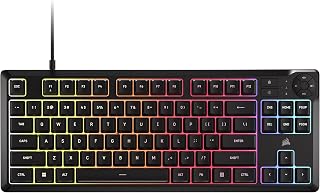
The Corsair K55 CORE TKL is a tenkeyless gaming keyboard designed for players who value compact desk real estate and reliable performance. It's ideal for competitive gamers, streamers, and anyone who needs a dependable keyboard that won't take up excessive space.
The standout feature is the combination of spill resistance and quiet operation. The 300mL spill resistance protects your investment from liquid accidents, while the responsive membrane keys deliver satisfying feedback without the noise of mechanical switches. The 1000Hz polling rate and 12-key rollover ensure your inputs register instantly during fast-paced gameplay.
Build quality is impressive for the price point. The keyboard features a durable plastic enclosure, a tangle-free 6-foot cable, and adjustable height settings. The 8-zone RGB backlighting with iCUE software customization adds personality to your setup, though per-zone control is less granular than per-key alternatives.
The main limitation is the membrane switch technology. While quiet and responsive, membrane switches wear over time and lack the durability some gamers prefer. Additionally, if you regularly use a number pad for work or productivity tasks, you'll need to adapt to the tenkeyless layout.
Overall, the K55 CORE TKL delivers exceptional value as a compact, spill-resistant gaming keyboard. It's perfect for gamers transitioning to a smaller desk footprint or those seeking reliable performance without premium pricing.
This keyboard is ideal for competitive gamers who need maximum desk space for mouse movement and precise aiming. The tenkeyless design is perfect for esports enthusiasts and FPS players.
It's also great for students and professionals with limited desk space who want gaming features without sacrificing productivity. The quiet keys and media controls make it suitable for shared workspaces and late-night gaming sessions.
The spill resistance makes it an excellent choice for anyone who likes to have beverages nearby during work or play, adding a safety net against accidental liquid damage that could destroy other keyboards.
Layout and Design: Tenkeyless form factor with 87 keys, compact dimensions of 14.56 inches wide by 5.56 inches deep.
Backlighting: 8-zone RGB with 16.8 million colors, per-zone programmable through iCUE software.
Performance: 1000Hz polling rate, 12-key selective rollover, responsive membrane switches.
Connectivity: USB 2.0 Type-A with 6-foot cable, compatible with Windows PC.
Controls: Four dedicated media hotkeys (play/pause, mute, volume up/down), brightness adjustment, Windows lock key, adjustable height.
Durability: 300mL spill resistance, 2-year manufacturer warranty.

Pros
- Exceptional value for a mechanical keyboard with premium features like hot-swap capability
- Tri-mode connectivity provides genuine flexibility for multi-device workflows
- Durable construction with hot-swappable switches that can survive drops
- Outstanding battery life with quick charging capability
- Quiet, smooth switches suitable for both gaming and office environments
Cons
- RGB lighting controls can be confusing to navigate initially
- Switches are notably soft and light compared to traditional mechanical keyboards
- LED backlighting turns off at low battery, reducing visibility when power is low
The AULA F87 Pro is a 75% mechanical keyboard designed for gamers, content creators, and professionals who value flexibility and customization. Its tri-mode connectivity lets you seamlessly switch between a desktop PC, laptop, tablet, and mobile devices without fumbling with cables or dongles.
Where this keyboard truly shines is in its hot-swappable design and pre-lubed switches. The LEOBOG space gold switches come pre-lubricated, delivering a buttery smooth typing experience straight from the box. If you want to experiment with different switch types later, the hot-swap mechanism makes it effortless. Unlike soldering-based keyboards, even beginners can swap switches in seconds. Real users report using this keyboard as a daily driver for years without issues.
Build quality is solid for the price. The keyboard features multiple dampening layers between the PCB, plate, and switches to reduce hollow noise and provide a stable, elastic feel. The compact 75% layout preserves arrow keys while saving significant desk real estate compared to full-size boards. Side-printed PBT keycaps resist shine and fading better than standard ABS plastic, though they require deliberate learning curves to navigate color customization features.
The main drawbacks are the learning curve with RGB controls and a design quirk where backlighting cuts off at low battery levels. Additionally, some users may find the pre-lubed switches too soft compared to stiffer mechanical alternatives. The 4000mAh battery provides excellent runtime, easily lasting weeks between charges in wireless mode.
For the price point, the AULA F87 Pro delivers professional-grade performance with practical multi-device support. It's best suited for users who want a customizable, durable mechanical keyboard without premium pricing. Recommended for casual to serious gamers, remote workers, and keyboard enthusiasts exploring hot-swap customization.
Layout: 75% TKL with 87 keys, QWERTY format
Connectivity: Bluetooth 5.0, 2.4GHz wireless dongle, USB-C wired, supports up to 5 simultaneous device connections
Switches: Pre-lubricated LEOBOG space gold switches, 3-pin or 5-pin compatible (hot-swappable), linear actuation
Keycaps: Side-printed PBT dual-injection molded, heat sublimation processed
Backlighting: 16.8 million RGB colors, 16 preset effects, 10 music rhythm modes, programmable via software
Battery: 4000mAh rechargeable, USB-C charging
Build: Plastic enclosure with advanced PCB slotting, extended silicone pads, five-layer noise dampening
Compatibility: Windows, Linux, Android, works with PC, Mac, laptops, tablets, smartphones, PS, Xbox
Warranty: 6 months manufacturer coverage
Included: Dust cover, 2 extra switches, keycap/switch puller, USB cable, user manual
Who should buy this keyboard? Gamers seeking an affordable mechanical keyboard with customization options, remote workers juggling multiple devices, and keyboard enthusiasts wanting to explore hot-swap customization without expensive entry prices. Also ideal for Mac and Linux users thanks to broad OS compatibility.
What makes it stand out? The tri-mode connectivity eliminates the need for multiple keyboards when working across devices. The hot-swappable design with pre-lubed switches provides an accessible entry point to custom mechanical keyboards. The compact 75% layout maximizes productivity without wasting desk space.
Is it better than budget alternatives? At this price point, the AULA F87 Pro competes favorably against membrane and lower-quality mechanical keyboards. However, it targets different needs than premium mechanical keyboards costing $150 or more. The trade-off is excellent value and versatility rather than audiophile-grade sound or boutique switch exclusivity.
What should you know before buying? The RGB lighting interface requires some experimentation. The switches favor smoothness over heaviness, which may disappoint users preferring stiff tactile feedback. Plan for a battery learning curve since low power disables backlighting. The keyboard is water-repellent but not fully waterproof.

Pros
- Excellent build quality with full aluminum body that feels premium and stays rigid under heavy use
- Compact TKL form factor maximizes desk real estate without sacrificing essential keys or gaming performance
- Custom HyperX switches strike a genuine balance between tactile feedback and rapid actuation for gaming
- Extensive customization options including per-key RGB, macros, Game Mode, and three saveable profiles
- Strong reliability rating with 4.7 out of 5 stars across thousands of reviews
Cons
- Tenkeyless layout eliminates the numeric keypad, which may inconvenience users who frequently type numbers
- Detachable USB Type-C cable requires manual connection and disconnection for portability, adding setup time
- HyperX NGENUITY software is required to unlock full customization features and may feel heavy for basic users
The HyperX Alloy Origins Core is a precision-engineered tenkeyless mechanical keyboard built specifically for competitive gamers and enthusiasts who refuse to compromise on performance or build quality. This keyboard strips away the numeric keypad to reclaim valuable desk space, making it an ideal choice for FPS and MOBA players who need room to move their mouse freely without losing keyboard functionality.
The standout feature here is HyperX's custom Aqua mechanical switches, which are engineered to deliver a sweet spot between responsiveness and accuracy. With an 80-million keypress lifespan and no quality degradation, these switches prove their mettle in intense gaming sessions. Paired with exposed LEDs for vibrant RGB lighting and per-key customization through NGENUITY software, you get both performance and visual flair that rivals keyboards costing significantly more.
Build quality is exceptional. The full aircraft-grade aluminum chassis feels incredibly solid, with zero flex even during aggressive gameplay. The keyboard feet offer three adjustable angles (3°, 7°, 11°), allowing you to dial in the perfect wrist position for extended play sessions. The detachable USB Type-C cable is convenient for portability, though it adds a minor inconvenience compared to fixed connectors.
The main trade-off is the missing numeric keypad, which eliminates some productivity workflows, though this is inherent to any TKL design. For gaming and space-constrained desks, it's a worthwhile compromise. The NGENUITY software provides powerful customization but does require installation for full feature access.
Verdict: The HyperX Alloy Origins Core delivers tournament-grade reliability and performance in a thoughtfully designed compact form. If you prioritize precision gaming, premium build quality, and desk space optimization, this keyboard absolutely earns its place in your setup.
Tenkeyless keyboards have become the standard for serious gamers and professionals who value mouse freedom over numeric convenience. By removing the numeric keypad, the HyperX Alloy Origins Core reduces overall footprint by roughly 20% compared to full-size alternatives, giving your mouse pad and wrist more breathing room during fast-paced gameplay.
For desk setups under 48 inches wide, a TKL keyboard transforms usability. You gain the psychological advantage of controlled space and the practical benefit of lower arm strain during extended sessions. Modern operating systems make numeric input painless through number row keys, making the sacrifice minimal for most users.
Key Specifications:
Switch Type: HyperX Aqua (Tactile Mechanical)
Keyboard Layout: Tenkeyless, 87 Keys, QWERTY
Connection: USB Type-C (Detachable)
Enclosure: Aircraft-grade Aluminum
Backlighting: Per-key RGB LED
Customization: HyperX NGENUITY Software
Profiles: 3 onboard memory slots
Tilt Angles: 3 adjustable positions (3°, 7°, 11°)
Key Features: 100% anti-ghosting, N-key rollover, Game Mode
Dimensions: 15.5 inches L x 6.9 inches W x 1.8 inches H
Weight: 0.9 kg
Compatibility: Windows 10+, Linux
Warranty: 2-year manufacturer coverage
Pros
- Exceptional value for money, praised by reviewers for outperforming more expensive competitors
- Whisper-quiet switches make it perfect for late-night gaming or streaming without disturbing others
- Compact tenkeyless form factor is the professional esports standard for precision and positioning
- Water and dust resistance means you can game worry-free without fear of accidental spills
- Solid build quality and heavy construction feel that instills confidence in durability
Cons
- Non-removable keycaps limit customization options and make deep cleaning difficult
- M1-M6 macro keys cannot be independently bound, requiring workarounds for advanced customization
- Plastic multimedia controls have a budget feel compared to the rest of the keyboard
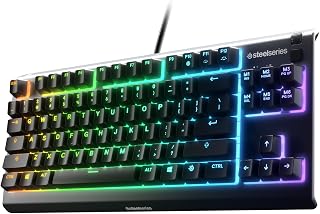
The SteelSeries Apex 3 TKL is a compact gaming keyboard designed for competitive players and typists who demand performance without compromise. The tenkeyless layout has become the gold standard in esports, offering the space-saving advantage that pros rely on while maintaining full functionality for gaming and work.
The standout feature is the whisper-quiet switch technology, which delivers near-silent keystrokes while maintaining the tactile feedback gamers expect. With anti-ghosting technology and a 20+ million keystroke lifespan, every keypress registers with precision. The 8-zone RGB illumination system offers extensive customization, from reactive effects to interactive lightshows, all synced across your gaming setup via PrismSync.
Build quality impresses for the price point, with a solid, heavy construction that feels premium in hand. The IP32 water and dust resistance rating is a practical advantage, allowing you to game through spills or crumbs without damage. Dedicated multimedia controls, including a clickable volume roller, add convenience without clutter.
The main limitation is the non-removable keycaps, which restricts personalization and makes thorough cleaning challenging. Additionally, the M1-M6 macro keys lack independent binding capabilities, a feature found on higher-end SteelSeries models. The plastic multimedia controls feel noticeably less refined than the rest of the keyboard.
Verdict: The Apex 3 TKL delivers professional-grade performance at a consumer-friendly price. If you value quiet, responsive gaming in a space-efficient package, this keyboard is a smart investment that consistently outperforms more expensive alternatives.
Connectivity: Wired USB
Layout: QWERTY, 87 Keys, Tenkeyless (TKL)
Switch Type: SteelSeries Omnipoint, Whisper Quiet
Backlighting: 8-Zone RGB with PrismSync
Water Resistance: IP32 rated
Special Features: Anti-ghosting, Volume roller, Multimedia controls
Dimensions: 14.3" L x 5.9" W x 1.57" H
Weight: 1.4 lbs
Material: ABS plastic
Compatibility: Windows, Mac OS X, PS4, PS5, Xbox Series S/X
Warranty: 1 Year

Pros
- Excellent build quality with brushed aluminum top case and robust aluminum-magnesium frame
- Tactile mechanical switches deliver consistent performance for competitive gaming
- Compact tenkeyless layout saves desk space without sacrificing essential keys
- PBT keycaps outperform standard plastic in durability and appearance over time
- Wired connection eliminates latency and charging concerns during tournaments
Cons
- Tenkeyless design removes the numeric keypad, limiting functionality for data entry or spreadsheet work
- No wireless option available for gamers seeking cable-free portability
- White LED lighting only, no RGB customization for aesthetic preferences
The Logitech G413 TKL SE is a compact mechanical gaming keyboard built for players who value performance and desk real estate equally. This tenkeyless model combines gaming-first engineering with durable materials to deliver reliability when it matters most, making it ideal for competitive gamers and serious enthusiasts.
The standout feature is the combination of tactile mechanical switches and premium PBT keycaps, materials rarely found at this price point. These keycaps resist the wear and shine that plague cheaper keyboards, while the tactile switches provide consistent feedback for precise input. The 6-key rollover anti-ghosting technology ensures every keystroke registers cleanly, even during rapid-fire gaming scenarios where multiple keys overlap.
Design and build quality set this keyboard apart from casual gaming peripherals. The brushed aluminum top case with integrated aluminum-magnesium alloy frame eliminates flex and wobble, creating a stable typing surface. The minimalist aesthetic with white LED backlighting complements both gaming and productivity setups, while the 12 programmable media control keys add practical functionality without cluttering the layout.
The main limitation is the tenkeyless design, which removes the numeric keypad entirely. For pure gaming, this is negligible, but users needing frequent number pad access for work or data entry should consider the full-size G413 SE instead. Additionally, the fixed white LED lighting offers no customization compared to RGB alternatives, and the wired-only connection provides no wireless flexibility.
The Logitech G413 TKL SE delivers excellent value for competitive gamers prioritizing reliability and durability over flashy features. Strong construction, proven mechanical switches, and anti-ghosting performance make this a solid investment for players ready to upgrade from budget keyboards.
Switch Type: Tactile mechanical switches
Keycaps: PBT, heat and wear-resistant
Layout: Tenkeyless (87-key), QWERTY
Backlighting: White LED with 12 media control hotkeys
Anti-Ghosting: 6-key rollover
Connectivity: Wired USB
Case Material: Brushed aluminum with aluminum-magnesium alloy frame
Dimensions: 16L x 7W x 2H inches
Weight: 650g
Compatibility: Windows and macOS
Warranty: 1-year limited hardware warranty
Best For: Competitive gamers seeking a compact mechanical keyboard with proven reliability. Esports players, FPS enthusiasts, and MOBA competitors benefit most from the anti-ghosting performance and tactile feedback. Also ideal for desk space-constrained users who refuse to compromise on quality.
Not Ideal For: Users requiring numeric keypad access for accounting or data entry. Those seeking wireless flexibility or extensive RGB lighting customization should explore alternatives. Casual gamers on strict budgets may find adequate performance in less expensive models.

Pros
- Quieter than traditional mechanical keyboards, ideal for shared spaces and late-night gaming
- Low-profile design with included wrist rest promotes ergonomic comfort for extended use
- Excellent build quality with durable keycaps and responsive switches that feel solid and reliable
- Seamless RGB customization through Razer Synapse with game-specific lighting integration
- Compact form factor without sacrificing key responsiveness or gaming performance
Cons
- Lower travel distance compared to full mechanical switches may feel less responsive for competitive rhythm games
- Low-profile design allows more dust accumulation between keys, requiring regular cleaning
- Fixed cord attachment means less flexibility for users with pets prone to chewing cables
The Razer Ornata V3 TKL is a tenkeyless gaming keyboard that bridges the gap between mechanical and membrane typing experiences. It's designed for gamers, content creators, and professionals who value desk space, quiet operation, and all-day comfort without sacrificing responsiveness.
The standout feature is the mecha-membrane switch technology, which combines the satisfying click of mechanical switches with the gentler, quieter operation of traditional keyboards. Real-world testing shows users appreciate the balanced noise level, subtle tactile feedback, and consistent key response. The 8-zone RGB lighting integrates with popular games for dynamic effects, and the customizable media keys add convenience for multimedia control.
Build quality is solid across the board. The UV-coated keycaps resist fading and wear better than standard keycaps, and the magnetic wrist rest is a thoughtful addition that snaps securely to the keyboard frame. The low-profile key design reduces wrist strain during extended sessions, and users report the overall construction feels durable and well-engineered even after months of daily use.
The main tradeoff is that the shorter travel distance, while ergonomic for typing, may feel less responsive than full mechanical keyboards in competitive gaming. The low-profile design also means dust can accumulate more easily between keys, though this is offset by easier cleaning and keycap removal. The permanently attached USB cord may be a concern for users with pets.
The Razer Ornata V3 TKL is an excellent choice for anyone seeking a quiet, space-efficient keyboard that performs well across gaming and productivity without requiring significant desk real estate. It's especially recommended for shared environments, late-night gaming, and users prioritizing ergonomic comfort.
This keyboard is ideal for casual to mid-level gamers who prefer quieter peripherals, office workers looking for a compact gaming-grade keyboard, content creators who want RGB customization, and anyone in shared living spaces who needs a responsive keyboard without high noise levels. The tenkeyless design appeals to desk-space-conscious users, while the included wrist rest benefits those with extended typing sessions.
It's less suitable for competitive esports players who demand maximum key travel and click feedback, or users heavily invested in ultra-mechanical switch aesthetics. If you rely on a number pad for data entry or spreadsheet work, the missing keys will be a limitation.
Layout and Design: Tenkeyless (87 keys), QWERTY, 10.89 x 5.68 x 1.22 inches, 10.56 ounces
Switch Type: Razer Mecha-Membrane, clicky feedback, low-profile keycaps
Connectivity: Wired USB-A (permanently attached cord)
Lighting: 8-zone RGB with 16.8 million colors, Razer Chroma game integration
Features: Backlit media keys, UV-coated keycaps, magnetic soft-touch wrist rest, water-resistant, Razer Snap Tap support
Compatibility: Windows 11 and later, Razer Synapse 4 software
Warranty: 2-year manufacturer warranty

Pros
- Excellent value for a mechanical keyboard with hot-swap capability and programmable controls
- Gasket design significantly reduces keyboard noise, improving focus and comfort
- Compact 75% form factor maximizes usable desk space without sacrificing functionality
- Pre-installed Alpaca V2 Linear switches offer smooth, responsive typing straight out of the box
- Highly customizable through QMK/VIA firmware for power users and enthusiasts
Cons
- Limited to USB-C wired connection with no wireless option for flexibility
- Linear switches may feel less tactile than mechanical switches with feedback for some users
- Knob programming requires firmware knowledge for advanced customization beyond basic volume control
The RK Royal Kludge R87 Pro is a 75% mechanical keyboard designed for gamers, content creators, and typists who need both performance and desk real estate savings. Its 88-key layout preserves navigation and function keys while eliminating the numpad, making it perfect for crowded setups or anyone seeking a more portable gaming keyboard.
The standout feature is its hot-swappable design paired with the programmable CNC metal knob. You can swap between switch types instantly, and the knob can be customized beyond simple volume control using QMK/VIA firmware. The pre-installed Alpaca V2 Linear switches deliver a smooth, creamy typing experience that suits both rapid gaming and extended typing sessions. The gasket mounting structure with its 5-layer design absorbs vibration and reduces bottoming-out noise, creating a quieter workspace that benefits both the typist and those nearby.
Build quality is solid with a blend of recycled ABS plastic, metal accents, and reinforced construction. The keyboard feels stable during gameplay, and the Cherry profile keycaps provide good ergonomics. The 15+ RGB lighting effects add visual flair, though these are purely aesthetic. The included keycap puller and extra switches show attention to user needs.
The main limitation is the wired USB-C connection, which restricts mobility compared to wireless alternatives. Additionally, full customization of the knob requires comfort with firmware programming. Budget-conscious buyers or those seeking simplicity may find the QMK/VIA learning curve unnecessary for basic use.
Overall, the R87 Pro is a compelling choice for anyone seeking a customizable, compact mechanical keyboard with professional-grade features at a consumer price point. It excels as both a gaming peripheral and a daily driver for productivity.
Layout and Keys: 75% TKL design with 88 keys total, QWERTY layout, ambidextrous orientation
Switches: Hot-swappable 3/5-pin compatible, pre-installed Alpaca V2 Linear switches, supports custom switch replacement without soldering
Connectivity: Wired USB-C connection, compatible with Windows and Linux systems
Customization: Programmable multi-function knob, QMK/VIA firmware support, 15+ RGB lighting effects with adjustable brightness and speed
Build: Gasket mounting structure with 5-layer design, Cherry profile keycaps, recycled and standard ABS plastic with metal accents
Dimensions: 14.37 inches length x 5.47 inches width x 1.57 inches height, weighs 1.62 kg
Warranty: 1 year manufacturer warranty, includes keycap puller and replacement keycaps
Who Should Buy: The R87 Pro suits competitive gamers, touch typists, programmers, and creators who value desk space and customization. It's ideal if you've outgrown membrane keyboards and want an affordable entry into mechanical switches without sacrificing features.
Best For: Daily typing, gaming sessions, and creative work where a compact footprint matters. The gasket design makes it excellent for noise-sensitive environments. The programmable knob appeals to users who want productivity shortcuts at their fingertips.
Consider Alternatives If: You need wireless connectivity, prefer tactile or clicky switches over linear options, or want a full-size keyboard with a numpad. The learning curve for QMK/VIA may deter users seeking plug-and-play simplicity.
Value Assessment: For under $65, this keyboard punches above its price point with hot-swap support, gasket mounting, and QMK/VIA compatibility. Most competitors at this price skip one or more of these features, making the R87 Pro a strong value proposition for budget-conscious enthusiasts.

Pros
- Lightning-fast 0.2ms response time with industry-leading optical switch speed
- Dual actuation points give you flexibility between aggressive gaming and comfortable typing
- Hot-swap design lets you upgrade or repair without replacing the entire keyboard
- Aluminum construction feels solid and professional for a compact keyboard
- PBT keycaps maintain texture and appearance far longer than standard ABS plastic
Cons
- Not water resistant, so spills pose a risk to this investment
- TKL layout removes numpad, which some users may miss for productivity
- Limited information about switch variety available for hot-swap customization
The SteelSeries Apex 9 TKL is a precision gaming keyboard built for competitive esports players who demand minimal input lag and maximum control. This compact tenkeyless design is engineered for FPS, MOBA, and tactical shooters where response time directly impacts performance.
The standout feature is SteelSeries' custom OptiPoint optical switches, which actuate 33% faster than leading competitors with a 0.2ms response time and zero debounce. The innovative 2-point actuation system lets you switch between 1mm (ultra-responsive gaming) and 1.5mm (deliberate typing) without changing hardware, adapting to your playstyle instantly. Rapid Tap technology prioritizes the last keystroke in a pair, giving you the edge on counter-strafing and crouch jumping.
Build quality is excellent. The aluminum alloy frame and plate provide durability and a premium feel, while double-shot PBT keycaps resist fading and maintain their texture over years of use. The compact TKL form factor reclaims desk real estate for broader mouse movements, a critical advantage in competitive gaming. Hot-swap switch design means you can customize, upgrade, or repair individual switches without replacing the entire keyboard.
The main drawback is the lack of water resistance, making this keyboard vulnerable to accidental spills. Additionally, while the TKL layout is standard for competitive gaming, users who rely on a numpad for productivity may find it limiting.
The Apex 9 TKL is a high-performance choice for esports enthusiasts and competitive gamers willing to invest in precision input devices. The 1-year warranty and customizable switch system add long-term value.
Switches: Custom OptiPoint optical with 0.2ms response time, 1mm to 1.5mm adjustable actuation
Layout: Tenkeyless (TKL), QWERTY, 87 keys total
Build: Aluminum frame and plate, double-shot PBT keycaps
Connectivity: USB-C wired (corded electric power)
RGB: Full RGB customization
Compatibility: Windows 10+, macOS
Dimensions: 13.99W x 5.05L x 1.65H inches
Weight: 2.3 pounds
Warranty: 1 year manufacturer warranty

The clicky switch type delivers satisfying tactile feedback that typists appreciate for reducing errors during long writing sessions, while the RGB backlighting helps gamers spot keys instantly in low-light setups. Its wired connectivity ensures zero input lag during competitive play, and the mechanical construction provides the durability needed for millions of keystrokes across both gaming marathons and daily typing work.
Pros
- GX Blue clicky switches provide tactile and audible keystroke confirmation
- Detachable three-pronged cable ensures secure transport and tournament reliability
- Onboard memory stores RGB and key assignments without software
- Aluminum and rubber construction with adjustable angles for ergonomic positioning
Cons
- Windows-only compatibility limits cross-platform use
- Clicky switches generate noticeable sound during typing and gaming
The Logitech G PRO Mechanical TKL brings tournament-grade engineering to a compact form factor that serves both competitive gamers and typists who value precision feedback. The GX Blue clicky switches deliver audible and tactile confirmation with every press, helping gamers register inputs with confidence while giving typists the satisfying mechanical feel that improves accuracy during long writing sessions. The tenkeyless layout frees up mouse space for low-sensitivity gaming while keeping essential typing keys within comfortable reach. Onboard memory stores your LIGHTSYNC RGB profiles and key assignments, meaning your settings travel with the keyboard without software dependencies. The detachable three-pronged Micro USB cable ensures secure tournament connections and hassle-free transport between setups. Build quality centers on durability with aluminum and rubber construction, rubber feet for stability, and 3-step angle adjustment to match your ergonomic preferences. At 2.2 pounds, it balances portability with solid desk presence. The 16 programmable keys cover gaming macros and productivity shortcuts equally well, though full customization requires Logitech G HUB software on Windows 10 or later.
Physical Dimensions: 14.96 inches L x 6.3 inches W x 1.97 inches H, weighing 2.2 pounds
Switch Type: GX Blue Clicky mechanical switches with audible and tactile feedback
Layout: Tenkeyless (87 keys) QWERTY, ambidextrous hand orientation
Lighting: LIGHTSYNC RGB with 16.8 million color options, programmable with onboard memory storage
Connectivity: Wired via 1.8m detachable Micro USB cable with three-pronged connector
Compatibility: Windows 10 and later, PC only
Additional Features: 3-step angle adjustment, rubber feet for stability, F-key programmable macros (F1-F12), 2-year manufacturer warranty
Competitive gamers seeking tournament-ready hardware and typists who prefer clicky mechanical feedback will appreciate the dual-purpose design and reliable performance. Writers, coders, and data entry professionals who don't need a numpad but value keystroke confirmation will find the layout efficient. Skip this if you rely on Mac compatibility, need a numeric keypad for spreadsheet work, share your workspace with others who may find the clicky switches disruptive, or prefer quieter mechanical options for office environments.

OmniPoint 3.0 analog magnetic switches let gamers customize actuation points per key, enabling hair-trigger responses in FPS titles or deeper presses for precise MOBA inputs. Rapid Trigger and Rapid Tap features eliminate traditional debounce delays, giving competitive players the split-second advantage needed in high-level matches. The PBT keycaps resist shine from heavy use, keeping the board looking sharp whether you're typing reports or grinding ranked queues.
Pros
- OmniPoint 3.0 switches with 0.1mm to 4.0mm adjustable actuation for custom response
- QuickSet auto-presets switch gaming modes automatically without manual intervention
- Premium aluminum plate with double-shot PBT keycaps and triple-layer sound dampening
- OLED display provides onboard settings access and media controls
Cons
- Advanced customization features require learning curve to master effectively
- USB-C connection may need adapters for legacy systems
The SteelSeries Apex Pro TKL Gen 3 redefines what a TKL keyboard can deliver for both competitive gaming and professional typing through its OmniPoint 3.0 magnetic Hall Effect switches. The adjustable actuation range from 0.1mm to 4.0mm lets gamers set hair-trigger responsiveness for competitive shooters while typists can dial in deeper travel for accurate document work without accidental presses. QuickSet auto-presets automatically apply Rapid Trigger for instant key resets, Rapid Tap for prioritizing the latest input, and Protection Mode to prevent surrounding key misfires when gaming profiles load, then revert to standard typing behavior for productivity tasks. The 84-key layout maintains full typing functionality while clearing desk space for mouse movement. Premium construction features include an aluminum top plate, double-shot PBT keycaps that resist shine and fading through extended use, per-key lubrication for consistent feel, and triple-layer sound dampening foam that reduces typing noise. The integrated OLED display provides quick access to settings and media controls without leaving your workflow, with all configurations stored onboard for use across multiple systems. Per-key RGB with Prism Sync creates cohesive lighting across your entire setup.
Switch Technology: OmniPoint 3.0 analog magnetic Hall Effect switches with 40 adjustable actuation levels (0.1mm to 4.0mm) and 45g bottom-out force.
Performance Modes: Rapid Trigger for instant key reset, Rapid Tap for faster key prioritization, and Patent-pending Protection Mode to reduce accidental presses.
Display: Integrated OLED smart display for settings adjustment and media control without leaving gameplay.
Design: Compact tenkeyless (TKL) layout with 84 keys, aluminum top plate, double-shot PBT keycaps, triple-layer dampening foam, and per-key RGB illumination.
Connectivity: USB-C wired connection, Windows compatible, with onboard memory to save configurations.
Dimensions: 13.98 inches length and width by 1.7 inches height. Includes wrist support accessory.
Esports competitors, high-level FPS players, and typists who want granular control over key response will benefit from the magnetic switch technology and automatic mode switching. Content creators, programmers, and writers who split time between gaming and productivity tasks will appreciate the dual-purpose design and premium build quality. Skip this if you're new to mechanical keyboards and prefer simpler plug-and-play operation, need Mac-specific software support, work in noise-sensitive environments where even dampened mechanical switches are too loud, or find the investment unjustified for casual use.
Buying Guide: What to Consider Before Choosing Your TKL Keyboard
Switch Type and Actuation Characteristics
Switch technology fundamentally shapes your typing experience. Membrane switches like those in the Corsair K55 CORE TKL RGB Gaming Keyboard offer quiet operation and soft keypresses, ideal for shared workspaces or late-night sessions. Mechanical switches provide tactile feedback and longer lifespan, the HyperX Alloy Origins Core features custom HyperX Aqua switches rated for 80 million actuations.
Advanced options include hot-swappable sockets that let you change switches without soldering. The AULA F87 Pro Wireless Mechanical Keyboard,Tri-Mode supports both 3-pin and 5-pin switch replacement, allowing you to experiment with different spring weights and actuation points. Optical switches deliver even faster response, the SteelSeries New Apex 9 TKL registers inputs 33% faster than competing optical keyboards with its OptiPoint technology.
Build Quality and Material Construction
Keyboard stability directly impacts performance during intense gaming sessions. Aircraft-grade aluminum top cases, like those on the HyperX Alloy Origins Core and Logitech G413 TKL SE Mechanical Gaming Keyboard, prevent flex during aggressive keypresses. PBT keycaps resist shine and fade better than ABS plastic, the SteelSeries New Apex 9 TKL uses double-shot PBT construction for long-lasting legends.
Gasket-mounted designs reduce vibration and hollowness. The RK ROYAL KLUDGE R87 Pro Wired Mechanical Keyboard implements a 5-layer gasket structure that dampens noise while maintaining responsive feedback. Consider keyboards with integrated silicone padding between PCB layers if you prioritize quieter acoustics. For builders upgrading their entire setup, pairing a quality TKL with a powerful motherboard like those in our best Z890 motherboard guide ensures balanced system performance.
Connectivity and Battery Performance
Wired connections guarantee zero latency but limit portability. Most wired models use detachable USB-C cables for transport convenience. Wireless keyboards offer multi-device flexibility, the AULA F87 Pro Wireless Mechanical Keyboard,Tri-Mode connects via Bluetooth 5.0, 2.4GHz wireless, or USB-C wired mode, switching between five devices with shortcut keys or a side button.
Battery capacity determines wireless runtime. The AULA F87 Pro packs a 4000mAh cell for extended untethered use. Check whether a keyboard supports simultaneous charging and use if you want to avoid downtime. Tournament players often prefer wired connections to eliminate battery concerns and potential wireless interference; the Logitech G PRO Mechanical TKL Tenkeyless was specifically designed with esports athletes for competition-level reliability.
Customization and Software Integration
Programmable keys let you create macros for complex command sequences. The SteelSeries Apex Pro TKL Gen 3 Gaming Keyboard features GG QuickSet auto-presets that load pro-level configurations when you launch specific games. Its Rapid Trigger technology resets keys the instant you release them, while Rapid Tap prioritizes your latest input for faster strafing.
Onboard memory stores lighting profiles and macro assignments directly on the keyboard, crucial for tournament systems that block custom software installations. RGB customization ranges from basic 8-zone lighting on the Corsair K55 CORE TKL RGB Gaming Keyboard to per-key addressable LEDs with 16.8 million color options. QMK/VIA support on keyboards like the RK ROYAL KLUDGE R87 Pro Wired Mechanical Keyboard grants advanced firmware-level programming for enthusiasts. Gamers building high-refresh setups should also consider pairing their TKL with a capable graphics card from our best GPU under $250 roundup for smooth, responsive gameplay.
Final Thoughts
Your ideal TKL keyboard depends on whether you prioritize wireless flexibility, mechanical precision, or budget efficiency. The AULA F87 Pro delivers exceptional value with tri-mode connectivity and hot-swappable switches for under seventy dollars, while the SteelSeries Apex Pro TKL Gen 3 represents the premium tier with its adjustable magnetic switches and game-specific auto-presets. Both excel in their respective segments, offering compact layouts that maximize desk space without compromising functionality.
Frequently Asked Questions
What makes a TKL keyboard better than a full-size model?
Tenkeyless keyboards eliminate the numeric keypad, reducing overall width by approximately 3-4 inches. This compact footprint allows lower mouse sensitivity players to execute wide sweeping movements without hitting the keyboard edge. The ergonomic benefit comes from centered monitor alignment, your hands naturally rest in a more neutral position when the main typing cluster sits directly in front of your screen rather than offset to the left.
Can I use a TKL keyboard for productivity work or just gaming?
TKL keyboards serve both purposes effectively. While gaming benefits from the space savings, office work and coding remain fully functional since you retain arrow keys, function row, and navigation cluster. If you frequently input numerical data, you might miss the dedicated numpad, accountants and data analysts often prefer full-size layouts. Most TKL models compensate with Fn-layer number key access for occasional numeric entry.
How long do mechanical switches last compared to membrane switches?
Quality mechanical switches typically endure 50-100 million keystrokes, with some premium variants rated even higher. Membrane switches average 5-20 million actuations before degradation. The SteelSeries Apex 3 TKL RGB Gaming Keyboard uses whisper-quiet gaming switches rated for 20 million presses, representing the upper tier of membrane durability. This translates to roughly 3-5 years of heavy daily use for mechanical models versus 1-2 years for membrane keyboards, though actual lifespan varies with typing intensity and environmental factors.
Are wireless TKL keyboards suitable for competitive gaming in 2026?
Modern 2.4GHz wireless technology matches wired latency for practical purposes, high-quality models register inputs within 1-2 milliseconds. The AULA F87 Pro Wireless Mechanical Keyboard,Tri-Mode supports both 2.4GHz and Bluetooth, with the 2.4GHz mode delivering performance indistinguishable from USB connections for competitive play. Battery life concerns matter more than latency; ensure your keyboard maintains charge during extended sessions or supports charging while playing. Professional esports events sometimes mandate wired connections for standardization, so verify tournament rules if you compete at that level. If you’re building a complete gaming station with a motherboard that supports fast memory, check out our DDR5 7200 RAM recommendations to pair with your new TKL setup.



Write Your Review
No reviews yet. Be the first to share your experience!